
If you need a computer headset with busy light, the goal is simple: fewer interruptions and clearer calls. The best options help coworkers see when you are unavailable while keeping your voice clean and comfortable.
Below, we focus on practical picks for office, remote, and hybrid work, including wired USB models, wireless headsets, and add-on busy light solutions.
Best 10 Computer Headset with Busy Light Picks for 2026
Teams Focus Busy Light
VoicePro 80 USB Headset for Calls

- Illuminated Teams focus light turns red on calls
- Noise-canceling mic with 330-degree boom
- USB-A and USB-C support for PC and phones
Best For: Teams callers who want a wired busy-light headset
Desk Phone Busy Light
Kuando Busylight Combi Accessory

- Red light shows when you're on the phone
- Blue mode supports do-not-disturb status
- Works with headsets, desktops, laptops, and phones
Best For: Office users who want a visible call-status indicator
Easy USB Setup
Jabra Evolve 10 Wired Meeting Headset

- Simple plug-and-play USB-A connection
- Noise-canceling mic for clearer calls
- Lightweight build with adjustable boom arm
Best For: Users who want a simple wired headset for meetings
Wireless Call Status Bundle
Plantronics Savi W740 Renewed with Busy Light

- Red busy light signals active calls
- Wireless DECT range up to 350 feet
- Works with desk phones, mobiles, and computers
Best For: Office users needing wireless freedom and a status light
Conference-Ready Wired Pick
Lenovo USB-A Wired Stereo Headset

- AI noise canceling via app
- Lightweight 140 g design
- Inline mute and volume controls
Best For: Wired work calls on Teams and Zoom
Wireless Desk-Call Pick
Bluetooth Headset with Busylight
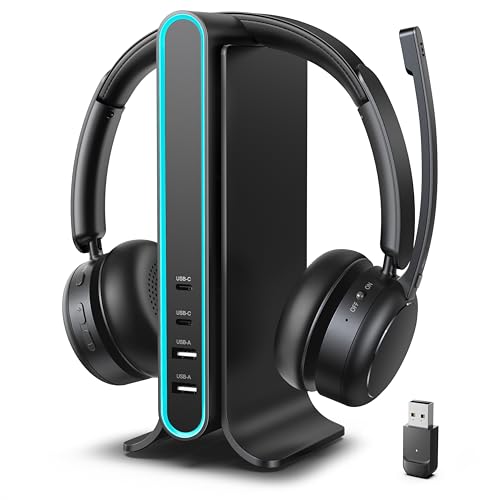
- Auto-on busylight and mute indicator
- Bluetooth 5.4 plus Qualcomm adapter
- Charging dock with USB-A/USB-C ports
Best For: Wireless work setups with dual-device convenience
Shared-Office Quiet Pick

- Dual noise-canceling microphones
- Visible red busy light
- USB-C/A plug-and-play connection
Best For: Open offices and Teams calls
Office-Ready Single-Ear Pick
Sarevile Bluetooth Headset with USB Dongle

- ENC mic reduces background noise for calls.
- USB dongle works with computers without Bluetooth.
- 50-hour talk time supports long shifts.
Best For: Office workers and drivers who want a lightweight mono headset with dongle connectivity.
Premium Mono Travel Headset

- Four mics help reduce background noise during calls.
- Connects to PC, laptop, and mobile with dual-device support.
- Fast charging and a secure ear-hook fit improve portability.
Best For: Professionals who need a compact, travel-friendly headset for clear calls.
Best All-Day Workhorse
Wireless Headset with Mic for Work KH53

- ENC microphone helps reduce office background noise.
- USB dongle supports Windows PCs without Bluetooth.
- 40-hour battery and multipoint pairing aid busy workdays.
Best For: Remote workers and call-heavy users who need a long-lasting computer headset.
Teams Focus Busy Light – VoicePro 80 USB Headset for Calls
The VoicePro 80 is a practical computer headset with busy light for users who want fewer interruptions during Teams and other business calls. Its illuminated focus light turns red when a Microsoft Teams call starts, while the noise-canceling mic and in-line controls support everyday office and home-office use.
Best For: Teams users, call center work, and professionals who want a wired headset with an active busy light.
Pros:
- Teams focus light turns red during Microsoft Teams calls to signal availability.
- Noise-canceling microphone with a flexible 330-degree boom helps keep speech clear.
- Inline touch controls let you answer, end, mute, and adjust volume easily.
- USB-A and USB-C connections add broad PC and phone compatibility.
Cons:
- Wired design may not suit users who want wireless freedom.
- Focused on calling rather than music or general media use.
Overall, this headset is built around office communication first, with the busy light feature doing exactly what many remote and hybrid workers need: reducing interruptions. If you want a straightforward wired option with Teams integration, the VoicePro 80 is a strong fit.
Desk Phone Busy Light – Kuando Busylight Combi Accessory
The Kuando Busylight Combi is a simple computer headset with busy light accessory for office workers who need a visible on-air signal. It lights up red when you are on the phone and can be switched to blue for DND mode, making it useful for desk phones, computers, and home offices.
Best For: Shared workspaces, cubicles, and home offices where a clear call-status light helps reduce interruptions.
Pros:
- Red light indicates when you are on a call.
- Manual switch changes the light to blue for do-not-disturb mode.
- Compatible with desktops, laptops, and phones.
- Lightweight and built as a 2-in-1 solution for headsets and desk phones.
Cons:
- It is an accessory rather than a full headset.
- Does not include noise-canceling audio features.
This is the kind of add-on that works best when you already have a headset and just need a clear visual cue for availability. For people in busy offices, the Busylight Combi is a straightforward way to cut down on drive-by interruptions.
Easy USB Setup – Jabra Evolve 10 Wired Meeting Headset
The Jabra Evolve 10 is a straightforward computer headset with busy light-style call management for people who want easy USB setup and clear conversations. It does not include a visible light, but its noise-canceling mic, lightweight build, and inline controls make it a solid everyday headset for meetings and calls.
Best For: Professionals who want a simple wired USB headset for online meetings, calls, and busy work environments.
Pros:
- Plug-and-play USB-A setup keeps installation simple.
- Noise-canceling microphone helps reduce background distractions.
- Lightweight design supports all-day comfort.
- Adjustable boom arm can be worn on either side.
Cons:
- Does not include a physical busy light indicator.
- Wired USB design may not suit users who want cordless movement.
If your priority is dependable call clarity rather than extra hardware, the Evolve 10 keeps things simple. It is a sensible choice for office, laptop, or meeting-room use when you want a lightweight USB headset without setup hassle.
Wireless Call Status Bundle – Plantronics Savi W740 Renewed with Busy Light
Plantronics Savi W740 Wireless Office Headset System (Renewed) (Headset+Lifter+Busy Light)
Check Price On AmazonThe Plantronics Savi W740 is a wireless office headset system with a bundled busy light, making it a useful computer headset with busy light for desk-heavy professionals. The red light turns on during calls, and the wireless DECT design adds long-range freedom across desk phone, mobile, and computer use.
Best For: Professionals who want wireless range, multi-device compatibility, and a call-status light for office use.
Pros:
- Busy light illuminates red during calls to signal when not to disturb.
- Wireless DECT range reaches up to 350 feet.
- Works with corded desk phones, mobile phones, and computers.
- Lightweight design and included ear hooks support comfortable wear.
Cons:
- Renewed product with a 90-day limited warranty.
- Noise control is listed as none.
For users who need mobility around the office, this bundle stands out because it combines a headset, lifter, and busy light in one package. It is a strong pick if you want wireless call handling and a clear visual status indicator in a professional setup.
Conference-Ready Wired Pick – Lenovo USB-A Wired Stereo Headset
If you want a computer headset with busy light, this Lenovo USB-A wired headset is built for focused calls and simple daily use. It combines AI noise canceling through the Lenovo Accessories and Device Manager app with a lightweight 140 g design, so it aims to keep your voice clear while staying comfortable through long work sessions.
Best For: Office and home-office users who want a lightweight wired headset for Teams, Zoom, and other call apps.
Pros:
- AI noise canceling via the app helps improve call clarity in busy environments.
- At 140 g, it is designed to feel light during long meetings.
- Inline controls make mute, volume, and call functions easy to access.
- USB-A plug-and-play support works with common meeting platforms like Teams and Zoom.
Cons:
- It is wired, so it is not the best choice if you want full mobility.
- Noise canceling depends on Lenovo software for the extra enhancement.
Overall, this is a practical business headset for users who prefer a straightforward wired setup and want dependable call controls without extra complexity. The replaceable earcups and 2-year warranty add a nice touch for regular work use.
Wireless Desk-Call Pick – Bluetooth Headset with Busylight
This computer headset with busy light is aimed at professionals who want wireless flexibility and fewer interruptions during calls. The headset adds an auto-on busylight, a mute indicator, and dedicated mute control, while also promising strong background noise reduction and dual connectivity for work across devices.
Best For: Remote workers and office users who want a wireless headset with busylight, dual-device support, and a charging dock.
Pros:
- Auto-on busylight and mute indicator help reduce interruptions during calls.
- Supports Bluetooth 5.4 plus a Qualcomm adapter for flexible device connections.
- Can connect to two devices at once for easier switching between work tasks.
- Includes a hub-based charging dock with USB-A and USB-C ports for a tidier desk.
Cons:
- The dongle works with PC/laptop only, not office desk phones.
- The multifunction button does not answer or reject computer-app calls.
For people who split time between calls, music, and multiple devices, this model offers a lot of convenience. The tradeoff is that some call controls work differently depending on whether you are using a phone or a computer app.
Shared-Office Quiet Pick – Yealink UH44 USB Headset
If you need a computer headset with busy light for shared workspaces, the Yealink UH44 is designed to keep calls clear and signal when you are occupied. Its dual noise-canceling microphones, Teams certification, and red busy light make it a solid fit for office and home-office calling where focus matters.
Best For: Team and Zoom users who want a wired USB headset with a visible busy indicator for open offices.
Pros:
- Dual noise-canceling microphones help reduce keyboard and ambient noise.
- Busy light gives a clear “do not disturb” signal during calls.
- USB-C/A plug-and-play connectivity works with PCs, laptops, and common meeting apps.
- Lightweight on-ear design and rotating boom mic support all-day use.
Cons:
- It is a wired headset, so it does not provide wireless freedom.
- Passive noise cancellation means it relies on the headset fit and microphone filtering rather than active noise canceling.
This is a straightforward business headset built for clear communication and fewer interruptions in busy spaces. If you want a reliable wired option with a visible status light and simple controls, it checks the right boxes.
Office-Ready Single-Ear Pick – Sarevile Bluetooth Headset with USB Dongle
If you want a computer headset with busy light-style call control features for office or driving use, this single-ear Sarevile model is built around clear voice pickup, simple mute control, and easy PC pairing through the included USB dongle. It suits buyers who need a lightweight headset that stays comfortable through long shifts while keeping one ear open to what’s happening around them.
Best For: Office workers, truckers, and computer users who want a lightweight mono headset with dongle support and quick mute access.
Pros:
- ENC noise cancelling microphone helps cut background noise for clearer calls.
- USB dongle supports computers without built-in Bluetooth.
- 50-hour talk time and 200-hour standby reduce frequent charging.
- Single-ear open design and memory foam cushion improve all-day comfort.
Cons:
- Uses a micro USB charging port, not USB-C.
- Requires setting “M99+” as audio input and output on computer.
- One-ear design is less immersive for music or private listening.
This is a practical work headset if you want strong battery life, straightforward mute control, and reliable USB dongle pairing for computer calls. It is especially appealing for users who prefer a mono layout over a full over-ear office headset.
Premium Mono Travel Headset – Yealink BH71 Pro USB-C/A
If you’re comparing a computer headset with busy light-style call convenience, the Yealink BH71 Pro focuses on compact comfort, strong noise cancellation, and flexible pairing across PC and mobile. Its ear-hook design and quick magnetic charging make it a sensible choice for users who want a lightweight wireless earpiece for meetings, calls, and travel.
Best For: Professionals who need a compact headset for PC, laptop, and phone calls with strong mic noise reduction.
Pros:
- Four beamforming microphones are designed to cancel up to 90% of background noise.
- Works with PC/laptop via dongle and can connect to two devices at once.
- Fast 1.5-hour charge and 10-hour talk time suit daily use.
- Rotatable ear hook and mic arm help create a secure fit.
Cons:
- Battery life is shorter than some office headsets.
- Primarily designed for mobile phones and computers, not most desktop phone systems.
- Mono earbud style may not suit users who want a full over-ear headset.
This model stands out for portability and call quality rather than all-day marathon battery life. If you value a tidy fit, dual-device support, and strong mic performance, it is a polished business headset option.
Best All-Day Workhorse – Wireless Headset with Mic for Work KH53
For shoppers seeking a computer headset with busy light-style call handling features for remote work, this KH53 wireless headset leans into noise reduction, USB dongle compatibility, and long battery life. It is a practical fit for Zoom, Teams, and similar calls when you want a dependable over-ear design with multipoint pairing and quick mute access.
Best For: Remote workers, office users, and call-heavy setups that need long battery life and easy PC connectivity.
Pros:
- ENC noise cancelling helps block common office distractions.
- USB-A dongle supports Windows PCs that do not have Bluetooth.
- 40-hour battery life and 2-hour charging are strong for daily use.
- Multipoint pairing lets you stay connected to laptop and smartphone.
Cons:
- Dongle is not compatible with desk phones or landlines.
- MFB button only controls smartphone functions, not computer apps.
- It is a larger over-ear headset, so it may feel bulkier than a mono earpiece.
This is the most balanced pick for buyers who want a practical office headset with solid battery life, easy muting, and broad computer compatibility. It is especially useful if you move between desk work and phone calls throughout the day.
How We Picked the Best Computer Headset with Busy Light
We looked for products that make day-to-day calling easier, not just ones with long spec sheets. Priority went to clear microphone performance, reliable busy light behavior, easy PC or laptop setup, and comfort for longer work sessions. We also considered whether the product is a true Computer Headset with Busy Light or a headset plus a separate busy light accessory.
Quick Comparison
The list includes wired USB headsets for simple plug-and-play use, Bluetooth models for desk mobility, and office systems with bundled busy lights or lifters. Wired options usually offer the most dependable audio and the least setup. Wireless choices are better if you move often or take calls away from your desk.
Key Buying Factors for a Computer Headset with Busy Light
Busy Light Visibility
Check whether the light is built in, attached to the headset, or provided as a desk accessory. For shared workspaces, a brighter and more obvious indicator is usually better than a subtle status light.
Microphone Quality
Noise-cancelling or AI-based microphone filtering matters if you work around coworkers, fans, or household noise. If your calls are frequent, a strong mic is often more important than extra audio features.
Connection Type
USB-A and USB-C headsets are easiest for computers. Bluetooth models add freedom, but dongles can improve stability and call quality. If you need desk-phone compatibility, confirm the product supports that use case before buying.
Comfort and Fit
Look at weight, earcup style, and whether the headset is single-ear or stereo. Single-ear designs help you stay aware of your surroundings, while stereo models can improve focus.
Controls and Certification
Inline mute, call answer, and volume controls save time. Teams certification or other platform support can be valuable if you use a specific conferencing app every day.
Who Should Buy Which Computer Headset with Busy Light?
If you want the simplest setup, a wired USB headset is the safest choice. If you need room to move, choose a Bluetooth model with a dongle and solid noise cancellation. For shared offices or phone-heavy workflows, consider a bundled busy light system or a headset designed to work with a separate status light. The best Computer Headset with Busy Light for you depends on whether your priority is desk simplicity, mobility, or maximum call control.