
Choosing the right computer headset for transcription can make long listening sessions easier and improve word-by-word accuracy. The best models keep speech clear, reduce distractions, and stay comfortable through repeated use.
In this roundup, we focus on practical features that matter most for transcription work, including connection type, audio clarity, wear style, and everyday comfort.
Best 10 Computer Headset for Transcription Picks for 2026
Analog Pick
Spectra SP-PC Stereo Computer Transcription Headset

- True stereo twin speakers
- 10-foot 3.5 mm right-angle cord
- Lightweight with ear cushions
Best For: Simple wired transcription on a 3.5 mm PC setup
Comfort Pick
Philips Speech Deluxe LFH0334/00

- Lightweight under-the-chin fit
- Soft cushions and 10-foot cable
- Monitor-hanging bracket included
Best For: Comfort-focused professional transcription sessions
Feature-Rich Pick
ECS WordHear-O Under-Chin Headset
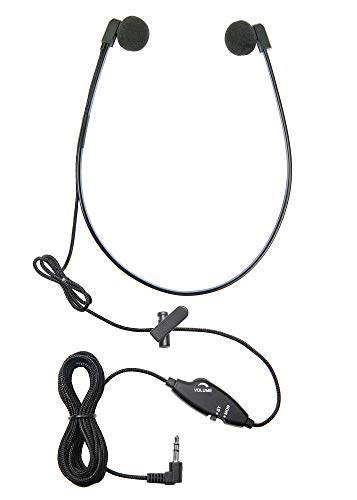
- Stereo/mono switch with inline volume
- Braided 10-foot cord and clothing clip
- Includes extra sponge pairs and pouch
Best For: Users who want adjustable controls and transcription-specific features
USB Upgrade
Spectra USB Transcription Headset
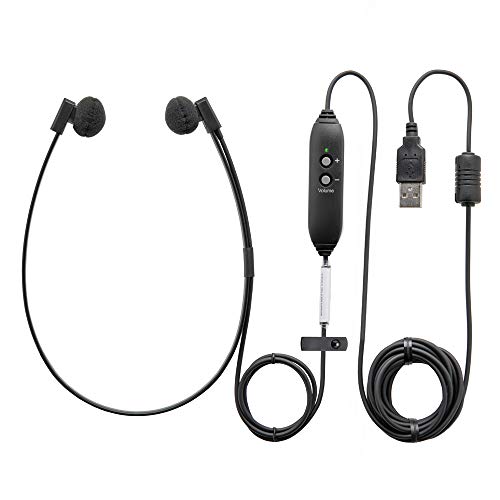
- USB headset with built-in sound card
- Digital in-line volume control
- 10-foot cable for desk movement
Best For: USB-based transcription setups with simple plug-and-play use
Classic Analog Transcription Pick
Olympus E-102 Stereo Transcription Headset

- 3.5 mm wired headset for computer soundcards
- Speech-optimized sound for transcription work
- Lightweight, haircut-friendly fit with long cable
Best For: PC users who want a simple analog transcription headset
USB Convenience Choice
Spectra SP-USB USB Transcription Headset with Volume Control

- Direct USB plug with no adapters or drivers
- True digital volume control for easy adjustment
- 10-foot cord and twin speakers for clarity
Best For: Transcribers who want a simple USB headset with volume control
Long-Cord Analog Upgrade
OM SYSTEM Olympus E-103 Stereo Transcription Headset, Black

- Wired 3.5 mm headset for PC-based transcription
- Includes 4 extra foam earpieces
- Long cord and easy on/off design
Best For: PC-based transcribers who want a long cable and extra earpieces
Professional USB Dictation Pick
ECS WordSlinger USB Transcription Headset
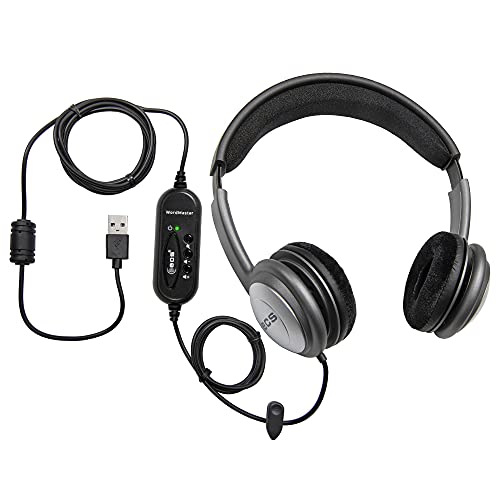
- External sound card for clearer playback
- 7-foot USB cord with volume control
- Padded over-head design for comfort
Best For: Medical and legal transcription work with a USB computer
Lightweight Budget-Friendly Option
VEC Spectra SP-VC 5 Deluxe Twin Speaker Headset

- Extremely lightweight design for long use
- Volume control plus stereo/mono switch
- 3.5mm right-angle plug with storage pouch
Best For: Lightweight wired transcription setup with basic controls
Comfort-Focused USB Choice
ECS WordMaster Transcription Headset

- External sound card for clearer playback
- Around-ear padding helps block outside noise
- 7-foot USB cord with volume control
Best For: Long transcription sessions with a comfortable USB fit
Analog Pick – Spectra SP-PC Stereo Computer Transcription Headset
If you want a straightforward computer headset for transcription, the Spectra SP-PC keeps things simple with a true stereo design, a 10-foot cord, and a standard 3.5 mm connection. It is aimed at PC use and gives you the basic features most transcription setups need without extra complexity.
Best For: Users who want a simple wired transcription headset for a 3.5 mm PC setup.
Pros:
- True stereo twin-speaker design for transcription listening
- 10-foot cord with right-angle 3.5 mm plug
- Lightweight build with ear cushions and storage pouch
- Volume control included
Cons:
- No active noise control
- Designed for devices with a 3.5 mm jack, so compatibility is narrower than USB models
Overall, this is a practical budget-style transcription headset for users who already have a 3.5 mm computer or transcriber connection. It focuses on the essentials: stereo audio, comfort, and a long cable.
Comfort Pick – Philips Speech Deluxe LFH0334/00
The Philips Speech Deluxe is a computer headset for transcription built around long-session comfort and clean digital playback. Its lightweight under-the-chin style, soft ear cushions, and 10-foot cable make it a practical choice when you need freedom to move around a workstation.
Best For: Transcribers who want a lightweight headset with comfortable fit and monitor-hanging storage.
Pros:
- Lightweight under-the-chin design for prolonged use
- Soft ear cushions for added comfort
- 10-foot cable for flexible movement
- Monitor-hanging bracket and gold-plated plug
Cons:
- Uses a 3.5 mm wired connection, so it is not USB
- Frequency range is listed specifically for speech-focused use rather than full-range audio
This model stands out if comfort matters more than extras. It is a strong fit for professional transcription work where a lightweight headset and reliable connection are the main priorities.
Feature-Rich Pick – ECS WordHear-O Under-Chin Headset
If you need a computer headset for transcription with more control built in, the ECS WordHear-O adds a stereo/mono switch, inline volume control, and extra accessories. It uses a 3.5 mm connection and is designed specifically for transcription, making it a strong fit for users who want a more adjustable wired setup.
Best For: Transcribers who want inline controls, extra sponges, and a 3.5 mm compatible headset.
Pros:
- Under-chin design for long transcription sessions
- Inline stereo/mono switch and volume control
- 10-foot braided nylon cord with clothing clip
- Includes three extra pairs of replacement sponges and a carrying pouch
Cons:
- Requires a 3.5 mm compatible device or transcriber
- No active noise control
For transcription work that benefits from quick adjustments and included replacement parts, this model offers a lot of utility. It is especially appealing if you want a headset built specifically for spoken-word clarity.
USB Upgrade – Spectra USB Transcription Headset
The Spectra USB Transcription Headset is a practical computer headset for transcription when you want a simpler USB connection instead of a 3.5 mm jack. It includes a built-in sound card, digital in-line volume control, and a 10-foot cord, which makes it easy to use with computers and other compatible devices.
Best For: Users who want a USB transcription headset with built-in sound card and inline volume control.
Pros:
- USB connection with external sound card built in
- Digital in-line volume control
- 10-foot cord for flexible desk use
- Compatible with computers, tablets, and telephones
Cons:
- Over-ear listing may not suit buyers specifically seeking under-chin style
- Wired USB design offers no wireless option
This is the easiest option if you want to avoid relying on a separate sound card or 3.5 mm audio port. It is a solid pick for transcription users who prefer a USB plug-and-play style setup.
Classic Analog Transcription Pick – Olympus E-102 Stereo Transcription Headset
If you want a straightforward computer headset for transcription, the Olympus E-102 keeps things simple with a wired 3.5 mm connection, speech-optimized sound, and an extra-long cable for reaching your PC’s soundcard. It’s built for busy transcription setups where comfort and quick on/off use matter.
Best For: PC-based transcription users who want a lightweight, analog headset with a long cable and easy wearability.
Pros:
- Extra-long cable connects to a computer soundcard with a 3.5 mm plug.
- Speech-optimized sound quality is aimed at transcription work.
- Comfortable, haircut-friendly design makes it easy to put on and off.
- Lightweight at 50 g for simpler all-day use.
Cons:
- Wired 3.5 mm design may not suit users wanting USB simplicity.
- Noise control is listed as active noise cancellation, but it is still a basic analog-style headset.
Overall, the E-102 is a practical pick if your workstation already uses a soundcard and you want a no-frills transcription headset focused on voice clarity and comfort.
USB Convenience Choice – Spectra SP-USB USB Transcription Headset with Volume Control
The Spectra SP-USB is a computer headset for transcription that plugs directly into USB, so there are no adapters or drivers to manage. It adds true digital volume control, a 10-foot cord, and twin speakers for clarity, making it a strong fit for workstations where soundcard quality is inconsistent.
Best For: Transcribers who want a direct USB headset with easy setup and built-in volume control.
Pros:
- Direct USB connection requires no adapters or driver installation.
- True digital volume control helps manage audio on less-than-perfect sound cards.
- 10-foot cord adds flexibility at the transcription station.
- Twin speakers are designed for excellent clarity.
Cons:
- It is a wired headset, so it won’t suit users who want wireless freedom.
- Sound isolation is listed, but there is no mention of active noise cancellation.
For a USB-first transcription setup, this model keeps the workflow clean and practical while giving you convenient on-headset control over the listening level.
Long-Cord Analog Upgrade – OM SYSTEM Olympus E-103 Stereo Transcription Headset, Black
If you need a computer headset for transcription in a busy environment, the OM SYSTEM Olympus E-103 offers a wired 3.5 mm connection, an extra-long cable, and speech-optimized sound quality. It also includes four extra foam earpieces, which is useful if you want more replacement comfort options.
Best For: PC-based transcribers who want a long-cord, easy-to-wear headset with extra foam earpieces.
Pros:
- Extra-long cable works with devices that have a 3.5 mm audio jack or soundcard.
- Speech-optimized sound quality is aimed at PC-based transcription.
- Includes 4 extra foam earpieces for added convenience.
- Easy on and off design supports mobility and busy work environments.
Cons:
- Noise control is listed as none.
- It uses a wired analog connection rather than USB.
As a transcription-focused headset, the E-103 is a solid fit when you want long-cord convenience and a practical design for repeated daily use.
Professional USB Dictation Pick – ECS WordSlinger USB Transcription Headset
If you need a computer headset for transcription, the ECS WordSlinger is built around clear playback and long-session comfort. Its external sound card, USB connection, and padded over-head design make it a practical fit for medical or legal dictation work where accuracy matters.
Best For: Medical and legal transcriptionists who want a simple USB headset with strong audio clarity and a comfortable over-head fit.
Pros:
- External sound card is designed to improve audio fidelity for transcription
- 7-foot USB cord adds reach and desk flexibility
- Padded headband and ear cups support extended wear
- Built-in volume control makes quick adjustments easy
Cons:
- No active noise control is listed
- USB-only design may not suit non-USB setups
- Bulkier over-head style may not appeal to users who prefer a lighter headset
The WordSlinger is a straightforward transcription headset that focuses on the essentials: clear sound, comfort, and plug-and-play USB use. For professionals handling long dictation files, it offers a dependable setup without unnecessary extras.
Lightweight Budget-Friendly Option – VEC Spectra SP-VC 5 Deluxe Twin Speaker Headset
For a computer headset for transcription that stays simple and lightweight, the VEC Spectra SP-VC 5 Deluxe focuses on the basics. It includes volume control, a stereo/mono switch, and a 5-foot cord with a right-angle 3.5mm plug, which makes it a practical choice for everyday dictation tasks.
Best For: Users who want a lightweight wired transcription headset with basic controls and a 3.5mm connection.
Pros:
- Very lightweight at just over 1 oz.
- Volume control and stereo/mono switch add useful flexibility
- 5-foot cord with right-angle 3.5mm plug supports everyday use
- Includes a pouch for personal storage
Cons:
- No noise control is listed
- Shorter cord than some USB transcription headsets
- Basic feature set may not suit users wanting premium audio refinement
This headset is best viewed as a lightweight, no-fuss transcription tool. If you prefer simple wired compatibility and a compact design, it delivers the core controls most transcription tasks require.
Comfort-Focused USB Choice – ECS WordMaster Transcription Headset
If you want a computer headset for transcription that emphasizes clarity and comfort, the ECS WordMaster is designed for long, focused listening sessions. Its USB connection, external sound card, and around-ear padded build are aimed at helping transcriptionists work through detailed medical and legal recordings with less fatigue.
Best For: Transcriptionists who need a comfortable over-head USB headset with strong audio clarity for long sessions.
Pros:
- External sound card is intended to improve sound quality and connection stability
- Around-ear padding helps block outside noise
- 7-foot cord and volume control add convenience during desk work
- USB plug-and-play setup is compatible with most computers and transcription software
Cons:
- No active noise control is listed
- USB connection may not fit users who need a 3.5mm headset
- Over-head, around-ear design may feel larger than minimalist options
The WordMaster is a strong fit for transcription work that rewards comfort and reliable clarity over long stretches. Its padded build and USB simplicity make it especially practical for focused office or home use.
How We Picked the Best Computer Headset for Transcription
We looked for a Computer Headset for Transcription that supports clear voice reproduction, dependable connectivity, and comfortable long-session wear. Priority went to models with transcription-friendly controls such as volume adjustment, mono/stereo switching, and inline or external sound options.
We also considered cord length, headset style, and compatibility with common desktop and laptop setups. For transcription, small usability details matter: a stable fit, easy controls, and consistent audio can save time and reduce fatigue.
Quick Comparison
USB models are usually the easiest choice for modern computers because they can offer more consistent audio and simple plug-and-play setup. 3.5mm models remain useful for systems with a headphone jack, especially if you want a lightweight, straightforward option.
Over-head designs often provide better all-day comfort and a more secure fit, while under-chin and twin-speaker styles may appeal to users who prefer a smaller profile or want to keep one ear less isolated.
Key Buying Factors for Computer Headset for Transcription
Audio Clarity
Speech intelligibility is the top priority. Look for headsets designed to emphasize spoken word rather than music-style bass. A clear, balanced sound makes it easier to catch soft consonants, accents, and low-volume recordings.
Connection Type
USB is often the safer buy for newer computers, while 3.5mm works well for devices with a dedicated audio jack. If you switch between systems, check whether the headset needs adapters, sound cards, or platform-specific setup.
Comfort and Fit
Transcription sessions can run long, so choose a design that stays comfortable. Adjustable headbands, cushioned ear pads, and lightweight frames can all reduce pressure during extended use.
Controls and Usability
Volume control, mono/stereo switching, and inline controls can make a meaningful difference. These features help you adapt quickly to different recordings without breaking your workflow.
Who Should Buy Which Computer Headset for Transcription?
If you want the simplest setup, choose a USB transcription headset. If you already have a reliable audio jack and prefer basic hardware, a 3.5mm model may be enough. Users who spend many hours at a desk should lean toward padded over-head options, while those who want a compact, work-focused fit may prefer under-chin or twin-speaker styles.
For most buyers, the best Computer Headset for Transcription is the one that balances clear audio, comfort, and compatibility with the devices you use every day.