
If you want a webcam with built-in privacy shutter, you are already thinking about two things at once: video quality and peace of mind. That makes sense for remote work, hybrid meetings, and everyday video calls.
Below, we focus on 10 practical picks that combine 1080p performance, simple setup, and physical privacy protection so you can choose confidently.
Best 10 Webcam with Built-In Privacy Shutter Picks for 2026
Reliable Everyday Choice
Logitech Brio 101 1080p Webcam

- Built-in privacy shutter for quick lens coverage
- Auto-light correction helps brighten your image
- USB-A plug-and-play with built-in mic
Best For: Remote work and everyday meetings
Creator-Friendly Flex Pick

- Built-in privacy shutter for added security
- 360° swivel helps with demos and angle changes
- 1080p video with dual microphones
Best For: Streaming, teaching, and flexible presentations
Compact USB-C Upgrade
Logitech Brio 300 Renewed Webcam

- Built-in privacy cover for quick lens blocking
- USB-C connection suits modern laptops
- Auto light correction helps in indoor lighting
Best For: USB-C meeting setups and compact desks
Budget Privacy Option

- Privacy cover blocks the lens when idle
- 1080p video with a 110-degree view
- Noise-canceling mic and wide compatibility
Best For: Affordable everyday calls and school use
Editor’s Pick
Logitech Brio 301 1080p Webcam with Privacy Shutter

- Full HD 1080p video with auto light correction
- Built-in spin privacy shutter for instant lens cover
- Certified for Zoom, Microsoft Teams, and Google Meet
Best For: Remote work, meetings, and everyday video calls
Budget Pick
JLab Go Pop Cam Compact 1080p Webcam
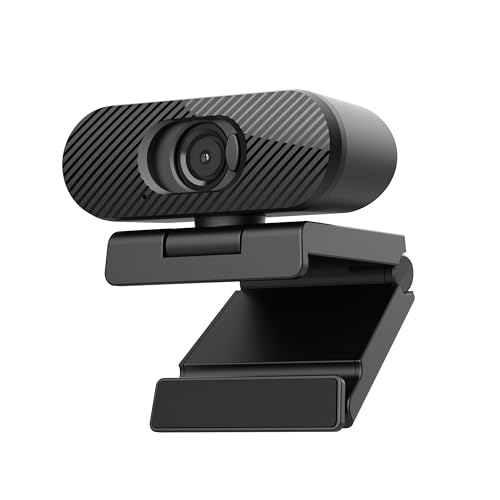
- 1080p/30fps video with auto-exposure
- Built-in privacy shutter for quick lens cover
- Plug-and-play setup on PC, Mac, and Chromebook
Best For: Budget-conscious users who want simple privacy and easy setup
Business Pick
Logitech C925-E Business 1080p Webcam

- Built-in sliding privacy cover for secure use
- Autofocus, RightLight 2, and dual mics for calls
- Certified for Teams and compatible with major apps
Best For: Work meetings and professionals who need privacy plus reliable conferencing
Compact Privacy Pick
1080P Privacy Webcam for Small-View Meetings

- Physical privacy cover for quick lens blocking
- 1080p video with auto light correction
- 70° view keeps the frame more personal
Best For: Personal calls, classes, and small-view meetings
Simple Everyday Choice
Renewed 1080p Webcam with Slide Cover

- Integrated privacy cover for easy lens blocking
- 1080p video with auto-light balance
- Built-in mic and plug-and-play USB-A
Best For: Daily calls and streaming with simple privacy
Business Privacy Standard
Business 1080p Webcam with Privacy Shutter

- Integrated webcam cover for workplace privacy
- 1080p video with RightLight 2 balance
- USB-A plug-and-play for easy deployment
Best For: Business calls, remote work, and Chromebook setups
Reliable Everyday Choice – Logitech Brio 101 1080p Webcam
If you want a webcam with built-in privacy shutter for everyday calls, the Logitech Brio 101 keeps things simple: 1080p video, auto-light correction, and a built-in mic in a plug-and-play USB-A design. It’s aimed at people who need a straightforward setup for meetings, streaming, and remote work without extra software hassles.
Best For: Remote workers, students, and casual streamers who want an easy USB-A webcam with privacy coverage and solid all-around video quality.
Pros:
- Built-in privacy shutter for quick lens coverage when you’re off camera
- RightLight auto-light correction helps brighten your image and reduce shadows
- Built-in microphone keeps setup simple for video calls
- Works with Teams, Zoom, and Google Meet with plug-and-play convenience
Cons:
- USB-A only, so it’s less convenient for USB-C-only setups
- Fixed-focus design limits advanced camera control
- Best suited to general meetings rather than specialized creator workflows
The Brio 101 is a practical pick if privacy and ease of use matter more than advanced features. It balances familiar meeting-room basics with a built-in cover and dependable compatibility, making it a low-fuss upgrade from a laptop camera.
Creator-Friendly Flex Pick – AVerMedia PW313 1080p Webcam
The AVerMedia Live Streamer Cam 313 is a webcam with built-in privacy shutter that leans toward creators and presenters who want more angle flexibility than a basic office cam. It offers Full HD 1080p video, dual microphones, and a 360-degree swivel design, so you can handle meetings, teaching, streaming, and product demos from a better position.
Best For: Streamers, teachers, and remote presenters who want a swivel webcam with privacy protection and flexible framing.
Pros:
- Built-in privacy shutter adds a secure lens cover when the camera is not in use
- 360° swivel makes it easier to adjust angles for demos and presentations
- 1080p Full HD video suits meetings, teaching, and streaming
- Plug-and-play USB setup requires no drivers
Cons:
- Fixed focus may not suit every distance or highly dynamic setup
- USB cable connection limits placement compared with wireless options
- Designed more for practical flexibility than premium creator-grade imaging
For users who move between calls, demos, and streaming, the PW313 stands out because the swivel mount is genuinely useful. The privacy shutter is a welcome addition, and the overall package is well matched to flexible home-office and classroom use.
Compact USB-C Upgrade – Logitech Brio 300 Renewed Webcam
If you’re shopping for a webcam with built-in privacy shutter and a cleaner USB-C connection, the renewed Logitech Brio 300 is a compact 1080p option with auto light correction. It’s built for modern meeting setups where a small footprint, easy compatibility, and a privacy cover matter more than extra controls.
Best For: Users with USB-C setups who want a compact meeting webcam with privacy coverage and automatic light adjustment.
Pros:
- Built-in privacy cover for simple lens protection
- USB-C connection fits newer laptops and desk setups
- Auto light correction helps improve image quality in typical indoor lighting
- Compact design keeps your workspace uncluttered
Cons:
- Renewed condition may not appeal to buyers who want brand-new hardware
- 90-day limited warranty is shorter than many new webcams
- Best for meetings rather than advanced streaming needs
The Brio 300 is a sensible upgrade if you want a small, modern webcam that handles video calls without fuss. Its privacy cover and USB-C layout make it especially practical for streamlined home-office setups.
Budget Privacy Option – NexiGo N60 1080p Webcam
The NexiGo N60 is a webcam with built-in privacy shutter that focuses on the essentials: 1080p video, a noise-canceling microphone, and plug-and-play USB compatibility. With adjustable field of view support and broad device compatibility, it’s a practical choice for calls, school, streaming, and general computer use.
Best For: Budget-minded buyers who want a simple webcam with privacy protection, wide compatibility, and everyday 1080p video.
Pros:
- Privacy cover blocks the lens when the webcam is not in use
- 1080p Full HD video with a 110-degree viewing angle
- Noise-canceling microphone helps reduce background distractions
- Works across many systems, including Windows, macOS, Linux, Android, and Chrome OS
Cons:
- Fixed-focus design is less flexible than autofocus models
- Not compatible with Xbox or PlayStation consoles
- Support notes mention firmware updates may be needed if audio delay appears
The N60 is an easy recommendation if you want practical privacy and broad compatibility without paying for extra frills. It covers the basics well and is especially appealing for everyday conferencing and casual streaming.
Editor’s Pick – Logitech Brio 301 1080p Webcam with Privacy Shutter
If you want a webcam with built-in privacy shutter for everyday calls, the Logitech Brio 301 is an easy, practical pick. It delivers Full HD 1080p video, auto light correction, and a noise-reduction mic, so it covers the basics well for meetings, interviews, and casual streaming.
Best For: Remote workers and students who want a simple 1080p webcam with a physical privacy shutter and broad meeting-app compatibility.
Pros:
- 1080p resolution with natural-looking video for meetings and calls
- RightLight 2 helps compensate for poor lighting automatically
- Built-in privacy shutter lets you block the lens when not in use
- Certified for Zoom, Microsoft Teams, and Google Meet
Cons:
- Fixed-focus design may be less flexible than autofocus models
- Single mono mic is fine for calls, but not a studio-level audio solution
The Brio 301 is a strong all-around choice if you want a dependable webcam that balances image quality, privacy, and straightforward setup. It’s especially appealing for people who spend most of their time on video meetings rather than content creation.
Budget Pick – JLab Go Pop Cam Compact 1080p Webcam
JLab Go Pop Cam, USB Webcam, 1080p, Built-in Privacy Shutter, Plug and Play, Black
Check Price On AmazonThe JLab Go Pop Cam is a straightforward webcam with built-in privacy shutter for users who want an affordable, no-fuss setup. It offers 1080p/30fps video, auto-exposure, and plug-and-play compatibility with PC, Mac, and Chromebook, making it a simple choice for quick calls and light streaming.
Best For: Buyers who want a compact, plug-and-play webcam with a physical privacy shutter and easy setup across common devices.
Pros:
- 1080p/30fps video quality for everyday conferencing
- Built-in privacy shutter slides over the lens when not in use
- Plug-and-play setup with no drivers required
- Works with PC, Mac, and Chromebook out of the box
Cons:
- Fixed-focus design is less adjustable than autofocus webcams
- No advanced features beyond basic auto-exposure and a minimalist design
This is a practical pick if you mainly need reliable video, easy compatibility, and a lens cover you can close in seconds. It keeps things simple, which is exactly what many buyers want from a budget webcam.
Business Pick – Logitech C925-E Business 1080p Webcam
If you need a webcam with built-in privacy shutter for work, the Logitech C925-E is built around business-friendly features. It combines 1080p/30fps video, autofocus, RightLight 2, dual microphones, and H.264 encoding for smoother calls on lower bandwidth connections.
Best For: Professionals who want a secure, work-focused webcam with privacy control, clear video, and strong conferencing compatibility.
Pros:
- Built-in sliding webcam cover provides quick privacy control
- Autofocus and RightLight 2 help keep you sharp in varied lighting
- Dual omnidirectional mics support clearer meeting audio
- Certified for Microsoft Teams and compatible with Zoom, Google Meet, and Skype
Cons:
- Uses USB-A, so some newer devices may need an adapter
- Business-first design may be more than casual users need
The C925-E stands out if your priority is dependable video conferencing with privacy built in. Its mix of autofocus, audio pickup, and low-bandwidth video support makes it a solid office-ready option.
Compact Privacy Pick – 1080P Privacy Webcam for Small-View Meetings
If you want a webcam with built-in privacy shutter for everyday calls, the EMEET C950 is a simple, focused option. It combines 1080p video, a 70° field of view, and a physical privacy cover, making it a solid pick for personal meetings, online classes, and other one-on-one use where you do not want extra room detail in frame.
Best For: Personal video calls, online classes, and users who want a compact webcam with a physical privacy cover.
Pros:
- Physical privacy cover helps block the lens when the camera is not in use.
- 1080p video with auto light correction aims for cleaner calls in everyday lighting.
- 70° view keeps the frame tighter for personal use and less background exposure.
- Built-in omnidirectional mic supports voice pickup for meetings and classes.
Cons:
- Fixed focus is less flexible than autofocus if you move around a lot.
- The 70° view may be too narrow for group settings.
- Best image quality depends on a well-lit environment.
Overall, the C950 is geared toward straightforward privacy and dependable video rather than advanced features. If you mainly want a compact webcam with built-in privacy shutter protection and easy plug-and-play setup, it covers the basics well.
Simple Everyday Choice – Renewed 1080p Webcam with Slide Cover
The Logitech Brio 100 is a practical webcam with built-in privacy shutter for people who want a simple upgrade for meetings and streaming. It delivers Full HD 1080p, auto-light balance, a built-in mic, and an integrated cover that gives you quick privacy when the call ends.
Best For: Everyday video calls and streaming with a reliable privacy cover and easy plug-and-play setup.
Pros:
- Integrated privacy cover makes it easy to block the lens when not in use.
- Full HD 1080p helps you look clearer on calls and streams.
- RightLight auto-light balance boosts brightness and reduces shadows.
- Built-in mic and USB-A plug-and-play support common meeting apps.
Cons:
- Renewed listing may not appeal if you prefer new-in-box products.
- Uses USB-A, which may require an adapter on newer devices.
- Focus is fixed, so it is less adjustable than autofocus models.
For buyers who want a no-fuss webcam with built-in privacy shutter protection, the Brio 100 keeps the feature set focused and familiar. It is best when you value simple setup, clear 1080p video, and an easy sliding cover over extra extras.
Business Privacy Standard – Business 1080p Webcam with Privacy Shutter
The Logitech Brio 105 is a business-focused webcam with built-in privacy shutter protection, designed for workers who want a dependable camera for meetings. It offers 1080p video, auto-light balance, a built-in mic, and USB-A plug-and-play setup, making it a straightforward fit for remote work and standard conferencing apps.
Best For: Business meetings, remote work, and Chromebook or office setups that need a webcam with privacy shutter.
Pros:
- Integrated webcam cover gives extra privacy when the camera is not needed.
- 1080p resolution and RightLight 2 help improve image quality in poor lighting.
- USB-A plug-and-play keeps setup simple for computers and docks.
- Certified for Google Meet and works with Chromebook and major platforms.
Cons:
- Uses USB-A rather than USB-C, which may limit convenience on some systems.
- Designed around business basics, so it does not add premium streaming features.
- Focus and feature set are straightforward rather than advanced.
As a workplace webcam with built-in privacy shutter, the Brio 105 is aimed at reliable everyday conferencing more than creative use. It makes sense if you want a modestly priced business camera that emphasizes privacy, compatibility, and simple operation.
How We Picked the Best Webcam with Built-In Privacy Shutter
For this roundup, we prioritized webcams that offer a physical privacy shutter or cover, reliable 1080p video, and broad compatibility for common meeting apps. We also looked at autofocus or auto light correction, built-in microphones, and mounting options that make daily use easier.
Because a Webcam with Built-In Privacy Shutter is often bought for work-first use, we gave extra weight to models that are simple to install, dependable in typical indoor lighting, and suitable for laptops, external monitors, and home offices.
Quick Comparison
The lineup includes a mix of budget-friendly plug-and-play options, business-oriented models, and a few webcams with extra convenience features such as USB-C, software controls, or wider mounting flexibility. In practical terms, that means you can choose based on whether you value price, simplicity, or a more polished meeting experience.
Key Buying Factors for a Webcam with Built-In Privacy Shutter
Video Resolution and Real-World Clarity
1080p is the sweet spot for most buyers. It looks sharp in Zoom, Teams, and Google Meet without demanding much from your computer or internet connection. If your room lighting is inconsistent, auto light correction can matter more than chasing higher resolution.
Privacy Shutter Design
Look for a shutter that is physical, easy to close, and unlikely to slip open accidentally. Some models use a sliding cover, while others include a built-in flip or cap-style cover. The best option is the one you can use every day without thinking about it.
Audio and Convenience Features
A built-in microphone is handy, but it should be treated as a convenience feature, not a replacement for a headset or dedicated mic. Also consider USB-A versus USB-C, whether the webcam supports software tweaks, and whether the mount works well with your display.
Business Versus Personal Use
Business users may prefer webcams with more consistent exposure, clearer audio, and a cleaner look on camera. Casual users may care more about price, fast setup, and a compact design that stores easily when not in use.
Who Should Buy Which Webcam with Built-In Privacy Shutter?
If you want the simplest upgrade for meetings, choose a plug-and-play 1080p model with auto light correction and a reliable shutter. If you take calls all day, prioritize comfort, stable mounting, and better camera tuning. If security and discretion are a major concern, the Webcam with Built-In Privacy Shutter should be non-negotiable rather than a nice bonus.
For most buyers, the best choice is the one that balances image quality, privacy, and everyday convenience. That usually leads to a dependable 1080p webcam with a physical shutter and just enough smart features to make work easier.