
If you need sharper close-ups than a standard fixed-lens webcam can deliver, a webcam with optical zoom can make a big difference for calls, demos, and creator workflows.
This roundup focuses on the best 2026 options for flexible framing, clearer detail at distance, and practical features that matter in real-world use.
Best 10 Webcam with Optical Zoom Picks for 2026
Optical Zoom Pick
Svpro 5MP Manual Focus 10X Optical Zoom Camera
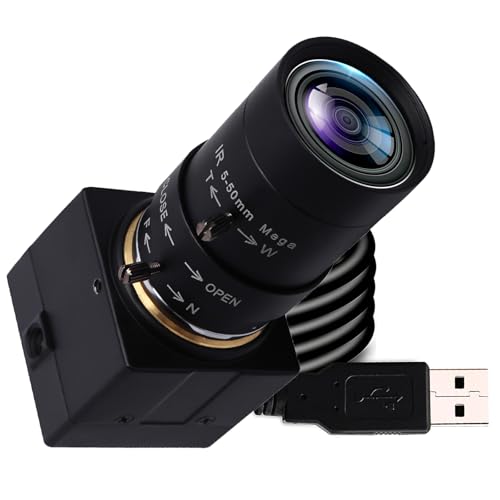
- 10X optical zoom with 5-50mm lens
- 5MP IMX335 sensor for detailed capture
- UVC plug-and-play for multiple systems
Best For: macro shots, product demos, and studio filming
Conference Zoom Option
Anker PowerConf C200 2K Adjustable Zoom Webcam

- 2K webcam with adjustable zoom controls
- Low-light correction for home office use
- Dual mics with AI noise cancellation
Best For: conference calls and flexible desktop framing
Creator Choice
EMEET S600 4K PDAF Autofocus Streaming Webcam

- 4K Sony sensor with 1080p/60 option
- PDAF autofocus for sharp tracking
- Noise-reduction mics and privacy cover
Best For: streaming, live commerce, and creator video
Flexible Framing Pick
Creative Live! Cam Sync V3 2K Webcam with 4X Zoom

- 4X digital zoom for presentations
- 2K QHD video at 30 fps
- Dual mics and privacy lens cap
Best For: meetings, demos, and small-object presentations
Telephoto Zoom Pick
SVPRO 1080P USB Webcam with 5-50mm Lens

- 5-50mm varifocal lens with manual optical zoom
- 1080p video with up to 100fps at VGA
- UVC plug-and-play support across major systems
Best For: Manual zoom and close-up framing
Dual-Camera Zoom Pick
EMEET C60E 4K Dual-Camera Webcam

- Wide-angle and telephoto cameras in one unit
- 1X to 11X hybrid zoom with PDAF autofocus
- Remote control plus EMEET STUDIO tuning
Best For: Flexible streaming and quick zoom changes
High-Speed Manual Zoom Pick
ELP 12MP USB Webcam with 3X Zoom Lens

- 3.6-10mm lens with manual 3X optical zoom
- 1080p at 120fps and up to 12MP capture
- Compact aluminum body with tripod mount
Best For: Fast capture and technical close-up work
Premium Creator Webcam
Logitech Brio 4K for Streaming and Meetings

- 4K video at 30 fps with autofocus
- 5x zoom and adjustable field of view
- RightLight 3 improves bright or backlit scenes
Best For: Streamers and professionals who want 4K video and flexible framing
Zoom Conference Camera
ELP 12X Zoom 4K USB/HDMI Webcam

- 10X optical zoom with 1.2X digital zoom
- 4K USB and 1080P HDMI output options
- Auto and manual focus with fast response
Best For: Fixed setups that need real optical zoom and dual-output flexibility
Wide-View 4K Webcam

- 4K support with 1080P 60fps mode
- PDAF autofocus for moving subjects
- 8X digital zoom with privacy shutter
Best For: Users who want autofocus and flexible digital zoom on a desktop webcam
Optical Zoom Pick – Svpro 5MP Manual Focus 10X Optical Zoom Camera
If you want a webcam with optical zoom for close-up work, this Svpro USB camera stands out because it uses a 5-50mm manual CS-mount lens with 10X optical zoom. It is aimed more at controlled shooting than casual video calls, so it makes sense for macro shots, product demos, studio filming, and other situations where framing matters.
Best For: Macro work, studio filming, DIY demos, and long-distance close-ups.
Pros:
- 10X optical zoom with a 5-50mm manual lens for precise framing.
- 5MP IMX335 sensor and 2595×1944 capture for crisp stills and video.
- UVC plug-and-play support for Windows, MacOS, Linux, and Android.
- Solid aluminum housing with tripod mounting support.
Cons:
- Manual focus, zoom, and aperture require hands-on adjustment.
- Better suited to studio or task-based use than simple face-to-face calls.
Overall, this is a practical pick if your priority is real optical zoom rather than the fixed-lens approach common in standard webcams. The tradeoff is manual control, but that is exactly what gives it flexibility for detailed shooting.
Conference Zoom Option – Anker PowerConf C200 2K Adjustable Zoom Webcam
For shoppers comparing a webcam with optical zoom, this Anker model is better understood as a flexible conference webcam with adjustable zoom rather than true optical magnification. It offers 2K video, a zoom lens design, and software-controlled framing, making it a strong option for meetings where clarity and convenience matter more than close-up detail work.
Best For: Video meetings, home offices, and users who want adjustable framing in a compact webcam.
Pros:
- 2K Ultra-Clear resolution for sharp conference video.
- Adjustable zoom and selectable viewing angles for easier framing.
- Low-light correction helps in dim home office setups.
- Dual microphones with AI noise cancellation improve voice clarity.
Cons:
- Not designed around optical zoom for close-up shooting.
- Best for meetings rather than studio or product-demo use.
In practice, this is a polished meeting webcam with useful framing controls and strong audio, not a specialty zoom camera. If your main need is reliable conferencing, it is a very sensible choice.
Creator Choice – EMEET S600 4K PDAF Autofocus Streaming Webcam
If you are shopping for a webcam with optical zoom, the EMEET S600 is really aimed at creators who want sharp image quality, fast autofocus, and a wide, controlled field of view. Its 4K Sony sensor and PDAF autofocus make it a stronger fit for streaming and on-camera content than for zoomed-in close-up shooting.
Best For: Streamers, live commerce hosts, gaming creators, and beauty/content setups.
Pros:
- 4K at 30 FPS or 1080p at 60 FPS for flexible streaming quality.
- PDAF autofocus keeps subjects sharp and steady.
- Built-in privacy cover adds convenience between sessions.
- Dual noise-reduction mics improve spoken audio.
Cons:
- Fixed field of view is not a true optical zoom solution.
- Best suited to creator workflows rather than close-up inspection work.
This is a strong all-around creator webcam when your priorities are image quality, autofocus, and sound. It is not the zoom-first choice in this roundup, but it does offer a polished, ready-to-stream experience.
Flexible Framing Pick – Creative Live! Cam Sync V3 2K Webcam with 4X Zoom
This Creative webcam is a better fit if you want a webcam with optical zoom-style flexibility for presentations, though it uses 4X digital zoom rather than true optical magnification. The 2K QHD image, easy plug-and-play setup, and zoom range make it useful for meetings, whiteboard demos, and small-object demonstrations.
Best For: Online meetings, whiteboard presentations, and demo-style calls.
Pros:
- 4X digital zoom helps move from group view to close-up framing.
- 2K QHD resolution keeps image detail strong at 1X zoom.
- Dual built-in microphones support clearer voice pickup.
- Privacy lens cap and adjustable mount add convenience.
Cons:
- Zoom is digital, not optical.
- Full features may depend on third-party or Creative software.
For users who need flexible framing more than true lens zoom, this webcam offers a practical balance of quality and convenience. It is especially appealing for meetings where you may switch between general shots and close-up demonstrations.
Telephoto Zoom Pick – SVPRO 1080P USB Webcam with 5-50mm Lens
If you want a webcam with optical zoom for closer framing, the SVPRO stands out with its 5-50mm CS-mount varifocal lens and manual focus control. It’s aimed at users who need more framing flexibility than a fixed-lens webcam, whether for product demos, close-up teaching, streaming, or machine-vision style setups.
Best For: Users who need manual optical zoom and a configurable lens for close-up work.
Pros:
- 5-50mm varifocal CS-mount lens provides flexible manual optical zoom.
- 1080p image quality with 30fps, plus 720p at 60fps and VGA at 100fps.
- UVC plug-and-play support for Windows, Mac, Linux, Android, and OTG.
- Metal housing and dual mounting options for tripod or wall placement.
Cons:
- Manual focus and zoom require hands-on adjustment.
- Not a typical fixed-position consumer webcam.
- Best results depend on choosing the right focal length for your setup.
This is a practical pick if you value optical zoom more than convenience features. The SVPRO is built for users who want control over distance, framing, and placement, rather than an all-in-one meeting camera.
Dual-Camera Zoom Pick – EMEET C60E 4K Dual-Camera Webcam
The EMEET C60E is a webcam with optical zoom styling and a more advanced dual-camera layout, combining wide-angle and telephoto views for flexible framing. Its zoom range is built for live streaming, teaching, product demos, and meetings where you want to switch between a full scene and tighter close-up shots without moving the camera.
Best For: Streamers and presenters who want quick switching between wide and telephoto views.
Pros:
- Dual-camera design separates wide-angle and telephoto capture.
- Hybrid zoom ranges from 1X to 11X for flexible framing.
- PDAF autofocus helps keep zoomed shots stable and clear.
- Remote control and EMEET STUDIO offer easier image adjustments.
Cons:
- Zoom is not supported in 4K, 60FPS, or YUY2 modes.
- More complex than a basic single-lens webcam.
- Best for users who will actually use its controls and framing options.
For anyone comparing a webcam with optical zoom options, the C60E focuses on flexibility and presentation quality rather than simplicity. It’s a strong fit if you want to move between wide and close views often and prefer remote-controlled adjustments.
High-Speed Manual Zoom Pick – ELP 12MP USB Webcam with 3X Zoom Lens
The ELP 12MP USB camera is a webcam with optical zoom aimed at users who need speed, close focusing, and manual control. Its 3.6-10mm CS-mount lens gives you roughly 3X optical zoom, making it useful for conference setups, streaming, macro-style close-ups, and technical or industrial capture where framing needs to be adjusted by hand.
Best For: Users who need a compact zoom webcam for fast motion, close-ups, or technical work.
Pros:
- 3.6-10mm lens offers manual 3X optical zoom control.
- High-speed capture reaches 1080p at 120fps.
- 12MP sensor provides up to 3840×3040 resolution.
- Compact aluminum housing with tripod-mount support.
Cons:
- Manual adjustments are required for focus, aperture, and zoom.
- Not optimized as a simple everyday plug-and-play meeting webcam.
- Some modes and settings are best suited to advanced users.
This model makes sense if your priority is optical zoom plus capture speed. It’s especially appealing for users who need a small camera that can handle closer working distances, motion, and specialized setups.
Premium Creator Webcam – Logitech Brio 4K for Streaming and Meetings
If you want a webcam with optical zoom for sharper framing control, the Logitech Brio stands out for its 4K image quality, 5x zoom, and flexible field-of-view presets. It is built for meetings and streaming where clear detail, good low-light handling, and easy setup matter more than flashy extras.
Best For: Streamers and professionals who want 4K video, zoom control, and reliable meeting performance.
Pros:
- 4K video up to 30 fps with autofocus and glass lens detail
- 5x optical zoom plus easy zoom and image controls in Logi Options+
- RightLight 3 helps balance exposure in glare or backlit rooms
- Three field-of-view presets make framing easier for different setups
Cons:
- Zoom is listed as digital in the product details, so true optical zoom framing may not apply the same way as dedicated PTZ cameras
- Premium feature set may be more than casual users need
This is a strong pick if you want a polished webcam for calls and content with dependable image tuning and broad platform support. Its zoom tools and lighting correction make it especially useful when you need to look consistent across changing environments.
Zoom Conference Camera – ELP 12X Zoom 4K USB/HDMI Webcam
For buyers specifically searching for a webcam with optical zoom, this ELP model is the most straightforward match in the group. It combines 10X optical zoom with 1.2X digital zoom, 4K USB output, and HDMI support, making it a flexible choice for presentations, church streaming, and conference room use.
Best For: Users who need real optical zoom and dual USB/HDMI output for live video setups.
Pros:
- 10X optical zoom plus 1.2X digital zoom for close framing control
- 4K USB output and 1080P 60fps HDMI output for versatile setups
- Auto focus/manual focus switching with fast response time
- USB and HDMI can be used simultaneously for dual-display workflows
Cons:
- Bulkier feature set is better suited to fixed installations than simple desk use
- 4K is available on USB output, while HDMI tops out at 1080P
This is the most specialized pick here for zoom-heavy use cases, especially when optical reach matters more than compact design. If you are building a streaming or conferencing setup that needs real framing flexibility, it offers more camera-style control than a typical webcam.
Wide-View 4K Webcam – Galyimage 8X Zoom Camera
This webcam with optical zoom-style framing control is aimed at users who want easy adjustment without moving the camera, though its zoom feature is digital rather than optical. It offers 4K support, PDAF autofocus, and a 78° field of view, making it practical for meetings, streaming, and everyday video calls.
Best For: People who want strong autofocus, privacy features, and flexible digital zoom for desktop use.
Pros:
- 4K support with 1080P 60fps for smoother calls and streaming
- PDAF autofocus helps keep moving subjects sharp
- 8X digital zoom with touch-controlled adjustment
- Magnetic privacy shutter and dual noise-canceling microphones
Cons:
- Zoom function is not available in 4K, 60FPS, or YUY2 modes
- Zoom is digital, not optical
This model makes sense if you value convenience features like privacy, mic quality, and easy zoom changes more than maximum zoom fidelity. It is a capable all-around webcam for users who want a simple way to reframe shots during calls and streams.
How We Picked the Best Webcam with Optical Zoom
We prioritized webcams and USB cameras that offer true optical zoom or lens-based variable focal length, along with the features buyers usually care about most: image quality, autofocus or manual focus control, frame rate, compatibility, microphone quality, and ease of setup. We also considered whether each model is better suited to conferencing, streaming, document capture, church production, or close-up inspection.
Quick Comparison
When comparing a Webcam with Optical Zoom to a standard webcam, the main advantage is the ability to reframe without losing as much detail. Models with telephoto or variable lenses are typically better for product demos, teaching, instrument capture, and situations where your subject is not always the same distance from the camera. By contrast, fixed-lens webcams are often simpler and better for everyday desk use.
Key Buying Factors for a Webcam with Optical Zoom
Zoom Type
Look closely at whether the camera uses true optical zoom, a telephoto lens, hybrid zoom, or only digital zoom. Optical and lens-based zoom preserve more detail than digital zoom, which simply crops the image.
Resolution and Frame Rate
Higher resolution helps preserve detail when zoomed in, but frame rate matters too. For smooth video, 1080p at 60fps is a strong baseline, while 4K can help if you plan to crop or stream in higher quality.
Focus Control
Autofocus is convenient for meetings and live demos, while manual focus can be preferable for controlled setups like microscope-style use, document capture, or fixed-stage filming.
Field of View and Framing
A wider view is useful for group calls and talking-head content, but a narrower telephoto view can be better when the camera sits farther from the subject. Choose based on how often you need to capture one person versus a larger area.
Software and Compatibility
Check operating system support, UVC plug-and-play behavior, and whether the camera works with your preferred apps. If you need remote control, privacy features, or advanced image tuning, make sure those tools are included.
Who Should Buy Which Webcam with Optical Zoom?
If you want simple video calls and better-than-basic image quality, a fixed 2K or 4K webcam may be enough. If you need flexible framing, detailed close-ups, or a camera for demonstrations, a Webcam with Optical Zoom or a telephoto lens is the better choice. Creators and presenters should look for stronger focus control and higher frame rates, while educators, churches, and product demonstrators may benefit most from hybrid zoom and remote operation.
For the best overall value, match the zoom style to your use case rather than chasing the highest spec on paper. The right camera is the one that keeps your subject clear at the distance you actually work from.