
Choosing the right webcam for conference rooms can make small huddles and large boardroom calls feel far more professional. The best options improve framing, reduce audio problems, and keep everyone visible without constant adjustment.
Below, we focus on room coverage, video quality, microphones, and ease of setup so you can quickly match the right system to your space and meeting style.
Best 10 Webcam for Conference Rooms Picks for 2026
Elite Panoramic Room Coverage
Jabra PanaCast 50 180° 4K Meeting Bar

- 180° panoramic 4K video
- Three 13 MP cameras with stitching
- Teams-certified, plug-and-play USB
Best For: Premium conference rooms needing wide coverage and smart framing
All-in-One Mid-Size Room Pick
Logitech ConferenceCam CC3000e HD System
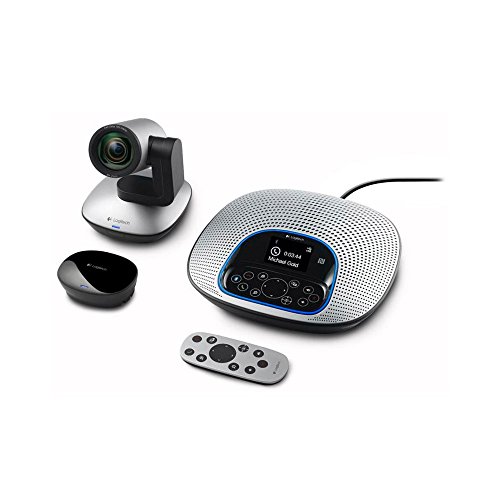
- 1080p HD video at 30 fps
- 90° view with 10x zoom
- Built-in speakerphone and noise-cancelling mics
Best For: Mid-size conference rooms needing a simple all-in-one system
Smart Tracking for Small Rooms
WYRESTORM FOCUS 210 AI Conference Webcam

- AI auto framing and presenter tracking
- 120° wide angle for small rooms
- Dual noise-cancelling mics with privacy cover
Best For: Small meeting rooms needing intelligent tracking and easy USB use
Large Room Conference System
Logitech GROUP Video and Audio Kit

- 1080p video with autofocus and zoom
- 20-foot audio range for bigger rooms
- Supports groups up to 14, or 20 with expansion mics
Best For: Large conference rooms and regular group meetings
All-in-One Meeting Hub

- 4K webcam with dual mics and a 3W speaker
- AI auto-framing and voice tracking for meetings
- Remote adjusts zoom, FOV, mute, and image flip
Best For: conference rooms that want an all-in-one camera, mic, and speaker
Wide-Angle Room System
MeetUp for Small Meeting Spaces

- 120° field of view covers the whole table
- Built-in microphones and speakers simplify setup
- USB plug-and-play for common meeting apps
Best For: small meeting rooms and huddle spaces needing broad coverage
Premium Videobar Pick
Bose VB-S for Clean Audio and Video

- 4K video with 5x digital zoom and wide FOV
- Four beamforming mics help reduce unwanted noise
- Bluetooth speaker and mounting options included
Best For: offices and classrooms wanting premium audio with 4K video
All-in-One Huddle Room Pick
Logitech MeetUp 4K Conference Camera

- 4K sensor with 120° FOV
- Beamforming mics up to 4 m
- USB plug-and-play BYOD setup
Best For: Small huddle rooms needing an easy all-in-one conference camera
360-Degree Collaboration Choice
j5create JVCU360 Meeting Webcam

- 360° video coverage for group calls
- Six display modes for flexible setups
- USB-C plug-and-play with built-in mic
Best For: Table-centered meetings and collaborative rooms
Certified Room Kit Upgrade
Yealink UVC34 4K Conference Camera

- 4K AI camera with auto framing
- 8-mic array plus 5W speaker
- USB-A plug-and-play with lens cap
Best For: Teams using certified room systems in huddle spaces
Elite Panoramic Room Coverage – Jabra PanaCast 50 180° 4K Meeting Bar
If you need a webcam for conference rooms that can capture everyone without awkward repositioning, the Jabra PanaCast 50 is built for that job. Its three 13 MP cameras and real-time video stitching let you choose a 90-, 120-, 140-, or 180-degree view, while the 4K output and automatic zoom help keep groups framed clearly in changing lighting.
Best For: Teams that want a premium, wide-angle meeting room camera with intelligent framing and room insights.
Pros:
- Switchable field of view from 90° up to 180° for different room sizes.
- Three 13 MP cameras with real-time stitching for panoramic 4K meeting video.
- Plug-and-play USB setup for quick deployment.
- Works with leading conferencing platforms and is certified for Microsoft Teams.
Cons:
- Heavier and more substantial than a simple desktop webcam.
- Best suited to organized meeting spaces rather than portable use.
Overall, this is a strong choice when coverage, automation, and conference-room readiness matter more than simplicity. The built-in occupancy insights also make it stand out for teams that want meeting space visibility alongside high-end video.
All-in-One Mid-Size Room Pick – Logitech ConferenceCam CC3000e HD System
The Logitech ConferenceCam CC3000e is a practical webcam for conference rooms when you want video and audio in one package. It delivers 1080p HD video at 30 fps, a 90-degree field of view, and remote-controlled pan, tilt, and 10x zoom, making it a solid fit for mid-size group calls.
Best For: Mid-size meeting rooms that need an affordable all-in-one conferencing setup.
Pros:
- All-in-one camera and speakerphone design simplifies room setup.
- 1080p HD video at 30 fps with a 90° room view.
- Remote pan, tilt, and 10x zoom for flexible framing.
- Built-in noise-cancelling mics and full duplex speakerphone.
Cons:
- Wide-room coverage is more limited than 180-degree systems.
- It is an older business product shipped in brown box packaging.
For teams that want dependable conference-room basics without a complicated install, this model stays appealing. It combines strong audio, straightforward USB connection, and useful camera controls in a compact system.
Smart Tracking for Small Rooms – WYRESTORM FOCUS 210 AI Conference Webcam
If you are shopping for a webcam for conference rooms with intelligent framing, the WYRESTORM FOCUS 210 is designed for small meeting spaces. It uses AI auto framing to keep groups centered, adds presenter tracking for active speakers, and offers a 120-degree wide angle so everyone stays in view without constant camera adjustments.
Best For: Small conference rooms that need auto framing, presenter tracking, and simple USB setup.
Pros:
- AI auto framing helps capture all attendees automatically.
- Presenter tracking follows the active speaker during meetings and presentations.
- 120° wide angle suits small conference rooms.
- Dual noise-cancelling microphones and a physical privacy cover add practicality.
Cons:
- Best aligned to smaller rooms rather than larger boardrooms.
- USB-only setup may be less flexible than networked room systems.
This model makes sense for teams that want professional 4K video without a complicated installation. Its mix of auto framing, tracking, and room-friendly audio is especially useful for hybrid meetings and training sessions.
Large Room Conference System – Logitech GROUP Video and Audio Kit
The Logitech GROUP is a strong webcam for conference rooms when you need to cover bigger spaces and larger teams. It pairs 1080p HD video with a 90-degree field of view, 20-foot audio range, and expandable microphone support, so it is designed around mid- to large-sized meeting rooms rather than personal use.
Best For: Larger conference rooms and group meetings that need broad audio coverage and reliable plug-and-play operation.
Pros:
- Built for mid- to large-sized conference rooms and groups up to 14, or 20 with expansion mics.
- 1080p HD video with autofocus and digital pan/tilt/zoom.
- 20-foot audio range with four integrated omni-directional mics.
- Plug-and-play USB setup works with Mac, PC, and many UC apps.
Cons:
- Requires more room and setup than a small desktop webcam.
- Video is 1080p, not 4K.
For bigger meeting spaces, this is a proven conference-room system that focuses on practical coverage and compatibility. The combination of extended audio pickup and business certifications makes it a dependable pick for regular group calls.
All-in-One Meeting Hub – 4K Conference Room All-in-One
If you want a webcam for conference rooms that cuts down on clutter, this 3-in-1 TONGVEO model combines a 4K camera, dual microphones, and a built-in speaker in one device. It is built for meetings where you need everyone visible, everyone heard, and setup to stay simple.
Best For: Small to mid-size conference rooms that need an all-in-one USB solution with AI framing and voice tracking.
Pros:
- 4K video with a 1/2.8-inch 8.29MP sensor for crisp meeting image quality.
- AI auto-framing and voice tracking help keep attendees and active speakers centered.
- Built-in dual microphones and a 3W speaker reduce the need for separate audio gear.
- Remote control lets you adjust zoom, FOV, mute, and image flip during calls.
Cons:
- 5x digital zoom may not match the flexibility of optical zoom systems.
- Best suited to rooms where an integrated speaker and mic setup is acceptable.
Overall, this is a practical choice if you want a straightforward conference-room webcam that handles video and audio together. The adjustable FOV options also make it easier to adapt the framing for group calls or solo presenters.
Wide-Angle Room System – MeetUp for Small Meeting Spaces
Logitech MeetUp HD Video and Audio Conferencing System for Small Meeting Rooms (Renewed)
Check Price On AmazonFor buyers seeking a webcam for conference rooms with a room-focused design, the Logitech MeetUp is made specifically for small meeting rooms and huddle spaces. Its wide 120° field of view, built-in audio, and USB plug-and-play setup make it a strong fit when you want simple deployment and broad room coverage.
Best For: Small meeting rooms and huddle spaces that need a wide-angle all-in-one conferencing system.
Pros:
- 120° ultra-wide field of view helps capture everyone at the table.
- Built-in beamforming microphones and speakers reduce the need for extra hardware.
- 4K Ultra HD video with 5x HD zoom adds room for clearer participant framing.
- USB plug-and-play compatibility works with Zoom, Teams, Google Meet, and more.
Cons:
- This is a renewed unit, so it may not suit buyers wanting brand-new hardware.
- Designed for smaller rooms rather than larger boardrooms.
In practice, the MeetUp is a dependable room system when wide coverage matters more than compact desktop convenience. It keeps setup simple while offering integrated audio and video in one conference-room package.
Premium Videobar Pick – Bose VB-S for Clean Audio and Video
If your webcam for conference rooms needs stronger sound and a more polished look, the Bose Professional VB-S brings an all-in-one video conferencing design with 4K video, beamforming microphones, and a Bluetooth speaker. It is aimed at office, classroom, or home setups where clear voice pickup and a professional footprint matter.
Best For: Offices and classrooms that want premium audio, 4K video, and flexible mounting options.
Pros:
- 4K Ultra-HD camera with 5x digital zoom and a wide field of view.
- Four beamforming microphones focus on voices and help reduce unwanted noise.
- Bluetooth speaker support adds flexibility for calls or music from a phone.
- Includes mounting options plus an IR remote and other install accessories.
Cons:
- Uses digital zoom rather than optical zoom.
- Its larger, more stationary design may be less suitable for portable use.
This model makes sense when you want conference-room hardware that feels more like a proper videobar than a basic webcam. The blend of strong audio features and 4K video should appeal to teams that care about presentation quality.
All-in-One Huddle Room Pick – Logitech MeetUp 4K Conference Camera
If you want a webcam for conference rooms that is simple to deploy in small spaces, Logitech MeetUp is built for exactly that job. Its all-in-one design, 120° field of view, and built-in mics make it a practical choice for huddle rooms where you need clean video and reliable pickup without a pile of extra gear.
Best For: Small conference rooms and huddle spaces that need a plug-and-play room camera with wide coverage.
Pros:
- 4K sensor with a wide 120° field of view for clear room coverage.
- Beamforming microphones capture voices up to 4 m away, with optional extension support.
- Motorized pan/tilt can expand the view up to 170° for whiteboards or side areas.
- USB plug-and-play connectivity works for bring-your-own-device setups.
Cons:
- Expansion microphone is sold separately.
- Best suited to small and huddle rooms rather than larger meeting spaces.
Overall, MeetUp is a straightforward conference-room webcam if you value easy setup and a wide, room-friendly field of view. It is especially appealing when you need one device to handle both video and speakerphone duties.
360-Degree Collaboration Choice – j5create JVCU360 Meeting Webcam
The j5create JVCU360 is a webcam for conference rooms when you want to show everyone in the room without repositioning the camera. Its 360° design, built-in microphone, and multiple viewing modes make it a flexible fit for collaborative meetings, online classes, and group calls.
Best For: Table-centered meetings and collaborative spaces that benefit from a full-room, 360-degree view.
Pros:
- 360° camera coverage helps capture the entire meeting table.
- Six display modes add flexibility for different meeting layouts.
- Built-in omnidirectional microphone supports conferencing audio.
- USB-C plug-and-play design works with major meeting apps.
Cons:
- Only records up to 1080p rather than 4K.
- May require app permission changes and a firmware update for best performance.
For teams that want to keep everyone visible in a compact room, this model offers a very different approach from a standard fixed-view camera. It is a strong option when flexibility matters more than ultra-high resolution.
Certified Room Kit Upgrade – Yealink UVC34 4K Conference Camera
If you need a webcam for conference rooms that combines video, audio, and room-ready convenience, the Yealink UVC34 is a strong all-in-one option. It pairs a 4K AI camera with an 8-microphone array and speaker, making it suitable for huddle rooms where clear framing and voice pickup both matter.
Best For: Teams using Teams or Zoom Rooms who want a certified, plug-and-play huddle room system.
Pros:
- 4K camera with AI auto framing and 120° wide-angle lens.
- Built-in 8-microphone array and 5W speaker for integrated audio.
- USB-A plug-and-play setup with no extra drivers needed.
- Electric lens cap adds privacy when meetings are not active.
Cons:
- Heavier and larger than a basic desktop webcam.
- Most useful in small or crowded rooms rather than large conference spaces.
As a room-focused conference camera, the UVC34 stands out for combining strong automation with practical audio hardware. It is especially appealing if you want a polished setup that is easy for admins to manage and simple for users to start.
How We Picked the Best Webcam for Conference Rooms
We prioritized systems that solve the most common meeting-room problems: wide-angle coverage, reliable autofocus or auto-framing, strong microphones, and compatibility with popular platforms like Zoom, Microsoft Teams, and Google Meet. We also looked at whether the camera is better suited to huddle rooms, medium conference rooms, or larger spaces.
Because a Webcam for Conference Rooms is usually part of a shared setup, we favored products that are simple to install, easy for non-technical users to operate, and stable enough for everyday business use.
Quick Comparison
For small rooms and huddle spaces, compact all-in-one units are usually the easiest fit. For medium and larger rooms, wider fields of view, speaker tracking, and stronger microphone arrays matter more. If you need a straightforward upgrade from a basic webcam, look for 4K video and clear digital zoom controls. If you want an all-in-one system, pay attention to built-in speakers and noise reduction.
Key Buying Factors for a Webcam for Conference Rooms
Room Size and Field of View
Match the camera’s viewing angle to the room. A wide field of view helps in larger spaces, while a more focused lens can avoid distortion in smaller rooms.
Audio Quality
Video matters, but poor audio ruins meetings faster. Prioritize mic arrays, noise cancellation, and speaker performance if the room does not already have separate conferencing audio.
Auto-Framing and Tracking
Auto-framing can keep speakers centered without manual adjustment, and presenter tracking is useful when one person moves around a room or whiteboard.
Platform Certification
Certified Teams or Zoom hardware often offers smoother setup and fewer compatibility surprises, especially in managed office environments.
Connectivity and Mounting
Check whether the unit uses USB, requires a hub, or includes a display-friendly mount. A clean installation is important for shared conference spaces.
Who Should Buy Which Webcam for Conference Rooms?
If you need the simplest setup, choose an all-in-one model with built-in audio. If your priority is broad room coverage, pick a panoramic or wide-angle system. If your team runs frequent hybrid presentations, look for auto-tracking and presenter-follow features. For companies standardizing meeting rooms, certification and software compatibility may matter more than extra camera features.
The best Webcam for Conference Rooms is the one that fits your space, your meeting habits, and your existing AV setup. Start with room size, then narrow your options by audio, framing, and platform support.