
Choosing the right screen can make a racing rig feel far more immersive, responsive, and easier to drive at speed. The best options balance refresh rate, low input lag, image clarity, and the right screen shape for cockpit use.
Below, we focus on displays and sim-friendly setups that suit serious racing, from fast 1080p panels to curved ultrawide-style options and cockpit-ready monitor mounts.
Best 10 Gaming Monitor for Racing Simulator Picks for 2026
Ultrawide Value Pick
Sceptre 30-inch 200Hz Curved Ultrawide

- 30-inch curved 21:9 ultrawide display
- 200+Hz refresh rate with FreeSync
- Built-in speakers and blue light filter
Best For: Budget-minded sim racers who want a wide, immersive screen
Adjustable Cockpit Choice
Dardoo G920 Racing Seat Cockpit

- Adjustable wheel, pedal, and shifter positions
- Includes a reclining seat with rail adjustment
- Supports Logitech, Thrustmaster, MOZA, and PXN
Best For: Drivers building a full sim cockpit around popular wheel bases
High-Refresh Compact Pick
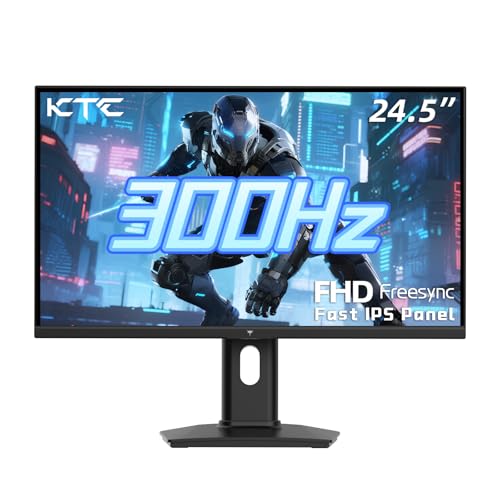
- 300Hz refresh rate with 1ms MPRT
- Fast IPS panel with Adaptive Sync
- Height, tilt, and pivot adjustments
Best For: Close-up racers who want maximum smoothness in a compact size
Triple-Screen Cockpit Pick
Dardoo Racing Cockpit with Triple Stand

- Supports three 24-inch to 32-inch monitors
- Reinforced steel vertical structure for stability
- Adjustable seat, wheel, pedal, and screen positions
Best For: Serious sim racers planning a triple-monitor cockpit build
Fast 1080p IPS Pick
Acer Nitro 24.5” 200Hz Gaming Monitor

- 200Hz refresh rate for smoother racing motion
- Up to 0.5ms GTG response time
- IPS panel with sRGB 99% and FreeSync Premium
Best For: sim racers who want a fast 1080p monitor with strong motion clarity
Cockpit-First Mounting Solution
Dardoo G923 Racing Simulator Cockpit with Monitor Mount

- Adjustable monitor bracket fits 24-50 inch displays
- Modular cockpit with flexible wheel, pedal, and shifter placement
- Steel frame with seat adjustment and cable management
Best For: sim racers building a dedicated cockpit with an integrated monitor mount
Curved High-Refresh Value Pick
Sceptre 24.5-inch 240Hz Curved Gaming Monitor

- 240Hz refresh rate with 1ms response time
- 1500R curved 24.5-inch 1080p panel
- FreeSync Premium plus built-in speakers
Best For: sim racers who want a curved high-refresh monitor with easy desk setup
Premium All-in-One Sim Rig
ARES WING racing cockpit with integrated monitor mount

- Reinforced frame built for stable sim racing
- Detachable mount fits up to 50-inch displays
- Seat, wheel, pedals, shifter, and screen are adjustable
Best For: sim racers who want an integrated cockpit and monitor mount
Budget Curved Display
Sceptre 24-inch curved 1080p gaming monitor

- 1800R curved 24-inch VA panel
- 1080p with 75Hz refresh and FreeSync
- HDMI x2 and VGA for flexible hookups
Best For: budget sim racers needing a compact curved display
Adjustable Cockpit Stand
Dardoo G923 cockpit with adjustable monitor mount
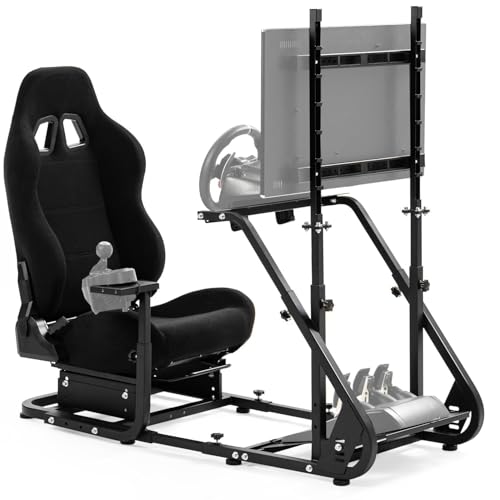
- Fits 24- to 50-inch monitors with height adjustment
- Modular frame adjusts for wheel, pedals, and shifter
- Steel construction with anti-slip feet and cable management
Best For: racing fans who want a configurable cockpit and screen mount
Ultrawide Value Pick – Sceptre 30-inch 200Hz Curved Ultrawide
If you want a gaming monitor for racing simulator use without moving into premium pricing, this 30-inch curved ultrawide is a practical fit. The 21:9 aspect ratio and 2560 x 1080 resolution give you a wider driving view, while the 200+Hz refresh rate and FreeSync support help keep motion smooth during fast laps.
Best For: Sim racers who want a wide, curved display with strong refresh rate value.
Pros:
- 30-inch curved ultrawide panel with a 21:9 aspect ratio for a broader race view
- 200+Hz refresh rate over DisplayPort plus FreeSync for smoother motion
- Blue Light Shift and flicker-free features for longer sessions
- Built-in speakers and Picture by Picture add everyday convenience
Cons:
- 5ms GTG response time is not the fastest in this group
- 2560 x 1080 resolution is less sharp than 1440p or 4K options
This Sceptre monitor makes sense if you prioritize immersion and refresh rate over pixel density. For racing simulator setups, its ultrawide format is the main draw, especially if you want a wider cockpit-style view on a budget.
Adjustable Cockpit Choice – Dardoo G920 Racing Seat Cockpit
If your racing simulator setup needs a full cockpit rather than just a monitor, this Dardoo rig is built for adjustable comfort and broad wheel support. It works with popular Logitech, Thrustmaster, MOZA, and PXN gear, and its adjustable wheel, pedal, shifter, and seat positions help you tune the driving posture to your setup.
Best For: Racers who want a fully adjustable sim cockpit with an included seat.
Pros:
- Adjustable steering wheel angle, pedal tilt, and shifter position
- Compatible with Logitech G29/G920/G923, Thrustmaster T150/T300/T248, MOZA R5, and PXN V99
- High-strength alloy steel frame with PU leather seating
- Includes cable management straps and non-slip foot pads for stability
Cons:
- Wheel, pedals, and shifter are not included
- At 72.1 pounds, it is a heavy setup to move around
This is a strong pick if you want the cockpit and seat to be the foundation of your racing simulator. It focuses more on fit, adjustability, and stability than on screen mounting or display integration.
High-Refresh Compact Pick – KTC 24.5-inch 300Hz Fast IPS
For a gaming monitor for racing simulator play where speed matters more than screen size, this 24.5-inch KTC model is a focused choice. It combines a 300Hz refresh rate, 1ms MPRT response time, and Adaptive Sync, which is a solid mix for keeping racing motion smooth and tearing under control.
Best For: Sim racers who want a fast, compact 1080p monitor with strong motion performance.
Pros:
- 300Hz refresh rate on DisplayPort and up to 240Hz via HDMI 2.0
- 1ms MPRT with Adaptive Sync to help reduce lag and tearing
- Fast IPS panel with 119% sRGB for vivid color
- Includes VESA support, height adjustment, pivot, and tilt flexibility
Cons:
- 24.5-inch 1080p screen is smaller and less immersive than ultrawide options
- 5ms response time is listed in the specs despite the 1ms MPRT claim
This KTC monitor is a speed-first option for racers who sit close to the screen and want high refresh performance. It is especially appealing if you value a compact footprint and adjustable stand over a larger cockpit-style display.
Triple-Screen Cockpit Pick – Dardoo Racing Cockpit with Triple Stand
If your racing simulator goal is a full panoramic setup, this Dardoo cockpit is designed around triple-monitor immersion. It supports three 24-inch to 32-inch displays and uses a reinforced vertical structure with thickened steel tubes, making it a serious option for users who want the screen mount and cockpit in one system.
Best For: Sim racers building an immersive triple-monitor cockpit.
Pros:
- Supports three 24-inch to 32-inch monitors for panoramic racing views
- Reinforced vertical column design with 50mm thickened steel tubes
- Adjustable wheel, pedal, shifter, and screen positions
- Includes a breathable racing seat with dual-rail adjustment
Cons:
- Large footprint may not suit smaller rooms
- Monitors, wheel, pedals, and shifter are not included
This is the most immersive option in the group if you are planning a true triple-screen racing simulator. It is aimed at builders who want structural stability and display flexibility more than a simple standalone monitor.
Fast 1080p IPS Pick – Acer Nitro 24.5” 200Hz Gaming Monitor
If you want a gaming monitor for racing simulator setups that feels quick and responsive, this Acer Nitro focuses on the basics that matter: a 24.5-inch Full HD IPS panel, 200Hz refresh rate, and up to 0.5ms response time. It also adds AMD FreeSync Premium and a near bezel-less design, which helps if you plan to run a dual-screen rig or simply want smoother motion with less distraction.
Best For: sim racers who want a fast, affordable-feeling 1080p display with strong motion clarity.
Pros:
- 200Hz refresh rate helps keep motion looking smooth during fast driving.
- Up to 0.5ms GTG response time is built for reducing smearing and ghosting.
- IPS panel with sRGB 99% and HDR10 support gives you solid image quality for the class.
- ZeroFrame design is useful for multi-monitor racing simulator layouts.
Cons:
- 1080p resolution may feel limited if you prefer higher-detail sim racing visuals.
- 24.5-inch size is compact compared with larger cockpit display options.
- Tilt adjustment is listed, but more advanced ergonomic controls are not highlighted.
This is a straightforward high-refresh option for racers who care more about speed and smoothness than extra screen real estate. It makes the most sense when you want quick response, FreeSync support, and a clean bezel setup without moving into a more expensive display tier.
Cockpit-First Mounting Solution – Dardoo G923 Racing Simulator Cockpit with Monitor Mount
This racing simulator cockpit is aimed at builders who want the display and driving position tied together in one frame. The included monitor bracket adjusts in height and fits 24- to 50-inch screens, while the cockpit itself offers modular adjustment for the wheel, pedals, shifter, and seat. For a gaming monitor for racing simulator setups, the appeal is less about the panel itself and more about creating a stable, integrated rig.
Best For: sim racers building a cockpit with an adjustable monitor mount for a more immersive setup.
Pros:
- Adjustable monitor bracket fits 24- to 50-inch displays and supports multiple VESA standards.
- Modular cockpit design allows flexible positioning of the wheel, pedals, and shifter.
- Seat has dual-lock, dual-slide adjustment plus a 70° to 180° recline range.
- Steel frame, anti-slip foot pads, and cable-tie straps help with stability and organization.
Cons:
- Monitor, wheel, pedals, and shifter are not included.
- Large footprint and 83.6-pound weight make it a serious space commitment.
- Assembly and setup will be more involved than using a simple desk mount.
If you are building a dedicated sim-racing space, this cockpit is about structure and adjustability rather than raw display specs. It is best when you want a monitor mount that moves with your driving position and supports a more complete racing rig.
Curved High-Refresh Value Pick – Sceptre 24.5-inch 240Hz Curved Gaming Monitor
For a gaming monitor for racing simulator use, this Sceptre model puts speed and immersion front and center. It combines a 24.5-inch curved 1080p panel with a 240Hz refresh rate, 1ms response time, and AMD FreeSync Premium. The 1500R curve is especially useful if you want the screen to feel a little more enveloping during long stints behind the wheel.
Best For: sim racers who want a curved, high-refresh 1080p monitor with built-in speakers.
Pros:
- 240Hz refresh rate is well suited to quick motion in racing games.
- 1ms response time helps reduce ghosting during fast scene changes.
- 1500R curved design increases the sense of immersion.
- Built-in speakers and dual HDMI plus DisplayPort add convenience.
Cons:
- 1080p resolution may not satisfy users looking for sharper detail.
- Built-in speakers are convenient, but serious sim racers may still prefer external audio.
- Curved panel size is still 24.5 inches, so it is not a large-format cockpit display.
This Sceptre is a strong pick if you want a fast curved monitor without overcomplicating the setup. It suits racers who value a high refresh rate, quick response, and a more immersive panel shape at a practical size.
Premium All-in-One Sim Rig – ARES WING racing cockpit with integrated monitor mount
If you want a gaming monitor for racing simulator setups without crowding your desk or TV space, this ARES WING cockpit takes an integrated approach. The detachable monitor mount lets you keep the screen attached to the rig, while the reinforced frame and adjustable seating help it handle serious sim racing use.
Best For: racers who want a sturdy, adjustable cockpit with an integrated monitor mount for PS5, PS4, Xbox, or PC.
Pros:
- Strong strengthened frame with 8 non-slip support feet for added stability
- Detachable monitor mount supports screens up to 50 inches and 77 lbs
- Wide VESA compatibility, including 75×75 through 400×200
- Highly adjustable seat, wheel, pedals, shifter, and monitor position
Cons:
- Shifter, pedals, steering wheel, and TV are not included
- Large footprint may be too much for smaller rooms
- Assembly and setup will take more effort than a standalone monitor
This is a practical choice if you want a cockpit-style racing setup that keeps your display aligned with the action. The comfort-focused seat and broad compatibility make it a flexible base for a serious sim racing build.
Budget Curved Display – Sceptre 24-inch curved 1080p gaming monitor
This Sceptre display is a straightforward gaming monitor for racing simulator setups when you want a compact screen with a curved panel. The 24-inch 1080p VA panel, 1800R curve, and FreeSync support make it a sensible pick for a smaller rig or a budget-minded desk setup.
Best For: budget buyers who want a compact curved monitor for racing games on PC or console.
Pros:
- 1800R curved 24-inch panel for a more immersive view
- 1080p resolution with 75Hz refresh rate and 5ms response time
- FreeSync support helps reduce screen tearing
- Dual HDMI plus VGA inputs make it easy to connect multiple devices
Cons:
- 24-inch size may feel small for full cockpit builds
- 75Hz is modest compared with higher-refresh gaming monitors
- Built-in speakers are convenient but not a replacement for dedicated audio
For entry-level sim racing, this monitor covers the basics well without taking up much space. It is best if you want a curved screen and simple connectivity more than high-end refresh performance.
Adjustable Cockpit Stand – Dardoo G923 cockpit with adjustable monitor mount
The Dardoo G923 cockpit is a flexible option if you’re building a gaming monitor for racing simulator setup around an adjustable frame rather than a standalone screen. Its monitor bracket supports 24- to 50-inch displays, and the modular design makes it easier to dial in wheel, pedal, and seat positioning for different drivers.
Best For: sim racers who want an adjustable cockpit with a monitor mount for Logitech, Thrustmaster, or other compatible wheels.
Pros:
- Height-adjustable monitor bracket fits 24- to 50-inch screens
- Modular cockpit with adjustable wheel, pedal, and shifter positions
- Seat offers dual-lock, dual-slide adjustment and a 70°-180° backrest range
- Steel frame, anti-slip foot pads, and cable-tidy details improve stability and organization
Cons:
- Wheel, pedals, shifter, and monitor are not included
- Heavier build at 85.4 pounds may be cumbersome to move
- Warranty coverage is short, at 3 months
This cockpit is aimed at users who want adjustability and monitor mounting in one chassis. The combination of steel construction, broad device support, and seat flexibility makes it a strong base for a tailored sim racing room.
How We Picked the Best Gaming Monitor for Racing Simulator
We focused on what matters most for a Gaming Monitor for Racing Simulator use: smooth motion, fast response, practical screen size, and compatibility with common sim rigs. We also considered whether the display or cockpit setup fits single-screen racing, triple-screen expansion, or integrated monitor mounting.
Quick Comparison
For most players, a high-refresh 24- to 25-inch 1080p monitor is the safest value pick. If you want more field of view without moving to triples, a curved 24- to 30-inch display can feel more immersive. If your rig is growing, cockpit systems with monitor mounts and triple-monitor support are better long-term investments.
Key Buying Factors for Gaming Monitor for Racing Simulator
Refresh Rate and Response Time
Higher refresh rates help motion look smoother during fast cornering and reduce visible blur. For sim racing, 144Hz is usable, but 200Hz, 240Hz, and beyond are excellent if your PC can hold the frame rate. Low response time also helps preserve clarity when you glance through apexes or brake markers.
Screen Size and Shape
A 24- to 25-inch monitor is ideal for desk-based setups and close cockpit positioning. Curved screens can improve immersion by wrapping the image around your field of view. Wider formats are especially useful when you want more peripheral awareness without relying on a triple-screen configuration.
Panel Quality and Connectivity
Look for IPS if you want strong color and viewing angles, or prioritize the fastest panel available if your main concern is motion performance. HDMI and DisplayPort support matter, especially if you plan to use a high refresh rate or multiple devices. Built-in speakers can be convenient, but they should not be a deciding factor.
Rig Compatibility
If you are building a full cockpit, monitor mounts and adjustable stands can be just as important as the display itself. Check VESA support, height adjustment, and whether the stand or cockpit places the screen at a comfortable distance for your wheelbase and pedal position.
Who Should Buy Which Gaming Monitor for Racing Simulator?
If you want the simplest upgrade, choose a fast 1080p high-refresh monitor. If you are chasing immersion and better side vision, a curved display is a smart step up. If you already own or plan to buy a cockpit, prioritize a rig with a monitor mount or triple-monitor support so your entire setup works together as one system.
For most buyers, the best Gaming Monitor for Racing Simulator use is the one that matches your frame rate, your seating distance, and your long-term rig plans—not just the biggest number on the box.