
Case fans with temperature sensors take the guesswork out of cooling by adjusting airflow when temperatures rise. That makes them a practical upgrade for PCs, AV cabinets, routers, and other enclosed gear that can overheat fast.
In this roundup, we focus on options that balance automation, noise, airflow, and ease of setup so you can choose the right fan or controller for your space.
Best 10 Case Fans with Temperature Sensors Picks for 2026
Thermostat-Controlled Pick
ELUTENG 140mm USB Fan with Digital Temp Control
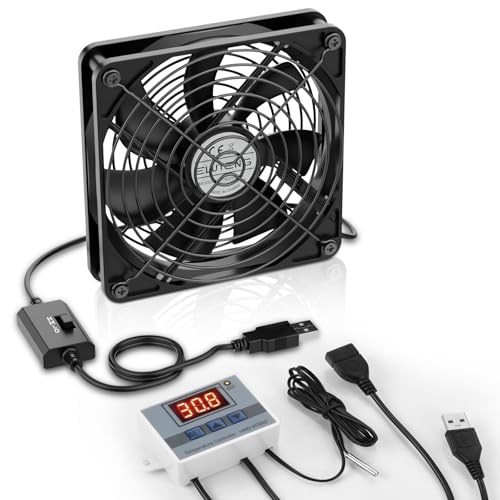
- Automatic temperature sensing and on/off control
- 3-speed fan: 900/1200/1500 RPM
- Hydraulic bearing and dual metal grilles
Best For: USB cooling for PCs, routers, cabinets, and consoles
Heavy-Duty Ventilation Pick
Amico 12" Smart Shutter Exhaust Fan

- 1282 CFM airflow for large spaces
- Thermostat probe triggers fan automatically
- 8 speeds with energy-saving brushless DC motor
Best For: Garages, attics, greenhouses, and other large ventilation spaces
Compact Sensor Fan Pick
ELUTENG 120mm USB Fan with Digital Temp Control
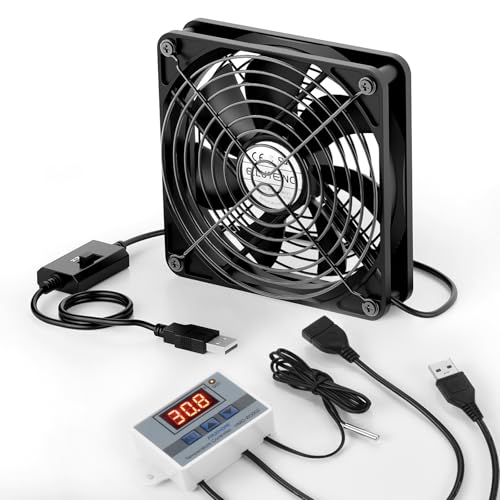
- Digital thermostat with ±0.1°C accuracy
- 3 speeds from 1000 to 1500 RPM
- Hydraulic bearings and dual metal grills
Best For: Small electronics enclosures and USB-powered device cooling
Quiet Cabinet Cooling Pick
AC Infinity AIRPLATE T3 6" Thermostat Fan

- Ultra-quiet 18 dBA operation
- Digital temperature readout with thermostat control
- 52 CFM for AV cabinets and media gear
Best For: Quiet cooling for home theater cabinets and AV racks
Digital Thermostat USB Cooler
WHTech 120mm USB Fan with LED Display

- Real-time digital temperature display
- USB 5V power for electronics and cabinets
- Metal grill and silicone feet included
Best For: compact electronics, consoles, and cabinets
Smart Exhaust Vent
AC Infinity AIRTITAN T3 WiFi Controller

- WiFi app control with climate data
- Temperature, humidity, and VPD programming
- Heavy-duty aluminum frame with IP-55 rating
Best For: automated ventilation in larger spaces
Smart Cabinet Cooler
120mm USB Fan with Adjustable Thermostat

- Set working and stop temperatures
- Three speed levels for airflow control
- Brushed aluminum frame with ball bearing design
Best For: media cabinets and console enclosures
Automatic Temp Governor

- Auto adjusts fan speed by ambient temperature
- Supports 2-wire, 3-wire, and 4-wire fans
- Fixed or adjustable start temperature modes
Best For: Automatic 12V cooling for small fan setups
Smart Box Cooler

- Auto on/off based on temperature range
- 5V USB power with low start current
- Made for routers, modems, and TV boxes
Best For: Compact electronics that need simple thermal switching
Digital Cooling Controller

- Probe-based thermostat for cooling devices
- 40-108°F control range with LED display
- ETL listed and rated for 1000W
Best For: Automated 120V ventilation and exhaust control
Thermostat-Controlled Pick – ELUTENG 140mm USB Fan with Digital Temp Control
If you want case fans with temperature sensors for flexible cooling, this ELUTENG 140mm USB fan is built around a digital thermostat rather than fixed-speed operation. It can automatically sense temperature and switch on or off, with adjustable start/stop thresholds, temperature correction, delayed start, and three wind-speed settings for more controlled airflow.
Best For: USB-powered cooling setups for PCs, routers, cabinets, consoles, and other enclosed electronics that benefit from automatic temperature-triggered operation.
Pros:
- Digital thermostat with temperature monitoring and automatic on/off control
- Three fan speeds: 900, 1200, and 1500 RPM
- Hydraulic bearing design for quieter operation and better wear resistance
- Metal grilles on both sides add protection against foreign objects and fingers
Cons:
- Needs USB power, so it is not a universal direct replacement for standard case fans
- Best suited to compact cooling applications rather than high-airflow room ventilation
- Temperature-controller details may be more than some simple plug-and-play users need
This is a practical option if your priority is automatic, sensor-based cooling in a small enclosure. It combines thermostat control with adjustable speed, making it more versatile than a basic fixed-RPM USB fan.
Heavy-Duty Ventilation Pick – Amico 12" Smart Shutter Exhaust Fan
Among case fans with temperature sensors, this Amico shutter exhaust fan stands out for moving a lot of air in larger spaces. Its built-in thermostat probe triggers the fan when your preset temperature is reached, while the 8-speed control lets you tailor airflow for garages, attics, greenhouses, and other demanding ventilation jobs.
Best For: Large enclosed spaces that need automatic temperature-based exhaust ventilation and strong airflow.
Pros:
- Powerful 1282 CFM airflow for spaces up to 1600 sq. ft.
- Smart thermostat probe with automatic temperature-triggered operation
- 8 adjustable speeds plus power-off memory
- 25W brushless DC motor is designed for lower energy use and quiet operation
Cons:
- Designed as a wall-mount exhaust fan, not a typical PC case fan
- Best for larger installations rather than small enclosures
- Installation is simple for the category, but still requires a wall or window opening
If your priority is thermostat-driven airflow rather than compact electronics cooling, this model delivers serious ventilation capacity. It is a strong fit when you need the fan to respond automatically to heat, moisture, or stale air.
Compact Sensor Fan Pick – ELUTENG 120mm USB Fan with Digital Temp Control
If you’re shopping for case fans with temperature sensors in a compact format, this ELUTENG 120mm USB fan is a straightforward choice. It combines a digital temperature controller with three selectable speeds, making it useful when you want monitored, automatic cooling in a small electronics enclosure.
Best For: Compact USB cooling for routers, PS5/PS4, AV cabinets, receivers, projectors, and similar devices.
Pros:
- Digital thermostat with -50 to 110°C control range and ±0.1°C accuracy
- Three speeds: 1000, 1250, and 1500 RPM
- Hydraulic bearing design for durability and long lifespan
- Metal grilles on both sides for added protection
Cons:
- USB-powered design limits it to compatible power sources
- Air volume is modest compared with larger ventilation fans
- Controller-focused feature set may be more than needed for basic cooling
This fan makes sense when you need a smaller, safer, and more controllable cooling solution. Its thermostat plus speed control gives it more flexibility than a standard single-speed USB fan.
Quiet Cabinet Cooling Pick – AC Infinity AIRPLATE T3 6" Thermostat Fan
For buyers looking at case fans with temperature sensors for AV gear, the AC Infinity AIRPLATE T3 is a focused cabinet-cooling system. It uses an onboard processor with digital temperature readout, thermostat control, fan-speed control, and a smart energy-saving mode to manage heat in enclosed entertainment setups.
Best For: Home theater cabinets, AV racks, gaming consoles, and receivers that need quiet temperature-based cooling.
Pros:
- Ultra-quiet design at 18 dBA with UL certification
- Digital temperature display and thermostat control
- Fan-speed control plus SMART energy-saving mode
- Compact cabinet-friendly size with 52 CFM airflow
Cons:
- Lower airflow than larger ventilation fans
- Designed specifically for cabinets rather than general-purpose room exhaust
- Best results depend on proper cabinet installation
This is a smart choice when low noise matters as much as temperature control. It is purpose-built for enclosed AV spaces, where consistent cooling and quiet operation are more important than brute airflow.
Digital Thermostat USB Cooler – WHTech 120mm USB Fan with LED Display
If you want case fans with temperature sensors for a small setup, this WHTech 120mm USB fan is built around active temperature monitoring and simple speed adjustment. The digital thermostat shows real-time temperature with a very wide control range, while the USB-powered 5V design makes it easy to use with consoles, AV gear, routers, or cabinets.
Best For: Cooling compact electronics, game consoles, and cabinets where you want a temperature-controlled USB fan with a visible display.
Pros:
- Digital thermostat displays real-time temperature with stated ±0.1°F control accuracy.
- LED voltage display and knob control make airflow adjustment straightforward.
- USB 5V power works with many common devices and power sources.
- Metal grills and silicone feet help with safety and vibration reduction.
Cons:
- Single-fan output is modest at 1.5W, so it suits targeted cooling more than heavy-duty airflow.
- Best fit is for smaller enclosures and electronics rather than full-room ventilation.
This is a practical pick if you need a compact fan that reacts to temperature and gives you visible status at a glance. It focuses on convenience and controlled cooling rather than maximum output.
Smart Exhaust Vent – AC Infinity AIRTITAN T3 WiFi Controller
For larger installations, this AC Infinity AIRTITAN T3 stands out among case fans with temperature sensors because it pairs temperature, humidity, and VPD programming with app-based control. It is designed as a ventilation exhaust fan for spaces like crawl spaces, basements, garages, attics, and grow rooms, where automation matters more than simple manual fan speed.
Best For: Automated exhaust ventilation in basements, crawl spaces, garages, attics, and hydroponic rooms.
Pros:
- WiFi app control lets you view climate data and set automation remotely.
- Temperature, humidity, and VPD programming supports more precise climate management.
- High-airflow 6-inch exhaust design is aimed at moving stale air and reducing humidity.
- Heavy-duty anodized aluminum frame and IP-55-rated fan improve durability.
Cons:
- It is a full ventilation exhaust fan, so it is not a typical small PC-style case fan.
- More advanced features may be more than you need for simple cooling jobs.
If you need smarter climate control rather than a basic fan, this model offers a strong automation-focused approach. It is best suited to spaces where temperature and moisture both need active management.
Smart Cabinet Cooler – 120mm USB Fan with Adjustable Thermostat
This 120mm USB cabinet fan is a strong fit if you want case fans with temperature sensors for home theater gear, AV cabinets, or other enclosed spaces. It combines a smart temperature control line with three-speed operation, so you can set when the fan starts and stops while also dialing in a noise and airflow balance that suits the setup.
Best For: Cooling cabinets, media centers, and gaming console setups with adjustable temperature-based control.
Pros:
- Smart temperature control lets you set working and stop temperatures.
- Three-speed controller gives you low, mid, and high airflow choices.
- Brushed aluminum frame and double ball bearing build are made for long service life.
- USB power works from adapters, AV equipment, and some console ports.
Cons:
- Temperature range is listed as 0-60°C, which is more limited than some alternatives.
- Best suited to enclosed equipment spaces rather than general-purpose cooling.
This model balances temperature automation with simple speed control, making it a practical cabinet-cooling option. It is especially appealing if you want a tidy USB-powered fan with a durable metal frame.
Automatic Temp Governor – DC 12V Fan Speed Controller
If you want case fans with temperature sensors that adjust automatically, this DC 12V fan governor is built for simple, no-manual-control cooling. It reacts to ambient temperature with stepless speed changes, so the fan runs slower when things are cool and ramps up as temperatures rise to help cut noise and save energy.
Best For: Builders who want an automatic 12V fan speed controller for 2-wire, 3-wire, or 4-wire fans under 1A total load.
Pros:
- Automatic temperature-based speed control with stepless adjustment
- Works with 2-wire, 3-wire, and 4-wire fans when only the power cable is connected
- Supports fixed or adjustable starting temperature modes
- Includes a sealed, waterproof probe with a 300mm cable
Cons:
- Limited to 12V fans with total current under 1A
- Requires reading the setup instructions carefully before use
- Designed for temperature control, not manual fan tuning
Overall, this is a practical pick if you want a compact controller that automatically ties fan speed to temperature. It is especially useful when you need basic, hands-off cooling without adding a more complex system.
Smart Box Cooler – 5V USB 80mm Temp Fan
For case fans with temperature sensors in small electronics enclosures, this 5V USB 80mm fan offers straightforward automatic cooling. It switches on when the temperature rises above the set range and turns off again once things cool down, making it a simple choice for keeping routers, modems, TV boxes, and similar gear from running hot.
Best For: Small electronics boxes that need automatic on/off cooling from a low-voltage USB fan.
Pros:
- Automatically turns on above 104-113°F and off below 86-95°F
- Runs on safe 5V USB power and needs only 0.5A to start
- Uses an all-copper coil fan for stronger airflow and longer life
- Includes screw mounting holes for easier installation
Cons:
- Temperature response is on/off rather than variable speed control
- Designed for small equipment boxes, not larger PC case setups
- Noise level and airflow specs may be more than some tiny enclosures need
This is a good fit if you want simple, automatic heat-triggered ventilation without extra setup. Its low-voltage USB design and built-in temperature switching make it easy to add cooling to compact electronics.
Digital Cooling Controller – Plug-In Thermostat Outlet
If you need case fans with temperature sensors for larger cooling devices, this plug-in thermostat controller gives you a simple way to automate an exhaust or ventilation fan. Place the probe, set the target temperature, and let the outlet switch cooling equipment on and off within its 40-108°F control range.
Best For: Attic fans, exhaust fans, greenhouse ventilation, and other 120V cooling devices that need temperature-triggered outlet control.
Pros:
- Easy 3-button setup with clear digital display
- Supports Fahrenheit and Celsius readings
- Long probe and power cord add placement flexibility
- ETL listed and rated for up to 8.3A / 1000W
Cons:
- Works only with cooling devices, not heaters
- Controls an outlet rather than directly managing a fan motor
- 120V use means it is not for low-voltage PC fans
As a temperature-controlled outlet, this is more of a system-level cooling tool than a direct fan controller. It is a strong option when you want reliable, probe-based automation for larger ventilation setups.
How We Picked the Best Case Fans with Temperature Sensors
We looked for temperature-controlled cooling solutions that offer reliable automation, practical airflow, and solid value. Priority went to models with clear temperature settings, sensible speed control, and use cases that match real-world needs such as computers, media cabinets, crawl spaces, and electronics enclosures.
Because Case Fans with Temperature Sensors can range from simple USB fans to larger exhaust systems and controller-based setups, we also considered installation flexibility, power requirements, and noise level.
Quick Comparison
If you want the simplest setup, USB-powered fans with built-in controllers are the easiest plug-and-play choice. For AV racks and enclosed cabinets, low-noise thermostat-controlled fan systems are usually the better fit. For larger rooms or utility spaces, wall-mounted exhaust fans and separate thermostat controllers deliver more airflow and broader coverage.
Key Buying Factors for Case Fans with Temperature Sensors
Temperature Control Type
Some products use a built-in thermostat, while others rely on an external controller or sensor. Built-in controls are simpler; external controllers usually offer more flexibility and can work with different fan types.
Airflow and Fan Size
Match the fan size and airflow to the enclosure or room you want to cool. A 120mm fan may be enough for a small cabinet, while a larger exhaust fan is better for bigger areas with more heat buildup.
Noise Level
If the fan will sit near a TV, studio rack, or desktop setup, noise matters. Look for quiet motors, adjustable speeds, and thermostat logic that avoids unnecessary full-speed operation.
Power and Compatibility
Check whether the unit uses USB, 5V DC, 12V DC, or standard outlet power. Also confirm compatibility with your fan wires, voltage requirements, and the equipment you plan to cool.
Installation and Placement
Some Case Fans with Temperature Sensors are designed for direct mounting, while others are better as add-on controllers for existing fans. Make sure the cable length, mounting style, and sensor placement work for your setup.
Who Should Buy Which Case Fans with Temperature Sensors?
Buy a compact USB model if you need affordable cooling for a PC, router, or small media cabinet. Choose a quiet thermostat fan system if you want automatic airflow for home theater gear or enclosed shelves. Go with a higher-capacity exhaust fan if you are cooling a garage, basement, crawl space, or other larger area. If you already own fans, a separate temperature controller can be the smartest value because it adds automation without replacing your hardware.
The best choice depends on whether you need targeted device cooling or broader room ventilation, but the right temperature sensor setup can make cooling simpler, quieter, and more efficient.