
Choosing a rackmount computer for virtualization is all about matching core count, memory headroom, and storage I/O to the number of virtual machines you plan to run.
Below, we focus on server-friendly options that make sense for homelabs, SMB virtualization, and cost-conscious builds in 2026.
Best 10 Rackmount Computer for Virtualization Picks for 2026
HP Virtualization Powerhouse
HP DL360 G9 36-Core, 64GB, 40TB

- 36-core dual Xeon setup
- 64GB DDR4 with 40TB raw storage
- Smart Array RAID and dual PSUs
Best For: Virtualization labs needing high core count and massive local storage
Compact AMD Barebone

- Modern AM5 platform for Ryzen 7000 CPUs
- Up to 128GB DDR5 ECC/non-ECC support
- Compact 1U chassis with hot-swap bays
Best For: DIY builders wanting a compact modern AMD virtualization server
High-Memory Dell Workhorse
PowerEdge R730xd 28-Core, 128GB

- 28-core dual Xeon platform
- 128GB DDR4 with 10Gb networking
- H730P RAID and dual 750W PSUs
Best For: Hosts needing lots of RAM and enterprise networking for virtualization
Modern Dell Virtualization Host

- 40-core 1U Dell platform
- 64GB RAM with 600GB drives
- Includes rails for rack mounting
Best For: Small-footprint virtualization racks that need a newer compact Dell server
Enterprise 2U Workhorse
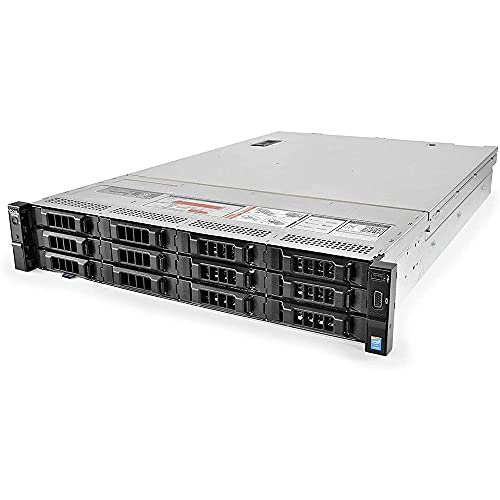
Dell PowerEdge R730XD Renewed 24-Core 128GB
- 24-core dual Xeon setup
- 128GB DDR4 registered memory
- 12-bay 3.5-inch rack chassis
Best For: Home labs and virtualization setups needing high memory and expandable storage
Compact 1U Legacy Server
HP ProLiant DL360 G7 32GB 8-Bay
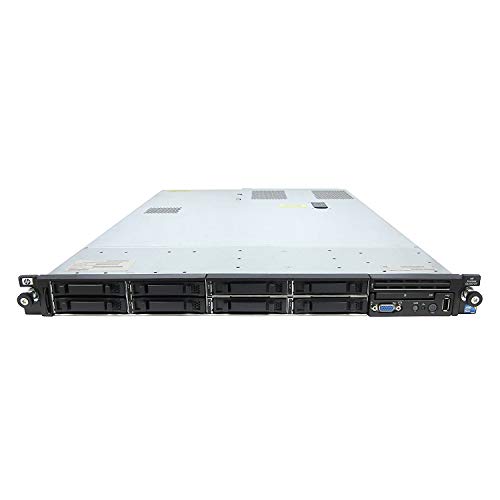
- 1U rackmount chassis with dual Xeon CPUs
- 32GB RAM with 8 SAS drives included
- P410i RAID and dual power supplies
Best For: Budget-minded users building a small lab or light virtualization setup
Balanced 1U Virtualization Server
Dell PowerEdge R630 28-Core 128GB

- 28-core dual-CPU configuration
- 128GB DDR4 memory for VMs
- 9.6TB SAS storage included
Best For: Users wanting a ready-to-run 1U server for virtualization and lab workloads
Legacy 1U Virtualization Value
HP ProLiant DL360 G7 Dual X5675

- Dual 6-core Xeon CPUs
- 72GB DDR3 registered RAM
- 4x 900GB 10K SAS drives
Best For: Budget labs and small virtualization workloads
Modern 14th-Gen Power
Dell PowerEdge R640 2x Gold 6126

- 24 total cores from dual Gold 6126 CPUs
- 128GB DDR4 memory installed
- 4 new 1.2TB SAS drives included
Best For: Compact virtualization hosts needing newer hardware
Balanced 1U Virtualization Workhorse
Dell PowerEdge R630 Dual E5-2690 V3

- Dual 12-core Xeon CPUs
- 128GB DDR4 ECC registered RAM
- PERC H730 RAID with redundant PSUs
Best For: Dense 1U virtualization with solid enterprise features
HP Virtualization Powerhouse – HP DL360 G9 36-Core, 64GB, 40TB
If you need a rackmount computer for virtualization with lots of CPU threads and huge local storage, this renewed HP ProLiant DL360 G9 is built for that job. It pairs dual Xeon E5-2695 v4 processors with 64GB of DDR4 RAM and four 10TB SATA drives, making it a practical fit for dense VM labs, test environments, or light enterprise consolidation.
Best For: Virtualization labs and storage-heavy rack setups that need high core count and built-in capacity.
Pros:
- 36 total CPU cores from dual Intel Xeon E5-2695 v4 processors
- 64GB DDR4 RAM installed for multi-VM workloads
- 4x 10TB 7.2K SATA drives provide 40TB of raw local storage
- Includes Smart Array P440ar RAID and dual 500W power supplies
Cons:
- 64GB is the stated maximum RAM, so expansion is limited
- Uses large 3.5″ HDDs rather than faster SSD storage
- Renewed system ships with Windows Server 2019 Standard Evaluation
This HP server stands out when storage capacity and thread count matter more than compact design. For virtualization buyers who want an all-in-one rack unit with plenty of onboard disk space, it is a strong high-capacity option.
Compact AMD Barebone – ASRock Rack 1U2S-B650 AM5
For buyers building a rackmount computer for virtualization from the ground up, this ASRock Rack 1U barebone gives you a modern AM5 platform in a compact chassis. It supports Ryzen 7000-series CPUs, DDR5 ECC or non-ECC UDIMMs, and up to 128GB of memory, so it suits efficient homelab or small-server virtualization builds where you want newer platform support.
Best For: DIY virtualization builds that need a modern compact 1U AMD platform.
Pros:
- Supports AMD Ryzen 7000 series processors on AM5
- Up to 128GB DDR5 ECC/non-ECC UDIMM support
- Compact 1U chassis with 315W 80-PLUS Gold PSU
- Includes dual hot-swap 2.5″ SATA bays plus a 3.5″ or slim ODD option
Cons:
- Barebone only, so CPU, RAM, and drives must be added
- Only two hot-swap 2.5″ drive bays for storage expansion
- 1U format may be less flexible for cooling and upgrades than larger servers
This is a good choice if you want to assemble a tailored virtualization server around a newer AMD platform. It is less turnkey than a prebuilt server, but the memory ceiling and compact footprint are attractive for a custom rack setup.
High-Memory Dell Workhorse – PowerEdge R730xd 28-Core, 128GB
If your priority is a proven rackmount computer for virtualization with plenty of memory and fast shared storage connectivity, this Dell PowerEdge R730xd is a solid enterprise-style option. It combines dual Xeon E5-2690 v4 processors, 128GB of DDR4 RAM, and 10Gb networking, which makes it well suited to host several virtual machines or services at once.
Best For: Virtualization hosts that need 128GB RAM, 10Gb networking, and reliable enterprise hardware.
Pros:
- 28 total cores from dual Intel Xeon E5-2690 v4 CPUs
- 128GB DDR4 RAM installed for heavier VM density
- Includes 2x 10Gb SFP+ and 2x 1Gb RJ45 NICs
- H730P mini RAID controller and dual 750W PSUs
Cons:
- Uses 2.5″ SAS drives, which may mean smaller per-drive capacity than LFF systems
- Renewed listing has no operating system included
- Older platform than newer AMD or 10th-gen Dell alternatives
This Dell makes sense when you want a balanced virtualization host with strong memory capacity and built-in high-speed networking. It is a practical rack server for lab use, services consolidation, or storage-backed VM workloads.
Modern Dell Virtualization Host – PowerEdge R640 40-Core, 64GB
Dell PowerEdge R640 10B SFF Server 2.00Ghz 40-Core 64GB RAM + 600GB HDDs Rails (Renewed)
Check Price On AmazonFor a more compact rackmount computer for virtualization, this Dell PowerEdge R640 offers a newer-generation 1U design with a 40-core processor setup and 64GB of RAM. The renewed listing also includes 600GB hard drives and rails, which makes it attractive for buyers who want a ready-to-rack server for a smaller footprint environment.
Best For: Small-footprint virtualization deployments that want a newer Dell 1U server.
Pros:
- 40-core CPU configuration for multi-VM workloads
- 64GB RAM installed for virtualization basics and light consolidation
- Includes 600GB HDDs and rails in the listing
- Compact Dell PowerEdge R640 chassis suits dense rack layouts
Cons:
- No detailed CPU, storage, or networking specs are provided in the notes
- Only 64GB RAM listed, which may be modest for larger VM stacks
- Storage appears limited compared with larger multi-bay servers
This R640 is appealing if you want a newer 1U Dell platform and do not need the larger drive capacity of deeper chassis models. The listing is less detailed than others, but the included rails and compact form factor help it fit cleanly into a virtualization rack.
Enterprise 2U Workhorse – Dell PowerEdge R730XD Renewed 24-Core 128GB
PowerEdge Dell R730XD Server | 2X E5-2670 v3 = 24 Cores | 128GB RAM | 12x Trays (Renewed
Check Price On AmazonIf you want a rackmount computer for virtualization with lots of RAM and room to grow, this Dell PowerEdge R730XD is built around that use case. With dual Xeon E5-2670 v3 processors, 128GB of DDR4 memory, and a 12-bay 3.5-inch chassis, it offers the core hardware needed for multiple virtual machines and storage-heavy lab work.
Best For: Small labs, home virtualization setups, and users who want a 2U rack server with strong memory capacity and large-drive flexibility.
Pros:
- Dual Intel Xeon E5-2670 v3 CPUs deliver 24 total cores for multitasking and VM workloads.
- 128GB of DDR4 registered memory gives virtualization projects a strong starting point.
- 12 empty 3.5-inch drive trays provide flexible storage expansion in a 2U rack design.
- Renewed unit includes a 90-day hardware replacement warranty.
Cons:
- No drives are listed, so storage will need to be added separately.
- The 3.5-inch LFF design is better for capacity than for dense drive counts.
- As a renewed enterprise server, it may be larger and louder than a typical desktop system.
This is a practical pick if you want a virtualization-focused rackmount platform with plenty of memory and expansion room. It is less about compact size and more about giving you a dependable 2U foundation for labs, servers, and shared services.
Compact 1U Legacy Server – HP ProLiant DL360 G7 32GB 8-Bay
This rackmount computer for virtualization is a budget-friendly HP ProLiant DL360 G7 with dual Xeon X5650 processors and 32GB of RAM. Its 1U form factor keeps the footprint small, while the included SAS drives, RAID controller, and dual power supplies make it a straightforward server option for lighter virtualization or general rack use.
Best For: Users who want an inexpensive 1U rack server for basic virtualization, testing, or general server tasks.
Pros:
- Dual Xeon X5650 CPUs provide 12 total cores for entry-level server workloads.
- 32GB of RAM is enough for modest virtualization and lab environments.
- Includes 8x 146GB 10K SAS drives, P410i RAID, and 4 Gigabit NICs.
- Dual power supplies add redundancy for a used rack server.
Cons:
- Older G7 platform is far less modern than newer DDR4-based servers.
- 1U chassis limits internal expansion compared with larger rack servers.
- Memory capacity is lower than better-suited high-density virtualization systems.
If your priority is low-cost rack space efficiency rather than maximum performance, this model is appealing. It works best as a starter server or small lab machine, not as the strongest choice for memory-heavy virtualization.
Balanced 1U Virtualization Server – Dell PowerEdge R630 28-Core 128GB
Dell PowerEdge R630 Server 2.40Ghz 28-Core 128GB RAM + 9.6TB SAS 12G HDDs +Rails (Renewed)
Check Price On AmazonIf you need a rackmount computer for virtualization that balances core count, memory, and storage, the Dell PowerEdge R630 is a strong middle ground. It pairs dual processors for 28 total cores with 128GB of DDR4 memory and a large 9.6TB SAS drive set, making it suitable for labs, services, and other multi-VM workloads.
Best For: Users who want a capable 1U virtualization server with substantial CPU headroom, ample RAM, and included storage.
Pros:
- 28 total cores provide solid compute capacity for multiple virtual machines.
- 128GB of DDR4 memory supports more demanding virtualization use.
- 9.6TB of SAS HDD storage is already included.
- Comes with rails, power cords, and Windows Server 2019 installed.
Cons:
- 1U servers can be less flexible for internal expansion than 2U systems.
- It is a renewed system, so long-term condition depends on the refurbishing quality.
- Spinning SAS HDDs are less responsive than SSD-based storage for VM-heavy workloads.
For a virtualization build, this server stands out because it combines a strong CPU count with generous memory and a large storage bundle. It is a good choice if you want a ready-to-deploy rack server rather than piecing together every component separately.
Legacy 1U Virtualization Value – HP ProLiant DL360 G7 Dual X5675
If you need a rackmount computer for virtualization on a tighter budget, this renewed HP ProLiant DL360 G7 offers a lot of raw CPU and memory for lab work, staging, or light production use. With dual Xeon X5675 processors, 72GB of DDR3 RAM, and 4x 900GB 10K SAS drives, it is built around a classic 1U enterprise footprint.
Best For: Budget-conscious virtualization labs, homelabs, and small business server workloads that benefit from lots of cores and ample RAM.
Pros:
- Dual 6-core Xeon X5675 CPUs provide strong multi-core capacity for older virtualization stacks.
- 72GB of registered DDR3 RAM gives solid headroom for several VMs.
- 4x 900GB 10K SAS drives and P410i RAID support enterprise-style storage configuration.
- Redundant power supplies add a useful reliability layer.
Cons:
- Older DDR3 platform may not suit users wanting newer-generation efficiency.
- Hard drives and memory upgrades are noted as included separately and not installed.
- As a 1U server, it is more about density than quiet operation.
Overall, this DL360 G7 makes sense when your priority is inexpensive rack density and proven enterprise hardware rather than the newest platform features.
Modern 14th-Gen Power – Dell PowerEdge R640 2x Gold 6126
For a rackmount computer for virtualization that leans toward newer platform hardware, the Dell PowerEdge R640 stands out with dual Xeon Gold 6126 processors, 128GB of DDR4 memory, and a 14th-generation 2.5-inch SFF chassis. It also comes with BIOS and firmware updated, plus four new 1.2TB SAS hard drives for a ready-to-deploy server setup.
Best For: Virtualization hosts that need newer CPU architecture, high memory capacity, and a compact 1U rack design.
Pros:
- Dual Xeon Gold 6126 CPUs bring 24 total cores for VM workloads.
- 128GB of DDR4 RAM provides strong capacity for multiple virtual machines.
- 4x new 1.2TB SAS 10K drives offer fresh storage out of the box.
- PERC H730p Mini RAID controller and updated firmware help round out the platform.
Cons:
- Only a 90-day hardware replacement warranty is listed.
- 1U SFF design favors density over easy internal expansion.
- Windows Server is noted as the operating system, which may not match every deployment plan.
Overall, the R640 is the strongest fit here if you want a newer, higher-core-count virtualization server with plenty of RAM and fresh SAS storage.
Balanced 1U Virtualization Workhorse – Dell PowerEdge R630 Dual E5-2690 V3
The Dell PowerEdge R630 is a practical rackmount computer for virtualization when you want strong specs in a compact 1U chassis. This renewed system pairs dual Xeon E5-2690 v3 processors with 128GB of DDR4 ECC registered memory, plus a PERC H730 RAID controller and included 2.5-inch drive trays for flexible deployment.
Best For: Homelabs, test environments, and virtualization setups that need a dense 1U server with lots of RAM and solid storage support.
Pros:
- Dual 12-core Xeon E5-2690 v3 CPUs provide substantial parallel processing power.
- 128GB DDR4 ECC registered memory is well suited to running multiple VMs.
- PERC H730 12Gbps RAID controller supports enterprise-style storage management.
- Two 750W PSUs improve redundancy for always-on use.
Cons:
- Only 4x 2.5-inch HDD trays are included, so drive expansion is limited by the chassis configuration.
- The product notes list a 1-year warranty, but some specs reference other mixed details.
- 1U servers can be less forgiving on noise and serviceability than larger rack units.
Overall, this R630 is a strong middle-ground choice for virtualization users who want a proven Dell platform with plenty of memory and dependable redundant power.
How We Picked the Best Rackmount Computer for Virtualization
For this roundup, we prioritized specs that matter most in a Rackmount Computer for Virtualization: multicore CPUs, enough ECC memory for stable VM hosting, storage layouts that support multiple drives, and platforms with practical upgrade paths. We also favored models that are commonly used for Proxmox, ESXi, Hyper-V, and similar workloads.
Quick Comparison
Higher-core dual-socket systems are the best fit when you want to consolidate many light-to-medium workloads, while newer single-socket platforms can be a smarter choice if you care more about efficiency, lower noise, and easier expansion. Larger RAM configurations help prevent contention when several VMs run at once, and SAS or SSD-backed storage is preferable when your guests need consistent responsiveness.
Key Buying Factors for a Rackmount Computer for Virtualization
CPU Platform
Look for enough physical cores to handle your total VM load, not just peak CPU speed. Older Xeon systems can still be useful for lab and budget builds, but newer platforms usually offer better performance per watt and a stronger upgrade ceiling.
Memory Capacity
RAM is often the first bottleneck in virtualization. Aim for more memory than you think you need, especially if you plan to run multiple guests, nested labs, or memory-heavy services like databases and file appliances.
Storage and Drive Bays
Drive count matters because virtualization workloads benefit from separating the hypervisor, VM datastore, and backups. Front-accessible bays, SAS support, and room for SSDs all improve flexibility.
Expansion and Remote Management
Check for PCIe slots, RAID/HBA compatibility, and management features like iDRAC or iLO. These make a big difference when you need to troubleshoot remotely or add networking and storage later.
Noise, Power, and Form Factor
1U systems save space but can be louder and less forgiving thermally. 2U servers often provide better cooling, easier drive access, and more room for upgrades, which can be helpful for always-on virtualization hosts.
Who Should Buy Which Rackmount Computer for Virtualization?
If you want the best value for a lab or test environment, older dual-Xeon platforms with lots of RAM are usually the cheapest way to start. If you want a more balanced long-term host, look for newer DDR4-based systems with strong core counts and better storage expandability. For heavier consolidation, pick the models with 128GB RAM or more, since memory capacity often determines how many VMs you can actually keep online.
In short, choose the platform that matches your workload density, not just the cheapest listing. The right Rackmount Computer for Virtualization should leave enough room for growth in CPU, memory, and storage so you do not outgrow it too quickly.