
Building a reliable home lab starts with the right chassis or server platform. The best rackmount computer for home lab use should balance airflow, drive capacity, noise, expandability, and easy maintenance.
Whether you want a compact virtualization host, a storage-heavy NAS-style build, or a quieter all-in-one workstation, this roundup helps you narrow the field fast.
Best 10 Rackmount Computer for Home Lab Picks for 2026
Quiet 2U Home Lab Workstation

- 8-core Ryzen 7 5700G with up to 4.6 GHz boost
- 32GB DDR4 and 1TB NVMe SSD included
- 2U rackmount design with 2 drive bays and 4 slots
Best For: Home lab users wanting a ready-to-run, quiet 2U workstation
Flexible DIY 2U Rack Case
MicroATX 2U Chassis with 7 Drive Bays

- Fits Micro-ATX or Mini-ITX builds
- Up to 7 x 3.5-inch drive bays
- Supports standard ATX PSU and front USB 3.0
Best For: DIY homelab builds that need lots of storage in a compact rack case
Enterprise 1U Lab Server
HP DL360p Gen8 with Dual Xeon and SAS Storage
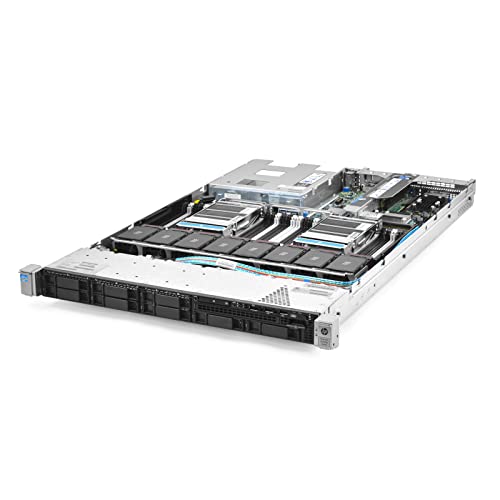
- Dual Xeon E5-2640 CPUs
- 64GB RAM with RAID and 8 SAS HDDs
- Includes dual power supplies and 4 Gigabit NICs
Best For: Budget-minded lab users needing real enterprise server hardware
Compact 2U Storage Rack Case
MicroATX 2U Chassis with 5.25 Bays

- Fits Micro ATX and Mini-ITX boards
- 2 x 5.25-inch plus 4 x 3.5-inch bays
- Short 400mm depth for tighter racks
Best For: Compact DIY homelab storage builds in a short-depth rack case
Refurbished Enterprise Power
HP DL360 G7 1U Xeon Rack Server
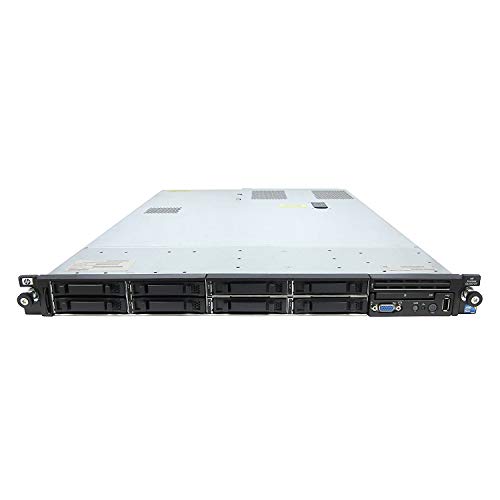
- Dual Xeon X5650 CPUs with 12 total cores
- 32GB RAM, 8x 146GB SAS drives, and P410i RAID
- Dual power supplies and 4 Gigabit NICs
Best For: home lab users who want a compact, renewed enterprise server
Compact DIY Build
2U Micro ATX Rackmount Chassis

- Supports Micro ATX and mini-ITX motherboards
- Holds 3 x 3.5-inch HDDs plus 1 x 2.5-inch SSD
- Fits an ATX PS/2 PSU and a GPU up to 29cm
Best For: DIY home lab builders who want a compact 2U rack case with room for drives and a GPU
Drive-Friendly Storage Build

- 3 external 5.25 bays plus 10 internal drive bays
- Supports ATX and microATX motherboards
- Includes front USB 3.0, dust filter, and keylock
Best For: home lab users who want a 4U chassis with lots of drive bays and a standard ATX layout
Liquid-Cooling Ready 3U Choice

- Supports ATX, Micro ATX, and Mini-ITX boards
- Ships with 3x120mm fans and can use a 360mm radiator
- Fits up to 8 expansion slots with SFX/SFX-L PSU support
Best For: home lab builders who want 3U flexibility and liquid-cooling support
Storage-Heavy 4U Rackmount
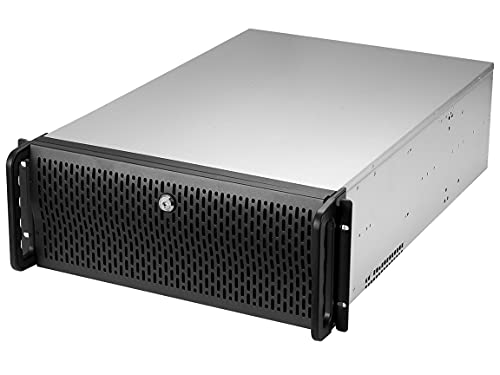
- 8 internal 3.5-inch bays plus 3 x 5.25-inch bays
- 4 pre-installed fans for straightforward airflow cooling
- ATX/CEB compatibility with front lock and USB 3.0
Best For: storage-focused home labs needing lots of drive bays
High-Capacity 3U Budget Pick
3U server chassis with 8-bay support

- Flexible storage layouts up to 8+4 x 3.5-inch drives
- Supports ATX, Micro-ATX, and Mini-ITX boards
- Includes 5 pre-installed fans across front and rear
Best For: home lab builders prioritizing drive count in a 3U chassis
Quiet 2U Home Lab Workstation – Ryzen 7 5700G, 32GB, 1TB SSD
If you want a rackmount computer for home lab use that can also double as a practical workstation, this 2U system is built around a Ryzen 7 5700G, 32GB of DDR4 memory, and a 1TB PCIe NVMe SSD. The mix of integrated Radeon graphics, Windows 11 Pro, and a rack-ready chassis makes it a straightforward option for labs, light content creation, and general business workloads.
Best For: Home lab builders who want a quiet, ready-to-use 2U rackmount computer with solid multitasking headroom and no discrete GPU requirement.
Pros:
- 8-core, 16-thread Ryzen 7 5700G with boost up to 4.6 GHz
- 32GB DDR4 3200 memory for smooth multitasking
- 1TB NVMe M.2 SSD for fast boot and storage access
- 2x 3.5″ drive bays and 4 expansion slots add flexibility
Cons:
- Integrated graphics only, so it is not aimed at GPU-heavy builds
- Ram memory maximum is listed as 16 GB in the supplied details, which conflicts with the installed 32 GB
- 2U layout gives less internal room than larger rack cases
For a home lab user who values a compact, quieter rackmount system over raw server density, this configuration offers a balanced and modern desktop-class foundation. It is especially appealing if you want one machine that can handle lab tasks, everyday computing, and light creative work without extra setup.
Flexible DIY 2U Rack Case – MicroATX 2U Chassis with 7 Drive Bays
For anyone assembling a rackmount computer for home lab projects, this 2U chassis is a practical starting point. It supports Micro-ATX or Mini-ITX boards, standard ATX power supplies, and offers a generous internal layout with up to seven 3.5-inch bays, plus front USB 3.0 for easier access.
Best For: DIY home lab builders who want a compact rack case with strong storage capacity and flexible cooling options.
Pros:
- Supports Micro-ATX and Mini-ITX motherboards
- Up to 7 x 3.5″ drive bays, or 6 x 3.5″ plus 1 x 2.5″
- Front-access USB 3.0 ports with USB 2.0 compatibility
- Can use standard ATX power supplies with 120mm or 80mm fans
Cons:
- Chassis only, so you must supply all internal components
- 2U height and 15.75-inch depth limit larger cooling setups
- Designed around Micro-ATX, so larger boards will not fit
This is a solid choice if you want to build your own home lab server and prioritize drive bays over turnkey convenience. The short-depth rack format and broad PSU support make it easy to adapt for storage-heavy or service-focused builds.
Enterprise 1U Lab Server – HP DL360p Gen8 with Dual Xeon and SAS Storage
If you need a rackmount computer for home lab testing and want enterprise hardware at a lower entry point, this renewed HP ProLiant DL360p Gen8 delivers a dense 1U design with dual Xeon CPUs, 64GB of DDR3 RAM, and eight 300GB 10K SAS drives. It is built for server-style workloads rather than quiet desktop use, and it comes with RAID and dual power supplies already included.
Best For: Home lab users who want a budget-friendly enterprise server for virtualization, storage experiments, and networking practice.
Pros:
- Dual Intel Xeon E5-2640 CPUs for server workloads
- 64GB DDR3 RAM and P420i RAID included
- Eight 300GB 10K SAS SFF drives installed
- Dual power supplies and 4 Gigabit NICs
Cons:
- No operating system included
- Older 2012 platform with DDR3 memory
- 1U server hardware is typically louder than a desktop-style rack machine
This machine makes sense when the goal is learning and testing with real enterprise-grade server hardware. It is less about convenience and more about giving a home lab the CPU, storage, and network features needed for hands-on infrastructure work.
Compact 2U Storage Rack Case – MicroATX 2U Chassis with 5.25 Bays
This rackmount computer for home lab builders is best thought of as a compact 2U chassis for custom storage or service builds. It supports Micro ATX and Mini-ITX motherboards, standard ATX PS2 power supplies, and includes front USB 3.0 along with a layout that combines two 5.25-inch bays and four internal 3.5-inch bays.
Best For: Home lab builders who want a short-depth rack case for a compact, storage-oriented DIY server.
Pros:
- Supports Micro ATX and Mini-ITX motherboards
- Compact 2U depth of 400mm suits tighter racks
- 2 x 5.25″ bays plus 4 x 3.5″ internal bays
- Includes front USB 3.0 ports and a 3.5-to-2.5 adapter
Cons:
- Chassis only, so it needs a full build from scratch
- Only 4 expansion slots, which may limit add-in cards
- Cooling relies on the included fan layout and top-mounted PSU arrangement
For a DIY home lab, this chassis gives you a compact rack-friendly foundation without wasting space on oversized hardware support. The short depth and mixed drive-bay layout make it a useful option when you want flexibility in a smaller rack footprint.
Refurbished Enterprise Power – HP DL360 G7 1U Xeon Rack Server
If you want a rackmount computer for home lab use with real server hardware, this HP ProLiant DL360 G7 brings plenty of compute and storage in a 1U footprint. It includes dual Xeon X5650 CPUs, 32GB of RAM, eight 146GB 10K SAS drives, dual power supplies, and a P410i RAID controller, so it is aimed at users who want a ready-to-run rack server platform rather than a bare chassis.
Best For: Home lab users who want a compact, renewed enterprise server with included CPUs, RAM, storage, and redundant power.
Pros:
- Dual Xeon X5650 processors provide 12 total cores.
- Includes 32GB of PC3-10600R RAM and 8x 146GB 10K SAS drives.
- P410i RAID controller and 4 Gigabit NICs support server-focused use.
- Dual power supplies add redundancy for always-on lab setups.
Cons:
- 1U rack servers are typically not the quietest choice for a home environment.
- Drive and platform hardware are older-generation enterprise parts.
- No operating system is included.
This is a practical pick if you care more about included server components and rack density than silence or modern efficiency. For a budget-friendly home lab rackmount computer, it offers a lot of hardware in a compact form factor.
Compact DIY Build – 2U Micro ATX Rackmount Chassis
This 2U rackmount computer for home lab builders is really a compact chassis, not a complete system, so it fits users who want to customize their own server. It supports Micro ATX or mini-ITX boards, an ATX PS/2 power supply, up to three 3.5-inch drives plus one 2.5-inch SSD, and a GPU up to 29cm long, giving you a flexible base for a small rack build.
Best For: DIY home lab builders who want a compact 2U rack case with room for a few drives and a graphics card.
Pros:
- Supports Micro ATX and mini-ITX motherboards.
- Fits 3 x 3.5-inch HDDs and 1 x 2.5-inch SSD.
- Includes front USB 2.0 ports and support for ATX PS/2 power supplies.
- Allows a GPU up to 29cm long and has a 2U format.
Cons:
- Only 2 expansion slots are listed.
- It is a chassis only, so you still need to source all core components.
- Cooling appears limited to air with a single 120mm fan specification.
For a home lab where you want to choose your own motherboard, storage, and PSU, this case gives a compact rack-friendly starting point. It is best suited to moderate builds rather than high-drive-count or high-expansion systems.
Drive-Friendly Storage Build – RackChoice 4U Server Chassis
RackChoice 4U Rackmount Server Chassis with 3x5.25 Front Bays+7x3.5 +3x2.5 Drive Bays
Check Price On AmazonIf your rackmount computer for home lab plans need more bays than a compact 2U case can offer, this RackChoice 4U chassis is built for storage-heavy builds. It supports ATX and microATX boards, standard ATX PS-2 power supplies, front access USB 3.0, and a large drive layout with external 3×5.25 bays plus internal 8×3.5 and 2×2.5 bays, making it a strong foundation for a custom server.
Best For: Home lab users who want a 4U chassis with lots of drive bays and a standard ATX layout.
Pros:
- Large storage capacity with 3 external 5.25-inch bays, 8 internal 3.5-inch bays, and 2 2.5-inch bays.
- Supports ATX and microATX motherboards.
- Includes a pre-installed 12cm fan plus 2 optional 6cm fans.
- Front door with keylock, handle, and dust filter adds practical rack features.
Cons:
- Chassis depth is listed at 450mm, so fit should be checked carefully.
- Drive support excludes 14TB+ HDDs according to the notes.
- It is a case only, so the rest of the system must be built separately.
This is the most storage-oriented option in the group and makes sense if your lab needs a flexible 4U tower-style rack chassis. It balances drive capacity, standard parts support, and practical front-panel access well for a custom build.
Liquid-Cooling Ready 3U Choice – 3U rackmount server chassis
If you want a rackmount computer for home lab work that can handle either airflow or a custom loop, this 3U RackChoice chassis is built around that flexibility. It supports ATX, Micro ATX, and Mini-ITX boards, includes three pre-installed 120mm fans, and can swap to a 360mm radiator setup if you remove the fans.
Best For: Home lab builders who want a compact 3U chassis with liquid-cooling support and room for mid-size expansion.
Pros:
- Supports ATX, Micro ATX, and Mini-ITX motherboards.
- Includes 3 pre-installed 120mm fans or supports a 360mm radiator configuration.
- Fits up to 8 PCI/PCIe expansion slots.
- Offers internal storage for 2 x 3.5-inch drives plus 1 x 2.5-inch drive.
Cons:
- GPU clearance is limited to 320mm with fans only or 305mm with AIO installed.
- SFX or SFX-L power supplies are required.
- 3U height may be tighter than a 4U chassis for larger components.
For a home lab that may grow from basic server duties into a cooled, expansion-friendly build, this chassis offers a strong middle ground. It is especially practical if you want the option to prioritize either standard fan cooling or liquid cooling in the same enclosure.
Storage-Heavy 4U Rackmount – RSV-R4000U server chassis
This rackmount computer for home lab storage-heavy builds leans hard into capacity and straightforward airflow. The Rosewill RSV-R4000U gives you an ATX/CEB-compatible 4U chassis with 8 internal 3.5-inch bays, 3 additional 5.25-inch device bays, and four pre-installed fans for cooling.
Best For: Storage-focused home labs that need lots of drive bays in a simple 4U rack case.
Pros:
- 8 internal 3.5-inch HDD bays plus 3 x 5.25-inch device bays.
- 4 pre-installed fans: 2 x 120mm PWM front fans and 2 x 80mm rear fans.
- ATX and CEB motherboard compatibility.
- Front panel lock and LED indicators add practical utility.
Cons:
- Designed for air cooling only, not liquid cooling.
- ATX/CEB support is less flexible than multi-form-factor chassis.
- 7 PCI slots are listed in the notes, but the details specify 6 expansion slots.
If your home lab is more about disks, backup capacity, or service hosting than compactness, this chassis makes sense. It trades advanced flexibility for a roomy layout and simple, dependable cooling.
High-Capacity 3U Budget Pick – 3U server chassis with 8-bay support
For a rackmount computer for home lab setups that need strong drive capacity in a shallower 3U footprint, this RackChoice chassis is geared toward practical expansion. It supports ATX, Micro-ATX, and Mini-ITX boards, includes pre-installed front and rear fans, and offers flexible storage layouts up to 8+4 x 3.5-inch drives depending on configuration.
Best For: Home lab builders who want a 3U chassis with high drive capacity and standard ATX or SFX PSU options.
Pros:
- Supports ATX, Micro-ATX, and Mini-ITX motherboards.
- Flexible drive layouts, including up to 8+4 x 3.5-inch or 6+4 x 3.5-inch plus 2 x 2.5-inch bays.
- Pre-installed 2 x 120mm plus 1 x 80mm front fans and 2 x 60mm rear fans.
- Supports standard ATX PSU or SFX PSU with the included bracket option.
Cons:
- Using an ATX motherboard can block access to some components under the PSU area.
- The PSU occupies two PCI slot spaces.
- GPU height is limited to 128mm unless HDD brackets are removed for longer cards.
This chassis makes a lot of sense if storage density and broad PSU compatibility matter more than easy internal access. It is a strong option for a compact lab server where drive count is the main priority.
How We Picked the Best Rackmount Computer for Home Lab
We focused on Rackmount Computer for Home Lab candidates that make sense for real-world testing, virtualization, file sharing, and self-hosted services. Priority went to models with practical rack sizes, sensible cooling layouts, flexible motherboard support, and storage options that match common lab workloads. We also considered whether a system is better as a ready-to-run server or as a build-it-yourself chassis.
Quick Comparison
For simplicity, think of these picks in three groups: complete systems for immediate use, compact 1U/2U servers for efficiency and density, and larger 3U/4U chassis for quieter airflow and more drives. If you need a Rackmount Computer for Home Lab tasks like Proxmox, TrueNAS, Docker, or light media serving, the best choice depends on whether you value CPU performance, storage bays, or low-noise operation.
Key Buying Factors for a Rackmount Computer for Home Lab
Size and Rack Depth
1U and 2U systems save space, but they can be louder and more constrained for cooling. 3U and 4U cases usually offer easier cable management, better fan options, and more room for full-size components.
CPU Platform and Memory Support
Choose a platform that matches your workload. Older Xeon-based servers can be excellent for budget lab use, while newer Ryzen-based systems are often better for faster single-threaded performance and lower power draw. Memory capacity matters more than many buyers expect, especially for virtualization.
Storage and Expansion
Count your drive needs first. If you are building a storage server, look for enough 3.5-inch bays and room for SSDs or boot drives. If you plan to add capture cards, HBAs, or high-speed networking later, verify PCIe clearance and motherboard form-factor support.
Noise, Cooling, and Power
For a home lab in a living space, fan layout and PSU compatibility matter as much as raw specs. Larger chassis often run quieter, while enterprise 1U systems may be best reserved for closets, basements, or dedicated racks.
Who Should Buy Which Rackmount Computer for Home Lab?
If you want a turnkey lab host, choose a complete server with CPU, RAM, and storage already installed. If you are building a NAS or expandable virtualization box, a 2U or 4U chassis is usually the safer choice. If your main goal is dense compute in the smallest footprint, a 1U server fits best. For most buyers searching for a Rackmount Computer for Home Lab use, the sweet spot is a 2U or 3U system that leaves room for cooling, drives, and future upgrades.
In short, match the machine to your priorities: performance, storage, noise, or expandability. That simple tradeoff will point you to the right rackmount setup faster than chasing the highest spec sheet on paper.