
NuPhy has become a go-to name for wireless mechanical keyboards that balance style, portability, and a premium typing feel. If you’re shopping for a nuphy wireless keyboard for pc, the lineup now covers everything from ultra-compact low-profile boards to full-size, feature-rich models.
This roundup focuses on the best options for Windows users who want reliable wireless performance, hot-swap support, and layouts that fit real-world work and play.
Best 10 Nuphy Wireless Keyboard for PC Picks for 2026
Best for Customizable Compact PC Use
NuPhy Air60 V2 60% Wireless Keyboard

- QMK/VIA remapping for deep customization
- Bluetooth 5.1, 2.4GHz, and USB-C connectivity
- Compact low-profile design with 1000Hz wireless polling
Best For: PC users who want a portable, highly configurable keyboard for work, travel, and gaming.
Best for Wireless PC Gaming
NuPhy Halo75 V2 75% Wireless Keyboard

- 1000Hz wired and 2.4GHz performance
- Bluetooth, 2.4GHz, and USB-C connectivity
- QMK/VIA support for deep customization
Best For: PC gamers and power users who want a premium wireless mechanical keyboard with flexible connectivity.
Best for Wireless Versatility
Air75 V2 75% Wireless Mechanical Keyboard
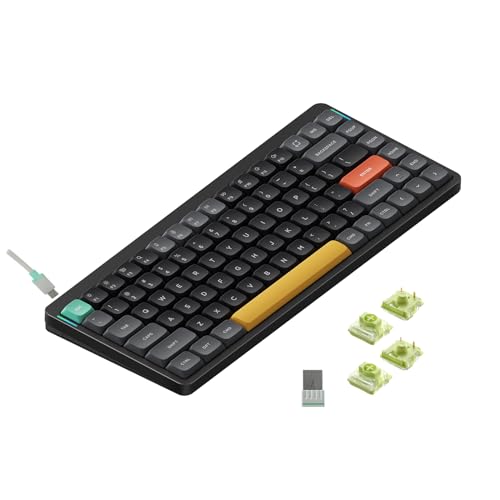
- Bluetooth, 2.4G, and USB-C connectivity
- Compact 75% layout for smaller desks
- Works with Windows, Mac, and Linux
Best For: PC users who want a slim mechanical keyboard with flexible wireless options and wide compatibility.
Best for Low-Profile Typing
NuPhy Air96 V2 Wireless Mechanical Keyboard

- Slim 13.5mm low-profile build
- Bluetooth 5.1, 2.4GHz, and USB-C
- 1000Hz polling with 4-device support
Best For: PC users who want a compact, customizable wireless mechanical keyboard with an ergonomic low-profile feel.
Best for Customization
NuPhy Halo V2 IO Wireless Mechanical Keyboard

- NuPhyIO software for key and RGB customization
- Gasket-mount design for a softer typing feel
- Bluetooth, 2.4GHz, and USB-C with multi-device support
Best For: PC users who want a customizable wireless mechanical keyboard with a premium feel.
Best for Multi-Device PC Use
NuPhy Node100 Wireless Mechanical Keyboard

- Tri-mode connectivity with easy switching across multiple devices
- Hot-swappable switches for simple customization
- Gasket mount design and PBT keycaps improve typing feel and durability
Best For: PC users who want a full-size wireless mechanical keyboard for work, gaming, and multitasking.
Best for Multi-Device PCs
NuPhy Node75 Wireless Mechanical Keyboard

- Tri-mode wireless with support for up to 5 devices
- Hot-swappable low-profile 75% layout
- Gasket mount and PBT keycaps improve typing feel
Best For: PC users who juggle multiple devices and want a customizable low-profile wireless keyboard.
Best for Customizable Compact PC Use – NuPhy Air60 V2 60% Wireless Keyboard
If you want a compact nuphy wireless keyboard for pc use that still feels flexible for work and play, the Air60 V2 is a strong pick. It combines a 60% low-profile layout with QMK/VIA support, so you can remap keys, pair multiple devices, and switch between Bluetooth, 2.4GHz, or USB-C as needed.
Best For: PC users who want a portable, highly configurable keyboard for office work, travel, and light gaming.
Pros:
- QMK/VIA support makes key mapping and customization easy
- Triple connectivity: Bluetooth 5.1, 2.4GHz, and wired USB-C
- Compact 60% layout saves desk space and travels well
- 1000Hz wireless polling helps reduce input lag in games
Cons:
- 60% layout removes dedicated function row and arrow cluster
- Premium feature set may be more than casual users need
- Low-profile feel may not suit everyone coming from taller keyboards
For buyers comparing a nuphy wireless keyboard for pc setups, the Air60 V2 stands out for its blend of portability, customization, and multi-device convenience. It is especially appealing if you want a small keyboard that can still handle daily productivity and occasional gaming without feeling limited.
Best for Wireless PC Gaming – NuPhy Halo75 V2 75% Wireless Keyboard
If you want a nuphy wireless keyboard for pc that can handle work and gaming, the Halo75 V2 is a strong all-around pick. It pairs a compact 75% layout with tri-mode connectivity, hot-swappable switches, and a premium aluminum build, so it feels equally at home on a desktop setup or a travel-friendly multi-device desk.
Best For: PC users who want a stylish wireless mechanical keyboard with low-latency 2.4GHz performance, strong customization, and easy device switching.
Pros:
- 1000Hz polling rate in wired and 2.4GHz modes for responsive gaming
- Bluetooth, 2.4GHz, and USB-C support with multi-device switching
- QMK/VIA support makes remapping and lighting customization easy
- Aluminum top shell and RGB lighting give it a premium look and feel
Cons:
- 75% layout may take time to adjust to if you rely on a full-size keyboard
- Premium features make it less appealing if you just need a basic office board
Overall, the Halo75 V2 stands out as a polished nuphy wireless keyboard for pc buyers who care about gaming latency, customization, and build quality. It is a better fit for enthusiasts than bargain hunters, but the feature set is compelling if you want one keyboard for both productivity and play.
Best for Wireless Versatility – Air75 V2 75% Wireless Mechanical Keyboard
If you want a nuphy wireless keyboard for pc that can move easily between a desktop, laptop, and mobile setup, the Air75 V2 is built for that kind of flexibility. It supports Bluetooth, 2.4G wireless, and USB-C wired use, making it a practical pick for mixed work and casual gaming.
Best For: PC users who want a slim, portable 75% keyboard with multiple connection options and broad system compatibility.
Pros:
- Bluetooth, 2.4G, and USB-C connectivity for flexible setup options
- 75% layout keeps the footprint compact without feeling too cramped
- Compatible with Windows, Mac, and Linux systems
- Low-profile portable design is easy to carry between workspaces
Cons:
- 75% layout removes the numpad, which some PC users may miss
- Compact design may take a little adjustment if you’re used to full-size keyboards
This is a strong choice if you want a nuphy wireless keyboard for pc that balances portability, wireless convenience, and everyday typing performance. It stands out most for users who value a slim mechanical board that still works well across multiple devices.
Best for Low-Profile Wireless Typing – NuPhy Air75 V3 75% Mechanical Keyboard
If you want a nuphy wireless keyboard for pc that feels slim on the desk but still offers mechanical-switch comfort, the Air75 V3 is built around that balance. Its low-profile 75% layout, wireless tri-mode connectivity, and hot-swappable design make it a practical pick for everyday work, light gaming, and multi-device setups.
Best For: PC users who want a compact, low-profile wireless mechanical keyboard with strong customization and easy device switching.
Pros:
- Thin 13.2mm low-profile build saves desk space and travels well
- Bluetooth, 2.4GHz, and USB-C support with up to five connected devices
- Gasket mount design helps deliver a quieter, smoother typing feel
- NuPhyIO customization plus a programmable knob add flexibility
Cons:
- 75% layout may take adjustment if you prefer a full-size board
- Premium features can push it above basic wireless keyboard pricing
The Air75 V3 stands out as a versatile nuphy wireless keyboard for pc if you care about portability, fast wireless performance, and a more refined typing experience than typical office keyboards. It is a strong fit when you want one board that can handle work, shortcuts, and casual gaming without taking up much room.
Best for Low-Profile Typing – NuPhy Air96 V2 Wireless Mechanical Keyboard
If you want a nuphy wireless keyboard for pc that feels slim, versatile, and travel-friendly, the Air96 V2 is an easy model to shortlist. It combines Bluetooth 5.1, 2.4GHz, and wired USB-C connections with a low-profile build, so it works well for desk setups that switch between a PC, laptop, and other devices.
Best For: PC users who want a compact full-size wireless mechanical keyboard with strong connectivity, hot-swappable flexibility, and a thin, ergonomic profile.
Pros:
- Ultra-slim 13.5mm design with aluminum alloy frame and PBT keycaps
- Connects via Bluetooth 5.1, 2.4GHz, or wired USB-C
- Supports up to 4 devices and QMK/VIA customization
- Fast 1000Hz polling rate for responsive wireless use
Cons:
- Black Gateron Blue switches are clicky, which may be loud for shared spaces
- Full-size layout takes more desk space than smaller boards
- Premium features push it above entry-level keyboard pricing
This is a strong nuphy wireless keyboard for pc buyers who care about low-profile comfort and flexible connectivity more than a bare-bones budget pick. If you want a board that can move between work and play without feeling bulky, the Air96 V2 is a smart fit.
Best for Customization – NuPhy Halo V2 IO Wireless Mechanical Keyboard
If you want a nuphy wireless keyboard for pc that leans heavily into personalization, the Halo V2 IO is a strong fit. It combines wireless flexibility with hot-swappable switches, PBT keycaps, and a gasket-mounted build, making it a practical choice for work and gaming setups that value both feel and control.
Best For: PC users who want a customizable wireless mechanical keyboard with a premium typing feel and multi-device support.
Pros:
- NuPhyIO driver lets you remap keys and tune RGB settings
- Gasket-mount design delivers a softer, more refined typing feel
- Bluetooth, 2.4GHz, and USB-C support for up to four devices
- 4000mAh battery offers strong endurance for wireless use
Cons:
- Customization options may feel excessive if you just want a simple keyboard
- Premium feature set likely puts it above basic office alternatives
For buyers comparing a nuphy wireless keyboard for pc, this model stands out most for its mix of build quality and deep software control. It is less about being the cheapest option and more about giving you a refined, flexible keyboard that can adapt to both productivity and gaming.
Best for Knob Control – NuPhy Kick75 Wireless Mechanical Keyboard
If you want a nuphy wireless keyboard for pc that balances compact size, tri-mode connectivity, and easy customization, the NuPhy Kick75 is a strong pick. Its 75% layout keeps more room on your desk for mouse movement, while the hot-swappable low-profile design and knob add flexibility for both work and gaming.
Best For: PC users who want a compact wireless mechanical keyboard with a knob, strong customization, and multi-device support.
Pros:
- Tri-mode connectivity with 2.4GHz, Bluetooth 5.1, and USB-C
- NuPhyIO web assistant supports key, knob, lighting, and macro customization
- 75% layout saves space without feeling too cramped
- PBT keycaps and gasket mount design improve feel and durability
Cons:
- PBT keycaps do not shine through, so RGB is more subtle than on shine-through boards
- 75% layout may take adjustment if you rely on a full-size number pad
- Best features depend on using NuPhyIO for customization
The Kick75 is a practical choice if you want a nuphy wireless keyboard for pc with a more premium typing feel than a basic office board. It stands out most for users who value compact ergonomics, wireless flexibility, and customization in one setup.
Best for Multi-Device PC Use – NuPhy Node100 Wireless Mechanical Keyboard
If you want a nuphy wireless keyboard for pc that can juggle work and play, the Node100 stands out with tri-mode connectivity, hot-swappable switches, and a full-size 109-key layout. It’s a practical pick for users who need a desktop-friendly board with wireless flexibility and a more refined typing feel than a basic office keyboard.
Best For: PC users who switch between multiple devices and want a full-size wireless mechanical keyboard with customization.
Pros:
- Bluetooth, 2.4GHz, and USB-C support with up to five-device switching
- Hot-swappable design makes switch changes easy without soldering
- Gasket mount build helps deliver a smoother, quieter typing feel
- PBT keycaps and RGB backlighting add durability and customization
Cons:
- Full-size 109-key layout takes up substantial desk space
- Touch-based volume and brightness control may not suit everyone
As a nuphy wireless keyboard for pc, the Node100 is strongest when you want one board for productivity, gaming, and easy device switching. It’s less about portability and more about delivering a feature-rich desktop experience with flexible connectivity and a premium typing feel.
Best for Multi-Device PCs – NuPhy Node75 Wireless Mechanical Keyboard
If you want a nuphy wireless keyboard for pc that stays flexible across work and play, the Node75 is built around tri-mode connectivity, hot-swappable switches, and a compact 75% layout. It’s a strong fit for anyone who values wireless convenience without giving up a fast polling rate, customizable lighting, or a more refined typing feel.
Best For: PC users who switch between multiple devices and want a low-profile mechanical keyboard with plenty of customization.
Pros:
- Connects via Bluetooth, 2.4GHz, or USB-C and supports up to 5 devices
- Touch gesture strip replaces a traditional knob for volume and brightness control
- Gasket mount, dampening, and PBT keycaps help deliver a softer, cleaner typing feel
- Hot-swappable design makes switch changes easy without soldering
Cons:
- Low-profile layout may not suit users who prefer taller keys
- Touch controls can feel less tactile than a physical knob
- Customization features may take extra setup in NuPhyIO
The Node75 stands out as a versatile nuphy wireless keyboard for pc if you want modern wireless support, fast response, and a premium typing experience in a compact format. It’s especially appealing for users who want a board that can move between desk setups with minimal clutter.
Best for Multi-Device PC Users – NuPhy Node75 Wireless Keyboard
If you want a nuphy wireless keyboard for pc that can jump between work and play without cluttering your desk, the NuPhy Node75 is a strong fit. Its tri-mode connectivity, hot-swappable switches, and low-profile 75% layout make it a practical choice for users who want a compact board with premium-feeling extras.
Best For: PC users who switch between multiple devices and want a low-profile wireless mechanical keyboard with customization.
Pros:
- Bluetooth, 2.4GHz, and USB-C support with up to 5-device pairing
- 1000Hz polling in wireless and wired modes for responsive input
- Hot-swappable switches and PBT keycaps for long-term customization
- Touch gesture control and RGB effects add a modern, flexible feel
Cons:
- Touch controls may not appeal to users who prefer a physical volume knob
- Low-profile design may feel different if you prefer taller mechanical keys
- Feature set is better suited to enthusiasts than basic office-only buyers
The Node75 stands out as a versatile nuphy wireless keyboard for pc thanks to its clean wireless setup, fast response, and customization-friendly hardware. If you want one keyboard that works well across a desktop, laptop, and other devices, it offers a smart balance of convenience and performance.
How We Picked the Best Nuphy Wireless Keyboard for PC Options
We focused on models that make sense for PC users first: dependable wireless connectivity, Windows compatibility, strong build quality, and layouts that match different desk setups. We also looked at key practical features such as hot-swappable switches, low-profile versus standard-profile designs, RGB lighting, knob controls, and whether each board is better for typing, gaming, or travel.
Quick Comparison: What Sets These NuPhy Boards Apart
The biggest differences come down to size and typing style. Compact models like 60% and 75% boards save desk space and are easier to carry, while 96-key and 100-key layouts keep dedicated navigation and number keys for productivity. Low-profile keyboards are often better if you want a slim, fast-feeling board, while gasket-mounted and aluminum-frame models tend to deliver a more substantial typing experience.
Key Buying Factors for a Nuphy Wireless Keyboard for PC
Layout and Size
Choose the layout based on how you actually use your keyboard. If you rely on arrow keys, function rows, or a numpad, go larger. If your priority is a clean, compact desk or frequent travel, a 60% or 75% model is usually the better fit.
Wireless Modes and Compatibility
For a Nuphy Wireless Keyboard for PC, look for solid Bluetooth support plus 2.4GHz or wired backup if you need lower latency or more flexibility. Windows compatibility matters, especially for key mapping and shortcut behavior.
Switch Feel and Profile
Low-profile boards feel slimmer and often encourage a faster, lighter typing motion. Standard-profile models may feel more traditional and customizable. Hot-swappable support is valuable if you want to change switches later without replacing the whole board.
Extras That Actually Matter
Knobs can make volume and media control easier. RGB can be useful if you want visibility or personalization, but it shouldn’t outweigh core factors like stability, battery life, and layout. PBT keycaps and metal frames usually improve durability and long-term feel.
Who Should Buy Which Nuphy Wireless Keyboard for PC?
Buy a compact 60% or 75% NuPhy keyboard if you want portability, a minimalist desk, or a smaller typing footprint. Choose a 96-key or 100-key model if you need maximum productivity and fewer compromises. If you’re a gamer or power user, prioritize hot-swap support, multi-mode wireless, and a layout that keeps essential keys within easy reach. If you type for hours every day, focus on comfort, stability, and a switch profile that matches your preference.
In short, the best Nuphy Wireless Keyboard for PC is the one that matches your space, workflow, and typing feel—not just the one with the most features.