
Looking for an EPOMAKER mechanical keyboard for PC that fits your desk, typing style, and budget? This roundup focuses on the most useful layouts, wireless options, and premium features buyers actually care about.
From compact 75% boards to full-size models with numpads, screen knobs, and hot-swap support, these picks make it easier to find a keyboard that feels right for gaming, productivity, and long sessions at the computer.
Best 10 Epomaker Mechanical Keyboard for PC Picks for 2026
Best for Quiet TKL-Like Comfort
EPOMAKER x Aula F75 75% Wireless

- 75% layout keeps arrows and nav keys in a compact footprint
- Gasket mount and five-layer padding reduce noise and vibration
- Hot-swap, knob, and tri-mode connectivity add flexibility
Best For: PC users who want a compact wireless keyboard with a softer typing feel and easy customization.
Best for Screen Customization
EPOMAKER TH108 PRO Full Size Keyboard

- Smart screen and knob for quick control
- 10,000mAh battery with tri-mode wireless
- Hot-swappable 5-pin design and PBT caps
Best For: PC users who want a full-size wireless mechanical keyboard with display-driven customization.
Best for Features
EPOMAKER Ajazz AK820 Pro 75% Wireless Keyboard

- TFT smart display and knob add useful onboard controls.
- 75% layout keeps your desk setup compact.
- BT, 2.4GHz, and USB-C support flexible PC use.
Best For: PC users who want a compact mechanical keyboard with extra controls and a more refined typing feel.
Best Full-Size Wireless
EPOMAKER Aula F108 Wireless Keyboard

- 108-key full-size layout for work and gaming
- Hot-swappable switches with programmable keys
- 4000mAh battery and tri-mode connectivity
Best For: PC users who want a full-size wireless mechanical keyboard with customization and long battery life.
Best for Screen & Knob Control
EPOMAKER X Aula F75 MAX Wireless Keyboard

- TFT screen and knob add useful on-board controls
- Gasket mount and foam layers support a softer typing feel
- Hot-swappable 75% board works across PC and other platforms
Best For: PC users who want a compact, feature-packed keyboard with screen and knob controls.
Best for Full-Size Wireless Gaming
EPOMAKER TH108 Full Size Mechanical Keyboard
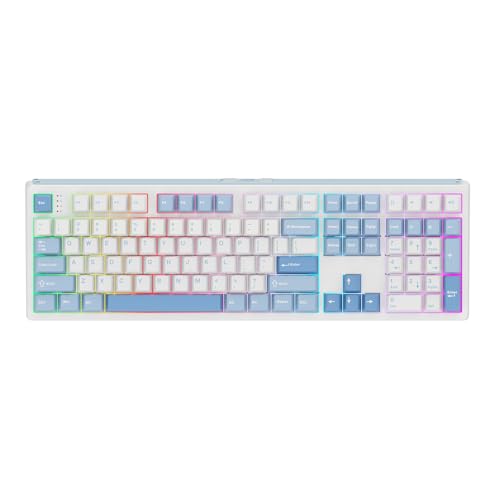
- 108-key layout with stable, heavy construction
- 8000mAh battery and tri-mode connectivity
- Gasket-mount build with hot-swap customization
Best For: PC users who want a full-size wireless mechanical keyboard with creamy acoustics and strong customization.
Best for Custom Controls
EPOMAKER X Aula F75 Max Wireless Keyboard

- TFT screen and knob for quick control and status
- Creamy gasket-mounted typing feel with foam damping
- Hot-swappable 75% board with wired, 2.4GHz, and Bluetooth modes
Best For: PC users who want a compact keyboard with extra controls, wireless flexibility, and a softer typing feel.
Best for Quiet Typing
EPOMAKER Aula F99 Wireless 96% Keyboard

- Cushioned gasket-mount typing with five-layer sound dampening
- 96% layout keeps the numpad while saving desk space
- BT, 2.4GHz, and USB-C support with an 8000mAh battery
Best For: PC users who want a quieter, cushioned mechanical keyboard with a numpad and wireless flexibility.
Best for Control
EPOMAKER TH99 Pro 96% Keyboard

- Screen and knob for quick onboard control
- 10,000mAh battery for long wireless sessions
- 96% layout keeps numpad support in a smaller footprint
Best For: PC users who want a feature-rich keyboard for gaming and productivity.
Best for Full-Size Productivity
EPOMAKER TH99 Tri-Mode Wireless Keyboard

- 1800 layout with numpad and function keys
- Tri-mode wireless plus wired connectivity
- 8000mAh battery and gasket-mounted typing feel
Best For: PC users who want a compact full-size mechanical keyboard for work and occasional gaming.
Best for Quiet TKL-Like Comfort – EPOMAKER x Aula F75 75% Wireless
If you want an epomaker mechanical keyboard for pc that balances desk-saving size with a premium typing feel, the EPOMAKER x Aula F75 is an easy pick. Its 75% layout keeps the navigation cluster and arrow keys, while the gasket mount, foam stack, and pre-lubed switches aim for a softer, quieter, more refined experience than a basic gaming board.
Best For: PC users who want a compact wireless keyboard with a nicer sound profile, a knob, and hot-swap flexibility for work or gaming.
Pros:
- 75% layout saves space without losing essential keys
- Five-layer padding and gasket mount help reduce noise and harshness
- Hot-swappable switches plus a multimedia knob add easy customization
- BT, 2.4GHz, and USB-C support make it versatile for PC setups
Cons:
- Not as compact as a 60% board if maximum desk space is the goal
- Wireless features and RGB can be unnecessary for very simple setups
This is a strong choice if you want an epomaker mechanical keyboard for pc that feels more polished than entry-level options. It stands out most for users who care about typing comfort, sound damping, and a flexible layout that still works well for everyday gaming and productivity.
Best for Screen Customization – EPOMAKER TH108 PRO Full Size Keyboard
If you want an epomaker mechanical keyboard for pc that blends full-size practicality with extra personalization, the TH108 PRO stands out. It adds a smart screen, a knob, tri-mode connectivity, and a large battery, making it a flexible pick for gaming, work, and everyday use.
Best For: PC users who want a full-size wireless mechanical keyboard with a display, knob control, and hot-swap customization.
Pros:
- Smart screen and knob add useful controls plus a personalized look
- 10,000mAh battery and tri-mode connectivity support long wireless use
- Hot-swappable 5-pin design makes switch changes easy
- Heavy, full-size build with PBT keycaps feels stable on a desk
Cons:
- Full-size layout takes up a lot of desk space
- Display features are handy, but not essential for every buyer
- Heavier chassis is less portable than smaller boards
This is a strong choice if you want an epomaker mechanical keyboard for pc that goes beyond basic typing and adds real utility. The TH108 PRO is especially appealing for users who like to tweak sound, feel, and visuals without giving up a conventional full-size layout.
Best for Features – EPOMAKER Ajazz AK820 Pro 75% Wireless Keyboard
If you want an epomaker mechanical keyboard for pc that feels more premium than its price suggests, the Ajazz AK820 Pro stands out with a TFT screen, knob control, and flexible wireless/wired connectivity. Its 75% layout keeps the desk footprint manageable while still preserving the keys most PC users actually need for everyday work and gaming.
Best For: PC users who want a compact mechanical keyboard with extra controls, modern connectivity, and a more tactile typing feel.
Pros:
- TFT smart display adds useful at-a-glance info and customization.
- 75% layout saves space without feeling too stripped down.
- BT, 2.4GHz, and USB-C support make it easy to switch between setups.
- Gasket-mounted build with flex-cut plate/PCB aims for a softer typing feel.
Cons:
- 75% layout may be too compact if you rely on a numpad.
- The display and extra features add complexity you may not need for a basic office board.
As an epomaker mechanical keyboard for pc, this model is a strong fit if you value convenience features and a compact form factor more than a plain no-frills board. It’s especially appealing for users who want a keyboard that looks modern, travels well, and still covers daily typing and gaming.
Best Full-Size Wireless – EPOMAKER Aula F108 Wireless Keyboard
If you want an epomaker mechanical keyboard for pc that keeps the full-size layout, adds hot-swap flexibility, and works wirelessly across multiple devices, the EPOMAKER Aula F108 is an easy fit. It combines a 108-key layout with 2.4GHz, Bluetooth, and wired modes, plus a large battery and RGB lighting for a setup that can handle work and gaming.
Best For: PC users who want a full-size wireless mechanical keyboard with macro-ready controls, hot-swappable switches, and long battery life.
Pros:
- Full-size 108-key layout is great for spreadsheets, shortcuts, and gaming controls
- Hot-swappable design lets you change switches without soldering
- 4000mAh battery, 1000Hz polling, and tri-mode connectivity add versatility
- Sound-dampening layers and pre-lubed switches aim for a smoother, quieter feel
Cons:
- Full-size footprint takes up more desk space than compact boards
- RGB and wireless features may be more than some basic office users need
The F108 stands out if you want the convenience of a full-size board without giving up customization. For anyone comparing an epomaker mechanical keyboard for pc, it offers a strong balance of wireless freedom, switch-swapping potential, and everyday usability.
Best for Screen & Knob Control – EPOMAKER X Aula F75 MAX Wireless Keyboard
If you want an epomaker mechanical keyboard for pc that adds real convenience, the F75 Max stands out with its TFT screen, volume knob, and wireless tri-mode connectivity. The 75% layout keeps the footprint compact while still preserving the core keys most PC users need for work, gaming, and everyday use.
Best For: PC users who want a feature-rich compact keyboard with a screen, knob, and hot-swap support.
Pros:
- TFT smart display and knob make media control and status checks easy
- Gasket mount, foam layers, and lubed switches aim for a softer, creamier typing feel
- Hot-swappable design supports customization with compatible mechanical switches
- Works across PC, Mac, Linux, and Android with wired, 2.4GHz, and Bluetooth modes
Cons:
- 75% layout may feel too compact if you rely on a full numpad
- Feature set and software controls may be more than casual users need
For buyers comparing an epomaker mechanical keyboard for pc, this model is a strong pick if you value extra control features and a tuned typing sound over a barebones budget board. It blends customization, comfort, and connectivity in a setup that fits both gaming and productivity.
Best for Full-Size Wireless Gaming – EPOMAKER TH108 Full Size Mechanical Keyboard
If you want an epomaker mechanical keyboard for pc that delivers a full-size layout, wireless flexibility, and a more refined typing sound, the TH108 is a strong fit. It combines a heavy, stable build with a large battery, hot-swap support, and a gasket-mounted design, making it practical for both gaming and everyday desk work.
Best For: PC users who want a full-size mechanical keyboard with wireless convenience, creamy acoustics, and customization options.
Pros:
- 108-key full-size layout with a solid, over-1.2kg build for stable typing
- 8000mAh battery with tri-mode connectivity, including 2.4GHz wireless and USB cable
- 5-layer gasket-mount design for a softer feel and more muted, creamy sound
- Hot-swappable PCB, RGB backlighting, and driver-based customization
Cons:
- Full-size footprint takes up more desk space than compact boards
- Feature-rich design may be more than casual users need
- Heavier body is less convenient if you move your keyboard often
The TH108 stands out if you want an epomaker mechanical keyboard for pc that balances gaming features with a more premium typing experience. It’s especially appealing if you prefer a complete number pad, long battery life, and a tuned sound profile without giving up hot-swap flexibility.
Best for Custom Controls – EPOMAKER X Aula F75 Max Wireless Keyboard
If you want an epomaker mechanical keyboard for pc that adds extra convenience without giving up a compact layout, the F75 Max is a strong pick. Its 75% design keeps the desk footprint manageable, while the TFT screen, knob, wireless modes, and hot-swap support make it feel more like a modern productivity tool than a basic gaming board.
Best For: PC users who want a feature-rich 75% keyboard with a screen, knob, and flexible connectivity for work, gaming, and everyday typing.
Pros:
- TFT screen and knob add quick access to volume, battery, and customization.
- Gasket mount, foam layers, and lubed switches aim for a softer, creamy typing feel.
- Works wired, over 2.4GHz, or Bluetooth, with broad PC/Mac/Linux support.
- Hot-swappable design makes switch changes easier for hobbyists.
Cons:
- The feature set may be more than casual users need.
- 75% layout still removes the numpad, which some office users may miss.
- Customization is a plus, but it may take time to learn all the options.
Overall, the F75 Max stands out as an epomaker mechanical keyboard for pc buyers who want more than just switches and RGB. It blends comfort, wireless flexibility, and extra controls into a compact board that suits gaming and daily desktop use alike.
Best for Quiet Typing – EPOMAKER Aula F99 Wireless 96% Keyboard
If you want an epomaker mechanical keyboard for pc that feels cushioned, sounds more muted, and still keeps the numpad, the Aula F99 is a strong pick. Its gasket mount, five-layer padding, and pre-lubed linear switches make it a good fit for both work and casual gaming.
Best For: PC users who want a space-saving 96% layout with a softer typing feel, wireless convenience, and easy switch swapping.
Pros:
- 96% layout keeps arrow keys and numpad in a more compact footprint
- Gasket mount plus five-layer dampening helps reduce noise and harsh bottom-out feel
- BT, 2.4GHz, and USB-C support gives you flexible PC and multi-device use
- Hot-swappable sockets make it easy to customize switches later
Cons:
- 96% layout is still larger than a true compact or TKL board
- Linear switch feel may not suit users who prefer tactile feedback
- Wireless features are great, but some buyers may still prefer a simpler wired setup
For shoppers comparing an epomaker mechanical keyboard for pc, the F99 stands out by blending a roomy layout with a softer, more refined typing experience. It is especially appealing if you want one board for typing, gaming, and desk-friendly organization.
Best for Control – EPOMAKER TH99 Pro 96% Keyboard
If you want an epomaker mechanical keyboard for pc that adds more than just keys, the TH99 Pro stands out with its built-in screen, rotary knob, and tri-mode wireless support. It aims at users who want a compact full-size layout, customization, and a desk-friendly typing feel without giving up numpad access.
Best For: PC users who want a feature-packed 96% keyboard for gaming, productivity, and quick on-board control.
Pros:
- Built-in screen and knob make volume, status, and lighting adjustments fast and convenient
- Large 10,000mAh battery supports long wireless use
- 96% layout keeps the numpad while saving desk space
- Hot-swap design and custom software add plenty of tuning options
Cons:
- Heavier than many compact keyboards, so it is less portable
- Extra screen features may be unnecessary if you only want a simple typing board
The TH99 Pro is a strong fit if you want an epomaker mechanical keyboard for pc that blends gaming features with everyday usability. It is especially appealing for users who like a stable, customizable board with plenty of extras built into the keyboard itself.
Best for Full-Size Productivity – EPOMAKER TH99 Tri-Mode Wireless Keyboard
If you want an epomaker mechanical keyboard for pc that balances work-friendly layout, wireless flexibility, and a more premium typing feel, the TH99 is a strong fit. Its 1800-style design keeps a numpad and function row without taking up full-size desk space, while the gasket-mounted build aims for a softer, quieter sound than a basic office board.
Best For: PC users who need a compact full-size keyboard with a numpad, long battery life, and customizable RGB for work or mixed use.
Pros:
- 1800 layout keeps the numpad and function keys in a space-saving footprint
- Tri-mode connectivity with Bluetooth, 2.4GHz, and wired USB for flexible PC use
- Large 8000mAh battery and customizable RGB backlighting
- Gasket-mount design with sound-dampening layers for a softer typing feel
Cons:
- Heavier build may be less convenient for frequent travel
- Full feature set can be more than casual typists need
- Software customization may take extra setup time
The TH99 stands out as an epomaker mechanical keyboard for pc if you want one board that can handle spreadsheets, daily typing, and light gaming without sacrificing comfort. It is especially appealing for buyers who want a numpad and a more refined acoustic profile in the same package.
How We Picked the Best Epomaker Mechanical Keyboard for PC
We focused on models that offer strong value for PC users, with attention to layout variety, wireless connectivity, hot-swappable switches, gasket-mounted builds, battery life, and convenience features such as knobs or displays. We also prioritized keyboards that suit different use cases, from gaming to office work to all-around desktop use.
Quick Comparison
The best Epomaker Mechanical Keyboard for PC depends on how much desk space you have and whether you want a compact, balanced layout or a full-size board with a numpad. 75% models are easier to fit into smaller setups, while 96% and full-size keyboards are better for users who rely on number entry or shortcut-heavy workflows. Screen-and-knob models add quick control and status visibility, while simpler boards may appeal to buyers who want a cleaner, more focused typing experience.
Key Buying Factors for an Epomaker Mechanical Keyboard for PC
Layout and Size
Choose the layout first. A 75% keyboard saves desk space and keeps mouse movement comfortable, while 96% and full-size options preserve the numpad and more function keys. If you work in spreadsheets, finance, or content tools, a larger layout can be worth it.
Wireless Mode and Battery Life
Most buyers will appreciate tri-mode or multi-mode connectivity for flexible PC use. Bluetooth works well for multi-device switching, while 2.4GHz is usually the better choice for low-latency gaming. Larger batteries matter if you want fewer charging breaks.
Typing Feel and Customization
Gasket mounting and layered padding can make a keyboard feel softer and quieter, which is helpful for daily typing. Hot-swap support is another major plus because it lets you change switches later without soldering. If you like tuning your setup, look for driver support, RGB control, and programmable keys.
Screen, Knob, and Extra Controls
Knobs are useful for volume and quick adjustments, and small displays can add practical status info. These features are not essential, but they improve convenience if you want a more feature-rich desktop keyboard.
Who Should Buy Which Epomaker Mechanical Keyboard for PC?
If you want a compact all-rounder, a 75% model is usually the sweet spot. If you need the numpad every day, go with a full-size or 96% board. If battery life and desk presence matter most, choose a larger wireless model with a high-capacity battery. For gamers and tinkerers, prioritize hot-swap support, 2.4GHz wireless, and a gasket design for a better balance of speed and feel.
In short, the right Epomaker Mechanical Keyboard for PC is the one that matches your layout needs first, then your preferred feel, then the extra features you’ll actually use.