
Keychron has become a go-to brand for PC users who want mechanical keyboards that balance typing feel, build quality, and versatile connectivity. Whether you need a compact desk setup, a full-size board with a numpad, or a fast gaming option, there’s a Keychron model built for the job.
This roundup highlights 10 of the best options for different needs and budgets, so you can quickly narrow down the right keychron mechanical keyboard for pc without sorting through specs you don’t need.
Best 10 Keychron Mechanical Keyboard for PC Picks for 2026
Best for Mac/Windows Switching
Keychron K4 96% Wireless Mechanical Keyboard

- 96% layout with built-in number pad
- Bluetooth 5.1 supports up to 3 devices
- Mac/Windows compatible with wired USB-C mode
Best For: PC users who want a compact wireless mechanical keyboard with a number pad and easy device switching.
Best for Hall Effect Gaming
Keychron K4 HE 96% Wireless Keyboard

- 96% layout keeps numpad and navigation keys
- Rapid Trigger magnetic switches for fast gaming input
- 2.4GHz, Bluetooth, and wired connectivity
Best For: PC gamers and productivity users who want a compact board with a numpad and fast magnetic switches.
Best Hot-Swappable Pick
Keychron C1 TKL Wired Mechanical Keyboard

- Hot-swappable switch sockets with no soldering
- Tenkeyless 87-key layout saves desk space
- USB-C wired connection with Mac/Windows support
Best For: PC users who want an easy-to-customize wired mechanical keyboard for work and light gaming.
Best for Full-Size Customization
Keychron V6 Wired Custom Keyboard

- 108-key full-size layout with knob control
- QMK/VIA support for easy remapping
- Hot-swappable with many MX-style switches
Best For: PC users who want a customizable full-size board with tactile brown switches.
Best for Everyday Use
Keychron K8 TKL Wireless Mechanical Keyboard

- Bluetooth 5.1 supports 3-device switching
- Tactile brown switches suit typing and light gaming
- Large 4000 mAh battery with USB-C wired backup
Best For: PC users who want a wireless TKL board that also handles Mac and Windows well.
Best for Comfort
Keychron K2 Wireless Mechanical Keyboard

- Compact 75% layout with arrow keys and shortcuts
- Bluetooth for 3 devices plus USB-C wired mode
- Smooth Gateron G Pro Red switches and RGB lighting
Best For: PC users who also switch between Mac, Windows, and mobile devices.
Best for Full-Size Typing
Keychron C2 Wired Mechanical Keyboard
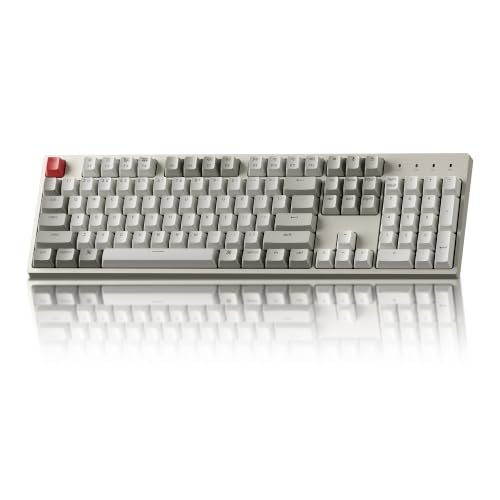
- 104-key full-size layout with numpad
- USB-C wired connection for steady performance
- Mac and Windows keycaps included
Best For: PC users who want a full-size mechanical keyboard for work and everyday typing.
Best for Wireless Multidevice Use
Keychron K4 96% Wireless Mechanical Keyboard

- 96% layout keeps the numpad in a compact footprint
- Bluetooth 5.1 supports up to 3 devices, plus USB-C wired mode
- Includes Mac/Windows keycaps and a 4000 mAh battery
Best For: PC users who want a compact wireless mechanical keyboard with a numpad and multi-device switching.
Best for Full-Size Productivity
Keychron K10 Wireless Mechanical Keyboard

- 104-key full-size layout with number pad
- Bluetooth 5.1 for up to 3 devices, plus USB-C wired mode
- Mac/Windows support with included extra keycaps
Best For: PC users who want a full-size mechanical keyboard with wireless flexibility and everyday comfort.
Best for Mac/Windows Switching – Keychron K4 96% Wireless Mechanical Keyboard
If you want a compact keychron mechanical keyboard for pc that still keeps a numpad, the Keychron K4 version 2 is a practical fit. Its 96% layout gives you desktop-friendly efficiency, while Bluetooth 5.1, wired USB-C mode, and Mac/Windows compatibility make it easy to use across a home office or light gaming setup.
Best For: PC users who want a compact wireless mechanical keyboard with a number pad, multi-device pairing, and easy Mac/Windows switching.
Pros:
- Compact 96% layout includes a full number pad
- Connects to up to 3 devices over Bluetooth 5.1
- Works with both Mac and Windows, with extra keycaps included
- 4000 mAh battery supports long wireless sessions
Cons:
- White LED backlight only, with no RGB lighting
- Wireless mode uses 6KRO instead of full NKRO
- Compact layout may feel cramped to users who prefer full-size boards
This is a strong pick if you need a keychron mechanical keyboard for pc that balances portability, typing feel, and everyday versatility. It is especially appealing for buyers who want one board for work and casual gaming without giving up essential desktop keys.
Best for Hall Effect Gaming – Keychron K4 HE 96% Wireless Keyboard
If you want a keychron mechanical keyboard for pc that still feels compact, the K4 HE is a smart pick. It keeps a numpad and navigation keys in a 96% layout, while adding hall effect magnetic switches, rapid trigger, and tri-mode connectivity for both work and play.
Best For: PC gamers and productivity users who want numpad utility, fast magnetic switches, and flexible wireless or wired use.
Pros:
- 96% layout preserves numpad and arrow/navigation keys in a smaller footprint.
- Hall effect switches with rapid trigger and Snap Tap give it a gaming-focused speed edge.
- 2.4GHz, Bluetooth, and USB-C support make it easy to use across multiple devices.
- Premium black frame with real wood accents and durable PBT keycaps.
Cons:
- More expensive than standard mechanical keyboards.
- Best features are aimed at gamers, so casual typists may not need the magnetic switch tech.
This is a strong choice if you want a keychron mechanical keyboard for pc that blends desk-saving layout, high-end gaming performance, and polished build quality. It stands out most for users who want one board to handle both competitive play and everyday number-entry tasks.
Best Hot-Swappable Pick – Keychron C1 TKL Wired Mechanical Keyboard
If you want a practical keychron mechanical keyboard for pc use, the Keychron C1 stands out for its hot-swappable switches, tenkeyless layout, and reliable USB-C wired connection. It’s a smart fit for users who want a customizable typing feel without soldering, plus enough flexibility for everyday work and light gaming.
Best For: PC users who want an affordable wired mechanical keyboard with easy switch swapping and Mac/Windows compatibility.
Pros:
- Hot-swappable sockets let you change MX-style switches without soldering
- TKL 87-key layout saves desk space while keeping function and multimedia keys
- USB-C wired connection is stable for office work, home use, and gaming
- Includes Mac and Windows keycaps for easier cross-platform setup
Cons:
- Wired-only design may not suit users who want wireless freedom
- White backlighting is simple rather than highly customizable RGB
- ABS keycaps are serviceable, but not as premium as PBT sets
As a keychron mechanical keyboard for pc buyers, the C1 offers a strong mix of upgradeability, dependable typing feel, and everyday practicality. It’s especially appealing if you want a straightforward board that can grow with your switch preferences over time.
Best for Multi-Device Switching – Keychron K2 75% Bluetooth Mechanical Keyboard
If you want a compact keychron mechanical keyboard for pc use that still keeps the arrow keys and function-row shortcuts, the Keychron K2 is a practical pick. Its 75% layout, Bluetooth 5.1 support, and USB-C wired mode make it flexible for home desks, office setups, and light gaming.
Best For: PC users who also switch between a laptop, tablet, or phone and want a compact wireless mechanical keyboard with Mac and Windows support.
Pros:
- 75% layout keeps navigation keys while saving desk space
- Connects to up to 3 devices and switches between them easily
- USB-C wired mode plus anti-ghosting and NKRO for gaming
- Large 4000 mAh battery supports long cordless use
Cons:
- White LED backlighting only, with no RGB lighting
- Compact layout may feel cramped if you need a full-size number pad
- Best experience depends on choosing the right switch feel for your typing style
For buyers who want a versatile keychron mechanical keyboard for pc setups, the K2 stands out more for convenience and portability than for flashy extras. It is a strong all-round option if you value wireless switching, Mac/Windows compatibility, and a tidy footprint.
Best for Full-Size Customization – Keychron V6 Wired Custom Keyboard
If you want a keychron mechanical keyboard for pc that feels more like a build platform than a basic prebuilt board, the Keychron V6 is a strong fit. Its full-size layout, QMK/VIA support, hot-swappable switches, and PC-friendly compatibility make it easy to tailor for work, gaming, or everyday typing.
Best For: PC users who want a full-size mechanical keyboard with deep remapping, knob control, and easy switch upgrades.
Pros:
- Full-size 108-key layout with a knob and programmable QMK/VIA support
- Hot-swappable PCB works with many 3-pin and 5-pin MX-style switches
- Double-shot PBT keycaps and pre-lubed brown switches improve typing feel
- Compatible with Windows, macOS, and Linux for flexible desktop use
Cons:
- Wired-only design may not suit users who want wireless convenience
- Full-size footprint takes up more desk space than compact boards
- Customization features may be more than casual users need
Overall, this is a practical pick if you want a keychron mechanical keyboard for pc that balances comfort, customizability, and full-size productivity features. It is especially appealing if you plan to remap keys or swap switches over time.
Best for Everyday Use – Keychron K8 TKL Wireless Mechanical Keyboard
If you want a flexible keychron mechanical keyboard for pc use, the Keychron K8 is a strong pick thanks to its 80% TKL layout, Bluetooth support for up to three devices, and included Windows keycaps. It’s built for everyday typing, multitasking, and light gaming without taking up much desk space.
Best For: PC users who want a wireless mechanical keyboard that also works smoothly across Mac and Windows setups.
Pros:
- Connects to up to 3 devices over Bluetooth 5.1 for easy switching
- Brown switches deliver tactile feedback for typing without being too loud
- USB-C wired mode supports NKRO for more responsive gaming and work
- Large 4000 mAh battery can last up to 200 hours with backlight off
Cons:
- No numpad, which may be a drawback for spreadsheet-heavy users
- White backlight only, so there’s no RGB lighting option
- Best features are more focused on typing than enthusiast customization
The Keychron K8 makes sense if you need a practical keychron mechanical keyboard for pc use that balances portability, wireless convenience, and tactile typing. It’s a good fit for mixed-device workstations where Mac and Windows compatibility both matter.
Best for Comfort – Keychron K2 Wireless Mechanical Keyboard
If you want a compact keychron mechanical keyboard for pc use that still feels full-featured, the Keychron K2 is a strong fit. Its 75% layout keeps the arrow keys and essential shortcuts, while Bluetooth and USB-C wired modes make it easy to move between a desktop, laptop, tablet, or phone.
Best For: PC users who also want easy switching between Mac and Windows devices, plus a portable layout for everyday typing and light gaming.
Pros:
- 75% 84-key layout keeps arrows and shortcuts in a compact footprint
- Bluetooth 5.1 supports up to 3 devices, with USB-C wired mode for PC use
- Gateron G Pro Red switches offer smooth, linear typing with NKRO in wired mode
- Large 4000 mAh battery and RGB backlighting add convenience and style
Cons:
- Not as small as a true 60% keyboard
- Wireless mode uses 6KRO instead of full NKRO
- Red switches may feel too light for users who prefer a tactile bump
This is a practical keychron mechanical keyboard for pc buyers who want a travel-friendly board without giving up arrow keys or multi-device flexibility. It lands in a sweet spot for work-first users who still want a responsive mechanical feel.
Best for Full-Size Typing – Keychron C2 Wired Mechanical Keyboard
If you want a dependable keychron mechanical keyboard for pc use, the Keychron C2 is a straightforward full-size option with a number pad, Mac/Windows compatibility, and a clean wired setup. It is aimed at users who prioritize productivity, familiar layout, and tactile typing over RGB effects or wireless features.
Best For: Office work, data entry, and home users who want a full-size mechanical keyboard with Mac and Windows support.
Pros:
- Full-size 104-key layout with numpad for productivity tasks
- Wired USB-C connection for stable, no-lag use
- Includes Mac and Windows keycaps for flexible setup
- Durable tactile brown switches with a comfortable typing feel
Cons:
- Non-backlit design may feel too plain for some buyers
- Wired-only connection is less flexible than wireless models
- Full-size footprint takes up more desk space
The Keychron C2 makes sense if you need a practical keychron mechanical keyboard for pc use and prefer a classic layout with dependable wired performance. It is less about flashy features and more about comfort, compatibility, and everyday typing consistency.
Best for Wireless Multidevice Use – Keychron K4 96% Wireless Mechanical Keyboard
If you want a keychron mechanical keyboard for pc that still feels compact, the Keychron K4 Version 2 is a smart fit. Its 96% layout keeps the number pad, works over Bluetooth or USB-C, and gives you a practical mix of desktop convenience and mechanical typing comfort.
Best For: PC users who want a compact wireless board with a numpad, Mac/Windows support, and easy switching between multiple devices.
Pros:
- 96% layout includes a numpad without taking up full-size desk space
- Connects to up to 3 devices over Bluetooth 5.1 and also supports wired USB-C
- Long 4000 mAh battery and white LED backlight add everyday flexibility
- Includes Mac and Windows keycaps for broader compatibility
Cons:
- Compact layout may take a little getting used to if you prefer full-size spacing
- Wireless mode uses 6KRO instead of full NKRO
- White-only backlighting is more functional than flashy
For buyers comparing a keychron mechanical keyboard for pc, the K4 stands out for combining a numpad, multi-device wireless support, and reliable wired fallback in one travel-friendly package. It is especially appealing if you split time between a PC, laptop, and tablet and want one keyboard that can handle all three.
Best for Full-Size Productivity – Keychron K10 Wireless Mechanical Keyboard
If you want a keychron mechanical keyboard for pc that feels roomy, versatile, and ready for both work and light gaming, the Keychron K10 is an easy fit. Its full-size 104-key layout includes the number pad, while Bluetooth 5.1 and USB-C wired mode give you flexible connection options for a desk setup or multi-device workflow.
Best For: PC users who want a full-size mechanical keyboard with wireless switching, Mac/Windows support, and everyday typing comfort.
Pros:
- Full-size 104-key layout with number pad for spreadsheets and data entry
- Connects to up to 3 devices via Bluetooth 5.1, plus USB-C wired mode
- Includes Mac/Windows keycaps and handy extra shortcut keys
- 4000 mAh battery and adjustable feet support long typing sessions
Cons:
- White backlight only, with no RGB lighting option
- Bulky full-size footprint may take up more desk space
- Not ideal if you prefer a compact or ultra-light keyboard
Overall, the K10 is a practical pick if you need a keychron mechanical keyboard for pc that balances comfort, connectivity, and a familiar full-size layout. It is especially appealing for office work, multitasking, and users who still want a mechanical feel without giving up wireless convenience.
How We Picked the Best Keychron Mechanical Keyboard for PC
We focused on the features that matter most for everyday PC use: layout, switch type, wired versus wireless support, hot-swappability, keycap quality, and software/customization options. We also looked for models that suit both typing and gaming, since many buyers want one keyboard that can do both.
Quick Comparison
If you want maximum desk efficiency, the 75% and 96% layouts are strong choices because they save space without giving up too many keys. If you need a numpad for spreadsheets or data entry, full-size and 96% models are better fits. For gaming or rapid input, Hall Effect and hot-swappable boards stand out for faster response and easier future upgrades.
Key Buying Factors for a Keychron Mechanical Keyboard for PC
Layout and Size
Choose based on how you work. Compact models are easier to fit on smaller desks and leave more room for mouse movement, while full-size boards are better for productivity-heavy users. The 96% layout is a useful middle ground, keeping the numpad in a tighter footprint.
Connection Type
Wired USB models are the simplest pick for low-latency use and plug-and-play reliability. Wireless models add flexibility for cleaner desks and multi-device setups, but make sure battery life and connection modes match your habits.
Switch Feel and Customization
Brown switches are a common all-around choice for typing and office work because they offer tactile feedback without being too loud. Red switches are usually preferred for lighter, smoother keypresses, while Hall Effect magnetic switches are ideal if you want rapid trigger behavior and advanced gaming tuning.
Hot-Swappability and Software
If you like to customize, hot-swappable boards make switch changes much easier. QMK and VIA support can be a big advantage for power users who want custom layers, macros, and remapping for a more efficient Keychron Mechanical Keyboard for PC setup.
Who Should Buy Which Keychron Mechanical Keyboard for PC?
Pick a full-size model if you need a numpad and the most complete layout. Go with a tenkeyless or 75% keyboard if you want a smaller footprint for general use or gaming. Choose a 96% board if you want a more compact design but still rely on number keys. If you prioritize speed and competitive play, the Hall Effect option is the standout. For most users, a wired hot-swappable Keychron board is the safest all-around choice, while wireless models are best for people who value desk flexibility and multi-device convenience.