
Choosing a magewell 4k capture card comes down to more than just resolution. The right model depends on your source type, workflow, latency needs, and whether you want a simple USB setup or a PCIe installation.
In this roundup, we focus on 10 practical options for streaming, recording, and professional video capture, with a clear eye on performance, compatibility, and value.
Best 10 Magewell 4K Capture Card Picks for 2026
Best for Reliable 1080p Capture
Magewell USB Capture HDMI Gen 2

- Clean 1080p60 capture from HDMI sources
- FPGA processing reduces host CPU load
- Works across Windows, macOS, Linux, and Chrome OS
Best For: Streamers and AV users who need a dependable HDMI-to-USB capture device for 1080p workflows.
Best for Multi-Cam Production
DeckLink Quad HDMI PCIe 4K Capture Card
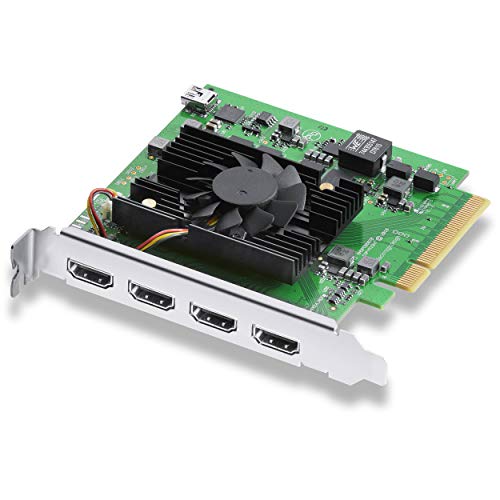
- Four HDMI 2.0b inputs in a single PCIe card
- Supports up to 4K60 capture workflows
- Ideal for studio rigs and multi-source production
Best For: Multi-camera creators and studio teams needing four HDMI inputs in one PC.
Best for SDI Workflows
Magewell USB Capture SDI Gen 2

- SDI capture up to 2048×1080 at 60fps
- FPGA processing reduces CPU overhead
- Compatible with Windows, macOS, Linux, and Chrome OS
Best For: SDI camera users and broadcasters who need dependable 1080p60 USB capture.
Best for HDMI 2.1 Console Setup
AVerMedia Live Gamer Ultra 2.1 4K60 Capture Card

- 4K60 capture for OBS, Twitch, YouTube, and Streamlabs
- HDMI 2.1 passthrough up to 4K144 HDR/VRR
- Low-latency capture with party chat support
Best For: Gamers and streamers who want modern-console capture with high-refresh passthrough.
Best for Pro Streaming Workflows
Magewell USB Capture HDMI Plus

- Up to 4K input with scaling to 1080p/720p
- HDMI loop-through for zero-delay monitoring
- Mic, line-in, and embedded audio support
Best For: Streamers and production users who need a dependable USB capture device with advanced audio and monitoring features.
Best for 4K60 HDR Capture
Elgato 4K Pro Internal Capture Card

- 8K60 passthrough with 4K60 HDR capture
- HDMI 2.1 and VRR support for smooth gameplay
- Works with OBS, Streamlabs, and dual PC setups
Best For: Streamers and gamers who want a high-end internal capture card for modern consoles and PC setups.
Best for Multi-Channel Production
Magewell Pro Capture Quad HDMI

- Four HDMI inputs for simultaneous capture
- FPGA processing lowers host CPU overhead
- Low-latency, pro-grade design for 24/7 use
Best For: Live production and AV teams needing reliable four-channel HDMI capture.
Best for Console Streamers

- Plug-and-play USB 3.2 setup
- OBS Studio certified for streaming
- 4K HDR passthrough with low latency
Best For: Console and PC streamers who want an easy, OBS-friendly 4K capture card.
Best for Plug-and-Play Streaming
Acer USB 3.0 HDMI Capture Card

- 4K input with 1080p60 capture
- Mic-in for live commentary
- Driver-free setup with wide compatibility
Best For: Streamers and gamers who want an easy, versatile capture card for quick setup.
Best for High-Refresh Passthrough

- 4K60 capture with ultra-low latency
- 1080p@240Hz and 2K@120Hz passthrough
- HDR, VRR, and USB 3.0 PC support
Best For: Streamers and gamers who want responsive console passthrough with 4K capture.
Best for Reliable 1080p Capture – Magewell USB Capture HDMI Gen 2
If you want a magewell 4k capture card alternative that prioritizes stability over flashy resolution claims, this Magewell USB Capture HDMI Gen 2 is built for smooth 1080p60 capture from HDMI sources. It’s a practical choice for live streaming, recording, and pro AV workflows where dependable operation and low CPU impact matter more than chasing 4K input specs.
Best For: Streamers, educators, and production teams who need a dependable HDMI-to-USB capture device for everyday 1080p recording.
Pros:
- Supports up to 2048×1080 at 60fps for clean 1080p60 capture
- FPGA-based processing helps reduce CPU load during capture
- Plug-and-play compatibility with Windows, macOS, Linux, and Chrome OS
- Built for continuous 24/7 operation with thermal protection
Cons:
- Not a true 4K capture solution
- Single HDMI input limits multi-source workflows
- More expensive than basic consumer capture dongles
For buyers comparing a magewell 4k capture card to more common 1080p devices, this model stands out for professional reliability, broad OS support, and on-device processing. It’s a strong pick when you need capture hardware that just works, day after day, without stressing your system.
Best for Multi-Cam Production – DeckLink Quad HDMI PCIe 4K Capture Card
If you need a magewell 4k capture card alternative for demanding multi-input workflows, the DeckLink Quad HDMI PCIe card is built for serious production setups. It supports up to 4K60 across four HDMI 2.0b inputs, making it a strong fit for live switching, ISO recording, and capture-heavy editing rigs.
Best For: Multi-camera creators, studios, and production teams that need four high-resolution HDMI inputs in one PCIe card.
Pros:
- Four HDMI 2.0b inputs for flexible multi-source capture
- Supports up to 4K60 for high-quality recording and monitoring
- PCIe installation suits permanent desktop and studio builds
Cons:
- Requires a compatible PCIe workstation or tower
- Overkill for simple single-camera or casual streaming use
For buyers comparing a magewell 4k capture card against other pro-grade options, this DeckLink card stands out for density and workflow flexibility rather than portability. It makes the most sense when you need multiple HDMI sources in one system and want dependable 4K capture performance.
Best for SDI Workflows – Magewell USB Capture SDI Gen 2
If you need a reliable magewell 4k capture card for SDI sources, this Magewell USB Capture SDI Gen 2 is a practical choice for stable 1080p60 acquisition. It’s aimed at users who value dependable capture, low setup friction, and hardware-level processing more than headline 4K specs.
Best For: SDI cameras, broadcast gear, and long-running streaming or recording setups that need dependable USB capture.
Pros:
- Supports SDI input up to 2048×1080 at 60fps for smooth 1080p capture
- On-device FPGA processing helps reduce CPU load during recording and streaming
- Works across Windows, macOS, Linux, and Chrome OS via USB 3.1 Gen 1
- Built for 24/7 operation with thermal protection and a 3-year warranty
Cons:
- Not a true 4K capture device
- Single-channel SDI input limits multi-source workflows
- Best suited to SDI setups, so HDMI users will need a different model
Overall, this is a strong pick if your priority is rock-solid SDI capture rather than maximum resolution. For buyers comparing a magewell 4k capture card, it stands out as a trusted workflow tool with excellent compatibility and onboard processing, but its real strength is dependable 1080p60 capture.
Best for HDMI 2.1 Console Setup – AVerMedia Live Gamer Ultra 2.1 4K60 Capture Card
If you want a magewell 4k capture card alternative for modern consoles and high-refresh gaming, the AVerMedia GC553G2 is built for 4K60 capture with HDMI 2.1 passthrough. It’s a practical fit for PS5, PS5 Pro, Xbox Series X/S, Nintendo Switch, and PC streamers who want smooth gameplay in OBS without giving up image quality.
Best For: Streamers and console gamers who want 4K60 capture, 4K120/4K144 passthrough, and low-latency performance in one device.
Pros:
- Captures gameplay in 4K60 for Twitch, YouTube, OBS, and Streamlabs.
- HDMI 2.1 passthrough supports up to 4K144 HDR/VRR for responsive play.
- Low-latency design helps keep audio and video synced during live streaming.
- Includes party chat support and customizable RGB lighting for a cleaner setup.
Cons:
- Overkill if you only need basic 1080p capture.
- Full feature set is most useful on newer HDMI 2.1 consoles and PCs.
As a magewell 4k capture card alternative, this AVerMedia model stands out for gamers who care more about passthrough speed and console-friendly extras than simple capture basics. It’s a strong pick if your priority is high-refresh gameplay with reliable 4K streaming support.
Best for Pro Streaming Workflows – Magewell USB Capture HDMI Plus
If you want a reliable magewell 4k capture card for live streaming, recording, or hybrid A/V setups, the Magewell USB Capture HDMI Plus stands out for its strong signal handling and plug-and-play operation. It accepts high-resolution HDMI sources, includes loop-through for zero-latency monitoring, and adds flexible audio options for more control than a basic dongle.
Best For: Streamers, educators, and production users who need a stable USB capture device with onboard scaling, loop-through, and dependable 24/7 operation.
Pros:
- Captures up to 4K input with onboard scaling for smooth 1080p or 720p workflows
- HDMI loop-through lets you monitor the source with no added delay
- Embedded, mic, and line-in audio support adds real flexibility
- USB-powered and driver-free on major operating systems
Cons:
- It is capped at 1080p capture, so it is not a true 4K recording device
- Pricier than many entry-level capture cards
- Single HDMI input limits multi-source setups
This is a strong magewell 4k capture card pick if your priority is stability, scaling, and professional reliability rather than raw output resolution. It makes the most sense when you want consistent capture quality and built-in monitoring for long sessions.
Best for 4K60 HDR Capture – Elgato 4K Pro Internal Capture Card
If you want a magewell 4k capture card alternative for high-end console or PC streaming, the Elgato 4K Pro is built for smooth 4K60 HDR capture with modern HDMI 2.1 passthrough. It’s a strong fit for creators who need low-latency gameplay, reliable recording, and compatibility with common tools like OBS, Streamlabs, and Zoom.
Best For: Streamers and gamers who want an internal capture card with 8K passthrough, 4K60 recording, and VRR support for a clean dual-use setup.
Pros:
- 8K60 passthrough with 4K60 HDR capture for current-gen consoles
- HDMI 2.1 in/out and VRR passthrough for smoother gameplay
- Works with major streaming apps and dual PC setups
Cons:
- Internal PCIe install is less convenient than a plug-and-play external card
- Overkill if you only need basic 1080p capture
For buyers comparing a magewell 4k capture card with a more gaming-focused option, the Elgato 4K Pro stands out for its mix of high refresh passthrough, ultra-low latency, and creator-friendly software support.
Best for Multi-Channel Production – Magewell Pro Capture Quad HDMI
If you need a magewell 4k capture card for four-camera workflows, the Magewell Pro Capture Quad HDMI is built for serious multi-source capture rather than casual single-input use. It combines four HDMI inputs, FPGA-based processing, and low-latency operation in a PCIe card designed for broadcast, streaming, and AV monitoring setups.
Best For: Live production teams, streamers, and AV pros who need reliable simultaneous capture from multiple HDMI sources.
Pros:
- Captures four independent HDMI channels at once with embedded audio
- On-board FPGA processing helps reduce CPU load during demanding workflows
- Supports high input resolutions and broad color/audio formats for pro use
- Built for low latency and 24/7 professional operation
Cons:
- Overkill if you only need a single HDMI input
- Requires a compatible PCIe desktop system, so it is not portable
- Premium hardware design comes at a professional-grade price
For teams comparing a magewell 4k capture card for studio or broadcast work, this model stands out because it prioritizes dependable multi-input capture and onboard processing over consumer-friendly simplicity. It is a strong fit when stability, latency, and channel count matter more than basic plug-and-play use.
Best for Console Streamers – ASUS TUF CU4K30 Capture Card
If you’re shopping for a magewell 4k capture card alternative that’s straightforward to set up, the ASUS TUF Gaming CU4K30 is built for quick streaming and recording from consoles or PC. It focuses on practical features like OBS certification, USB 3.2 plug-and-play operation, and HDR passthrough, making it a solid fit for creators who want reliable results without extra driver hassle.
Best For: Streamers who want an easy-to-use 4K capture card for PS5, Xbox, Switch, or PC with minimal setup.
Pros:
- Plug-and-play UVC support with USB 3.2 Type-C
- OBS Studio certified for smoother streaming workflow
- 4K HDR passthrough and up to 4K/30 capture, plus 1080p/120 support
- Near-zero latency and headset/controller audio support
Cons:
- Not designed for 4K capture beyond 30 fps
- Less feature-rich than higher-end pro-grade capture options
For most console-first creators, this ASUS card covers the essentials well and keeps setup simple. If you’re comparing it against a magewell 4k capture card, the CU4K30 stands out more for ease of use and OBS-friendly streaming than for advanced pro workflows.
Best for Plug-and-Play Streaming – Acer USB 3.0 HDMI Capture Card
If you want a simple, affordable alternative to a magewell 4k capture card, this Acer USB 3.0 HDMI capture card is built for quick setup and everyday streaming. It takes 4K input, outputs smooth 1080p at 60Hz, and keeps latency low for gaming, recording, and live content without adding much hassle.
Best For: Streamers, gamers, teachers, and creators who want plug-and-play capture with mic input and broad device compatibility.
Pros:
- 4K input with 1080p60 capture for clean streaming and recording
- Mic-in support makes live commentary easy without extra adapters
- Driver-free, bus-powered setup is quick and travel-friendly
- Works with PS5, PS4, Switch/Switch2, Xbox, cameras, PC, and Mac
Cons:
- Not a true 4K capture device for recording at 4K resolution
- Best suited to casual and midrange workflows rather than pro production
- USB 3.0 performance depends on a compatible host system
For buyers comparing it against a magewell 4k capture card, this model makes more sense if you value easy setup, mic input, and solid 1080p60 output over higher-end pro features. It’s a practical pick for simple streaming rigs and versatile everyday use.
Best for High-Refresh Passthrough – DX20R 4K60 HDMI Capture Card
If you want a magewell 4k capture card alternative that prioritizes smooth passthrough and low-latency capture, the DX20R is built for gameplay streaming, console recording, and mixed-use creator setups. It supports 4K60 capture, HDR, and VRR while also passing through 1080p at 240Hz or 2K at 120Hz for competitive play on a compatible display.
Best For: Streamers and gamers who need a USB 3.0 capture card with strong passthrough support for high-refresh monitors and current-gen consoles.
Pros:
- Captures up to 4K at 60Hz with ultra-low latency
- High-refresh passthrough for 1080p@240Hz and 2K@120Hz
- Supports HDR and VRR for more flexible console setups
- USB 3.0 connection works with PC, OBS, PS5, and Xbox
Cons:
- Passthrough performance depends on having the right display and cable setup
- Not a standalone recorder; it still needs a PC for streaming or capture
For buyers comparing a magewell 4k capture card to other plug-and-play options, the DX20R stands out more for smooth gaming passthrough than for studio-grade extras. It is a practical pick if your priority is keeping gameplay responsive while still recording in 4K.
How We Picked the Best Magewell 4K Capture Card
We prioritized cards that make sense for real-world capture setups: stable software support, strong input compatibility, low-latency performance, and the right mix of passthrough, recording quality, and connection type. For a Magewell 4K Capture Card, we also looked closely at whether the card is better suited for one-camera streaming, gaming capture, or multi-input production.
Quick Comparison
USB capture cards are usually the easiest choice for single-source setups and portable rigs. PCIe cards are better when you want more bandwidth, more reliable long sessions, or multiple HDMI inputs. If your main goal is console gaming, look for high refresh-rate passthrough. If you are capturing cameras or pro AV gear, pay attention to input format support and audio routing.
Key Buying Factors for a Magewell 4K Capture Card
Resolution and Frame Rate
Not every 4K card records 4K60, and some are optimized for 1080p capture with 4K passthrough only. Make sure the capture resolution matches your actual workflow, not just the marketing headline.
USB Vs. PCIe
USB models are best for simple plug-and-play use, laptops, and travel. PCIe options usually deliver better stability and are better suited to desktop systems, broadcast stations, and multi-camera workflows.
Passthrough and Latency
Gamers should check passthrough specs carefully. Low latency matters if you want to play on a monitor while recording without noticeable delay. Higher refresh-rate passthrough can be especially important for competitive play.
Audio and Compatibility
Look for support for embedded audio, analog audio I/O if needed, and confirmed compatibility with your software stack. OBS support is helpful, but professional users may need broader NLE or production software compatibility.
Who Should Buy Which Magewell 4K Capture Card?
If you want a straightforward setup for a single camera or console, a USB model is usually the easiest path. If you need multiple HDMI sources, a PCIe card is the smarter long-term investment. For creators focused on high-end gaming, choose a card with strong 4K passthrough and low latency. For pro AV and studio use, prioritize reliability, input flexibility, and workflow fit over headline resolution alone.
The best Magewell 4K Capture Card is the one that matches your source devices, editing or streaming software, and future upgrade plans. Buying for your actual use case will matter more than chasing the highest spec on the box.