
Choosing the right capture card can make a big difference in stream quality, recording reliability, and setup flexibility.
This roundup focuses on Blackmagic Design options for PC buyers, along with a few USB capture alternatives for simpler plug-and-play use cases.
Best 10 Blackmagic Design Capture Card for PC Picks for 2026
Best for 4K Capture
Blackmagic Design Intensity Pro 4K

- 4K Ultra HD capture and playback up to 30fps
- 1080p capture at 60fps for smoother recording
- PCIe internal card for PC streaming and editing
Best For: PC creators who want an internal capture card for 4K/30 and 1080p/60 workflows.
Best for Multi-Source PC Capture
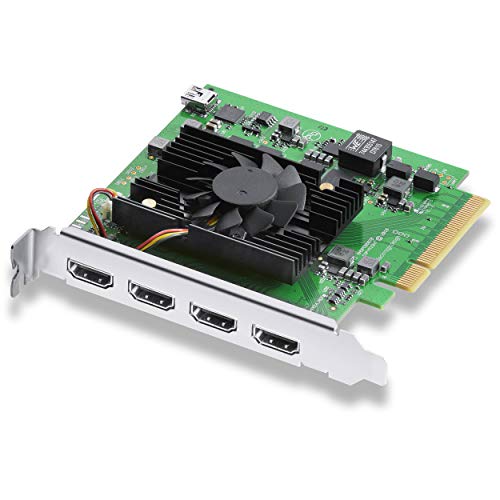
- Four HDMI 2.0b inputs for simultaneous capture
- PCIe Gen 3 x8 for low-latency performance
- Supports major streaming and production apps
Best For: Multi-camera PCs and live production setups needing four HDMI inputs.
Best for Plug-and-Play Streaming

- No-driver plug-and-play setup
- 1080p 60fps capture with HDMI loop-out
- Works with PS5, Xbox, Switch, PC, and Mac
Best For: Streamers and gamers who want a simple, compatible capture card for quick PC and console setups.
Best for Multi-Channel SDI
Blackmagic Design DeckLink Duo 2

- Four independent 3G-SDI channels
- Up to 1080p60 capture and playback
- Genlock reference input for sync
Best For: PC-based multi-camera SDI workflows that need four flexible channels.
Best for Easy Setup
acer USB 3.0 4K HDMI Capture Card

- No-driver, plug-and-play setup
- 1080p/60 capture with 4K input support
- Mic-in port for live commentary
Best For: Gamers and creators who want an easy HDMI capture card for PC, consoles, or cameras.
Best for Multi-Camera SDI Workflows
DeckLink Quad 2 PCIe Capture Card

- Eight bidirectional 3G-SDI connections
- Up to four simultaneous 1080p60 streams
- Reference input for genlock-synced setups
Best For: Editors and live production teams needing multiple SDI channels in one PC.
Best Dual-Interface Pick
UGREEN 2K@30Hz HDMI Capture Card

- USB-A and USB-C support for wide device compatibility
- Low-latency USB 3.0 capture for streaming and recording
- 4K input with 2K/30Hz or 1080p60 capture options
Best For: Streamers who want a flexible, easy-to-use capture card for PC and multi-device setups.
Best for Multi-Camera 8K
Blackmagic Design DeckLink 8K Pro G2

- Four 12G-SDI inputs/outputs for flexible multi-source workflows.
- Supports SD through 8K with HDMI 2.1 and genlock/reference input.
- PCIe Gen 3 x8 design suits pro editing and playback on PC.
Best For: Professional PC users who need multi-camera capture, 8K support, and broadcast-style connectivity.
Best Heavy-Duty Pick
4K HDMI Capture Card for Switch & PC

- Easy plug-and-play setup
- 1080p capture with HDMI passthrough
- Works with OBS on Windows and Mac
Best For: Streamers who want a simple USB capture card for consoles, cameras, or PC gameplay.
Best for Easy Plug-and-Play
Guermok 4K USB3.0 HDMI Capture Card

- 1080p 60fps capture over USB 3.0
- No-driver, plug-and-play setup
- Works with PC, Mac, OBS, PS5, Switch, and more
Best For: Beginners and casual streamers who want an easy external capture card for PC and consoles.
Best for 4K Capture – Blackmagic Design Intensity Pro 4K
If you want a flexible blackmagic design capture card for pc that can handle both 1080p/60fps workflows and 4K Ultra HD up to 30fps, the Intensity Pro 4K is a practical pick. It’s geared toward creators who need reliable capture and playback for editing, streaming, conferencing, or presentations without overcomplicating the setup.
Best For: PC users who want a capable PCIe capture card for recording, playback, and live production at up to 4K/30.
Pros:
- Supports 4K Ultra HD capture and playback at up to 30fps
- Captures 1080p at 60fps for smoother Full HD workflows
- Includes Media Express software for direct capture on PC
- Useful for streaming, video conferencing, and presentations
Cons:
- Requires a PCIe slot, so it’s not ideal for laptops
- 4K is limited to 30fps rather than 60fps
- May be more card than casual users need for basic recording
For buyers comparing a blackmagic design capture card for pc, this model stands out for its mix of pro-style flexibility and straightforward capture support. It’s a solid choice if you need dependable internal capture hardware and don’t mind that its strongest 4K mode tops out at 30fps.
Best for Multi-Source PC Capture – Blackmagic DeckLink Quad HDMI
If you need a blackmagic design capture card for pc that can handle multiple HDMI feeds at once, the DeckLink Quad HDMI is built for serious production workflows. It offers four HDMI 2.0b inputs, broad SD/HD/4K support, and low-latency PCIe performance for live switching, streaming, and recording.
Best For: Multi-camera rigs, live production PCs, and users who need four independent HDMI inputs in one card.
Pros:
- Four HDMI 2.0b inputs for capturing multiple sources simultaneously
- PCIe Gen 3 x8 design helps deliver reliable, low-latency capture
- Wide format support, including up to 4K60 workflows and HDR
- Works with major apps like OBS, vMix, Wirecast, and Media Express
Cons:
- Requires an 8-lane Gen 3 PCIe slot
- HDMI copy-protected sources cannot be captured
- More card than most casual single-camera setups need
For creators building a more advanced blackmagic design capture card for pc setup, this model stands out because it combines multiple input channels with pro-level compatibility. It makes the most sense when your workflow needs flexibility and dependable capture across several HDMI sources.
Best for Plug-and-Play Streaming – 4K HDMI Capture Card USB 3.0
If you want a simple, affordable blackmagic design capture card for pc alternative that’s easy to set up, this USB 3.0 HDMI capture card is built for fast plug-and-play use with OBS, Streamlabs, and XSplit. It focuses on smooth 1080p 60fps capture, HDMI loop-out, and broad device support, making it a practical choice for casual streamers and creators.
Best For: Streamers and gamers who want a no-driver capture card for PC, consoles, or lightweight creator setups.
Pros:
- Plug-and-play setup with no drivers required
- 1080p 60fps capture with HDMI loop-out for low-lag play
- Compatible with PS5, Xbox, Switch, PC, Mac, and DSLR cameras
- Works with popular streaming apps like OBS Studio and Streamlabs
Cons:
- Not a true Blackmagic Studio-level option for professional workflows
- Max capture resolution is centered on 1080p 60fps, not 4K recording
- Best suited to basic streaming rather than advanced production needs
This is a solid pick if you need a straightforward blackmagic design capture card for pc replacement without the learning curve or higher cost of pro gear. It’s best when you value easy setup, wide compatibility, and dependable performance over broadcast-grade features.
Best for Multi-Channel SDI – Blackmagic Design DeckLink Duo 2
If you need a blackmagic design capture card for pc that can handle multiple camera feeds at once, the DeckLink Duo 2 is built for serious SDI workflows. It supports four independent 3G-SDI connections, low-latency PCIe performance, and broad compatibility with common editing and streaming software.
Best For: Multi-camera production, live ingest, and PC setups that need four separate SDI channels in one card.
Pros:
- Four independent 3G-SDI inputs/outputs for flexible capture and playback
- PCIe Gen 2 x4 design for reliable, low-latency performance
- Supports SD, HD, and 3G-SDI formats up to 1080p60
- Reference input helps keep multi-camera timing locked
Cons:
- Requires a compatible PCIe slot and a properly configured PC
- Not a simple plug-and-play choice for beginners
- Limited to SDI workflows, so it is not ideal for HDMI-only gear
This is a strong blackmagic design capture card for pc users who care more about channel count and workflow control than consumer-friendly simplicity. If your setup revolves around SDI cameras, switchers, or monitoring, it offers a lot of flexibility in a compact internal card.
Best for Easy Setup – acer USB 3.0 4K HDMI Capture Card
If you want a simple, affordable blackmagic design capture card for pc alternative for streaming or recording, this Acer USB 3.0 HDMI capture card keeps the setup straightforward. It supports 4K input with smooth 1080p at 60Hz output, works with popular apps like OBS and VLC, and avoids the driver hunt that can slow down first-time setups.
Best For: Gamers, creators, and teachers who want quick plug-and-play capture for PC, Mac, consoles, or cameras.
Pros:
- Plug-and-play design with no extra drivers or external power
- 1080p/60 capture with 4K input support and low latency
- Mic-in jack makes live commentary and voice syncing easier
- Wide device support for PS5, Switch, Xbox, DSLR cameras, PC, and Mac
Cons:
- Not a pro-level Blackmagic replacement for advanced workflows
- Best results depend on using compatible software and settings
This is a practical pick if you care more about easy setup and broad compatibility than studio-grade capture features. For many users searching for a blackmagic design capture card for pc, it offers a simpler path into streaming without adding extra accessories or complexity.
Best for Multi-Camera SDI Workflows – DeckLink Quad 2 PCIe Capture Card
If you need a blackmagic design capture card for pc that can handle serious SDI input/output routing, the DeckLink Quad 2 is built for studio-style workflows rather than casual game capture. Its eight bidirectional 3G-SDI connections and PCIe design make it a strong fit for multi-source capture, playback, and synchronized production setups.
Best For: Editors, broadcasters, and live production teams that need multiple SDI channels in one PC.
Pros:
- Eight bidirectional 3G-SDI connections for flexible capture and playback
- Supports up to four simultaneous video streams at 1080p60
- Wide format compatibility with 720p, 1080i, and 1080p workflows
- Reference input helps keep multi-camera setups in sync
Cons:
- Requires a PCIe 8-lane Gen 2 slot, so it is not plug-and-play for every PC
- Overkill if you only need a simple single-input capture card
- Primarily aimed at SDI production gear rather than consumer HDMI sources
For users building a professional blackmagic design capture card for pc setup, this model stands out for channel count, timing control, and broad software support. It is a practical choice when reliability and multi-stream flexibility matter more than beginner-friendly simplicity.
Best Dual-Interface Pick – UGREEN 2K@30Hz HDMI Capture Card
If you want a practical blackmagic design capture card for pc alternative that works across more devices, this UGREEN model focuses on flexibility over pro-only features. It supports 4K input, 2K capture, and 1080p60 recording, making it a solid fit for streaming, gameplay capture, and everyday recording in OBS or similar apps.
Best For: Streamers and PC users who want a driver-free capture card with both USB-A and USB-C compatibility.
Pros:
- USB-A and USB-C connections for broader PC, laptop, and tablet compatibility
- Low-latency USB 3.0 performance for live streaming and recording
- Supports 4K input, 2K capture, and 1080p60 for flexible workflows
- Driver-free setup with wide app support like OBS, VLC, and QuickTime
Cons:
- Not a passthrough-first pro workflow device
- Requires HDMI input and HDCP off on protected consoles
- iPad USB-C use needs iPadOS 17 or later
This is a strong value option if you mainly need compatibility, simple setup, and solid frame rates rather than a high-end blackmagic design capture card for pc replacement for professional production.
Best for Multi-Camera 8K – Blackmagic Design DeckLink 8K Pro G2
If you need a blackmagic design capture card for pc that can handle serious post-production and live ingest, the DeckLink 8K Pro G2 is built for exactly that kind of workload. Its four bi-directional 12G-SDI connections, HDMI 2.1 support, and PCIe Gen 3 x8 requirement make it a strong choice for high-bandwidth setups where reliability and format flexibility matter more than simplicity.
Best For: Editors, colorists, and production teams working with multi-camera, high-resolution 4K/8K workflows on a PC.
Pros:
- Four 12G-SDI I/O connections support multi-channel capture and playback.
- Handles SD, HD, Ultra HD, 4K, and 8K formats with broad software support.
- HDMI 2.1 plus genlock/reference input fits pro studio and broadcast workflows.
- Supports high frame rates and 10/12-bit workflows for demanding production tasks.
Cons:
- Requires a PCIe Gen 3 x8 slot, so it is not ideal for basic desktops.
- More card than most casual streamers or simple single-camera setups need.
This is a strong pick if your blackmagic design capture card for pc needs lean toward professional editing, synchronized multi-source capture, or high-end playback rather than plug-and-play simplicity. For users who need maximum format support and serious I/O flexibility, it stands out as a workstation-grade option.
Best Heavy-Duty Pick – 4K HDMI Capture Card for Switch & PC
If you want a simple, low-latency way to get gameplay or camera video into OBS, this HDMI capture card is a practical alternative to a blackmagic design capture card for pc when you need easy setup over pro-level features. It supports up to 1080p capture, works over USB 3.0, and is designed for fast use with Windows or Mac.
Best For: Streamers, creators, and gamers who want a plug-and-play capture card for Switch, PlayStation, Xbox, or a PC without extra drivers.
Pros:
- Plug-and-play setup with no external power or driver install
- USB 3.0 connection with low-latency HDMI loop-out for passthrough play
- Works with OBS and common apps on Windows and Mac
- Mic-in support for live commentary
Cons:
- Captures at 1080p rather than true 4K recording
- No support for 4K120Hz or high-end pro workflows
- TRS mic input may be limiting for some headsets
For casual streaming and straightforward recording, this model covers the basics well and keeps setup friction low. If your priority is an easy-to-use blackmagic design capture card for pc alternative, this is a solid value pick rather than a studio-grade option.
Best for Easy Plug-and-Play – Guermok 4K USB3.0 HDMI Capture Card
If you want a simple external option that covers streaming, recording, and video calls without much setup, this Guermok card is a practical alternative to a blackmagic design capture card for pc. It delivers 1080p 60fps capture over USB 3.0, supports common streaming software, and works across a wide range of devices from PCs to consoles.
Best For: Beginners and creators who want an affordable plug-and-play capture card for PC, consoles, and everyday streaming.
Pros:
- Plug-and-play setup with no driver or external power required
- Captures up to 1080p at 60fps with USB 3.0 connectivity
- Broad compatibility with Windows, Mac, OBS, Zoom, PS5/4, Switch, and more
- Compact aluminum design for easy travel and quick field use
Cons:
- Not meant for direct screen casting to a monitor or TV
- One-way HDMI-to-USB capture only
- Audio setup in OBS may require a quick restart
This is a straightforward pick if you care more about convenience than pro-level workflow, especially when comparing against a blackmagic design capture card for pc. It’s a good fit for casual streamers, remote meetings, and console capture where ease of use matters most.
How We Picked the Best Blackmagic Design Capture Card for PC
We prioritized compatibility, input type, resolution support, channel count, and how well each card fits common PC workflows like live streaming, multi-camera capture, and game recording. For a Blackmagic Design Capture Card for PC, the most important factor is matching the card to your source signal and your editing or broadcast software.
We also weighed install requirements. PCIe cards offer lower latency and more stable performance, while USB capture devices are easier to set up and better for portable or entry-level use.
Quick Comparison
Choose PCIe if you want the most dependable desktop setup, especially for frequent streaming or multi-input production. Choose USB if you want fast setup, laptop compatibility, or a simple way to capture a console or single camera. Within Blackmagic Design, the main split is between HDMI-focused cards and SDI-focused DeckLink models.
Key Buying Factors for Blackmagic Design Capture Card for PC
Input Type
Match the card to your gear. HDMI cards suit gaming consoles, cameras, and consumer AV devices. SDI cards are better for professional cameras, longer cable runs, and studio environments.
Resolution and Frame Rate
For most streamers, 1080p60 is the practical baseline. If you work with higher-end sources, look for 4K60 or 8K support, but only if your PC, software, and storage can handle it.
Channel Count
Multi-channel cards matter for studios, production switching, and multi-cam workflows. If you only capture one source, a simpler single-input model may be the smarter buy.
PCIe Vs. USB
PCIe cards are usually the better long-term choice for desktop PCs because they offer stronger stability and lower latency. USB models are easier to move between systems and are often the better starting point for casual users.
Software Compatibility
Check support for your capture, streaming, and editing software before buying. Some Blackmagic Design models are especially strong in professional production environments, while generic USB cards are often easiest for basic OBS use.
Who Should Buy Which Blackmagic Design Capture Card for PC?
If you want a dependable studio or desktop workflow, a Blackmagic Design PCIe card is the best fit. If you need multi-input capture, choose a DeckLink model with enough channels for your sources. If you are mainly streaming a console, single camera, or laptop content, a USB HDMI capture card may be all you need.
For most buyers, the right choice comes down to one question: do you need professional-grade expandability, or just simple capture that works fast? Answer that first, then narrow the list by input type, resolution, and how many sources you plan to record.