
If you need more GPU power for editing, color grading, 3D, or AI-assisted creative work, the right external enclosure can make a major difference.
This guide to the best sonnet egpu enclosure for creators options in 2026 focuses on compatibility, power delivery, expandability, and real-world workflow value.
Best 9 Sonnet Egpu Enclosure for Creators Picks for 2026
Best for Thunderbolt 5 Power Users
Sonnet Breakaway Box 850 T5 eGPU
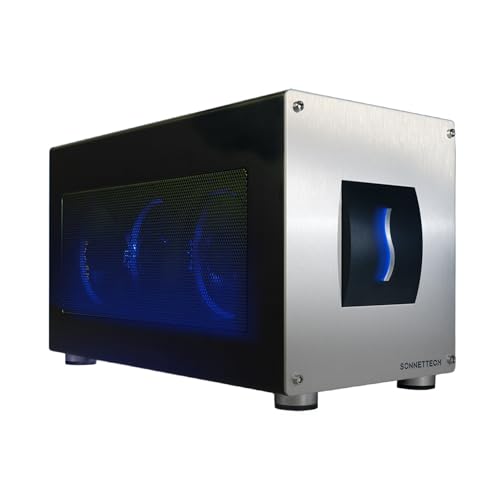
- 80 Gbps Thunderbolt 5 bandwidth
- 850W power for large triple-wide GPUs
- Built-in dock with 5GbE and USB-A
Best For: Creators who need maximum eGPU bandwidth, power headroom, and dock-style connectivity.
Best PCIe Expansion for Mac Creators
Sonnet Xmac Studio With Echo III

- Creator-friendly PCIe expansion for pro workflows
- Better fit for add-on hardware than simple GPU use
- Compact external setup for Mac-based studios
Best For: Mac creators who need external PCIe expansion for capture, storage, networking, or other pro add-ons.
Best for Power-Hungry Creator GPUs
Sonnet eGPU Breakaway Box 750ex

- 750W PSU handles high-end creator GPUs
- Adds 4 USB-A ports and Gigabit Ethernet
- Speeds up editing, rendering, and effects work
Best For: Creators who want a powerful eGPU enclosure with extra desk connectivity.
Best for Rack-Mounted Mac Studio
Sonnet xMac Studio Pro 3U Rackmount

- Mounts Mac Studio in a standard 3U rack
- Front USB-A ports improve day-to-day access
- Steel enclosure and tidy cable routing suit pro installs
Best For: Creators and studio pros who want a secure rackmount Mac Studio setup with easy front access.
Best for High-Power Creators

- 750W power supply for demanding GPUs
- Thunderbolt 3 eGPU chassis for Mac and Windows
- Quiet fan helps manage heat under load
Best For: Creators with compatible Thunderbolt 3 systems who need a high-power eGPU chassis for editing, rendering, and 3D work.
Best for Thunderbolt 5 Workstations
Sonnet Echo SE I T5 PCIe Expansion Chassis

- Thunderbolt 5 PCIe expansion with up to 6000 MB/s bandwidth
- Supports full-height, single-width PCIe 4.0 x8 cards
- Quiet aluminum build with auxiliary power and daisy chaining
Best For: Creators needing fast external PCIe expansion for pro cards in a quiet desktop setup.
Best PCIe Expansion
Sonnet Echo Express SE1 Thunderbolt 3 Chassis

- 40Gbps Thunderbolt 3 connection for fast PCIe expansion
- One PCIe 3.0 x8 slot supports a single high-performance card
- Compact chassis with daisy-chaining and display support
Best For: Creators who need a compact Thunderbolt 3 enclosure for one PCIe card, not a GPU.
Best for Thunderbolt Creator Setups
ORARA eGPU Enclosure with 750W PSU

- Thunderbolt 3/4 and USB4 40Gbps support
- 750W PSU with 85W power delivery
- Daisy chain plus extra USB-A hub port
Best For: Creators with compatible Thunderbolt or USB4 laptops who want a compact external GPU dock.
Best for Low-Profile PCIe Cards
Sonnet Echo Express SEL Thunderbolt 3 Chassis

- 40Gbps Thunderbolt 3 with up to 2750 MB/s bandwidth
- Compact support for low-profile PCIe cards
- Includes Thunderbolt cable and ThunderLok clip
Best For: Creators who need compact Thunderbolt 3 PCIe expansion for low-profile cards.
Best for Thunderbolt 5 Power Users – Sonnet Breakaway Box 850 T5 eGPU
If you want a sonnet egpu enclosure for creators that can keep up with heavy GPU-accelerated work, the Breakaway Box 850 T5 is built for exactly that. Its Thunderbolt 5 connection, 850W power supply, and support for triple-wide cards make it a strong fit for demanding editing, rendering, and AI workflows on Windows laptops.
Best For: Creators who need maximum eGPU bandwidth, lots of power headroom, and room for large modern graphics cards.
Pros:
- 80 Gbps Thunderbolt 5 bandwidth helps reduce bottlenecks in creator workflows.
- 850W PSU supports power-hungry GPUs, including large triple-wide cards.
- Built-in dock adds Thunderbolt 5, USB-A, and 5GbE connectivity.
- Quiet variable-speed cooling is designed for sustained performance.
Cons:
- Windows-focused support limits appeal for Mac users.
- Overkill if you only need light photo editing or casual external GPU use.
For creators building a desktop-class setup around a laptop, this sonnet egpu enclosure for creators stands out for sheer headroom and connectivity. It makes the most sense when you want both serious graphics acceleration and a practical dock in one box.
Best PCIe Expansion for Mac Creators – Sonnet Xmac Studio With Echo III
If you want a sonnet egpu enclosure for creators that goes beyond simple graphics expansion, the Sonnet Xmac Studio With Echo III Module is built for workflows that need flexible PCIe add-ons alongside serious desktop-class expansion. It makes more sense for creator setups that rely on capture cards, storage, audio, or networking hardware than for shoppers who only want a basic external GPU box.
Best For: Mac-based creators who need a compact expansion solution for PCIe accessories and pro workflow hardware.
Pros:
- Supports creator-focused PCIe expansion for a range of pro peripherals
- More versatile than a single-purpose enclosure for multi-device workflows
- Well suited to Mac studios that need clean, external expansion
Cons:
- Not the best fit if you only want a straightforward eGPU enclosure
- May be overkill for casual users with minimal expansion needs
For creators building a flexible desktop setup, this sonnet egpu enclosure for creators is appealing because it prioritizes expansion options and workflow utility over simplicity. If your setup depends on add-on cards more than raw plug-and-play graphics, it is a strong niche pick.
Best for Power-Hungry Creator GPUs – Sonnet eGPU Breakaway Box 750ex
If you need a sonnet egpu enclosure for creators that can keep up with demanding editing, grading, and motion-design workflows, the Breakaway Box 750ex is built for serious desktop-class acceleration over Thunderbolt 3. Its 750W PSU gives more headroom for higher-end cards, while the extra USB-A ports and Gigabit Ethernet make it more useful as a desk hub than a basic GPU shell.
Best For: Video editors, 3D artists, and digital creators who want a high-power eGPU enclosure with built-in connectivity for a tidy workstation.
Pros:
- 750W power supply supports a wide range of modern AMD and NVIDIA GPUs
- Can speed up editing, rendering, color grading, animation, and effects work
- Includes four USB-A ports plus Gigabit Ethernet for extra desktop connectivity
- Mac and Windows compatible with Thunderbolt 3 systems
Cons:
- Requires a compatible Thunderbolt 3 computer and supported GPU
- M1 Macs are not compatible with GPUs in this enclosure
- External GPU setup is still more expensive than upgrading a desktop tower
For creators who prioritize performance headroom and workstation-friendly ports, this sonnet egpu enclosure for creators is a strong fit. It is especially compelling if you want a single enclosure that can power a serious GPU and also reduce dock clutter on your desk.
Best for Rack-Mounted Mac Studio – Sonnet xMac Studio Pro 3U Rackmount
If you want a sonnet egpu enclosure for creators who keep a Mac Studio in a rack-based workflow, this enclosure is built to clean up the setup. It mounts the computer in a standard 3U space, improves cable organization, and gives you front-panel access for everyday connections without reaching behind the rack.
Best For: Editors, audio engineers, and studio creators who need a secure rackmount home for Mac Studio with easy front access and room for expansion planning.
Pros:
- Saves desk space by mounting Mac Studio in a standard 3U rack
- Front USB-A ports and accessible controls simplify daily use
- Sturdy steel construction adds protection in pro environments
- Clean cable routing helps keep studio installs tidy
Cons:
- PCIe expansion module is not included
- More useful in rack setups than on a standalone desk
- Designed specifically around Mac Studio, so it is not a universal enclosure
This is a smart fit if you need a sonnet egpu enclosure for creators-style workflow and care more about rack integration than a simple desktop dock. It is especially appealing when physical protection, access, and cable management matter more than portability.
Best for High-Power Creators – Sonnet Breakaway Box 750
Sonnet eGPU Breakaway Box 750 - External GPU Chassis - Not Compatible with M1 Macs
Check Price On AmazonIf you need a sonnet egpu enclosure for creators that can handle serious workloads, the Breakaway Box 750 is built for sustained GPU acceleration over Thunderbolt 3. It’s a practical choice for editing, rendering, color grading, animation, and effects work on compatible Mac and Windows systems, but it is not for M1 Macs or non-Thunderbolt 3 connections.
Best For: Creators who want a high-wattage eGPU chassis for demanding video, 3D, and motion-graphics work on compatible computers.
Pros:
- 750W power supply supports many high-end AMD and NVIDIA GPU cards
- Improves creative app performance for editing, rendering, and effects
- Quiet, temperature-controlled fan helps keep the system cool
Cons:
- Not compatible with M1 Macs
- Requires Thunderbolt 3; not for Thunderbolt 2 or USB-C-only setups
- GPU card is sold separately
For creators who already have a compatible workstation, this sonnet egpu enclosure for creators offers the kind of power headroom and GPU support that make it worth considering for heavier production pipelines. If your setup matches the compatibility requirements, it’s a strong long-term upgrade path.
Best for Thunderbolt 5 Workstations – Sonnet Echo SE I T5 PCIe Expansion Chassis
If you need a sonnet egpu enclosure for creators that does more than basic GPU duties, the Echo SE I T5 is built for serious PCIe expansion over Thunderbolt 5. It is a strong fit for workflows that rely on pro audio, video capture, fast networking, or storage cards, especially on Mac, Windows, or Linux systems.
Best For: Creators who want a compact Thunderbolt 5 PCIe enclosure for a single full-height, single-width card and quiet desktop use.
Pros:
- Up to 6000 MB/s bi-directional PCIe bandwidth for high-performance peripherals
- Supports half-length+, full-height, single-width PCIe 4.0 x8 cards
- Auxiliary PCIe power helps run more demanding add-in cards
- Quiet aluminum enclosure with variable-speed cooling and daisy-chaining support
Cons:
- Only supports one PCIe card, so it is not a multi-slot expansion solution
- Most useful for specialized pro workflows rather than casual desktop users
For creators who need dependable external PCIe expansion more than a traditional graphics-focused setup, this is a well-rounded sonnet egpu enclosure for creators with modern Thunderbolt 5 speed, broad OS support, and a studio-friendly design.
Best PCIe Expansion – Sonnet Echo Express SE1 Thunderbolt 3 Chassis
If you need the flexibility of Thunderbolt expansion rather than a GPU dock, the Sonnet Echo Express SE1 is a practical sonnet egpu enclosure for creators who rely on capture cards, audio interfaces, storage controllers, or other PCIe tools. It delivers a single PCIe 3.0 x8 slot over Thunderbolt 3 with enough bandwidth for demanding creator workflows, while staying compact enough for a crowded desk.
Best For: Creators who need a compact Thunderbolt 3 enclosure for a single high-performance PCIe card, not a graphics card.
Pros:
- Thunderbolt 3 connectivity provides fast 40Gbps expansion for PCIe accessories.
- Supports one half-length, full-height, single-width PCIe card at full performance.
- Small desktop footprint makes it easier to fit into mobile or tight studio setups.
- Second Thunderbolt port supports daisy-chaining and display connectivity.
Cons:
- Not designed to function as an eGPU or GPU enclosure.
- Only one PCIe slot limits multi-card expansion.
- Best suited to specific workflows, not general-purpose upgrades.
For creators shopping a sonnet egpu enclosure for creators but actually needing PCIe hardware support, this chassis is a better fit than a graphics-focused dock. It’s strongest when your workflow depends on one specialized card and you want solid Thunderbolt 3 performance in a compact box.
Best for Thunderbolt Creator Setups – ORARA eGPU Enclosure with 750W PSU
If you need a practical sonnet egpu enclosure for creators alternative, the ORARA enclosure is built around Thunderbolt 3/4 and USB4 performance with a strong 750W PSU and 85W power delivery. It’s aimed at users who want to add a desktop GPU to a laptop or compact workstation without overcomplicating the setup.
Best For: Creators using a Thunderbolt 3/4 or USB4 laptop or NUC who want a compact external GPU dock for faster editing, rendering, or AI workloads.
Pros:
- Supports Thunderbolt 3/4 and USB4 40Gbps connections for modern creator laptops
- Includes a 750W PSU plus 85W PD for a cleaner single-cable-ish setup
- Daisy chain support and extra USB-A port add useful desk connectivity
- Compatible with NVIDIA and AMD PCIe graphics cards in single- and dual-slot sizes
Cons:
- Not compatible with Thunderbolt 1/2, standard USB-C, or USB-A systems
- Too small for three-slot GPUs and has a strict width limit
- Windows 11 is preferred for detection, and Mac M-series support is not included
For creators who want a faster, more flexible external GPU path, this ORARA dock covers the core needs well. It’s not as universal as some broader options, but as a sonnet egpu enclosure for creators style pick, it makes sense if your device matches the Thunderbolt/USB4 requirements.
Best for Low-Profile PCIe Cards – Sonnet Echo Express SEL Thunderbolt 3 Chassis
Sonnet Echo Express SEL Thunderbolt 3-to-PCIe Expansion Chassis (1 Low Profile Slot)
Check Price On AmazonIf you need a practical sonnet egpu enclosure for creators who want to add a PCIe card without opening a desktop tower, the Echo Express SEL is a compact Thunderbolt 3 expansion chassis built around low-profile cards. It is a better fit for specialized creator hardware than a full-size GPU enclosure, offering strong bandwidth and simple plug-in expansion for Macs and Windows PCs.
Best For: Creators who need compact Thunderbolt 3 PCIe expansion for capture, audio, networking, or other low-profile cards.
Pros:
- 40Gbps Thunderbolt 3 connection with up to 2750 MB/s PCIe bandwidth
- Compact chassis supports popular low-profile PCIe cards at full performance
- Two Thunderbolt 3 ports for daisy-chaining and display support
- Includes Thunderbolt cable and ThunderLok retainer clip
Cons:
- Only works with low-profile PCIe cards
- Not a full-size GPU enclosure
- Single-slot design limits upgrade flexibility
For creators who care more about dependable PCIe expansion than a true GPU dock, this Sonnet chassis is a focused, space-saving option. It stands out as a sonnet egpu enclosure for creators only if your workflow uses low-profile cards rather than a full graphics card.
How We Picked the Best Sonnet Egpu Enclosure for Creators
For a Sonnet Egpu Enclosure for Creators, the biggest priorities are host connection speed, GPU compatibility, power headroom, and whether the chassis fits a desktop or rack-based workflow. We also weighed platform support for Windows, macOS, and mixed creative setups, since that often determines whether an enclosure is practical or just powerful on paper.
Quick Comparison
At a high level, the lineup splits into three categories: high-performance Thunderbolt 5 and Thunderbolt 4/USB4 models for newer systems, Thunderbolt 3-era enclosures for older but still capable creative rigs, and Studio/rack expansion chassis for users who need PCIe expansion rather than a traditional eGPU setup. If you want the simplest path to external GPU performance, start with the most current Thunderbolt 5 or USB4 options. If you are building around an older Mac or workstation, a Thunderbolt 3 model may be the more practical choice.
Key Buying Factors for a Sonnet Egpu Enclosure for Creators
Connection Standard
Thunderbolt 5 offers the most headroom for bandwidth-sensitive work, while Thunderbolt 4 and USB4 remain strong choices for many creators. Thunderbolt 3 models can still be useful, but they are best suited to systems that cannot move up to newer interfaces.
Power Supply and GPU Fit
Check the enclosure’s power rating, internal cable support, and physical clearance before buying. High-wattage cards and pro-style GPUs can require more PSU overhead than general-purpose creative builds.
Host System Compatibility
Compatibility matters as much as raw performance. Some enclosures are better suited to Windows workstations, while others are designed around Mac expansion or broader cross-platform use. Always confirm whether your laptop, desktop, or studio machine is officially supported.
Workflow Needs
If your work is mostly video editing and motion graphics, prioritize stable bandwidth and quiet operation. If you also need PCIe expansion for capture, storage, or specialty cards, a PCIe expansion chassis may be a better fit than a standard eGPU enclosure.
Who Should Buy Which Sonnet Egpu Enclosure for Creators?
Choose the newest Thunderbolt 5-based Sonnet options if you want the most future-ready setup for demanding creative work. Pick Thunderbolt 4/USB4 models if you need broad compatibility with current laptops and desktops. Go with Thunderbolt 3 enclosures if you are upgrading an older machine and want a cost-effective route to external GPU support. If your workflow depends on cards beyond graphics, consider the Studio or expansion chassis models instead of a pure eGPU enclosure.
In short, the best choice depends less on brand alone and more on how your system connects, what GPU you plan to install, and whether your creative workflow needs graphics acceleration or broader PCIe expansion.