
A good workstation UPS does more than keep a computer running during an outage. It can protect against surges, smooth out voltage swings, and give you enough time to save work safely.
Below, we focus on the best Eaton UPS for workstation use, plus a few comparable alternatives, so you can match capacity and features to your desk setup, peripherals, and runtime needs.
Best 10 Eaton Ups for Workstation Picks for 2026
Best for Desktop Workstations
Eaton Tripp Lite SMART1500LCDT 1500VA UPS

- 900W / 1500VA capacity for desktop setups
- 10 protected outlets with surge backup
- AVR and LCD screen add practical monitoring
Best For: Home office and workstation users who want dependable backup for a desktop PC and peripherals.
Best for Rack-Mount Workstations

- 1100W / 1440VA capacity for workstation-class loads
- 10 NEMA 5-15R outlets for multiple devices
- 2U rackmount format with USB and serial cables
Best For: Workstations and small rack setups that need reliable backup power with lots of outlets.
Best for High-End Workstations
Eaton 5SC1500 Pure Sinewave UPS
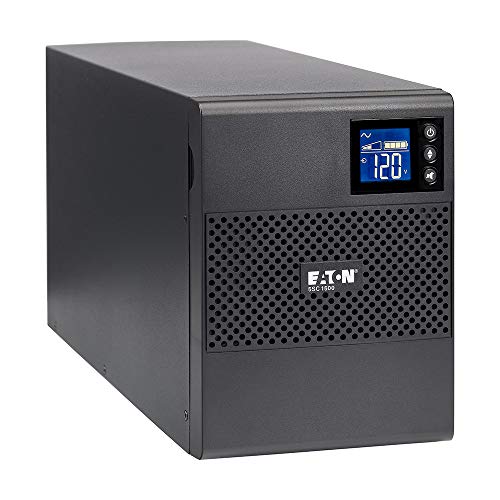
- Pure sinewave output for active PFC workstations
- 8 battery-backed outlets with AVR
- USB monitoring for Windows, Mac, and Linux
Best For: Workstations, NAS units, and small office systems that need clean backup power.
Best for Cloud Monitoring
Eaton Tripp Lite 500VA 1U Lithium UPS

- Cloud-connected alerts and remote control via app
- Lithium-ion battery for lighter weight and longer life
- 1U rackmount design with 6 protected outlets
Best For: Workstations and small rack setups that need remote UPS monitoring in a compact form factor.
Best for Quiet Workstations
Eaton 5S1500LCD 1500VA/900W UPS

- 1500VA/900W capacity for a full workstation setup
- LCD screen shows runtime, load, and outage tracking
- Five battery-backed outlets plus surge-only expansion
Best For: Home office and workstation users who want quiet, informative battery backup.
Best for Small Workstations

- 10 outlets with 5 battery-backed ports
- Compact 550VA / 300W capacity for light desktop setups
- Wall-mountable design with replaceable battery
Best For: Home office users needing compact backup power for a small workstation and networking gear.
Best PFC Sine Wave Pick
CyberPower CP1500PFCLCD 1500VA UPS

- Pure sine wave output for active-PFC systems
- AVR helps stabilize everyday voltage fluctuations
- 12 outlets with USB-A and USB-C charging
Best For: Workstations and active-PFC desktops that need clean backup power and clear monitoring.
Best with Extra Features
Eaton 5S550 550VA UPS Battery Backup

- Quiet line-interactive UPS with AVR for stable desktop power
- 4 battery-backed outlets plus 4 surge-only outlets
- USB shutdown support for Windows, Mac, and Linux
Best For: Home office and workstation users who want compact, quiet backup power for a single PC setup.
Best High-Capacity Backup

- 1500VA / 900W output for larger desktop setups
- AVR reduces brownout stress without draining the battery
- 5 battery outlets and 5 surge-only outlets
Best For: Workstations, home offices, and gaming rigs that need more outlet space and runtime.
Best for High-Capacity Workstations
- 810W / 1500VA capacity suits demanding workstation setups
- AVR helps correct brownouts and overvoltages without draining the battery
- 10 outlets and 650 joules of surge protection cover multiple devices
Best For: Workstations, gaming PCs, and small office setups that need battery backup plus surge protection.
Best for Desktop Workstations – Eaton Tripp Lite SMART1500LCDT 1500VA UPS
If you need an eaton ups for workstation that can handle a desktop PC, peripherals, and light network gear, the SMART1500LCDT is a practical mid-range choice. Its 900W output, 10 outlets, and automatic voltage regulation make it well suited for keeping a work setup running through brief outages, brownouts, and voltage swings.
Best For: Home offices, desktop workstations, and small setups that need dependable battery backup plus surge protection.
Pros:
- 900W / 1500VA capacity is solid for a workstation and accessories
- 10 outlets with battery backup and surge protection
- AVR helps correct brownouts without draining the battery
- LCD screen gives quick status on load, runtime, and battery health
Cons:
- Not ideal for very high-end gaming PCs or larger server loads
- Can be heavier and bulkier than basic compact UPS units
For buyers comparing an eaton ups for workstation use, this model stands out for its balanced capacity, useful display, and strong protection features rather than flashy extras. It’s a sensible pick if you want reliable desktop backup and line conditioning in one unit.
Best for Rack-Mount Workstations – Eaton 5P Compact 1500VA UPS
If you need an eaton ups for workstation setups that live in or near a rack, the Eaton 5P rackmount Compact 1500VA UPS is a practical fit. It pairs 1100W of protection with 10 NEMA 5-15R outlets, giving you enough headroom for a serious desktop, monitors, and supporting gear while keeping the footprint manageable in 2U.
Best For: Workstations, small server racks, and edge equipment that need rack-friendly backup power with plenty of outlets.
Pros:
- 1100W / 1440VA capacity handles demanding workstation loads
- 10 outlets provide flexible device coverage
- 2U rackmount design fits cleanly into compact setups
- Includes USB and serial cables for basic monitoring and control
Cons:
- Heavier than typical desktop UPS units at about 41 lb
- Rack-focused design is less convenient for simple under-desk placement
- No mention of advanced network management in the included package
For buyers comparing an eaton ups for workstation protection, this model stands out more for rack flexibility and outlet count than ultra-compact size. It makes the most sense when you want reliable Eaton power protection and plan to mount the UPS with other equipment instead of keeping it on the floor beside a desk.
Best for High-End Workstations – Eaton 5SC1500 Pure Sinewave UPS
Eaton 5SC1500 Pure Sinewave UPS Battery Backup, 1440VA / 1080W, AVR, LCD Display, Line Interactive
Check Price On AmazonIf you need an eaton ups for workstation use, the Eaton 5SC1500 is built for systems that demand clean, stable backup power. Its pure sinewave output, AVR, and active PFC support make it a smart fit for modern desktops, storage gear, and professional rigs that can be sensitive to cheaper simulated-wave UPS units.
Best For: Powering a workstation, NAS, or small business setup that needs reliable sinewave backup and voltage correction.
Pros:
- Pure sinewave output helps ensure compatibility with high-end workstations and active PFC power supplies
- 8 battery-backed outlets plus AVR for better protection in small office setups
- USB connectivity works with Windows, Mac, and Linux for straightforward monitoring
- ABM battery management and a 3-year warranty add long-term peace of mind
Cons:
- Not the smallest or lightest UPS in this class
- Runtime is limited if you’re backing up a power-hungry workstation
For buyers comparing an eaton ups for workstation protection, the 5SC1500 stands out because it focuses on compatibility and dependable power conditioning rather than flashy extras. It’s a practical choice if you want a clean sinewave UPS that can support serious hardware without overcomplicating the setup.
Best for Cloud Monitoring – Eaton Tripp Lite 500VA 1U Lithium UPS
If you need an eaton ups for workstation use in a rack or compact office setup, this 500VA model stands out for its cloud-connected monitoring and lithium battery design. It delivers basic battery backup and surge protection in a slim 1U form factor, with app-based alerts and remote control features that are especially useful when the system is tucked away.
Best For: Workstations, small rack setups, and users who want remote UPS monitoring in a compact package.
Pros:
- Lithium-ion battery should last longer and weigh less than traditional UPS batteries
- Cloud-connected monitoring with email/text alerts, app control, and outlet bank management
- 1U rackmount design fits tight spaces and includes 6 outlets with battery backup and surge protection
- 5-year warranty plus connected equipment coverage adds peace of mind
Cons:
- 400W output is fine for a workstation, but not ideal for higher-power rigs
- Short full-load runtime means it’s mainly for shutdown time, not extended operation
- Requires a rack-friendly setup to get the most value from the 1U design
For buyers comparing an eaton ups for workstation protection, this model makes sense if remote visibility and long-life lithium batteries matter more than maximum wattage. It’s a practical choice for protecting a single PC, monitor, and network gear in a small rack or tucked-away equipment area.
Best for Quiet Workstations – Eaton 5S1500LCD 1500VA/900W UPS
If you want an eaton ups for workstation use that balances capacity, quiet operation, and basic power management, the Eaton 5S1500LCD is a strong desktop option. Its 1500VA/900W rating gives you room for a PC, monitor, and networking gear, while the LCD helps you quickly check runtime, load, and outage history.
Best For: Home offices, professional workstations, and compact setups that need dependable battery backup with clear status information.
Pros:
- 1500VA/900W capacity suits single-workstation setups with peripherals.
- LCD readout makes it easy to monitor battery time and power usage.
- Five battery-backed outlets plus five surge-only outlets add flexibility.
- USB integration and bundled shutdown software support graceful saves.
Cons:
- Battery-backed outlets are limited to five, so you may need to prioritize devices.
- Audible battery alerts can be distracting until disabled.
- It is a desktop/tower unit, so it is less convenient for rack-style installs.
Overall, the Eaton 5S1500LCD is a practical eaton ups for workstation buyers who want a straightforward line-interactive UPS with useful visibility and solid everyday protection. It is especially appealing if your setup needs clean shutdown support more than advanced rack features.
Best for Small Workstations – Eaton INTERNET550U 550VA UPS
If you need an eaton ups for workstation use, the Eaton Tripp Lite INTERNET550U is a compact, practical pick for keeping a PC, monitor, and networking gear alive long enough to save work and shut down safely during an outage.
Best For: Home offices and small workstations that need basic battery backup, surge protection, and a space-saving design.
Pros:
- 10 outlets total, with 5 battery-backed outlets for essential workstation gear
- Compact 550VA / 300W design is a good fit for light desktop setups
- Includes EMI/RFI filtering, LED status indicators, and a replaceable battery
- Wall-mountable or under-desk friendly with a 5-foot power cord
Cons:
- Limited runtime for power-hungry PCs and larger workstation builds
- Not ideal if you need advanced management features or higher wattage capacity
For a basic eaton ups for workstation protection, this model stands out more for reliability and convenience than raw capacity. It is a sensible choice if you want simple backup power for a smaller desk setup without paying for extra features you may not use.
Best PFC Sine Wave Pick – CyberPower CP1500PFCLCD 1500VA UPS
If you need an eaton ups for workstation alternative that can handle an active-PFC desktop, this CyberPower unit is a practical choice. It pairs pure sine wave output with AVR, making it well suited to business PCs, docking stations, and other sensitive gear that needs cleaner backup power.
Best For: Workstations, active-PFC power supplies, and users who want strong power conditioning plus a clear status display.
Pros:
- Pure sine wave output supports active-PFC workstation power supplies
- AVR helps smooth minor voltage swings without draining the battery
- 12 outlets, plus USB-A and USB-C charging ports
- Color LCD makes battery and load status easy to check at a glance
Cons:
- Bulkier than a compact desktop UPS
- Runtime will be limited under heavier workstation loads
For shoppers comparing an eaton ups for workstation setup, the CP1500PFCLCD stands out for its sine wave output, useful outlet count, and easy-to-read monitoring. It is a solid fit if you want reliable protection for a high-end PC without moving up to a larger rack-style system.
Best with Extra Features – Eaton 5S550 550VA UPS Battery Backup
Eaton 5S550 UPS Battery Backup & Surge Protector, 550VA / 330W, AVR, Line Interactive
Check Price On AmazonIf you need an eaton ups for workstation that stays compact and unobtrusive, the Eaton 5S550 is a practical fit. It offers line-interactive protection with AVR, enough battery-backed outlets for a typical desktop setup, and a quiet design that won’t distract you in a home office or shared workspace.
Best For: Workstations, PCs, and desk setups that need basic battery backup, surge protection, and clean voltage correction in a small footprint.
Pros:
- 4 battery backup outlets plus 4 surge-only outlets for flexible desktop connections
- AVR and line-interactive design help smooth out minor power fluctuations
- USB connectivity supports automatic shutdown on Windows, Mac, and Linux
- Quiet operation with a fan that only runs when needed
Cons:
- 550VA / 330W capacity is better for a single PC and peripherals than heavier loads
- Audible alarm may need to be silenced during battery mode
Overall, the Eaton 5S550 is a sensible pick if your eaton ups for workstation search is about protecting a basic desktop setup without paying for extra capacity you may not use. It focuses on the essentials: reliable backup, decent outlet count, and straightforward management for everyday office power protection.
Best High-Capacity Backup – APC Back-UPS Pro 1500VA
If you need an eaton ups for workstation alternative that can handle a busy desktop setup, the APC Back-UPS Pro 1500VA is built for practical short-term backup power. It combines a large battery capacity, AVR, and enough outlets for a workstation plus network gear, making it a solid fit for home office protection.
Best For: Workstations, home offices, and gaming PCs that need extra runtime for the PC, monitor, router, and storage devices during outages.
Pros:
- 1500VA / 900W capacity gives more headroom than many home-office UPS units
- AVR helps smooth brownouts without constantly switching to battery
- 5 battery-backed outlets plus 5 surge-only outlets for a full desk setup
- Replaceable battery and Ethernet/coax surge protection add long-term value
Cons:
- Bulkier than compact desktop UPS models
- Runtime is limited if you’re running a high-wattage workstation load
- Replacement battery is sold separately
For buyers comparing an eaton ups for workstation setup, this APC model stands out more for capacity and outlet count than for compactness. It’s a strong choice if you want dependable backup power for a full home-office stack rather than just a single PC.
Best for High-Capacity Workstations – Eaton OMNI1500LCDT 1500VA UPS
If you need an eaton ups for workstation use, the OMNI1500LCDT is a practical choice for protecting a desktop PC, peripherals, and networking gear from outages and voltage swings. Its 810W capacity, 10 outlets, and automatic voltage regulation make it a strong fit for users who want longer runtime and cleaner power without overcomplicating setup.
Best For: Workstations, gaming PCs, and small office setups that need battery backup plus surge protection.
Pros:
- 810W / 1500VA capacity suits demanding workstation setups
- AVR helps correct brownouts and overvoltages without draining the battery
- 10 outlets and 650 joules of surge protection cover multiple devices
- LCD screen shows runtime, load, input voltage, and battery status
Cons:
- Heavier-duty than many basic desktop UPS units
- No network-management features for advanced monitoring
- Runtime will drop quickly if you connect a very high-wattage rig
For buyers comparing an eaton ups for workstation protection, this model stands out because it balances capacity, outlet count, and voltage regulation in a straightforward package. It is a solid middle-ground option for users who want reliable backup power for a work PC and connected accessories.
How We Picked the Best Eaton Ups for Workstation
For an Eaton Ups for Workstation roundup, the most important filters are real usable wattage, waveform quality, outlet count, and whether the unit can support a desktop, monitor, docking station, and networking gear without being oversized or underpowered. We also looked for practical features such as AVR, LCD status readouts, and line-interactive or online topologies that make everyday use easier.
We favored models that fit common workstation needs: compact tower units for under-desk placement, rackmount options for studio or IT desks, and higher-end units for users who need cleaner power or remote monitoring. Battery-backed outlets, surge protection, and clarity around VA versus watt ratings were all key considerations.
Quick Comparison
Lower-capacity units are best for a single PC, monitor, and router, while midrange 900W to 1080W models are better for productivity desks with multiple displays and heavier peripherals. Higher-end options are worth considering if you run a demanding workstation, want longer save time, or need networked monitoring and more advanced protection.
In general, Eaton’s 5S and 5SC lines suit everyday office and creative workstations, Tripp Lite-branded Eaton units can offer strong value and outlet flexibility, and larger rackmount or online models are better for users who prioritize uptime and manageability over simplicity.
Key Buying Factors for Eaton Ups for Workstation
Watt Rating Matters More Than VA
Always check the watt rating first. VA tells you the apparent capacity, but watt output determines what your equipment can actually draw. For a workstation, that difference can be the deciding factor between a safe setup and constant overload alarms.
Waveform and Power Quality
If your PC has an active PFC power supply, a pure sinewave or PFC sinewave UPS is often the safer choice. Basic line-interactive models work well for many office systems, but cleaner output is preferable for premium desktops, workstations, and sensitive peripherals.
Runtime and Shutdown Margin
Most buyers do not need hours of battery life; they need enough time to save files, finish a call, and shut down properly. Pick a capacity that leaves headroom so the UPS is not operating near its limit during normal work.
Outlets, Layout, and Device Mix
Count how many battery-backed outlets you truly need. Monitors, routers, and external drives can add up quickly, and outlet spacing matters if you use bulky power bricks. A workstation UPS should fit the desk, not just the spec sheet.
Monitoring and Convenience Features
LCDs, USB monitoring, and cloud-connected management are useful if you want easy status checks or remote alerts. AVR is especially helpful in areas with frequent brownouts or voltage swings.
Who Should Buy Which Eaton Ups for Workstation?
If you want a straightforward backup for a single desktop and one or two accessories, a compact 550VA to 1500VA line-interactive model is usually enough. If you run dual monitors, a high-power PC, or a more demanding creative workflow, look at 900W-plus units with stronger headroom.
Choose a rackmount or cloud-monitored option if your workstation also serves as a small production hub, home lab, or remote-managed system. For buyers who want the simplest path, the best Eaton Ups for Workstation is the one that matches your real load, offers clean enough power for your hardware, and leaves room for growth.