
If you want to run AI models locally, the right GPU matters more than almost anything else. With MSI’s current lineup, the best choice depends on memory size, bandwidth, cooling, and how much headroom you want for larger models.
This roundup covers nine strong MSI options for local AI, spanning entry-level cards for lighter workloads and high-end picks built for faster inference, better multitasking, and more demanding model sizes.
Best 9 Msi Graphics Card for Local AI Picks for 2026
Best for 16GB AI Workflows
MSI RTX 5060 Ti 16G Ventus 3X OC
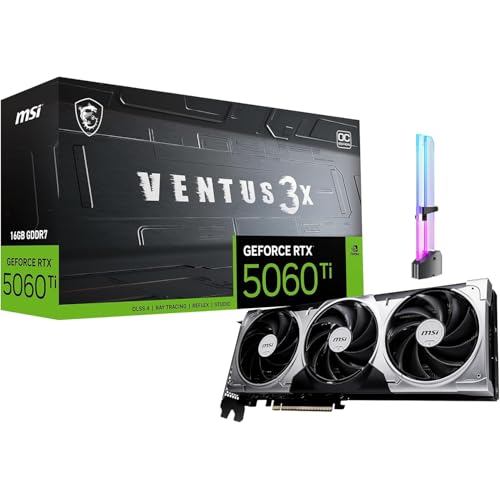
- 16GB GDDR7 suits local AI and creative workloads
- Triple-fan cooling helps sustain long sessions
- Strong 1440p gaming plus multi-monitor support
Best For: Users who want a balanced GPU for local AI, content creation, and 1440p gaming.
Best for Local LLMs
MSI RTX 5080 Ventus 3X OC 16GB

- 1801 AI TOPS and 5th Gen Tensor Cores
- 16GB GDDR7 for local LLM inference
- Triple-fan cooling with included GPU holder
Best For: Creators and AI users who want local inference headroom plus modern gaming performance.
Best for Easy Setup
MSI RTX 5070 Ti Ventus 3X PZ OC 16GB
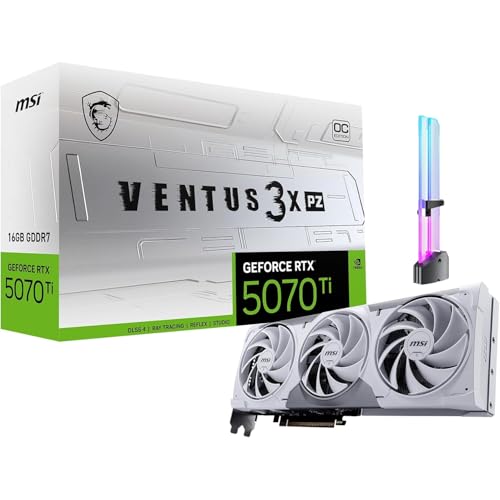
- 16GB GDDR7 for local AI and creator workflows
- 1406 AI TOPS with 5th Gen Tensor Cores
- Includes GPU holder and Project Zero-friendly cable routing
Best For: Creators and AI hobbyists running local LLMs, image tools, and modern games.
Best Entry-Level CUDA Pick

- NVIDIA Ampere with Tensor cores for AI-friendly workloads
- 6GB GDDR6 keeps the price and power needs lower
- Compact dual-fan MSI design fits smaller builds
Best For: People starting local AI on a budget and needing NVIDIA CUDA support.
Best for Local AI Workloads
MSI GeForce RTX 5070 Ti Shadow 3X OC 16GB

- 16GB GDDR7 helps with local LLMs and multitasking
- 1406 AI TOPS and Tensor Cores speed creator AI tasks
- Triple-fan cooling and GPU holder improve stability
Best For: Creators and AI hobbyists who need a capable GPU for local LLMs, editing, and gaming.
High-End Local AI Build
MSI RTX 5080 Ventus 3X OC White 16GB

- 16GB GDDR7 suits local AI inference and larger workloads.
- RTX 5080 Blackwell performance targets demanding compute tasks.
- White Ventus 3X cooler is a good fit for premium builds.
Best For: Creators and AI hobbyists building a high-performance local inference PC.
Best Heavy-Duty Pick

- 16GB GDDR7 with a 256-bit bus for demanding AI and creative projects
- Tensor Core support for local LLM inference and AI-assisted editing
- Triple-fan cooling and OC clocks for sustained high-end performance
Best For: Creators and AI enthusiasts who want one GPU for local inference, editing, and gaming.
Best for 16GB AI Workflows – MSI RTX 5060 Ti 16G Ventus 3X OC
If you want an msi graphics card for local ai that also pulls double duty for gaming, the MSI GeForce RTX 5060 Ti 16G Ventus 3X OC is a practical middle-ground pick. Its 16GB GDDR7 buffer gives AI tools more breathing room than 8GB cards, while the triple-fan cooler helps it stay steady during long creator sessions.
Best For: Buyers running local AI image tools, upscalers, and creative workloads who also want strong 1440p gaming performance.
Pros:
- 16GB GDDR7 is a solid fit for local AI, image generation, and GPU-heavy creative projects
- Trio-fan VENTUS cooling is built for longer gaming, rendering, and streaming sessions
- 3x DisplayPort 2.1b plus HDMI 2.1b makes multi-monitor creator setups easy
- Includes a GPU holder accessory to help reduce sag in heavier builds
Cons:
- Not the fastest option if you want maximum local AI throughput
- Requires a 600W recommended PSU, so older systems may need power upgrades
- PCIe Gen 5 x16 interface operates at x8, which may matter to spec-focused buyers
For a balanced msi graphics card for local ai, this model stands out more for practical VRAM capacity and all-around creator usability than for raw flagship speed. It makes the most sense if you want one GPU that can handle local AI tasks, rendering, and 1440p gaming without jumping to a much pricier class.
Best for Low-Profile Builds – MSI RTX 3050 LP 6G OC
If you need an msi graphics card for local ai without moving up to a power-hungry or oversized GPU, the MSI Gaming RTX 3050 LP 6G OC is a practical entry point. Its Ampere architecture includes Tensor Cores for AI workloads, while the 6GB GDDR6 frame buffer is enough for light local models, inference, and tinkering in a compact system.
Best For: Budget-conscious builders using small-form-factor PCs who want basic local AI capability plus everyday gaming and display support.
Pros:
- Low-profile design suits compact cases and space-limited builds
- RTX 3050 Ampere features include Tensor Cores for AI tasks
- 6GB GDDR6 and HDMI 2.1a/DisplayPort outputs add practical flexibility
Cons:
- 6GB VRAM is limiting for larger local AI models
- 96-bit memory bus is modest compared with higher-end GPUs
- Not ideal if you want fast training or heavier GPU compute
For buyers prioritizing size, price, and simple local inference, this is a sensible msi graphics card for local ai. It is best viewed as a compact starter GPU rather than a serious workstation card, but the balance of RTX features and low-profile fit makes it easy to recommend for entry-level experimentation.
Best for Local LLMs – MSI RTX 5080 Ventus 3X OC 16GB
If you want an msi graphics card for local ai that can also handle serious creative work, this RTX 5080 Ventus 3X OC is built around fast GDDR7 memory, strong Tensor performance, and modern display outputs. It’s a practical pick for users running on-device AI tools, local LLM chats, and GPU-accelerated editing without stepping all the way up to a workstation card.
Best For: Creators and AI enthusiasts who need 16GB of VRAM for local LLM inference, AI image/video workflows, and high-end gaming in one card.
Pros:
- 1801 AI TOPS and 5th Gen Tensor Cores suit local AI and creator workflows
- 16GB GDDR7 gives more headroom for on-device AI and multitasking
- Triple-fan cooling, plus an included GPU holder, helps support heavier builds
- DP 2.1b and HDMI 2.1b make it ready for multi-display, high-refresh setups
Cons:
- 16GB VRAM is capable, but not ideal for the largest local models
- High-end performance and features come with a premium price
- May be more card than casual users need for light AI experimentation
This is a strong msi graphics card for local ai if you want a balanced mix of inference performance, creator acceleration, and gaming support. It stands out most for users who need a modern GPU that can do private AI work today and still feel fast in demanding everyday workloads.
Best for Quiet Air Cooling – MSI RTX 5070 Gaming Trio OC 12G
If you want an msi graphics card for local ai that balances strong next-gen performance with cooler, quieter operation, the MSI RTX 5070 12G Gaming Trio OC is a smart middle-ground pick. Its Blackwell-based RTX 5070 core, 12GB GDDR7 memory, and triple-fan thermal design make it better suited to sustained model work than compact, budget-first cards.
Best For: Creators and hobbyists who want a quieter RTX 5070-class MSI card for local AI, inference, and mixed gaming use.
Pros:
- 12GB GDDR7 and RTX 5070 performance fit many local AI workloads well
- TRI FROZR 4 cooling and STORMFORCE fans are built for lower noise under load
- Nickel-plated copper baseplate and core pipes help maintain boost clocks
Cons:
- 12GB VRAM may be limiting for larger local AI models
- Triple-fan cooler needs a roomy case
For buyers comparing an msi graphics card for local ai, this model stands out more for thermals and acoustics than raw VRAM capacity. It is a practical choice if you want dependable CUDA-capable performance now and prefer a card that can stay composed during longer sessions.
Best for Easy Setup – MSI RTX 5070 Ti Ventus 3X PZ OC 16GB
If you want an msi graphics card for local ai that can handle creator tools and on-device models without feeling cramped, this RTX 5070 Ti Ventus 3X is a strong middle-high-end pick. Its 16GB of GDDR7 memory, 1406 AI TOPS, and Blackwell-era Tensor core support make it a practical fit for local LLM chat, image workflows, and mixed gaming workloads.
Best For: Creators and AI hobbyists who want a balanced card for local inference, content creation, and modern gaming.
Pros:
- 16GB GDDR7 gives more breathing room for local LLMs and heavier AI tasks
- 1406 AI TOPS and 5th Gen Tensor Cores help speed up creator and inference workflows
- DLSS 4 and strong ray tracing make it a capable gaming card too
- Included GPU holder and Project Zero-friendly design help with cleaner builds
Cons:
- 16GB is useful, but power users running larger models may still want more VRAM
- Its performance tier and feature set come at a premium versus basic gaming cards
- Best results for AI and rendering depend on software support and optimized workflows
This is a smart msi graphics card for local ai if you want a card that can do more than just game: it offers solid VRAM, modern AI acceleration, and a clean-build-friendly design in one package.
Best Entry-Level CUDA Pick – MSI RTX 3050 Ventus 2X 6G OC
If you want an msi graphics card for local ai without jumping to a high-power, high-cost model, this RTX 3050 6GB is a practical starting point. It brings NVIDIA’s Ampere architecture, Tensor cores, and 6GB of GDDR6 memory, which can be enough for lightweight inference, small models, and basic experimentation.
Best For: Beginners, students, and budget-conscious builders who need CUDA support for entry-level local AI work.
Pros:
- CUDA, Tensor cores, and Ampere support for AI-friendly software
- Low 6GB-class entry point is easier to fit into modest systems
- Compact dual-fan design suits smaller cases
- HDMI 2.1a and DisplayPort outputs for flexible setup
Cons:
- 6GB VRAM limits larger models and heavier local AI workloads
- 96-bit memory interface is modest for demanding tasks
- Not ideal if you want longer-term headroom for ML growth
For buyers comparing an msi graphics card for local ai, this card makes sense when affordability and NVIDIA compatibility matter more than raw capacity. It’s a sensible entry point for trying local inference, but power users will likely outgrow the memory ceiling quickly.
Best for Local AI Workloads – MSI GeForce RTX 5070 Ti Shadow 3X OC 16GB
If you want an msi graphics card for local ai that can also handle modern gaming and creator apps, this RTX 5070 Ti Shadow 3X OC is a strong middle-to-high-end option. Its 16GB of GDDR7 memory, 1406 AI TOPS, and NVIDIA Tensor Core features make it a practical pick for on-device LLMs, image generation, and AI-assisted editing without jumping to a much more expensive flagship card.
Best For: Creators, power users, and AI hobbyists who want a balanced GPU for local LLM inference, content creation, and 1440p gaming.
Pros:
- 16GB GDDR7 and 256-bit bandwidth give you useful headroom for local AI models and multitasking
- 1406 AI TOPS plus 5th Gen Tensor Cores help speed up AI creation, upscaling, and denoise workflows
- Triple-fan TORX cooling and included GPU holder support sustained performance and build stability
- DLSS 4, Reflex 2, and ray tracing make it versatile for both work and play
Cons:
- It is still a premium purchase if your AI workloads are light or occasional
- Local AI users with very large models may still want more VRAM than 16GB
- Requires a well-sized case and quality power supply for the best experience
This is a compelling msi graphics card for local ai if you want a card that does more than one job well. It is not the cheapest route, but the memory capacity, cooling, and AI-focused specs make it a sensible buy for private AI tools, creator pipelines, and gaming in the same system.
High-End Local AI Build – MSI RTX 5080 Ventus 3X OC White 16GB
If you want a fast msi graphics card for local ai, this RTX 5080 model brings 16GB of GDDR7 memory, a wide 256-bit bus, and next-gen Blackwell performance in a cooling-focused Ventus design. It’s a strong fit for running heavier models, accelerating inference, and keeping a premium workstation-style build looking clean.
Best For: Creators and AI hobbyists who want a high-performance GPU for local inference, mixed productivity, and a white-themed build.
Pros:
- 16GB GDDR7 gives you solid headroom for local AI workloads and larger model files.
- RTX 5080 / Blackwell platform offers strong acceleration for inference and compute-heavy tasks.
- Ventus 3X cooling is designed to keep performance steady under sustained loads.
- White, minimal look works well in modern, showcase PC builds.
Cons:
- 16GB VRAM is good, but some larger local AI models may still want more.
- High-end pricing may be hard to justify if you only need light AI or gaming use.
- Large triple-fan cards need enough case space and airflow.
For buyers prioritizing speed, style, and practical local AI performance, this msi graphics card for local ai sits in a strong sweet spot. It’s not the cheapest option, but the combination of 16GB GDDR7, modern outputs, and robust cooling makes it a compelling pick for serious desktop AI setups.
Best Heavy-Duty Pick – MSI RTX 5080 Triple Fan OC
If you want an msi graphics card for local ai that can also handle serious gaming and creator work, this RTX 5080 is built for the job. Its Blackwell architecture, 16GB of GDDR7 memory, and Tensor Core acceleration make it a strong fit for on-device AI workflows without giving up high-end graphics performance.
Best For: Creators, power users, and AI hobbyists who want fast local LLM inference, AI-assisted editing, and a GPU that still performs well in modern games.
Pros:
- 16GB GDDR7 and a 256-bit bus help reduce VRAM pressure in heavier AI and creative tasks
- 5th Gen Tensor Cores support local LLM inference and AI-powered photo/video workflows
- Factory OC clocks and triple-fan cooling are built for sustained performance
- DisplayPort 2.1b and HDMI 2.1b provide flexible multi-monitor connectivity
Cons:
- Premium pricing puts it out of reach for many casual buyers
- 16GB VRAM is solid, but larger AI models may still benefit from more memory
- Overkill if you only need basic productivity or light gaming
This is a compelling msi graphics card for local ai if you want a single GPU that balances inference speed, creator features, and top-tier gaming headroom. It makes the most sense when you need one card to do everything well rather than the cheapest path to local AI.
How We Picked the Best Msi Graphics Card for Local AI
We prioritized VRAM capacity, memory bandwidth, current-generation architecture, and practical cooling designs. For Msi Graphics Card for Local AI use, those factors usually matter more than gaming frame rates because they directly affect model size, responsiveness, and stability under sustained load.
We also considered power requirements, size, and value across tiers so you can match the card to your workload instead of overspending on performance you will not use.
Quick Comparison
In simple terms: 6GB cards are best for light experimentation, 12GB cards are a reasonable midrange starting point, and 16GB cards are the safer choice for larger local models and smoother multitasking. Among the options here, the RTX 5070 Ti and RTX 5080 class cards offer the strongest balance of VRAM and AI-focused performance, while RTX 3050 models are better for budget or entry-level use.
Key Buying Factors for Msi Graphics Card for Local AI
VRAM Comes First
Local AI workloads are often limited by memory before raw compute. More VRAM lets you load larger models, use higher context lengths, and reduce offloading to system memory. If you plan to experiment with local LLMs regularly, 16GB is the more comfortable target.
Memory Bandwidth and Architecture
Newer GPUs with faster GDDR7 and wider memory buses tend to move data more efficiently, which helps with inference speed and overall responsiveness. That matters when prompts are long, models are larger, or you want faster iteration.
Cooling and Form Factor
AI workloads can run for long stretches, so a stronger cooler can improve sustained performance. Triple-fan designs are usually better for heavier use, while compact and dual-fan cards make sense in smaller systems with tighter space constraints.
Power Supply and Case Clearance
Check wattage, connector type, and physical dimensions before buying. High-end MSI GPUs may need more PSU headroom and case room than a typical gaming build.
Who Should Buy Which Msi Graphics Card for Local AI?
Choose a 6GB RTX 3050 if you are just learning local AI, testing smaller models, or building a low-cost system with modest power needs.
Choose a 12GB RTX 5070 if you want a balanced midrange card for everyday AI experimentation, mixed creative work, and better future flexibility.
Choose a 16GB RTX 5070 Ti or RTX 5080 if you care about smoother local LLM inference, larger model support, and a more serious long-term AI setup.
For most buyers focused on Msi Graphics Card for Local AI, the smartest path is to buy as much VRAM as your budget allows, then confirm the card fits your case and power supply.