
Choosing a Dell AI workstation desktop is about more than raw specs. The right system should balance AI acceleration, multitasking speed, storage, and long-term upgrade potential.
Below, we’ve narrowed the field to 10 strong options for business users, creators, and power buyers who want a dependable desktop built for modern workloads in 2026.
Best 10 Dell AI Workstation Desktop Picks for 2026
Best for AI-Ready Business Use
Dell Tower Desktop, Core Ultra 5, 16GB, 1TB

- Intel Core Ultra 5 with Intel AI Boost NPU
- 16GB DDR5 RAM and 1TB PCIe NVMe SSD
- Windows 11 Pro with HDMI, DP, Wi‑Fi 6, and Bluetooth
Best For: Small businesses and professionals who want a secure, AI-capable everyday workstation.
Best for AI Productivity
Dell Pro Tower Plus Business Desktop

- Core Ultra 5 with 13 TOPS NPU for AI-assisted tasks
- 16GB DDR5 RAM and 512GB SSD for smooth multitasking
- Triple 4K monitor support for an expanded workspace
Best For: Small businesses and professionals who want an AI-ready tower for office productivity and multi-monitor work.
Best for Heavy Multitasking
Dell Pro Tower Plus QBT1250 Business Desktop
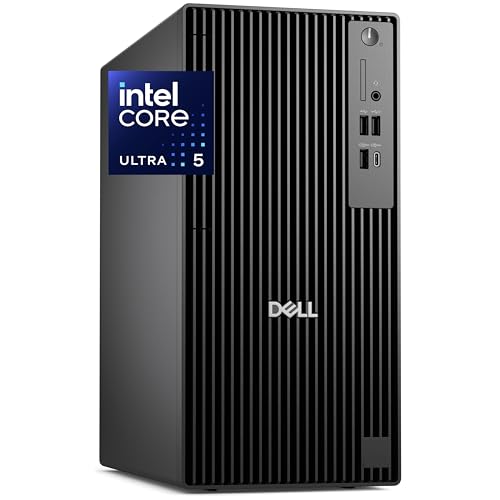
- Core Ultra 5 with AI-ready NPU
- 64GB DDR5 RAM and 2TB PCIe SSD
- Native triple 4K DisplayPort support
Best For: Financial analysts and power users who need fast multitasking and triple-monitor productivity.
Best for AI-Ready Power
Dell Tower Plus EBT2250 Workstation Desktop

- Intel Ultra 7-265 + RTX 5060 for strong CPU/GPU performance
- 32GB DDR5 RAM and 1TB PCIe SSD for fast multitasking
- WiFi 7, Thunderbolt 4, and triple-display support
Best For: Creators and professionals who want a capable, modern tower for productivity and graphics work.
Best for Business Productivity
Dell Pro Tower i5-14500 vPro Desktop

- 14-core i5-14500 vPro handles demanding office multitasking
- 16GB DDR5 + 512GB SSD deliver quick everyday responsiveness
- Dual 4K display support is great for spreadsheets and dashboards
Best For: Analysts and office professionals who need a secure, responsive tower for daily productivity.
Best for AI-Ready Productivity
Pro Tower Plus Business Desktop, Core Ultra 5

- AI-focused Intel Core Ultra 5 processor
- 32GB DDR5 for responsive multitasking
- 1TB SSD and Windows 11 Pro included
Best For: Professionals who need a dependable AI-ready business tower for productivity and everyday workloads.
Best for Multi-Monitor AI Workspaces

- Core Ultra 5 with 13 TOPS NPU for AI-ready productivity
- 32GB DDR5 RAM and 1TB SSD for smooth multitasking
- Drives up to four 4K monitors in an ultra-compact chassis
Best For: Office and remote-work users who need a compact AI-ready desktop with strong multi-display support.
Best Heavy-Duty Pick
Dell Pro Tower Plus Business Desktop
- Core Ultra 5 chip with 13 TOPS NPU for AI tasks
- 16GB DDR5 RAM and 1TB SSD for smooth multitasking
- Triple 4K monitor support for a more productive workspace
Best For: Small businesses and office users who want an AI-ready tower for daily productivity.
Best for AI Multitasking
Dell Pro Tower Plus QBT1250 Business Desktop
- AI-ready Intel Core Ultra with NPU support
- Native triple 4K display output
- 16GB DDR5 RAM and 512GB PCIe SSD
Best For: Business users who want AI-assisted productivity and easy multi-monitor setups.
Best for AI-Ready Business Use – Dell Tower Desktop, Core Ultra 5, 16GB, 1TB
If you want a practical dell ai workstation desktop for office productivity, local AI features, and dependable multitasking, this Dell Tower is built around Intel Core Ultra 5, DDR5 memory, and fast NVMe storage. It’s a solid fit for buyers who need Windows 11 Pro, wired display support, and modern wireless connectivity without moving into a higher-priced creator rig.
Best For: Small businesses, remote teams, and professionals who want a secure everyday workstation with AI acceleration.
Pros:
- Intel Core Ultra 5 with Intel AI Boost NPU for local AI workloads
- 16GB DDR5 RAM and 1TB PCIe NVMe SSD for fast, responsive performance
- Windows 11 Pro adds business-ready security and remote management features
- HDMI, DisplayPort, Wi‑Fi 6, and Bluetooth support flexible office setups
Cons:
- Not intended for heavy gaming or workstation-class graphics tasks
- No discrete GPU listed, so GPU-accelerated creative work may be limited
- May be more machine than casual home users need
Overall, this dell ai workstation desktop makes the most sense for buyers who value reliability, speed, and business features over flashy extras. It’s a balanced tower that should handle day-to-day AI-assisted productivity and standard office workloads with ease.
Best for AI Productivity – Dell Pro Tower Plus Business Desktop
If you want a practical dell ai workstation desktop for everyday business work, the Dell Pro Tower Plus is built around speed, stability, and multitasking. Its Intel Core Ultra 5 processor with built-in NPU helps handle AI-accelerated apps, while the DDR5 memory, SSD storage, and triple-monitor support make it a strong fit for busy office setups.
Best For: Small businesses, remote professionals, and power users who need an AI-ready desktop for office apps, video calls, and multi-monitor productivity.
Pros:
- Intel Core Ultra 5 with NPU support for AI-assisted workflows
- 16GB DDR5 RAM and 512GB SSD for responsive multitasking
- Triple 4K monitor support expands your workspace
- Windows 11 Pro and Gigabit Ethernet suit business environments
Cons:
- Not aimed at high-end graphics or gaming workloads
- Storage may feel modest for large media libraries
- Tower design takes up more desk space than compact desktops
Overall, this Dell tower makes sense if you want a dependable dell ai workstation desktop that prioritizes office productivity over flashy extras. It offers the right mix of AI features, connectivity, and business-ready hardware for teams and solo professionals who live in spreadsheets, meetings, and multitasking.
Best Budget – Dell Tower Desktop ECT1250 with Core Ultra 7
If you want a practical dell ai workstation desktop for everyday business work, the Dell Tower Desktop ECT1250 brings Intel Core Ultra 7 performance, built-in AI support, and a clean tower design that fits well in an office or home setup.
Best For: Professionals who want a dependable Windows 11 Pro desktop for multitasking, light creator work, and AI-accelerated productivity.
Pros:
- Intel Core Ultra 7 processor adds built-in AI support for faster productivity tasks
- Tool-less side panel makes future upgrades and maintenance easier
- Supports multiple monitors for a flexible workstation layout
- Includes Windows 11 Pro, keyboard, mouse, and 1-year onsite service
Cons:
- UHD Graphics is fine for office use but not ideal for demanding gaming or heavy 3D work
- 16GB memory is solid, though power users may want to upgrade sooner
Overall, this dell ai workstation desktop is a sensible pick if you value business-ready features, easy expandability, and AI-focused CPU support over flashy hardware extras.
Best for Heavy Multitasking – Dell Pro Tower Plus QBT1250 Business Desktop
If you need a dell ai workstation desktop that can handle serious office workloads, the Dell Pro Tower Plus is built around a Core Ultra processor, 64GB of DDR5 memory, and a fast 2TB SSD. It’s a practical fit for users who juggle analytics, large spreadsheets, multiple apps, and AI-assisted productivity without wanting to move up to a full workstation-class GPU setup.
Best For: Financial analysts, power users, and business teams that need fast multitasking, triple-monitor support, and AI-ready Windows productivity.
Pros:
- Intel Core Ultra 5 with built-in NPU for AI-enhanced workflows
- 64GB DDR5 RAM and 2TB PCIe SSD for fast, heavy multitasking
- Native triple 4K DisplayPort output supports a strong multi-monitor setup
- Windows 11 Pro, TPM 2.0, and business-focused expandability
Cons:
- No dedicated graphics card for more demanding creative or 3D work
- Large tower design takes up more desk space than compact desktops
- DVD drive and legacy ports are useful, but not essential for every buyer
This Dell Pro Tower Plus makes sense if your dell ai workstation desktop priority is speed, stability, and monitor flexibility rather than graphics-heavy rendering. It’s especially appealing for office pros who want a dependable business desktop that can keep up with modern AI-assisted workflows.
Best for AI-Ready Power – Dell Tower Plus EBT2250 Workstation Desktop
If you want a Dell AI workstation desktop that blends creator-grade performance with modern expandability, the Dell Tower Plus EBT2250 is a strong fit. It pairs an Intel Ultra 7-265 CPU with RTX 5060 graphics, 32GB of DDR5 memory, and a fast 1TB PCIe SSD for smooth multitasking, content work, and light AI-accelerated workloads.
Best For: Creators, professionals, and power users who want a ready-to-run tower with strong CPU/GPU performance and business-friendly Windows 11 Pro.
Pros:
- Intel Ultra 7-265 and RTX 5060 deliver strong all-around performance for work and graphics tasks.
- 32GB DDR5 RAM and 1TB NVMe SSD provide fast multitasking and quick load times.
- Good connectivity includes WiFi 7, Bluetooth 5.4, Ethernet, Thunderbolt 4, and multiple display outputs.
- Comes with keyboard and mouse, so setup is straightforward out of the box.
Cons:
- 460W power supply may limit heavier future GPU upgrades.
- Not a compact system, so it needs more desk or floor space than an all-in-one.
This Dell AI workstation desktop makes sense if you want a balanced tower that is ready for demanding everyday productivity, creative apps, and future display expansion without stepping into a full workstation price tier.
Best for Business Productivity – Dell Pro Tower i5-14500 vPro Desktop
If you want a practical dell ai workstation desktop for office work, reporting, and multitasking, this Dell Pro Tower is built around a 14th Gen Core i5-14500 vPro, 16GB DDR5 RAM, and a fast 512GB PCIe SSD. It delivers the kind of everyday responsiveness business users need, with enough headroom for spreadsheets, conferencing, web apps, and light content creation.
Best For: Analysts, office teams, and professionals who need a secure, reliable tower for daily productivity and dual-monitor workflows.
Pros:
- 14-core i5-14500 vPro offers strong business-class performance for multitasking
- 16GB DDR5 and 512GB SSD keep boot times and app loading fast
- Intel UHD 770 supports dual 4K displays for a more efficient workspace
- Windows 11 Pro, BitLocker, and vPro add enterprise-friendly security and manageability
Cons:
- No dedicated GPU, so it is not ideal for heavy AI training or creative rendering
- No built-in Wi-Fi, so wired Ethernet or a separate adapter may be needed
- 512GB storage may feel limited for larger local project libraries
This is a solid choice if you need a dependable dell ai workstation desktop for productivity-first workloads rather than graphics-heavy computing. It focuses on security, speed, and practical expansion-friendly business use.
Best for AI-Ready Productivity – Pro Tower Plus Business Desktop, Core Ultra 5
If you want a practical dell ai workstation desktop for business tasks, this Pro Tower Plus keeps the focus on modern efficiency rather than flashy extras. The Intel Core Ultra 5 235, 32GB of DDR5 memory, and 1TB SSD make it a solid fit for multitasking, office workflows, and AI-assisted apps that benefit from newer platform features.
Best For: Professionals who want a dependable tower for productivity, light content creation, and everyday AI-enabled workflows.
Pros:
- Core Ultra 5 platform brings AI-focused performance for modern workloads
- 32GB DDR5 RAM supports smoother multitasking and heavier business use
- 1TB SSD offers fast boot times and ample local storage
- Windows 11 Pro is a strong fit for business and IT environments
Cons:
- Not a dedicated graphics workstation for demanding 3D or GPU rendering
- Enterprise-style tower design may be larger than some users need
Overall, this dell ai workstation desktop makes sense if you want a well-rounded business tower with current-generation hardware and room to handle serious day-to-day workloads. It is a sensible choice when stability, memory capacity, and AI-ready CPU features matter more than gaming or high-end creative graphics.
Best for Multi-Monitor AI Workspaces – Dell Pro Micro Mini Desktop
If you want a compact dell ai workstation desktop that can handle everyday business apps and AI-assisted tasks without taking up much room, this Dell Pro Micro is a strong fit. It pairs Intel Core Ultra 5 performance with a 13 TOPS NPU, plus 32GB of RAM and a 1TB SSD for smooth multitasking.
Best For: Office users, analysts, and remote professionals who need a tiny desktop with serious multi-monitor support and Windows 11 Pro.
Pros:
- Intel Core Ultra 5 235T with built-in NPU for AI-accelerated productivity
- 32GB DDR5 RAM and 1TB PCIe SSD keep apps and files responsive
- Supports up to four 4K displays for large, efficient workspaces
- Ultra-compact design with Wi-Fi 6, Bluetooth, and Windows 11 Pro
Cons:
- Integrated graphics are fine for productivity, but not ideal for gaming or heavy 3D work
- Micro form factor limits upgrade room compared with larger towers
This dell ai workstation desktop stands out most for practical business setups where desk space is tight but productivity demands are high. If your priority is AI-ready everyday performance, clean cable management, and support for multiple 4K monitors, it makes a lot of sense.
Best Heavy-Duty Pick – Dell Pro Tower Plus Business Desktop
If you want a practical dell ai workstation desktop for everyday business work, the Dell Pro Tower Plus is built around a Core Ultra 5 processor with an NPU that can speed up AI-assisted tasks in apps like Zoom, Adobe, and Microsoft Office. It also gives you the kind of core specs that matter most for productivity: 16GB of DDR5 memory, a 1TB SSD, and support for three 4K displays.
Best For: Small businesses, office professionals, and multitaskers who want a dependable tower with AI acceleration and triple-monitor support.
Pros:
- Intel Core Ultra 5 with 13 TOPS NPU for AI-enhanced workflows
- 16GB DDR5 RAM and 1TB SSD for fast multitasking and storage
- Triple 4K monitor support for a spacious multi-display setup
- Windows 11 Pro and Gigabit Ethernet suit business environments
Cons:
- 16GB RAM may feel limiting for heavier creative or data workloads
- Not the right choice if you need a compact or silent desktop
- Integrated AI features depend on software support
Overall, this dell ai workstation desktop makes sense if you value reliable business performance, AI-ready efficiency, and a flexible tower design over flashy extras. It’s a solid fit for offices that want a straightforward machine that can handle modern productivity demands without overcomplicating the setup.
Best for AI Multitasking – Dell Pro Tower Plus QBT1250 Business Desktop
If you want a dell ai workstation desktop that’s built for everyday business productivity, the Dell Pro Tower Plus QBT1250 is a solid fit. It pairs Intel Core Ultra processing with a dedicated NPU, triple 4K display support, and enterprise-friendly security features, making it a practical choice for office teams and power users.
Best For: Financial analysts, programmers, and business users who want AI-assisted productivity, strong multitasking, and easy multi-monitor setups.
Pros:
- Intel Core Ultra 5 with NPU support for AI-enabled workflows
- Native triple 4K DisplayPort output for multi-monitor productivity
- 16GB DDR5 RAM and 512GB PCIe SSD for fast everyday performance
- Windows 11 Pro, TPM 2.0, and serviceable tower design for business use
Cons:
- Integrated graphics are fine for productivity, but not ideal for heavy 3D work
- 16GB RAM may feel limiting for very large datasets or virtual machines
- Desktop tower format takes more space than a compact office PC
Overall, this dell ai workstation desktop is strongest as a dependable office tower for AI-assisted tasks, triple-monitor workflows, and IT-managed business environments rather than creative or gaming-heavy workloads.
How We Picked the Best Dell AI Workstation Desktop
We focused on Dell systems that bring together practical AI features, dependable business hardware, and configurations that make sense for real workloads. Priority went to newer Intel Core Ultra platforms, strong memory and SSD options, Windows 11 Pro, and ports or expansion that support office, AI-assisted productivity, and light creative work.
We also looked at the spread of form factors. A good Dell AI Workstation Desktop can be a compact micro PC, a standard tower, or a higher-end tower plus build with better thermals and upgrade headroom.
Quick Comparison
For most buyers, the main decision is whether you need value, capacity, or performance. Core Ultra 5 models are the sweet spot for general business use and AI-assisted productivity. Core Ultra 7 systems are better if you run heavier multitasking, larger files, or more demanding workflows. If you need the strongest overall desktop for graphics or workstation-style tasks, look for the tower plus configurations with dedicated GPUs and larger power supplies.
Memory matters too: 16GB is fine for standard office work, but 32GB or 64GB is better for data-heavy multitasking, virtual meetings, browser-heavy workflows, and future-proofing.
Key Buying Factors for Dell AI Workstation Desktop
Processor and AI Capability
Look for Intel Core Ultra processors with an NPU if AI features are part of your workflow. They can help with background tasks, collaboration tools, and on-device AI workloads while reducing pressure on the CPU.
Memory and Storage
Choose 16GB only for lighter use. If you keep many apps open or work with large spreadsheets, 32GB is a better baseline. For local file storage and snappy load times, 1TB SSD options are generally the safest long-term pick.
Expandability and Ports
Business desktops should offer enough display outputs, USB ports, and upgrade room for future needs. If you use multiple monitors, prioritize models with more video connectivity and stronger graphics support.
Size and Use Case
Micro desktops save space and suit front-desk or office deployments, while towers are better if you want easier upgrades, better cooling, and more performance flexibility.
Who Should Buy Which Dell AI Workstation Desktop?
If you want the best value for standard productivity, a Core Ultra 5 tower with 16GB RAM is usually enough. If your work involves heavier multitasking or you want extra headroom, step up to 32GB RAM. Buyers who need maximum storage, multi-monitor flexibility, or stronger all-around workstation capability should focus on the higher-spec tower plus models.
If space is tight, the micro desktop is the most practical choice. If you want a Dell AI Workstation Desktop that can grow with your business, choose a full tower with the most upgrade-friendly configuration you can justify today.