
As you explore the gaming world in 2026, you’ll want to know about the top 10 1440p gaming monitors at 240Hz that can elevate your experience. These monitors promise stunning visuals and fluid performance, essential for competitive play. With advanced features like G-SYNC and FreeSync, they’re designed to enhance your gameplay. But what specific models should you consider? Let’s take a closer look at the standout options available this year.
Acer Nitro 27″ WQHD Gaming Monitor (XV272U W2bmiiprx)

If you’re serious about gaming and crave a visually stunning experience, the Acer Nitro 27″ WQHD Gaming Monitor (XV272U W2bmiiprx) is a top choice. With a resolution of 2560 x 1440 and an IPS screen, you’ll enjoy vibrant colors and sharp images. The impressive refresh rate of up to 240Hz, coupled with a lightning-fast response time of 1ms, guarantees smooth gameplay. Plus, with AMD FreeSync Premium technology, you’ll minimize screen tearing. Ergonomically designed for comfort, it offers tilt, height adjustment, and swivel options. Connectivity is a breeze with multiple ports, making it perfect for any gaming setup.
Best For: Serious gamers seeking a high-performance monitor with vibrant visuals and smooth gameplay.
Pros:
- High Refresh Rate: Offers up to 240Hz refresh rate for ultra-smooth gaming experiences.
- Fast Response Time: Features a 1ms response time, minimizing motion blur and ghosting during fast-paced action.
- Ergonomic Design: Provides multiple ergonomic adjustments for comfortable viewing angles.
Cons:
- Limited HDR Performance: Only supports DisplayHDR 400, which may not meet the expectations for high-end HDR gaming.
- Built-in Speakers: The 2 Watt speakers may lack sufficient audio quality for immersive gaming without external speakers.
- Price Point: May be considered expensive compared to other monitors with similar specifications in the market.
SANSUI 27″ Gaming Monitor (1440p, 260hz/240hz)

The SANSUI 27″ Gaming Monitor is a standout choice for competitive gamers seeking an edge, thanks to its impressive 260Hz refresh rate via DisplayPort. With a WQHD resolution of 2560 x 1440P and a fast IPS panel boasting a 1ms MPRT response time, you’ll experience stunning visuals with minimal lag. HDR10 support and a wide color gamut guarantee vibrant colors, while FreeSync Premium technology eliminates screen tearing. With multiple connectivity options, including two DisplayPorts and two HDMI ports, you can easily set it up. Plus, enjoy peace of mind with a robust warranty and lifetime technical support.
Best For: Competitive gamers who prioritize high refresh rates and vibrant visuals in their gaming experience.
Pros:
- High refresh rates of 260Hz (DisplayPort) and 240Hz (HDMI) for ultra-smooth gameplay.
- Fast IPS panel with 1ms MPRT response time ensures minimal lag and quick response to in-game actions.
- HDR10 support and a wide color gamut (DCI-P3 98% and sRGB 130%) provide stunning and vibrant visuals.
Cons:
- Limited to 144Hz when using HDMI 2.0, which may not fully utilize the monitor’s capabilities for some users.
- Brightness of 320 Nits may not be sufficient for very bright environments or HDR content.
- May require specific cables to achieve optimal performance at 2560x1440p@260Hz.
INNOCN 27″ Gaming Monitor (27G2T)

For competitive gamers seeking an edge, the INNOCN 27″ Gaming Monitor (27G2T) stands out with its impressive 240Hz refresh rate and lightning-fast 1ms response time. With a QHD resolution of 2560 x 1440P, you’ll enjoy stunning visuals and vibrant colors, thanks to its 99% sRGB color gamut. This monitor’s G-SYNC compatibility guarantees tear-free gaming, perfect for FPS and RTS genres. Its ultra-slim design, coupled with tilt adjustability, makes for a comfortable viewing experience. Plus, with HDMI 2.1 and DisplayPort 1.4 connectivity, it seamlessly connects to desktops, gaming laptops, and consoles. Experience gaming like never before!
Best For: Competitive gamers looking for high performance and stunning visuals in their gaming experience.
Pros:
- High refresh rate of 240Hz and 1ms response time for smooth gameplay.
- G-SYNC compatible for tear-free gaming, enhancing performance in fast-paced genres.
- Ultra-slim and ergonomic design with tilt adjustability for comfortable extended use.
Cons:
- Limited to 2560 x 1440P resolution, which may not meet the needs of those seeking 4K displays.
- Weight of 12.32 lbs may make it less portable compared to lighter monitors.
- Potentially higher price point compared to standard monitors without advanced gaming features.
AOC Gaming Q27G41ZE 27 inch QHD IPS Gaming Monitor

Offering an impressive 240Hz refresh rate, the AOC Gaming Q27G41ZE 27 inch QHD IPS Gaming Monitor is perfect for competitive gamers seeking a smooth and responsive experience. With its 2560×1440 resolution and 300-nit brightness, you’ll enjoy vibrant visuals and wide viewing angles. The 0.3ms MPRT response time guarantees quick reactions, while Adaptive-Sync support enhances performance with AMD and NVIDIA GPUs. Its sleek, three-sided frameless design fits seamlessly in any setup. Plus, with multiple connectivity options and a user-friendly OSD menu, it’s easy to customize your gaming experience. Enjoy the peace of mind with a 3-year warranty too!
Best For: Competitive gamers looking for high refresh rates and vibrant visuals in their gaming monitor.
Pros:
- 240Hz refresh rate provides ultra-smooth gameplay for fast-paced action.
- 0.3ms MPRT response time ensures minimal motion blur and quick reaction times.
- Adaptive-Sync support enhances compatibility with both AMD and NVIDIA graphics cards.
Cons:
- Limited to HDMI 2.0, which may restrict higher refresh rates on some devices.
- Brightness of 300 nits may not be sufficient for very bright environments.
- The tilt adjustment range might not be enough for all ergonomic preferences.
LG Ultragear 27-inch OLED Gaming Monitor (27GS93QE)

Experience immersive gaming like never before with the LG Ultragear 27-inch OLED Gaming Monitor (27GS93QE). This stunning 27-inch OLED display boasts a QHD 1440p resolution and an impressive 240Hz refresh rate, ensuring buttery-smooth visuals. With a lightning-fast 0.03ms response time and rich colors covering up to 98.5% of the DCI-P3 spectrum, every detail pops. Plus, it’s NVIDIA G-SYNC and AMD FreeSync Premium Pro compatible to eliminate tearing. The sleek, adjustable design and anti-glare screen enhance your setup, while HDMI 2.1 and DisplayPort 1.4 connectivity maximize performance. Enjoy peace of mind with a 2-year warranty for added protection.
Best For: Gamers seeking a high-performance monitor with stunning visuals and advanced features for an immersive gaming experience.
Pros:
- Exceptional display quality with 27-inch OLED, QHD resolution, and 240Hz refresh rate for smooth and vibrant visuals.
- Compatibility with G-SYNC and FreeSync to eliminate screen tearing and provide a seamless gaming experience.
- Ergonomic design with adjustable height, tilt, and pivot options for optimal comfort during long gaming sessions.
Cons:
- Higher price point compared to standard monitors, which may not be suitable for budget-conscious consumers.
- Limited availability of HDMI 2.1 content may restrict the full potential of the monitor’s features initially.
- Potential burn-in issues with OLED technology if static images are displayed for prolonged periods.
SANSUI 34 Inch Ultrawide Curved Gaming Monitor

The SANSUI 34 Inch Ultrawide Curved Gaming Monitor is an ideal choice for gamers seeking an immersive experience with its stunning UWQHD resolution of 3440×1440. Its 1500R curvature enhances your field of view, making every game feel more dynamic. With a blazing 240Hz refresh rate and a rapid 1ms response time, you’ll enjoy smooth, tear-free gameplay. The HDR400 and vibrant color coverage of 130% sRGB guarantee stunning visuals. Plus, Freesync support and AI features like Crosshair and Sniper Scope give you a competitive edge. With multiple HDMI2.1 and DP ports, it’s perfect for consoles and PCs alike.
Best For: Gamers looking for an immersive experience with high-resolution visuals and rapid response times.
Pros:
- Exceptional UWQHD resolution (3440×1440) with impressive color coverage (130% sRGB, 97% DCI-P3).
- High refresh rate of 240Hz and 1ms response time for smooth and responsive gameplay.
- Multiple connectivity options including HDMI2.1 and DP 1.4, along with useful AI features for enhanced gaming.
Cons:
- The 1500R curvature may not be suitable for everyone’s viewing preference.
- Some users may find the brightness (450 nits) insufficient for bright environments.
- Limited stand adjustments (tilt only) may not provide optimal ergonomics for all users.
INNOCN 24.5 Inch Gaming Monitor (25G2S)

For gamers seeking a competitive edge, the INNOCN 24.5 Inch Gaming Monitor (25G2S) stands out with its impressive 240Hz refresh rate and rapid 1ms response time. This monitor features a QHD resolution (2560 x 1440) on a Fast IPS display, ensuring vibrant colors with a 99% sRGB gamut. Enjoy a tear-free gaming experience thanks to G-SYNC compatibility, while the ultra-narrow bezels and tilt-adjustable metal stand enhance its sleek design. With HDMI 2.1 and DisplayPort 1.4 ports, it connects easily to various devices. Plus, eye care features like blue light reduction keep your eyes comfortable during those long gaming sessions.
Best For: Competitive gamers looking for high-performance visuals and rapid response times for an enhanced gaming experience.
Pros:
- High Refresh Rate: The 240Hz refresh rate ensures ultra-smooth gameplay and reduced motion blur.
- Vibrant Colors: 99% sRGB color gamut provides deeper colors and vivid graphics for immersive visuals.
- Eye Care Features: Blue light reduction and flicker-free technology help minimize eye strain during long gaming sessions.
Cons:
- Weight: At 8.98 lbs, it may be less portable compared to lighter monitors.
- Limited Adjustability: While it has a tilt-adjustable stand, it lacks height and swivel adjustments.
- Price Point: Higher-end features may come with a more premium price, which might not fit all budgets.
CRUA 27” Curved Gaming Monitor

Looking for an immersive gaming experience? The CRUA 27” Curved Gaming Monitor delivers just that with its stunning 2K QHD resolution and 260Hz refresh rate. The 1800R curvature wraps around your view, pulling you into the action. Thanks to the VA panel, you’ll enjoy deeper contrasts and vibrant colors with 120% sRGB coverage. Plus, AMD FreeSync guarantees smooth gameplay without screen tearing. With HDMI 2.0 and DisplayPort 1.4, you can connect easily to your devices. A built-in blue light filter protects your eyes during long gaming sessions, making this monitor a top pick for serious gamers.
Best For: Serious gamers looking for an immersive and responsive gaming experience with vibrant visuals and smooth gameplay.
Pros:
- High refresh rate of 260Hz ensures fluid motion and reduces lag during fast-paced gaming.
- 2K QHD resolution provides sharper images with more detail compared to standard 1080p monitors.
- Built-in blue light filter reduces eye strain, making it suitable for long gaming sessions.
Cons:
- Curved design may not appeal to everyone and could take time to get used to.
- Limited built-in speaker quality compared to dedicated audio systems.
- Higher resolution and refresh rates may require a powerful graphics card for optimal performance.
SANSUI Gaming Monitor 27 inch 1440p 300Hz
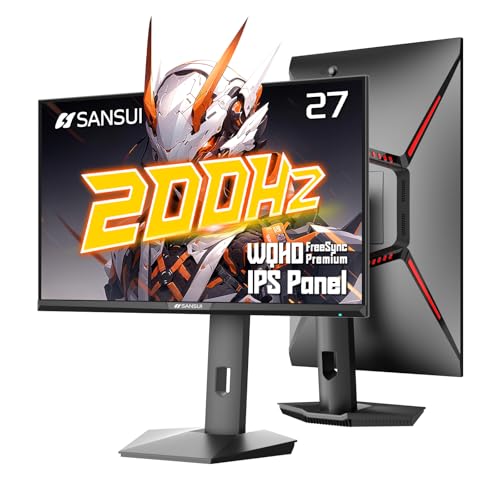
Experience lightning-fast gameplay with the SANSUI Gaming Monitor, featuring an impressive 300Hz refresh rate that’s perfect for competitive gamers. With a stunning 27-inch WQHD display at 2560 x 1440P, you’ll enjoy vibrant colors and sharp details. The 1ms response time and FreeSync Premium guarantee smooth visuals without tearing. Ergonomically designed, the adjustable stand allows for a customized viewing experience. Connectivity is versatile with multiple DisplayPort and HDMI options, plus you get a lifetime of technical support. With AI features like Low Blue Light and gaming assistants, this monitor elevates your gaming experience to new heights.
Best For: Competitive gamers seeking a high-performance monitor with exceptional refresh rates and vibrant visuals.
Pros:
- 300Hz refresh rate ensures ultra-smooth gameplay, reducing motion blur during fast-paced action.
- 1ms response time and FreeSync Premium technology minimize screen tearing and lag for a seamless gaming experience.
- Adjustable ergonomic stand allows for personalized viewing angles, enhancing comfort during long gaming sessions.
Cons:
- The 27-inch size may be too large for some desk setups or smaller spaces.
- Limited HDR performance compared to higher-end models may not satisfy all gamers’ visual expectations.
- Price point may be higher than entry-level monitors, which could be a barrier for budget-conscious buyers.
LG Ultragear 27-inch Gaming Monitor (27GR83Q-B)

The LG Ultragear 27-inch Gaming Monitor (27GR83Q-B) stands out as an exceptional choice for competitive gamers seeking high performance. With a stunning 2560×1440 IPS display and a lightning-fast 240Hz refresh rate, your visuals will be incredibly smooth. Its 1ms response time minimizes lag, while NVIDIA G-SYNC and AMD FreeSync Premium keep gameplay fluid and tear-free. You’ll appreciate the dynamic action sync and black stabilizer features, enhancing your overall experience. Plus, with multiple connectivity options and customizable settings, this monitor caters to your gaming needs. The sleek design further immerses you in your favorite titles, making every session unforgettable.
Best For: Competitive gamers looking for a high-performance monitor with advanced features for immersive gameplay.
Pros:
- Stunning Visuals: The 2560×1440 resolution and 240Hz refresh rate deliver incredibly smooth and vibrant graphics.
- Advanced Gaming Features: NVIDIA G-SYNC and AMD FreeSync Premium provide a fluid, tear-free gaming experience.
- Customizable Settings: Multiple gaming modes and adjustable stand enhance the overall user experience.
Cons:
- Limited HDR Support: DisplayHDR 400 may not provide the best HDR experience compared to higher-end models.
- Weight: At 13.7 pounds, it may be heavier than some users prefer for easy portability.
- Price Point: May be considered expensive for casual gamers who do not require high-end specifications.
Factors to Consider When Choosing a 1440P Gaming Monitor 240HZ
When picking a 1440p gaming monitor with a 240Hz refresh rate, you’ll want to take into account several key factors. Think about how important refresh rate and response time are for your gaming style, as well as the screen size and color accuracy that suit your needs. Don’t forget to check the connectivity options to guarantee you can easily connect your devices.
Refresh Rate Importance
Choosing a 1440p gaming monitor with a refresh rate of 240Hz can drastically enhance your gaming performance. This high refresh rate allows for smoother motion and a more responsive experience, considerably reducing motion blur in fast-paced games. If you’re into first-person shooters or esports, a 240Hz monitor gives you a competitive edge, as quick reactions can make all the difference in a match. You’ll also notice that monitors with this refresh rate can display up to 240 frames per second, especially when paired with powerful graphics cards. Additionally, a 240Hz refresh rate minimizes input lag, providing immediate feedback between your actions and what happens on-screen. This clarity makes for a truly immersive gaming experience.
Response Time Considerations
High refresh rates like 240Hz elevate your gaming experience, but to fully capitalize on that advantage, you need to contemplate response time. Aim for a lower response time, ideally around 1ms, to minimize motion blur and ghosting, especially in fast-paced games. Monitors with response times between 0.03ms and 0.5ms provide a smoother visual experience during quick movements, enhancing your gameplay fluidity. This is essential in competitive gaming, where even slight delays can affect your performance. Remember, the type of panel technology, like IPS or VA, can impact response times. Choosing a monitor with a response time that matches or exceeds its refresh rate guarantees it keeps up with rapid frame changes, preventing visual artifacts.
Screen Size Selection
Selecting the right screen size for your 1440p gaming monitor can greatly impact your gaming experience. Typically, these monitors range from 24 to 32 inches, with 27 inches being a popular choice that balances immersion and desk space. A larger screen enhances your viewing experience but may require you to sit further back to avoid pixelation. If you’re into competitive gaming, a smaller size (24-27 inches) allows quicker head movements and sharper focus on your peripheral vision. Remember to take into account the resolution and refresh rate together; a 27-inch monitor at 1440p should ideally support 240Hz for smooth gameplay. Smaller monitors also offer improved pixel density, resulting in sharper images and better detail for high-performance gaming.
Color Accuracy Features
When you’re in the market for a 1440p gaming monitor at 240Hz, color accuracy features play a significant role in elevating your gaming experience. A monitor’s color gamut is essential; look for one with 99% sRGB or 98% DCI-P3 coverage for a wider range of colors. The bit depth also matters—10-bit panels can display over a billion colors, ensuring smooth gradients. HDR support enhances contrast and vibrancy, providing brighter highlights and deeper shadows. Calibration features allow you to fine-tune settings for precise color reproduction. Additionally, technologies like Anti-Flicker and Low Blue Light help maintain color consistency while reducing eye strain, making your gaming sessions more enjoyable and visually immersive.
Connectivity Options Needed
Choosing the right connectivity options is essential for maximizing the performance of your 1440p gaming monitor at 240Hz. Look for monitors that feature multiple inputs, specifically HDMI 2.1 and DisplayPort 1.4. These connections support high refresh rates and resolution effectively. Make certain the monitor has at least two DisplayPort inputs, as they typically deliver better performance than HDMI at the same resolution. If you plan to connect next-gen gaming consoles, verify that the HDMI ports meet HDMI 2.1 specifications. Additionally, consider the number of USB ports available for connecting peripherals, which can help reduce cable clutter. Finally, check for audio output options like a 3.5mm jack or built-in speakers to enhance your gaming experience.
Ergonomic Design Aspects
To guarantee a comfortable gaming experience with your 1440p monitor at 240Hz, consider the ergonomic design aspects that can enhance your setup. Look for monitors with adjustable height, tilt, swivel, and pivot features to find the perfect viewing angle, minimizing neck and eye strain during long sessions. VESA mount compatibility is also a plus, letting you position the monitor ideally for comfort and space efficiency. Pay attention to the monitor’s weight and stand stability; a robust stand prevents wobbling and provides a steady view. Opt for ultra-narrow bezels to boost immersion and reduce distractions. Finally, don’t forget eye care technologies like blue light reduction and flicker-free tech to help keep eye fatigue at bay.