
A great 1080p esports monitor makes fast games easier to follow without demanding a high-end graphics card. But a bigger refresh-rate number does not automatically mean a better fit for your setup.
These 10 picks span budget-friendly IPS displays, motion-focused TN models, and ultra-high-refresh options. The right choice depends on the frame rates your PC can sustain, the games you play, and whether you also want a monitor for everyday use.
Best 10 1080p Esports Monitor Picks for 2026
White 320Hz Pick

- 25-inch 1080p Fast IPS panel
- Up to 320Hz via DisplayPort
- White finish and VESA support
Best For: White high-refresh Fast IPS setups
400Hz Motion-Clarity Pick

- 400Hz Fast TN panel
- DyAc 2 blur reduction
- Height-adjustable stand
Best For: Refresh-rate and motion-clarity priorities
Feature-Rich IPS Pick

- 24.5-inch Fast IPS; overclockable to 310Hz
- ELMB SYNC with variable refresh support
- Height, tilt, swivel, and pivot adjustments
Best For: Adjustable Fast IPS gaming setups
280Hz TN Pick

- 280Hz Fast TN panel
- Auto Game Mode color switching
- Height adjustment and FreeSync
Best For: 280Hz Fast TN competitive setups
Compact 240Hz Pick

- 23.8-inch 1080p IPS panel at 240Hz
- FreeSync Premium and HDMI VRR
- Two HDMI inputs and DisplayPort 1.4
Best For: Fast gaming on a compact desk
Maximum Refresh Pick

- 27-inch Fast IPS panel; up to 380Hz overclocked
- ELMB Sync supports VRR with blur reduction
- USB-C and tripod socket
Best For: High-frame-rate gaming on a larger screen
Feature-Rich 240Hz Pick

- 24.5-inch 1080p IPS panel at 240Hz
- FreeSync Premium and gaming aids
- Built-in speakers and three-year warranty
Best For: Competitive play with extra gaming tools
Maximum Refresh Rate
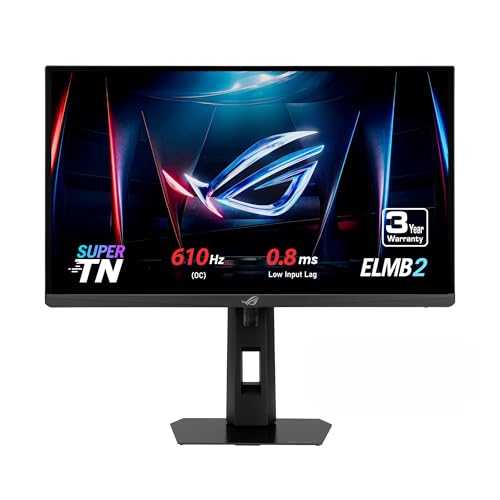
- 24.1-inch FHD Super TN panel
- 610Hz overclocked refresh rate
- ELMB 2 and FreeSync Premium
Best For: Competitive players prioritizing maximum refresh rate
Adjustable Competitive Setup

- 24-inch FHD display at 180Hz
- Height, tilt, swivel, and pivot stand
- FreeSync and Black Equalizer
Best For: Players wanting flexible positioning and visibility controls
IPS All-Rounder
ASUS TUF Gaming VG249QE5A 146Hz

- 23.8-inch FHD IPS panel
- 146Hz overclocked refresh rate
- ELMB Sync and built-in speakers
Best For: IPS-focused players seeking a versatile gaming display
White 320Hz Pick – Amzfast AMZG25F6F
The Amzfast AMZG25F6F is a white 1080p esports monitor with a 25-inch Fast IPS panel and a 320Hz refresh rate. It suits players who want high refresh rates without switching to a TN panel.
Best For: Players seeking a white, high-refresh Fast IPS setup.
Pros:
- Supports up to 320Hz over DisplayPort, with a DP cable included.
- Adaptive-Sync, game modes, AI crosshair, and Night Vision offer gaming-focused options.
- Includes TÜV Rheinland-certified low-blue-light features and 100 × 100mm VESA support.
Cons:
- HDMI 2.0 is limited to 1080p at 240Hz.
- No built-in speakers.
Use DisplayPort to access its headline refresh rate. The listing notes that an upgraded metal stand will gradually replace the original, so the stand version may vary.
400Hz Motion-Clarity Pick – BenQ Zowie XL2566X+
The BenQ Zowie XL2566X+ is a 1080p esports monitor built around a 400Hz Fast TN panel. Its DyAc 2 technology targets motion blur, making this the most refresh-rate-focused choice in this group.
Best For: Competitive players prioritizing refresh rate and motion clarity.
Pros:
- 400Hz refresh rate on a 24.1-inch-class Full HD screen.
- DyAc 2 uses dual-backlight technology for blur reduction.
- Height adjustment helps position the screen for play.
Cons:
- Fast TN panel may be less appealing if an IPS panel is a priority.
- The supplied specifications list only one HDMI port.
Choose the XL2566X+ for its Fast TN and DyAc 2 combination rather than for an IPS-style panel. Its three-year manufacturer warranty is another useful consideration.
Feature-Rich IPS Pick – ASUS TUF Gaming VG259QMRL5A
The ASUS TUF Gaming VG259QMRL5A is a 24.5-inch 1080p esports monitor with a Fast IPS panel that can be overclocked to 310Hz. It combines high refresh rates with several sync and adjustment options.
Best For: Players who want Fast IPS, flexible positioning, and motion-control features.
Pros:
- Overclockable 310Hz refresh rate and a specified minimum 0.3ms GTG response time.
- G-SYNC compatibility, FreeSync Premium, and ELMB SYNC.
- Height, tilt, swivel, and pivot adjustments; DisplayPort cable included.
- 99% sRGB coverage and DisplayHDR 400 certification.
Cons:
- 310Hz is an overclocked setting, not the unqualified refresh-rate specification.
This is a strong fit if you want an adjustable Fast IPS screen with variable refresh and blur-reduction options. Check your preferred settings when enabling the 310Hz overclock.
280Hz TN Pick – BenQ Zowie XL2540X+
The BenQ Zowie XL2540X+ is a 1080p esports monitor with a 280Hz Fast TN panel and a compact 24.1-inch-class screen. It focuses on the essentials of competitive play, including responsive visuals and convenient positioning.
Best For: Players seeking a 280Hz Fast TN monitor with automatic color-mode switching.
Pros:
- 280Hz refresh rate and a specified 0.5ms response time.
- Auto Game Mode switches color modes between games and use scenarios.
- Height adjustment and FreeSync support.
Cons:
- TN panel is not an IPS option.
- The supplied specifications list only one HDMI port.
The XL2540X+ makes sense if you prefer Zowie’s Fast TN approach but do not need the XL2566X+’s 400Hz rate or DyAc 2. It carries a three-year manufacturer warranty.
Compact 240Hz Pick – Dell SE2426HG
The Dell SE2426HG is a compact 1080p esports monitor with a 23.8-inch IPS panel and 240Hz refresh rate. Its 99% sRGB coverage and matte finish make it a practical choice for gaming and everyday desktop use.
Best For: Players who want a fast, compact display with straightforward PC and console connectivity.
Pros:
- 240Hz refresh rate and advertised 0.5ms response for fast-paced play.
- FreeSync Premium and HDMI VRR help reduce tearing.
- Two HDMI inputs plus DisplayPort 1.4 offer flexible connections.
Cons:
- Stand adjustment is limited to tilt.
- The specifications also list a 5ms response time, so the advertised 0.5ms figure needs context.
Choose this Dell if desk space and smooth 1080p motion matter more than extensive stand adjustments. Its one-year Advanced Exchange Service is worth comparing with the longer warranties on the other picks.
The ASUS ROG XG279CNS is a 27-inch 1080p esports monitor built around speed: its Fast IPS panel can be overclocked to 380Hz and carries an advertised 0.3ms GTG response time. USB-C and a tripod socket add flexibility for mixed gaming and streaming setups.
Best For: Competitive players seeking the highest listed refresh rate here and a larger screen.
Pros:
- Overclockable 380Hz refresh rate and advertised 0.3ms GTG response.
- ELMB Sync combines motion-blur reduction with variable refresh rate.
- USB-C, DisplayHDR 400 certification, and a three-year warranty add versatility.
Cons:
- 1080p resolution across 27 inches yields a less dense image than on the smaller monitors here.
- Its 380Hz specification requires overclocking.
This is the speed-first option if your system can deliver high frame rates. The larger display and extra features may appeal to streamers, but buyers prioritizing crisp 1080p desktop text may prefer a smaller screen.
The GIGABYTE G25F2A is a 24.5-inch 1080p esports monitor pairing a SuperSpeed IPS panel with 240Hz refresh and an advertised 1ms GTG response. Its gaming tools and built-in speakers give it more to offer than refresh rate alone.
Best For: Players who want a compact competitive display with built-in gaming aids and speakers.
Pros:
- 240Hz refresh rate and 1ms GTG specification suit fast-paced games.
- FreeSync Premium helps reduce tearing and stutter.
- Includes Aim Stabilizer, Black Equalizer, Game Assist, and two 2W speakers.
- 120% sRGB gamut claim and HDR10 support broaden its display features.
Cons:
- Its 1080p resolution does not offer the extra workspace of a higher-resolution monitor.
- HDR10 support alone does not establish how impactful HDR will look.
Consider the G25F2A if you want 240Hz performance alongside gaming utilities and basic onboard audio. Its three-year manufacturer warranty is another useful point of comparison.
Maximum Refresh Rate – ASUS ROG XG248QSG 610Hz
If your priority in a 1080p esports monitor is the highest refresh rate on this list, the 24.1-inch ROG XG248QSG reaches 610Hz when overclocked. Its Super TN panel and compact stand design are aimed at competitive setups.
Best For: Competitive players with a PC capable of taking advantage of an exceptionally high refresh rate.
Pros:
- 610Hz overclocked refresh rate and specified 0.1ms response time.
- ELMB 2 blur reduction and FreeSync Premium support.
- Smaller stand footprint leaves more room for mouse and keyboard movement.
- Includes HDMI 2.1 and a three-year warranty with advanced replacement and repair.
Cons:
- Full HD resolution limits desktop detail compared with higher-resolution displays.
- Super TN panel may be less appealing if an IPS panel is a priority.
This is the specialist pick for chasing high frame rates, rather than a monitor chosen primarily for resolution or panel type.
The 24-inch Odyssey G3 is a practical 1080p esports monitor if you want 180Hz gameplay and a stand you can position carefully. FreeSync and Samsung’s visibility tools round out its competitive features.
Best For: Players who value ergonomic adjustment and in-game visibility controls alongside a 180Hz refresh rate.
Pros:
- 180Hz refresh rate with a specified 1ms MPRT response time.
- Stand supports height, tilt, swivel, and pivot adjustments.
- Black Equalizer, Virtual Aim Point, and FreeSync add gaming-focused controls.
Cons:
- 250 cd/m² specified brightness may be limiting in a bright room.
- One HDMI port limits direct HDMI connections.
Its strongest case is the combination of refresh rate, adjustable ergonomics, and useful on-screen tools—not a claim to the fastest refresh rate here.
For a 1080p esports monitor that also suits general use, the 23.8-inch TUF Gaming VG249QE5A pairs an IPS panel with a 144Hz refresh rate that can be overclocked to 146Hz. It also includes built-in speakers.
Best For: Players who prefer an IPS panel and versatile everyday features over the highest available refresh rate.
Pros:
- IPS panel with a 146Hz overclocked refresh rate.
- ELMB Sync allows blur reduction and variable refresh rate to operate together.
- Shadow Boost, built-in speakers, and mouse-based settings via DisplayWidget Center.
Cons:
- 146Hz maximum refresh rate is below the other two monitors in this roundup.
- Only one HDMI port is specified.
Choose it for its IPS panel and balanced feature set; players focused strictly on refresh rate have faster options above.
How We Picked These 1080p Esports Monitors
We focused on monitors suited to fast competitive play, while keeping a range of refresh rates, screen sizes, panel types, and price positions. The shortlist includes accessible 144Hz and 240Hz choices, faster all-rounders, and specialist displays reaching 400Hz or more. Advertised specifications are a starting point, not proof that two monitors with the same refresh rate look equally clear in motion.
Quick Comparison: Which Type Fits You?
- Value-focused play: The ASUS TUF VG249QE5A, Samsung Odyssey G3 G30D, and Dell SE2426HG are starting points if price matters more than chasing the highest refresh rate.
- Fast IPS flexibility: The GIGABYTE G25F2A, Amzfast 25-inch, and ASUS TUF VG259QMRL5A target players who want speed alongside the viewing angles and everyday versatility of IPS.
- Competitive specialists: The BenQ Zowie XL2540X+ and XL2566X+ prioritize 24.1-inch Fast TN panels and esports-oriented motion performance.
- Maximum refresh or more space: The ASUS ROG XG248QSG targets buyers seeking an extreme 610Hz specification; the 27-inch ROG XG279CNS offers a larger 1080p screen with a 380Hz specification.
Key Buying Factors for a 1080p Esports Monitor
Match Refresh Rate to Your Actual Frame Rate
A 240Hz screen can show a new frame roughly every 4.2 milliseconds; at 400Hz, that interval falls to 2.5 milliseconds. Those gains matter most when your PC consistently produces similarly high frame rates. If it cannot, spending more on the fastest display may deliver less benefit than a GPU upgrade or a better-balanced monitor.
Look Beyond the “1ms” Claim
Pixel response time and refresh rate are different. Slow transitions can leave visible trails even on a high-Hz panel, while aggressive overdrive can create bright inverse ghosting. Check independent motion tests at the refresh rates you will actually use. Motion-blur reduction modes can improve clarity, but may reduce brightness or limit compatibility with variable refresh rate; check the specific model’s behavior.
Choose a Size and Panel You Can Live with
At 1080p, a roughly 24- to 25-inch screen offers a denser image than a 27-inch screen and suits compact competitive setups. A 27-inch display gives you more physical space, but its lower pixel density is easier to notice at a typical desk distance. IPS generally offers wider viewing angles; Fast TN may appeal to players prioritizing motion clarity over image versatility.
Verify Connections and Useful Extras
Before ordering, confirm that your graphics card, cable, and monitor input support the advertised refresh rate at 1080p. Check adjustable stand options, variable-refresh support, and whether features such as USB-C or blur reduction matter to your setup. Regional listings and model variants can differ, so verify the exact model number.
Who Should Buy Which 1080p Esports Monitor?
Start with a 144Hz-class option if you are moving from 60Hz or building on a tight budget. Look at 240Hz to 310Hz models for a balance of speed and cost, particularly if your favorite games regularly run above 200 fps. Consider the Zowie models if competitive motion performance is your main priority, or the 380Hz and 610Hz ASUS ROG options if your PC, games, and budget justify extreme refresh rates. Choose the 27-inch option only if you value screen size enough to accept less-sharp 1080p text and detail.