
When it comes to maximizing your data management capabilities, choosing the right docking station with a storage bay can make all the difference. These devices offer impressive speeds and storage solutions tailored to your needs. From versatile dual-bay options to high-capacity enclosures, you’ll find a range of features that enhance productivity. Curious about which models stand out and why they might be the perfect fit for you? Let’s explore the top contenders.
SABRENT USB 3.0 Dual Bay External Hard Drive Docking Station

If you’re looking for a reliable solution to manage multiple hard drives, the SABRENT USB 3.0 Dual Bay External Hard Drive Docking Station is a standout choice. It supports both 2.5 and 3.5 SATA hard drives or SSDs, accommodating up to 10TB. With impressive transfer speeds of 5Gbps via USB 3.0, you’ll experience quick data transfers. Plus, its hard drive duplicator function allows offline cloning at speeds up to 60Mbps. Weighing just 1.19 pounds and requiring no drivers, this plug-and-play device is compatible with standard desktop SATA drives, making it a convenient addition to your tech setup.
Best For: Users needing an efficient and versatile solution for managing and duplicating multiple SATA hard drives or SSDs.
Pros:
- Supports a wide range of SATA drives including both 2.5 and 3.5 models, accommodating up to 10TB.
- High transfer speeds of up to 5Gbps with USB 3.0 for quick data transfers.
- Easy to use with a plug-and-play setup that requires no additional drivers.
Cons:
- Limited offline cloning speed of 60Mbps may be slower compared to some advanced duplicators.
- Weight of 1.19 pounds could be considered heavy for portable use.
- No advanced features such as RAID configurations or additional connectivity options.
SABRENT 4-Bay USB 3.0 Docking Station for SATA HDD & SSD

For tech enthusiasts and professionals managing multiple drives, the SABRENT 4-Bay USB 3.0 Docking Station is an ideal solution. This docking station supports up to four 2.5” and 3.5” SATA HDDs and SSDs, making data access and backups effortless. With USB 3.0 connectivity, you can achieve reliable file transfers up to 5Gbps, while it’s backward compatible with USB 2.0. The trayless design allows for quick drive insertion without tools, and the offline clone function lets you clone drives directly without a computer. Plus, plug-and-play operation guarantees you can start using it right away, making it incredibly user-friendly.
Best For: Tech enthusiasts and professionals managing multiple SATA HDDs and SSDs looking for efficient data access and backups.
Pros:
- Supports up to four drives for extensive data management and backups.
- USB 3.0 connection allows for fast file transfers up to 5Gbps.
- Trayless design simplifies drive insertion and maintenance without tools.
Cons:
- Requires external power adapter, which may add to desk clutter.
- Limited to SATA drives, not compatible with other drive types.
- Cloning function may be less useful for those who prefer using a computer for backups.
WAVLINK 4-Bay Hard Drive Enclosure for SATA HDD/SSD

The WAVLINK 4-Bay Hard Drive Enclosure is perfect for professionals and enthusiasts who need robust storage solutions. Supporting both 3.5″ and 2.5″ SATA HDDs/SSDs, it offers a massive capacity of up to 88TB. With a USB 3.2 Type-C port, you’ll enjoy data transfer speeds reaching 10Gbps, making it suitable for heavy files and projects. The enclosure features dual fans for cooling and independent ON/OFF switches for each bay, allowing easy drive swapping. Plus, it includes an HDMI interface for 4K video output. WAVLINK also provides a 12-month warranty and lifetime technical support for your peace of mind.
Best For: Professionals and enthusiasts seeking a high-capacity, efficient storage solution for extensive data management.
Pros:
- Supports both 3.5″ and 2.5″ SATA HDDs/SSDs with a massive total capacity of up to 88TB.
- USB 3.2 Type-C port provides data transfer speeds of up to 10Gbps, ideal for handling large files.
- Independent ON/OFF power switches for each bay facilitate easy drive swapping without downtime.
Cons:
- Additional mounting brackets are required for 2.5″ drives, which are not included.
- The HDMI interface requires a compatible host USB-C port that supports video output.
- Dual fans may produce noise during operation, which could be distracting in quiet environments.
ORICO All-Flash USB-C Docking Station for 2.5-inch SSD

Designed specifically for video editors and photographers, the ORICO All-Flash USB-C Docking Station is a game-changer in efficient data management. This compact model supports up to five 2.5-inch SSDs or HDDs, allowing a whopping 40TB of total storage. With USB 3.2 Gen 2, you’ll enjoy blazing data transfer speeds of up to 10 Gbps. It offers seven RAID modes for customized performance, ensuring your footage remains secure. Plus, four expansion ports—including SD & TF card slots—make it perfect for on-the-go backups. Lightweight and shock-resistant, it fits effortlessly into your bag, keeping your workflow seamless wherever you are.
Best For: The ORICO All-Flash USB-C Docking Station is best for video editors and photographers seeking efficient data management and high-speed transfers for their projects.
Pros:
- High-speed data transfer: Achieves speeds up to 10 Gbps with USB 3.2 Gen 2, enhancing productivity.
- Flexible RAID options: Offers seven different RAID modes for customized performance and data protection.
- Compact and portable design: Lightweight and shock-resistant, making it easy to transport for on-site work.
Cons:
- Limited to 2.5-inch drives: Only compatible with 2.5-inch SSDs and HDDs, which may restrict some users.
- Potentially expensive: The advanced features may come with a higher price point compared to basic docking stations.
- Requires USB-C connection: Users with older USB interfaces may need adapters for compatibility.
4 Bay Hard Drive Enclosure with Cooling Fan for SATA HDD/SSD

If you’re looking for a reliable solution to expand your storage capabilities, the 4 Bay Hard Drive Enclosure with a cooling fan is an excellent choice for tech enthusiasts and professionals alike. This enclosure supports up to 80TB, accommodating both 2.5 and 3.5-inch SATA HDDs/SSDs. With a tool-free design and hot-swappable feature, it’s easy to manage your drives. You’ll enjoy lightning-fast data transfer rates of up to 5Gbps, allowing you to transfer a 1GB movie in just 3-5 seconds. Plus, the aluminum-alloy design and built-in cooling fan keep your drives safe from overheating. Compatible with multiple OS, it’s plug-and-play ready!
Best For: Tech enthusiasts and professionals seeking a high-capacity storage solution with fast data transfer rates.
Pros:
- Tool-free design allows for easy installation and management of drives.
- Hot-swappable feature enables users to change drives without shutting down the system.
- Built-in cooling fan helps prevent overheating, ensuring long-term reliability.
Cons:
- No RAID/NAS support may limit data redundancy options.
- Fan noise levels could be noticeable in quiet environments.
- Requires DC 12V power adapter, which may limit portability compared to USB-powered options.
ORICO USB C 5 Bay Hard Drive Docking Station (6656C3)

For professionals dealing with extensive digital assets, the ORICO USB C 5 Bay Hard Drive Docking Station (6656C3) is a game-changer. It supports up to 100TB of storage, accommodating 2.5” and 3.5” SSDs and HDDs. You can clone up to four drives simultaneously with just one button—no computer needed! Its durable aluminum alloy design guarantees efficient heat dissipation, while the LED indicators keep you informed of status. With USB 3.2 Gen 1 connectivity, it’s compatible with various devices, making it a versatile addition to your setup. Experience high-speed data transfer rates of up to 625 MB/s for seamless workflow.
Best For: Professionals needing extensive storage solutions for high-resolution images and videos.
Pros:
- Simultaneous Duplication: Clone up to four drives at once without a computer connection.
- High Capacity: Supports up to 100TB of storage, accommodating both 2.5” and 3.5” drives.
- Durable Design: Made from aluminum alloy for efficient heat dissipation and includes anti-vibration pads.
Cons:
- Weight: Weighs 2.99 pounds, which may be considered heavy for portable use.
- Backup Required: Users must back up data before cloning to avoid accidental overwriting.
- Limited to USB 3.2 Gen 1: While fast, it may not support the latest USB standards for even higher speeds.
SABRENT USB Type C Dual Bay Hard Drive Docking Station (EC-CH2B)

The SABRENT USB Type C Dual Bay Hard Drive Docking Station (EC-CH2B) is an ideal choice for tech enthusiasts and professionals who need to manage multiple hard drives efficiently. Weighing just 10 ounces and measuring 6.2 x 4 x 2.7 inches, it supports both 2.5” and 3.5” SATA HDDs, accommodating drives up to 20+ TB. You can read and write from two drives simultaneously, ensuring quick data transfers up to 5 Gbps with USB 3.0. Plus, the offline cloning feature allows for easy duplication at 60 MBps. With a 4.3-star rating, it’s a reliable addition to your setup.
Best For: Tech enthusiasts and professionals needing efficient management of multiple hard drives.
Pros:
- Supports both 2.5” and 3.5” SATA HDDs, accommodating a wide range of drives.
- Simultaneous read and write capability allows for efficient data handling.
- Offline cloning feature enables fast duplication of data without a computer.
Cons:
- Limited to two drives, which may not suffice for users with larger setups.
- Requires USB 3.0 connection to achieve maximum transfer speeds.
- Warranty information is not explicitly detailed, which may concern some buyers.
ORICO 5 Bay Hard Drive Enclosure (DS500U3)
Designed for those who need substantial storage capacity, the ORICO 5 Bay Hard Drive Enclosure (DS500U3) stands out with its ability to accommodate up to 90TB of data across five 3.5-inch SATA HDDs. You’ll appreciate the USB 3.0 connection that allows for impressive transfer rates of up to 5Gbps, transferring 1GB in around 3 seconds. With a built-in 60mm fan and honeycomb design, it guarantees ideal cooling during intense operations. Plus, its safety features protect against over-voltage and short-circuits, while indicator lights keep you informed about your drives’ status, making it an excellent choice for reliable storage solutions.
Best For: Data-heavy users seeking a reliable and expandable storage solution with high transfer speeds.
Pros:
- High Capacity: Supports up to 90TB of data across five 3.5-inch HDDs.
- Fast Transfer Rates: Achieves speeds of up to 5Gbps, allowing for quick data transfer.
- Robust Cooling System: Features a 60mm fan and honeycomb design for effective heat dissipation during operation.
Cons:
- Single Drive Access in Linux: Only one drive can be read at a time when used with Linux systems.
- Size and Portability: The enclosure is larger and less portable compared to single-drive options.
- Limited Compatibility in Older Operating Systems: May not support some older versions of operating systems beyond Windows XP/Vista.
SABRENT 5-Bay USB 3.2 Gen 2 SATA Docking Station (DS-SC5B)

If you’re a content creator or a data enthusiast needing robust storage solutions, the SABRENT 5-Bay USB 3.2 Gen 2 SATA Docking Station (DS-SC5B) is your go-to choice. This versatile dock connects up to five 3.5” HDDs or SSDs through a single USB-C port, providing transfer speeds up to 10Gbps—perfect for backups and 4K video editing. Its tray-less design allows for quick drive swaps, while individual on/off switches and LED indicators let you manage each drive effortlessly. Built from durable aluminum with a cooling fan, it guarantees long-lasting performance, making it a top contender in storage solutions.
Best For: Content creators and data enthusiasts in need of flexible and robust multi-drive storage solutions.
Pros:
- High transfer speeds of up to 10Gbps for efficient data management and editing.
- Tray-less hot-swap design allows for easy drive insertion and removal without tools.
- Durable aluminum construction with active cooling ensures long-term performance and reliability.
Cons:
- Limited to 3.5” drives, which may not accommodate users with 2.5” SSDs.
- Weight of 10 pounds could make it less portable for some users.
- No RAID configuration, which may not suit those looking for data redundancy.
SABRENT 4-Bay USB 3.2 Gen 2 SATA Docking Station for HDD/SSD
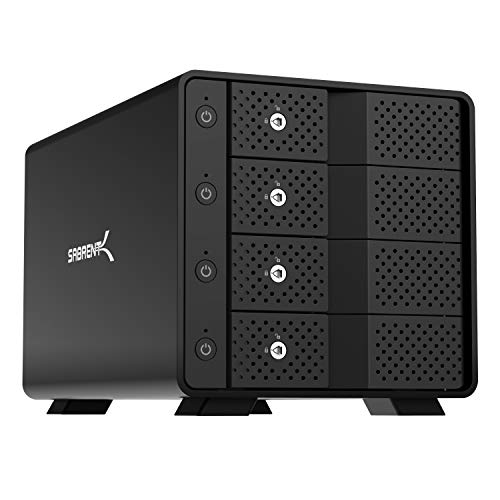
For professionals in video editing or data-intensive tasks, the SABRENT 4-Bay USB 3.2 Gen 2 SATA Docking Station stands out as an essential tool. You can connect up to four 3.5” SATA HDDs or SSDs via a single USB-C port, enjoying impressive transfer speeds of up to 10Gbps. Its tray-less hot-swap capability lets you quickly insert or remove drives without hassle. Each bay features an independent power switch and LED indicator, ensuring safe operation. Built with durable aluminum and a cooling fan, this docking station is designed for reliable, long-term performance, making it perfect for bulk file transfers and high-capacity archiving.
Best For: Professionals in video editing and data-intensive tasks who require efficient and flexible storage solutions.
Pros:
- High transfer speeds: Supports USB 3.2 Gen 2 with transfer rates up to 10Gbps, ideal for fast data access and transfers.
- Hot-swap capability: Allows for quick and easy insertion/removal of drives without the need for trays or screws.
- Durable design: Constructed with aluminum housing and includes a built-in cooling fan for enhanced durability and reliable long-term operation.
Cons:
- No built-in RAID: Lacks RAID functionality, which may be a drawback for users seeking redundancy or performance enhancements.
- Limited to 3.5” drives: Only compatible with 3.5” SATA HDDs and SSDs, potentially limiting options for users with different drive sizes.
- Single USB-C port: Only one USB-C connection means that users may need additional hubs for connecting multiple devices simultaneously.
Factors to Consider When Choosing a Docking Station With Storage Bay
When you’re choosing a docking station with a storage bay, consider key factors like drive capacity options and data transfer speeds. You’ll also want to guarantee compatibility with your devices and look for any cloning features that could simplify your workflow. Finally, think about the design and portability to make certain it fits your needs.
Drive Capacity Options
Choosing the right docking station with a storage bay hinges on understanding drive capacity options. First, consider the maximum drive capacity supported by the model you’re eyeing, which can range from 40TB to over 100TB. Many docking stations offer multiple bays, usually accommodating 2 to 5 drives, greatly boosting your total storage potential. Pay attention to drive capacity per bay; some stations handle single drives up to 20TB, while others can accommodate larger individual drives of 22TB or 18TB. Remember, the total storage capacity is calculated by multiplying the number of bays by the maximum capacity per drive. Finally, verify compatibility with various drive sizes, like 2.5” or 3.5” SATA HDDs/SSDs, to meet your storage needs effectively.
Data Transfer Speeds
After considering drive capacity options, it’s important to evaluate data transfer speeds, as they impact how quickly you can manage your files. USB 3.0 typically offers rates up to 5Gbps, while USB 3.2 can reach speeds of 10Gbps. Higher data transfer speeds drastically reduce the time needed for large file transfers, allowing you to move a 1GB movie in just 3-5 seconds under ideal conditions. This speed is crucial for tasks like video editing or data archiving, where you frequently access large files. Also, check for UASP (USB Attached SCSI Protocol) support; it enhances transfer speeds by processing multiple commands simultaneously, boosting overall performance and efficiency. Choose wisely to improve your productivity!
Compatibility With Devices
Selecting the right docking station with a storage bay requires careful evaluation of compatibility with your devices. First, ascertain the docking station supports the specific size and type of hard drives or SSDs you plan to use, like 2.5″ or 3.5″ SATA drives. Next, check for compatibility with your operating system, as some may have limitations with Windows, Mac, or Linux. It’s also crucial to take into account the maximum storage capacity supported, which can vary from 20TB to over 100TB. Additionally, verify the connection interface, such as USB 3.0 or USB 3.2, to match your device’s ports for peak data transfer speeds. Finally, look for hot-swappable capability to enhance usability with compatible devices.
Cloning Features Available
When considering a docking station with a storage bay, it is essential to look at the available cloning features, as they can greatly simplify your data management tasks. Cloning features allow for direct drive-to-drive duplication without needing a computer, making quick backups a breeze. Some models support high-speed offline cloning, with rates up to 60 Mbps, ensuring fast data transfer. Advanced functionalities may also include S.M.A.R.T and TRIM support, which enhance the performance and reliability of your cloned drives. To keep you informed, many docking stations feature LED displays that show cloning progress in real-time. Additionally, certain models offer multiple cloning modes, letting you choose the specific functionality that fits your data management needs best.
Design and Portability
Cloning features are just one aspect to contemplate; the design and portability of a docking station with a storage bay play a significant role in your overall experience. Look for a tray-less, hot-swap capability that lets you quickly insert and remove drives without tools. Lightweight materials and compact dimensions enhance portability, making it easy to carry your docking station in a backpack or camera bag. A robust build, often using aluminum, guarantees durability and heat dissipation for long-term performance during intensive tasks. Additionally, independent power switches for each drive bay allow safe power management, allowing you to control each drive without impacting others. Prioritize these features to maximize convenience and efficiency in your storage solutions.
Cooling Mechanism Efficiency
Cooling efficiency is essential for maintaining the performance and longevity of your drives in a docking station with a storage bay. Look for docking stations with efficient cooling mechanisms, like built-in fans, to prevent overheating during intensive tasks. Consider models made from aluminum alloy, as they typically offer better heat dissipation than plastic alternatives. Dual cooling fans that activate at specific temperatures, such as 48°C, can proactively manage heat, especially in setups with multiple drives. Additionally, independent power switches for each bay allow you to power down specific drives, reducing heat generation when not in use. Finally, features like honeycomb holes or ventilated panels enhance airflow, further supporting effective temperature control during operation.