
A good hands-on throttle-and-stick setup can make flying feel more intuitive, but the right choice depends on what you fly. A compact starter controller and a cockpit-style setup with pedals solve different problems.
These 10 PC-compatible options span entry-level sticks, control-heavy systems, space-focused layouts, and bundles with rudder pedals. Use the guide below to narrow your choice by game support, room on your desk, and the controls you’ll actually use.
Best 10 Hotas for PC Picks for 2026
Flexible Starter Pick

- Detachable throttle for flexible placement
- 12 buttons and five programmable axes
- Adjustable stick resistance
Best For: PC newcomers seeking an adaptable, easy-to-start HOTAS
Display-Equipped Pick

- LCD display and illuminated buttons
- Five-position handle adjustment
- Throttle detents and adjustable resistance
Best For: PC pilots wanting a display and adjustable grip
Combat Replica Pick
Thrustmaster HOTAS Warthog MKII

- Licensed 1:1-scale VIPER stick grip
- A-10C throttle and control panel
- Redesigned metal base with Hall Effect technology
Best For: Windows 10/11 combat-sim players seeking replica controls
Space-Sim Control Pick

- Mini analog sticks for extra inputs
- Twin throttles with adjustable friction
- Four spring options and configurable RGB
Best For: PC space-sim and VR players wanting extensive controls
Complete Flight Pack
Thrustmaster T16000M FCS Flight Pack

- Stick, throttle, and pedals included
- Ambidextrous joystick with twist rudder
- Game-specific profiles via T.A.R.G.E.T
Best For: PC pilots seeking a stick, throttle, and pedals in one pack
Space-Sim Controls
Logitech G Pro Flight X56 Rhino HOTAS

- Mini analog sticks for extra control
- Twin throttles with friction adjustment
- Adjustable stick force and RGB lighting
Best For: PC space and combat-sim players wanting twin throttles
Cross-Platform Cockpit
Turtle Beach VelocityOne H.O.T.A.S.
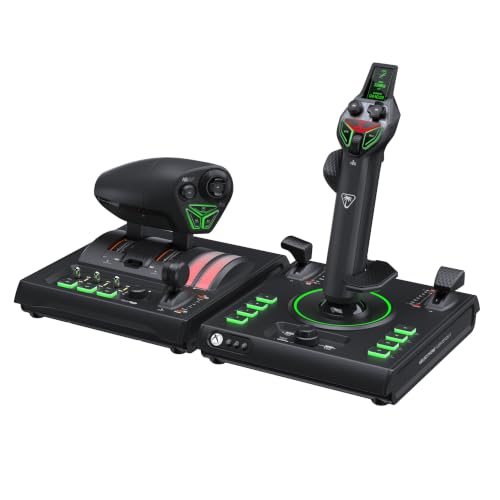
- Compatible with PC and Xbox
- 73 programmable inputs and 15 axes
- Display and adjustable dual-throttle controls
Best For: PC and Xbox pilots seeking extensive customization
Most Programmable
Thrustmaster Sol-R4 Space Combat HOTAS

- 58 programmable buttons
- 16-bit magnetic sensing on three stick axes
- Throttle with repositionable detent
Best For: PC space-sim pilots who map many commands
Complete Pedal Kit
Thrustmaster T-Flight Full Kit

- HOTAS plus TFRP rudder pedals
- Five axes and 14 programmable buttons
- PC and Xbox Series X|S compatibility
Best For: Players who want stick, throttle, and pedals together
Xbox-Crossover Pick

- Works with PC, Xbox Series X|S, and Xbox One
- Separate stick and throttle
- Integrated headset jack
Best For: Players switching between PC and Xbox
Flexible Starter Pick – Thrustmaster T-Flight Hotas X
If you want a hotas for pc that can fit a compact desk or a separated stick-and-throttle layout, the T-Flight Hotas X offers both. Its preconfigured controls make it straightforward to start flying, while the buttons and axes can be programmed later.
Best For: PC flight-sim newcomers who want flexible placement and uncomplicated setup.
Pros:
- Detachable, full-size throttle works beside the stick or attached to it.
- 12 programmable buttons, five programmable axes, and preset memory.
- Adjustable stick resistance and two rudder-control options.
Cons:
- Offers fewer buttons than the more control-heavy options in this roundup.
- Corded USB connection requires a nearby port.
Choose this model if easy setup and adaptable desktop placement matter more to you than a large bank of dedicated controls.
Display-Equipped Pick – Logitech G Saitek X52 Pro
The X52 Pro is a hotas for pc buyers who want illuminated buttons and an LCD multi-function display within reach. Its adjustable handle and progressive throttle add useful fit and control options for longer flight-sim sessions.
Best For: PC pilots who value an on-controller display and adjustable hand fit.
Pros:
- LCD multi-function display and illuminated buttons.
- Five-position handle adjustment with a soft-touch, contoured grip.
- Throttle resistance adjustment with idle and afterburner detents.
- No-contact X/Y-axis technology and a precision centering mechanism.
Cons:
- Requires two USB 2.0 ports.
- Listed Windows support covers Windows 7, 8.1, and 10; Windows 11 is not specified in the supplied requirements.
This is a strong match if the display, tactile throttle detents, and adjustable grip are features you will actually use. Check your PC’s ports and operating system against the listed requirements before buying.
Combat Replica Pick – Thrustmaster HOTAS Warthog MKII
For a hotas for pc built around military-sim controls, the Warthog MKII pairs a 1:1-scale, officially licensed U.S. Air Force VIPER stick grip with an A-10C throttle and control panel. Its redesigned metal base and Hall Effect technology are aimed at precise, durable control.
Best For: Windows 10/11 combat-sim players who want replica-style stick and throttle controls.
Pros:
- Licensed VIPER grip with 19 action buttons, including a two-step trigger.
- A-10C throttle and panel with 17 action buttons and a slew control.
- Redesigned metal base and Hall Effect precision technology.
- Listed as plug-and-play for DCS and X-Plane 11/12.
Cons:
- PC compatibility is specified for Windows 10/11, not consoles.
- Its substantial stick-and-throttle layout calls for a dedicated setup space.
Consider this bundle when authentic combat-style controls are the priority. For Microsoft Flight Simulator 2020/24, the notes specify automatic recognition rather than the same plug-and-play claim listed for DCS and X-Plane.
Space-Sim Control Pick – Logitech G X56 H.O.T.A.S.
The X56 is a hotas for pc players who want plenty of reachable inputs for space and flight sims, especially when using VR. Its mini analog sticks support movement and separately controlled gimballed weapons, while twin throttles offer adjustable friction.
Best For: PC space-sim and VR players who want extensive controls and twin throttles.
Pros:
- Mini analog sticks for additional movement and weapon-control inputs.
- Twin throttles with a friction adjuster and throttle lock.
- Four spring options for adjusting stick force.
- Hall-effect sensors on the 16-bit aileron and elevator axes, plus configurable RGB lighting.
Cons:
- Requires two USB 2.0 ports.
- Its many programmable controls may take time to map to your preferred games.
Pick the X56 if you expect to use its extra inputs and split-throttle control; for a simpler desktop setup, those same features may be more than you need.
Complete Flight Pack – Thrustmaster T16000M FCS Flight Pack
If you want a hotas for pc with rudder pedals included, the T16000M FCS Flight Pack puts a joystick, throttle, and pedals in one package. Its USB joystick supports Windows PCs and uses H.E.A.R.T technology for precision.
Best For: PC pilots who want a stick, throttle, and pedals together, especially if they prefer a left-handed stick setup.
Pros:
- Includes a flight stick, throttle, and pedals.
- Ambidextrous joystick has removable parts for left- or right-handed use.
- Joystick offers 16 action buttons, an eight-way hat, and twist rudder; T.A.R.G.E.T software supports game-specific profiles.
Cons:
- Listed compatibility is PC via USB, not Xbox or PlayStation.
- Joystick has 16 action buttons, so buyers seeking a larger control set should compare alternatives.
The included pedals distinguish this pack from a basic stick-and-throttle setup. Check that your games and available desk or floor space suit a three-piece kit.
Space-Sim Controls – Logitech G Pro Flight X56 Rhino HOTAS
The Logitech G Pro Flight X56 Rhino is a hotas for pc built around numerous configurable controls. Its mini analog sticks can handle directional movement or separately controlled gimballed weapons, making them particularly relevant to space sims.
Best For: PC space and combat-sim players who want twin throttles and fingertip controls.
Pros:
- Mini analog sticks add options for multidirectional movement and weapon control.
- Twin throttles include a friction adjuster and throttle lock.
- Hall-effect sensors serve the 16-bit aileron and elevator axes; stick force is adjustable with a four-spring system.
- Distinct button shapes aid control identification in VR, and RGB lighting is customizable.
Cons:
- Supplied package contents list a stick and throttle but no rudder pedals.
- The number of configurable controls may be more than a casual flight-sim player needs.
Choose the X56 when twin-throttle handling and analog fingertip inputs matter more to you than an all-in-one package with pedals.
Cross-Platform Cockpit – Turtle Beach VelocityOne H.O.T.A.S.
For a hotas for pc that also supports Xbox, the Turtle Beach VelocityOne H.O.T.A.S. offers 73 programmable inputs and 15 axes. A full-color display provides flight data and quick performance adjustments without relying solely on the Flight Hangar app.
Best For: PC and Xbox flight-sim players who want extensive controls and on-device tuning.
Pros:
- Supports Windows PCs, Xbox One, and Xbox Series X|S.
- Features 73 programmable inputs, 15 axes, and 16-bit Hall-effect sensors for Flightstick II control.
- Dual-throttle detents are swappable; throttle resistance and stick tension are adjustable.
- Grip adjusts for left- or right-handed use, and twist rudder can be locked out when using pedals.
Cons:
- Pedals and mounting solutions are supported as expansions, not listed as included components.
- Its extensive input set may take time to configure to your preferences.
The display, adjustable feel, and Xbox compatibility make this a flexible choice if you plan to tailor a cockpit over time. Budget separately for pedals if you want a dedicated rudder setup.
Most Programmable – Thrustmaster Sol-R4 Space Combat HOTAS
If you want a hotas for pc with extensive control mapping, the Thrustmaster Sol-R4 pairs a flight stick and throttle with 58 programmable buttons. Its space-combat-focused layout puts 21 controls on the ambidextrous stick grip.
Best For: PC space-sim pilots who want plenty of mapped controls and precise stick input.
Pros:
- 58 programmable buttons, including two triggers, two hats, a mini stick, and a thumbwheel on the grip.
- Magnetic sensors provide 16-bit resolution across all three joystick axes.
- Throttle offers 3.1 inches of travel and a repositionable detent.
Cons:
- PC compatibility is specified; console support is not listed.
- Rudder pedals are not listed as part of the set.
The Sol-R4 makes the most sense if you will use its large control count; the adjustable throttle detent and sensor-equipped stick add practical value beyond the extra buttons.
For a hotas for pc that also includes rudder pedals, the Thrustmaster T-Flight Full Kit covers stick, throttle, and foot-operated yaw control in one package. It is also designed for Xbox Series X|S, with dedicated console navigation buttons.
Best For: PC and Xbox flight-sim players who want rudder pedals included with their HOTAS.
Pros:
- Includes TFRP rudder pedals with S.M.A.R.T. slide rails and removable heel rests.
- Detachable throttle and stick provide five axes and 14 programmable buttons.
- Dedicated Guide, View, and Menu buttons support Xbox navigation.
Cons:
- Its 14 programmable buttons offer fewer mappings than the 58-button Sol-R4.
- The pedals add another component to position around your desk or seat.
Choose this kit when coordinated turns and ground steering matter more to you than a high button count. The included pedals are its clearest advantage over a stick-and-throttle-only setup.
The HORI Flight Stick is a hotas for pc buyers who also play on Xbox Series X|S or Xbox One. Its separate joystick and throttle provide a conventional HOTAS layout, while adjustable sensitivity and advanced settings let you tune the controls.
Best For: PC and Xbox players who want one HOTAS with an integrated headset jack.
Pros:
- Listed compatibility covers PC, Xbox Series X|S, and Xbox One.
- Separate joystick and throttle with adjustable sensitivity.
- Integrated headset jack and official Microsoft licensing.
Cons:
- Rudder pedals are not listed as included.
- The listed manufacturer warranty is 90 days.
This is a practical crossover choice if console compatibility and headset connectivity are priorities. If you need pedals in the box, consider a kit that explicitly includes them.
How We Picked the Best Hotas for PC
We focused on PC-compatible stick-and-throttle setups across a range of prices and flying styles. The selection includes compact starter units, control-dense systems, a replica-style option, a space-combat design, and a kit with pedals. We considered the controls and accessories listed for each product, along with practical questions such as desk fit and setup complexity. A long feature list is useful only if your games and flying habits make use of it.
Quick Comparison: Which Setup Fits?
For a straightforward first HOTAS, start with the Thrustmaster T-Flight Hotas X. Consider the T-Flight Full Kit if you want rudder pedals in the same purchase. The Logitech G X52 Pro is a middle-ground option for pilots who want more controls on the stick and throttle, while the Thrustmaster HOTAS Warthog MKII suits buyers drawn to a replica-style cockpit. The Thrustmaster Sol-R4 is aimed at space combat. If Xbox use matters alongside PC, compare the Turtle Beach VelocityOne and HORI options, then check support for the specific games you play.
Key Buying Factors for Hotas for PC
Game Support and Control Mapping
Check that your flight sim or space game supports separate stick and throttle inputs and lets you map the controls you need. PC compatibility alone does not guarantee a ready-made profile for every title. Extra hats, switches, and buttons help most when you are willing to configure them; saveable profiles can be valuable if you switch between aircraft or games.
Rudder Control and Pedals
Decide how you will steer on the ground and control yaw in flight. Some pilots are comfortable using stick twist or a throttle-mounted control; others prefer separate pedals for a more cockpit-like layout. Check the exact bundle contents before buying: the T16000M FCS Flight Pack and T-Flight Full Kit are distinct purchases from standalone stick-and-throttle options.
Desk Space and Ergonomics
Measure where both units will sit, especially if your keyboard and mouse must remain within reach. Think about throttle travel, hand position, cable routing, and whether you need a stable surface or mounting hardware. A large, switch-heavy setup can be rewarding in a dedicated space but awkward on a small shared desk.
Price, Listings, and Setup Time
Budget for any pedals or mounts you plan to add. Read the exact listing before checkout, particularly for similarly named X56 models and products offered in several bundles. Expect to spend some time assigning axes, adjusting sensitivity, and testing button mappings in your preferred game.
Who Should Buy Which Hotas for PC?
Choose a simpler T-Flight setup if you want to try HOTAS controls without committing to a larger station; choose the Full Kit if included pedals are a priority. Look at the X52 Pro or an X56 listing if you want many assignable controls, and compare the Warthog MKII if replica-style controls appeal to you. The T16000M FCS Flight Pack is worth considering when you want a multi-piece flight setup. Space-combat players should compare the Sol-R4 against the button layouts of the other options. For a PC-and-Xbox setup, put the VelocityOne and HORI models on your shortlist—but confirm game compatibility before choosing either.