
If you’re serious about flight simulation, choosing the right throttle quadrant can greatly enhance your experience. With so many options available, it’s crucial to find a device that fits your flying style and needs. From the precision of the Logitech G Saitek to the customizability of the Thrustmaster Boeing Edition, each option offers unique benefits. Let’s explore these top throttle quadrants to help you elevate your virtual cockpit experience.
Logitech G Saitek PRO Flight Throttle Quadrant for PC
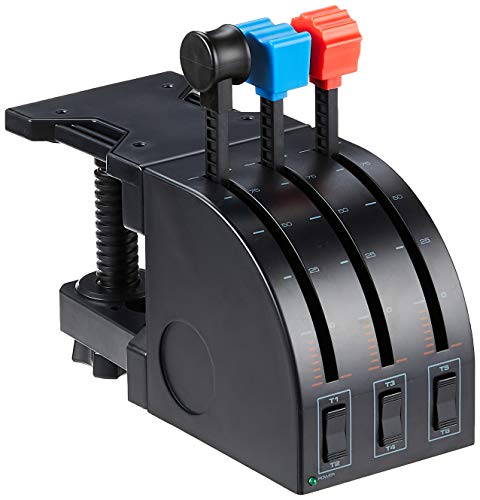
If you’re a dedicated flight sim enthusiast seeking precision control, the Logitech G Saitek PRO Flight Throttle Quadrant is your ideal companion. With its three professional simulation axis levers, you’ll experience enhanced control options that elevate your flying experience. The included LCD display keeps essential information at your fingertips, while three two-way rocker switches add even more functionality. You can customize configurations using additional quadrant lever heads for throttle, flaps, mixture, or prop pitch. Plus, its versatile mounting options let you position it wherever feels best, and it connects easily via USB, compatible with various Windows versions.
Best For: Flight sim enthusiasts who desire precision control and customizable configurations for an immersive flying experience.
Pros:
- Enhanced control with three professional simulation axis levers.
- Customizable configurations with additional quadrant lever heads for various functions.
- Versatile mounting options for ergonomic placement and easy USB connectivity.
Cons:
- Limited to compatibility with Windows operating systems only.
- May require additional setup for optimal use in various flight simulation software.
- Some users may find the size and weight cumbersome for portable setups.
Honeycomb Sierra TPM Module for Flight Simulation

The Honeycomb Sierra TPM Module is an exceptional choice for serious general aviation flight simulation enthusiasts. With its vernier-style throttle, prop, and mixture levers, you’ll experience realistic engine control like never before. Designed specifically for piston aircraft such as the Cessna 172, its three push-pull axes offer smooth travel and precise adjustments. You’ll also benefit from a high-resolution trim wheel, parking brake, and landing gear lever with LED indicators, enhancing your home cockpit’s realism. Built with premium metal components, this throttle quadrant guarantees durability and reliability, making it a standout addition to your flight simulation setup for MSFS 2024/2020.
Best For: Serious general aviation flight simulation enthusiasts looking for a high-quality throttle quadrant designed for piston aircraft.
Pros:
- High-resolution trim wheel and LED indicators enhance realism in flight simulations.
- Durable construction with premium metal components ensures longevity and reliability.
- Smooth travel and precise control with three push-pull vernier axes for fine-tuning engine performance.
Cons:
- May be more expensive compared to basic throttle quadrants.
- Limited compatibility primarily focused on piston-engine aircraft, which might not suit all users.
- Requires a PC or Mac setup, which could be a barrier for some users without compatible systems.
Thrustmaster TCA Quadrant Airbus Edition (Compatible with PC)

For flight sim enthusiasts seeking an authentic Airbus experience, the Thrustmaster TCA Quadrant Airbus Edition is a standout choice. This officially licensed throttle quadrant mimics iconic Airbus flight controls and offers two navigational axes, featuring 16 customizable buttons, detents, and a thrust reverser mechanism. Its ergonomic design guarantees comfort during long sessions, while contactless magnetic sensor technology assures precision and durability. Plus, it’s compatible with Thrustmaster’s T.Flight Rudder Pedals and the TM Flying Clamp. Weighing just 2.4 pounds and measuring 12.2 x 9.25 x 6.3 inches, it’s a compact yet powerful addition to your flight sim setup.
Best For: Flight simulation enthusiasts who want an authentic Airbus throttle experience.
Pros:
- Ergonomic design enhances comfort during extended use.
- Features contactless magnetic sensor technology for precision and longevity.
- Includes 16 customizable buttons and controls for versatile functionality.
Cons:
- Limited to PC compatibility, which may not suit all users.
- Additional accessories like the TM Flying Clamp are sold separately.
- May require a learning curve for those new to flight simulation controls.
Thrustmaster TCA Quadrant Boeing Edition (Compatible with PC)

Designed with flight sim enthusiasts in mind, the Thrustmaster TCA Quadrant Boeing Edition offers seamless integration with Microsoft Flight Simulator on both PC and Xbox. Its modular design allows you to easily swap out mini-stick modules without tools, ensuring you can customize your setup effortlessly. The next-gen S5 NXG mini-sticks deliver improved precision and an impressive lifespan of 2 million activations. With an ergonomic mechanical D-pad, you’ll enjoy better control and comfort, while mechanical buttons respond 64% faster than standard ones. Plus, it’s compatible with Thrustmaster’s TFRP and TPR rudder systems, enhancing your flying experience even further.
Best For: Flight simulation enthusiasts looking for a high-quality, customizable control quadrant for an immersive experience on PC and Xbox.
Pros:
- Modular design allows for easy swapping of mini-stick modules without tools.
- Enhanced control with an ergonomic mechanical D-pad and mechanical buttons that are 64% faster than standard options.
- Long lifespan of components, including mini-sticks rated for 2 million activations and mechanical buttons for over 5 million activations.
Cons:
- Limited compatibility with other non-Thrustmaster products may restrict users looking for a more diverse setup.
- Price point may be higher compared to basic flight control options, making it less accessible for casual gamers.
- Requires separate purchase of Microsoft Flight Simulator and additional rudder systems for full functionality.
ENGINEDIY Flight Simulator Throttle Quadrant for MSFS2020/2024
Looking for an immersive flight simulation experience? The ENGINEDIY Flight Simulator Throttle Quadrant is designed specifically for MSFS2020 and MSFS2024, offering motorized throttle control with backlit, full-range motion. It seamlessly supports Fenix A32X and FBW A32X aircraft. With near 1:1 realistic dimensions and a solid build, it’s durable and built to last. The dual-motor throttle allows for smooth operation, while auto/manual trim switching enhances functionality. Remember, you’ll need Mobiflight software for setup, and the craftsmanship requires a 30-day production cycle. Enjoy the thrill of flying with this advanced throttle quadrant tailored for true simulation enthusiasts!
Best For: Flight simulation enthusiasts seeking an authentic and immersive experience with motorized throttle control for MSFS2020/2024.
Pros:
- Seamless compatibility with Fenix A32X and FBW A32X aircraft models.
- Durable construction with a realistic scale design, enhancing the simulation experience.
- Smooth dual-motor throttle control with auto/manual trim switching for added functionality.
Cons:
- Requires Mobiflight software for setup, which may be an additional hurdle for some users.
- Made-to-order craftsmanship entails a 30-day production cycle before the product is received.
- Assembly is required upon delivery, which may be inconvenient for users seeking a plug-and-play solution.
CH Products Throttle Quadrant USB (300-133)

The CH Products Throttle Quadrant USB (300-133) is an excellent choice for serious flight sim enthusiasts seeking precise engine control. With six axes and 12 buttons, it provides an extensive range of functions. You’ll enjoy the flexibility of six bi-directional flip switch buttons and a total of 176 programmable functions through the included Control Manager software. Installation is a breeze with its plug-and-play design, compatible with both PC and Mac. The sturdy mounting base and adjustable clamps accommodate desks between 3/4 inch to 2 1/4 inches thick, ensuring a reliable setup for your flight simulation experience.
Best For: Serious flight sim enthusiasts seeking precise engine control and extensive programmable functions.
Pros:
- Plug-and-play installation makes it easy to set up without the need for additional drivers.
- Extensive programmability with 176 functions allows for customizable control tailored to individual preferences.
- Sturdy design with adjustable clamps ensures stability and compatibility with various desk thicknesses.
Cons:
- Limited to PC and Mac compatibility, which may not suit users on other operating systems.
- Size may be bulky for smaller desk setups, potentially taking up more space than desired.
- Learning curve for utilizing the Control Manager software effectively for all programmable functions.
Logitech G PRO Flight Yoke System for PC

For both new and experienced pilots seeking an immersive flight simulation experience, the Logitech G PRO Flight Yoke System stands out with its 75 programmable controls. You’ll appreciate the realistic yoke and throttle quadrant, designed for precision and durability, featuring a robust stainless steel shaft. With 14 button controls and a 3-position mode switch, it helps develop muscle memory for more authentic flying. The system connects easily via USB, and its two desk clamps guarantee secure mounting on various desks. Compatible with multiple flight simulation software, this yoke system elevates your virtual flying experience to new heights.
Best For: New and experienced pilots seeking an immersive and realistic flight simulation experience.
Pros:
- 75 programmable controls allow for extensive customization and flexibility during flight simulations.
- Durable build quality with a stainless steel shaft ensures precision and longevity.
- Easy installation with included desk clamps for secure mounting on various desks.
Cons:
- Requires optional software for compatibility with specific flight simulation programs.
- The USB and PS/2 connectivity may limit use with certain systems without additional adapters.
- Size and weight might be cumbersome for smaller desks or limited space.
Flight Sim Stuff Cessna Style Carb Heat Throttle Quadrant TPM Controller
If you’re a flight sim enthusiast seeking an authentic experience, the Flight Sim Stuff Cessna Style Carb Heat Throttle Quadrant TPM Controller stands out with its push-pull controls for Carb Heat, Throttle, and Mixture. Weighing just 1.5 pounds and measuring 7 x 5.75 x 2 inches, it’s easy to set up. The throttle lock guarantees your settings stay secure during flight, while the included desktop mounting clamp makes attachment a breeze. Compatible with Microsoft Flight Simulator, X-Plane, and Prepar3D on both Windows and Mac, this handcrafted controller adds realism to your virtual cockpit without needing any drivers. Elevate your flying experience today!
Best For: Flight sim enthusiasts looking for an authentic and immersive experience with realistic controls.
Pros:
- Handcrafted design ensures a unique and quality product.
- Easy setup with desktop mounting clamp and no driver requirements.
- Versatile compatibility with major flight simulation software on both Windows and Mac platforms.
Cons:
- Limited compatibility as it does not work with Xbox or PS.
- Requires manual attachment for permanent mounting, as screws are not included.
- 3D printed materials may not appeal to users preferring traditional construction methods.
Saitek PRO Flight Throttle Quadrant (Renewed)

Elevate your flight simulation experience with the Saitek PRO Flight Throttle Quadrant (Renewed), perfect for enthusiasts who crave enhanced control and realism. This throttle quadrant features three axis levers, allowing for expanded control over your virtual aircraft. You’ll also appreciate the three two-way rocker switches for additional functions. Customize your setup with interchangeable lever heads for throttle, flaps, mixture, or prop pitch. It’s versatile, easily mounted on your desk, and accessible from either pilot or co-pilot side. Plus, it’s compatible with Windows 7, 8, 8.1, and 10, ensuring seamless integration into your simulation experience.
Best For: Flight simulation enthusiasts seeking to enhance their control and realism in virtual flying experiences.
Pros:
- Versatile control with three axis levers and additional rocker switches for expanded functionality.
- Customizable setup with interchangeable lever heads for different aircraft controls.
- Flexible mounting options for optimal accessibility from either pilot or co-pilot side.
Cons:
- Limited compatibility as it only works with Windows operating systems (7, 8, 8.1, and 10).
- May require additional space on your desk for optimal mounting.
- Renewed product may have minor cosmetic imperfections compared to brand new items.
Honeycomb Alpha Flight Controls Yoke and Bravo Throttle Quadrant Bundle

The Honeycomb Alpha Flight Controls Yoke and Bravo Throttle Quadrant Bundle is an ideal choice for flight simulation enthusiasts seeking an extensive, all-in-one cockpit experience. This bundle features a highly configurable throttle setup, accommodating everything from single-engine to four-engine aircraft. With multiple cockpit components at your fingertips, like the autopilot and annunciator panel, you’ll enjoy seamless control during your virtual flights. The gear lever even includes LED landing gear indicator lights, enhancing realism. Designed for versatility, this bundle elevates your simulation experience, making every flight more engaging and immersive. You won’t want to miss out on this essential addition to your setup!
Best For: Flight simulation enthusiasts looking for a comprehensive and realistic cockpit experience.
Pros:
- Versatile throttle setup suitable for a range of aircraft types, from single-engine to four-engine.
- Multiple cockpit components, including autopilot and annunciator panel, enhance control and realism.
- LED landing gear indicator lights provide visual feedback for a more immersive flight experience.
Cons:
- The bundle may be considered expensive for casual users or beginners in flight simulation.
- Setup may require additional configuration time to optimize for specific aircraft types.
- Some users might find the size of the yoke and throttle quadrant cumbersome in smaller spaces.
Factors to Consider When Choosing a Throttle Quadrant for Flight Sim
When you’re choosing a throttle quadrant for your flight sim setup, there are several important factors to keep in mind. You’ll want to contemplate control features, compatibility with your simulators, and how durable the build is. Additionally, think about the design and ergonomics, as well as the flexibility for mounting and installation.
Control Features and Options
Choosing the right throttle quadrant for your flight simulation setup can greatly enhance your experience, especially if you pay attention to the control features it offers. Look for quadrants with multiple axis levers, giving you enhanced control over throttle, flaps, and mixture settings. Programmable buttons and rocker switches are essential too, allowing you to customize controls to fit your unique flying style. Durability matters, so choose a unit made from solid materials that can withstand long sessions. Consider accessibility features, like adjustable mounting positions, to improve comfort during use. By focusing on these control options, you can create a more immersive and responsive flight simulation experience that feels true to life.
Compatibility With Flight Simulators
Selecting a throttle quadrant that seamlessly integrates with your flight simulator is essential for an immersive experience. First, make sure it’s compatible with your specific software, like Microsoft Flight Simulator 2020/2024 or X-Plane. You’ll also want to verify that it supports your computer’s operating system, especially if you’re using Windows 7, 8, 8.1, or 10. Look for quadrants that enhance usability by integrating well with popular aircraft models. Additionally, check if the throttle quadrant requires extra software or drivers; some operate on a plug-and-play basis, while others need specific applications. Finally, consider the design—some are tailored for general aviation, while others focus on commercial aircraft, affecting compatibility across various flight simulation scenarios.
Build Quality and Durability
Build quality and durability are vital factors in ensuring a reliable throttle quadrant for flight simulations. When you choose a quadrant, look for premium materials like metal and reinforced structures; they greatly outlast plastic alternatives. A solid construction is essential for maintaining precise control, as flimsy designs can lead to inaccurate inputs, ruining your immersive experience. Consider the weight of the unit, as heavier throttle quadrants tend to stay in place better, boosting your confidence during use. Although we’ll discuss ergonomics later, features like comfortable grips and intuitive layouts also enhance build quality. Additionally, options like backlighting and adjustable mounts can improve usability and durability, allowing you to customize your setup for a more resilient flight simulation experience.
Design and Ergonomics
When it comes to flight simulation, a well-designed throttle quadrant can considerably enhance your experience, especially during long sessions. You’ll want to prioritize ergonomic placement and usability, ensuring comfortable access to controls. An intuitive layout of buttons and levers is essential; quick access to important functions keeps you focused on the flight. Look for features that provide realistic scale and tactile feedback, as these elements boost immersion and authenticity. Additionally, consider the weight and build quality—sturdy construction allows for repeated use without compromising precision. An adjustable mounting base can further enhance your experience, offering stability and flexibility in positioning your throttle quadrant to suit your unique setup. Choose wisely, and elevate your virtual flying experience!
Mounting and Installation Flexibility
A well-designed throttle quadrant not only enhances your flying experience but also needs to fit seamlessly into your setup. Many throttle quadrants offer flexible mounting options, allowing you to position them on top of or in front of your desk for ideal accessibility. Look for models with adjustable clamps that can accommodate various desk thicknesses, ensuring a secure fit during use. Installing the quadrant on either the pilot or co-pilot side can enhance control accessibility based on your preference. A sturdy mounting base is essential for stability during flight simulation, and some designs even feature built-in clamps for easy attachment. Compatibility with multiple setups, including permanent mounting options, provides additional customization for your tailored flight experience.
Connectivity and Setup Requirements
Choosing the right throttle quadrant involves considering several key connectivity and setup requirements. Most models connect via USB, with cable lengths between 5 to 7 feet, giving you flexibility in your setup. Pay attention to software needs, as some advanced features may require specific programs to function fully. Compatibility is vital; make certain the quadrant supports your operating system, typically Windows 7 to 11, and sometimes macOS. Plug-and-play functionality is common, making installation straightforward without extra drivers. Finally, think about mounting options. Some throttle quadrants allow secure attachment to desks or can be configured in various ways to match your preferences, guaranteeing a comfortable and effective flying experience.