
When it comes to flight simulation, having the right joystick can make all the difference in your experience. You want precision and comfort, whether you’re a beginner or a seasoned pilot. With so many options available, it can be tough to choose the best one for your needs. Let’s explore the top contenders that promise to elevate your virtual flying experience and help you navigate the skies with confidence.
Thrustmaster T-Flight Hotas One Controller for Xbox Series X|S & PC

If you’re a passionate flight simulator enthusiast looking for realistic control, the Thrustmaster T-Flight Hotas One Controller is your ideal choice. This officially licensed controller for Xbox Series X|S and PC features a flight stick and throttle, offering 10-bit precision with five axes, including Z-axis rudder control. With 14 action buttons and a detachable throttle, you can customize your setup for comfort. The adjustable joystick resistance guarantees long gaming sessions remain enjoyable. Plus, it’s plug-and-play compatible with Microsoft Flight Simulator 2024, making your shift to the cockpit smooth and effortless. Experience enhanced control and realism like never before.
Best For: Flight simulator enthusiasts who seek realistic control and customizable setups for an immersive experience.
Pros:
- 10-bit precision with five axes and Z-axis rudder control for enhanced maneuverability.
- Detachable throttle allows for versatile setups, whether on a desk or lap.
- Plug-and-play compatibility with Microsoft Flight Simulator 2024 for easy setup.
Cons:
- May require additional purchases, such as the Thrustmaster TFRP rudder pedals, for full functionality.
- Adjustable joystick resistance might not suit everyone’s preferences.
- Some users may find the weight of the controller slightly cumbersome during long sessions.
Thrustmaster T-Flight Hotas X (Compatible with PC)

The Thrustmaster T-Flight Hotas X is the ideal choice for both novice and seasoned flight simulation enthusiasts seeking comfort and precision. Its wide hand-rest and detachable throttle control guarantee you stay comfortable during long sessions. You’ll appreciate the high-precision joystick with adjustable resistance and dual-system controls for versatile handling. With 12 programmable buttons and an exclusive mapping feature, switching functions on the fly is a breeze. Installation is plug-and-play, so you can jump right into your favorite simulations. The weighted base provides stability, enhancing your overall performance in both civil and military flight scenarios. Enjoy the skies like never before!
Best For: Flight simulation enthusiasts, both novice and experienced, looking for comfort and precision in their flying experience.
Pros:
- Wide hand-rest and detachable throttle control enhance comfort during extended use.
- 12 programmable buttons and exclusive mapping features allow for quick function switching.
- Plug-and-play installation ensures immediate use without complicated setup.
Cons:
- Limited compatibility as it is only designed for PC use.
- Some users may find the joystick’s resistance adjustment insufficient for their preferences.
- The weighted base, while providing stability, may not be portable for those who wish to travel with it.
Thrustmaster T-Flight Full Kit (Compatible with Xbox Serie X|S and PC)

For avid flight simulation enthusiasts looking to elevate their gaming experience, the Thrustmaster T-Flight Full Kit offers exceptional compatibility with both Xbox Series X|S and PC. This kit features official Xbox buttons for easy navigation and high-precision HOTAS controls, perfect for various flight simulations. The ergonomic rudder pedals with Thrustmaster’s S.M.A.R.T slide rails guarantee smooth steering, while the large detachable throttle gives you full control. With 5 axes, 14 buttons, and a rapid-fire trigger, you’ll enjoy seamless gameplay. Whether you’re into air combat or civil flight, this kit delivers the ultimate gaming experience.
Best For: Avid flight simulation enthusiasts seeking a high-quality, immersive gaming experience on Xbox Series X|S and PC.
Pros:
- High-precision HOTAS controls enhance gameplay across various flight simulation genres.
- Ergonomic design of rudder pedals provides comfort and stability during extended gaming sessions.
- Large detachable throttle and multiple buttons offer versatile control options for different flight scenarios.
Cons:
- The kit may require a learning curve for beginners unfamiliar with flight simulation controls.
- Some users may find the price point higher compared to basic game controllers.
- Compatibility with non-flight simulation games may be limited.
Turtle Beach VelocityOne Flightstick Universal Simulation Controller Joystick

Designed for serious flight simulation enthusiasts, the Turtle Beach VelocityOne Flightstick Universal Simulation Controller Joystick offers high-precision, non-contact main axes that enhance your control during intense air and space combat. With customizable throttle and flap levers, you can tailor your setup to match your flying style. It features 27 programmable buttons and an intuitive flight configuration wheel, ensuring quick access to all essential functions. The integrated OLED display provides crucial flight management information at a glance. Plus, its ambidextrous design and adjustable RGB lighting make it perfect for any setup, whether you’re piloting fighter jets or commercial airliners.
Best For: Serious flight simulation enthusiasts seeking a versatile joystick for air and space combat.
Pros:
- High-precision, non-contact main axes provide enhanced control.
- 27 programmable buttons ensure quick access to essential functions.
- Ambidextrous design and adjustable RGB lighting cater to various setups.
Cons:
- May not be suitable for casual gamers who prefer simpler controllers.
- Price point could be higher compared to standard game controllers.
- Some users may require additional setup time to customize controls.
Thrustmaster T16000M FCS (Compatible with PC)

With its advanced H.E.A.R.T technology, the Thrustmaster T16000M FCS stands out as an exceptional choice for flight simulation enthusiasts seeking precision and reliability. Compatible with PC via USB, it works seamlessly on both 32-bit and 64-bit systems. The fully ambidextrous design allows you to customize the joystick for left or right-handed use, while the 16 action buttons offer tactile feedback with braille-style identification. With four independent axes and a twist rudder, your control experience is enhanced. Plus, T.A.R.G.E.T software lets you create tailored mapping profiles, ensuring you get the most out of your flight simulations.
Best For: Flight simulation enthusiasts who seek high precision and customizable controls for an immersive gaming experience.
Pros:
- Advanced H.E.A.R.T technology ensures long-lasting precision and consistent performance.
- Fully ambidextrous design allows for easy customization for both left-handed and right-handed users.
- T.A.R.G.E.T software provides the ability to create specific mapping profiles for various games, enhancing gameplay.
Cons:
- Limited compatibility as it is only designed for PC users via USB.
- Potential learning curve for new users unfamiliar with flight simulation controls.
- Some users may find the design less ergonomic for extended gaming sessions.
Logitech G X56 H.O.T.A.S Flight Simulator Game Controller
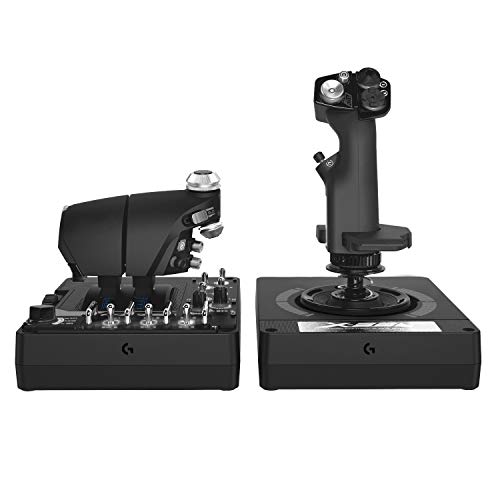
The Logitech G X56 H.O.T.A.S Flight Simulator Game Controller is an excellent choice for serious flight enthusiasts seeking military-grade precision and extensive customization. Weighing just over five pounds, it features twin throttles with friction adjusters and 189 programmable controls, allowing you to tailor your experience. The mini analog sticks enhance pitch, roll, and yaw control, while 16-bit sensors guarantee accuracy. Its sleek black and gray design, complete with customizable RGB lighting, fits perfectly into your gaming setup. Compatible with multiple Windows systems, the X56 is ideal for VR enthusiasts, providing tactile feedback for effortless navigation.
Best For: Serious flight enthusiasts and combat pilots seeking military-grade precision and extensive customization in their flight simulation experience.
Pros:
- Customizable Controls: Over 189 programmable controls allow for extensive personalization to fit individual play styles.
- Accurate Sensors: Features 16-bit non-contact sensors that ensure precise control and responsiveness during gameplay.
- VR Compatibility: Control placement enhances navigation, making it ideal for virtual reality flight simulations.
Cons:
- Weight: At 5.07 pounds, it may be heavier than some casual gamers prefer for extended use.
- USB Port Requirement: Requires two USB 2.0 ports, which may be an inconvenience for users with limited available ports.
- Learning Curve: The extensive customization options may present a steep learning curve for beginners unfamiliar with flight controllers.
Thrustmaster T-Flight Hotas One Flight Stick Controller for PC & Xbox Series X|S

For those seeking an immersive flight simulation experience, the Thrustmaster T-Flight Hotas One Flight Stick Controller stands out as an excellent choice. Its precision joystick and detachable throttle provide a hands-on flying experience, making it suitable for various aircraft types. You’ll appreciate the adjustable joystick resistance and ergonomically placed buttons, ensuring you maintain precise control during takeoff, landing, and combat maneuvers. Plus, its modular design allows for versatile setups, whether on a desk or your lap. With plug-and-play compatibility for both PC and Xbox Series X|S, this controller is a fantastic addition to your flight sim arsenal.
Best For: Flight simulation enthusiasts looking for a high-quality, versatile controller to enhance their gaming experience on PC and Xbox Series X|S.
Pros:
- Ergonomic design with adjustable joystick resistance for comfortable long-term use.
- Modular setup options allow for customizable configurations on a desk or lap.
- Plug-and-play compatibility with both PC and Xbox Series X|S, making it easy to use with popular flight sim software.
Cons:
- May require additional purchases for enhanced control, such as rudder pedals.
- Some users might find the throttle less responsive compared to higher-end models.
- Limited features compared to more expensive flight simulation controllers.
PC Joystick Flight Simulator Game Controller (PXN 2113)

Looking for an affordable yet effective option to enhance your flight simulation experience? The PXN 2113 PC Joystick is a wired gamepad designed specifically for Windows users. Its ergonomic design and four power-grip suction cups guarantee comfort and stability during long flights. With features like a rapid-fire trigger, 4-axis control, an 8-way hat switch, and 12 programmable buttons, you’ll enjoy seamless interaction with various flight simulator games, including Microsoft Flight Simulator and World of Warplanes. Plus, setup is a breeze—no driver installation is required, and customer support is readily available for any questions you might have.
Best For: Flight simulation enthusiasts looking for an affordable and user-friendly joystick compatible with Windows systems.
Pros:
- Ergonomic design ensures comfort during extended use.
- Features such as 4-axis control and 12 programmable buttons enhance gameplay flexibility.
- Easy setup with no driver installation required for immediate play.
Cons:
- Limited compatibility, as it only works with Windows 7/8/10/11 and not with other gaming consoles.
- Lacks Force Feedback support, which may be a drawback for some users.
- Not all flight simulator games are supported, excluding popular titles like Minecraft and Ace Combat 7.
Thrustmaster TCA Sidestick Airbus Edition (Compatible with PC)

Designed for aviation enthusiasts who crave an authentic flying experience, the Thrustmaster TCA Sidestick Airbus Edition offers an ergonomic 1:1 scale replica of the iconic Airbus sidestick. With 17 action buttons featuring “braille”-style identification, you’ll easily manage controls. The four swappable joystick head modules and 12 remappable buttons provide versatile customization suited to your flying style. It also includes a throttle with a built-in thrust reverser mechanism, enhancing realism. Plus, the contactless magnetic sensor technology guarantees unlimited lifespan and peak precision, making this sidestick a durable and reliable choice for your PC flight simulation adventures.
Best For: Aviation enthusiasts seeking an authentic and customizable flying experience with a high-quality sidestick for PC flight simulations.
Pros:
- Ergonomic 1:1 scale replica design inspired by Airbus sidestick for realistic handling.
- 17 action buttons with braille-style identification and 12 remappable buttons for versatile customization.
- Durable contactless magnetic sensor technology ensures unlimited lifespan and optimal precision.
Cons:
- Exclusively compatible with PC, limiting use for console gamers.
- The complexity of features may overwhelm beginners in flight simulation.
- Limited throttle functionality compared to more advanced flight control setups.
Logitech G X52 Flight Control System – Standard Packaging
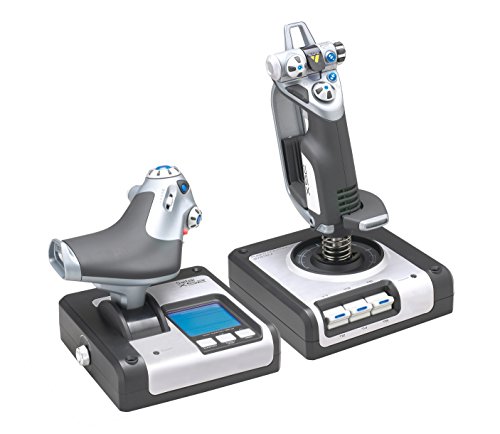
The Logitech G X52 Flight Control System stands out as the ideal choice for dedicated flight simulation enthusiasts seeking an immersive experience. With its advanced multi-function display (MFD), you can engage in interactive flying like never before. The joystick features precision centering and non-contact technology on both X and Y axes, ensuring smooth control. You’ll appreciate the progressive throttle with tension adjustment, complete with detents for Afterburner and Idle. Plus, it’s compatible with various Windows versions, making it versatile. With a sleek design and reliable functionality, the X52 enhances your flying adventures effortlessly. Get ready to take to the skies!
Best For: Dedicated flight simulation enthusiasts seeking an immersive and realistic flying experience.
Pros:
- Advanced multi-function display (MFD) for interactive flying and enhanced game functionality.
- Precision centering mechanism and non-contact technology provide smooth control on both X and Y axes.
- Compatible with various Windows versions, ensuring versatility for a wide range of users.
Cons:
- May have a steep learning curve for beginners unfamiliar with flight simulation controls.
- Wired connection may limit mobility compared to wireless options.
- May require additional software for full functionality in some flight simulation games.
Factors to Consider When Choosing a Flight Simulator Joystick
When choosing a flight simulator joystick, you’ll want to contemplate several key factors. Think about compatibility with your favorite flight sims, as well as how comfortable the design feels during long sessions. Don’t overlook precision features and customization options that can enhance your flying experience.
Compatibility With Flight Sims
Choosing a flight simulator joystick isn’t just about aesthetics; compatibility with your setup is crucial for an ideal experience. First, check if the joystick works with your operating system, whether it’s Windows 7, 8, 10, or 11. Some devices won’t support older systems or specific consoles. You’ll also want plug-and-play functionality, so you can start flying without complicated setup. Ascertain the joystick is compatible with popular flight simulation games like Microsoft Flight Simulator or X Plane, as some are optimized for specific titles. Additionally, verify it supports the necessary axes and buttons for your simulation needs. Finally, consider if it can be expanded with peripherals, such as rudder pedals, for a more immersive experience.
Ergonomic Design and Comfort
While you might be drawn to flashy designs and features, the ergonomic design and comfort of a flight simulator joystick play an essential role in your overall experience. Look for a joystick with a wide hand-rest, which guarantees ideal comfort during long gaming sessions. Adjustable resistance is a great feature that allows you to customize the joystick’s feel based on your preferences and how long you plan to play. Consider controllers with detachable throttles for versatile setups, letting you position them for your comfort, whether on a desk or in your lap. A weighted base enhances stability, reducing hand fatigue, while ergonomically placed buttons offer easy access to essential controls, improving your overall experience during intense flights.
Precision and Control Features
Comfort and ergonomics set the stage for an enjoyable flight simulation experience, but precision and control features take it to the next level. Look for joysticks that offer high precision control, like 10-bit precision with multiple axes, to enhance your flight maneuvers. Adjustable resistance can provide better comfort and control during those long sessions, allowing you to tailor your experience. Consider dual-controlled systems, combining a rotating handle with a progressive throttle lever for improved maneuverability. Advanced sensor technologies, such as magnetic sensors, guarantee durability and consistent precision over time. These features work together to elevate your simulation experience, making every flight feel authentic and responsive, allowing you to navigate the skies with confidence.
Programmability and Customization Options
When considering a flight simulator joystick, programmability and customization options play a fundamental role in tailoring your experience. Many joysticks, like the Thrustmaster T-Flight Hotas X, offer extensive programmability with 12 customizable buttons and internal memory for saving configurations. If you’re looking for advanced options, the Logitech G X56 H.O.T.A.S provides over 189 programmable controls, letting you shape your setup to match your flying style. Some models even feature exclusive mapping buttons for quick function switching, which can be essential during intense flights. Additionally, joysticks like the Turtle Beach VelocityOne Flightstick include multi-function throttle and flap levers, enhancing your efficiency. Software like T.A.R.G.E.T with the Thrustmaster T16000M FCS allows you to create specific mapping profiles for various simulations.
Build Quality and Durability
Choosing a flight simulator joystick involves more than just features; build quality and durability are essential for a reliable experience. Look for joysticks made from high-quality materials, as they withstand extensive use during intense gaming sessions. Opt for models with contactless sensor technology, like magnetic sensors, which provide a longer lifespan and maintain precision over time. A weighted base enhances stability, preventing wobbling during vigorous maneuvers and ensuring consistent performance. Ergonomic designs with adjustable resistance and comfortable grips can improve your experience and reduce strain during long flights. Additionally, consider joysticks with swappable components, allowing you to replace worn-out parts without needing to invest in a new joystick, ultimately extending the product’s life.
Throttle System Functionality
A quality throttle system is essential for achieving precise control over engine power in flight simulation, directly impacting your ability to manage speed and altitude during maneuvers. When selecting a joystick, consider whether it has a dual throttle configuration, which allows you to independently control multiple engines—ideal for larger aircraft or combat scenarios. Look for adjustable friction settings to tailor resistance to your comfort, especially during long sessions. Advanced systems may feature detents for specific power settings, like afterburner and idle, offering tactile feedback that enhances your flying experience. Additionally, customizable throttle and flap levers can mimic real aircraft controls, further immersing you in the simulation and improving your overall flying performance.
Setup and Installation Ease
After ensuring your throttle system meets your flight simulation needs, the next step is to contemplate how easily you can set up your joystick. Many flight simulator joysticks offer plug-and-play compatibility, letting you immerse yourself in your flying experience without complicated installations or extra drivers. Some models come pre-configured for immediate use, so you can start flying right away. If you prefer customization, look for joysticks with built-in software to create and load specific mapping profiles. A modular design can also help, allowing you to configure the joystick and throttle separately. Finally, ergonomic designs often include suction cups for stability, ensuring your setup remains secure during intense flights, whether on a desk or your lap.
Price and Value Comparison
When it comes to flight simulator joysticks, prices can vary considerably, ranging from around $30 for basic models to over $300 for high-end options. The price reflects differences in features and build quality. Higher-priced joysticks often offer advanced features like customizable controls, multiple axes of movement, and ergonomic designs for comfort. To assess value, consider compatibility with your favorite flight simulation software to guarantee it meets your needs. Joysticks with programmable buttons and customizable settings provide better long-term value, allowing you to adapt to different flight scenarios. Don’t forget to check customer ratings and reviews, as they can guide you towards options that deliver the best satisfaction and performance within your budget.