
A bad HDMI cable can look like a failing display, source, or port. A cable tester helps narrow down the problem before you replace equipment or spend time troubleshooting the wrong device.
These 10 picks range from simple continuity boards to portable testers with multiple connectors and fault indicators. The right choice depends on the HDMI plugs you use and how much detail you need from a test.
Best 10 Hdmi Cable Tester Picks for 2026
Best for Installed Cables

- Detachable remote for separated cable ends
- Scan and full-display testing modes
- Checks standard and Mini HDMI wiring
Best For: Long or installed HDMI cable runs
Best HDMI and RJ45 Combo
Portable HDMI/LAN Cable Tester

- Tests HDMI and RJ45 cables
- Scans up to 19 HDMI wires
- AAA or USB-charger power options
Best For: Mixed AV and network cable troubleshooting
Best for Micro HDMI Coverage

- Type A, C, and D connector support
- 20 pin-status LEDs
- Multimeter-friendly line-sequence checks
Best For: Bench testing standard, Mini, and Micro HDMI
Best USB-C-Powered Option

- Tests HDMI Type A, C, and D
- 20 pin-by-pin LED indicators
- Uses 5V/1A USB-C power
Best For: USB-C-powered AV cable diagnostics
Best HDMI and Ethernet Combo

- Checks HDMI Type A and RJ45 cables
- Scans 19 HDMI wires for wiring faults
- 9V battery or USB charger power
Best For: Mixed HDMI and Ethernet cable checks
Best for Connector Repair

- 19 + 1 pin indicator lights
- Probe-based connection mapping
- Suited to connector repair
Best For: Manual HDMI connector troubleshooting
Best for Mini HDMI Checks

- Supports Type A and Type C mini HDMI
- LEDs flag opens, shorts, and miswiring
- Low-battery alert and auto shutoff
Best For: Standard-to-mini HDMI field checks
Best Multi-Interface Option
MFL Detachable Professional Cable Tester
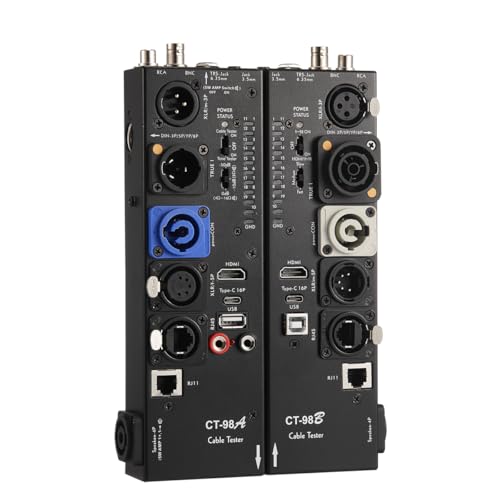
- Tests HDMI and multiple audio/data connector types
- Detaches for split testing
- LEDs indicate connectivity and pin status
Best For: Technicians working with mixed cable types
Best for HDMI Mini Cables

- Tests standard and Mini HDMI combinations
- Offers fast scan and full display modes
- Includes low-battery alert and auto shutoff
Best For: Standard HDMI and HDMI Mini cable checks
Best Simple Pick

- Tests HDMI Type A and RJ45 cables
- Checks shorts, opens, and wrong wire order
- Offers two modes and auto shutoff
Best For: Standard HDMI and RJ45 cable testing
Best for Installed Cables – Jonard Tools HDMI-100
The Jonard Tools HDMI-100 is an HDMI cable tester for checking shorts, open circuits, and incorrect wire pairings. Its detachable remote makes it especially useful when the two ends of an installed cable are far apart.
Best For: Installers testing long or already-installed standard and Mini HDMI cables.
Pros:
- Detachable remote supports testing cables with separated ends.
- Scan mode shows individual connections; full display mode shows them together.
- Supports standard and Mini HDMI cables, including versions 1.2 through 2.0.
Cons:
- No Micro HDMI Type D support is specified.
- Requires a 9V battery to operate.
Choose this model when access to both cable ends is the main challenge. Its two display modes also give you a choice between connection-by-connection inspection and a quick overall view.
Best HDMI and RJ45 Combo – Portable HDMI/LAN Cable Tester
This portable HDMI cable tester also checks RJ45 network cables, making it a practical option if you troubleshoot both AV and Ethernet connections. Its main and removable remote units test standard and Mini HDMI cables, with a scan covering up to 19 wires.
Best For: Users who want one tester for HDMI Type A, Mini HDMI Type C, and RJ45 cables.
Pros:
- Checks HDMI wires for shorts, opens, and incorrect order.
- Tests RJ45 cables with rotating LED indicators.
- Runs on one AAA battery or a phone USB charger power supply.
Cons:
- Battery and charger are not included.
- No Micro HDMI Type D connector is specified.
Its main advantage is versatility rather than HDMI-only depth: it covers two common cable categories in one portable unit. Check the supported connectors before buying if your setup uses Micro HDMI.
Best for Micro HDMI Coverage – Treedix Cable Tester Board
The Treedix board is an HDMI cable tester for buyers who need Standard Type A, Mini Type C, and Micro Type D connectors. Twenty LEDs provide pin-by-pin status, while the board also allows multimeter checks of HDMI line sequence during cable maintenance.
Best For: Bench troubleshooting across standard, Mini, and Micro HDMI cables.
Pros:
- Supports HDMI versions 1.0 through 2.1 and three connector types.
- Twenty LEDs help identify pin status, shorts, and opens.
- Offers battery or 3–12V external power and includes an acrylic case.
Cons:
- Detailed line-sequence measurements require a separate multimeter.
- Power-source setup requires attention when using Type-C power.
This is a flexible choice when connector coverage and hands-on diagnostics matter more than a simple pass/fail check. The board-style design and multimeter option suit users comfortable inspecting individual pins.
Best USB-C-Powered Option – Multi HDMI Cable Tester
This HDMI cable tester covers Standard Type A, Mini Type C, and Micro Type D cables with 20 LEDs for pin-by-pin inspection. Its 5V/1A USB-C power requirement makes it a fit for users who prefer an externally powered tester over a battery-powered model.
Best For: AV servicing that needs three HDMI connector types and USB-C power.
Pros:
- Tests Type A, Type C, and Type D HDMI cables.
- Twenty indicators help locate shorts, opens, and wiring errors.
- Lightweight design includes a protective acrylic enclosure.
Cons:
- Requires a 5V/1A USB-C power source to operate.
- Listed HDMI version compatibility stops at 2.0.
Pick this tester if pin-by-pin visibility and Micro HDMI support are priorities and USB-C power is readily available. For HDMI 2.1-specific coverage, its stated compatibility range does not make that claim.
Best HDMI and Ethernet Combo – HDMI/RJ45 Cable Tester
If you need an HDMI cable tester that also checks Ethernet runs, this portable unit combines HDMI Type A and RJ45 testing. Its detachable remote stores on the side of the main unit.
Best For: Checking both standard HDMI and RJ45 cable continuity with one tool.
Pros:
- Scans up to 19 HDMI wires for shorts, opens, and incorrect order.
- RJ45 indicator lights show which connections are not working properly.
- Runs from a 9V battery or a phone USB charger power supply.
Cons:
- HDMI testing is specified for Type A connectors.
- Battery and charger are not included.
Choose this for mixed HDMI and network-cable troubleshooting; if you only work with HDMI, the RJ45 feature may go unused.
Best for Connector Repair – HDMI Cable Tester Board
This HDMI cable tester board is aimed at hands-on connector repair. Touch a probe to an HDMI cable core, and the corresponding indicator lights to help you map its connection.
Best For: Checking individual HDMI connections while repairing or replacing a connector.
Pros:
- Provides 19 + 1 indicator lights corresponding to HDMI pins.
- Supports manual continuity and configuration checks.
- Lets you identify a probed connection by its indicator light.
Cons:
- Requires probing and recording results rather than offering an automatic scan.
- Designed around HDMI checks, not RJ45 cable testing.
Its manual approach makes sense at a repair bench, but buyers seeking quick end-to-end screening should consider a scanning tester instead.
Best for Mini HDMI Checks – UT681 HDMI Cable Tester
The UT681 is a compact HDMI cable tester for standard Type A and mini Type C connections. Its scanning mode identifies opens, shorts, and incorrect wire order, while its full-display mode lights the indicator groups together.
Best For: Field checks of standard-to-mini HDMI cables where a separate transceiver is useful.
Pros:
- Supports Type A standard and Type C mini HDMI interfaces.
- Uses LED zones to show wiring abnormalities.
- Provides a low-battery warning and automatic shutoff after 10 minutes of inactivity.
Cons:
- Its stated interface support does not include RJ45.
- A 9V operating voltage is specified, so plan for an appropriate power source.
Pick this model when mini HDMI compatibility matters more than network-cable testing. The separate transceiver also suits one-person checks away from a workbench.
Best Multi-Interface Option – MFL Detachable Professional Cable Tester
If an HDMI cable tester needs to handle more than HDMI, this MFL model covers audio, video, and other compatible cables through ports including XLR, USB, Type-C, RCA, BNC, TRS, and RJ11. Its detachable design allows split testing when cable ends are in different locations.
Best For: Technicians checking several connector types, including cables with ends in separate locations.
Pros:
- Supports HDMI alongside a broad range of audio and data connectors.
- Detachable design accommodates split testing.
- LED indicators show connectivity and pin configuration status.
Cons:
- At 2.5 pounds and 10.5 × 8.5 inches, it is less compact than a pocket-size tester.
- Its many ports may be unnecessary if you only test HDMI cables.
Choose this one for its connector range and detachable setup rather than for a minimal HDMI-only kit.
Best for HDMI Mini Cables – UT681 HDMI Tester
This compact HDMI cable tester is a practical pick when your cables use standard Type A plugs, Mini Type C plugs, or one of each. It offers fast scan and full display modes for checking cable connections.
Best For: Anyone testing both standard HDMI and HDMI Mini cables.
Pros:
- Accepts Type A–Type A, Type C–Type C, and Type A–Type C cables.
- Provides fast scan and full display modes.
- Flashes a low-battery alert and shuts off after 10 minutes of inactivity.
Cons:
- Designed specifically for HDMI rather than other cable types.
- Battery replacement is needed when voltage drops below approximately 7.2V.
Its main advantage is connector flexibility within HDMI, especially if Mini HDMI cables are part of your setup.
Best Simple Pick – HDMI Cable Tester Checker
This HDMI cable tester also checks RJ45 network cables, making it useful when both connector types are on your workbench. Its stated checks cover short circuits, open circuits, and wires in the wrong order.
Best For: Users who need one tester for standard Type A HDMI and RJ45 cables.
Pros:
- Tests both HDMI Type A and RJ45 cables.
- Offers fast scan and full display modes.
- Checks up to 19 wires and shuts down after 10 minutes of inactivity.
Cons:
- HDMI compatibility is specified for Type A, not Mini Type C.
- Does not list the audio connectors offered by broader multi-interface testers.
Consider it when RJ45 testing matters alongside HDMI; for Mini HDMI or audio cables, choose a tester with those ports specified.
How We Picked These Hdmi Cable Testers
We compared the listed testers by their stated connector support, fault-checking features, indicator design, power requirements, and suitability for workbench or on-site use. We also considered whether a tool is dedicated to HDMI or can test other cables. These are buying criteria, not claims of hands-on testing; confirm the exact connectors and functions on the seller’s current listing before ordering.
Quick Comparison: Which Type Fits Your Job?
For straightforward HDMI checks: A dedicated portable tester is a practical choice when you mainly need to identify wiring faults in standard HDMI cables. The Jonard Tools HDMI-100 is also worth considering if Mini HDMI support matters.
For visible pin-by-pin checks: An LED-indicator tester or a continuity board can make it easier to trace a suspected connection problem. Board-style options are better suited to a bench than a crowded equipment rack.
For mixed cable kits: Consider a combined HDMI/RJ45 tester or a multi-interface model if you regularly carry network, USB, or audio cables alongside HDMI. Check each supported interface separately—having several ports does not mean every port receives the same depth of testing.
Key Buying Factors for an Hdmi Cable Tester
Connector Compatibility
Match the tester to the plugs on your cables. Standard Type A HDMI is common, while Mini HDMI (Type C) and Micro HDMI (Type D) require explicit support or suitable adapters. A USB-C power input does not mean the device can test USB-C video cables.
Fault Information
Basic continuity checks can help find open connections and some shorts. If you need to distinguish opens, shorts, crossed wires, or out-of-order connections, look for those functions in the specifications and a clear explanation of how the indicators report them. A pass indication is less useful if you cannot interpret a failure.
Power and Working Style
Check whether the unit uses batteries, USB-C power, or another supply, and whether that supply is included. A compact enclosed tester travels more easily; an exposed board may be convenient for occasional DIY inspection but needs more care in a tool bag.
Testing Limits
A wiring test is not the same as a bandwidth or signal-integrity test. A cable may pass continuity yet still behave poorly at a demanding resolution or refresh rate. For intermittent picture dropouts, test the cable in the actual setup as well.
Who Should Buy Which Hdmi Cable Tester?
Home users: Choose a simple, clearly labeled tester that matches your HDMI connectors. Installers and IT staff: Prioritize portability and readable fault indicators; a combined network tester may reduce the number of tools you carry. Repair hobbyists: Consider a continuity board or detailed LED model when tracing individual connections is the goal. AV technicians with varied cables: A multi-interface tester may be convenient, provided its HDMI functions meet your needs.