
When it comes to protecting your devices, finding the right PC cable lock is essential. You want something that not only secures your laptop or desktop but also complements your style. With options ranging from Kensington’s versatile locks to keyless solutions, there’s a blend of security and aesthetics to suit your needs. But how do you choose the best one for your setup? Let’s explore the top contenders that balance protection with design.
Kensington Combination Cable T-Bar Lock for Laptops

If you’re looking for a reliable security solution for your laptop, the Kensington Combination Cable T-Bar Lock is an excellent choice. This lock features a resettable 4-digit password, offering 10,000 possible combinations for enhanced security. Its push-button design allows for easy, one-handed engagement, making it user-friendly. You’ll find it compatible with popular brands like HP, Lenovo, Acer, and Asus, but note it doesn’t work with Dell or Alienware models. The 6-foot cut-resistant carbon steel cable secures your device to any fixed structure, ensuring peace of mind wherever you are. Safeguard your valuable tech with this robust locking solution.
Best For: Individuals seeking a secure and easy-to-use locking solution for their laptops, particularly those with HP, Lenovo, Acer, or Asus devices.
Pros:
- Resettable 4-digit password with 10,000 combinations enhances security.
- User-friendly push-button design allows for one-handed engagement.
- 6-foot cut-resistant carbon steel cable provides strong physical security.
Cons:
- Not compatible with Dell or Alienware models, limiting its usage for some users.
- May not work with 2016 and newer Dell laptops and tablets, reducing compatibility.
- Requires a Kensington standard size security slot, which may not be available on all devices.
Kensington Universal 3-in-1 Combination Laptop Lock (K62316WW)

The Kensington Universal 3-in-1 Combination Laptop Lock (K62316WW) is an ideal choice for anyone seeking versatile and robust security for their laptops. It fits various locking slots, including standard, nano, and wedge-shaped designs, guaranteeing compatibility across brands. The resettable 4-number dial offers 10,000 combinations, so you can easily personalize your security code. With a 1.8m (6 ft.) carbon steel cable protected by a plastic sheath, it resists cutting and theft. Plus, the included tether keeps unused lock tips handy, while Kensington’s Register & Retrieve program assures you can quickly access your combination if forgotten.
Best For: Individuals and businesses looking for a versatile and secure locking solution for their laptops across various brands and models.
Pros:
- Versatile Compatibility: Fits standard, nano, and wedge-shaped locking slots, making it suitable for different laptop brands.
- Enhanced Security: The resettable 4-number dial provides 10,000 combinations, allowing for personalized and secure access.
- Durable Construction: The 1.8m carbon steel cable is resistant to cutting, offering strong theft protection.
Cons:
- Limited Locking Range: The cable length may not be sufficient for securing laptops in larger or more open spaces.
- Locking Mechanism Complexity: Some users may find the 4-number combination dial challenging to reset or operate.
- Weight: The additional weight of the cable and lock may add bulk when carrying the laptop.
Kensington Slim Combination T-Bar Laptop Lock

For those with thin and light laptops, the Kensington Slim Combination T-Bar Laptop Lock stands out as an ideal security solution. Designed for brands like HP, Lenovo, and Acer, this lock features a slim head that keeps your device flat and stable. You’ll appreciate the pivot and rotate cable head, allowing for one-handed operation. Its resettable 4-wheel number code provides 10,000 combinations for added security. Plus, the 6-foot carbon steel cable is cut-resistant and anchors securely to fixed structures. With a push-button design, attaching the lock becomes a breeze, making it perfect for portable security on the go.
Best For: Users with thin and light laptops from brands such as HP, Lenovo, and Acer who seek a portable security solution.
Pros:
- Slim lock head design ensures stability and flatness of the laptop.
- Resettable 4-wheel number code offers a high level of security with 10,000 combinations.
- Easy one-handed operation with the pivot and rotate cable head for quick attachment.
Cons:
- Not compatible with Dell or Alienware laptops.
- May not provide the same level of security as more robust locking mechanisms.
- The 6-foot cable length may be limiting in some environments.
2 Pcs 6-Foot Laptop Lock with 4 Digit Combination
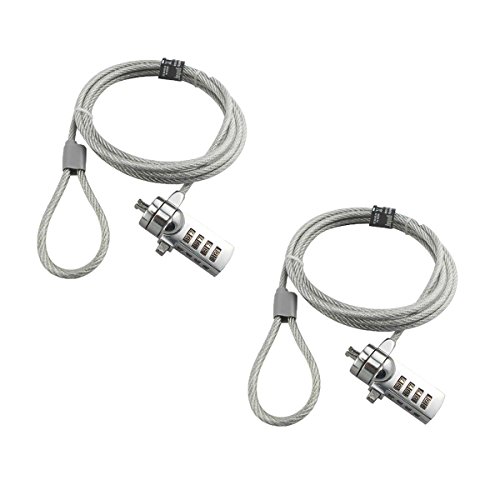
Perfect for professionals and students alike, the Pcs 6-Foot Laptop Lock with 4 Digit Combination offers robust security with its keyless cipher lock. You can easily set a memorable 4-digit code from 10,000 possible combinations, eliminating the hassle of lost keys. Crafted with galvanized wire rope and hardened stainless steel, it provides excellent theft deterrence. Just verify your laptop has a compatible 3 * 7mm keyhole, as some models, like older MacBook Pros and specific Lenovo and Dell devices, aren’t supported. Changing your code is simple, using a screwdriver to reset it whenever you need. Secure your device with confidence!
Best For: Professionals and students looking for a reliable and secure way to protect their laptops from theft.
Pros:
- Keyless cipher lock with 10,000 possible combinations offers flexibility and convenience.
- Durable materials, including galvanized wire rope and hardened stainless steel, provide strong anti-cut protection.
- Easy-to-change password feature allows users to reset their lock code whenever necessary.
Cons:
- Not compatible with certain laptop models, including older MacBook Pros and specific Lenovo and Dell devices.
- Requires a screwdriver for resetting the password, which may be inconvenient for some users.
- The lock’s length may not be suitable for all settings or locations.
Kensington NanoSaver Combination Laptop Lock for Ultra-thin Laptops

Designed specifically for ultra-thin laptops, the Kensington NanoSaver Combination Laptop Lock is an ideal choice for those who prioritize portability without sacrificing security. Compatible with select HP, Lenovo, and Asus models, this slim lockhead lets your laptop lie flat without blocking ports. Its pivot and rotate cable head guarantees one-handed operation for easy connection. With a resettable four-wheel number code offering 10,000 combinations, you’ll enjoy enhanced security. The 6-foot carbon steel cable resists tampering, and Kensington’s Register & Retrieve program helps you recover lost combinations, while the two-year warranty provides peace of mind for your investment.
Best For: Individuals using ultra-thin laptops who need a portable and secure locking solution.
Pros:
- Slim design allows laptops to lie flat without obstructing ports, maintaining functionality.
- Resettable four-wheel number code offers 10,000 combinations for enhanced security.
- Durable carbon steel cable resists tampering and provides cut and theft resistance.
Cons:
- Compatibility limited to select HP, Lenovo, and Asus models, which may exclude other brands.
- Requires remembering the combination, which can be a hassle if forgotten.
- Not as thick as traditional locks, which may raise concerns for some users regarding security strength.
Kensington Desktop & Peripherals Locking Kit 2.0, Black (K64424WW)
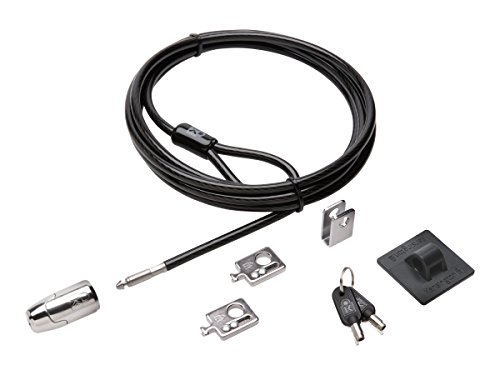
The Kensington Desktop & Peripherals Locking Kit 2.0 is an ideal solution for anyone seeking robust security for their desktop setup. This kit lets you lock your computer, up to three peripherals, and a wired keyboard and mouse with ease. Its strong lock head features a 5mm keying system that includes patented anti-pick Hidden Pin Technology. Plus, the 8-foot cut-resistant carbon steel cable can anchor to desks or fixed structures. With two adapters and a cable trap, securing your devices has never been simpler. Weighing just 0.8 pounds, this locking kit combines durability and effective security in a sleek design.
Best For: Individuals and businesses looking for a reliable security solution to protect desktop computers and peripherals.
Pros:
- Strong security features with a cut-resistant cable and patented anti-pick technology.
- Versatile locking options for securing multiple devices, including peripherals and keyboards.
- Lightweight and portable design, making it easy to transport and set up.
Cons:
- Limited to devices with Kensington Security Slots unless using the included adapters.
- May require additional setup for users unfamiliar with cable locking systems.
- Not suitable for portable devices like laptops without additional accessories.
Computer Laptop Cable Lock with 4 Digit Password Protection

For anyone seeking reliable protection for their laptop, the Computer Laptop Cable Lock with 4 Digit Password Protection stands out with its customizable security code, offering over 10,000 unique combinations. This lock features a 6.23ft braided cable that’s 30% thicker than standard options, ensuring cut resistance. Installation is a breeze, whether your device has a security lock hole or not. Simply attach the adhesive slot plate if needed, insert the lock head, and secure it around a fixed object. With a strong stainless steel lock head and a user-friendly design, this lock provides peace of mind for your valuable devices.
Best For: Individuals seeking a secure and convenient locking solution for their laptops and portable devices.
Pros:
- Customizable 4-digit combination allows for over 10,000 unique security codes.
- Enhanced cut resistance with a 5mm diameter, 30% thicker braided cable.
- Easy installation for both devices with and without security lock holes.
Cons:
- Requires adhesive for devices without security lock holes, which may not be suitable for all users.
- Limited to 4-digit combinations, potentially less secure than longer codes.
- Some users may prefer traditional key locks over combination locks for ease of use.
Kensington T-Bar Standard Keyed Lock Slot for Laptops
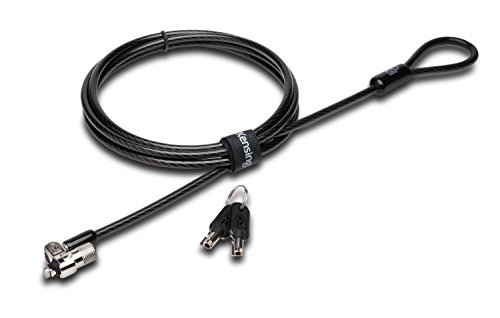
Securing your laptop has never been easier with the Kensington T-Bar Standard Keyed Lock Slot, especially if you’re frequently on the move or work in shared spaces. This lock is designed to secure not just laptops but also desktops, monitors, and more, utilizing advanced t-bar technology for enhanced security. The 6’ carbon steel cable, covered in a plastic sheath, resists cutting attempts while ensuring mobility. Plus, the pivoting lock head makes it easy to lock and release thin devices. Just remember, it’s not compatible with certain Dell and HP models, so check compatibility before purchasing. Enjoy peace of mind with Kensington!
Best For: Individuals who frequently work in shared spaces or travel and need to secure their laptops and other devices.
Pros:
- Enhanced security with patented hidden pin technology and anti-pick tubular lock.
- 6’ carbon steel cable provides resistance to cutting attempts while allowing for mobility.
- Pivoting lock head offers easy locking and unlocking for thin devices.
Cons:
- Not compatible with 2016 and newer Dell laptops and tablets.
- Some HP models require a different lock slot, limiting compatibility.
- Keyed lock may be less convenient for users preferring combination locks.
Master Lock Black Python Steel Cable Lock (2 Pack)

When it comes to protecting your outdoor gear, the Master Lock Black Python Steel Cable Lock (2 Pack) stands out as a reliable choice. This heavy-duty lock is perfect for securing trail cameras, kayaks, bikes, and tools. Its adjustable cable, made of braided steel, offers strength and flexibility, while the patented locking mechanism guarantees a snug fit at any position. Plus, the rust-resistant lock and vinyl-coated cable provide excellent weather and scratch resistance. With a 6 ft. length and two locks included, you can easily safeguard your gear against theft and the elements—keeping your equipment secure wherever you go.
Best For: Outdoor enthusiasts looking to secure their trail cameras, kayaks, bikes, and tools from theft.
Pros:
- Heavy-duty construction made with braided steel for enhanced strength and flexibility.
- Patented locking mechanism allows for a snug fit at any cable position, ensuring versatility in use.
- Weather-resistant design with rust-resistant lock and vinyl-coated cable, providing durability against the elements.
Cons:
- Limited cable length of 6 ft. may not be sufficient for larger items or more complex securing needs.
- Requires keys for unlocking, which can be inconvenient compared to combination locks.
- Potential for cable wear over time with frequent use or exposure to harsh conditions.
Kensington K64615US Desktop Computer and Peripherals Locking Kit

The Kensington K64615US Desktop Computer and Peripherals Locking Kit is an excellent choice for anyone needing to safeguard multiple devices in office or public settings. With its 8’ cut-resistant, high-carbon steel cable, you can secure various items efficiently. The anchor plate lets you lock equipment that lacks a Kensington Security Slot, while the cable trap keeps your wired keyboards and mice safe. Just make sure your devices, especially specific Dell models, are compatible before installation. This convenient kit enhances your security, making it easy to protect your tech in any environment. Installation is straightforward, ensuring peace of mind quickly.
Best For: Individuals or organizations looking to secure multiple desktop devices and peripherals in office or public environments.
Pros:
- Versatile Security: The kit can secure various devices, including those without a Kensington Security Slot.
- Durable Cable: The 8’ cut-resistant, high-carbon steel cable provides strong protection against theft.
- Easy Installation: Simple setup process with included components makes securing devices quick and hassle-free.
Cons:
- Compatibility Issues: Not compatible with several 2016 Dell laptops and tablets, limiting its use for some users.
- Fixed Length: The 8’ cable may be too short for certain setups or arrangements.
- Limited Protection for Wireless Devices: The cable trap is designed for wired keyboards and mice, offering no protection for wireless peripherals.
Factors to Consider When Choosing a PC Cable Lock
When choosing a PC cable lock, you should consider several key factors. Think about the locking mechanism type, cable length options, and compatibility with your devices to guarantee ideal security. Don’t forget to evaluate the installation process and usability to make certain it fits your needs.
Locking Mechanism Type
Choosing the right locking mechanism type for your PC cable lock is essential for guaranteeing effective security. You can opt for key-based locks or combination locks, with the latter offering more potential combinations for added protection. Resettable combination locks typically feature 4-number dials, allowing you to choose from up to 10,000 unique combinations, which greatly deters unauthorized access. On the other hand, keyed locks often use anti-pick technologies, such as hidden pin mechanisms, to prevent tampering. Consider locks with push-button designs for one-handed engagement, making them easier to operate. Finally, make sure the lock is compatible with specific locking mechanisms, like Kensington or Noble slots, to guarantee a proper fit with your device’s security slot.
Cable Length Options
Selecting the right cable length for your PC cable lock is essential for ensuring effective security. Typically, cable lengths range from 6 to 8 feet, giving you flexibility in securing your devices to various stationary objects. A longer cable offers more versatility, especially in larger spaces or public areas, while a shorter one can be easier to manage and transport. Make sure the length you choose can reach from your device to a sturdy anchor point without excess slack, as that could pose a security risk. Additionally, consider the trade-off between cable thickness and length; thicker cables may provide better security but can limit flexibility. Choose wisely to balance security and usability for your specific needs.
Compatibility With Devices
Compatibility with your devices is essential for guaranteeing your PC cable lock provides the security you need. First, check if the lock fits your device’s specific security slot type, whether it’s standard, nano, or wedge-shaped. Different devices require different designs, so confirm compatibility with laptops and desktops, especially for models that might not support certain locks. Be mindful that brands like Dell and Alienware often have unique locking mechanisms, necessitating specific lock models. Also, consider the lock head’s size and design; slimmer options work better for ultra-thin laptops to avoid obstructing ports. Finally, verify the dimensions and cable length to guarantee the lock can secure your device effectively while remaining user-friendly.
Security Features Overview
When looking for a reliable PC cable lock, consider the security features that will best protect your devices from theft. Opt for locks made from cut-resistant materials like carbon steel, which enhance resistance against tampering. A resettable combination locking mechanism is essential, offering up to 10,000 combinations for customizable security. Assess the cable length; a longer cable, around 6 feet, provides flexibility for securing devices to various fixed structures. Make sure the lock is compatible with your devices, particularly if they have specific security slots like Kensington or Noble. Additionally, look for extra security features such as anchor plates or traps that allow you to securely attach peripherals and multiple devices for added protection.
Installation and Usability
While finding the right PC cable lock, you should prioritize installation and usability to guarantee a seamless experience. Look for locks that easily install on devices with built-in security lock holes or those equipped with adhesive plates for devices without such holes. Opt for cable locks that allow one-handed operation, making it quick to secure or release your device. Verify the cable length is adequate for your setup, allowing for a secure attachment to a fixed object while keeping access easy. A resettable combination feature can simplify usability, enabling you to change the security code as needed. Finally, check the lock head design to confirm compatibility with your device’s security slot, providing a stable connection without obstructing ports.