
Airport seats, hotel lamps, and rental cars make USB charging convenient—but you may not want an unfamiliar port connected to your phone’s data lines. A USB data blocker sits between the port and your cable to allow charging while blocking data transfer.
The right choice depends on your connectors, how many devices you carry, and whether the adapter supports the charging speed you need. These 10 options include single adapters and multipacks for everyday carry and travel.
Best 10 USB Data Blocker Picks for 2026
Mixed-Port Starter Kit

- Four charge-only adapters
- USB-A-to-C charging up to 2.4A
- USB-C-to-C supports up to 240W PD
Best For: Travelers with mixed USB-A and USB-C setups
Dual-Device Pick
JSAUX 2-in-1 Data Blocker 2-Pack

- Two devices from one USB-A adapter
- Up to 3A for one device
- No fast charging with both in use
Best For: Charging USB-A and USB-C devices from one USB-A port
Balanced Connector Pack

- Two USB-A and two USB-C blockers
- USB-C PD charging up to 100W
- USB-A charging up to 2.4A
Best For: An even split of USB-A and USB-C adapters
Six-Piece Travel Set
BUISAMG USB-A and USB-C Blockers

- Six-piece mixed-connector kit
- USB-A-to-C and USB-C-to-C options
- Listed charging current up to 2.4A
Best For: Keeping charge-only adapters in multiple bags
Best Mixed-Port Pack
JSAUX USB-A and USB-C Data Blockers

- Two USB-A and two USB-C adapters
- USB-C supports up to 100W PD charging
- Blocks data transfer while charging
Best For: Travelers using both USB-A and USB-C chargers
Best USB-A Four-Pack
JSAUX Red Charge-Only Adapters

- Four USB-A charge-only adapters
- Supports up to 2.4A charging
- Aluminum shells with non-slip grip
Best For: Keeping USB-A blockers in multiple bags or locations
Best Simple Two-Pack
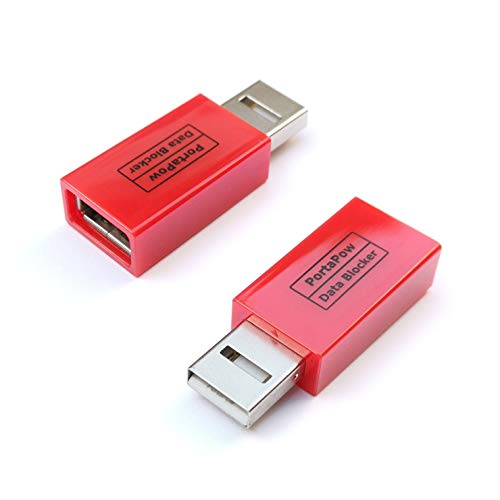
- Two USB-A to USB-A blockers
- Physically blocks data transfer
- Visible indication of data blocking
Best For: Two USB-A charging setups
Smart-Charge Pick
PortaPow Black USB-A Data Blocker

- Physically blocks USB data transfer
- SmartCharge supports up to 2.4A
- Single USB-A to USB-A adapter
Best For: USB-A charging across multiple device standards
Visible-Pin Pick
PortaPow Transparent USB-A Twin Pack

- Removed data pins are visible
- No-chip design
- Two USB-A to USB-A blockers
Best For: Inspecting the physical data barrier in a two-pack
Compact Travel Pick
Plugable USB-MC1 Charge-Only Adapter

- Blocks unwanted data transfers
- Compact single-adapter design
- Listed 1A current rating
Best For: Charge-only use at unfamiliar USB ports
Mixed-Port Starter Kit – BUISAMG 4-Pack Data Blockers
This four-piece usb data blocker set is a practical option if you charge devices through both USB-A and USB-C connections. The adapters allow charging while blocking data transfer and syncing.
Best For: Travelers who want several charge-only adapters for mixed USB-A and USB-C setups.
Pros:
- Four adapters for use across multiple devices or bags.
- Supports USB-A-to-C charging up to 2.4A.
- USB-C-to-C charging is listed as supporting up to 240W PD.
Cons:
- Data transfer and syncing will not work while an adapter is connected.
- The notes do not specify the exact count of each connector type in the four-pack.
Choose this set if you want mixed-connector coverage and the listed USB-C charging capability; check the connector mix against your cables before buying.
Dual-Device Pick – JSAUX 2-in-1 Data Blocker 2-Pack
Each usb data blocker in this two-pack combines USB-A-to-A and USB-A-to-C charge-only connections, so one adapter can charge two devices at once from a USB-A source. Its compact size makes it easy to carry for public charging stops.
Best For: People who want one USB-A adapter to charge both a USB-A and a USB-C device.
Pros:
- Two-in-one design supports simultaneous charging of two devices.
- Blocks data transfer and syncing.
- Supports up to 3A charging for a single device.
Cons:
- Fast charging is not supported when charging two devices at once.
- The two-in-one design starts with USB-A, not a USB-C source port.
This is the convenient pick when you need two charge-only connections from a USB-A port, provided you can accept slower charging when both are in use.
Balanced Connector Pack – JSAUX USB-A and USB-C 4-Pack
This usb data blocker pack has a clear connector mix: two USB-A blockers and two USB-C blockers. All four are designed for charge-only use, blocking data transfer and syncing when you plug into an unfamiliar charging source.
Best For: Households or travelers who want an even split of USB-A and USB-C charge-only adapters.
Pros:
- Includes two blockers of each connector type.
- USB-C blockers support PD charging up to 100W.
- USB-A blockers support charging up to 2.4A.
Cons:
- Actual charging speed depends on the device and wall charger.
- Data syncing is unavailable through the blockers.
The defined two-and-two mix makes this an easy set to plan around; choose it when both port types feature in your charging routine.
Six-Piece Travel Set – BUISAMG USB-A and USB-C Blockers
This six-piece usb data blocker kit gives you multiple adapters for charge-only use with USB-A and USB-C connections. The listing describes USB-A-to-C and USB-C-to-C options, making it worth considering if you keep chargers in several bags or locations.
Best For: Buyers who want a larger supply of mixed-connector blockers for everyday carry and travel.
Pros:
- Six-piece kit offers more adapters to distribute across bags or devices.
- Includes options described for USB-A-to-C and USB-C-to-C charging.
- Metal shells are described as aiding heat dissipation.
Cons:
- The listed charging current is up to 2.4A; no USB-C wattage rating is specified.
- The exact count of each connector configuration is not stated in the supplied notes.
Consider this kit for its quantity and connector variety, but confirm the configuration if you need a particular number of USB-C-to-C adapters.
Best Mixed-Port Pack – JSAUX USB-A and USB-C Data Blockers
This JSAUX usb data blocker four-pack includes two USB-A and two USB-C adapters, making it a practical choice if your charging cables use both connectors. Each adapter blocks data transfer while allowing charging.
Best For: Travelers who want charge-only adapters for both USB-A and USB-C charging setups.
Pros:
- Includes two blockers of each connector type.
- USB-C blockers support up to 100W PD charging; the USB-A blockers support up to 2.4A.
- Compact adapters are easy to carry for use at public charging stations.
Cons:
- Actual charging speed depends on the device and charger.
- Only two adapters are included for each connector type.
The mixed pack is the most flexible option here for households or travel bags with both port types; check your cable connector before choosing which adapter to use.
Best USB-A Four-Pack – JSAUX Red Charge-Only Adapters
If you regularly plug charging cables into USB-A ports, this JSAUX usb data blocker set gives you four charge-only adapters. They prevent data syncing and the associated data-transmission prompts while your device charges.
Best For: People who want multiple USB-A blockers for travel, work, or everyday charging.
Pros:
- Four adapters let you keep one in several bags or locations.
- Supports charging up to 2.4A.
- Aluminum shells and non-slip surfaces aid durability and handling.
Cons:
- USB-A connectors only; this set does not include USB-C blockers.
- Data syncing is unavailable while an adapter is connected.
Choose this pack when your charging sources have USB-A ports and you value having spares. For USB-C ports, the mixed-port JSAUX pack is the better fit.
Best Simple Two-Pack – PortaPow USB-A Data Blockers
The PortaPow usb data blocker fits between a USB-A charging cable and a USB-A charging source to physically block data transfer. This two-pack is a straightforward option for charging without data-sync pop-ups in places such as cars and airports.
Best For: Buyers who need two USB-A charge-only adapters rather than a larger pack.
Pros:
- Physically blocks the data connection between cable and charging source.
- Two adapters suit a pair of charging kits.
- Designed to visibly indicate that data is blocked.
Cons:
- USB-A to USB-A only; USB-C versions are separate.
- The supplied notes do not specify a charging-current or wattage rating.
PortaPow keeps the decision simple if your setup uses USB-A at both ends of the adapter. Check the connector type before buying, especially if you charge from USB-C ports.
Smart-Charge Pick – PortaPow Black USB-A Data Blocker
This USB data blocker sits between a USB-A charging port and your cable, physically blocking data transfer while your device charges. Its SmartCharge chip switches among Apple, Universal, and Samsung charging standards, with support for up to 2.4A.
Best For: Travelers who want a USB-A charge-only adapter with support for multiple charging standards.
Pros:
- Physically blocks data transfer and syncing.
- SmartCharge chip supports charging at up to 2.4A.
- Two-year manufacturer warranty.
Cons:
- USB-A to USB-A only; check your port and cable before buying.
- Comes as a single blocker.
Choose this version if charging compatibility matters more to you than the transparent, no-chip design of PortaPow’s twin pack.
Visible-Pin Pick – PortaPow Transparent USB-A Twin Pack
This USB data blocker uses a transparent casing and a custom USB connector with visibly removed data pins, so you can inspect how it blocks syncing. The two-pack gives you a charge-only adapter for more than one USB-A charging setup.
Best For: Buyers who prefer a visibly pin-free, no-chip design and need two USB-A blockers.
Pros:
- Visibly removed data pins make the physical barrier easy to inspect.
- No-chip design.
- Includes two blockers.
Cons:
- USB-A to USB-A only; check your charging setup before ordering.
- No charging-current rating is specified in the supplied notes.
This is the straightforward pick if seeing the removed pins matters to you; the supplied information does not establish how quickly it will charge your device.
Compact Travel Pick – Plugable USB-MC1 Charge-Only Adapter
The Plugable USB-MC1 is a compact USB data blocker that turns a USB data port into a charge-only port. It is designed for charging at unfamiliar USB ports in places such as airports, coffee shops, and libraries.
Best For: Travelers who want a small, single-adapter option for public USB ports.
Pros:
- Prevents unwanted data transfers while charging.
- Compact, travel-ready size.
- Rated for 1A charging and backed by a two-year limited warranty.
Cons:
- Only one adapter is included.
- Its listed 1A rating is lower than the PortaPow black model’s stated 2.4A maximum.
This is a practical pocket-size option when your priority is charge-only access at an unfamiliar port, rather than the higher stated current of the PortaPow black model.
How We Picked These USB Data Blockers
We focused on charge-only adapters suited to public USB ports, then compared connector formats, pack sizes, portability, and how clearly each listing describes its charging behavior. This selection includes USB-A options, USB-C options, and mixed packs. Pack count matters if you want an adapter in every travel bag or need to equip several people; it matters less if you only charge one device away from home.
Product descriptions cannot establish how every adapter is wired or how it will perform with every charger. Before relying on one, check the exact variant you receive and test it with your phone, cable, and charger.
Quick Comparison
Start by sorting the options by connector and quantity. The listed JSAUX packs offer two or four adapters, including a mixed USB-A/USB-C choice. The other USB-C-focused multipacks offer four or six pieces. The PortaPow listings cover single and two-pack choices, while Plugable offers a charging-focused option for public USB ports. Choose by the ports and cables you actually use rather than by pack size alone.
Key Buying Factors for a USB Data Blocker
Connector Direction
“USB-A” or “USB-C” is not enough information by itself. Check the adapter’s plug and socket: the plug must fit the charging port, and the socket must accept your cable. For example, a USB-A-to-USB-A blocker will not fit a USB-C-only charging port. If you regularly encounter both, consider carrying one of each or a mixed pack.
Charging Compatibility
Blocking data connections can also affect charging negotiation. Do not assume an adapter will preserve your phone’s fastest charging mode just because it fits. Check the maker’s stated charging support, then test the complete combination of port, blocker, cable, and device before a trip. If speed is essential, a trusted wall charger plugged into an AC outlet is usually a more predictable choice.
Fit and Everyday Handling
A small adapter is easy to lose. Consider whether it fits beside neighboring ports, how easily you can remove it, and whether a visible color or spare in your bag would help. Multipacks are useful for households and frequent travelers, but only if every piece has the connectors you need.
Who Should Buy Which USB Data Blocker?
For a single travel setup, start with a single adapter that matches your most-used cable and public-port type. For a family or several bags, compare the four- and six-piece packs by connector mix before choosing. If you switch between USB-A and USB-C ports, a mixed pack may save you from carrying the wrong adapter. Whichever you buy, remember that a charge-only connection addresses USB data transfer through that connection; it does not make an untrusted charger safe from every possible electrical problem.