
When it comes to achieving accurate color representation in your work, investing in a reliable hardware calibrator is essential. In 2026, the market offers a variety of options tailored for photographers, videographers, and graphic designers. Each calibrator has unique features aimed at enhancing your workflow. Curious about which devices stand out this year and why they might be the perfect fit for your needs? Let’s explore the top contenders.
Calibrite Display Pro HL Monitor Calibration Colorimeter
If you’re a professional photographer or designer seeking impeccable color accuracy for your displays, the Calibrite Display Pro HL Monitor Calibration Colorimeter is your ideal companion. This high luminance colorimeter calibrates LCD, mini LED, and OLED screens, measuring brightness up to 3000 nits. With the advanced HL sensor, it guarantees precise tone and color consistency essential for your projects. The included Calibrite PROFILER software offers Basic and Advanced modes, letting you customize settings like white point and gamma. Plus, it supports profiling multiple monitors, making it perfect for team environments that require matched color outputs across different displays.
Best For: Professionals in photography and design who require precise color calibration for high-brightness displays.
Pros:
- High luminance sensor capable of measuring brightness up to 3000 nits, ensuring accuracy for modern displays.
- Calibrite PROFILER software offers customizable settings for tailored calibration, accommodating both basic and advanced users.
- Supports profiling of multiple monitors, making it ideal for collaborative environments that demand consistent color outputs.
Cons:
- May have a steeper learning curve for users unfamiliar with calibration tools and software.
- The price point may be higher compared to basic colorimeters, which could be a consideration for budget-conscious users.
- Requires regular calibration to maintain accuracy, which might be time-consuming for some users.
Calibrite Display Plus HL Monitor Calibration Colorimeter
The Calibrite Display Plus HL Monitor Calibration Colorimeter is an essential tool for professionals working with high-end displays like Mini LED and OLED. It features an advanced HL high luminance sensor that measures up to 10,000 nits, ensuring precise HDR calibration. With the Calibrite PROFILER software, you can easily adjust settings like white point and gamma. Plus, it supports broadcast standards for accurate video production. Weighing only 4.9 ounces and compact at 1.5 x 2.56 x 2.6 inches, it’s portable and includes handy validation tools. With a 4.4-star rating, it’s a trusted choice for color accuracy.
Best For: The Calibrite Display Plus HL Monitor Calibration Colorimeter is best for video production professionals and photographers who require high precision in color calibration for high-end displays.
Pros:
- Advanced HL sensor measures brightness up to 10,000 nits for accurate HDR calibration.
- Calibrite PROFILER software allows comprehensive adjustments of various settings including white point and gamma.
- Portable design with a lightweight build and included travel pouch makes it easy to transport.
Cons:
- Limited to high-end displays, which may not be necessary for all users.
- Customer feedback indicates a learning curve with the software for beginners.
- Price point may be higher compared to basic calibration tools.
Calibrite Display 123 Monitor Calibration Colorimeter for Photo Editing

For photographers and creators seeking precise color accuracy, the Calibrite Display 123 Monitor Calibration Colorimeter stands out with its user-friendly 1 2 3 software workflow. Its compact design and adjustable counterweight make it easy to position on screens. You’ll appreciate the brightness target options and the before-and-after check feature for instant feedback. This calibrator corrects common color shifts, ensuring your edits appear consistently across multiple displays. Plus, it supports dual monitors, perfect for a multi-screen workspace. With its guided process, you’ll achieve reliable color editing without hassle, keeping your work aligned with your vision.
Best For: Photographers and creators who require precise color accuracy for their photo editing and color-accurate viewing needs.
Pros:
- User-friendly 1 2 3 software workflow simplifies the calibration process, making it accessible for all skill levels.
- Supports dual monitors for consistent color matching in multi-screen workspaces, enhancing productivity.
- Compact design with adjustable counterweight allows for easy placement on various screen types.
Cons:
- Limited to two displays, which may not suffice for users with larger multi-monitor setups.
- Requires USB-C connection, which may not be compatible with all devices without an adapter.
- Calibration may need to be repeated regularly to maintain accuracy, potentially adding to workflow time.
Datacolor Spyder X Pro Monitor Calibrator

Ideal for first-time users, the Datacolor Spyder X Pro Monitor Calibrator guarantees your displays showcase accurate colors without the complexity often associated with calibration tools. Its groundbreaking lens-based color engine enhances precision across multiple monitors, ensuring your images look their best. With automatic room-light monitoring, it adjusts profiles based on lighting conditions, providing peak performance. The intuitive design allows for quick, single-click calibration in just a minute or two. Plus, the SpyderProof feature lets you easily compare before and after results using your own images. Experience color accuracy like never before with this user-friendly calibrator.
Best For: First-time users who need a simple and effective solution for achieving accurate color calibration on their monitors.
Pros:
- Intuitive design allows for quick, single-click calibration, making it accessible for non-experts.
- Groundbreaking lens-based color engine enhances precision for multiple monitors, ensuring consistent color quality.
- Automatic room-light monitoring adjusts profiles based on changing lighting conditions for optimal performance.
Cons:
- Requires 4 AA batteries, which may need to be replaced periodically.
- Limited to 12 predefined calibration targets, potentially restricting advanced users seeking more customization.
- Customer rating of 4.3 out of 5 indicates some users may have experienced issues or limitations.
Datacolor Spyder4Pro S4P100 Colorimeter for Display Calibration

Designed for enthusiasts and professionals alike, the Datacolor Spyder4Pro S4P100 Colorimeter stands out with its ability to automate color and brightness calibration. This device features a single sensor that conveniently calibrates multiple displays, ensuring consistent results. You’ll appreciate the Fast Re-calibration Assistant (ReCAL), which simplifies the recalibration process over time. Its full-spectrum color sensor with double-shielded filters enhances accuracy, meeting CIE color standards. With a 26% increase in average accuracy and a 19% improvement in consistency between units, you can trust its long-term stability to maintain precision, making it an excellent choice for display calibration.
Best For: The Datacolor Spyder4Pro S4P100 Colorimeter is best for professionals and enthusiasts seeking precise and automated display calibration.
Pros:
- Automated calibration simplifies the process for users, saving time and effort.
- Improved accuracy and consistency enhance the reliability of color calibration across multiple displays.
- Long-term stability ensures that the calibration remains accurate over time, reducing the need for frequent adjustments.
Cons:
- Single sensor limitation may not cater to specialized calibration needs for different display types.
- Initial setup time could be longer for users unfamiliar with calibration processes.
- Cost may be a consideration for casual users or those on a tight budget.
Calibrite Display SL (CCDISSL)

The Calibrite Display SL (CCDISSL) stands out with its advanced SL sensor, making it a top choice for still image and video editors who demand precise color calibration. This compact device connects via USB-C, and it even includes a USB-A adapter for versatility. You’ll appreciate its compatibility with multiple displays connected to the same computer. The Calibrite PROFILER software simplifies the calibration process for both Mac and Windows users, ensuring powerful yet easy operation. Weighing only 4.9 ounces and packaged in a recyclable pouch, it’s perfect for travel. With a solid 4.0-star rating, it’s a reliable option for your calibration needs.
Best For: The Calibrite Display SL is best for still image and video editors seeking precise color calibration for their LCD displays.
Pros:
- Compact and lightweight design, making it easy to transport.
- Includes USB-C connectivity with an adapter for USB-A compatibility.
- User-friendly Calibrite PROFILER software simplifies the calibration process.
Cons:
- Requires a 12V battery, which may need replacement over time.
- Limited to LCD displays, not suitable for other types of screens.
- Average customer rating of 4.0 stars may indicate some user dissatisfaction.
25MM Calibration Block Bar for Micrometer Standard Caliper

For professionals seeking precision in their measurements, the 25MM Calibration Block Bar for Micrometer Standard Caliper stands out as an essential tool. Made from durable stainless steel, it resists deformation, ensuring your calibration stays accurate over time. Its compact design, measuring 7x5x1cm, makes it easy to store in toolboxes without taking up much space. To use, just fix the calibration block by holding the measuring rod in the middle, rotate the bar, and take multiple measurements for an average value. This process minimizes errors, helping align your micrometer readings with true values for maximum accuracy.
Best For: Professionals and technicians who require precise calibration for micrometers and other measuring instruments.
Pros:
- Durable Material: Made from stainless steel, ensuring long-lasting accuracy and resistance to deformation.
- Compact Size: Lightweight and easy to store, making it convenient for transport in toolboxes.
- Error Minimization: Allows for averaging multiple measurements, enhancing the reliability of readings.
Cons:
- Limited Length Options: Only available in specific lengths (25mm, 50mm, 75mm, 100mm), which may not suit all calibration needs.
- Requires Skill: Proper usage involves technique, which may necessitate training for inexperienced users.
- Not a Comprehensive Calibration Solution: Primarily focused on micrometers, potentially limiting its application for other types of measuring tools.
Secure Wall Mount for 6 Inch Calipers

When you need to keep your tools organized and easily accessible, the Secure Wall Mount for 6-Inch Calipers stands out as an essential solution for machinists and engineers alike. This wall mount accommodates various calipers, ensuring your digital, vernier, and dial calipers are securely held and protected from damage. Its durable construction guarantees stability while maximizing your workspace, allowing you to utilize wall space effectively. Plus, installation is quick and hassle-free on any wall or pegboard. With this mount, you’ll always have your precision measuring tools ready to go, enhancing your efficiency in any project you tackle.
Best For: Machinists, engineers, and precision instrument users who require organized and accessible storage for their calipers.
Pros:
- Durable construction ensures stability and protects calipers from damage.
- Space-saving design allows for efficient use of wall space.
- Quick and easy installation on any wall or pegboard.
Cons:
- Limited to 6-inch calipers, may not accommodate larger tools.
- Requires wall or pegboard space, which may not be available in all work environments.
- May not be suitable for users with different types of measuring tools that exceed the size or type specifications.
RUOSHUI 04S Multi-function Temperature Calibrator

Engineers and technicians seeking precision in their calibration processes will find the RUOSHUI 04S Multi-function Temperature Calibrator an invaluable tool. With its large LCD display and a 5-digit readout, you’ll experience clear and accurate measurements. The calibrator boasts a basic accuracy of 0.05%, ensuring reliable results. It features built-in self-tests and supports closed-case calibration, eliminating the need for internal adjustments. Additionally, it offers versatile output capabilities, including DC voltage and current, along with a 24V loop voltage source. This multi-functional device is perfect for various applications, making it a must-have for your calibration toolkit.
Best For: Engineers and technicians seeking precise and reliable calibration solutions for temperature and voltage measurements.
Pros:
- High accuracy of 0.05% ensures dependable calibration results.
- Large LCD display with 5-digit readout for clear measurement visibility.
- Versatile output capabilities including DC voltage, current, and 24V loop voltage source.
Cons:
- May be more expensive than basic calibration tools.
- Closed-case calibration might limit user adjustments for specific needs.
- Limited to temperature and voltage calibration, not suitable for all types of measurements.
Upgrade 5-step Calibration Block for Thickness Gauge
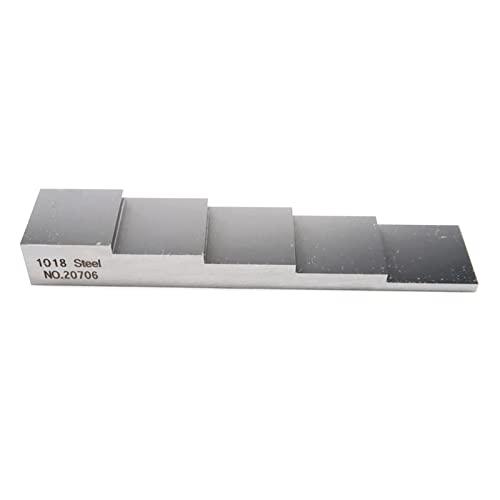
The Upgrade 5-step Calibration Block for Thickness Gauge stands out as an essential tool for professionals needing precise measurements in various applications. Designed for thickness and linearity calibration, it covers measurements of 0.1″, 0.2″, 0.3″, 0.4″, and 0.5″. Crafted from durable carbon steel, it guarantees long-lasting use. Its compact size of approximately 10×2 cm (4×1 inches) makes it portable, allowing you to easily carry it wherever you go. Whether you’re calibrating thickness gauges in a workshop or on-site, this calibration block guarantees accurate measurements, making it a must-have for your toolkit.
Best For: Professionals and technicians who require precise calibration of thickness gauges in various settings.
Pros:
- Durable construction: Made from carbon steel for long-lasting use.
- Compact and portable: Easy to carry, making it convenient for on-the-go calibration.
- Versatile measurements: Covers a range of thicknesses (0.1″ to 0.5″) for various applications.
Cons:
- Limited to specific measurements: Only available for thicknesses of 0.1″, 0.2″, 0.3″, 0.4″, and 0.5″.
- Weight considerations: While portable, carbon steel may add some weight compared to other materials.
- Requires proper maintenance: Regular care is needed to maintain the integrity of the calibration block.
Factors to Consider When Choosing a Hardware Calibrator for Displays
When choosing a hardware calibrator for your display, it’s essential to take into account several key factors. You’ll want to assess calibration accuracy, verify compatibility with your specific display type, and look for a user-friendly interface. Also, think about software functionality and whether the calibrator supports multiple monitors for a seamless workflow.
Calibration Accuracy Requirements
Choosing a hardware calibrator for your display hinges on understanding calibration accuracy requirements, as even minor discrepancies can distort color representation. Look for devices that offer accuracy levels as fine as 0.05% for overall performance. High luminance sensors are essential, especially for modern displays, as they can measure brightness levels up to 10,000 nits for HDR content. Advanced tools often provide features like profile validation and uniformity checks, ensuring consistent accuracy across multiple displays. Additionally, support for various color standards, such as Rec.709 and BT.1886, enhances the calibration process tailored to specific workflows. Finally, consider quick calibration solutions with intuitive workflows, making the process accessible, even if you don’t have extensive technical knowledge.
Display Compatibility Features
Selecting a hardware calibrator that matches your display technology is vital for achieving ideal color accuracy. Make certain the calibrator supports your specific display type—whether it’s LCD, OLED, or mini LED—to guarantee precise calibration. Additionally, check that it can measure peak brightness levels, especially if you’re using ultra-bright screens with luminance up to 10,000 nits. Look for a calibrator compatible with multiple display setups, allowing you to profile several monitors for consistent color output. Consider the software features too; verify it supports various color standards like Rec.709 or Rec.2020 and offers custom calibration settings tailored to your workflow. Finally, validation tools for uniformity checks and profile validation are vital for maintaining consistent performance across different viewing conditions.
User-Friendly Interface Design
A user-friendly interface design can make all the difference in your calibration experience, especially if you’re new to the process. Look for calibrators that offer intuitive navigation, which simplifies the calibration steps and helps you avoid common pitfalls. Guided workflows can provide step-by-step instructions, making it easier to follow along and reducing errors. Visual feedback, like before-and-after comparisons, allows you to see the impact of your adjustments, keeping you engaged and informed. Additionally, customizable settings and presets let you tailor the process to your specific display needs. Finally, quick access to essential features can save you time, boosting your productivity and ensuring a smoother calibration experience overall.
Software Functionality Options
Since you’ll want the best calibration results for your display, examining the software functionality options is essential. Look for software that offers both Basic and Advanced modes, allowing you to adjust white point, luminance, contrast ratio, and gamma effectively. It’s vital to choose a calibrator that supports custom presets, ensuring consistent results across different workstations. Validation tools like Quick Check and profile validation help verify calibration accuracy and performance over time. If you work with multiple displays, opt for solutions that facilitate multi-display profiling for matched color outputs. Finally, user-friendly software with guided workflows simplifies the calibration process, making it accessible even for beginners. This way, you can achieve ideal results effortlessly.
Multi-Monitor Support Capability
How can you ensure color consistency across multiple displays in your workspace? Look for hardware calibrators that support simultaneous calibration of several monitors. This feature guarantees that all your screens display uniform colors, essential for any collaborative environment. Some calibrators let you share custom presets across monitors, maintaining consistent color profiles. Advanced tools, like uniformity checks, help you verify and adjust each monitor’s performance, reducing color discrepancies. Additionally, modern calibrators allow for quick re-calibration, making it easy to keep your displays accurate over time without extensive setup. By profiling different monitors on the same system, you can greatly enhance your workflow efficiency, especially in creative settings where matched color output is crucial.
Connectivity and Port Options
Maintaining color consistency across multiple displays sets the stage for understanding the importance of connectivity and port options in hardware calibrators. First, look for USB-C connectivity, as it’s quickly becoming the standard for modern devices, allowing for faster data transfer and compatibility. Including USB-A adapters is also a plus, letting you connect to older devices.
Consider calibrators that support multiple display connections to guarantee you can calibrate several monitors simultaneously. Always verify the device’s compatibility with your operating system, since some come with dedicated software for either Mac or Windows. Finally, opt for models that feature a built-in mounting thread, providing secure attachment to tripods or stands, which enhances stability during calibration.
Portability and Storage Solutions
When choosing a hardware calibrator for displays, portability and storage solutions play an essential role in ensuring you can easily transport and protect your investment. Consider the weight and compact design; lighter models are easier to carry and won’t take up much space. Look for calibrators that come with travel pouches or cases to safeguard the device during transport. Evaluate the dimensions to make sure it fits comfortably in your workspace or carry-on luggage. A built-in mount can enhance stability during calibration and simplify storage. Additionally, opt for models that allow simultaneous calibration of multiple displays, reducing the need for multiple devices and streamlining your storage needs.
Warranty and Return Policies
While you might be focused on features and performance, understanding the warranty and return policies of hardware calibrators for displays is equally essential. Check the warranty period offered by the manufacturer, as it provides peace of mind regarding the product’s longevity and reliability. Many calibrators come with a standard return policy that typically allows for returns within 30 days of purchase, which is vital for ensuring your satisfaction. Some products may even offer extended warranty options for coverage beyond the initial period, adding value to your investment. Also, pay attention to return policy details, like whether the product must be in its original packaging or if there are restocking fees, to avoid unexpected costs.