
If you’re looking to optimize your multi-display setup, choosing the right KVM switch for your triple monitor configuration is essential. With technology advancing rapidly, options now support high resolutions and seamless switching between multiple computers. You’ll want to take into account factors like resolution, connectivity, and switching mechanisms. Let’s explore the top picks that can enhance your visual experience and productivity.
TESmart 8K@60Hz DP KVM Switch for 3 Monitors and 2 Computers
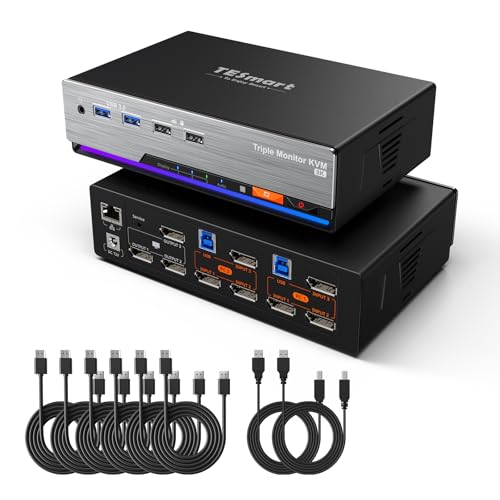
If you’re a gamer or a professional who relies on multiple screens for productivity, the TESmart 8K@60Hz DP KVM Switch is an ideal choice. This powerful device lets you connect two computers to three monitors, supporting resolutions up to 8K at 60Hz. With USB 3.0 connectivity and advanced features like G-Sync and FreeSync, it guarantees smooth performance and stunning visuals. You’ll enjoy seamless switching via customizable hotkeys, front panel buttons, or even an IR remote. Plus, the integrated audio management lets you listen to one computer while using another, making it perfect for multitasking in any high-performance setup.
Best For: Gamers and professionals who require a high-performance KVM switch for multitasking across multiple monitors.
Pros:
- Supports stunning 8K resolution at 60Hz, ensuring exceptional visual quality.
- Multiple switching options (hotkeys, buttons, remote) provide flexibility and ease of use.
- Integrated audio management allows for simultaneous audio from different computers.
Cons:
- May require additional setup for optimal performance with certain graphics cards.
- The weight and dimensions could make it less portable for users needing a travel-friendly option.
- Limited to DisplayPort connections, which may not suit all users’ needs.
8K/4K Triple Monitor KVM Switch for 3 Computers

For professionals juggling multiple tasks or gamers who crave an immersive experience, the 8K/4K Triple Monitor KVM Switch is an ideal solution. It supports three monitors—two DisplayPort and one HDMI—allowing you to seamlessly switch between three computers with just one click. Enjoy stunning visuals with resolutions up to 8K@60Hz or 4K@144Hz, provided your equipment meets compatibility standards. Plus, with four USB 3.0 ports for peripherals and a straightforward switching mechanism, you’ll enhance your workflow or gaming setup effortlessly. Enjoy dedicated customer support and a 12-month warranty for peace of mind while you elevate your multi-display experience.
Best For: Professionals managing multiple tasks and gamers seeking an immersive multi-monitor experience.
Pros:
- Supports up to 8K resolution for stunning visuals and enhanced gaming or work performance.
- Easy one-click switching between three computers with multiple connectivity options.
- Equipped with four USB 3.0 ports for fast data transfer and peripheral connections.
Cons:
- Requires specific cables and compatibility for optimal performance, which may not be included.
- Each PC needs multiple cables, potentially leading to clutter or complex setup.
- Performance may vary depending on the connected devices’ capabilities and configurations.
8K@60Hz HDMI Displayport KVM Switch for 3 Monitors

The K@60Hz HDMI Displayport KVM Switch for 3 Monitors is ideal for professionals and gamers who demand high-quality visuals and seamless multitasking. Supporting 8K@60Hz and 4K@120Hz, this switch guarantees stunning display performance across three monitors. You’ll enjoy the convenience of four USB 3.0 ports for fast connections to keyboards, mice, and other peripherals. Switching between two computers is effortless, thanks to the built-in button or wired controller. Compatible with major operating systems, it assures reliable performance with the included 12V adapter. Elevate your workspace efficiency and enjoy a clutter-free setup with this powerful KVM switch.
Best For: Professionals and gamers seeking high-quality visuals and seamless multitasking across three monitors.
Pros:
- Supports stunning 8K@60Hz and 4K@120Hz visuals for exceptional display performance.
- Features four USB 3.0 ports for fast and efficient connections to various peripherals.
- Easy switching between two computers using a built-in switch button or a wired controller.
Cons:
- Requires specific port configurations (2 DP ports and 1 HDMI port) on computers, limiting compatibility with some setups.
- High-power USB devices may need an additional power supply, adding to the complexity.
- Does not support DP to HDMI or DP to DVI adapters, which could restrict some users’ options.
KVM Switch for 3 Monitors and 2 Computers
Designed for professionals and multitaskers who need efficient control over multiple systems, the KVM Switch for 3 Monitors and 2 Computers lets you seamlessly operate two computers with three HDMI monitors. This switch supports Ultra HD 4K@60Hz resolutions and offers extended and copy display modes. With four USB 3.0 ports, you get high-speed data transmission for peripherals like keyboards and printers. Switching between computers is easy, thanks to the manual button or desktop controller. Just remember to connect the included 12V DC power supply to guarantee stability and avoid disconnection issues during your multitasking sessions.
Best For: Professionals and multitaskers who need to efficiently control multiple systems with three monitors.
Pros:
- Supports Ultra HD 4K@60Hz resolution for high-quality visuals.
- Easy switching between computers using manual button or desktop controller.
- Four USB 3.0 ports provide high-speed data transfer for peripherals.
Cons:
- Requires three HDMI cables for each computer, which may increase setup complexity.
- Keyboard shortcuts for switching are not supported, limiting convenience.
- Needs a 12V DC power supply for stable operation, adding to cable management.
8K HDMI 2.1 Displayport KVM Switch for 3 Monitors and 2 Computers

If you need a seamless way to manage multiple high-resolution displays, the 8K HDMI 2.1 Displayport KVM Switch is your ideal solution. This powerful device supports three monitors and two computers, allowing you to easily share both displays and USB devices. With resolutions up to 8K@60Hz and 4K@144Hz, you’ll enjoy stunning visuals. The switch features plug-and-play operation, so you won’t need to install any drivers. Plus, the included wired remote makes switching between systems effortless. It’s perfect for discreet graphics cards and guarantees smooth multi-display setups without any hassle. Upgrade your workstation with this versatile KVM switch today!
Best For: Those looking to efficiently manage multiple high-resolution displays and USB devices with a seamless switching experience between two computers.
Pros:
- Supports ultra-high resolutions up to 8K@60Hz and 4K@144Hz for stunning visuals.
- Plug-and-play operation eliminates the need for driver installation, making setup quick and easy.
- Includes a wired remote for effortless switching between systems.
Cons:
- Requires two DisplayPort and HDMI connections per computer, which may limit compatibility with some setups.
- Not compatible with HDMI to DisplayPort or DVI/VGA to DisplayPort conversions, restricting connection options.
- Relatively bulky size and weight may not suit all workstation configurations.
8K HDMI 2.1 Displayport KVM Switch for 3 Monitors and 3 Computers

For those looking to maximize productivity across three screens, the 8K HDMI 2.1 Displayport KVM Switch is an ideal solution. This powerful switch supports up to 8K@60Hz and 4K@144Hz resolutions, letting you enjoy stunning visuals. With connectivity for three computers and three monitors, it features USB 3.0 ports for fast data transfer and includes a wired remote for easy switching. You’ll appreciate its plug-and-play functionality, eliminating the need for drivers. Just remember, you’ll need HDMI2.1 and DP1.4 cables for peak performance. Elevate your multi-display setup and streamline your workflow with this versatile KVM switch.
Best For: Professionals and gamers looking to enhance their productivity and visual experience across multiple displays with high-resolution support.
Pros:
- Supports high resolutions up to 8K@60Hz and 4K@144Hz for superior visual quality.
- Plug-and-play functionality eliminates the need for complicated driver installations.
- Includes a wired remote for convenient switching between computers.
Cons:
- Requires specific cable types (HDMI2.1 and DP1.4) for optimal performance, which may need to be purchased separately.
- Not compatible with HDMI to DP or DVI/VGA to DP converters, limiting some connection options.
- Requires two outputs per computer for triple display setup, which may complicate some installations.
KVM Switch for 3 Monitors and 2 Computers

The KVM Switch for 3 Monitors and 2 Computers stands out as the ideal solution for professionals who require seamless multitasking across multiple screens. It enables you to share three monitors, supporting extended and mirrored display modes while delivering impressive resolutions up to 8K@60Hz. With four USB 3.0 ports, you can effortlessly connect your keyboard, mouse, or printer, achieving data transfer speeds of 5Gbps. Compatibility is a breeze, as it works with various operating systems without needing drivers. Switching between two computers is simple, thanks to the wired remote and clear LED indicators, enhancing your workflow like never before.
Best For: Professionals and multitaskers who need to efficiently manage multiple monitors and devices across two computers.
Pros:
- Supports high resolutions up to 8K@60Hz and 4K@144Hz, ensuring stunning visual clarity.
- Four USB 3.0 ports enable fast data transfer and easy connectivity for various devices.
- Driver-free compatibility with multiple operating systems simplifies setup and use.
Cons:
- Limited to two computers, which may not suit users with more extensive setups.
- Actual performance may vary based on graphics card and cables used.
- The reliance on a wired remote for switching may not be ideal for all users.
4K@120Hz Displayport KVM Switch for 3 Monitors and 2 Computers
Designed for gamers and professionals who demand high performance, the 4K@120Hz DisplayPort KVM switch seamlessly manages three monitors across two computers. It supports impressive resolutions up to 8K@60Hz and delivers crystal-clear ultra HD video for an immersive experience. You’ll enjoy smooth conversion with a built-in switch button or the convenient wired controller. Plus, it features four USB 3.0 ports for fast file sharing at 5Gbps. Backward compatibility guarantees versatility with older USB devices. Compatible with major brands and operating systems, this KVM switch comes with a 12-month warranty, offering peace of mind for your multi-display setup.
Best For: Gamers and professionals who require high-performance multi-display setups for enhanced productivity and immersive gaming experiences.
Pros:
- Supports high resolutions up to 8K@60Hz and 4K@120Hz, providing stunning video quality.
- Four USB 3.0 ports allow for fast file transfers at 5Gbps, enhancing usability with various peripherals.
- Multiple switching options (built-in button and wired controller) offer convenience in managing connected devices.
Cons:
- Requires all components (source, monitor, and DP cable) to support 8K for optimal performance, which may limit compatibility.
- Limited to DisplayPort connections, potentially excluding users with HDMI-only devices.
- Power adapter needed for operation, which may add to cable clutter in the workspace.
KVM Switch 2 Port MST Dual USB-C Docking with Triple Monitor Support
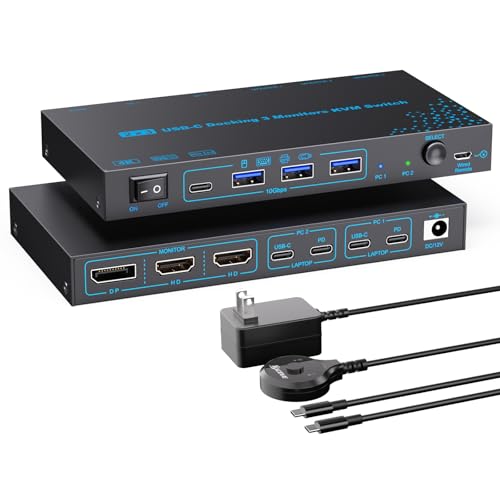
If you need a seamless way to manage multiple devices, the KVM Switch 2 Port MST Dual USB-C Docking is an excellent choice for professionals juggling two laptops and three monitors. This powerful switch supports dual 4K@60Hz and one 1080P@60Hz output, allowing you to enjoy stunning visuals. With four USB 3.1 Gen2 ports, you can easily connect peripherals like keyboards and mice. Plus, it features a 100W power delivery port, keeping your laptops charged while in use. Switching between devices is effortless, thanks to its flexible control methods and clear LED indicators, ensuring a smooth workflow.
Best For: Professionals who need to manage multiple laptops and monitors efficiently in a workspace.
Pros:
- Supports triple monitor setup with dual 4K@60Hz outputs for high-quality visuals.
- Easy switching between two laptops with multiple flexible control options.
- 100W power delivery keeps laptops charged while in use, ensuring uninterrupted productivity.
Cons:
- Limited display mode options for Mac OS users may restrict functionality.
- Actual power delivered to laptops is lower than advertised due to power consumption by connected devices.
- May require compatible cables and monitors to achieve optimal output resolution.
ANGEET 3 Monitor KVM Switch for 3 Computers

For tech enthusiasts juggling multiple computers, the ANGEET 3 Monitor KVM Switch is an ideal solution, offering seamless control over three systems with just one set of peripherals. It supports extended and mirrored display modes, ensuring compatibility with Windows, Mac, Linux, and Unix. You’ll enjoy stunning visuals with resolutions up to 8K@60Hz and 4K@144Hz, thanks to HDMI 2.1 and DP 1.4. With integrated USB 3.0 ports, sharing devices is fast at 5Gbps. Switching is effortless with a manual push button or wired remote, and the package includes everything you need, backed by a one-year warranty.
Best For: Tech enthusiasts and professionals managing multiple computers who require seamless control over their peripherals.
Pros:
- Supports high resolutions up to 8K@60Hz and 4K@144Hz for stunning visuals.
- Integrated USB 3.0 ports offer fast data transfer speeds of 5Gbps for connected devices.
- Easy switching between computers with manual push button or wired remote control.
Cons:
- Limited to three computers, which may not be sufficient for users with more systems.
- No wireless switching option, requiring a physical connection for control.
- May require additional cables for full setup, as only USB cables are included in the package.
Factors to Consider When Choosing a KVM Switch for Triple Monitor
When choosing a KVM switch for triple monitors, you need to take into account several key factors. First, think about resolution support options and monitor compatibility to guarantee everything works seamlessly. Additionally, pay attention to USB port availability, switching mechanisms, and power supply specifications to meet your specific needs.
Resolution Support Options
Choosing the right KVM switch for a triple monitor setup hinges on its resolution support options, as these directly affect your visual experience. For peak clarity and performance, look for switches that support high resolutions like 8K@60Hz or 4K@144Hz. Confirm the switch complies with standards such as HDMI 2.1 or DisplayPort 1.4 to guarantee compatibility with your high-resolution displays. Many options offer backward compatibility with lower resolutions like 4K@60Hz or 2K@144Hz, giving you flexibility in monitor choices. Additionally, check for support of extended display modes, allowing different content on each monitor, or mirrored modes for duplicating content. Finally, verify that your graphics cards, monitors, and cables match the KVM switch’s maximum supported resolution to avoid performance issues.
Monitor Compatibility Requirements
Understanding monitor compatibility requirements is vital in selecting the right KVM switch for your triple monitor setup. First, make certain the KVM switch supports the video output standards your monitors need, like HDMI 2.1 or DisplayPort 1.4, to achieve the best resolution and refresh rates. Check the switch’s maximum resolution and refresh rate capabilities, as some may limit your display quality. It’s also important that the number of video outputs matches your monitors—typically two DisplayPort and one HDMI for triple displays. Verify your graphics card’s compatibility with the KVM switch to confirm it can handle multiple outputs without performance issues. Finally, consider if you need backward compatibility for older monitor resolutions.
USB Port Availability
A KVM switch for triple monitors often comes with 4 to 6 USB 3.0 ports, which are essential for connecting keyboards, mice, and other peripherals. When choosing one, verify the USB ports support data transfer speeds of at least 5Gbps for efficient file transfers. It’s also important to look for backward compatibility with USB 2.0 and 1.1 to connect a wider range of devices. Some KVM switches feature high-power USB ports, which are necessary for powering devices like hard drives and webcams, so check the power specifications. Finally, evaluate how many USB connections each computer requires; some switches need just a single USB cable for proper recognition of connected devices.
Switching Mechanisms Available
When considering a KVM switch for triple monitors, think about the various switching mechanisms it offers. You’ll find options like manual push buttons, wired remote controllers, and customizable keyboard hotkeys. Manual buttons are often easy to access on the KVM switch panel, letting you quickly switch between devices without fuss. If you prefer convenience, a wired remote controller allows you to toggle from a distance, making it perfect for setups where the switch is out of reach. Keyboard hotkeys provide seamless changes using pre-defined key combinations, which can greatly streamline your workflow. Additionally, some switches feature LED indicators, helping you easily track which computer is active while managing multiple displays. Choose the mechanism that best suits your needs.
Power Supply Specifications
Power supply specifications play an essential role in ensuring your KVM switch for triple monitors operates smoothly. First, make sure the KVM switch uses a suitable power supply, typically a 12V adapter, especially when powering high-demand USB devices. Check the wattage rating; switches may need anywhere from 10 watts to over 36 watts, depending on their features and connected devices. Pay attention to the current rating, which generally falls between 2 Amps and 3 Amps, to handle the demands effectively. Consistent operating voltage is vital, with most switches requiring 12V or 5V to prevent damage. Finally, if your KVM switch supports charging, consider its power delivery capabilities, which can range from 60W to 100W.
Cable Requirements and Types
Selecting the right cables is key to maximizing your KVM switch‘s performance for triple monitors. You’ll typically need two DisplayPort (DP) cables and one HDMI cable per computer for peak performance. Make sure all cables meet the required standards, like HDMI 2.1 or DP 1.4, to support high resolutions such as 8K@60Hz or 4K@144Hz. Opt for high-quality, high-speed cables that can handle the necessary data bandwidth for your desired video outputs. Keep in mind that using adapters, like DP to HDMI, can cause compatibility issues; it’s best to use direct connections for multi-monitor setups. Finally, don’t forget to connect USB cables—preferably USB 3.0—to each USB port on the KVM switch for efficient peripheral use.
Operating System Compatibility
Choosing the right KVM switch for your triple monitor setup hinges on operating system compatibility, as it directly affects performance and usability. Make certain the switch works with the operating systems of all your computers, like Windows, macOS, Linux, and Unix. Check if it supports specific OS versions, as some might need newer drivers for peak performance. Look for a driver-free operation feature; this simplifies setup and enhances compatibility without extra software. If you plan to run different systems simultaneously, confirm the KVM switch can manage those unique configurations. Finally, verify that it supports peripheral devices, since compatibility can vary across operating systems, affecting how your USB devices function.