
As you navigate the ever-evolving world of internet technology, you’ll find that WiFi 6E PCIe cards are setting new standards for speed and performance. In 2026, these top contenders promise to elevate your online experience, whether you’re gaming or streaming. With features like tri-band capabilities and advanced Bluetooth support, they’re designed to meet your demands. But which options truly stand out? Let’s explore the best choices available this year.
GIGABYTE WiFi 6E GC-WBAX210 Expansion Card

If you’re looking to upgrade your PC’s connectivity, the GIGABYTE WiFi 6E GC-WBAX210 Expansion Card is an excellent choice. This PCIe expansion card features tri-band WiFi, utilizing the Intel WI-FI 6E AX210 module for exceptional performance. You’ll enjoy maximum speeds of up to 2400Mbps across 2.4GHz, 5GHz, and the dedicated 6GHz band, ensuring ultra-low latencies for seamless gaming and streaming. Plus, with Bluetooth 5.2 support, you’ll have enhanced connectivity options for all your devices. Designed for compatibility with PCIe expansion slots, this card easily integrates into your system, giving you the boost you need for modern connectivity.
Best For: Gamers and streamers seeking high-speed wireless connectivity with low latency for an enhanced online experience.
Pros:
- Tri-band technology offers access to 2.4GHz, 5GHz, and 6GHz bands for optimal performance.
- Maximum speeds of up to 2400Mbps ensure fast data transfer rates for gaming and streaming.
- Bluetooth 5.2 support provides enhanced connectivity for a wider range of devices.
Cons:
- Requires a PCIe slot, which may not be available on all motherboards.
- Compatibility limited to devices that support WiFi 6E technology.
- Installation may be challenging for users unfamiliar with hardware upgrades.
TP-Link WiFi 6E AXE5400 PCIe WiFi Card for Desktop PC

The TP-Link WiFi 6E AXE5400 PCIe WiFi Card is the perfect choice for gamers and power users seeking high-speed connectivity and low latency. With speeds up to 2.4 Gbps, it leverages Wi-Fi 6E technology for ultra-reliable connections. Two high-gain antennas ensure extensive coverage, while the Intel chipset minimizes latency for optimal performance. Plus, Bluetooth 5.3 enhances your wireless experience with faster speeds and broader range. You’ll also benefit from WPA3 security, keeping your network safe. Whether you’re gaming or streaming, this card’s OFDMA and MU-MIMO technology deliver seamless experiences, making it a top-tier choice for your desktop PC.
Best For: Gamers and power users seeking high-speed connectivity and low latency for an enhanced online experience.
Pros:
- Utilizes Wi-Fi 6E technology for ultra-fast speeds up to 2.4 Gbps.
- Equipped with Bluetooth 5.3 for faster wireless connections and broader coverage.
- Features OFDMA and MU-MIMO technology, reducing lag for real-time gaming and streaming.
Cons:
- Requires Windows 11 to access 6GHz Wi-Fi capabilities.
- Bluetooth functionality requires additional connection of a USB cable.
- Compatibility may vary with different computer cases despite included standard and low-profile brackets.
TP-Link WiFi 6E AXE5400 PCIe WiFi Card for PC
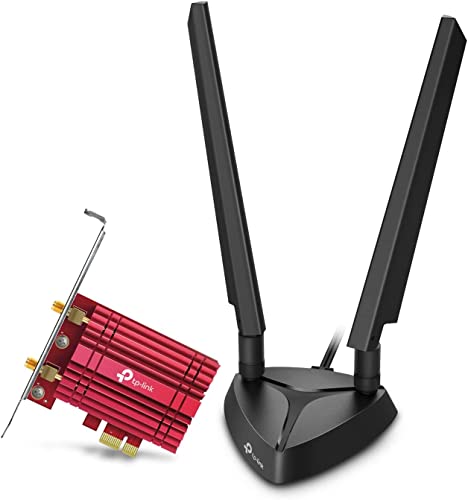
For gamers and content creators looking for a competitive edge, the TP-Link WiFi 6E AXE5400 PCIe WiFi Card is an ideal choice. This tri-band wireless adapter offers impressive speeds of up to 2402 Mbps on both 6 GHz and 5 GHz bands, ensuring smooth gaming and streaming. With dual multi-directional antennas, you’ll enjoy wider coverage throughout your home. The card also features Bluetooth 5.3 for faster connections and supports multiple devices seamlessly. Enhanced security with WPA3 keeps your data safe, while MU-MIMO and OFDMA technology reduce lag for an immersive experience. Get ready to elevate your connectivity!
Best For: Gamers and content creators seeking high-speed, reliable connectivity for seamless online experiences.
Pros:
- Impressive speeds: Up to 2402 Mbps on both 6 GHz and 5 GHz bands for smooth gaming and streaming.
- Enhanced coverage: Dual multi-directional antennas provide wider signal coverage throughout your home.
- Advanced technology: Features Bluetooth 5.3 for faster connections and supports multiple devices simultaneously.
Cons:
- Compatibility requirement: 6 GHz Wi-Fi utilization requires Windows 11.
- USB cable needed: Bluetooth functionality necessitates a USB cable connected to the F_USB connector.
- Potential for interference: Tri-band performance may be affected by environmental factors or competing signals.
BZIZU WiFi 6E PCIe Card with Intel AX210 Chip

Gamers and content creators will find the BZIZU WiFi 6E PCIe Card with Intel AX210 Chip an exceptional choice, thanks to its blazing-fast tri-band speeds of up to 5400Mbps. With next-gen WiFi 6E technology, you’ll experience reduced latency and enhanced stability for gaming and 4K streaming. Plus, Bluetooth 5.3 offers two times faster data transfer and four times the range, allowing seamless connections with your favorite peripherals. This card is compatible with Windows 10/11 and supports WPA3 encryption for added security. Weighing only 3.56 ounces, it’s a powerful upgrade for your desktop that won’t weigh you down.
Best For: Gamers and content creators seeking high-speed internet connectivity and low latency for an enhanced online experience.
Pros:
- Tri-band speeds of up to 5400Mbps, ensuring rapid data transfer for gaming and streaming.
- Bluetooth 5.3 technology provides faster data transfer and a broader range for seamless peripheral connectivity.
- Supports WPA3 encryption, enhancing security for users and protecting their data.
Cons:
- Full functionality of the 6GHz band requires a compatible WiFi 6E router and Windows 11.
- Limited to desktop PCs running Windows 10/11, which may exclude some users with different systems.
- May require additional setup or installation knowledge, potentially challenging for less tech-savvy users.
OKN WiFi 6E AX5400 PCIe WiFi Card for Desktop PC
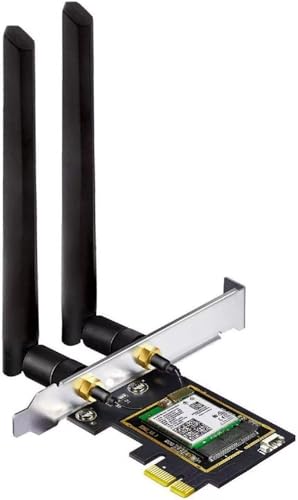
Looking to elevate your desktop’s connectivity? The OKN WiFi 6E AX5400 PCIe WiFi Card is a game-changer. With tri-band support and speeds up to 5400 Mbps, you’ll experience lightning-fast internet for gaming and streaming. Its advanced features, including OFDMA and MU-MIMO, ensure minimal lag, making it perfect for multiple users. Plus, with Bluetooth 5.3 and WPA3 security, your connections are faster and safer. The included dual 5dBi antennas boost signal reception, reducing dead zones in your home. Compatible with Windows 10/11, the OKN card blends performance and reliability effortlessly, making it a top choice for desktop upgrades.
Best For: Those seeking high-speed, reliable internet connectivity for gaming, streaming, and multiple users on their desktop PCs.
Pros:
- Tri-band support allows for faster speeds and better performance in congested environments.
- Advanced technologies like OFDMA and MU-MIMO reduce lag and enhance real-time experiences for multiple users.
- Bluetooth 5.3 and WPA3 security provide faster connections and improved safety for all devices.
Cons:
- Requires a compatible PCIe slot, which may not be available on all desktop motherboards.
- Performance may vary based on the distance from the router and physical obstructions.
- Initial setup might be complex for users unfamiliar with hardware installations.
WiFi 6E AX210 Wireless Network Card with Bluetooth 5.3

The WiFi 6E AX210 Wireless Network Card with Bluetooth 5.3 is an ideal choice for anyone seeking lightning-fast internet speeds and seamless connectivity. With tri-band support, it delivers impressive speeds of up to 2400Mbps on 5GHz and 574Mbps on 2.4GHz. The card’s expansion into the 6GHz band minimizes congestion, enhancing your network experience. Equipped with OFDMA and MU-MIMO technology, it ensures low latency, perfect for gaming and streaming. Plus, Bluetooth 5.3 doubles your connection speed and extends coverage. With WPA3 security, you can trust that your data is safe while enjoying optimal performance.
Best For: Gamers and content creators seeking high-speed internet and low latency for an enhanced online experience.
Pros:
- High-speed connectivity: Offers speeds up to 2400Mbps on 5GHz and 574Mbps on 2.4GHz, ensuring fast internet access.
- Tri-band support: Expands into the 6GHz band, reducing signal congestion and improving overall network performance.
- Advanced Bluetooth capabilities: Bluetooth 5.3 provides faster speeds and broader coverage, enhancing wireless device connectivity.
Cons:
- Requires compatible hardware: To fully utilize WiFi 6E features, a compatible router is necessary.
- Potentially higher cost: As a newer technology, it may be more expensive compared to older WiFi cards.
- Installation complexity: May require technical knowledge for installation, especially for users unfamiliar with PCIe cards.
TP-Link WiFi 6 PCIe WiFi Card for Desktop PC (Archer TX55E)

For anyone seeking a powerful upgrade for their desktop PC, the TP-Link WiFi 6 PCIe Card (Archer TX55E) stands out with its impressive dual-band speeds of up to 2.4 Gbps. It features ultra-low latency, perfect for real-time gaming and VR experiences, thanks to OFDMA and MU-MIMO technology. The card comes with two high-gain antennas for extended signal range and includes Bluetooth 5.2 for faster connections. With advanced WPA3 security, you’ll enjoy safe browsing. Plus, it’s compatible with Windows 11 and 10, making it a versatile choice for any modern setup. Experience seamless connectivity and top-tier performance today!
Best For: Gamers and tech enthusiasts looking for high-speed internet connectivity and low latency for an enhanced online experience.
Pros:
- Supports Wi-Fi 6 technology, delivering speeds up to 2.4 Gbps for fast internet.
- Includes Bluetooth 5.2 for improved connectivity with peripherals and devices.
- Features advanced WPA3 security protocol for enhanced network protection.
Cons:
- Compatibility limited to Windows 10 and 11 (64bit), excluding other operating systems.
- Requires a PCIe slot, which may not be available in all desktop setups.
- Some users may find installation challenging if they lack technical expertise.
TP-Link AXE5400 WiFi 6E PCIe WiFi Card for Desktop PC (Archer TXE73E)

Gamers and tech enthusiasts seeking top-tier connectivity should consider the TP-Link AXE5400 WiFi 6E PCIe Card (Archer TXE73E). With tri-band speeds up to 5.3 Gbps, including 2402 Mbps on both the 6 GHz and 5 GHz bands, it’s perfect for lag-free gaming and VR. Its compact antenna design saves space while providing strong reception. Bluetooth 5.3 lets you connect controllers and headsets seamlessly, and WPA3 encryption ensures your online security. Compatible with Windows 10 and 11, setup is a breeze, allowing you to integrate it effortlessly into your desktop PC for enhanced performance.
Best For: Gamers and tech enthusiasts seeking high-speed, reliable connectivity for gaming, VR, and seamless device integration.
Pros:
- Tri-band speeds of up to 5.3 Gbps ensure minimal lag and optimal performance for gaming and streaming.
- Compact single antenna design saves desktop space while providing strong Wi-Fi reception.
- Bluetooth 5.3 connectivity allows for seamless connections to various devices such as controllers and headsets.
Cons:
- Requires Windows 11 for full utilization of the 6 GHz band, limiting compatibility for some users.
- May require additional setup for optimal placement of the antenna for best performance.
- Limited availability of tri-band routers may restrict the full potential of the card’s capabilities.
TP-Link WiFi 6 AX3000 PCIe WiFi Card (Archer TX3000E)

Experience lightning-fast internet speeds with the TP-Link WiFi 6 AX3000 PCIe WiFi Card (Archer TX3000E), ideal for those who demand seamless connectivity in busy environments. This dual-band wireless adapter supports speeds up to 2400 Mbps, making it perfect for gaming and streaming. With Wi-Fi 6 technology, OFDMA, and MU-MIMO, you’ll enjoy ultra-low latency and uninterrupted connections. The card features two high-performance antennas with a magnetized base for optimal signal strength. Plus, Bluetooth 5.3 provides faster speeds and broader coverage, connecting multiple devices effortlessly. Installation is a breeze with straightforward driver setup, ensuring you’re ready to go in no time.
Best For: Users who demand high-speed internet connectivity for gaming, streaming, and multitasking in busy environments.
Pros:
- Supports speeds up to 2400 Mbps, providing fast and reliable connections for online gaming and streaming.
- Wi-Fi 6 technology ensures ultra-low latency and uninterrupted connectivity even in crowded networks.
- Bluetooth 5.3 capabilities allow for faster device connections and broader coverage for peripherals like headphones and game controllers.
Cons:
- Driver installation may be required via the website or included CD, which could be inconvenient for some users.
- Compatibility limited to Windows 10 and 11 (64-bit), excluding other operating systems.
- Antenna placement may require optimization to achieve the best signal strength, which could be cumbersome for some setups.
5400Mbps PCIe WiFi Card with Intel 6E Chipset

Looking for a top-tier WiFi solution? The 5400Mbps PCIe WiFi Card with the Intel 6E chipset could be your answer. It utilizes the WiFi 6E standard, expanding to the 6 GHz band for unparalleled speeds—up to 2402 Mbps on both the 5 GHz and 6 GHz bands. With Bluetooth 5.3, you get double the speed and quadruple the coverage compared to previous versions. Installation is a breeze, thanks to included brackets for mini tower cases. Plus, if you encounter any issues, Ubit offers reliable after-sales support. Upgrade your connectivity now and experience lightning-fast internet like never before!
Best For: Users seeking high-speed internet connectivity and enhanced Bluetooth performance for gaming, streaming, and multitasking.
Pros:
- High-speed performance: Achieves up to 5400 Mbps combined speed across multiple bands.
- Latest Bluetooth technology: Bluetooth 5.3 offers faster speeds and wider coverage, perfect for connecting various devices.
- Easy installation: Comes with both standard and low-profile brackets for versatile compatibility with different PC cases.
Cons:
- Limited compatibility: Only supports Windows 10/11 (64-bit), excluding other operating systems.
- Requires driver download: Users must manually download drivers from Intel, which may be inconvenient for some.
- Potential interference: While the 6 GHz band reduces congestion, it may not be available in all regions, limiting its use.
Factors to Consider When Choosing a Wifi 6e Pcie Card
When choosing a WiFi 6E PCIe card, you need to consider several key factors. Look at speed and performance, antenna design, and Bluetooth version compatibility to ensure you get the best experience. Don’t forget to check security protocols and compatibility with your operating system for seamless connectivity.
Speed and Performance
Choosing the right WiFi 6E PCIe card can significantly impact your internet experience, especially if you need high-speed performance for activities like gaming or streaming. Look for cards that can achieve speeds up to 5400 Mbps through the combined use of the 2.4GHz, 5GHz, and 6GHz bands. The 6GHz band alone can provide speeds up to 2402 Mbps, offering ultra-low latency for real-time applications. Additionally, ensure the card supports OFDMA and MU-MIMO technology; these features allow simultaneous data transmission to multiple devices, reducing latency. Tri-band capabilities are also crucial for optimizing connectivity and minimizing interference in crowded environments. Lastly, compatibility with WPA3 security will keep your high-speed connection secure while maintaining performance.
Antenna Design and Coverage
Antenna design significantly influences your WiFi performance, so understanding its impact is essential. High-gain antennas provide better signal range and coverage, making them ideal for larger spaces. If you want to reduce dead zones, consider multi-directional antennas, which capture signals from various angles for improved connectivity. Some WiFi 6E PCIe cards come with magnetic base antennas, allowing you to position them optimally for stronger signals. The number of antennas also matters—more antennas generally enhance signal distribution and support multiple users more effectively. Effective antenna coverage is crucial for bandwidth-intensive tasks like gaming and streaming, ensuring you enjoy smooth performance with minimal lag. Prioritize these features to elevate your WiFi experience.
Bluetooth Version Compatibility
Evaluating Bluetooth version compatibility is essential for maximizing your WiFi 6E PCIe card’s potential. Look for cards that support Bluetooth 5.3, as it offers 2x faster speeds and 4x broader coverage than Bluetooth 4.2. This version enhances connectivity with reduced interference and improved audio transmission, perfect for connecting multiple devices like game controllers, headphones, and keyboards effortlessly. Make sure to check if your chosen WiFi 6E PCIe card requires a USB cable for Bluetooth functionality. Additionally, advanced features like LE connection functions can significantly boost performance in demanding applications like gaming and streaming. Prioritizing Bluetooth compatibility ensures a seamless and enjoyable user experience as you upgrade your wireless capabilities.
Security Protocols Supported
When selecting a WiFi 6E PCIe card, understanding the supported security protocols is crucial for safeguarding your network. Most cards support the WPA3 security protocol, which enhances protection against unauthorized access and improves password security. WPA3 also features individualized data encryption, making it harder for attackers to exploit even if they get hold of your password. Compared to WPA2, WPA3 offers stronger encryption methods, ensuring your sensitive information stays secure during transmission. Some cards may still support the legacy WPA2 protocol, which helps maintain compatibility with older devices while prioritizing newer standards. Always verify the supported security protocols of a WiFi 6E PCIe card to ensure it meets your network’s security requirements.
Compatibility With Operating Systems
As you consider a WiFi 6E PCIe card, compatibility with your operating system is a key factor that can significantly affect its performance. Most WiFi 6E cards require Windows 10 or 11 (64-bit) to fully utilize advanced features, especially those leveraging the 6GHz band. If you’re using older operating systems like Windows 7 or 8, you might encounter limitations in functionality. It’s also crucial to ensure the card supports the latest drivers for your OS to keep performance and security optimal. Additionally, check compatibility with your motherboard, as PCIe slot versions and sizes can vary. Don’t forget to consider any extra connections needed, such as USB for Bluetooth, which may affect your setup.
Installation and Setup Ease
Installing a WiFi 6E PCIe card can be straightforward if you choose the right model. Most cards come with standard and low-profile brackets, making them compatible with various desktop cases. This flexibility simplifies installation. Many WiFi 6E cards also utilize a plug-and-play approach, allowing you to simply insert the card into an available PCIe slot without extensive setup. Before installation, check that your operating system, like Windows 11, supports the full capabilities of the 6GHz band. Additionally, drivers can often be downloaded from the manufacturer’s website, ensuring you have the latest software for optimal performance. Finally, consider antenna designs, such as magnetized bases or high-gain options, which can enhance signal placement and optimization.
Additional Features Offered
Choosing the right WiFi 6E PCIe card involves considering several key features that can significantly enhance your internet experience. Look for tri-band connectivity, allowing simultaneous use of 2.4GHz, 5GHz, and 6GHz bands to maximize speed and reduce congestion. Models with Bluetooth 5.3 offer 2x faster speeds and 4x broader coverage, which enhances connectivity with your peripherals. Advanced technologies like OFDMA and MU-MIMO minimize lag and improve performance, especially for gaming and streaming on busy networks. Security is crucial, so ensure your card supports WPA3 for enhanced encryption and protection against unauthorized access. Lastly, check for standard and low-profile brackets to ensure compatibility with various computer cases, making installation easier.
Warranty and Support Options
When evaluating WiFi 6E PCIe cards, warranty and support options are crucial for ensuring long-term satisfaction and reliability. Start by checking the manufacturer’s warranty period, which can range from 30 days to several years. A solid return policy is also important; it allows you to exchange or return a card if it’s defective or doesn’t meet your expectations. Look for customer support options like online FAQs, user manuals, and forums to help with troubleshooting and installation. Some brands even offer direct technical support through email or chat, making it easier to resolve issues quickly. Lastly, consider the availability of driver updates and firmware support, as these can significantly affect your card’s performance and security over time.