
When you’re building a custom PC, selecting the right modular case can make all the difference in performance and aesthetics. Each case offers unique features, from airflow optimization to customizable designs. Whether you’re a gamer or a tech enthusiast, understanding what these top modular cases can do for you is crucial. Let’s explore the top contenders that might just elevate your setup to the next level.
CORSAIR 4000D RS ARGB Mid-Tower ATX PC Case

If you’re a PC enthusiast looking for a case that combines customization and performance, the CORSAIR 4000D RS ARGB Mid-Tower ATX PC Case is a standout choice. Its high airflow design, featuring three pre-installed RS fans, ensures excellent cooling. You’ll appreciate the FRAME Modular Case System, which allows for extensive customization, adapting to your needs effortlessly. With compatibility for powerful graphics cards and dual 360mm radiators, it supports your ambitious builds. Plus, the 4.6-star rating from nearly 1,200 reviews shows it’s a popular pick. Enjoy a sleek black finish, and rest easy with a solid warranty and return policy.
Best For: PC enthusiasts seeking a customizable and high-performance mid-tower case for their builds.
Pros:
- High airflow design with three pre-installed RS fans for excellent cooling efficiency.
- FRAME Modular Case System offers extensive customization options to suit individual preferences.
- Compatibility with powerful graphics cards and dual 360mm radiators for ambitious builds.
Cons:
- The case may be heavier compared to some alternatives, weighing 22.7 pounds.
- Limited color options, only available in black.
- Some users may find the modular setup complex if they are not experienced with PC building.
CORSAIR 4000D RS Frame Mid-Tower PC Case

The CORSAIR 4000D RS Frame Mid-Tower PC Case is a game-changer for enthusiasts seeking both customization and high performance. Its modular design allows you to personalize your build with ease, accommodating upgrades like a billet aluminum motherboard tray and extra USB ports. Featuring three high-performance CORSAIR RS PWM fans, it ensures optimal cooling, while the 3D Y-Pattern Airflow Panel maximizes airflow for your components. You can even mount fans up to 200mm in the front and 140mm on the roof. With clean lines and options for side fan mounting, this case blends aesthetics with functionality seamlessly.
Best For: Enthusiasts and gamers looking for a customizable and high-performance mid-tower PC case with excellent airflow.
Pros:
- Modular design allows for easy upgrades and personalization.
- High-performance cooling with three CORSAIR RS PWM fans and flexible fan mounting options.
- Aesthetic appeal with clean lines and options for side fan mounting.
Cons:
- Limited compatibility with certain non-standard motherboard sizes due to the modular design.
- Could be considered overkill for casual users or basic builds.
- Assembly may require additional time and effort for optimal cable management and airflow setup.
ASUS TUF Gaming GT502 Horizon ATX Mid-Tower PC Case

Gamers and PC builders seeking a blend of aesthetics and functionality will find the ASUS TUF Gaming GT502 Horizon ATX Mid-Tower PC Case an exceptional choice. Its boundless panoramic design showcases tempered glass panels, allowing you to admire your components. The dual-chamber chassis provides independent cooling zones, optimizing thermal management for both CPU and GPU. Plus, the fully modular design makes installation a breeze, with most panels easily detachable. You’ll appreciate the tool-free side panels, letting you access your hardware quickly. With a high-speed USB Type-C port on the front, transferring data has never been faster.
Best For: Gamers and PC builders looking for a stylish yet functional case that enhances cooling and accessibility.
Pros:
- Boundless panoramic design offers an unobstructed view of components, enhancing aesthetic appeal.
- Dual-chamber chassis provides optimized cooling for both CPU and GPU, improving thermal management.
- Tool-free side panels allow for quick access to hardware, making upgrades and maintenance easier.
Cons:
- The tempered glass panels may be prone to fingerprints and smudges, requiring regular cleaning.
- Limited space for additional cooling options could be a concern for users with high-performance builds.
- The fully modular design might complicate the installation process for those unfamiliar with PC building.
MUSETEX ATX PC Case with ARGB Fans (K2)

For those seeking a perfect blend of customization and performance, the MUSETEX K2 ATX PC Case stands out with its seven pre-installed PWM ARGB fans. This mid-tower case not only supports various motherboard sizes—ATX, Micro-ATX, and Mini-ITX—but also boasts a stunning 270° panoramic dual tempered glass design. You’ll appreciate its innovative air duct system, which enhances heat dissipation while keeping components cool. With a user-friendly IO panel featuring Type-C and USB 3.0 ports, plus magnetic dust filters, the K2 prioritizes functionality and aesthetics. Plus, enjoy peace of mind with MUSETEX’s robust customer support and return policy.
Best For: Gamers and PC enthusiasts looking for a stylish and customizable case with excellent cooling capabilities.
Pros:
- Seven pre-installed PWM ARGB fans provide superior cooling and customizable lighting options.
- 270° panoramic dual tempered glass design enhances aesthetics and visibility of internal components.
- User-friendly IO panel with Type-C and USB 3.0 ports for easy connectivity.
Cons:
- Limited expansion capability as it only supports up to 10 fans total.
- Weight of 15 pounds may make it less portable compared to lighter cases.
- Potential difficulty in cable management due to the compact internal structure.
MUSETEX ATX PC Case with Tempered Glass and Pre-Installed Fans

Looking for a versatile case that combines style and functionality? The MUSETEX Y6 ATX PC Case offers a sleek black matte design with dual tempered glass panels, providing 270° visibility. Weighing 16.9 pounds and measuring 16.54 x 11.61 x 14.49 inches, it’s perfect for your mid-tower setup. Pre-installed with three 120mm fans, it supports effective cooling and accommodates up to a 360mm liquid cooler. With easy snap-on panels for quick installation, magnetic dust filters, and ample space for high-end components, this case ensures optimal performance while keeping your system clean and stylish. Enjoy a hassle-free building experience!
Best For: Gamers and PC enthusiasts looking for a stylish and functional mid-tower case with excellent cooling capabilities.
Pros:
- High-end design with dual tempered glass panels for enhanced visibility.
- Efficient cooling support with pre-installed fans and liquid cooler compatibility.
- Tool-less snap-on panels for easy installation and maintenance.
Cons:
- Limited to a specific size for power supplies and CPU coolers.
- May require additional fans for optimal cooling in high-performance builds.
- The weight of the case might be cumbersome for frequent transport.
HYXN H1 ATX PC Gaming Case with 7 PWM ARGB Fans

The HYXN H1 ATX PC Gaming Case stands out with its impressive dual-chamber design and panoramic 270° view, making it an ideal choice for enthusiasts who value both aesthetics and performance. Weighing just 11 pounds, this mid-tower case features two tempered glass panels that showcase your components beautifully. With 7 pre-installed PWM ARGB fans and customizable lighting, you can create a vibrant setup. It supports various motherboard sizes and GPUs up to 400mm, ensuring compatibility. Plus, excellent airflow and dust management keep your hardware cool and lasting longer. You’ll appreciate the efficient layout and easy installation, enhancing your gaming experience.
Best For: Gamers and PC enthusiasts who prioritize aesthetics, cooling performance, and easy installation in their builds.
Pros:
- Dual-chamber design offers a panoramic 270° view, enhancing the visual appeal of your setup.
- Excellent cooling system with 7 pre-installed PWM ARGB fans and support for multiple radiators ensures optimal hardware performance.
- Versatile compatibility with various motherboard sizes and GPU lengths, catering to a wide range of builds.
Cons:
- Limited storage options with only 1 HDD and 2 SSD mounts, which may not suffice for users with extensive storage needs.
- Weight of 11 pounds might be a consideration for those needing a lighter case for portability.
- Potential issues with cable management despite daisy connection method, as it may still require careful organization for optimal airflow.
NZXT H5 Flow Compact ATX Mid-Tower Gaming Case

Designed for gamers and PC builders seeking both performance and customization, the NZXT H5 Flow Compact ATX Mid-Tower Gaming Case stands out with its exceptional cooling capabilities. With dimensions of 16.93 x 8.86 x 18.31 inches and weighing 17.6 pounds, it’s compact yet powerful. You’ll appreciate the perforated PSU shroud for optimal GPU cooling and support for large radiators up to 360mm. The ultra-fine mesh panels maximize airflow while filtering dust. Plus, the seamless cable management system keeps your setup tidy. With a stellar 4.7 out of 5-star rating, this case proves it’s a top choice for performance enthusiasts.
Best For: Gamers and PC builders looking for a compact case with excellent cooling and cable management features.
Pros:
- Exceptional cooling capabilities with support for large radiators and perforated PSU shroud for optimal GPU airflow.
- Seamless cable management system simplifies the routing and concealment of cables, keeping setups tidy.
- High customer satisfaction, evidenced by a 4.7 out of 5-star rating from over 2,800 reviews.
Cons:
- Limited space for expansion due to its compact size, which may restrict some larger components.
- Weight of 17.6 pounds may make it less portable compared to lighter cases.
- Potential for restocking fees if returned for reasons related to misrepresentation or customer misuse.
CORSAIR Frame 5000D RS Modular High Airflow Mid-Tower PC Case

For PC enthusiasts who demand both customization and performance, the CORSAIR Frame 5000D RS Modular High Airflow Mid-Tower PC Case stands out with its innovative FRAME Modular Case System. You’ll appreciate the flexibility it offers, like the billet aluminum motherboard tray and various interchangeable panels. With support for up to 14x 120mm fans and 420mm top-mounted radiators, cooling is optimized through the 3D Y-Pattern Airflow front panel. Its spacious interior accommodates multiple motherboard sizes and plenty of storage options, ensuring your powerful components thrive. Plus, with a solid customer rating, it’s a reliable choice for your next build.
Best For: PC enthusiasts seeking a customizable and high-performance mid-tower case for optimal cooling and airflow.
Pros:
- Modular Design: The FRAME Modular Case System allows for extensive customization with interchangeable panels and upgrade options.
- High Airflow: Features a 3D Y-Pattern Airflow front panel and supports up to 14x 120mm fans for superior cooling performance.
- Spacious Interior: Accommodates various motherboard sizes and provides ample storage options for SSDs and HDDs.
Cons:
- Size: Being a mid-tower case, it may take up significant space compared to smaller cases.
- Price Point: Higher price compared to basic cases may not suit budget-conscious users.
- Complexity: The modular nature may be overwhelming for beginners who prefer simpler setups.
CORSAIR 4000D RS ARGB Mid-Tower ATX PC Case

Looking for a versatile case that adapts to your evolving needs? The CORSAIR 4000D RS ARGB Mid-Tower ATX PC Case is just what you need. With its high airflow design and modular frame system, you can easily customize your build. It comes with three pre-installed CORSAIR RS ARGB PWM fans, featuring daisy-chainable connections for seamless integration. The innovative InfiniRail fan mounting system allows you to optimize airflow by placing fans where you need them most. Plus, its internal side panel doubles as a cable cover, keeping your setup organized and clean. Upgrade your gaming experience with this stylish, functional case.
Best For: Gamers and PC builders looking for a customizable and high airflow case to enhance their system’s cooling and aesthetics.
Pros:
- High Airflow Design: Optimized airflow with a 3D Y-pattern air panel and versatile fan placement options.
- Modular Customization: Easily adapt and upgrade components with the FRAME modular system.
- Pre-Installed Fans: Comes with three daisy-chainable ARGB PWM fans for immediate cooling efficiency and visual appeal.
Cons:
- Limited Color Options: Available only in white, which may not suit all aesthetic preferences.
- Potential Noise at High Loads: Fans may generate noise under heavy usage, despite the Zero RPM mode.
- Cable Management Complexity: While it has cable management features, it may require additional effort for a clean setup.
CORSAIR 3500X ARGB Mid-Tower ATX PC Case
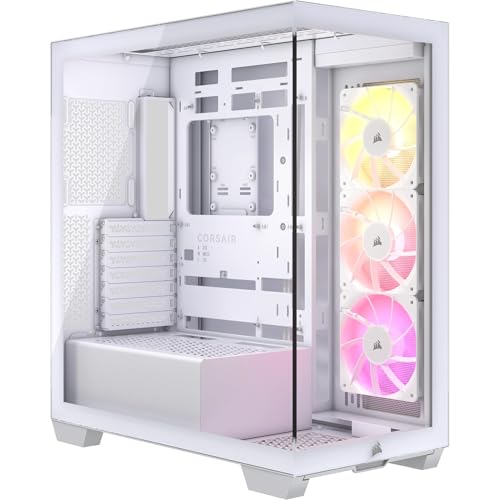
The CORSAIR 3500X ARGB Mid-Tower ATX PC Case stands out as an ideal choice for gamers and PC enthusiasts seeking a blend of customization and performance. With its panoramic tempered glass design, you’ll love the way your components shine. It supports Mini-ITX to EATX motherboards and features three pre-installed CORSAIR RS120 ARGB fans for impressive cooling. You can easily manage cables with compatibility for ASUS BTF and MSI Project Zero motherboards. The case accommodates up to 10 fans and large radiators, ensuring exceptional airflow. Plus, its sleek, white aesthetic enhances your setup without sacrificing functionality.
Best For: Gamers and PC enthusiasts looking for a stylish and high-performing case with excellent cooling capabilities and customizable features.
Pros:
- Panoramic tempered glass design enhances the aesthetic appeal of your build.
- Supports up to 10 fans and large radiators for exceptional cooling performance.
- Compatibility with ASUS BTF and MSI Project Zero motherboards allows for clean cable management.
Cons:
- Limited USB ports with only one USB 2.0 and one USB 3.0 available.
- Weight may be a factor for those looking for a lightweight case.
- Tempered glass panels may require careful handling to avoid damage during installation or transport.
Factors to Consider When Choosing a Modular PC Case
When choosing a modular PC case, you need to consider several key factors to ensure optimal performance. Pay attention to airflow and cooling efficiency, as well as how customizable the case is for your specific needs. Compatibility with your components and effective cable management solutions will also play a crucial role in your overall build experience.
Airflow and Cooling Efficiency
While selecting a modular PC case, you can’t overlook the importance of airflow and cooling efficiency. A high airflow design is crucial for keeping optimal temperatures, as cases with perforated panels and strategically placed fans greatly reduce thermal buildup. Look for features like a 3D Y-Pattern Airflow Panel, which minimizes airflow restriction for better cooling performance. The inclusion of multiple pre-installed fans, such as PWM or ARGB fans, can enhance cooling efficiency, especially when they operate in Zero RPM mode for silent performance at low loads. Additionally, modular fan mounting systems let you customize fan placement, accommodating larger fans or extra cooling options. Effective cable management also plays a role, allowing unobstructed airflow for cool air circulation and hot air expulsion.
Modular Customization Options
After ensuring optimal airflow and cooling efficiency, it’s time to focus on modular customization options that truly make a PC case your own. Look for cases featuring FRAME Modular Case Systems, which let you personalize layouts and connectivity by swapping front I/O panels and more. Many modular cases also support larger cooling solutions, accommodating fan mounts and radiators up to 420mm, tailored to your cooling needs. Removable side panels allow for easy access, making upgrades and maintenance a breeze without tools. Plus, consider aesthetic elements like RGB lighting, which can be controlled via motherboard software for a unique visual experience. These features not only enhance usability but also reflect your personal style.
Compatibility With Components
Selecting the right modular PC case involves several key compatibility factors that ensure your build meets performance expectations. First, check if the case supports your motherboard size—options range from Mini-ITX to E-ATX. Next, consider the maximum GPU length; many cases accommodate graphics cards up to 400mm, essential for high-performance setups. You’ll also want adequate CPU cooler height clearance, typically allowing for coolers up to 175mm, to avoid installation headaches. Don’t forget to verify support for cooling solutions, ensuring the case can mount multiple radiators and fans for optimal airflow. Lastly, assess the number of expansion slots; most cases offer at least seven, giving you room for future upgrades and enhancements.
Design and Aesthetics
When you’re diving into the world of modular PC cases, design and aesthetics play a crucial role in your overall experience. You’ll find that many cases feature clean lines and a sleek appearance, enhancing your computer setup’s visual appeal. Tempered glass panels offer a stunning 270° panoramic view, letting you showcase your build with pride. A well-thought-out structure often includes removable panels for easy access and customization, allowing you to personalize your setup effortlessly. Color options, like black or white finishes, can significantly impact how well your case matches your gaming or office environment. Additionally, dual-chamber designs improve aesthetics by separating components, providing a tidier look while enhancing cooling efficiency. Choose wisely for the best visual impact!
Cable Management Solutions
A sleek, organized setup doesn’t just rely on design; effective cable management is equally important for both aesthetics and performance. When choosing a modular PC case, look for removable internal side panels that can serve as cable covers. These help you route and conceal cables neatly, boosting airflow. Dedicated channels and hooks make it easy to manage cables and reduce clutter. Tool-free panel removal simplifies access for adjustments during installation or upgrades. High-quality cases often include multiple tie-down points or Velcro straps to secure cables, minimizing movement and interference with airflow. Additionally, magnetic dust filters can aid cable management by limiting dust buildup while maintaining optimal cooling performance. Prioritize these features for a cleaner, more efficient build.
Expansion and Upgrade Potential
Considering your future needs is crucial when choosing a modular PC case, as it can significantly impact your system’s longevity and adaptability. Look for cases that feature customizable components like motherboard trays and front I/O panels, allowing you to tailor the setup to your preferences. The FRAME Modular Case System, for example, supports extensive upgrades for improved hardware compatibility. Ensure the case can accommodate larger components, such as dual 360mm radiators and high-performance graphics cards, to support advanced cooling and upgrades. Additional mounting options, like side fan placements and extra SSD/HDD slots, enhance expansion potential without compromising airflow. Lastly, effective cable management systems make upgrades and maintenance easier, keeping your internal layout clean and organized.
Price and Value Consideration
While you might be tempted to choose a modular PC case based solely on its price tag, it’s essential to evaluate the overall value it brings to your build. Consider how the price aligns with customization options and features like fan compatibility and cooling efficiency. Cases with good airflow designs and pre-installed fans can save you on cooling solutions. Also, think about long-term usability; a slightly pricier case with a versatile design may prevent future replacements as your hardware needs change. Don’t forget to compare warranty and return policies, as a solid warranty can enhance value. Lastly, check customer feedback and ratings; higher-rated products often indicate better overall satisfaction and reliability.