
When it comes to 3D rendering, having the right workstation laptop is essential for your workflow. In 2026, you’ll find a range of powerful options that combine cutting-edge technology with impressive design. Think about processors like the Intel Core i9 and high-end NVIDIA RTX graphics. The Lenovo ThinkPad P16 Gen 2 and ASUS ROG Strix G16 are just a couple of models worth considering. But what should you really look for in a workstation laptop?
Lenovo ThinkPad P16 Gen 2 Mobile Workstation
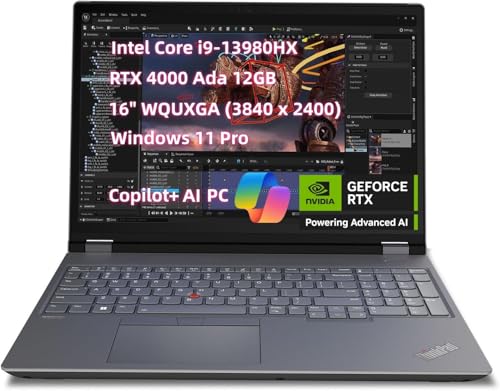
The Lenovo ThinkPad P16 Gen 2 Mobile Workstation is an exceptional choice for professionals in 3D rendering, thanks to its powerful 13th Generation Intel Core i9 processor and NVIDIA RTX 4000 graphics card. With up to 64GB of RAM and a 1TB SSD, you’ll enjoy lightning-fast performance and ample storage for your projects. The stunning 16″ WQUXGA display, offering 800 nits brightness and 100% DCI-P3 color gamut, guarantees your work looks vibrant and accurate. Plus, features like a backlit keyboard, Wi-Fi 6E connectivity, and a privacy shutter camera make it user-friendly, keeping you productive and secure on the go.
Best For: Professionals in 3D rendering and demanding creative tasks who need high performance and exceptional display quality.
Pros:
- Powerful hardware with 13th Generation Intel Core i9 processor and NVIDIA RTX 4000 graphics card for intensive applications.
- Impressive display featuring 800 nits brightness and 100% DCI-P3 color gamut for vibrant and accurate visuals.
- Ample memory and storage with 64GB RAM and 1TB SSD, ensuring smooth multitasking and plenty of space for projects.
Cons:
- Higher price point compared to standard laptops, which may not be suitable for casual users.
- Weight and bulkiness may make it less portable for users who travel frequently.
- Limited battery life under heavy workloads, which may necessitate frequent charging during intensive tasks.
ASUS ROG Strix G16 Gaming Laptop (2025)

For 3D rendering professionals seeking a powerful and efficient workstation, the ASUS ROG Strix G16 Gaming Laptop (2025) stands out with its Intel® Core™ Ultra 9 275HX Processor and NVIDIA® GeForce RTX™ 5070 Ti GPU. You’ll appreciate the 32GB DDR5 memory and 1TB PCIe Gen 4 SSD, ensuring lightning-fast performance and ample storage. The stunning 16” ROG Nebula Display features a 2.5K resolution and 240Hz refresh rate, delivering crisp visuals. With advanced cooling technology and customizable RGB lighting, you can tailor the experience to suit your style while maintaining peak performance in demanding rendering tasks.
Best For: 3D rendering professionals and gamers seeking a high-performance laptop with advanced graphics capabilities and efficient cooling.
Pros:
- Powerful Performance: Equipped with an Intel® Core™ Ultra 9 275HX Processor and NVIDIA® GeForce RTX™ 5070 Ti GPU, ideal for demanding tasks.
- Stunning Display: 16” ROG Nebula Display with a 2.5K resolution and 240Hz refresh rate provides exceptional visual clarity.
- Advanced Cooling Technology: ROG Intelligent Cooling with tri-fan technology and liquid metal ensures optimal performance during intense workloads.
Cons:
- Weight and Portability: Gaming laptops often tend to be heavier and bulkier, which may affect portability.
- Battery Life: High-performance components may lead to shorter battery life during intensive use compared to ultrabooks.
- Price Point: The premium specifications may come with a higher price tag, making it less accessible for casual users.
Alienware 16 Aurora Gaming Laptop (AC16250)

Looking for a powerful laptop that can handle the demands of 3D rendering? The Alienware 16 Aurora Gaming Laptop (AC16250) is a stellar choice. With a 16” WQXGA display boasting 120Hz and 300 nits brightness, your visuals will pop. Its Intel Core 7-240H processor and 16GB DDR5 RAM guarantee fast performance, while the NVIDIA GeForce RTX 5050 graphics bring AI capabilities to your projects. Plus, the innovative Cryo-Chamber cooling structure keeps it running smoothly. Weighing just 5.49 pounds, it’s portable, too. With a 1TB SSD, you’ll have ample space for all your 3D rendering needs.
Best For: Gamers and 3D rendering professionals seeking a high-performance, portable laptop with exceptional graphics capabilities.
Pros:
- High-quality display with WQXGA resolution and 120Hz refresh rate for immersive visuals.
- Powerful graphics from the NVIDIA GeForce RTX 5050, ideal for demanding applications and gaming.
- Innovative cooling system ensures optimal performance during extended use.
Cons:
- Relatively heavy at 5.49 pounds compared to some other laptops in the market.
- No optical drive, which may limit media playback options.
- Higher price point may not be suitable for budget-conscious consumers.
Lenovo ThinkPad P16 Gen 2 Mobile Workstation
When it comes to demanding 3D rendering tasks, the Lenovo ThinkPad P16 Gen 2 Mobile Workstation stands out with its powerful 13th Generation Intel Core i9-13980HX processor. With 64GB of DDR5 RAM and a 2TB SSD, you’ll experience lightning-fast performance and ample storage for your projects. The NVIDIA RTX 2000 GPU guarantees stunning graphics rendering, while the 16″ FHD+ display with 100% sRGB brings your creations to life. Weighing in at just 14.33 x 10.47 inches, it’s portable too. Plus, with a battery life of up to 12 hours, you can work uninterrupted, making it a perfect choice for professionals.
Best For: Professionals in 3D rendering and graphic-intensive tasks who require high performance and portability.
Pros:
- Powerful Performance: Equipped with a 13th Generation Intel Core i9 processor and 64GB DDR5 RAM for exceptional speed and multitasking.
- Stunning Graphics: NVIDIA RTX 2000 GPU delivers impressive graphics rendering capabilities for demanding applications.
- Long Battery Life: Up to 12 hours of battery life allows for extended work sessions without needing to recharge.
Cons:
- Weight and Size: Weighing 14.33 x 10.47 inches may be cumbersome for users seeking ultra-portability.
- Price Point: High-end specifications may come with a premium price, making it less accessible for budget-conscious buyers.
- Limited Warranty: The standard 1-year warranty may be a concern for users looking for longer coverage.
HP ZBook Studio 16 Mobile Workstation Laptop

The HP ZBook Studio 16 Mobile Workstation Laptop stands out as an exceptional choice for professionals engaged in 3D rendering and multimedia editing. With its 16″ WUXGA display, the vibrant visuals come alive, while the NVIDIA RTX A1000 graphics and Intel 14-Core i7-12800H processor handle intensive tasks effortlessly. You’ll appreciate the 32GB DDR5 RAM and 1TB SSD for quick data access. Coupled with military-grade durability, a bright anti-glare screen, and immersive Bang & Olufsen audio, this laptop guarantees a premium experience. Plus, with robust connectivity options and high-quality security features, you’re set for any project that comes your way.
Best For: Professionals engaged in 3D rendering, multimedia editing, and data analysis who require high performance and reliability in their laptop.
Pros:
- High-performance Intel 14-Core i7 processor and NVIDIA RTX A1000 graphics for demanding tasks.
- 32GB DDR5 RAM and 1TB SSD provide fast data access and ample storage.
- Military-grade durability and comprehensive security features ensure reliability and data protection.
Cons:
- The 16″ display may be larger and heavier than traditional laptops, impacting portability.
- The premium features can lead to a higher price point compared to standard laptops.
- Battery life may vary under heavy usage, requiring frequent charging during intensive tasks.
Dell Precision 3570 Workstation Laptop (2022)

For professionals in 3D rendering, the Dell Precision 3570 Workstation Laptop (2022) stands out with its powerful Intel Core i7-1265U processor and impressive 32GB of DDR5 RAM. This laptop boasts a 15.6-inch FHD display with a resolution of 1920×1080, ensuring clear visuals for detailed work. With a 1TB PCIe NVMe SSD and an Nvidia GeForce RTX A500 graphics card, you’ll enjoy fast data transfers and smooth rendering. Weighing 8 pounds and equipped with robust wireless connectivity, it’s both portable and efficient. This renewed model runs Windows 11 Pro, offering essential features for enhanced security and productivity.
Best For: Professionals in 3D rendering and creative fields who require high performance and portability.
Pros:
- High Performance: Features a powerful Intel Core i7-1265U processor and 32GB DDR5 RAM for demanding tasks.
- Ample Storage: Equipped with a 1TB PCIe NVMe SSD for fast data transfers and large storage capacity.
- Graphics Capability: Nvidia GeForce RTX A500 graphics card ensures smooth rendering and gaming performance.
Cons:
- Weight: Weighs 8 pounds, which may be considered heavy for a laptop.
- Renewed Model: Being a renewed product, there may be concerns about its condition and warranty.
- Display Resolution: While FHD is adequate, some professionals may prefer higher resolution options for detailed visual work.
ASUS ROG Strix SCAR 18 Gaming Laptop (2025)

Engineered for professionals and enthusiasts alike, the ASUS ROG Strix SCAR 18 (2025) stands out with its stunning 18-inch ROG Nebula HDR display, boasting a 2.5K resolution and 100% DCI-P3 color accuracy. Powered by the Intel® Core™ Ultra 9 275HX and NVIDIA® GeForce RTX™ 5080 GPU, this laptop handles 3D rendering tasks with ease. With 32GB of DDR5 memory and a lightning-fast 2TB PCIe SSD, you’ll experience smooth multitasking and rapid file access. The ROG Intelligent Cooling system guarantees peak performance while the customizable RGB lighting lets you express your style. This laptop truly delivers power and performance.
Best For: Professionals and gaming enthusiasts seeking high-performance computing and stunning visuals for demanding tasks and gaming experiences.
Pros:
- Powerful Performance: Equipped with an Intel® Core™ Ultra 9 processor and NVIDIA® GeForce RTX™ 5080 GPU for seamless multitasking and graphics-intensive applications.
- Impressive Display: Features an 18” ROG Nebula HDR display with a 2.5K resolution and 100% DCI-P3 color accuracy, ideal for immersive gaming and content creation.
- Customizable Features: Offers customizable RGB lighting and a unique AniMe Vision display for personal expression and aesthetics.
Cons:
- Weight: At 6.28 pounds, it may be less portable compared to lighter gaming laptops.
- Price Point: High-performance features come with a premium price, which may not be budget-friendly for all users.
- Battery Life: While the MUX switch enhances battery performance, heavy gaming sessions may still lead to shorter battery life.
GIGABYTE Gaming A16 Laptop

Designed for professionals in 3D rendering and gaming, the GIGABYTE Gaming A16 Laptop delivers exceptional performance with its Intel i7-13620H processor and NVIDIA GeForce RTX 5070 graphics card. You’ll appreciate the stunning 165Hz WUXGA display, which enhances both work and play. With 32GB of DDR5 RAM and a 1TB SSD, multitasking is seamless. The innovative WINDFORCE Infinity Cooling keeps your laptop cool during intense sessions. Plus, with GiMATE AI features, controls are intuitive. Its slim chassis and ergonomic keyboard design make it easy to use anywhere. Enjoy up to 14 hours of battery life for uninterrupted productivity.
Best For: Professionals in 3D rendering and gaming who require high-performance hardware and intuitive software features.
Pros:
- High-performance hardware: Equipped with an Intel i7-13620H processor and NVIDIA GeForce RTX 5070 for exceptional graphics and processing power.
- Impressive display: The 165Hz WUXGA screen provides smooth visuals, enhancing both gaming and professional work experiences.
- Long battery life: Offers up to 14 hours of usage for extended productivity without frequent recharges.
Cons:
- Weight and portability: While slim, the laptop may still be heavier compared to other ultraportable options.
- Price point: Premium specifications may come with a higher price, potentially limiting budget-conscious buyers.
- Cooling noise: Although designed for quiet operation, intensive usage may still lead to noticeable fan noise under load.
ASUS ROG Strix G18 Gaming Laptop (2025)

The ASUS ROG Strix G18 Gaming Laptop (2025) stands out for professionals who demand top-tier performance in 3D rendering and gaming. With its Intel® Core™ Ultra 9 275HX processor and NVIDIA® GeForce RTX™ 5070 GPU, it handles intensive tasks effortlessly. The 18” ROG Nebula display boasts a 240Hz refresh rate and 2.5K resolution, ensuring stunning visuals. Featuring 32GB DDR5 memory and a 2TB PCIe Gen 4 SSD, multitasking feels seamless. The ROG Intelligent Cooling system keeps it quiet and cool, while customizable RGB lighting adds flair. This laptop is designed to elevate your creative and gaming experience to new heights.
Best For: Professionals and gamers who require high-performance hardware for demanding tasks such as 3D rendering and gaming.
Pros:
- Exceptional performance with Intel® Core™ Ultra 9 processor and NVIDIA® GeForce RTX™ 5070 GPU.
- Stunning visuals on an 18” ROG Nebula display with a 240Hz refresh rate and 2.5K resolution.
- Effective cooling system that ensures quiet operation and optimal thermal management.
Cons:
- The laptop’s size may be less portable compared to smaller models.
- High-end specifications may come with a premium price tag.
- Battery life may be limited under heavy gaming or rendering conditions.
Dell Precision 5560 Workstation Laptop (Renewed)

If you’re a 3D rendering professional in need of a powerful and reliable laptop, the Dell Precision 5560 Workstation is a standout choice. With its Intel Core i9-11950H processor and eight-core architecture, you’ll experience impressive performance, reaching speeds up to 5GHz. The 32GB RAM and 1TB SSD guarantee you can handle large projects with ease. Its 15.6″ FHD+ display paired with the Nvidia RTX A2000 graphics card provides stunning visuals and smooth rendering. Plus, with integrated Wi-Fi, Bluetooth, and a webcam, staying connected is a breeze. This renewed model offers top-tier performance at an attractive price point.
Best For: 3D rendering professionals and power users who need high performance and reliability in a laptop.
Pros:
- High-performance Intel Core i9 processor with turbo boost capabilities for demanding tasks.
- Ample storage and memory with 32GB RAM and a 1TB SSD for efficient multitasking and large project handling.
- Stunning visuals with a 15.6″ FHD+ display and Nvidia RTX A2000 graphics card, ideal for graphics-intensive applications.
Cons:
- Renewed model may have minor cosmetic imperfections compared to brand new units.
- Non-touch screen, which may not be preferred by users who favor touch functionality.
- Weight and portability might be a concern for users needing a lightweight laptop for travel.
Factors to Consider When Choosing Workstation Lapfor 3d Rendering
When you’re choosing a workstation laptop for 3D rendering, several key factors come into play. You’ll want to look closely at processor power, graphics card performance, and memory capacity to guarantee smooth operation. Additionally, don’t overlook storage speed, size, and display quality, as these features can greatly impact your rendering experience.
Processor Power and Cores
Choosing the right processor power and core count is essential for achieving peak performance in 3D rendering. A higher clock speed and more cores greatly enhance computation speed, allowing you to multitask smoothly. Look for processors with at least 8 cores; they excel in handling parallel processing tasks, which is critical for rendering complex scenes. Modern CPUs often come with performance tiers, like E-cores and P-cores, optimizing tasks based on workload. Technologies like Turbo Boost can temporarily increase clock speeds during peak loads, enhancing your rendering capabilities. It’s important to balance high core counts with strong single-thread performance, as many rendering applications benefit from both parallel and single-threaded task execution. This balance guarantees efficient and effective rendering.
Graphics Card Performance
A powerful graphics card is essential for 3D rendering, as it directly influences both the speed and quality of your work. Dedicated GPUs typically outperform integrated solutions, so prioritize those. Look for GPUs with a higher number of CUDA cores or equivalent features, as they considerably boost parallel processing capabilities during rendering tasks. Ideally, your graphics card should have at least 8GB of memory to manage complex models and textures efficiently. Additionally, consider cards with ray tracing technology, which enhances realism by simulating light behavior more accurately. Finally, guarantee compatibility with your preferred rendering software, verifying support for APIs like OpenGL and DirectX to release peak performance and access to advanced rendering features.
Memory Capacity Considerations
Memory capacity plays an essential role in 3D rendering performance, directly impacting your workflow and project outcomes. For efficient handling of complex models and textures, you’ll want a minimum of 32GB of RAM. Opting for high-performance workstations with RAM speeds of 4000MHz or higher can greatly enhance your rendering times. Consider a dual-channel memory configuration, like two 32GB sticks, to boost memory bandwidth and speed, which benefits rendering applications. If your projects demand even more power, 64GB or 128GB of RAM may be necessary, especially for advanced or real-time rendering tasks. Finally, don’t overlook the latest DDR5 memory technology, as it offers higher capacities and faster speeds compared to DDR4, making it ideal for demanding workloads.
Storage Speed and Size
When tackling 3D rendering, the importance of storage speed and size can’t be overstated. Opt for SSDs, especially PCIe NVMe models, as they offer notably faster data transfer rates than traditional HDDs. This speed is essential for enhancing your overall performance during rendering. You’ll also need ample storage capacity; aim for at least 1TB to accommodate high-resolution textures, complex models, and large project files. High-speed SSDs minimize wait times by improving file load and save rates. Consider a secondary storage solution, like an additional SSD or external drive, for managing large files and backups. Utilizing RAID configurations can further enhance data redundancy and access speeds, making them ideal for extensive rendering projects.
Display Quality and Features
Display quality and features play a crucial role in your 3D rendering experience. A high resolution, like 2.5K or WQUXGA, guarantees that intricate models appear sharp and detailed. Opt for displays with wide color gamuts, such as 100% DCI-P3, to achieve better color accuracy, important for precise rendering tasks. An anti-glare IPS panel is a must, as it reduces reflections and enhances visibility in various lighting conditions, making long sessions more comfortable. Look for high brightness levels around 400 nits or more to guarantee better contrast and visibility in bright environments. Finally, a higher refresh rate, like 240Hz, improves the smoothness of animations, which can be beneficial for real-time rendering and simulations.