
If you’re looking to enhance your gaming setup with a quieter experience, choosing the right PC case is key. Sound dampening panels can greatly reduce noise without compromising performance. From sleek designs to customizable features, the market offers a variety of options tailored to your needs. Curious about which cases stand out for their sound insulation? Let’s explore the top contenders that promise to keep your gaming sessions serene.
Antec Flux SE Silent PC Case (E-ATX Mid Tower)

The Antec Flux SE Silent PC Case is perfect for gamers who prioritize a quieter environment without sacrificing performance. This E-ATX mid-tower combines metal, glass, and walnut wood, giving it a premium feel. You’ll appreciate the sound-dampening foam on both side panels, ensuring a serene gaming session. The case’s multi-directional vent design promotes effective airflow, supporting up to nine fans, including three pre-installed P12 PWM fans. Plus, it accommodates various radiator setups for ideal cooling. With modern connectivity options like a USB Type-C port, it’s designed to fit today’s gaming needs while keeping noise to a minimum.
Best For: Gamers seeking a quiet yet high-performance case with premium materials and modern connectivity.
Pros:
- High-quality design featuring metal, glass, and walnut wood for an elegant look.
- Effective sound-dampening foam on side panels for reduced noise during operation.
- Versatile cooling options with support for multiple fans and radiator configurations.
Cons:
- The premium materials may increase the overall cost compared to standard cases.
- Limited compatibility with certain motherboard sizes, requiring careful selection.
- The size may not be suitable for compact setups or smaller gaming spaces.
be quiet! Silent Base 802 ATX Midi Tower PC Case

For gamers who prioritize a silent gaming experience without sacrificing performance, the be quiet! Silent Base 802 ATX Midi Tower PC Case is an excellent choice. Its interchangeable top cover and front panel let you switch between ideal airflow and silent operation. You’ll appreciate the decoupled motherboard tray, allowing for an inverted layout if desired. With three pre-installed Pure Wings 2 fans and an advanced IO panel featuring a fan controller and USB 3.2 Gen. 2 Type C, cooling is a breeze. Plus, the thick insulation mats enhance noise reduction, making your gaming sessions quieter and more enjoyable.
Best For: Gamers who seek a quiet computing environment without compromising on cooling performance.
Pros:
- Interchangeable panels allow users to choose between optimal airflow and silent operation.
- Decoupled motherboard tray supports versatile layouts, including inverted configurations.
- Pre-installed fans and advanced IO panel ensure efficient cooling and modern connectivity options.
Cons:
- The case may be more expensive compared to basic models lacking advanced features.
- Extra thick insulation mats could slightly increase the overall weight of the case.
- Some users may find the modular design more complex to set up compared to simpler cases.
Antec P7 S Mid-Tower ATX PC Case
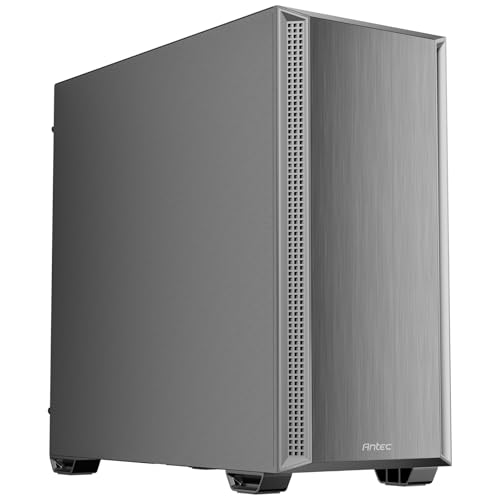
Looking for a PC case that blends aesthetics with performance? The Antec P7 S Mid-Tower ATX PC Case is a stellar choice. Its sleek brushed front panel and dual side mesh design enhance airflow while maintaining a stylish look. Equipped with four PWM fans, including three 120 mm at the front, it guarantees superior cooling. You can even fit a 360 mm radiator at the top for extra heat dissipation. Plus, sound-dampening foam on the side panels effectively reduces noise, making your gaming sessions quieter. With Type-C 3.2 Gen 2 connectivity, it’s both functional and modern.
Best For: Gamers and PC builders seeking a stylish case that offers excellent cooling performance and noise reduction.
Pros:
- Sleek design with a brushed front panel and dual mesh sides for improved airflow.
- Pre-installed cooling system with four PWM fans and support for a 360 mm radiator.
- Noise reduction features with sound-dampening foam on side panels for quieter operation.
Cons:
- Limited space for larger components due to mid-tower form factor.
- No RGB lighting options included for those who prefer customizable aesthetics.
- Type-C port may not be compatible with all older devices without an adapter.
Hyte X50 Air ATX Mid-Tower Gaming PC Case

If you’re seeking a gaming PC case that prioritizes both performance and noise reduction, the Hyte X50 Air ATX Mid-Tower is an outstanding choice. Its modern design features a micro mesh panel and tempered acoustic glass, which not only enhance aesthetics but also contribute to a quieter gaming experience. The optimized airflow allows for low-pressure air intake, ensuring your components stay cool while minimizing noise. With support for up to three extra thick 120mm fans, it keeps your graphics card chilled. Plus, the meticulously designed chassis offers excellent cable management, making installation hassle-free and efficient.
Best For: Gamers looking for a stylish and efficient PC case that optimizes airflow while maintaining low noise levels.
Pros:
- Optimized airflow design ensures effective cooling for internal components.
- Tempered acoustic glass and micro mesh panel enhance aesthetics and reduce noise.
- Excellent cable management features facilitate easy installation and a clean build.
Cons:
- Limited support for fan configurations beyond the three 120mm fans.
- The pitch black color may not appeal to users seeking more vibrant options.
- May be overkill for casual users who do not require high-performance cooling.
be quiet! Pure Base 600 ATX Midi Tower PC Case

Pure Base 600 ATX Midi Tower PC Case is designed for gamers seeking a quieter experience. Weighing in at 16.4 pounds and measuring 20.36 x 22.37 x 11.34 inches, it combines versatility and performance. With repositionable HDD slots and support for up to a 360mm radiator, it adapts to your cooling needs. Plus, the two pre-installed Pure Wings 2 fans guarantee whisper-quiet operation. Sound-dampening material throughout minimizes noise, while professional cable management keeps your build neat. Rated 4.7 out of 5 stars, this case is a top choice for serious gamers focused on silence.
Best For: Gamers seeking a quiet PC experience without sacrificing performance or versatility.
Pros:
- Versatile design with repositionable HDD slots and removable ODD cage for customizable configurations.
- Optimized for water cooling with support for large radiators, ensuring excellent thermal management.
- Whisper-quiet operation due to pre-installed fans and sound-dampening materials, making it ideal for noise-sensitive environments.
Cons:
- Weighty design at 16.4 pounds may be less portable for users who frequently move their setups.
- Limited stock cooling options as only two fans are pre-installed, requiring additional purchases for enhanced airflow.
- Price point could be higher compared to other cases with similar features, potentially deterring budget-conscious buyers.
SilverStone EPDM Sound Dampening Foam (2 Pack SF01-NEW)
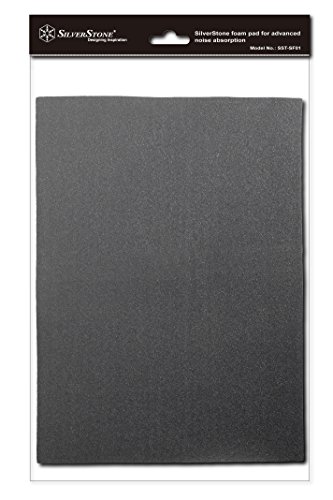
For gamers seeking a quieter experience, the SilverStone EPDM Sound Dampening Foam (2 Pack SF01-NEW) is an excellent choice. Each pack includes two high-density pads, 4mm thick, designed for effective noise absorption in your PC chassis. With a large surface area, these pads adhere well even in high temperatures, making installation flexible and straightforward. Weighing just 6.4 ounces, they won’t add unnecessary bulk. Plus, with a customer rating of 4.4 out of 5 stars, you can trust their performance. Upgrade your build for a silent yet powerful gaming experience with this reliable sound dampening solution.
Best For: Gamers and PC enthusiasts looking for effective noise reduction in their computer chassis.
Pros:
- High-density EPDM foam provides excellent sound absorption.
- Flexible installation options with a large surface area and good adhesion even at high temperatures.
- Lightweight design (6.4 ounces) ensures it doesn’t add unnecessary bulk to your setup.
Cons:
- May not fit all chassis sizes without trimming.
- The effectiveness of noise dampening can vary based on the specific setup and components used.
- Some users may find the price higher compared to other sound dampening solutions.
BXI Sound Absorber Acoustic Panels (6 Pack)

Gamers seeking a quieter environment will find the BXI Sound Absorber Acoustic Panels an excellent choice. This six-pack of high-density polyester fiber panels effectively reduces reverb and mid-high frequency noise, boasting an impressive NRC of 0.87. Each panel measures 16 x 12 x 3/8 inches, covering 7.7 square feet in total. They’re odorless, non-toxic, and safe for indoor use, making them perfect for gaming rooms or home theaters. Installation is a breeze—just use construction adhesive or double-sided tape. With a solid rating of 4.2 stars, these panels are a trusted addition to your sound dampening setup.
Best For: Gamers, podcasters, and content creators looking to enhance sound quality and reduce noise in their environments.
Pros:
- Effective Sound Absorption: High NRC of 0.87 significantly reduces reverb and mid-high frequency noise.
- Safe and Non-Toxic: Odorless, formaldehyde-free, and suitable for indoor use.
- Easy Installation: Can be easily mounted with construction adhesive or double-sided tape.
Cons:
- Limited Coverage: Each pack only covers 7.7 square feet, which may require multiple packs for larger spaces.
- Thickness: At only 3/8 inches thick, may not absorb lower frequencies as effectively as thicker panels.
- Adhesives Not Included: Requires separate purchase of construction adhesive or double-sided tape for installation.
Silverstone 21-Inch x 15-Inch Acoustic Foam (2-Piece)
Looking to reduce noise in your gaming setup? The Silverstone 21-Inch x 15-Inch Acoustic Foam is an excellent choice. This two-piece sound dampening foam, made from high-quality EPOM material, is 4mm thick and designed for ideal noise absorption in your computer chassis. Each pad measures 530mm x 380mm, giving you plenty of coverage. It’s easy to cut and fit into various configurations, ensuring a perfect match for your setup. With a customer rating of 4.4 stars, it effectively builds silent computers without compromising speed or cooling. Upgrade your gaming experience with this reliable acoustic foam.
Best For: Gamers and PC builders looking to reduce noise levels in their setups without sacrificing performance.
Pros:
- Effective noise absorption thanks to high-density EPOM foam material.
- Versatile sizing allows for easy customization to fit various computer chassis configurations.
- High customer satisfaction with a rating of 4.4 stars from 419 reviews.
Cons:
- Limited thickness of 4mm may not be sufficient for extreme soundproofing needs.
- Adhesion may vary in different temperature conditions, potentially affecting performance.
- Not designed for standalone use, as it’s intended for integration within a computer chassis.
SilverStone KL07E ATX Tower Chassis
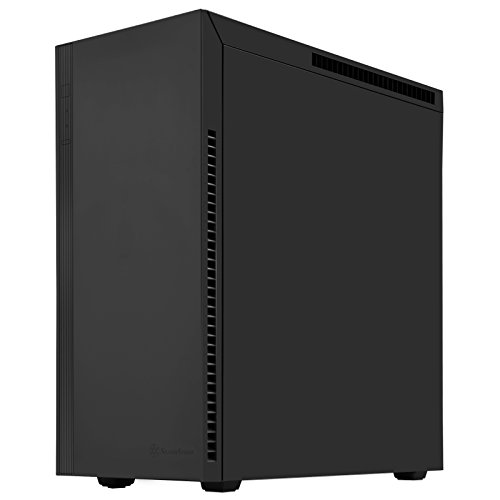
The SilverStone KL07E ATX Tower Chassis stands out with its exceptional sound dampening features, making it an ideal choice for enthusiasts who want a quieter gaming experience. Its panels lined with asphalt material and wave-patterned foam effectively absorb noise, allowing you to focus on gameplay. With support for six fans and a maximum radiator of 360mm, cooling won’t be a problem. Plus, it accommodates graphics cards up to 388mm, ensuring compatibility with high-performance components. The sleek design, featuring a power supply cover and smart cable routing, keeps your setup looking clean while enhancing overall performance.
Best For: The SilverStone KL07E ATX Tower Chassis is best for gamers and PC enthusiasts seeking a quiet and aesthetically pleasing case with ample cooling options.
Pros:
- Exceptional sound dampening features with asphalt-lined panels and wave-patterned foam.
- Supports up to six fans and a maximum radiator size of 360mm for excellent cooling performance.
- Sleek design with a power supply cover and smart cable routing for a clean internal look.
Cons:
- Weighs 23.1 pounds, which may be heavy for some users.
- Limited to specific dimensions for graphics cards, which may restrict compatibility with larger models.
- The return policy may incur additional fees for damaged or tampered products.
be quiet! Dark Base 701 Midi Tower PC Case

For those seeking a perfect blend of aesthetics and performance, the be quiet! Dark Base 701 Midi Tower PC Case delivers. Its open mesh design guarantees superior airflow while the tempered glass panel showcases your components beautifully. With three pre-installed Silent Wings 4 fans, you’ll enjoy excellent cooling without the noise. Plus, the fan controller lets you adjust speeds and sync with your motherboard. You can customize lighting effects using the integrated ARGB controller, connecting up to eight PWM fans and two ARGB components. This case keeps your rig cool and quiet during intense gaming sessions, enhancing your overall experience.
Best For: Gamers and PC builders looking for a stylish case that combines excellent airflow and customizable lighting options.
Pros:
- Exceptional cooling performance with three pre-installed Silent Wings 4 fans for quiet operation.
- Customizable lighting effects through the integrated ARGB controller and support for additional ARGB components.
- Tempered glass panel provides a visually appealing showcase of your components while maintaining an open mesh design for airflow.
Cons:
- Size may not be suitable for very compact setups, as it is a midi tower case.
- Limited pre-installed fans compared to some other cases, which may require additional purchases for optimal cooling.
- Price point may be higher than basic cases, which could be a consideration for budget-conscious builders.
Factors to Consider When Choosing a PC Case with Sound Dampening Panels
When choosing a PC case with sound dampening panels, you need to take into account several key factors. Noise reduction efficiency, material quality, and durability all play an essential role in your case’s performance. Additionally, think about cooling system compatibility, design aesthetics, and fan configuration options to guarantee you get the best fit for your gaming setup.
Noise Reduction Efficiency
Choosing a PC case with effective sound dampening panels can greatly enhance your gaming experience, especially if you value a quieter environment. Look for cases that incorporate high-quality sound dampening materials, as these are designed to absorb noise from your internal components, considerably reducing overall noise levels. Pay attention to the Noise Reduction Coefficient (NRC); higher values indicate better sound absorption. Materials like EPDM foam or thick insulation mats can minimize vibrations and echoes within the chassis, further enhancing the quietness. For best results, select cases with sound-dampening features on both side panels, as this can lead to a more silent computing experience while still allowing for effective thermal performance. Your ears will thank you!
Material Quality and Durability
Material quality and durability are vital factors in selecting a PC case with sound dampening panels. High-quality materials like EPDM and acoustic foam greatly enhance noise absorption, making your gaming experience quieter. Look for durable materials that can withstand high temperatures and maintain their effectiveness over time. Thicker sound dampening panels, around 4mm, provide better noise reduction, ensuring a more immersive environment. High-density materials improve sound absorption, which is essential in gaming or home theater setups. Additionally, consider the overall construction quality; cases featuring extra insulation layers or innovative designs can further boost durability and noise reduction. By focusing on these aspects, you’ll choose a case that not only performs well but lasts long.
Cooling System Compatibility
Selecting a PC case with sound dampening panels means you can’t overlook cooling system compatibility. You’ll want to verify it supports adequate cooling for your components, so look for multiple fan slots and radiator compatibility. Cases that allow for various cooling configurations, like installing larger radiators or additional fans, help maintain ideal temperatures while minimizing noise. Pre-installed fans designed for quiet operation can also enhance airflow without ramping up the sound levels. Additionally, evaluate how the sound dampening materials are placed within the case; effective insulation should still allow for efficient cooling through well-placed vents. Finally, confirm the case’s design promotes good airflow patterns, as poor airflow can lead to overheating, even with sound dampening features.
Design and Aesthetics
Many gamers underestimate the importance of design and aesthetics when it comes to choosing a PC case with sound dampening panels. Aesthetic appeal can greatly enhance your setup, especially when you select a case with unique materials like metal, glass, or wood. These materials not only provide a premium look but also complement sound dampening features like thick insulation mats or foam. Consider cases with interchangeable panels that let you customize airflow and noise levels, giving you control over both functionality and style. A clean internal layout with smart cable routing boosts visual appeal while supporting sound dampening strategies. Finally, tempered glass panels combined with sound dampening materials allow you to showcase your components without sacrificing a quieter operation.
Fan Configuration Options
The right fan configuration can profoundly impact both your cooling performance and noise levels in a PC case designed with sound dampening panels. Choosing a case that supports multiple fans, sometimes up to nine, allows you to optimize airflow while minimizing noise. Using fans with PWM technology gives you precise speed control, reducing noise during lighter loads. If you’re considering larger radiators, like 360mm or 420mm, they’ll enhance cooling efficiency and lessen the need for additional, potentially noisy fans. Additionally, pairing sound-dampening foam with a thoughtful fan layout, such as decoupled fans, can considerably decrease vibrations and overall noise. This strategic approach guarantees a quieter and cooler gaming experience.
Size and Form Factor
When choosing a PC case with sound dampening panels, size and form factor play an essential role in ensuring compatibility and performance. You’ll need to take into account the type of motherboard you plan to use—whether it’s ATX, E-ATX, or Micro-ATX—as this dictates the case’s size. Cases come in various shapes, like mid-tower, full-tower, and mini-tower, which affect the space available for components and cooling solutions. A larger case generally provides better airflow and can accommodate more sound dampening materials, enhancing noise reduction. Additionally, the internal layout influences cooling efficiency and sound dampening effectiveness. Make sure the overall dimensions fit comfortably in your intended space while allowing room for future upgrades.
Cable Management Features
While selecting a PC case with sound dampening panels, don’t overlook the importance of effective cable management features. Good cable management enhances airflow and cooling efficiency by preventing cables from blocking airflow paths. Look for cases that include predefined routing channels and tie-down points, which simplify installation and help you organize cables neatly. Some cases even offer modular layouts, letting you customize cable management to fit your specific build needs. Adequate cable management not only improves functionality but also elevates the aesthetics of your PC, creating a cleaner and more professional appearance. Plus, cases designed with cable management in mind often provide extra space behind the motherboard tray, accommodating thicker cables and giving you ample room to hide them.
Accessibility and Connectivity
Choosing a PC case with sound dampening panels means you should prioritize accessibility and connectivity features that enhance your overall experience. Look for modern options, like USB Type-C ports, to keep up with today’s devices. An accessible I/O panel with fan controllers can make managing cooling systems and noise reduction much easier. Make sure the case offers ample front and side panel access so you can connect peripherals without disrupting the sound dampening materials. It’s also vital that the design allows for straightforward installation and maintenance while preserving sound insulation. Consider modular designs that let you customize your connectivity layout, optimizing both functionality and noise reduction to suit your specific needs.