
When building a high-performance PC, the case you choose plays a pivotal role in ensuring ideal cooling and airflow. With numerous options available, it can be challenging to find one that balances aesthetics and functionality. You’ll want a case that not only supports powerful components but also prioritizes ventilation and dust filtration. Let’s explore the top 10 airflow cases with front mesh that can enhance your system’s performance and keep your components running cool.
NZXT H5 Flow 2024 Compact ATX Mid-Tower PC Gaming Case

If you’re a gamer looking for a compact yet powerful case that prioritizes cooling and airflow, the NZXT H5 Flow 2024 is an excellent choice. This ATX mid-tower case measures just 16.93 x 8.86 x 18.31 inches and weighs 17.6 pounds, making it a great fit for tight spaces. With exceptional GPU cooling thanks to its perforated PSU shroud and support for large radiators, your components will stay chill. Plus, the ultra-fine mesh panels maximize airflow while filtering dust. You’ll appreciate the seamless cable management system, too, which keeps your build looking clean and organized.
Best For: Gamers seeking a compact and efficient case that offers exceptional cooling and airflow for optimal performance.
Pros:
- Exceptional cooling capabilities with perforated PSU shroud and support for large radiators.
- High-performance airflow with ultra-fine mesh panels that filter dust while maximizing airflow.
- Seamless cable management system that keeps your build organized and tidy.
Cons:
- Limited expansion options compared to larger cases.
- Weight may be heavier than other compact cases, which could affect portability.
- Potential restocking fees for returns if the product condition is misrepresented.
Montech AIR 903 MAX E-ATX Mid Tower Case

For gamers and content creators seeking exceptional cooling and airflow, the Montech AIR 903 MAX E-ATX Mid Tower Case stands out with its innovative metal front panel, boasting a remarkable 51% ventilation rate. Weighing 19.96 pounds and measuring 18.82 x 9.05 x 19.41 inches, it’s designed to accommodate powerful setups, including NVIDIA GeForce RTX 4090 GPUs. Pre-installed with 3x 140mm ARGB PWM fans, it guarantees efficient cooling while offering 21 stunning lighting effects. Plus, the easy-to-clean dust filter keeps your system pristine. With a 4.7-star rating from customers, it’s a reliable choice for your next build.
Best For: Gamers and content creators looking for a high-performance case with exceptional cooling and airflow capabilities.
Pros:
- Innovative metal front panel with a 51% ventilation rate for superior thermal efficiency.
- Comes pre-installed with 3x 140mm ARGB PWM fans and offers 21 captivating lighting effects.
- Easy-to-clean dust filter and support for large cooling solutions, including 360mm AIO coolers.
Cons:
- Weighs nearly 20 pounds, which may be cumbersome for some users.
- Limited to the black color option, potentially lacking variety for aesthetic preferences.
- Compatibility with larger GPUs may restrict space for additional components.
GAMDIAS ATX Mid Tower Gaming PC Case with Tempered Glass
The GAMDIAS ATX Mid Tower Gaming PC Case with Tempered Glass is an ideal choice for gamers seeking a perfect blend of style and performance. Its sleek stealth black design and full-sized tempered glass cover let you showcase your components beautifully. With an airflow-focused mesh front panel and four built-in 120mm ARGB fans, cooling is a breeze. You can easily expand your setup, supporting various motherboard sizes and multiple storage options. The front I/O includes essential connectivity features, ensuring you stay connected. Plus, tool-free installation makes accessing your components simple, making it a practical choice for your gaming rig.
Best For: Gamers seeking a stylish and functional PC case that offers excellent airflow and easy access to components.
Pros:
- Sleek design: The stealth black finish and tempered glass cover enhance the aesthetic appeal of any gaming setup.
- Superior cooling: Equipped with four ARGB fans and a mesh front panel, ensuring optimal airflow and temperature management.
- Versatile compatibility: Supports multiple motherboard sizes and storage options, accommodating a variety of gaming configurations.
Cons:
- Limited color options: The stealth black design may not appeal to those looking for a more colorful or customizable appearance.
- Potentially tight space: The maximum CPU cooler height of 160mm may limit options for high-end cooling solutions.
- No built-in RGB controller: Users may need to manage ARGB lighting through their motherboard or external controllers, which could complicate setup.
NZXT H3 Flow Micro-ATX PC Case

Designed specifically for gamers and PC enthusiasts seeking ideal cooling and performance, the NZXT H3 Flow Micro-ATX PC Case stands out with its high-airflow design. Its ultra-fine steel mesh panels enhance airflow while filtering dust, making it perfect for maintaining a clean system. You can support a 280mm front radiator or a 240mm top radiator, along with up to seven fans, ensuring peak cooling. The case accommodates full-sized GPUs up to 377mm, providing versatility for high-performance builds. Weighing just 10.58 pounds and featuring USB 3.0 ports, it’s a practical choice with a stellar customer rating of 4.8 out of 5 stars.
Best For: Gamers and PC enthusiasts looking for a compact case with optimized cooling and airflow for high-performance components.
Pros:
- High-airflow design with ultra-fine steel mesh panels improves ventilation and reduces dust accumulation.
- Versatile compatibility for full-sized GPUs up to 377mm, accommodating powerful graphics cards for gaming and high-performance tasks.
- Lightweight construction at 10.58 pounds makes it easy to transport and install.
Cons:
- Limited space for cable management, which may require careful organization during assembly.
- Potential noise levels could increase with multiple fans installed, depending on fan speed settings.
- No included RGB lighting, which may be a drawback for users wanting a visually enhanced build.
Okinos Air Cross Mid Tower PC Case

If you’re seeking a mid tower PC case that seamlessly blends aesthetics with high-performance cooling, the Okinos Air Cross is an excellent choice. With its genuine walnut wood accents and sleek black finish, it stands out in any setup. The dual-channel airflow design, featuring three 140mm PWM fans and two 120mm reverse PWM fans, guarantees peak cooling, reaching an impressive airflow of 116.8 CFM. Plus, the tool-free design makes upgrades a breeze. You’ll appreciate the unobstructed GPU airflow and adjustable bracket for heavy graphics cards. Rated 4.7 out of 5 stars, it’s a reliable option for your gaming needs.
Best For: Gamers and PC builders looking for a stylish mid tower case that offers excellent cooling performance and easy upgrade options.
Pros:
- Premium walnut wood accents add a touch of elegance to any setup.
- Dual-channel airflow design with high airflow capacity ensures optimal cooling for components.
- Tool-free design simplifies upgrades and maintenance.
Cons:
- The weight of 17.6 pounds may make it less portable for users who move their setup frequently.
- Limited color options, as it only comes in black.
- The full refund return policy may have specific conditions that could be restrictive for some customers.
Fractal Design North Chalk White ATX Airflow Mid Tower PC Gaming Case

For gamers seeking a blend of aesthetics and functionality, the Fractal Design North Chalk White ATX Airflow Mid Tower PC Gaming Case stands out with its genuine oak wood front and integrated mesh panels. This case supports ATX, mATX, and ITX motherboards, featuring two 140mm Aspect PWM fans for ideal cooling. Its design combines natural materials with modern touches, ensuring excellent airflow. You’ll enjoy compatibility with GPUs up to 355 mm and ample storage options with multiple drive mounts. With a solid customer rating of 4.8 stars, this case is a top choice for performance-driven builds.
Best For: Gamers and PC builders who prioritize aesthetics, airflow, and compatibility in a mid-tower case.
Pros:
- Stylish Design: Features genuine oak wood and modern materials for an elegant appearance.
- Excellent Cooling: Comes with two 140mm Aspect PWM fans and integrated mesh for optimal airflow.
- Versatile Compatibility: Supports various motherboard sizes (ATX, mATX, ITX) and GPUs up to 355 mm.
Cons:
- Limited GPU Space with Radiators: Only supports GPUs up to 300 mm if using a 360 mm front radiator.
- Weight: At 20.9 pounds, it may be heavier than some other mid-tower cases.
- Price Point: Higher-end materials and design may come at a cost compared to basic cases.
Antec Performance Full Tower Gaming Case
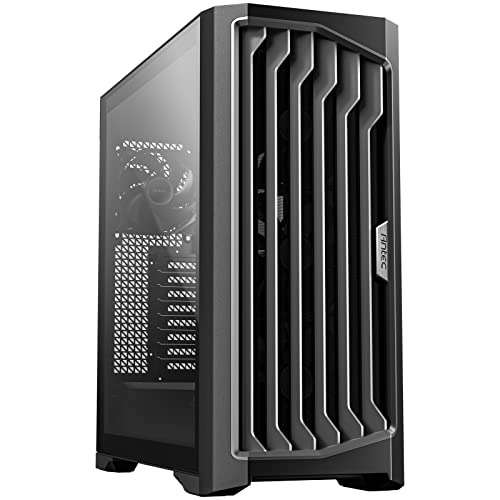
With its impressive high airflow mesh front panel and four Storm T3 PWM fans, the Antec Performance 1 FT Full Tower Gaming Case stands out as an excellent choice for gamers seeking superior cooling and performance. This case supports E-ATX motherboards and features dual tempered glass side panels, showcasing your components beautifully. You’ll appreciate the Type-C port for modern connectivity and the temperature display for monitoring system heat. With dimensions of 20.55 x 20.55 x 9.05 inches and a weight of 27.6 pounds, it’s spacious yet manageable. Plus, customer reviews give it a solid rating of 4.6 out of 5 stars.
Best For: Gamers looking for a high-performance, spacious full tower case with excellent cooling capabilities and modern connectivity options.
Pros:
- High airflow mesh front panel and four Storm T3 PWM fans for superior cooling.
- Dual tempered glass side panels for an aesthetically pleasing view of components.
- Includes a Type-C port and temperature display for enhanced functionality.
Cons:
- Slightly heavier at 27.6 pounds, which may affect portability.
- May require additional effort for optimal cable management despite included cable covers.
- Larger size may not fit well in all gaming setups or spaces.
Montech X3 Mesh ATX Mid-Tower PC Gaming Case

The Montech X3 Mesh ATX Mid-Tower PC Gaming Case is an ideal choice for gamers seeking exceptional cooling and performance without breaking the bank. Featuring a high airflow design, it boasts triple front 140mm fans for massive air intake and pre-mounted top and rear ventilation. You’ll love the six pre-installed fans with fixed RGB lighting, easily controlled with a dedicated LED button. The full panoramic tempered glass panels showcase your battle system beautifully, while the unique side swivel design adds flair. Plus, the zero drill-hole design enhances panel strength and safety, making it a smart choice for your gaming setup.
Best For: Gamers looking for an affordable mid-tower case that offers excellent cooling and an attractive RGB setup.
Pros:
- High airflow design with triple front 140mm fans for optimal cooling.
- Full panoramic tempered glass panels to showcase your build and RGB lighting.
- Unique side swivel tempered glass design allows for easier access and enhanced aesthetics.
Cons:
- Fixed RGB lighting may limit customization options for users wanting addressable lighting.
- Potential for noise from multiple fans, depending on usage.
- May not accommodate very large components due to mid-tower size limitations.
CORSAIR 4000D RS Frame Mid-Tower PC Case

Engineered for gamers and PC enthusiasts who demand exceptional cooling and performance, the CORSAIR 4000D RS Frame Mid-Tower PC Case stands out with its modular design and high airflow capabilities. You’ll appreciate the flexibility this case offers, allowing for extensive customization and upgrades. With compatibility for multiple 360mm radiators and three high-performance CORSAIR RS PWM fans, your system will stay cool under pressure. The 3D Y-Pattern Airflow Panel provides minimal obstruction, ensuring ideal airflow. Plus, the clean lines and aesthetic appeal make it a striking addition to your setup, all while supporting flexible fan placements for enhanced cooling.
Best For: Gamers and PC enthusiasts seeking a customizable and high-performance cooling solution for their builds.
Pros:
- Modular design allows for easy upgrades and personalization.
- High airflow capabilities with a 3D Y-Pattern Airflow Panel for optimal cooling.
- Flexible fan placement options accommodate various cooling configurations.
Cons:
- Limited RGB options for users looking for more aesthetic lighting effects.
- No included GPU support bracket, which may be needed for heavier graphics cards.
- Might be overkill for casual users who don’t require advanced cooling solutions.
Lian Li A3 Micro Form Factor Chassis (A3X-WD)

Designed for enthusiasts who demand both performance and aesthetics, the Lian Li A3 Micro Form Factor Chassis (A3X-WD) stands out with its sleek modular design and a striking wood front panel. This micro chassis supports M-ATX and ITX motherboards while accommodating GPUs up to 415mm. Weighing just 11.02 pounds, it’s compact yet powerful. You can install a 360mm radiator and up to 10 x 120mm fans for peak airflow. With three USB 3.0 ports, it offers ample connectivity. Rated 4.6 out of 5 stars, this chassis combines style and functionality, making it a top choice for your next build.
Best For: Enthusiasts seeking a compact yet stylish chassis that offers modularity and high-performance cooling options.
Pros:
- Modular design allows for easy customization and upgrades.
- Supports large GPUs up to 415mm, catering to powerful graphics cards.
- Ample cooling options with room for a 360mm radiator and up to 10 x 120mm fans.
Cons:
- No fans included, which may require additional purchases for optimal cooling.
- Limited to micro form factors, potentially restricting some motherboard options.
- Higher price point compared to standard cases, which might not suit all budgets.
Factors to Consider When Choosing an Airflow Case With Front Mesh
When you’re choosing an airflow case with front mesh, consider the mesh panel design for ideal air intake. Think about fan configuration options that suit your cooling needs and guarantee size compatibility with your components. Don’t overlook dust filtration efficiency and cooling performance metrics to keep your system running smoothly.
Mesh Panel Design
While choosing an airflow case with front mesh, it’s essential to evaluate the mesh panel design, as it directly impacts cooling efficiency and system performance. Look for designs that enhance airflow, allowing air to flow freely while filtering dust and debris. Some mesh panels offer ventilation rates of 51% or more, greatly improving thermal efficiency. High-performance cases often feature ultra-fine mesh across multiple panels, maximizing air intake and reducing dust buildup. Consider how the mesh integration facilitates the installation of additional cooling components, like radiators and fans, without hindering airflow. Easy cleaning and maintenance are also vital; opt for cases with removable filters that you can access and wash effortlessly to keep your system running smoothly.
Fan Configuration Options
Choosing the right fan configuration can greatly enhance your airflow case’s cooling performance. Effective cases often support multiple setups, typically featuring three front fans, one or two on top, and one rear fan. For ideal cooling, consider a mix of 120mm and 140mm fans. Larger fans provide greater airflow at lower RPMs, which means quieter operation. Many high-airflow cases allow for six or more fans, giving you customizable options based on your hardware needs. Pre-installed fans, like 140mm ARGB PWM models, can enhance both cooling and aesthetics with integrated lighting. Additionally, don’t overlook dust filters in front mesh cases; they help maintain airflow efficiency by keeping dust away from your components, ensuring ideal cooling performance over time.
Size Compatibility Considerations
How do you guarantee your airflow case with front mesh meets all your hardware needs? Start by ensuring compatibility with your motherboard size; cases typically support ATX, Micro-ATX, and Mini-ITX formats. Next, check the GPU clearance specifications to confirm your graphics card fits, especially if you’ve chosen a larger model. Don’t forget to take into account the maximum height for your CPU cooler to avoid installation issues and maintain peak cooling. Additionally, assess the number of expansion slots for future upgrades, as more slots offer room for additional GPUs or other expansion cards. Finally, evaluate the radiator support capabilities since different cases accommodate various radiator sizes, directly impacting your cooling setup options.
Dust Filtration Efficiency
When selecting an airflow case with front mesh, it is vital to take into account dust filtration efficiency to guarantee the best cooling and performance. Look for cases that utilize ultra-fine mesh materials, as these can capture smaller dust particles effectively. A front mesh panel with a high ventilation rate, around 51%, will provide excellent airflow while filtering out dust. Regular maintenance is important; most cases allow easy removal and cleaning of the mesh panels to improve airflow. Additionally, consider designs that incorporate dust filters at multiple points—front, top, and side panels—to enhance overall filtration. Efficient dust filtration not only boosts cooling performance but also extends the lifespan of your internal components by preventing dust buildup that could lead to overheating.
Cooling Performance Metrics
While evaluating airflow cases with front mesh, it’s essential to contemplate several cooling performance metrics that directly impact your system’s thermal efficiency. First, look at the airflow design; a front mesh panel allows for increased air intake, reducing temperature buildup. Consider the fan configurations—opt for cases that support multiple fans, ideally accommodating six or more for ideal circulation. Radiator support is also vital; cases that can fit larger radiators, like 360mm, generally offer superior cooling for high-performance setups. A ventilation rate of 51% or more through mesh panels enhances thermal efficiency by allowing hot air to escape while drawing in cooler air. Finally, dust filters help maintain cleanliness, preventing dust buildup that can hinder cooling performance over time.
Aesthetic Appeal Factors
What makes an airflow case with front mesh not just functional but also visually appealing? The sleek, modern design of front mesh cases enhances your setup’s aesthetics while showcasing airflow. Many of these cases come with customizable RGB lighting, letting you create striking color schemes that match your components. When paired with tempered glass side panels, the overall elegance is elevated, allowing you to display your hardware beautifully. Unique geometric mesh patterns can also serve as eye-catching design elements, improving ventilation while grabbing attention. Additionally, aesthetic choices like color finishes and material contrasts—combining mesh with metal or glass—can greatly enhance the visual appeal, making your case a stunning focal point in any build.
Cable Management Features
Aesthetic appeal goes hand in hand with functionality, especially when it comes to cable management in airflow cases with front mesh. A well-designed cable management system enhances airflow by keeping cables out of the way of fans and air passages, boosting cooling performance. Look for cases with wide channels, hooks, and straps that make routing and concealing cables easy, resulting in a cleaner build. Effective management not only reduces the risk of accidental disconnections but also simplifies upgrades and maintenance by granting easy access to components. Some cases even offer removable cable covers, hiding cables while allowing for extra fan mounting options, further optimizing airflow and showcasing your components without the distraction of tangled wires.
Build Quality Assessment
When choosing an airflow case with front mesh, you’ll want to prioritize build quality to guarantee durability and performance. Start by examining the materials used, like steel or tempered glass, as these enhance both strength and aesthetics. A sturdy case typically features reinforced frames and edges, reducing flexing and ensuring stability during installation and transport. Check the mesh panels for seamless integration—this should facilitate airflow while keeping dust at bay. Pay attention to the cable management system, as a well-designed setup promotes efficient routing and maintains a tidy interior, further enhancing airflow. Finally, consider thermal performance; cases with ideal airflow pathways and strategic fan placements often provide superior cooling efficiency.