
When assembling your workstation, the case you choose plays a crucial role in your system’s performance. A well-ventilated case can greatly impact the temperature and efficiency of your components. With so many options available, it’s important to find one that balances airflow, design, and functionality. Let’s explore the top airflow cases that can help guarantee your build runs cool and efficient, setting the stage for peak performance.
CORSAIR 4000D RS ARGB Mid-Tower ATX PC Case

If you’re a gamer or content creator seeking a high-performance case, the CORSAIR 4000D RS ARGB Mid-Tower ATX PC Case stands out with its exceptional airflow design. Featuring three pre-installed RS fans and a 3D Y-Pattern Airflow Panel, it keeps your components cool during intense gaming sessions. The FRAME Modular Case System lets you customize your setup easily, adapting to your needs. Plus, its compatibility with powerful graphics cards and dual 360mm radiators guarantees expansive cooling options. Weighing in at 22.7 pounds, this sleek black case combines style and functionality, making it a top choice for workstation builds.
Best For: Gamers and content creators looking for a high-performance case with excellent airflow and customization options.
Pros:
- High airflow design with 3x pre-installed RS fans and optimized 3D Y-Pattern Airflow Panel ensures effective cooling during heavy use.
- Modular customization with FRAME Modular Case System allows for easy upgrades and adjustments to fit user preferences.
- Compatibility with powerful components, including graphics cards and dual 360mm radiators, supports extensive cooling solutions.
Cons:
- Weight of 22.7 pounds may make it less portable for users who frequently move their setups.
- Limited color options available, as it only comes in black, which may not appeal to all aesthetic preferences.
- Requires additional ARGB motherboard connector for full lighting control, which may not be available on all motherboards.
NZXT H5 Flow 2024 Compact ATX Mid-Tower Gaming Case

The NZXT H5 Flow 2024 Compact ATX Mid-Tower Gaming Case is perfect for gamers who demand exceptional cooling and airflow in a compact design. Measuring 16.93 x 8.86 x 18.31 inches and weighing 17.6 pounds, it’s designed for peak performance. With its perforated PSU shroud, you’ll enjoy outstanding GPU cooling, while large radiator support allows for up to 360mm in front and 240mm on top. The ultra-fine mesh panels filter dust and maximize airflow. Plus, seamless cable management makes routing easy. With a stellar 4.7-star rating from over 2,800 reviews, it’s a top choice for serious gamers.
Best For: Gamers looking for a compact case that offers exceptional cooling and airflow capabilities.
Pros:
- Exceptional GPU cooling with perforated PSU shroud for optimal air intake.
- Large radiator support for enhanced cooling options.
- Seamless cable management system for easy routing and concealment of cables.
Cons:
- Limited space for larger components due to its compact design.
- Only two pre-installed fans may require additional purchases for optimal cooling.
- May not suit users who prefer a more traditional case size and layout.
be quiet! Pure Base 501 Airflow ATX Case

Designed for users who prioritize both performance and a quiet environment, the be quiet! Pure Base 501 Airflow ATX Case is a premium choice. Its minimalistic design in Airflow Black complements any setup while ensuring ideal cooling. With two preinstalled Pure Wings 3 140mm PWM fans and space for additional cooling options, your components will stay cool even under heavy loads. The case supports high-end GPUs with 90° PCIe slots for vertical mounting, enhancing aesthetics. Plus, the front I/O ports offer fast access with USB 3.2 Gen. 2 Type C. With a 4.7-star rating, it’s a reliable investment for your workstation.
Best For: Users seeking a high-performance, quiet computer case with excellent cooling capabilities and aesthetic appeal.
Pros:
- Optimized Cooling: Equipped with two preinstalled Pure Wings 3 140mm PWM fans and supports multiple additional fans or radiators, ensuring efficient cooling.
- Aesthetic Appeal: Minimalistic design in Airflow Black and vertical GPU mounting option enhances the overall look of any setup.
- Convenient Connectivity: Features USB 3.2 Gen. 2 Type C and multiple USB 3.0 ports for fast access to peripherals.
Cons:
- Weight: At 14.96 pounds, it may be heavier compared to some other cases, potentially affecting portability.
- Limited Stock Fans: While it comes with two fans, users may need to purchase additional cooling solutions for optimal performance in high-demand situations.
- Size Constraints: While compact, it may not fit larger components or setups as comfortably as more spacious cases.
Cooler Master MasterBox Q300L Micro-ATX Tower

With its fully ventilated airflow and support for up to five fans, the Cooler Master MasterBox Q300L Micro-ATX Tower is an excellent choice for users seeking to build a compact yet powerful workstation. This case supports Micro-ATX and Mini-ITX motherboards, ensuring compatibility with various components. You’ll appreciate the maximum CPU cooler height of 159mm and GPU cards up to 360mm, along with a standard ATX PSU. The adjustable I/O panel and unique cube design add customization options, while the magnetic dust filter keeps your system clean. Rated 4.5 stars, it’s a popular choice among users for superior thermal performance.
Best For: Users looking to build a compact yet powerful workstation with excellent thermal performance and customization options.
Pros:
- Supports Micro-ATX and Mini-ITX motherboards for versatile system compatibility.
- Maximum CPU cooler height of 159mm and GPU support up to 360mm, allowing for powerful components.
- Adjustable I/O panel and unique cube design enhance customization and aesthetic appeal.
Cons:
- Limited space may not accommodate larger components or extensive cooling solutions.
- Weight of 1.06 pounds may not provide the stability some users desire in a case.
- Some users may find the acrylic side panel less durable compared to tempered glass options.
Corsair 3000D Airflow Mid-Tower PC Case

If you’re building a high-performance workstation, the Corsair 3000D Airflow Mid-Tower PC Case stands out with its exceptional cooling capabilities. With room for up to eight 120mm fans and support for large radiators, your components will stay cool even under heavy loads. This case accommodates quad-slot graphics cards up to 360mm, ensuring you can fit powerful GPUs. Its optimized steel front panel and tempered glass side panel combine durability with aesthetics. Plus, the inclusion of two quiet 3-pin CORSAIR SP120 ELITE fans enhances airflow. With a 4.6-star rating, it’s a popular choice for efficient, stylish builds.
Best For: The Corsair 3000D Airflow Mid-Tower PC Case is best for gamers and PC builders looking for a high-performance chassis with excellent cooling and graphics card support.
Pros:
- Exceptional Cooling: Supports up to 8 fans and large radiators, ensuring optimal airflow and temperature management for high-performance components.
- Spacious GPU Compatibility: Accommodates quad-slot graphics cards up to 360mm in length, allowing for powerful GPU installations.
- Stylish Design: Features a tempered glass side panel for showcasing components and an optimized steel front panel for improved airflow.
Cons:
- Weight: At 16.09 pounds, it may be heavier compared to other mid-tower cases, making it less portable.
- Limited Included Fans: Comes with only two fans, which may require additional purchases for optimal cooling setup.
- RAM Height Dependent Radiator Support: The roof radiator support is dependent on RAM height, potentially limiting compatibility with some RAM configurations.
Stackable Open Air Computer Case Rack for ATX/MATX/ITX Motherboards
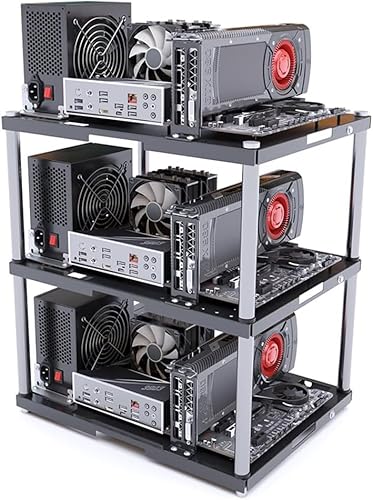
The Stackable Open Air Computer Case Rack is perfect for builders looking to create efficient cooling systems for their ATX, MATX, or ITX motherboards. Its modular design allows you to stack up to 10 layers, making it ideal for large-scale projects like mining rigs or DIY builds. Each layer, constructed from a durable metal frame, supports up to 20kg, ensuring robust stability. The open frame promotes superior airflow, enhancing heat dissipation. Assembly is a breeze with included accessories, making it suitable even for beginners. With a 30-day return policy, you can invest in this rack with confidence.
Best For: Builders looking to create efficient cooling systems for ATX, MATX, or ITX motherboards, especially for large-scale projects like mining rigs or DIY builds.
Pros:
- Modular design allows for stacking up to 10 layers, accommodating extensive setups.
- Superior airflow promotes excellent heat dissipation, enhancing overall system performance.
- Easy assembly with included accessories makes it beginner-friendly.
Cons:
- Single-layer purchase means additional layers must be bought separately, increasing overall cost.
- Lightweight design may raise concerns about stability with heavier components.
- Mixed customer reviews (3.6 out of 5 stars) suggest potential quality control issues.
CORSAIR 6500D Airflow Mid-Tower PC Case

For those seeking a high-performance workstation, the CORSAIR 6500D Airflow Mid-Tower PC Case stands out with its exceptional cooling capabilities and organized dual chamber design. Its fully mesh paneling guarantees maximum airflow, while accommodating up to 13x 120mm or 9x 140mm fans for peak thermal management. You’ll appreciate the compatibility with reverse connection motherboards, which promotes a clutter-free aesthetic. With space for four storage drives in the second chamber, you can keep things tidy. The modern front panel I/O features USB 3.2 Gen-2 Type-C, making device access a breeze while allowing for customizable builds that grow with your needs.
Best For: The CORSAIR 6500D Airflow Mid-Tower PC Case is best for gamers and PC builders who prioritize high airflow and organized builds for optimal thermal performance.
Pros:
- Exceptional Airflow: Fully mesh paneling and support for multiple fans enhance cooling capabilities.
- Organized Design: Dual chamber layout allows for efficient cable management and a clean aesthetic.
- Versatile Compatibility: Supports reverse connection motherboards and offers ample storage options.
Cons:
- Size Limitations: As a mid-tower case, it may not accommodate larger components compared to full-tower options.
- Assembly Complexity: The multitude of features may require more time and effort for assembly and customization.
- Limited Stock Fans: Depending on the configuration, users may need to purchase additional fans separately for optimal cooling.
GAMDIAS ATX Mid Tower Gaming PC Case with Tempered Glass
Looking for a gaming PC case that combines style and functionality? The GAMDIAS ATX Mid Tower Gaming PC Case features a sleek stealth black design and a full-sized tempered glass cover that showcases your components beautifully. With an airflow-focused mesh front panel and four built-in 120mm ARGB fans, it guarantees excellent cooling. You’ll appreciate the tool-free installation and compatibility with various motherboard sizes, along with ample storage options. Plus, the front I/O offers multiple connectivity options to accommodate your modern gaming setup. This case not only looks great but also keeps your system running cool and efficiently.
Best For: Gamers looking for a stylish and functional PC case that offers excellent cooling and expandability options.
Pros:
- Tool-free installation makes building and upgrading easy.
- Excellent airflow with mesh front panel and four ARGB fans ensures optimal cooling.
- Supports various motherboard sizes and has ample storage options for customization.
Cons:
- Limited maximum CPU cooler height may restrict high-performance cooling solutions.
- Full-sized tempered glass may be prone to fingerprints and smudges.
- Aesthetic appeal may not suit everyone’s taste, especially those preferring minimalist designs.
NZXT H6 Flow Compact Mid-Tower Airflow Case (CC-H61FW-01)

With its compact dual-chamber design, the NZXT H6 Flow Compact Mid-Tower Airflow Case (CC-H61FW-01) is perfect for users who prioritize both aesthetics and thermal performance. The wraparound glass panels offer a stunning view of your components while enhancing airflow with optimized perforation patterns. Equipped with three pre-installed 120mm fans, this case guarantees your system stays cool during demanding tasks. Plus, the intuitive cable management system simplifies your build process, keeping everything tidy. With its high-performance airflow features, the NZXT H6 Flow not only looks great but also contributes to your system’s longevity and efficiency.
Best For: Users who seek a stylish and efficient mid-tower case with excellent thermal performance for their gaming or workstation builds.
Pros:
- Stylish Design: Wraparound glass panels provide a sleek look and unobstructed views of internal components.
- Efficient Cooling: Comes with three pre-installed 120mm fans and airflow-optimized panels for superior cooling performance.
- Easy Cable Management: Intuitive system simplifies the building process, ensuring a clean and organized setup.
Cons:
- Limited Space: Compact design may restrict the size of certain components or cooling solutions.
- Price Point: May be considered expensive compared to other mid-tower cases with similar features.
- Dust Accumulation: While it has airflow-optimized panels, dust can still accumulate on filters and fans, requiring regular maintenance.
LIAN LI O11D MINI V2 Compact ATX Mid-Tower Computer Case

The LIAN LI O11D MINI V2 Compact ATX Mid-Tower Computer Case stands out as an excellent choice for gamers and content creators who demand both performance and aesthetics in their setups. Its pillar-less tempered glass panels offer a stunning view of your components, while the compact design maintains a small footprint. Optimized airflow with a slanted bottom enhances GPU cooling, ensuring efficient thermal management. You’ll appreciate the support for various motherboards and GPU anti-sag brackets, which keep everything in place. Plus, adjustable I/O and efficient cable management make for a clean, organized build, perfect for any workstation.
Best For: Gamers and content creators looking for a compact case that combines aesthetics with efficient cooling and cable management.
Pros:
- Pillar-less tempered glass panels provide an unobstructed view of internal components, enhancing the overall aesthetic appeal.
- Optimized airflow design improves GPU cooling performance, ensuring efficient thermal management during intense workloads.
- Versatile motherboard support and robust GPU anti-sag brackets allow for a tidy and stable build, accommodating various setups.
Cons:
- Compact size may limit expansion options for additional components compared to larger cases.
- Potentially challenging cable management for users with extensive wiring, despite designed features to assist.
- Limited space for cooling solutions may restrict options for high-performance cooling setups.
Factors to Consider When Choosing an Airflow Case for Workstation
When you’re picking an airflow case for your workstation, several key factors come into play. You’ll want to evaluate cooling system efficiency, fan configuration options, and how well the case manages cables. Don’t forget to check the size and compatibility with your components, along with the overall build quality and design.
Cooling System Efficiency
Choosing an airflow case for your workstation hinges on several key factors that directly impact cooling system efficiency. Look for cases that support multiple fan configurations, as some can accommodate up to 13x 120mm or 9x 140mm fans, ensuring robust airflow. The design of airflow panels, like perforated or mesh surfaces, greatly enhances air intake, optimizing cooling performance. Additionally, consider cases that support large radiators, up to 360mm, for flexible liquid cooling options. Pre-installed fans with PWM capabilities can operate silently during low workloads, maintaining efficiency when necessary. Finally, a well-designed case with good cable management and optimized layouts promotes unobstructed airflow, further improving your system’s cooling and overall performance.
Fan Configuration Options
Selecting the right fan configuration is essential for maximizing your workstation’s cooling potential. When you choose an airflow case, consider the number of fan mounting options; look for cases that support up to 8x 120mm or 4x 140mm fans for ideal cooling. Dedicated fan support for radiators is a plus, especially if you need to accommodate large radiators, like 360mm in the front or 240mm on top. Pay attention to the airflow arrangement—front-to-back and top-to-bottom designs promote unobstructed air circulation. Pre-installed fans, such as 120mm or 140mm models, offer immediate cooling and quieter operation. Finally, check for additional fan mounts, as expanding your cooling options can greatly enhance airflow and heat dissipation in high-performance setups.
Cable Management Features
Effective cable management is key to maintaining an organized and efficient workstation. When choosing an airflow case, look for wide channels, hooks, and straps that make routing and concealing cables easy. This not only enhances aesthetics but also keeps your workspace tidy. Many modern cases feature modular I/O panels, allowing you to customize cable access based on your preferences. Integrated cable management solutions help prevent clutter, improving airflow and simplifying upgrades or maintenance. Smart routing capabilities offer dedicated paths for power and data cables, minimizing interference with cooling performance. Additionally, features like cable grommets and tie-down points guarantee a cleaner build, which is vital for maximizing airflow efficiency. Prioritize these features to keep your workstation running smoothly.
Size and Compatibility
An organized workspace relies not only on cable management but also on the right case size and compatibility. When choosing an airflow case, make certain it supports your motherboard size—whether it’s ATX, Micro-ATX, or Mini-ITX. You’ll also need to check if the case dimensions can accommodate your internal components, especially CPU coolers up to 159mm and graphics cards reaching 360mm in length. Don’t overlook the weight; heavier cases often provide added stability and durability. Additionally, seek cases that offer multiple fan and radiator support, such as up to 8x 120mm fans or 360mm radiators, to optimize cooling performance. Finally, verify the design promotes effective cable management for improved airflow and aesthetics.
Build Quality and Design
When considering an airflow case for your workstation, prioritizing build quality and design is essential for ensuring both performance and longevity. Look for robust materials like steel or tempered glass to guarantee durability and structural integrity for your components. Design features such as modular layouts and customizable options allow you to create a personalized build while enhancing airflow management.
Opt for cases with perforated panels and well-placed fan mounts for superior ventilation. A dual-chamber design can markedly improve cable management by separating the power supply and storage from the main components, boosting airflow. Finally, consider the case’s dimensions and weight; larger cases typically provide better cooling but require more space, so find a balance that fits your setup.