
If you’re looking to enhance your workspace with a heavy-duty quad monitor mount, you’ve come to the right place. These mounts can greatly improve your setup, providing the support and flexibility you need for multitasking or gaming. With so many options available, it’s important to find one that suits your specific needs. Let’s explore the top contenders that promise to elevate your workstation to new heights.
VIVO Pneumatic Arm Quad Ultrawide Monitor Desk Mount (STAND-V400D)

If you’re looking to enhance your workspace with multiple ultra-wide monitors, the VIVO Pneumatic Arm Quad Ultrawide Monitor Desk Mount (STAND-V400D) is an excellent choice. This heavy-duty mount supports up to four ultra-wide screens, making it perfect for multitaskers. With its durable cast aluminum construction and a clamp base that fits desktops up to 2” thick, you’ll enjoy maximum strength and scratch resistance. The pneumatic arms allow for effortless height adjustments, while the tilt, swivel, and rotation features guarantee ideal viewing angles. Plus, the detachable VESA plates make installation a breeze. Transform your setup and boost productivity effortlessly!
Best For: Professionals and gamers who require multiple ultra-wide monitors for enhanced productivity and immersive experiences.
Pros:
- Durable construction: Made from heavy-duty cast aluminum for maximum strength and scratch resistance.
- Effortless adjustments: Pneumatic arms allow for easy height adjustments with minimal effort.
- Versatile viewing options: Features tilt, swivel, and rotation capabilities for optimal screen positioning.
Cons:
- Weight limitations: Each arm can only support monitors between 5.5 lbs to 44 lbs, which may not accommodate all larger models.
- Clamp base size: The mount requires a desktop thickness of up to 2”, which may not fit all desk types.
- Installation complexity: While the VESA plates are detachable, some users may still find the assembly process challenging.
VIVO Quad Pneumatic Monitor Mount for 4 Screens (STAND-V400G)
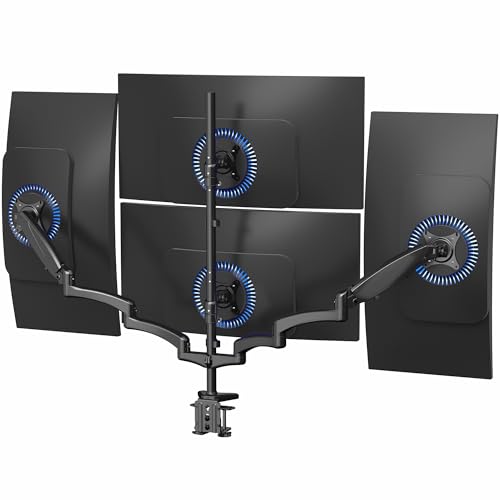
The VIVO Quad Pneumatic Monitor Mount (STAND-V400G) is the perfect solution for professionals needing to optimize their workspace with four monitors. This mount supports screens from 17 to 32 inches, holding up to 17.6 lbs per monitor. With dual pneumatic arms, you can easily tilt, swivel, and rotate your displays for the best viewing angles. Crafted from sturdy steel and aluminum, it guarantees stability while accommodating various monitor weights. Installation is a breeze with the included hardware and drill-free C-clamp, making it easy to secure to surfaces up to 3.25 inches thick. Maximize your desk space and enhance productivity!
Best For: Professionals looking to enhance productivity and optimize their workspace with multiple monitor setups.
Pros:
- Supports up to four monitors, providing ample screen real estate for multitasking.
- Easy installation with drill-free mounting and included hardware, saving time and effort.
- Adjustable pneumatic arms allow for smooth transitions and customizable viewing angles.
Cons:
- May not be suitable for heavier monitors, as it has a weight limit of 17.6 lbs per screen.
- Requires sufficient desk space to accommodate the base of the mount and the monitors.
- Limited to VESA compatible monitors, which may exclude some older or non-standard models.
MOUNTUP Quad Monitor Stand (MU3007)

For professionals juggling multiple tasks or gamers seeking an immersive experience, the MOUNTUP Quad Monitor Stand (MU3007) is the ideal solution. This sturdy stand supports four monitors ranging from 17 to 32 inches and offers impressive versatility with 360° rotation and +90°/-90° tilt. Each arm holds up to 17.6 lbs, ensuring your screens are secure. Its space-efficient design features a solid base and cable clips for neat organization. Assembly is a breeze, taking under 20 minutes with included instructions. Plus, with a 3-year warranty and excellent customer support, you can trust your investment will last.
Best For: Professionals managing multiple tasks or gamers seeking an immersive multi-screen setup.
Pros:
- Versatile Adjustability: Monitors can be rotated 360°, tilted +90°/-90°, and swiveled 180° for optimal viewing angles.
- Space Efficiency: The solid base supports four monitors, freeing up valuable desk space while keeping cables organized with clips.
- Quick Assembly: Easy to install with a quick-release VESA plate and takes less than 20 minutes to set up.
Cons:
- Weight Limit: Each arm can only hold up to 17.6 lbs, which may limit the choice of larger or heavier monitors.
- Requires Desk Space: The base of the stand occupies some desk space, which may be a concern for smaller workstations.
- VESA Compatibility: Only compatible with VESA patterns of 75x75mm or 100x100mm, which may not fit all monitors.
PUTORSEN Quad Monitor Mount for Ultrawide and Standard Screens
Whether you’re a gamer, designer, or multitasker, the PUTORSEN Quad Monitor Mount is an ideal choice for maximizing your workspace. It supports a 49’’ ultrawide monitor on top and three 27’’ monitors below, providing flexibility for various setups. The heavy-duty steel construction and reliable gas spring guarantee stability, while the adjustable arms prevent sagging. With a tilt of +50°/-20° for the center bracket and ±35° for the lower arms, you can achieve the best screen positioning. Installation is a breeze thanks to the detachable VESA plate and compatible mounting options. Enjoy a sleek, organized workspace with this versatile mount.
Best For: Gamers, designers, and multitaskers looking to maximize their workspace with a versatile monitor mounting solution.
Pros:
- Heavy-duty steel construction provides stability and durability.
- Adjustable arms and gas spring design allow for optimal screen positioning and prevent sagging.
- Supports a variety of monitor sizes, accommodating both ultrawide and standard screens.
Cons:
- May require a significant amount of desk space for proper setup.
- Limited weight capacity for lower arms may not support heavier monitors.
- Installation may be challenging for those unfamiliar with mounting hardware.
WALI Quad Monitor Mount for Ultrawide and Standard Screens (M004S-P)

Designed to accommodate both ultrawide and standard screens, the WALI Quad Monitor Mount (M004S-P) is ideal for multitaskers who need versatile display options. You can mount one ultrawide monitor (up to 49”) on the top bracket, while three standard monitors (up to 27”) fit perfectly below. With ergonomic tilt and swivel features, you’ll achieve superior viewing angles. Plus, its durable steel construction guarantees stability and longevity, surviving over 20,000 fatigue tests. Installation is a breeze with included tools and cable management keeps your workspace tidy. Rated 4.7 stars by users, it’s a reliable choice for any setup.
Best For: Multitaskers and professionals looking for a versatile and ergonomic solution for mounting multiple monitors, including ultrawide screens.
Pros:
- Supports one ultrawide monitor (up to 49”) and three standard monitors (up to 27”), providing ample screen real estate.
- Ergonomic design with adjustable tilt, swivel, and height settings for optimal viewing angles and comfort.
- Made of durable steel, ensuring stability and longevity, with over 20,000 fatigue tests confirming its reliability.
Cons:
- May require a larger desk space to accommodate the mount and the monitors.
- Installation can be complicated for those unfamiliar with monitor mounts, despite included tools.
- The weight of the mount (18.85 pounds) could be a concern for some desk types, particularly if using the grommet mount option.
WALI Quad Monitor Desk Mount (M004)

The WALI Quad Monitor Desk Mount (M004) is an ideal solution for professionals who juggle multiple tasks simultaneously. This sturdy mount accommodates four monitors, each up to 27 inches and 22 lbs. Its detachable, height-adjustable plates and two-stage locking system guarantee secure positioning. With +/-90° tilt, swivel, and 360° rotation, you can easily switch between landscape and portrait modes. The 31.5” height pole promotes ergonomic comfort, reducing neck and eye strain. Plus, it enhances your workspace efficiency. Backed by a 4.5-star rating and US-based support, it’s a reliable choice for boosting productivity in any setup.
Best For: Professionals who need to manage multiple tasks efficiently with the use of four monitors.
Pros:
- Increases desk space, allowing for a more organized and clutter-free work environment.
- Ergonomic design with height adjustability helps reduce neck and eye strain during long work hours.
- Versatile monitor positioning with tilt, swivel, and rotation features for optimal viewing angles.
Cons:
- Installation may be complex for users who are not familiar with mounting hardware.
- Weight limit per arm may restrict the use of heavier monitors or accessories.
- Requires sufficient desk space to accommodate the mount and four monitors effectively.
Quad Monitor Mount for 17-32 Inches

If you’re looking to maximize your workspace and enhance productivity, the Quad Monitor Mount for 17-32 inches is an excellent choice for professionals who manage multiple screens. This heavy-duty mount supports four monitors, each weighing up to 22 lbs, ensuring durability. With VESA compatibility and adjustable features like tilt, swivel, and rotation, you can achieve the best viewing angles. The non-hole height adjustment system allows precise positioning, whether in portrait or landscape. Plus, it saves over 80% of desktop space, making it perfect for multitasking. Enjoy easy installation with versatile mounting options and included cable management accessories.
Best For: Professionals who manage multiple screens and seek to optimize their workspace for enhanced productivity.
Pros:
- Durable construction supports up to four monitors, each weighing up to 22 lbs, ensuring long-lasting use.
- Fully adjustable features including tilt, swivel, and rotation allow for personalized viewing angles and comfort.
- Space-saving design frees up over 80% of desktop area, ideal for multitasking environments.
Cons:
- Installation may be complex for some users, requiring careful setup and adjustment.
- Limited to specific desk thicknesses for mounting, which may not accommodate all desk types.
- Weight limit per screen might restrict usage for larger or heavier monitors.
VIVO Quad Monitor Extra Tall Desk Mount (STAND-V104T)

For professionals who need a robust and versatile setup, the VIVO Quad Monitor Extra Tall Desk Mount (STAND-V104T) stands out with its ability to hold an ultra-wide monitor alongside three standard monitors. It accommodates up to 49” on the top and 27” on the lower brackets, supporting a total weight of 44 lbs above and 15.4 lbs per lower bracket. With heavy-duty steel construction and a clamp base for desktops up to 3.3” thick, it guarantees durability. The adjustable height and extensive articulation options give you ideal viewing angles, while detachable VESA plates streamline installation for a seamless setup.
Best For: Professionals and gamers who require a multi-monitor setup for enhanced productivity and immersive experiences.
Pros:
- Heavy-duty steel construction ensures durability and stability for multiple monitors.
- Extensive articulation options provide optimal viewing angles, reducing glare and improving comfort.
- Detachable VESA plates make installation quick and hassle-free.
Cons:
- Limited weight capacity may not support heavier ultra-wide monitors beyond 49 lbs.
- Clamp base might not be suitable for all desk types, especially those thicker than 3.3”.
- Complexity in setup may require additional time for proper assembly and adjustment.
VIVO Adjustable Quad Monitor Desk Stand Mount (STAND-V004FG)

Designed for professionals who rely on multiple screens for productivity, the VIVO Adjustable Quad Monitor Desk Stand Mount (STAND-V004FG) provides a robust solution for managing your workspace. It supports four monitors up to 27 inches, with a sturdy glass base that enhances aesthetics while offering excellent support. Built from high-grade steel and aluminum, it can hold screens weighing up to 22 lbs each. The fully adjustable arms allow for a -90° to +90° tilt, 180° swivel, and 360° rotation, ensuring you achieve the perfect viewing angles. Just be cautious not to pull monitors too far forward unless bolted down.
Best For: Professionals needing an efficient and organized workspace with multiple monitors for enhanced productivity.
Pros:
- Sturdy construction with high-grade steel and aluminum, ensuring durability and support for multiple monitors.
- Fully adjustable arms provide versatile positioning with tilt, swivel, and rotation options for optimal viewing angles.
- Aesthetic glass base enhances desk appearance while providing solid support and protection against scratches.
Cons:
- Limited to monitors sized between 13” to 27”, which may not accommodate larger screens.
- Potential stability issues if not bolted down when monitors are pulled forward or backward excessively.
- Requires assembly, which may be complex for some users without experience in setup.
VIVO Quad Monitor Desk Mount (STAND-V104A)

The VIVO Quad Monitor Desk Mount (STAND-V104A) is perfect for professionals who need to enhance their multitasking capabilities. This mount supports four monitors, fitting screens from 13 to 32 inches, each up to 22 lbs. With fully adjustable arms, you can tilt, swivel, and rotate your displays for ideal viewing angles. Installation is a breeze with a heavy-duty C-clamp that fits desks up to 3.94 inches thick. Plus, the design keeps your workspace clutter-free while providing a sleek look. With a 4.3-star rating and easy setup, it’s a top choice for productivity and organization.
Best For: Professionals who require a multi-monitor setup for enhanced productivity and organization.
Pros:
- Fully adjustable arms allow for optimal viewing angles with tilt, swivel, and rotation features.
- Space-efficient design keeps monitors off the desk, freeing up valuable workspace.
- Easy installation with all necessary hardware included, making setup quick and straightforward.
Cons:
- Weight limit of 22 lbs per monitor may restrict the use of heavier displays.
- C-clamp mounting may not be suitable for all desk types, especially those with limited thickness.
- Limited warranty period of 30 days may not provide enough reassurance for long-term use.
Factors to Consider When Choosing a Quad Monitor Mount Heavy Duty
When choosing a heavy-duty quad monitor mount, you need to take into account several key factors. First, make certain the mount can handle your monitor sizes and weight. Then, look at adjustability features and mounting options to guarantee it fits your workspace needs.
Monitor Size Compatibility
Selecting the right quad monitor mount hinges on understanding monitor size compatibility. You’ll want to make sure the mount supports monitor sizes ranging from 17 to 49 inches, as different models vary in their size allowances. Don’t forget to check that the mount accommodates the VESA mounting patterns of 75x75mm or 100x100mm, which are standard for most monitors. If you’re considering a unique setup, some mounts allow for an ultra-wide monitor alongside standard ones, so keep that in mind. Finally, verify the mount design permits tilt, swivel, and rotation adjustments to optimize your viewing angles. By focusing on these factors, you can create a setup that enhances your productivity and comfort.
Weight Capacity Limits
Understanding monitor size compatibility lays the groundwork for your quad monitor setup, but weight capacity limits also play an essential role in ensuring stability and safety. When choosing a quad monitor mount, make sure each arm’s weight capacity meets or exceeds your monitors’ weights, which typically range from 17.6 lbs to 44 lbs. Additionally, consider the total weight capacity of the mount, as some can support 88 lbs or more. It’s vital to verify the weight distribution capabilities since uneven weights can compromise stability. Don’t forget to factor in any accessories that may add extra weight. Always check the manufacturer’s specifications for maximum weight per monitor and total capacity to prevent potential damage or safety issues.
Adjustability Features
Adjustability features are vital for maximizing the functionality of your quad monitor mount, as they directly impact your comfort and productivity. Look for mounts that offer a wide range of tilt adjustments, ideally between +90° to -90°, to optimize viewing angles and minimize glare. Swivel capabilities of at least 180° are important for repositioning monitors during collaborative work. Additionally, make sure the mount includes 360° rotation features, allowing you to switch between landscape and portrait orientations effortlessly. Height adjustment along the center pole accommodates different user preferences, promoting ergonomic setups. Finally, individual arm adjustments enable precise positioning and alignment of each monitor, enhancing your overall workspace efficiency and making multitasking smoother.
Mounting Options Available
When considering a heavy-duty quad monitor mount, it is crucial to evaluate the mounting options available to guarantee a secure and efficient setup. You typically have two main choices: C-clamp and grommet mounts. C-clamp mounts easily attach to desk surfaces up to 3.25 inches thick without any drilling, offering flexibility. Alternatively, grommet mounts require a pre-drilled hole and fit desk thicknesses from 0.39 to 2.95 inches, with a hole diameter of 0.39 to 2.36 inches. Look for models with detachable VESA plates, which simplify monitor installation and removal. Additionally, many mounts come equipped with built-in cable management systems, helping you keep your workspace organized and free of clutter. Choose wisely to enhance your setup experience!
Construction Material Durability
Choosing a heavy-duty quad monitor mount made from high-quality materials is essential for ensuring durability and stability. Look for mounts constructed from heavy-duty steel or aluminum, as these materials offer superior strength for supporting multiple screens. A robust design can handle the weight of monitors, with individual arm capacities often ranging from 17.6 lbs to 44 lbs. Additionally, scratch-resistant finishes and durable coatings protect against daily wear and tear, enhancing longevity. The right materials not only affect weight capacity but also reduce sagging, ensuring reliable performance over time. Plus, high-quality construction can elevate your workspace’s aesthetic, seamlessly blending into modern environments while providing the support you need for an effective setup.
Installation Ease
After confirming your quad monitor mount is built from durable materials, the next consideration is installation ease. Look for mounts that come with clear instructions and all necessary hardware to make assembly straightforward. Many models feature detachable VESA plates, simplifying the monitor mounting process and cutting down installation time. Also, consider options that allow for drill-free installation using heavy-duty C-clamps or grommet mounts, which can accommodate various desk thicknesses. Quick-release mechanisms in the design can appreciably speed up monitor adjustments. Finally, evaluate the weight capacity and compatibility with multiple VESA mounting patterns to guarantee a secure, stable setup during installation. This attention to ease will save you time and frustration.
Cable Management Solutions
Effective cable management is essential for maintaining a clean and organized workspace, especially when dealing with multiple monitors. When choosing a heavy-duty quad monitor mount, consider options with built-in cable clips or channels that secure and route cables, preventing tangles. Utilizing cable ties or Velcro straps adds flexibility, making it easier to adjust and maintain your setup. Look for mounts with detachable VESA plates, which simplify connecting and disconnecting cables during rearrangements or servicing. An organized cable management system not only enhances aesthetics but also improves airflow around your devices, potentially reducing overheating and boosting performance. Prioritize these features for a more efficient and visually pleasing workspace.