
If you’re looking to enhance your workspace efficiency, investing in a triple monitor mount for ultrawide displays is a smart choice. These mounts not only provide ideal viewing angles but also help keep your area organized and clutter-free. With several options available, each offering unique features and benefits, you might be wondering which one suits your needs best. Let’s explore the top contenders and see how they can transform your setup.
VIVO Pneumatic Arm Triple Ultrawide Monitor Desk Mount (STAND-V300D)

If you’re looking to enhance your workspace with a versatile solution for multiple ultrawide displays, the VIVO Pneumatic Arm Triple Ultrawide Monitor Desk Mount (STAND-V300D) is the perfect choice. This mount supports one 49-inch and two 38-inch ultrawide screens, ensuring ample viewing space. With a robust clamp base and a weight capacity of 5.5 to 44 lbs per arm, it’s built for heavy-duty use. The premium cast aluminum construction guarantees durability, while its pneumatic arms allow for easy height adjustments. Enjoy ideal viewing angles with its tilt, swivel, and rotation features, making your workspace both ergonomic and efficient.
Best For: Professionals and gamers who require multiple ultrawide displays for enhanced productivity and immersive experiences.
Pros:
- Durable Construction: Made from premium cast aluminum, ensuring long-lasting performance and scratch resistance.
- Versatile Adjustability: Pneumatic arms allow for easy height adjustments and optimal viewing angles with tilt, swivel, and rotation options.
- Heavy-Duty Support: Robust clamp base and weight capacity of 5.5 to 44 lbs per arm accommodate a variety of ultrawide monitors.
Cons:
- Complex Assembly: May require time and effort to assemble due to multiple components and instructions.
- Limited Desktop Compatibility: The clamp base is only suitable for desktops up to 2 inches thick.
- Weight Limitations: Each arm has a maximum weight capacity, which may restrict the use of heavier ultrawide monitors.
Triple Monitor Mount with Adjustable Gas Spring Arm

Designed specifically for gamers and professionals who utilize ultrawide displays, the Triple Monitor Mount with Adjustable Gas Spring Arm offers unparalleled flexibility and support. It accommodates ultrawide screens up to 49 inches and two additional monitors, ensuring you have ample display space. With fully adjustable arms allowing tilt, swivel, and rotation, you can easily optimize your viewing angles. The gas spring arms provide smooth movement, enhancing ergonomics while reducing glare. Installation is a breeze with a C-clamp design, and the integrated cable management keeps your workspace tidy. Crafted from premium cast aluminum, this mount promises durability and stability.
Best For: Gamers and professionals seeking an ergonomic and flexible solution for multiple ultrawide and standard monitors.
Pros:
- Fully adjustable arms with tilt, swivel, and rotation for optimal viewing angles.
- Easy installation with a C-clamp design, fitting a variety of desk thicknesses.
- Integrated cable management system keeps workspace organized and clutter-free.
Cons:
- May require significant desk space to accommodate three monitors.
- The weight capacity may be limiting for larger or heavier monitor models.
- Initial setup may be challenging for users unfamiliar with monitor mounts.
VIVO Clamp-on Dual Pole Triple Monitor Desk Mount (STAND-V300CU)
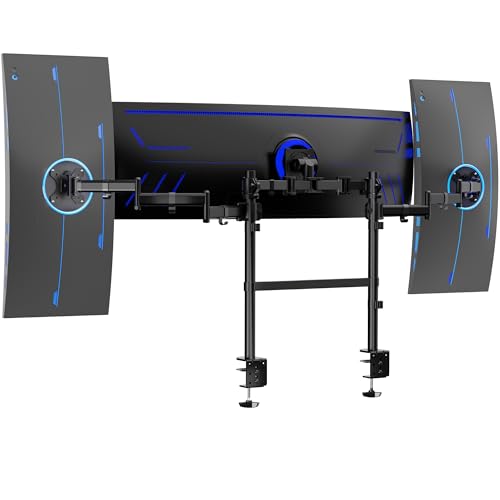
For gamers and professionals who demand expansive screen real estate, the VIVO Clamp-on Dual Pole Triple Monitor Desk Mount (STAND-V300CU) is an exceptional choice. It supports one ultrawide monitor up to 49 inches and two side monitors up to 38 inches, making it versatile for any setup. With adjustable features like +55° to -25° tilt and 360° swivel, you’ll find the perfect viewing angle. Plus, its durable C-clamps easily attach to desktops up to 3.3 inches thick. Weighing 27.2 lbs, this mount is both sturdy and space-efficient, helping you maximize your workspace without hassle. Customer ratings average 4.7 out of 5 stars!
Best For: Gamers and professionals looking for an expansive and adjustable monitor setup with support for multiple screens.
Pros:
- Supports a wide range of monitor sizes, including an ultrawide up to 49 inches and two side monitors up to 38 inches.
- Offers excellent adjustability with tilt, swivel, and height adjustment features for optimal viewing angles.
- Durable construction with heavy-duty C-clamps ensures stability and support for triple monitor configurations.
Cons:
- The weight of the mount (27.2 lbs) may make installation challenging for some users.
- Limited to desktops with a thickness of 3.3 inches or less, which may not be suitable for all workstations.
- Some users may find the assembly process complex, despite included instructions.
WALI Triple Monitor Mount (M003-P)

The WALI Triple Monitor Mount (M003-P) is perfect for gamers and professionals who want to maximize their productivity with a spacious setup. It supports a 49” ultrawide monitor on the top bracket and dual 32” monitors on the sides, holding up to 44 lbs and 22 lbs respectively. With adjustable tilts, swivels, and a 360° rotation, you can find your ideal viewing angle. Its durable steel construction guarantees stability and longevity, while the installation is straightforward with all necessary tools included. Plus, the built-in cable management keeps your workspace organized. Enjoy a clutter-free, efficient environment with this reliable mount!
Best For: Gamers and professionals looking to enhance productivity with a multi-monitor setup.
Pros:
- Versatile setup: Accommodates a 49” ultrawide monitor and dual 32” monitors, providing ample screen space.
- Adjustable features: Offers multiple tilt and swivel options for personalized viewing angles.
- Sturdy construction: Built from durable steel, ensuring long-lasting stability and resistance to wear.
Cons:
- Weight limit: May not support heavier monitors beyond specified weight capacities.
- Desk compatibility: Installation options may not suit all desk thicknesses, limiting placement flexibility.
- Initial setup time: Some users may find the installation process time-consuming despite included tools.
VIVO Triple Monitor Extra Tall Desk Mount (STAND-V103T)
If you’re looking to maximize your workspace with an impressive setup, the VIVO Triple Monitor Extra Tall Desk Mount (STAND-V103T) is perfect for you. It supports ultrawide displays up to 49 inches on the center bracket and 27-inch monitors on the side brackets, accommodating a total weight of up to 44 lbs. With dimensions of 31.5 x 31.5 x 34.7 inches, this sturdy mount has received an impressive 4.5-star rating from nearly 2,800 reviews. Available in sleek black, it’s a reliable choice that comes with a 30-day return guarantee, ensuring you’re covered if it doesn’t meet your needs.
Best For: Those looking to create an efficient and organized workspace with multiple monitor setups.
Pros:
- Supports large displays: Accommodates ultrawide monitors up to 49 inches and standard monitors up to 27 inches.
- Sturdy and reliable: With a weight capacity of 44 lbs, it ensures stability for your expensive equipment.
- Highly rated: Boasts a customer rating of 4.5 out of 5 stars from nearly 2,800 reviews.
Cons:
- Limited color options: Only available in black, which may not suit all aesthetic preferences.
- Weight limit: May not be suitable for heavier monitors or setups exceeding the 44 lbs capacity.
- Size constraints: Requires sufficient desk space with dimensions of 31.5 x 31.5 inches, which may not fit in smaller work areas.
Triple Monitor Mount for Ultrawide Monitors

Designed specifically for ultrawide monitors, the Triple Monitor Mount is perfect for gamers, streamers, and productivity enthusiasts who need ample screen real estate. It supports monitors up to 49 inches and 44 lbs per arm, ensuring stability with its heavy-duty aluminum and steel construction. Enjoy smooth adjustments with its hyper-adjustable design, featuring +50°/-20° tilt and 180° swivel for ideal viewing angles. Installation is a breeze thanks to quick-release VESA plates and compatibility with various desk sizes. With a 4.5-star rating and responsive customer support, it’s a reliable choice for elevating your workspace efficiency.
Best For: Gamers, streamers, and productivity enthusiasts who require extensive screen real estate for their ultrawide monitors.
Pros:
- Heavy-duty aluminum and steel construction ensures maximum stability and durability.
- Hyper-adjustable design allows for customizable viewing angles, reducing eye and neck strain.
- Easy installation with quick-release VESA plates and flexible mounting options for various desk sizes.
Cons:
- May not be suitable for smaller or standard-sized monitors due to its focus on ultrawide displays.
- The weight limit of 44 lbs per arm may restrict the use of some high-end, heavier monitors.
- Requires desk space for installation, which may not be ideal for compact workspaces.
Triple Monitor Mount for Up to 35-Inch Screens

For gamers and professionals who require expansive screen real estate, the triple monitor mount for up to 35-inch screens stands out as an ideal solution. This heavy-duty ultrawide stand features fully adjustable gas spring arms, supporting VESA 75×75/100×100 mm. With a 12kg load capacity per arm, it accommodates both flat and curved monitors, making it perfect for a 1×35 main monitor and 2×32 side screens setup. You can easily mount it using the C-clamp or grommet options, ensuring stability and flexibility. Plus, it’s backed by a 30-day return guarantee, giving you peace of mind with your purchase.
Best For: Gamers and professionals who need a spacious and adjustable setup for multiple monitors.
Pros:
- Heavy-duty design accommodates up to three monitors, including ultrawide and curved options.
- Fully adjustable gas spring arms allow for precise height, tilt, and depth adjustments.
- Versatile mounting options (C-clamp and grommet) provide flexibility for different desk setups.
Cons:
- Weighty item at 19.27 pounds, which may require additional effort for installation.
- Limited compatibility with desks thicker than 1.8 inches for C-clamp mounting.
- Potentially complex setup for inexperienced users, especially with multiple monitors.
VIVO Pneumatic Arm Triple Ultrawide Monitor Desk Stand (STAND-V300FG)

The VIVO Pneumatic Arm Triple Ultrawide Monitor Desk Stand (STAND-V300FG) is an ideal choice for professionals and gamers who need to maximize their screen real estate. Supporting up to three ultra-wide screens, it accommodates monitors up to 49 inches, with a sturdy tempered glass base to guarantee stability. The pneumatic height adjustment allows you to easily find the perfect viewing angle, while the reinforced steel construction handles heavier screens without sagging. With adjustable tilt, swivel, and rotation features, you can customize your setup effortlessly. Plus, installation is a breeze with detachable VESA plates and included hardware.
Best For: Professionals and gamers looking to maximize screen space with a robust and adjustable triple monitor setup.
Pros:
- Supports up to three ultra-wide monitors, accommodating larger screens for enhanced productivity or immersive gaming.
- Pneumatic height adjustment allows for easy customization of monitor height for optimal viewing comfort.
- Reinforced steel construction ensures stability even with heavier screens, preventing sagging.
Cons:
- Installation may require additional assistance, especially for larger monitors due to their size and weight.
- Limited to VESA-compatible monitors, which may exclude certain brands or models.
- Higher initial cost compared to simpler monitor stands or mounts on the market.
VIVO Premium Triple Monitor Desk Mount (STAND-TS03C)
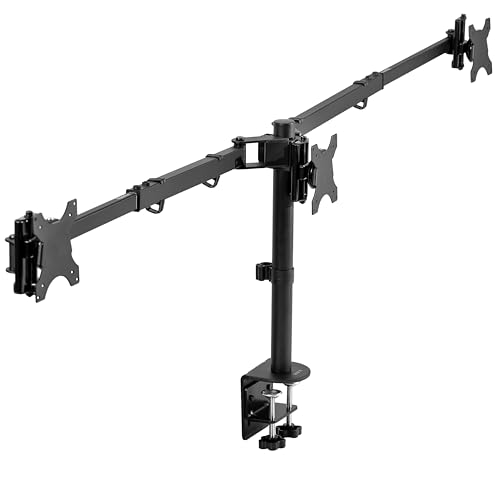
Enhancing your workspace with the VIVO Premium Triple Monitor Desk Mount (STAND-TS03C) is a game-changer for anyone juggling multiple screens. This mount supports three monitors, each up to 22 lbs, accommodating ultrawide setups or standard configurations effortlessly. Its unique telescoping arms guarantee a flush wall setup, maximizing stability and strength. With impressive adjustability, you can tilt, swivel, and rotate your monitors to achieve the perfect viewing angle. Installation is a breeze with detachable VESA brackets and clear instructions, securing to desks up to 4” thick. Boost your productivity and organization with this versatile mount tailored for both personal and professional use.
Best For: Professionals and gamers looking to enhance their multi-monitor setups for improved productivity and immersive experiences.
Pros:
- Versatile Configuration: Supports both ultrawide and standard monitor setups, accommodating various screen sizes.
- Enhanced Adjustability: Offers +90° to -90° tilt, 360° swivel, and 360° rotation for optimal viewing angles.
- Sturdy Design: Unique telescoping arms ensure a flush wall setup while maximizing stability and strength.
Cons:
- Weight Limitations: Each monitor can weigh a maximum of 22 lbs, which may limit options for heavier screens.
- Desk Thickness Restriction: Installation is only compatible with desks up to 4” thick, potentially excluding some setups.
- Assembly Required: While installation is straightforward, it still requires assembly and may take time to set up properly.
PUTORSEN Triple Monitor Mount for Ultrawide and Standard Monitors

Designed for gamers and professionals who need expansive screen real estate, the PUTORSEN Triple Monitor Mount offers a unique solution by accommodating one ultra-wide monitor up to 49 inches in the center and two standard monitors up to 32 inches on the sides. With a weight capacity of 44 lbs in the center and 22 lbs per side, it’s perfect for high-end displays. Its heavy-duty steel construction guarantees stability, while adjustable features allow for ideal viewing angles. Plus, this mount reclaims 40% more desk space, making your workspace more efficient. Installation is a breeze with clear instructions and necessary hardware included.
Best For: Gamers and professionals seeking an efficient multi-monitor setup with adjustable viewing angles and enhanced desk space.
Pros:
- Heavy-duty construction ensures stability and durability for large, high-end monitors.
- Flexible adjustability allows for optimal viewing angles with tilt, swivel, and rotation features.
- Space-efficient design reclaims 40% more desk space compared to traditional monitor stands.
Cons:
- Limited weight capacity may not support heavier monitors beyond specified limits.
- Installation may require additional effort due to the number of components and setup instructions.
- Clamp and grommet base limitations may not be compatible with all desk types and thicknesses.
Factors to Consider When Choosing a Triple Monitor Mount for Ultrawide
When choosing a triple monitor mount for your ultrawide displays, you need to take into account several important factors. Think about the weight capacity requirements, monitor size compatibility, and adjustability options to guarantee a comfortable setup. Don’t forget to check the construction materials for durability and the various mounting options available.
Weight Capacity Requirements
Choosing the right triple monitor mount for your ultrawide displays hinges considerably on weight capacity. You’ll want to check the weight limit of each arm, as most mounts support between 22 lbs to 44 lbs per monitor. Confirm the total weight of your monitors doesn’t exceed the combined weight capacity, or you risk instability and damage. Also, consider how your monitors distribute weight; mounts with higher capacities usually offer better stability for larger ultrawide displays. Keep in mind that different mounts may have varying limits for the center and side monitors, so verify you match your monitor sizes with the mount’s specifications. Always verify the mount’s specs against your monitors’ actual weight, including accessories, for safe installation.
Monitor Size Compatibility
Ensuring your triple monitor mount is compatible with your ultrawide displays is vital for ideal performance. Look for mounts that support monitor sizes up to 49 inches, as many are specifically designed for larger screens. Check the weight capacity, ensuring it can handle the combined weight of your ultrawide center monitor (up to 44 lbs) and the side monitors (up to 26.4 lbs each). VESA compatibility is important too, so verify it meets the standard mounting holes of 75x75mm or 100x100mm for most ultrawide and curved monitors. Finally, confirm the mount’s design accommodates the overall dimensions of your monitor, including features for height adjustment and effective cable management to keep your workspace organized.
Adjustability and Ergonomics
To get the most out of your triple monitor setup, adjustability and ergonomics should be top priorities. Look for mounts that offer a wide range of tilt angles, like +55° to -25°, and swivel capabilities of 180°. This guarantees ideal viewing angles while reducing glare. Gas spring arms are ideal for smooth height adjustments, promoting better ergonomics and minimizing neck strain. Additionally, choose a mount with 360° rotation capabilities to easily switch between portrait and landscape modes. Independent adjustment features for each monitor arm allow for precise control over height, tilt, and depth, enabling a customized setup. Finally, integrated cable management systems help keep your workspace organized, enhancing both efficiency and comfort.
Mounting Options Available
When selecting a triple monitor mount for ultrawide displays, it is essential to evaluate the various mounting options available. You’ll typically find C-clamp and grommet mounts. C-clamp mounts are versatile since they don’t require pre-drilled holes, making them suitable for different desk thicknesses. On the other hand, grommet mounts offer a more permanent solution by using existing holes in your desk. Most mounts support VESA 75x75mm and 100x100mm patterns, accommodating a range of monitor sizes. Additionally, look for mounts that can handle the weight of large ultrawide monitors, often supporting between 22 lbs to 44 lbs per arm. Adjustable features also allow for ergonomic positioning, enhancing your viewing angles and reducing neck strain.
Construction Material Durability
Choosing a durable triple monitor mount for your ultrawide displays means paying close attention to the construction materials. Look for mounts made from premium cast aluminum or heavy-duty steel, as these materials provide the strength and longevity needed to support multiple monitors. Many mounts can handle up to 44 lbs per arm, guaranteeing stability and minimizing sagging. Reinforced joints and heavy-duty clamps enhance the mount’s overall stability, especially with larger ultrawide screens. A scratch-resistant finish is also crucial, helping maintain the mount’s appearance in busy work environments. Finally, consider mounts that undergo durability testing, like fatigue tests, to verify they’ll perform reliably under regular use. Your workspace efficiency depends on this essential choice!
Cable Management Features
A durable triple monitor mount not only supports your ultrawide displays but also plays a significant role in maintaining an organized workspace. Effective cable management systems are essential for hiding wires and preventing tangles behind the mount. Look for mounts that feature integrated cable management channels or clips to secure cables along the arms and poles. This not only enhances aesthetics but also makes adjustments easier. A well-designed cable management feature can reclaim desk space, reducing clutter and ensuring cables don’t interfere with monitor movement. Additionally, some mounts allow easy access to cables, making it simple to swap or add peripherals. By managing your cables properly, you can also extend their lifespan and keep your devices in top shape.
Installation Simplicity
Although installing a triple monitor mount for your ultrawide display might seem intimidating, several factors can simplify the process considerably. First, look for mounts with detachable VESA plates, as they make mounting your monitors quicker and easier. Guarantee the mount offers various installation options, like C-clamp and grommet mounts, to fit different desk thicknesses. It’s also essential to check if the mount includes all necessary tools and hardware, which can greatly reduce installation complexity. Clear assembly instructions are a must, especially if you’re not technically inclined. Finally, consider mounts with integrated cable management systems to simplify both installation and keep your workspace tidy afterward. These features can make your setup experience much smoother.
Aesthetic Design Considerations
When it comes to creating a visually appealing workspace, aesthetic design plays an essential role, especially with multiple monitors. When choosing a triple monitor mount for your ultrawide displays, consider a sleek, modern finish that enhances your overall setup. Opt for colors like black or silver that seamlessly blend with your existing furniture and equipment, ensuring a cohesive look. Pay attention to the mount’s physical dimensions and profile, as these factors will affect both style and functionality within your workspace. Additionally, look for models with cable management features to reduce clutter and keep wires hidden, leading to a cleaner, more organized desk environment. A well-designed mount not only improves efficiency but also elevates your workspace’s aesthetic appeal.