
If you’re in the market for a mini PC that offers high-quality performance and connectivity, you’re in the right place. These compact systems with DisplayPort connections can handle everything from gaming to professional tasks seamlessly. With powerful processors and ample RAM, they provide the boost you need for multitasking. Curious about which options stand out and what key features to evaluate? Let’s explore the top contenders together.
GMKtec Mini PC Workstation with Intel Core i9 13900HK

If you’re a power user seeking a compact powerhouse, the GMKtec Mini PC Workstation with Intel Core i9 13900HK is tailor-made for you. Featuring a robust 14-core processor that hits speeds up to 5.4GHz, it handles demanding tasks effortlessly. With 32GB of DDR5 RAM and a lightning-fast 1TB SSD, you’ll enjoy seamless multitasking and ample storage. The integrated Intel Iris Xe Graphics supports stunning 8K resolution, perfect for high-end applications. Plus, versatile connectivity options, including a DisplayPort for multi-screen setups, guarantee you’re always connected. Enjoy reliable performance and a 1-year warranty, making it an excellent choice for serious users.
Best For: Power users who require a compact and high-performance workstation for demanding tasks and multitasking.
Pros:
- High-performance processor with 14 cores and speeds up to 5.4GHz, ideal for intensive applications.
- Ample RAM and storage with 32GB DDR5 and a 1TB SSD, ensuring smooth multitasking and quick data access.
- Versatile connectivity options including support for 8K resolution and multi-screen setups, catering to diverse user needs.
Cons:
- Limited upgrade options for RAM as it is pre-installed and may not be easily replaced.
- Potential heat generation due to high-performance components under heavy load, requiring adequate ventilation.
- Higher price point compared to basic mini PCs, which may not be suitable for casual users.
KAMRUI Pinova P2 Mini PC with AMD Ryzen 4300U, 16GB RAM, 512GB SSD

For professionals and casual users seeking a powerful yet compact solution, the KAMRUI Pinova P2 Mini PC stands out with its AMD Ryzen 4300U processor. This 4-core CPU handles demanding tasks like HD video editing and casual gaming effortlessly. With 16GB of DDR4 RAM and a speedy 512GB SSD, multitasking becomes a breeze. The integrated AMD Radeon graphics enhance your visual experience, supporting triple 4K displays for immersive entertainment. Plus, its compact design allows for easy portability and VESA mounting. With robust connectivity options and lifetime technical support, the KAMRUI Pinova P2 is your go-to mini PC for ultimate performance.
Best For: Professionals and casual users seeking a compact yet powerful mini PC for demanding tasks like HD video editing and casual gaming.
Pros:
- High performance with AMD Ryzen 4300U processor, ideal for multitasking and handling demanding applications.
- Support for triple 4K displays enhances visual experiences for entertainment and presentations.
- Compact and portable design allows for easy installation and mobility.
Cons:
- Limited integrated graphics performance compared to dedicated GPUs for high-end gaming.
- Maximum storage capacity of 4TB may not be sufficient for users with extremely large data needs.
- Potential for thermal throttling under sustained heavy loads due to compact design.
origimagic C4 Dual Nic Mini PC Ryzen 5 3550H
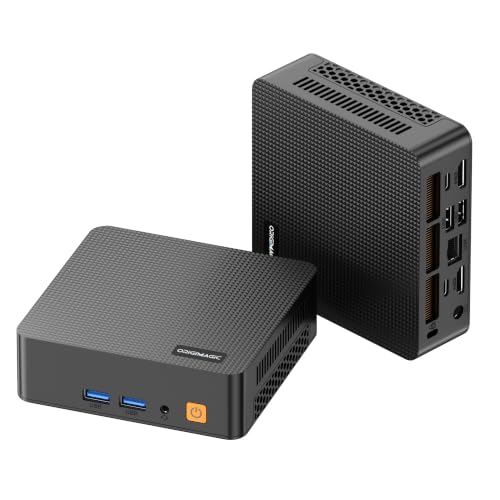
The origimagic C4 Dual Nic Mini PC, powered by the Ryzen 5 3550H processor, is an excellent choice for professionals and students who need a compact yet powerful device for multitasking. With 4 cores and 8 threads, it handles office tasks and web browsing effortlessly. You’ll appreciate the 16GB DDR4 RAM and 512GB NVMe SSD, ensuring quick access to your files. Plus, it supports triple displays, allowing you to enhance your workflow. Dual LAN ports, WiFi 5, and Bluetooth 5.0 keep you connected reliably. With its low-noise fan and 2-year warranty, the C4 delivers stable performance for any environment.
Best For: Professionals and students seeking a compact yet powerful mini PC for multitasking and productivity.
Pros:
- Fast performance with Ryzen 5 3550H processor and 16GB RAM, suitable for office tasks and web browsing.
- Triple display support enables enhanced multitasking with HDMI, DP, and USB Type-C outputs.
- Reliable connectivity through dual LAN ports, WiFi 5, and Bluetooth 5.0 for seamless online experiences.
Cons:
- Limited upgrade options for RAM and storage, as it only supports up to 32GB RAM and 1TB SSD.
- Base TDP of 25W may not be sufficient for high-performance gaming or intensive applications.
- Compact size might lead to limited thermal management compared to larger PCs.
GMKtec Mini PC Workstation with Intel Core i9 13900HK

Designed for professionals who demand top-tier performance, the GMKtec Mini PC Workstation with Intel Core i9-13900HK stands out with its impressive processing power. With 14 cores and a boost clock of up to 5.4 GHz, multitasking is seamless. The 64GB DDR5 RAM and 1TB PCIe SSD, expandable to 12TB, guarantee you have ample space and speed for demanding applications. Connectivity options are robust, featuring multiple USB ports, dual HDMI, and a DisplayPort for 8K output. Plus, with WiFi6 and Bluetooth 5.2, you’ll enjoy high-speed wireless networking. This mini PC truly excels in performance and versatility.
Best For: Professionals and power users who require high-performance computing for demanding tasks and multitasking.
Pros:
- Exceptional processing power with Intel Core i9-13900HK, ideal for heavy workloads.
- Ample memory and storage options, supporting up to 12TB for extensive data management.
- Versatile connectivity with multiple USB ports and support for ultra-high-definition displays.
Cons:
- Higher price point compared to standard mini PCs, which may not suit budget-conscious users.
- Limited warranty period of just one year, potentially leading to additional costs for prolonged use.
- Integrated graphics may not meet the needs of users requiring dedicated graphics performance for gaming or intensive graphic design tasks.
KAMRUI Pinova P1 Mini PC with AMD Ryzen 4300U

If you’re looking for a compact yet powerful computing solution, the KAMRUI Pinova P1 Mini PC with AMD Ryzen 4300U stands out as an excellent choice. With dimensions of just 5.06 x 5.06 x 2.01 inches, it’s 60% smaller than many competitors. You’ll enjoy 16GB of DDR RAM and a 512GB M.2 SSD, expandable up to 2TB, ensuring quick system response. Featuring 4K@60Hz graphics, it’s perfect for light gaming and multimedia. Plus, with ample connectivity options, including a DP port, and lifetime tech support, this mini PC delivers exceptional performance in a sleek design.
Best For: Users seeking a compact and powerful mini PC for everyday tasks, light gaming, and multimedia activities.
Pros:
- High performance: Equipped with an AMD Ryzen 4300U processor, providing 50% higher performance compared to older models.
- Compact design: Small footprint (5.06 x 5.06 x 2.01 inches) makes it easy to fit in any workspace or mount on a monitor.
- Versatile connectivity: Offers multiple ports including USB 3.2, HDMI, Type-C, and supports dual-band WiFi for seamless connections.
Cons:
- Limited gaming capabilities: While it can handle light gaming, it’s not suitable for high-end gaming or resource-intensive applications.
- Integrated graphics: Relies on integrated graphics, which may not meet the needs of users requiring advanced graphical performance.
- Expandable storage not included: While it supports expansion up to 2TB, the additional storage drive must be purchased separately.
HP EliteDesk 800 G3 Mini Business Desktop PC (Renewed)

For professionals seeking a reliable and powerful mini PC, the HP EliteDesk 800 G3 Mini Business Desktop PC (Renewed) stands out with its Intel Quad-Core i7 processor and 16 GB of RAM. This compact machine offers a 256 GB SSD for swift performance and runs on Windows 10 Pro 64-bit. With a stunning 3840 x 2160 resolution and Intel HD Graphics 530, your visuals will be sharp. It features multiple USB ports, including a DP port for versatile connectivity. Certified refurbished, it comes with a 90-day warranty, ensuring peace of mind alongside impressive functionality. Make it your go-to business companion.
Best For: Professionals seeking a compact, reliable mini PC for business and productivity tasks.
Pros:
- Powerful Performance: Equipped with an Intel Quad-Core i7 processor and 16 GB of RAM for efficient multitasking.
- High Resolution: Offers stunning visuals with a 3840 x 2160 screen resolution, ideal for detailed work.
- Versatile Connectivity: Multiple USB ports and a DP port provide flexible options for connecting peripherals.
Cons:
- Limited Storage: The 256 GB SSD may require upgrades for users with extensive storage needs.
- Refurbished Condition: Being a renewed product, there may be minor signs of wear and tear.
- Weight: At 5.48 pounds, it may be heavier than some other mini PC options in the market.
MINISFORUM AI Mini PC M1-1295 with Intel Core i9-12950HX

The MINISFORUM AI Mini PC M1-1295 with Intel Core i9-12950HX is an excellent choice for professionals and power users who demand outstanding performance in a compact form factor. With its 16-core processor, you’ll enjoy smooth multitasking and high-frequency performance up to 5.0 GHz. It supports dual DDR4 memory, preinstalled with 32GB, expandable to 96GB, and features dual M.2 NVMe SSD slots for rapid data access. Enhanced cooling guarantees peak performance, while versatile connectivity options, including DP 1.4 ports, enable you to connect up to three 4K displays. Plus, the sleek design and three-year warranty add to its appeal.
Best For: Professionals and power users seeking high-performance computing in a compact mini PC form factor.
Pros:
- Strong Performance: Features a powerful Intel Core i9-12950HX processor with 16 cores, ensuring smooth multitasking and high-speed operation.
- Expandable Memory and Storage: Comes with 32GB of RAM, expandable to 96GB, and includes dual M.2 NVMe SSD slots for ample storage options.
- Versatile Connectivity: Offers multiple high-speed connectivity options, allowing connection to up to three 4K displays for enhanced productivity.
Cons:
- Price Point: The high-end specifications may come at a premium price, potentially limiting accessibility for budget-conscious users.
- Size Limitations: While compact, it may still be larger than some ultra-portable alternatives, which could be a consideration for users prioritizing extreme portability.
- Cooling Noise: Advanced cooling systems, while efficient, may produce noise under heavy load, which could be a concern in quiet environments.
KAMRUI Hyper H2 Mini Gaming PC
Gamers and content creators seeking high performance in a compact form will find the KAMRUI Hyper H2 Mini Gaming PC an excellent choice. Powered by an Intel Core i9-11900H processor, it offers impressive multi-core speed, making it perfect for 3A games and video editing. With 32GB of DDR RAM and a 1TB M.2 SSD, you’ll enjoy swift responsiveness and ample storage. Its connectivity options, including a DP port and six USB 3.2 ports, allow for seamless device connections. Plus, it supports triple 4K displays, enhancing your visual experience while saving valuable desktop space. You won’t be disappointed!
Best For: Gamers and content creators looking for high-performance computing in a compact design.
Pros:
- Impressive Performance: Equipped with an Intel Core i9-11900H processor for exceptional multi-core performance.
- Ample Memory and Storage: Comes with 32GB DDR RAM and a 1TB M.2 SSD, providing quick responsiveness and sufficient storage for large files.
- Versatile Connectivity: Features multiple USB ports and supports triple 4K displays for enhanced visual experiences.
Cons:
- Price Point: May be more expensive compared to traditional gaming PCs with lower specifications.
- Limited Upgradeability: While expandable, the compact design may limit some hardware upgrades.
- Heat Management: High-performance components may generate more heat, requiring adequate ventilation.
Beelink SER5 Max Mini PC (6800U AMD Ryzen R7)

If you’re looking for a powerhouse in a compact form, the Beelink SER5 Max Mini PC with its AMD Ryzen R7 6800U processor is an excellent choice. With 8 cores and 16 threads, it delivers impressive performance up to 4.7GHz. You’ll enjoy seamless multitasking with 24GB LPDDR5 memory and a 500GB M.2 PCIe 4.0 SSD, expandable to 8TB. Its integrated 12-core AMD Radeon 680M graphics makes it perfect for gaming and design applications. Plus, with HDMI, DP, and Type-C ports, you can easily connect multiple monitors, enhancing your workspace and productivity greatly.
Best For: Those who need a powerful yet compact mini PC for multitasking, gaming, and professional design work.
Pros:
- Compact design saves desk space and enhances portability.
- High-performance AMD Ryzen R7 6800U processor with integrated AMD Radeon 680M graphics for seamless multitasking and gaming.
- Multiple connectivity options and support for multi-monitor setups improve productivity.
Cons:
- Limited internal storage capacity out of the box, requiring additional investment for expansion.
- Integrated graphics may not meet the demands of high-end gaming compared to dedicated GPUs.
- Cooling system may produce noise under heavy load, which could be distracting in quiet environments.
GMKtec Mini PC with Intel Core i9 13900HK
For professionals needing robust computing power in a compact form, the GMKtec Mini PC with Intel Core i9-13900HK stands out. With its 14 cores and 20 threads, this 13th Gen processor hits a max frequency of 5.4 GHz, ensuring exceptional performance. You’ll appreciate the 32GB of DDR5 RAM and a 2TB PCIe NVMe SSD, expandable up to 12TB. The mini PC supports quad-screen 8K displays and features versatile connectivity options, including a DisplayPort 1.4. Plus, with WiFi6 and Bluetooth 5.2, staying connected is a breeze. Enjoy peace of mind with a one-year warranty and professional support.
Best For: Professionals and power users who require high-performance computing in a compact form factor.
Pros:
- Exceptional processing power with Intel Core i9-13900HK, featuring 14 cores and 20 threads.
- Supports quad-screen 8K display setup, ideal for multitasking and high-resolution content creation.
- Ample storage with a 2TB PCIe NVMe SSD, expandable to 12TB for extensive data management.
Cons:
- Higher price point compared to standard mini PCs with lower-end processors.
- Limited internal upgrade options for components other than storage.
- May require additional cooling solutions for optimal performance under heavy workloads.
Factors to Consider When Choosing a Mini PC with DP Ports
When choosing a mini PC with DP ports, consider several key factors that can impact your experience. You’ll want to look at display resolution support, connectivity options, and performance specifications to guarantee it meets your needs. Additionally, think about upgradeability and the size, as these will affect how well the mini PC fits into your setup.
Display Resolution Support
As you consider a mini PC with DisplayPort (DP) ports, it is vital to evaluate its display resolution support, since this can greatly impact your viewing experience. DP ports can handle high resolutions, including 8K at 60Hz, making them perfect for ultra-high-definition displays and multi-monitor setups. However, the maximum resolution varies by version; for instance, DisplayPort 1.4 supports 8K, while earlier versions may fall short. Mini PCs with DP ports often allow for multiple displays, enhancing productivity. Additionally, the bandwidth of DisplayPort supports higher refresh rates, ideal for gaming and video editing. Features like Adaptive Sync technologies can further reduce screen tearing, providing a smoother visual experience during fast-paced content, which is significant for gamers and professionals alike.
Connectivity Options Available
Choosing a mini PC with DP ports involves looking closely at the connectivity options available to guarantee it meets your needs. DisplayPort ports offer higher bandwidth than HDMI, making them ideal for high-definition displays with higher resolutions and refresh rates. Many mini PCs featuring DP ports support multiple monitors, so you can expand your workspace with dual or triple display setups. The latest DP standards, like DP 1.4 and 2.0, support up to 8K at 60Hz and 4K at 120Hz, perfect for graphic-intensive tasks. Additionally, features like Adaptive Sync and Multi-Stream Transport (MST) enhance visual performance and allow multiple independent displays. Compatibility with USB-C ports that support DisplayPort Alt Mode adds even more versatility to your mini PC.
Performance Specifications Needed
To make the most of your mini PC with DisplayPort ports, performance specifications play an important role. First, aim for a processor with at least 8 cores and multithreading support to boost multitasking. You’ll want a minimum of 16GB of RAM, preferably DDR4 or DDR5, to handle multiple applications smoothly. A solid graphics solution is essential—look for integrated graphics that can support multiple 4K displays or dedicated graphics for better gaming and design performance. Opt for a high-speed NVMe SSD with at least 512GB for quick data access and faster boot times. Finally, consider the thermal design; efficient cooling is critical for maintaining peak performance during prolonged use.
Upgradeability and Expansion Potential
When selecting a mini PC with DisplayPort ports, it’s vital to take into account its upgradeability and expansion potential to verify it meets your evolving needs. Consider the maximum resolution and refresh rate supported, as higher specs allow for superior multi-monitor setups. Look for upgradeable memory and storage options, enabling you to add RAM and SSDs as performance demands increase. Check the number of available DP ports; more ports mean you can connect multiple displays, significant for productivity in tasks like video editing. Assess compatibility with current and future display technologies, such as 8K support via DP 1.4, to confirm longevity. Finally, evaluate thermal management capabilities to maintain performance when running several displays simultaneously.
Size and Form Factor
Considering your upgradeability and expansion potential, the size and form factor of a mini PC with DisplayPort ports play a significant role in its overall functionality. Mini PCs vary widely, with compact models often measuring around 5 x 5 inches, ideal for limited desk space. Their design typically includes VESA mounting options, allowing you to attach them behind monitors for a clean setup. However, a smaller form factor can limit expandability, with fewer RAM slots and storage options available. Additionally, the number of ports, including DisplayPort connections, may be reduced in more compact devices. Keep in mind that larger models often provide better cooling and heat dissipation, which can enhance performance over time. Choose wisely to meet your specific needs.
Cooling and Noise Levels
Effective cooling and noise levels are essential factors to keep in mind as you choose a mini PC with DisplayPort ports. Many of these systems feature advanced cooling solutions like heat pipes and turbine fans, which enhance airflow and maintain peak temperatures during demanding tasks. This effective cooling not only keeps performance consistent but also minimizes noise, making these mini PCs perfect for quiet environments like home offices or studios. Low-noise fan designs and energy-efficient components further reduce heat generation, lowering the need for aggressive cooling. With these considerations, you can guarantee a powerful yet unobtrusive computing experience, free from the distracting sounds typically associated with traditional desktop setups.