
If you’re looking to enhance your workspace in 2026, ultrawide monitors with KVM switches can be game-changers. These monitors not only provide expansive screen real estate but also simplify device management. Imagine effortlessly switching between your laptop and desktop while enjoying stunning visuals. With a variety of models available, it’s essential to know which ones stand out. Let’s explore the top contenders that could redefine your productivity.
Samsung 49” Business Curved Ultrawide Dual QHD Monitor (LS49C954UANXZA)

If you’re a multitasker who values productivity, the Samsung 49” Business Curved Ultrawide Dual QHD Monitor (LS49C954UANXZA) is an ideal choice. Its impressive 49” 1000R curved display and 32:9 aspect ratio create an immersive experience, perfect for multitasking. With Dual QHD resolution, you’ll enjoy crisp visuals that enhance focus. This monitor doubles as a docking station, reducing desk clutter with multiple connectivity options, including USB Type-C for fast charging. Plus, its 120Hz refresh rate guarantees smooth scrolling, while built-in speakers provide convenient audio. The height-adjustable stand and eye care features make it comfortable for prolonged use.
Best For: Multitaskers and professionals seeking an immersive and productive workspace with a high-quality display.
Pros:
- Large 49” curved display enhances immersion and allows for multiple windows to be viewed simultaneously.
- Multiple connectivity options including USB Type-C for easy device connection and charging, reducing desk clutter.
- 120Hz refresh rate provides smooth visuals, making it ideal for both work and gaming.
Cons:
- Large size may not fit well in smaller workspaces, requiring ample desk space.
- Higher price point compared to standard monitors may not be suitable for budget-conscious users.
- Built-in speakers may not provide the same audio quality as dedicated external speakers for audiophiles.
Deco Gear 49″ Curved Ultrawide Dual-QHD Monitor

The Deco Gear 49″ Curved Ultrawide Dual-QHD Monitor is perfect for multitaskers who demand a seamless viewing experience. With a stunning resolution of 5120×1440 and a 32:9 aspect ratio, it replaces dual screens effortlessly. The 120Hz refresh rate and 1ms response time guarantee smooth visuals for gaming or editing. Plus, its HDR support and 3000:1 contrast ratio deliver lifelike colors. You’ll appreciate the built-in KVM switch, allowing easy device switching. The ergonomic stand and multiple connectivity options, including USB-C, make it a versatile choice. Enjoy enhanced productivity and entertainment on this impressive curved canvas.
Best For: The Deco Gear 49″ Curved Ultrawide Dual-QHD Monitor is best for multitaskers and gamers seeking an immersive and expansive viewing experience.
Pros:
- Seamless dual-screen replacement with a massive 49” curved display.
- Smooth visuals with a 120Hz refresh rate and 1ms response time, ideal for gaming and editing.
- Multiple connectivity options including USB-C with 65W power delivery and a built-in KVM switch.
Cons:
- The size may require a large desk space for optimal placement.
- Limited HDR400 performance may not satisfy professional content creators looking for higher HDR capabilities.
- Built-in speakers may not provide the best audio quality for an immersive experience.
LG UltraWide QHD 34-Inch Curved Computer Monitor (34WQ73A-B)
Designed for multitaskers and creative professionals, the LG UltraWide QHD 34-Inch Curved Computer Monitor (34WQ73A-B) stands out with its built-in KVM feature, allowing seamless control of two computers from a single display. With a stunning resolution of 3440 x 1440 and a 21:9 aspect ratio, you’ll enjoy immersive visuals and vibrant colors, thanks to HDR 10 and 99% sRGB coverage. Its curved design enhances your multitasking experience, while features like Reader Mode and Flicker Safe protect your eyes during long work sessions. Plus, USB-C connectivity guarantees you can easily charge devices while you work.
Best For: This monitor is best for multitaskers and creative professionals who require an expansive display for enhanced productivity and immersive visuals.
Pros:
- Curved design enhances immersion and makes multitasking easier.
- HDR 10 support and 99% sRGB color coverage provide vibrant and accurate colors for graphic design and multimedia work.
- Built-in KVM feature allows control of two computers with one monitor, simplifying workspace management.
Cons:
- Weight of 18.92 pounds may make it less portable.
- OnScreen Control requires software download for adjustments, which may be inconvenient for some users.
- Return policy has specific conditions that may complicate the process for some customers.
Samsung 34” ViewFinity S65UC Curved Monitor (LS34C654UANXGO)

For professionals and gamers seeking an immersive experience, the Samsung 34” ViewFinity S65UC Curved Monitor stands out with its stunning 34” Ultra-WQHD display and 100Hz refresh rate. Featuring a 1000R curve, it enhances your visual engagement in gaming and design projects. With HDR10 technology and one billion colors, you’ll enjoy true-to-life visuals with richer contrasts. The built-in KVM switch lets you control two devices seamlessly, while USB-C connectivity simplifies your setup. Plus, it’s eco-friendly, incorporating recycled materials and sustainable packaging. Elevate your productivity and entertainment with this exceptional monitor that prioritizes both performance and the planet.
Best For: Professionals and gamers looking for an immersive visual experience with high performance and eco-friendly features.
Pros:
- Stunning 34” Ultra-WQHD display with HDR10 technology for enhanced color accuracy and contrast.
- Built-in KVM switch enables seamless control of two devices with a single keyboard and mouse.
- Eco-friendly design utilizing recycled materials and sustainable packaging reduces environmental impact.
Cons:
- Large curved design may not fit well in smaller workspaces.
- Higher price point compared to standard monitors may be a consideration for budget-conscious buyers.
- Limited built-in speaker quality may not satisfy audiophiles seeking superior sound performance.
Samsung 34” ViewFinity Ultra-WQHD Curved Computer Monitor (S65TC Series)

If you’re looking to enhance your productivity and gaming experience, the Samsung 34” ViewFinity Ultra-WQHD Curved Monitor (S65TC Series) stands out with its impressive KVM switch feature. This 34-inch monitor boasts a stunning 3440×1440 resolution and a 21:9 aspect ratio, delivering immersive visuals. With a 100Hz refresh rate and AMD FreeSync, you’ll enjoy smooth gameplay without stuttering. Its 1000R curvature aligns perfectly with your field of vision, while TÜV-certified eye care technology minimizes strain. Plus, the height-adjustable stand guarantees comfort during long hours, making the S65TC a top choice for both work and play.
Best For: Those seeking an immersive gaming and productivity experience with advanced features and ergonomic design.
Pros:
- High-resolution 3440×1440 display with a 21:9 aspect ratio for enhanced visuals.
- KVM switch allows control of two devices with a single keyboard and mouse, simplifying multitasking.
- TÜV-certified eye care technology reduces strain during long usage sessions.
Cons:
- The monitor may be heavy at 17.9 pounds, making it less portable.
- Limited to a 100Hz refresh rate, which might not satisfy hardcore gamers seeking higher refresh rates.
- The 30-day return policy may not be sufficient for thorough testing before deciding.
LG 34U65ZA-B UltraWide 34-Inch Curved Monitor

The LG 34U65ZA-B UltraWide 34-Inch Curved Monitor stands out as an excellent choice for multitaskers and creative professionals who need to switch between devices seamlessly. With a stunning QHD resolution of 3440 x 1440 and 99% sRGB color accuracy, you’ll enjoy vibrant visuals and enhanced clarity for your projects. Its built-in KVM switch lets you control two computers using one keyboard and mouse, while Picture-by-Picture functionality shows content from two sources simultaneously. The ergonomic stand allows for comfortable adjustments, and multiple connectivity options, including USB Type-C, keep your workspace clutter-free. Elevate your productivity with this versatile monitor!
Best For: Multitaskers and creative professionals seeking vibrant visuals and seamless device management.
Pros:
- High Resolution: QHD (3440 x 1440) resolution provides enhanced clarity for detailed work.
- Color Accuracy: Up to 99% sRGB color gamut ensures vibrant and true-to-life colors.
- Versatile Connectivity: USB Type-C connectivity allows for charging and data transfer through a single cable.
Cons:
- Weight: At 24.2 pounds, it may be cumbersome to move or adjust.
- OnScreen Control Software Requirement: PBP functionality requires additional software installation.
- Limited Built-in Speakers: While equipped with Waves MaxxAudio, the audio experience may not satisfy audiophiles.
ASUS TUF Gaming 34” Ultra-Wide Curved Monitor (VG34VQ3B)

Gamers seeking an immersive experience will find the ASUS TUF Gaming 34” Ultra-Wide Curved Monitor (VG34VQ3B) hard to resist. With its 34-inch QHD display and a 1500R curvature, it wraps you in stunning visuals. The 180Hz refresh rate and 1ms MPRT response time guarantee smooth gameplay, while ASUS Extreme Low Motion Blur (ELMB) SYNC minimizes blurring. FreeSync Premium technology eliminates screen tearing, enhancing your gaming experience. You’ll appreciate the 90% DCI-P3 color gamut for vibrant colors. Plus, it includes handy accessories and a 3-year warranty, along with a complimentary 3-month Adobe Creative Cloud access. Upgrade your setup today!
Best For: Gamers seeking an immersive and visually stunning experience with high performance and vibrant colors.
Pros:
- 180Hz refresh rate and 1ms MPRT response time ensure smooth and responsive gameplay.
- FreeSync Premium technology eliminates screen tearing for a seamless gaming experience.
- Comes with a 3-year warranty and 3-month complimentary Adobe Creative Cloud access.
Cons:
- The ultra-wide design may not fit all desk setups.
- Higher price point compared to standard monitors.
- Limited native resolution options for some games.
TANXJIA 34″ UltraWide Monitor (UWQHD 3440×1440)
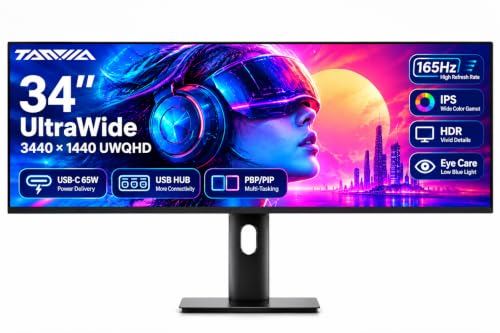
For multitaskers who crave a seamless workflow, the TANXJIA 34″ UltraWide Monitor (UWQHD 3440×1440) stands out with its impressive KVM switch functionality. You can effortlessly control two devices using a single keyboard and mouse, enhancing your productivity. The 34-inch Fast IPS panel delivers stunning visuals with a 165Hz refresh rate and robust color coverage. Multiple connectivity options, including USB-C, HDMI, and DisplayPort, cater to various devices like PCs and consoles. With Picture by Picture and Picture in Picture modes, you’ll easily manage tasks, whether you’re gaming, programming, or working from home, all while minimizing eye strain.
Best For: Multitaskers and professionals who need an efficient and immersive workspace for gaming, programming, and home office tasks.
Pros:
- High refresh rate: Offers a 165Hz refresh rate for smooth visuals during gaming and fast-paced activities.
- Versatile connectivity: Features multiple connectivity options including USB-C, HDMI, and DisplayPort for compatibility with various devices.
- KVM switch functionality: Allows seamless control of two devices with a single keyboard and mouse, boosting productivity.
Cons:
- Limited port availability: While it has versatile connectivity, the number of USB ports may be limited for users with multiple peripherals.
- Size and space requirements: The large 34-inch screen may require ample desk space and may not fit well in smaller setups.
- Price point: UltraWide monitors can be more expensive compared to standard monitors, which might not suit all budgets.
Samsung 34″ ViewFinity S50GC Ultra-WQHD Monitor

If you’re seeking a versatile monitor that excels in multitasking and delivers stunning visuals, the Samsung 34″ ViewFinity S50GC Ultra-WQHD Monitor is an excellent choice. With its 3440 x 1440 resolution and 21:9 aspect ratio, you’ll enjoy detailed images and vibrant colors, thanks to HDR10 support. The 100Hz refresh rate guarantees smooth motion, making it perfect for gaming or video playback. Plus, features like Picture-by-Picture and Picture-in-Picture enhance your productivity. With eye care technology to reduce strain, this monitor is designed for comfort during long hours. Weighing just 10.8 pounds, it’s easy to fit into your workspace.
Best For: Those seeking a high-resolution monitor that excels in multitasking and provides eye care features for extended use.
Pros:
- Excellent Ultra WQHD resolution (3440 x 1440) for vibrant and detailed visuals.
- Features like Picture-by-Picture and Picture-in-Picture enhance productivity for multitasking.
- Eye care technology, including Flicker Free and Eye Saver Mode, reduces strain during long usage.
Cons:
- Limited to 300 cd/㎡ brightness, which may not be sufficient for bright environments.
- Weighing 10.8 pounds, it may be cumbersome for frequent relocation.
- Some users may prefer higher refresh rates for competitive gaming beyond 100Hz.
INNOCN 49″ Curved Ultrawide Gaming Monitor (49C1R)

The INNOCN 49″ Curved Ultrawide Gaming Monitor (49C1R) stands out with its impressive 5120 x 1440 resolution, making it an exceptional choice for multitaskers and content creators who crave expansive screen real estate. With a 120Hz refresh rate and 1800R curvature, you’ll enjoy immersive visuals and smooth gameplay. The monitor boasts 99% sRGB color accuracy, HDR400 support, and a high contrast ratio of 3000:1 for stunning details. Connectivity is versatile, featuring USB-C, HDMI 2.1, and multiple USB ports. Plus, ergonomic adjustments and eye comfort features reduce fatigue, enhancing your productivity and enjoyment during long work or gaming sessions.
Best For: The INNOCN 49″ Curved Ultrawide Gaming Monitor (49C1R) is best for gamers and content creators seeking an immersive and expansive display for multitasking and high-quality visuals.
Pros:
- Excellent 5120 x 1440 resolution provides stunning image clarity and detail.
- Adaptive-Sync technology ensures smooth gameplay without screen tearing.
- Ergonomic adjustments and eye comfort features help reduce fatigue during extended use.
Cons:
- The large size may require ample desk space for proper setup.
- Higher price point compared to standard monitors may not fit all budgets.
- Limited HDR performance (HDR400) compared to higher-end displays may not satisfy all users.
Factors to Consider When Choosing an Ultrawide Monitor With KVM
When you’re choosing an ultrawide monitor with KVM, there are several key factors to keep in mind. You’ll want to take into account the size, resolution, and connectivity options to guarantee it meets your needs. Don’t forget about refresh rates and ergonomic design features that can enhance your overall experience.
Monitor Size Selection
Choosing the right size for your ultrawide monitor can greatly enhance your productivity and gaming experience. Typically, ultrawide monitors range from 34 to 49 inches, providing ample screen space for multitasking and immersion. Opt for a 49-inch model if you want the equivalent of two 27-inch monitors side by side, perfect for intense work or gaming sessions. Keep in mind the aspect ratios, usually 21:9 or 32:9, as they affect how you use multiple applications. Additionally, consider the monitor’s curvature; a more pronounced curve, like 1000R, can create a more immersive feel. Finally, assess your desk space and viewing distance to guarantee comfort and minimize eye strain while working or gaming.
Resolution and Clarity
After selecting the right size for your ultrawide monitor, resolution and clarity become key factors in maximizing your experience. Higher resolutions, like Dual QHD (5120 x 1440) and Ultra-WQHD (3440 x 1440), deliver sharper images and more screen real estate, perfect for multitasking and immersive gaming. The 3440 x 1440 resolution enhances clarity with its 21:9 aspect ratio, keeping details crisp for both work and play. Opting for monitors with HDR support also boosts color ranges and contrast ratios, making visuals more lifelike. Additionally, higher pixel density improves text legibility, essential for professional tasks and content creation. If you game, consider adaptive technologies like FreeSync or G-Sync for smoother visuals and reduced screen tearing.
Connectivity Options Available
To fully enjoy the benefits of an ultrawide monitor with KVM, you’ll want to contemplate the range of connectivity options available. Look for models that offer HDMI, DisplayPort, and USB Type-C ports. USB Type-C is particularly advantageous since it enables data transfer, video output, and power delivery all through a single cable, helping you keep your desk tidy. Many ultrawide monitors also include built-in KVM switches, allowing you to control multiple computers with one keyboard and mouse, which is a game-changer for multitasking. Additionally, features like Picture-in-Picture (PIP) and Picture-by-Picture (PBP) let you view content from two sources simultaneously, further enhancing your productivity. Choose wisely to maximize your workflow!
Refresh Rate Importance
When considering an ultrawide monitor with KVM, the refresh rate plays a crucial role in your overall experience, especially if you engage in gaming or fast-paced applications. Measured in hertz (Hz), a higher refresh rate means smoother motion and less motion blur. For gaming, a refresh rate of 120Hz or higher is recommended, providing a responsive feel and reducing lag. Most ultrawide monitors offer refresh rates ranging from 60Hz to 180Hz, catering to different needs like gaming or content creation. If you’re multitasking or using applications with animations, a higher refresh rate can enhance your productivity. Additionally, monitors with elevated rates complement technologies like AMD FreeSync and NVIDIA G-Sync, minimizing screen tearing for an even better experience.
Ergonomic Design Features
While a high refresh rate enhances your gaming and productivity experience, ergonomic design features greatly impact your comfort during long hours of use. Look for height-adjustable stands that let you customize the monitor’s height for ideal viewing and posture alignment. Models with tilt and swivel adjustments enable you to change the screen’s angle, reducing glare and improving visibility from different seating positions. Eye care technologies, like flicker-free screens and blue light reduction, help minimize eye strain. Additionally, consider ultrawide monitors with a curved design that matches your field of view, promoting a more immersive experience. Built-in KVM switches allow you to seamlessly control multiple devices, contributing to a clutter-free and ergonomic workspace.
Color Accuracy and Coverage
Understanding color accuracy and coverage is essential if you want an ultrawide monitor that meets your creative and productivity needs. Look for monitors with at least 100% sRGB coverage for vibrant color reproduction, but if you’re into graphic design or video editing, opt for models supporting wider color spaces like Adobe RGB or DCI-P3, which cover over 90% of the spectrum. HDR technology is also a game-changer, allowing displays to show over a billion colors, enhancing your visual experience. A high contrast ratio, ideally 3000:1 or greater, guarantees deeper blacks and brighter whites, improving overall image quality. Finally, don’t forget about calibration features to maintain color accuracy, making certain your work aligns with specific professional standards.
Picture-in-Picture Functionality
Picture-in-Picture (PIP) functionality can greatly boost your productivity by allowing you to view multiple input sources on a single ultrawide monitor. With PIP, you can display one source in a smaller window while your main task occupies the rest of the screen. This makes tasks like coding alongside documentation or monitoring live feeds much easier. Many ultrawide monitors offer customizable window sizes and placements, so you can tailor the layout to your needs. To make the most of PIP, verify your monitor has multiple connectivity options. This way, you can switch between devices effortlessly without the hassle of unplugging and replugging cables. Embrace PIP to enhance your multitasking efficiency and streamline your workflow.