
When it comes to achieving stunning visuals in 2026, choosing the right monitor with pro-grade HDR can make all the difference. Whether you’re a creative professional or a passionate gamer, the options available today offer exceptional performance and features. From breathtaking resolutions to advanced connectivity, there’s a lot to assess. Let’s explore the top contenders that promise to elevate your visual experience to new heights.
ASUS ProArt Display 27” 4K HDR Professional Monitor (PA279CRV)

The ASUS ProArt Display 27” 4K HDR Professional Monitor (PA279CRV) is an ideal choice for photographers and graphic designers who demand exceptional color accuracy. With its 27-inch 4K resolution and wide-view IPS panel, you’ll enjoy stunning visuals from any angle. It boasts a wide color gamut, covering 99% of DCI-P3 and Adobe RGB, ensuring your work looks true-to-life. Plus, it’s Calman Verified and factory pre-calibrated to a Delta E of less than 2. You’ll appreciate the extensive connectivity options, ergonomic design, and the peace of mind from a 3-year warranty, along with a complimentary 3-month Adobe Creative Cloud access.
Best For: Photographers and graphic designers seeking exceptional color accuracy and high-resolution displays for their creative work.
Pros:
- 99% DCI-P3 and Adobe RGB coverage for vibrant and accurate colors.
- Calman Verified with factory pre-calibration ensures Delta E < 2 color accuracy.
- Extensive connectivity options, including DisplayPort over USB-C and a USB hub.
Cons:
- 27-inch screen may be too small for some professional users who prefer larger displays.
- Price point may be higher compared to standard monitors with lower color accuracy.
- Limited to 3-month Adobe Creative Cloud access, which may not be sufficient for all users.
ASUS ProArt Display 27” 5K HDR Professional Monitor (PA27JCV)
For creative professionals seeking exceptional image quality, the ASUS ProArt Display 27” 5K HDR Professional Monitor (PA27JCV) stands out with its stunning 5K resolution and impressive color accuracy. Featuring a 27-inch LED-backlit IPS panel with a 178° wide view, it guarantees vibrant visuals. You’ll appreciate the wide color gamut, offering 99% DCI-P3 and 100% sRGB coverage, all Calman Verified with factory calibration for ΔE < 2. Ambient light and backlight sensors enhance brightness and color temperature. Plus, with USB-C PD 96W connectivity, you’ll enjoy easy power delivery. A 3-year warranty and complimentary Adobe Creative Cloud access make it even better.
Best For: Creative professionals who require high-resolution displays with exceptional color accuracy for tasks such as graphic design, video editing, and photography.
Pros:
- Calman Verified with factory pre-calibration ensures top-notch color accuracy (ΔE < 2).
- 27-inch 5K resolution provides exceptional detail and clarity for professional work.
- USB-C PD 96W connectivity allows for easy power delivery and streamlined workspace.
Cons:
- The high price point may not be suitable for casual users or those on a budget.
- Limited adjustment options for height and tilt compared to some competitors.
- The size may be too large for smaller workspaces or setups.
ASUS TUF Gaming 27” 1440P HDR Monitor (VG27AQ3A)

Looking for a monitor that meets the demands of competitive gaming? The ASUS TUF Gaming 27” VG27AQ3A is your go-to choice. With a stunning QHD resolution of 2560 x 1440, it delivers crisp visuals at an impressive 180Hz refresh rate and a lightning-fast 1ms response time. The Fast IPS panel guarantees vibrant colors, covering 130% of the sRGB gamut, while HDR-10 support enhances your gaming experience. Plus, features like ELMB Sync, FreeSync Premium, and G-SYNC compatibility assure a seamless, tear-free experience. With multiple connectivity options and a solid build, this monitor’s perfect for serious gamers.
Best For: Competitive gamers seeking a high-performance monitor that offers exceptional visuals and a smooth gaming experience.
Pros:
- High Refresh Rate: 180Hz refresh rate ensures smooth and responsive gameplay.
- Fast Response Time: 1ms response time minimizes motion blur, enhancing clarity during fast-paced action.
- Wide Color Gamut: 130% sRGB coverage delivers vibrant and accurate colors for an immersive experience.
Cons:
- Weight: At 10.12 pounds, it may be heavier than some other monitors, making it less portable.
- Limited Port Options: Only includes HDMI and DisplayPort, which may not be sufficient for users with multiple devices.
- Price Point: Higher-end features may come at a premium price compared to standard monitors.
ASUS TUF Gaming 27” 4K HDR Monitor (VG27UQ1A)

Gamers seeking an immersive 4K experience will appreciate the ASUS TUF Gaming 27” 4K HDR Monitor (VG27UQ1A) for its impressive 160Hz refresh rate and 1ms response time. With NVIDIA G-SYNC and AMD FreeSync Premium compatibility, you’ll enjoy tear-free gameplay. The exclusive ELMB Sync technology minimizes ghosting, enhancing your gaming sessions. Its HDR technology and 95% DCI-P3 color gamut deliver exceptional color accuracy and contrast, making visuals pop. Weighing 10.6 pounds and measuring 8.4 x 24.2 x 17.9 inches, it fits well on your desk. Plus, you get a 3-year warranty and 3-month Adobe Creative Cloud access for added value.
Best For: Gamers looking for an immersive 4K experience with high refresh rates and advanced gaming technologies.
Pros:
- Exceptional 160Hz refresh rate and 1ms response time for smooth gameplay.
- Compatibility with NVIDIA G-SYNC and AMD FreeSync Premium for tear-free visuals.
- High dynamic range (HDR) and 95% DCI-P3 color gamut for outstanding color accuracy.
Cons:
- May be heavier compared to other monitors at 10.6 pounds, which could affect portability.
- The price point may be higher than standard monitors, making it less accessible for budget-conscious buyers.
- Limited to a 3-month complimentary access to Adobe Creative Cloud, which may not be sufficient for long-term users.
INNOCN 27″ Gaming Monitor 2K QHD IPS Display

The INNOCN 27″ Gaming Monitor offers an impressive 240Hz to 320Hz refresh rate, making it an excellent choice for competitive players seeking a smooth and responsive gaming experience. With a 2560 x 1440P resolution and 1ms response time, you’ll enjoy stunning visuals and quick reactions. G-Sync compatibility guarantees a tear-free experience, perfect for FPS and RTS games. The fast IPS technology delivers vibrant colors with a 99% sRGB color gamut, while HDR 400 enhances brightness and contrast. Plus, its sleek design features ultra-narrow bezels and adjustable height for comfort during long gaming sessions.
Best For: Competitive gamers and professionals seeking high refresh rates and vibrant visuals in a sleek, ergonomic design.
Pros:
- G-Sync compatible for a tear-free gaming experience.
- Fast IPS technology with a 99% sRGB color gamut for vibrant colors and HDR 400 for enhanced contrast.
- Adjustable height and pivot for user comfort during long gaming sessions.
Cons:
- Limited to a 27-inch screen size, which may not appeal to users preferring larger displays.
- The weight of 15.97 pounds may be cumbersome for some setups.
- Higher refresh rates may require specific hardware to fully utilize capabilities.
MSI PRO MP243L E14 24-inch FHD Gaming Office Monitor
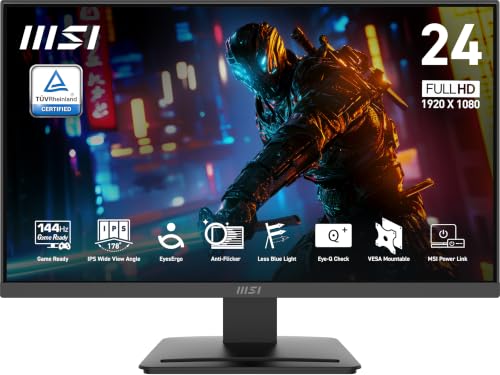
For those seeking a versatile monitor that excels in both gaming and office tasks, the MSI PRO MP243L E14 stands out with its impressive 144Hz refresh rate and 1ms response time. This 24-inch IPS display offers FHD resolution, ensuring vibrant colors and sharp images. With Adaptive-Sync and HDR readiness, you’ll enjoy smooth gameplay and stunning visuals. The TÜV certified screen and MSI EyesErgo technology protect your eyes during long sessions, while the slim bezel maximizes your workspace. Plus, with HDMI and VGA ports, you can easily connect various devices for seamless productivity and entertainment.
Best For: Gamers and professionals seeking a high-performance monitor that offers both excellent visuals and eye protection for extended use.
Pros:
- High Refresh Rate: Offers a 144Hz refresh rate for smooth gaming experiences.
- Eye Protection Features: TÜV certified with MSI EyesErgo technology to reduce eye strain during long sessions.
- Versatile Connectivity: Equipped with HDMI and VGA ports for easy connection to multiple devices.
Cons:
- Limited Resolution: Maximum resolution of 1920 x 1080 may not satisfy users looking for higher pixel density.
- Weight: Weighs 9.5 pounds, which may be considered heavy for some setups.
- No DisplayPort: Lacks a DisplayPort option, limiting connectivity with certain high-end devices.
LG 27US500-W Ultrafine Monitor 27-Inch 4K UHD

Creative professionals looking for a high-resolution display will find the LG 27US500-W Ultrafine Monitor to be an exceptional choice. With its 27-inch 4K UHD screen, you’ll enjoy stunning visuals at 3840×2160 resolution. The 1000:1 contrast ratio guarantees deeper blacks and vivid colors, while HDR10 support and nearly 90% DCI-P3 color gamut deliver unmatched accuracy. Its borderless design provides a sleek aesthetic, complemented by an ergonomic stand that allows flexible tilt adjustments. Plus, the Onscreen Control feature enables easy workspace customization, and the split display option enhances your multitasking capabilities. This monitor is perfect for any creative endeavor.
Best For: Creative professionals needing high-resolution, color-accurate displays for work and design tasks.
Pros:
- Exceptional 27-inch 4K UHD resolution for stunning visuals.
- High 1000:1 contrast ratio and HDR10 support for vibrant colors and deep blacks.
- Ergonomic design with flexible tilt adjustments and Onscreen Control for easy customization.
Cons:
- Limited connectivity options may not meet all user needs.
- Price point may be higher compared to standard monitors.
- Some users may find the lack of built-in speakers inconvenient.
ASUS ProArt Display 32” 4K HDR Monitor (PA329CV)

Designed for professionals who demand precision, the ASUS ProArt Display 32” 4K HDR Monitor (PA329CV) stands out with its exceptional color accuracy. With a 32-inch 4K UHD display and an impressive aspect ratio of 16:9, it offers vibrant visuals through its IPS panel and 178° wide viewing angle. You’ll love the 100% sRGB and Rec. 709 color gamut, ensuring your projects look stunning. Plus, it’s Calman Verified with a Delta E < 2 color accuracy. Connectivity is easy with USB-C, DisplayPort, and HDMI options. Enjoy added value with a complimentary 3-month Adobe Creative Cloud access upon purchase.
Best For: Professionals in graphic design, video editing, and photography who require high color accuracy and resolution for their projects.
Pros:
- Exceptional color accuracy with 100% sRGB and Rec. 709 color gamut.
- Calman Verified with excellent Delta E < 2 for precise color reproduction.
- Versatile connectivity options including USB-C, DisplayPort, and HDMI.
Cons:
- May be too large for users with limited desk space.
- Higher price point compared to standard monitors.
- Limited built-in features beyond basic adjustments, requiring external calibration tools for optimal performance.
SANSUI 27 Inch Curved Gaming Monitor (FHD 1080P)

The SANSUI 27 Inch Curved Gaming Monitor stands out with its impressive 240Hz refresh rate, making it an excellent choice for gamers seeking smooth and responsive gameplay. Its 1500R curvature enhances immersion while the FHD 1080P resolution delivers crisp visuals. With FreeSync technology and a 1ms MPRT response time, you’ll enjoy seamless action without tearing. The 130% sRGB and 95% DCI-P3 color gamut guarantee vibrant colors, while the 4000:1 contrast ratio and HDR support enhance your viewing experience. Plus, its durable metal stand offers tilt adjustments, and connectivity is easy with HDMI and DP1.4 options. Enjoy the SANSUI experience!
Best For: Gamers looking for an immersive and high-performance monitor with fast refresh rates and vibrant colors.
Pros:
- 240Hz refresh rate for ultra-smooth gameplay.
- FreeSync technology reduces screen tearing and stuttering.
- Wide color gamut (130% sRGB and 95% DCI-P3) enhances visual quality.
Cons:
- No built-in speakers, requiring external audio solutions.
- Limited tilt adjustment range (-5° to 15°) may not suit all viewing preferences.
- Only FHD 1080P resolution, which may not satisfy users seeking higher resolutions.
ASUS ProArt Display 27″ Monitor PA278CV

For professionals in photography, graphic design, and video editing, the ASUS ProArt Display 27″ Monitor PA278CV stands out with its impressive factory-calibrated color accuracy, boasting a Delta E of less than 2. With a WQHD resolution and an IPS panel, you’ll enjoy stunning visuals from a wide 178° viewing angle. The monitor supports a 75Hz refresh rate with Adaptive-Sync technology, ensuring smooth performance. You’ll appreciate the extensive connectivity options, including USB-C, HDMI, and DisplayPort. Plus, eye care technology minimizes strain, while the adjustable stand allows for ergonomic comfort. A bonus: you get three months of Adobe Creative Cloud free!
Best For: Professionals in photography, graphic design, and video editing who require high color accuracy and a wide viewing angle.
Pros:
- Factory-calibrated color accuracy with Delta E < 2 for precise color representation.
- Wide connectivity options including USB-C, HDMI, and DisplayPort, along with a USB 3.1 hub.
- Ergonomic features such as an adjustable stand and eye care technology to reduce strain during long hours of use.
Cons:
- Limited refresh rate at 75Hz may not satisfy hardcore gamers looking for higher frame rates.
- No built-in speakers, which may require additional external audio solutions.
- Weight and size may make it less portable compared to smaller monitors.
Factors to Consider When Choosing a Monitor With Pro Grade HDR
When you’re choosing a monitor with pro-grade HDR, you’ll want to take into account several key factors. Think about resolution and display quality, as they greatly impact your viewing experience. Don’t forget to check color accuracy standards, HDR brightness levels, connectivity options, and ergonomic design features to guarantee you get the best fit for your needs.
Resolution and Display Quality
Choosing a monitor with pro-grade HDR hinges on resolution and display quality, as these factors greatly impact your viewing experience. Higher resolution monitors, like 4K or 5K, deliver exceptional detail and clarity, essential for professional-grade HDR applications. You’ll appreciate vibrant colors and precise reproduction when you opt for displays with wide color gamuts, covering 99% DCI-P3 and 100% sRGB. HDR support enhances brightness levels and contrast ratios, creating dynamic and lifelike images. Look for IPS panels to guarantee wide viewing angles and consistent color accuracy, especially in collaborative settings. Finally, monitors with factory calibration often achieve a Delta E value of less than 2, assuring that you get accurate color right out of the box for your critical tasks.
Color Accuracy Standards
Understanding color accuracy standards is vital for selecting a monitor that meets pro-grade HDR requirements. Look for monitors with a Delta E value of less than 2, as this indicates high fidelity to original colors. A wide color gamut coverage, like 99% DCI-P3 or 100% sRGB, is essential for reproducing a broad spectrum of colors needed in professional HDR work. Calibration processes, such as Calman verification, guarantee your monitor is factory-tuned to meet stringent standards. Additionally, consider monitors with IPS panels, as they offer superior color accuracy and wider viewing angles. Remember, monitors supporting HDR standards like HDR10 should have a minimum brightness of 400 nits to accurately display the rich colors and contrasts in HDR content.
HDR Brightness Levels
HDR brightness levels play an essential role in delivering stunning visuals that captivate your audience. When choosing a monitor, aim for a minimum peak brightness of 1000 nits for true HDR performance. This level enhances contrast and detail in bright scenes, making your content pop. Some monitors even reach up to 2000 nits, providing exceptional brightness for immersive viewing. However, it’s not just about peak brightness; local dimming capabilities are vital too. They help maintain brightness across different screen areas, ensuring that HDR content looks vibrant and detailed. For ideal HDR viewing, look for displays that can achieve at least 400 nits, allowing you to fully experience HDR’s wider color gamut and enhanced details in both bright and dark areas.
Connectivity Options Available
Achieving stunning visuals is only part of the equation when selecting a pro-grade HDR monitor. You need to take into account connectivity options to guarantee compatibility with your devices. Look for monitors that offer multiple ports, like USB-C, HDMI, and DisplayPort, so you can connect various setups seamlessly. Monitors with USB-C Power Delivery are especially beneficial, allowing you to charge devices while transmitting video and data. A USB hub can enhance usability by providing additional peripheral connections, reducing cable clutter. Also, check for daisy-chaining capabilities through DisplayPort, enabling multiple monitors in one setup. Finally, verify the monitor supports the latest standards, like HDMI 2.1, for peak performance with high-resolution content and refresh rates.
Ergonomic Design Features
When choosing a pro-grade HDR monitor, ergonomic design features play an essential role in your overall experience. Look for height-adjustable stands that let you customize the screen’s height for ideal viewing comfort during long sessions. Tilt and swivel capabilities are also important, as they help reduce glare and improve your posture. Consider VESA mount compatibility for flexible mounting options, allowing you to save desk space and position the monitor to suit your needs. Eye care technologies, like flicker-free screens and blue light reduction, are critical for minimizing eye strain. Finally, ultra-narrow bezels maximize screen real estate while maintaining a sleek look, especially beneficial if you’re using multiple monitors. Opt for these features to enhance your productivity and comfort.
Calibration and Verification Process
Choosing the right monitor involves more than just checking specifications; it requires understanding the calibration and verification processes that guarantee color accuracy. Calibration adjusts a monitor’s settings to achieve accurate color representation, ideally aiming for a Delta E value of less than 2. This guarantees minimal color deviation from the original source. Look for monitors with factory calibration, as they come pre-set to ideal color settings, so you can enjoy professional-grade color accuracy right out of the box. Additionally, verification processes, like those by Calman, confirm that monitors meet specific color accuracy standards. For HDR work, a wide color gamut—such as 99% DCI-P3 or 100% sRGB—is essential, guaranteeing you display colors accurately for photography, video editing, and graphic design.
Refresh Rate Importance
While many factors influence your monitor selection, refresh rate stands out as a crucial element, especially for pro-grade HDR content. A higher refresh rate—like 144Hz or 240Hz—greatly enhances motion smoothness and reduces blur, essential for gaming and video editing. Monitors above 60Hz offer a more immersive experience, delivering smoother shifts particularly beneficial for HDR. Additionally, lower response times (around 1ms) paired with high refresh rates minimize ghosting and tearing during fast action. For competitive gaming, a refresh rate of 120Hz or higher is often recommended, giving you a competitive edge by allowing quicker reactions. Just remember, to maximize these benefits, pair your high refresh rate monitor with a graphics card capable of maintaining consistent frame rates.
Warranty and Support Services
As you explore options for pro-grade HDR monitors, considering warranty and support services is essential for long-term satisfaction. A warranty typically spans 3 to 5 years, offering peace of mind against defects and performance issues. Look for manufacturers that provide technical assistance through phone, email, or live chat, ensuring you can troubleshoot efficiently. Some brands even offer a money-back guarantee or return policy, letting you evaluate the monitor risk-free. Additionally, you might find extended warranty options available for extra coverage beyond standard terms. Many premium models also include complimentary access to valuable software or services, enhancing their usability in professional settings. Choosing wisely in these areas can greatly improve your overall experience.