
As technology evolves, so do our expectations for monitors. In 2026, you’ll want an AI-ready monitor that delivers exceptional performance for both gaming and professional tasks. With features like high refresh rates and advanced eye care technologies, these monitors can markedly enhance your experience. But how do you choose the right one? Let’s explore the top contenders and what makes them stand out.
SANSUI 34 Inch 240Hz Ultrawide Curved Gaming Monitor

If you’re a serious gamer looking for an immersive experience, the SANSUI 34 Inch 240Hz Ultrawide Curved Gaming Monitor is made for you. With its UWQHD 3440×1440 resolution and 21:9 aspect ratio, you’ll dive deep into your favorite games. The 1500R curvature enhances your field of view, while the 240Hz refresh rate and 1ms response time guarantee smooth gameplay. Enjoy vibrant colors with a 130% sRGB and 97% DCI-P3 color gamut. Plus, ergonomic features like tilt adjustment and wide viewing angles make it comfortable for long sessions. Connect easily via HDMI 2.1 or DP 1.4 for peak performance.
Best For: Serious gamers seeking an immersive and high-performance gaming experience with vibrant visuals.
Pros:
- High refresh rate of 240Hz and 1ms response time for smooth gameplay.
- UWQHD resolution and 21:9 aspect ratio provide an expansive and detailed viewing experience.
- Ergonomic design with tilt adjustment and wide viewing angles for comfort during long gaming sessions.
Cons:
- No built-in speakers, requiring external audio solutions.
- Limited to 240Hz at 2K resolution, which may not meet the needs of all users.
- May be considered bulky for smaller gaming setups due to its size and curvature.
MSI MAG 245F X24 24-inch Gaming Monitor

The MSI MAG 245F X24 24-inch Gaming Monitor stands out as an exceptional choice for gamers seeking a high-performance display. With a Full HD resolution of 1920 x 1080 and a rapid IPS panel, you’ll enjoy stunning visuals. The impressive 240Hz refresh rate and 0.5ms response time guarantee smooth gameplay, while FreeSync Premium technology eliminates screen tearing. AI Vision enhances details in dark areas for richer colors. Its sleek, 4-side slim bezel design is VESA mountable, and the tilt functionality adds comfort. Plus, the reduced blue light emission keeps your eyes comfy during long gaming sessions.
Best For: Gamers who prioritize high refresh rates and fast response times for competitive gaming.
Pros:
- Exceptional 240Hz refresh rate for ultra-smooth gameplay.
- FreeSync Premium technology effectively eliminates screen tearing.
- AI Vision technology enhances visibility in dark scenes for improved gaming experience.
Cons:
- Limited connectivity options with only HDMI and VGA ports.
- Screen size may be small for users preferring larger displays.
- Rapid IPS panels may not be as vibrant as some high-end OLED screens.
MSI MAG 274QRFW X32 27-inch QHD Gaming Monitor

Gamers seeking an edge in performance will find the MSI MAG 274QRFW X32 27-inch QHD Gaming Monitor an exceptional choice. With a stunning QHD resolution of 2560 x 1440 and a lightning-fast refresh rate of 320Hz, you’ll experience incredibly smooth gameplay. The 0.5ms response time eliminates screen tearing, ensuring every frame is crisp. Featuring a Rapid IPS panel, the monitor optimizes colors and brightness, while AI Vision enhances details in dark areas. Plus, its eye care technology reduces blue light emission, allowing for extended gaming sessions. The sleek, VESA mountable design complements any setup, making it a top choice for gamers.
Best For: Gamers seeking high-performance visuals and smooth gameplay in a stylish design.
Pros:
- 320Hz refresh rate provides ultra-smooth visuals for competitive gaming.
- 0.5ms response time eliminates screen tearing and ensures crisp frame transitions.
- AI Vision technology enhances dark details and overall color saturation for improved image quality.
Cons:
- Limited port options with only HDMI and VGA connections.
- May be more expensive compared to standard monitors without high refresh rates.
- Brightness and color performance may vary in different lighting conditions.
MSI MAG 346CQ 34-inch Gaming Monitor

For those seeking an immersive gaming experience, the MSI MAG 346CQ 34-inch Gaming Monitor stands out with its stunning 3440 x 1440 resolution and lightning-fast 180Hz refresh rate. Its 1ms response time guarantees smooth gameplay without lag. The VA panel enhances colors and brightness, while AI Vision technology sharpens details in dark areas. You’ll appreciate the less blue light emission for comfortable, extended gaming sessions. With adjustable tilt and height options, you can customize your setup. Plus, connectivity is a breeze with HDMI and DisplayPort, and the integrated speaker offers solid audio for gaming and multimedia enjoyment.
Best For: Gamers seeking an immersive experience with high-resolution displays and fast refresh rates.
Pros:
- Excellent 3440 x 1440 resolution for stunning visuals.
- High 180Hz refresh rate and 1ms response time for smooth gameplay.
- Adjustable tilt and height for customizable comfort during extended gaming sessions.
Cons:
- Limited integrated audio quality compared to dedicated speakers.
- VA panel may not offer the same color accuracy as IPS panels.
- May require additional setup for optimal performance with certain games or graphics settings.
MSI MAG 274QPF E20 27-inch Gaming Monitor
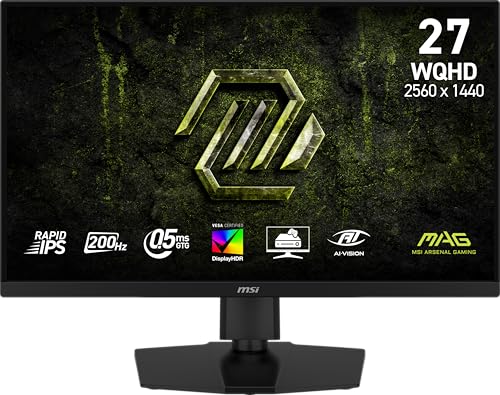
Designed with competitive gameplay in mind, the MSI MAG 274QPF E20 27-inch Gaming Monitor delivers an impressive 200Hz refresh rate and a rapid 0.5ms response time. Its 2560 x 1440 resolution guarantees crystal-clear visuals, essential for FPS, RPG, and racing games. Featuring AI Vision Technology, it enhances brightness and color saturation, helping you spot enemies lurking in dark corners. The monitor also reduces blue light for eye comfort during long sessions. With HDMI and VGA connectivity, plus a sleek design with a slim bezel, this monitor is perfect for gamers looking for both performance and style.
Best For: Competitive gamers seeking a high-performance monitor with fast response times and vibrant visuals for immersive gameplay.
Pros:
- 200Hz refresh rate ensures smooth gameplay and reduces motion blur.
- AI Vision Technology enhances brightness and color saturation for better visibility in dark scenes.
- Less Blue Light feature promotes eye comfort during extended gaming sessions.
Cons:
- Limited connectivity options with only HDMI and VGA ports.
- Relatively heavy at 20.1 pounds, which may affect portability.
- May not be suitable for casual users who do not require high refresh rates and response times.
MSI MPG 271QR QD-OLED Gaming Monitor

The MSI MPG 271QR QD-OLED Gaming Monitor stands out with its impressive 500Hz refresh rate and ultra-fast 0.03ms response time, making it an excellent choice for anyone seeking a competitive edge in fast-paced gaming. You’ll enjoy stunning visuals with a QHD resolution of 2560 x 1440 and HDR support, enhanced by the QD Premium Color technology. Its sleek design features a 4-side slim bezel and tilt functionality for maximum comfort. Plus, with DisplayPort 2.1a and HDMI connectivity, you can easily connect to your devices. The MSI OLED Care 3.0 guarantees the monitor stays in peak condition, detecting presence every 0.2 seconds.
Best For: Competitive gamers looking for high-performance visuals and ultra-fast response times.
Pros:
- Impressive 500Hz refresh rate for smooth gameplay.
- Ultra-fast 0.03ms response time minimizes motion blur and ghosting.
- QD Premium Color technology enhances visual brilliance and accuracy.
Cons:
- Limited connectivity options with only HDMI and VGA ports.
- Higher price point may not be suitable for casual gamers.
- Requires a powerful graphics card to fully utilize the high refresh rate.
MSI MAG 274F 27-inch FHD Gaming Monitor
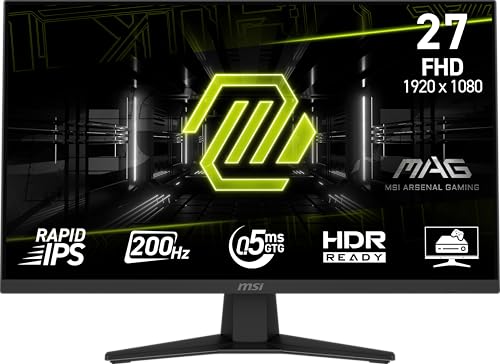
With a stunning 200Hz refresh rate and a lightning-fast 0.5ms response time, the MSI MAG 274F 27-inch FHD Gaming Monitor stands out as an exceptional choice for competitive gamers. Its Rapid IPS panel optimizes colors and brightness, while AI Vision Technology reveals details in dark areas, enhancing your gaming experience. The monitor’s Adaptive Sync eliminates screen tearing, ensuring smooth gameplay across FPS, RPG, and racing genres. Plus, its HDR readiness and less blue light feature make it easy on your eyes during long sessions. With a sleek design and VESA mountability, it seamlessly fits into any setup.
Best For: Competitive gamers seeking high performance and enhanced visual clarity for fast-paced gaming genres.
Pros:
- Exceptional 200Hz refresh rate for ultra-smooth gameplay.
- Rapid IPS panel optimizes color accuracy and brightness levels.
- Adaptive Sync technology eliminates screen tearing and choppy frame rates.
Cons:
- Relatively heavy at 14.2 pounds, which may affect portability.
- FHD resolution may not meet the expectations of gamers seeking higher resolutions.
- Limited to 27 inches, which may not satisfy users desiring larger screens.
MSI MAG 272F 27-inch FHD Gaming Monitor
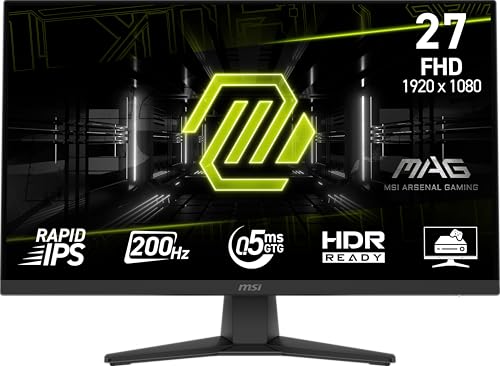
For gamers seeking an edge in fast-paced action, the MSI MAG 272F 27-inch FHD Gaming Monitor stands out with its impressive 200Hz refresh rate and lightning-fast 0.5ms response time. Its rapid IPS panel delivers stunning 1920 x 1080 resolution, ensuring every detail pops. With Adaptive Sync technology, you’ll enjoy smooth gameplay without tearing. AI Vision technology enhances dark areas and boosts brightness and color saturation, while HDR readiness elevates your visual experience. The sleek 4-side slim bezel design and tilt adjustment add ergonomic comfort, and the Less Blue Light feature reduces eye strain during long sessions.
Best For: Gamers looking for a high-performance monitor that enhances fast-paced gameplay with smooth visuals and vibrant colors.
Pros:
- 200Hz refresh rate for ultra-smooth gameplay and reduced motion blur.
- Rapid IPS panel provides vibrant colors and wide viewing angles.
- Less Blue Light feature helps reduce eye strain during extended gaming sessions.
Cons:
- Limited to 1080p resolution, which may not satisfy users seeking 4K quality.
- Tilt adjustment only may not be sufficient for all ergonomic preferences.
- HDR performance may not be as robust as on higher-end monitors.
MSI MAG 321CQF E18 Gaming Office Monitor (32-inch, QHD)

Experience stunning visuals and seamless performance with the MSI MAG 321CQF E18 Gaming Office Monitor. Its 32-inch QHD display delivers a sharp 2560 x 1440 resolution, while the 180Hz refresh rate and 0.5ms response time guarantee fluid motion during gaming or multitasking. The Rapid VA Panel enhances color accuracy and brightness, complemented by AI Vision technology that brightens dark scenes. Adaptive-Sync eliminates screen tearing, making every frame smooth. Plus, the less blue light feature helps reduce eye strain. With HDMI and VGA connectivity, and a sleek, VESA mountable design, this monitor fits perfectly into any setup.
Best For: Gamers and professionals seeking a high-performance monitor with vibrant visuals and smooth motion for gaming and multitasking.
Pros:
- High 180Hz refresh rate and 0.5ms response time for fluid motion and reduced input lag.
- AI Vision technology enhances detail in dark scenes, improving overall visual experience.
- Less Blue Light feature helps minimize eye strain during extended use.
Cons:
- Limited to HDMI and VGA connectivity options, which may not meet all users’ needs.
- Some users may find the 32-inch size too large for smaller desk setups.
- HDR performance may not be as pronounced compared to higher-end monitors.
MSI MAG 244C 24-inch FHD Gaming Monitor

The MSI MAG 244C 24-inch FHD Gaming Monitor stands out with its impressive 180Hz refresh rate and 1ms response time, making it an ideal choice for gamers seeking smooth, responsive visuals. The VA panel delivers stunning 1920 x 1080 resolution, while HDR capability enhances contrast and detail in darker scenes. With Adaptive-Sync and AI Vision technology, you’ll enjoy vibrant colors and reduced screen tearing. Weighing 10.4 pounds and featuring adjustable tilt and height, it fits perfectly in any gaming setup. Rated 4.1 out of 5 stars, this monitor has quickly become a beloved choice among enthusiasts.
Best For: Gamers who seek high-performance visuals and responsiveness in their gaming monitors.
Pros:
- 180Hz refresh rate for ultra-smooth gameplay.
- 1ms response time reduces screen tearing and latency.
- Adjustable tilt and height for comfortable viewing angles.
Cons:
- Limited to 1920 x 1080 resolution, which may not satisfy those seeking higher resolutions.
- Weight of 10.4 pounds may make it less portable.
- Customer rating of 4.1 stars indicates some mixed reviews.
Factors to Consider When Choosing an AI Ready Monitor
When you’re choosing an AI-ready monitor, several key factors come into play. You’ll want to contemplate resolution and screen size, refresh rate, and the type of panel technology. Additionally, think about connectivity options and ergonomic design features that can enhance your overall experience.
Resolution and Screen Size
Choosing the right resolution and screen size for your AI-ready monitor can greatly enhance your visual experience. Higher resolutions like QHD (2560 x 1440) and UWQHD (3440 x 1440) offer sharper details compared to standard FHD (1920 x 1080). A larger screen, ideally 27 inches and above, provides an expansive viewing area, perfect for multitasking and immersive gaming. Additionally, an ultrawide aspect ratio (21:9) gives you more horizontal space, enhancing cinematic visuals and overall immersion. When you combine a higher resolution with a larger screen, you boost the effectiveness of AI-driven visual enhancements, like brightness and color saturation adjustments. Finally, consider a curved monitor to improve viewing angles while maintaining ideal resolution across the screen.
Refresh Rate Importance
Resolution and screen size lay the groundwork for an outstanding visual experience, but refresh rate takes it to the next level, especially for gamers. A higher refresh rate, like 240Hz or 320Hz, delivers smoother motion and a more responsive gaming experience, cutting down motion blur during intense action. For competitive gaming, aim for at least 144Hz; this guarantees clearer visuals and reduces screen tearing. Monitors with refresh rates of 200Hz or more can greatly lower input lag, vital for quick reaction times. Plus, adaptive sync technologies like FreeSync or G-SYNC shine with higher refresh rates, syncing the monitor’s refresh with your GPU’s frame rate, enhancing overall visual quality. Choosing the right refresh rate can elevate your gaming experience dramatically.
Panel Technology Type
The type of panel technology you select plays an essential role in your AI-ready monitor’s performance and visual quality. IPS panels excel in color reproduction and wide viewing angles, making them perfect for content creators and gamers who crave immersive experiences. VA panels, on the other hand, offer superior contrast ratios with deeper blacks, but their slower response times might hinder fast-paced gaming. OLED technology provides stunning color depth and true blacks thanks to individual pixel illumination, although it can be pricier and may face burn-in issues over time. Your choice of panel technology greatly impacts how effectively your monitor utilizes AI-driven features like brightness enhancement and detail visibility in dark scenes, so choose wisely!
Connectivity Options Available
When you’re in the market for an AI-ready monitor, considering the connectivity options is vital for maximizing performance and versatility. Look for a monitor with multiple HDMI ports, especially HDMI 2.1, to support high refresh rates and resolutions, perfect for gaming consoles and other devices. If you plan to connect older hardware, verify it includes a VGA port for broader compatibility. USB ports are also important for connecting peripherals and future-proofing your setup. Additionally, VESA mount compatibility allows for flexible mounting options, helping you adjust your workspace ergonomically. By focusing on these connectivity features, you’ll enhance your overall experience and guarantee your monitor meets your evolving tech needs.
Ergonomic Design Features
Choosing an AI-ready monitor with ergonomic design features can greatly enhance your comfort and productivity. Look for adjustable tilt angles, as these let you customize your viewing experience, minimizing strain during long hours. VESA mount compatibility is another vital aspect, allowing you to easily attach your monitor to various mounts, saving valuable desk space. A wide viewing angle of 178° guarantees that the display remains clear from different positions, perfect for multi-user environments. Additionally, monitors with ergonomic stands often include height adjustment options, helping you align the screen to your eye level, which promotes better posture and reduces neck strain. These features collectively create a more comfortable and efficient workspace.
Eye Care Technologies
While selecting an AI-ready monitor, it is crucial to take into account eye care technologies that can greatly enhance your viewing experience. Look for features like reduced blue light emission, which helps minimize eye strain during long hours of use. Monitors equipped with AI Vision technology can boost brightness and color saturation, making images clearer and easier on the eyes. HDR support improves contrast and shadow detail, providing a comfortable viewing experience. Additionally, rapid response times below 1ms reduce motion blur and screen tearing, ensuring visual clarity during fast-paced activities. Finally, ergonomic features such as tilt adjustments and VESA mount compatibility allow for better viewing angles, further minimizing eye strain and enhancing comfort during extended periods of use.