
If you’re serious about your photo editing, having a color-accurate monitor is non-negotiable. It can transform your workflow and guarantee your colors are true to life. With various options available, you’ll want to take into account factors like resolution and color gamut. In this guide, we’ll explore the eight best monitors that can elevate your editing game and help you choose the right fit for your needs.
ASUS ProArt Display 14” Portable Touchscreen Monitor (PA148CTV)

If you’re a creative professional seeking exceptional color accuracy, the ASUS ProArt Display 14” Portable Touchscreen Monitor (PA148CTV) is a fantastic choice. With its 14-inch Full HD IPS anti-glare panel, you’ll enjoy vibrant visuals that cover 100% sRGB and Rec. 709 color gamut. The factory pre-calibrated Delta E < 2 guarantees your colors remain true to life. Plus, the capacitive 10-point multitouch functionality enhances your editing experience. Connectivity is a breeze with two USB Type-C ports and a Micro HDMI port. Don’t forget the 3-month complimentary Adobe Creative Cloud access to elevate your creative projects even further!
Best For: Creative professionals and artists who require exceptional color accuracy and portability in their display solutions.
Pros:
- 100% sRGB and Rec. 709 color gamut for vibrant and true-to-life colors.
- Capacitive 10-point multitouch functionality enhances usability for creative tasks.
- Includes a 3-month complimentary access to Adobe Creative Cloud, adding value for users.
Cons:
- The 14-inch screen size may be too small for some users who prefer larger displays.
- Limited connectivity options with only one Micro HDMI port.
- Battery life may vary depending on usage, potentially limiting portability for long sessions.
INNOCN Portable Monitor 13.3″ OLED 1080P
For creatives seeking precision in color accuracy, the INNOCN Portable Monitor 13.3″ OLED 1080P stands out as an exceptional choice. With its 100% DCI-P3 color gamut and impressive 100,000:1 contrast ratio, you’ll enjoy vibrant visuals and detailed color contrast. This ultra-slim, lightweight monitor is perfect for photo and video editing, easily connecting to laptops or gaming consoles via USB C or Mini HDMI. The flicker-free and low blue light technologies guarantee comfortable viewing during long editing sessions. Plus, its portability makes it a fantastic companion for on-the-go creatives. Elevate your editing experience with the INNOCN monitor!
Best For: Creatives who require high color accuracy and portability for photo and video editing on the go.
Pros:
- Vibrant visuals with 100% DCI-P3 color gamut and 100,000:1 contrast ratio for stunning image quality.
- Lightweight and ultra-slim design makes it easy to carry, perfect for travel and multitasking.
- Flicker-free and low blue light technologies ensure comfortable viewing during long hours of use.
Cons:
- Limited screen size may not be ideal for all users who prefer larger displays for extensive editing tasks.
- Connectivity options may require additional adapters for devices that do not support USB C or Mini HDMI.
- Potential price point may be higher compared to standard portable monitors with less specialized features.
HONGO 4K OLED Portable Monitor (15.6 Inch Touchscreen)

The HONGO 4K OLED Portable Monitor is an exceptional choice for photographers and graphic designers seeking unparalleled color accuracy in their work. With 4K UHD resolution and 100% DCI-P3 coverage, you’ll enjoy stunning visuals and deep contrasts. Its 10-point touchscreen lets you effortlessly interact with your edits using tap, swipe, and pinch-to-zoom gestures. Weighing only 1.5 pounds and measuring just 0.21 inches thick, this monitor is incredibly portable. Plus, it connects easily to various devices through USB-C or HDMI, making it a versatile companion for your creative needs. Enjoy 24/7 customer support for any inquiries you may have.
Best For: Photographers and graphic designers seeking exceptional color accuracy and portability in their work.
Pros:
- Stunning 4K UHD resolution with 100% DCI-P3 coverage for vibrant visuals.
- Lightweight and ultra-thin design makes it easy to transport and set up anywhere.
- 10-point touchscreen functionality enhances user interaction and editing precision.
Cons:
- Touchscreen functionality requires a USB-C full-featured cable, limiting some connectivity options.
- Apple systems can connect but do not support touch features, reducing usability for Mac users.
- Limited built-in speaker quality may not meet the expectations of audio-focused users.
INNOCN 15.6″ Portable OLED Touch Monitor for Photo Editing
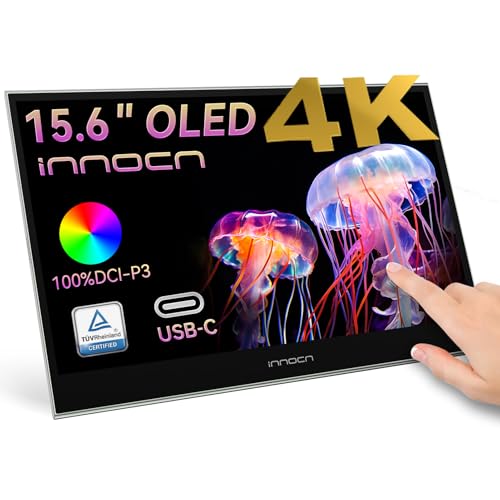
Photographers and graphic designers seeking precision in color reproduction will find the INNOCN 15.6″ Portable OLED Touch Monitor an excellent choice. With its stunning 4K resolution and 100% DCI-P3 color gamut, it guarantees vibrant and accurate colors. The 100000:1 contrast ratio and 10-bit color depth enhance your editing experience, making fine details pop. Its 10-point touch functionality allows for intuitive interaction, whether you’re tapping, swiping, or zooming. Plus, the plug-and-play connectivity with USB Type-C and mini HDMI makes it compatible with various devices. This portable monitor not only serves as a secondary display but also elevates your workflow efficiency.
Best For: Photographers and graphic designers seeking a portable monitor with exceptional color accuracy and intuitive touch functionality.
Pros:
- Stunning 4K resolution provides vibrant and accurate colors ideal for photo editing.
- 10-point touch functionality allows for intuitive interaction, enhancing workflow efficiency.
- Plug-and-play connectivity with USB Type-C and mini HDMI makes it compatible with a wide range of devices.
Cons:
- Limited screen size may not be suitable for all users who prefer larger displays for editing.
- Higher price point compared to standard portable monitors without touch functionality.
- Potential battery life concerns if using with devices that do not support power delivery through USB Type-C.
New Mobile Pixels Duex Max DS 14.1” FHD Portable Monitor

Designed for creatives on the go, the New Mobile Pixels Duex Max DS 14.1” FHD Portable Monitor offers a vibrant 1080p IPS screen that enhances color accuracy, making it an excellent choice for those using Photoshop. Weighing just 1.8 lbs and measuring only 0.25 inches thick, it’s incredibly portable, allowing you to easily transport it wherever you need. Setup is a breeze with its plug-and-play functionality via USB Type-C or HDMI, so you won’t deal with complicated configurations. Plus, it’s compatible with a variety of devices, ensuring you can expand your workspace effortlessly. Reliable customer support is also included.
Best For: Creatives and professionals who need a portable and efficient dual-screen setup for enhanced productivity on the go.
Pros:
- Lightweight and portable design makes it easy to carry at just 1.8 lbs and 0.25 inches thick.
- Plug-and-play functionality via USB Type-C or HDMI ensures quick and hassle-free setup.
- Wide compatibility with various devices, including laptops, phones, and gaming consoles.
Cons:
- Limited screen size may not provide enough workspace for users who require larger displays.
- Dependence on external power for some devices could limit portability.
- Potential screen brightness issues in direct sunlight may hinder usability outdoors.
Duex Plus DS Portable Monitor (13.3″ FHD 1080P)

For creative professionals on the go, the Duex Plus DS Portable Monitor offers a compact 13.3″ FHD 1080P display that enhances your workflow with vibrant colors and sharp details. Weighing just 1.3 lbs and measuring 12.25 x 8.46 x 0.25 inches, it’s easy to carry. With flexible display modes—landscape for data, portrait for coding, and kickstand for presentations—it adapts to your needs. The plug-and-play functionality via USB Type-C or HDMI guarantees quick setup. Compatible with various devices, you’ll enjoy seamless integration. Plus, responsive customer support is available to address any concerns, improving your overall experience.
Best For: Creative professionals and remote workers seeking a portable monitor that enhances productivity with versatile display options.
Pros:
- Lightweight and portable: At just 1.3 lbs, it’s easy to carry for on-the-go use.
- Flexible display modes: Offers landscape, portrait, and kickstand modes for various tasks.
- Plug-and-play functionality: Quick setup with USB Type-C or HDMI connection for seamless integration.
Cons:
- Limited USB ports: Only one USB port may restrict connectivity options.
- Average customer rating: With a rating of 3.8 out of 5 stars, some users may find room for improvement.
- Best Sellers Rank: Positioned at #133,855 in Electronics, indicating moderate market presence.
Duex Lite Portable Monitor (12.5″ Full HD IPS)

The Duex Lite Portable Monitor is an excellent choice for creative professionals who need a reliable display on the go. Weighing just 1.3 lbs and only 0.39 inches thick, it’s designed to fit seamlessly with 12-14 inch laptops. With a Full HD 1080P IPS screen, you’ll enjoy vibrant visuals and an anti-glare surface that enhances your editing experience. Its plug-and-play functionality via USB-C makes it easy to connect to Windows and Mac systems. You can switch between multiple modes, including landscape and portrait, ensuring versatility for presentations or multitasking. Plus, it’s durable and comes with a one-year warranty.
Best For: Creative professionals and frequent travelers looking for a lightweight, portable monitor that enhances productivity on the go.
Pros:
- Lightweight and Slim Design: At only 1.3 lbs and 0.39 inches thick, it’s easy to carry and fits well with 12-14 inch laptops.
- Vibrant Display: Full HD 1080P IPS screen with anti-glare surface provides excellent visuals for editing and presentations.
- Versatile Connectivity: Plug-and-play functionality via USB-C makes it compatible with both Windows and Mac systems.
Cons:
- Limited Screen Size: At 12.5 inches, it may not be suitable for those needing larger displays for extensive multitasking.
- Single Connectivity Option: Requires USB-C connection only, which may limit compatibility with older devices.
- Potential Battery Drain: Using the monitor might drain the laptop’s battery faster, requiring careful power management.
New Mobile Pixels Duex Lite Portable Monitor for Laptops (12.5″ Full HD IPS)

If you’re a creative professional or an avid photographer who needs to edit on the go, the New Mobile Pixels Duex Lite Portable Monitor is an ideal choice. This 12.5″ Full HD IPS screen weighs just 1.3 lbs and is only 0.39 inches thick, making it incredibly portable. Its ultra-slim design features a thinner bezel to maximize your viewing area. With multi-mode functionality, you can easily switch between landscape, portrait, and presentation modes. Setup is a breeze, thanks to plug-and-play compatibility with various devices and no driver requirements. Plus, it’s durable and backed by a one-year warranty for peace of mind.
Best For: Creative professionals and photographers who require a portable monitor for editing on the go.
Pros:
- Ultra-slim and lightweight design for easy transport and convenience.
- Multi-mode functionality allows for versatile viewing options including landscape, portrait, and presentation modes.
- Plug-and-play setup with no driver required, ensuring compatibility with a wide range of devices.
Cons:
- Limited screen size may not be sufficient for users needing extensive workspace.
- Reliance on USB C connection may be a limitation for some older devices without this port.
- One-year warranty may be shorter than some users expect for electronic devices.
Factors to Consider When Choosing a Color Accurate Monitor for Photoshop
When choosing a color accurate monitor for Photoshop, you need to take into account several key factors. Color gamut coverage and display resolution can greatly impact your editing experience, while calibration capabilities guarantee your colors remain true. Additionally, think about the panel technology types and connectivity options that best suit your workflow.
Color Gamut Coverage
Choosing a color accurate monitor for Photoshop hinges on understanding color gamut coverage, as it determines the range of colors your display can reproduce. For precise color work, look for monitors that offer 100% sRGB and 100% Adobe RGB coverage; these are essential for digital art and photography. High-end options may support wider color spaces like DCI-P3 or Rec. 2020, which are great for video editing. Pay attention to Delta E values too—aim for those below 2 for professional use to guarantee minimal color deviation. Finally, selecting a monitor with factory calibration and a high color accuracy rating assures reliable color representation across devices and workflows, making your editing process smoother and more effective.
Display Resolution Importance
A high display resolution is essential for achieving ideal results in Photoshop, as it considerably enhances your editing capabilities. When you choose a monitor with a higher resolution, like 4K or Full HD, you gain greater detail and clarity in your images. This lets you see finer details, making it easier to spot color inaccuracies and subtle flaws. Monitors with at least 1920×1080 resolution are recommended for professional photo editing, as they can display a wider range of colors and finer gradations. The pixel density affects how sharp and clear your images appear, directly impacting your editing experience. Plus, higher resolution displays improve workflow efficiency, letting you view multiple images or tools simultaneously without sacrificing clarity.
Calibration Capabilities
Calibration capabilities play an essential role in achieving accurate color representation in Photoshop, ensuring your images reflect true-to-life hues. When choosing a monitor, look for factory calibration with a low Delta E value—ideally under 2—to minimize color deviation. This reliability allows for better color editing. Advanced calibration tools and software can help you fine-tune brightness, contrast, and gamma, tailoring your monitor for color-sensitive tasks. Remember, regular calibration is vital, as monitors can drift over time due to aging or environmental changes. If you want precise control, opt for monitors that support hardware calibration. This feature allows you to adjust internal settings directly, leading to greater accuracy than software calibration alone.
Panel Technology Types
When it comes to selecting a color-accurate monitor for Photoshop, understanding the different panel technologies can greatly impact your editing experience. IPS panels are a popular choice because they offer wide viewing angles and consistent color reproduction, often covering over 95% of the sRGB color gamut. If you need deeper blacks and vibrant colors, consider OLED panels, which excel with contrast ratios that can reach up to 100,000:1. However, if you’re looking at VA panels, keep in mind they provide higher contrast ratios but may have slower response times and limited color accuracy, making them less suitable for professional work. Always check the color gamut coverage, like DCI-P3 or Adobe RGB, for the best results.
Connectivity Options Available
Choosing the right connectivity options is essential for getting the most out of your color-accurate monitor in Photoshop. Look for monitors that offer multiple ports like USB Type-C, HDMI, and Mini HDMI to easily connect different devices. Monitors with plug-and-play functionality make setup quick and hassle-free, saving you time. Verify compatibility with laptops, tablets, and even gaming consoles to enhance versatility across your projects. Dual signal input methods can accommodate diverse needs in creative environments, allowing you to switch devices effortlessly. Additionally, a one-cable solution reduces clutter, simplifying your workspace and keeping your setup streamlined for those color-sensitive tasks. Prioritizing these features will elevate your editing experience considerably.
Size and Portability
Size and portability are essential considerations for anyone looking to enhance their Photoshop experience with a color-accurate monitor. Larger screens, typically between 15 to 27 inches, allow for better detail visibility and more precise editing. If you’re often on the go, opt for lightweight, slim monitors under 1.5 inches thick and weighing around 1.3 to 1.8 lbs. These features make transportation hassle-free without sacrificing functionality. A resolution of at least 1080p is vital for clear image detail, while higher resolutions like 4K enhance color accuracy further. Additionally, consider a widescreen aspect ratio, such as 16:9 or 21:9, to maximize your workspace for toolbars and palettes, ultimately improving your editing workflow.
Touchscreen Functionality Benefits
Touchscreen functionality can greatly transform your Photoshop editing experience. It allows you to directly manipulate images and tools, making the editing process feel more intuitive. With 10-point multitouch support, you can easily perform gestures like pinch-to-zoom and swipe, granting you precise control and speeding up your workflow. Plus, the responsiveness of touchscreen monitors, often with less than 1ms response speed, guarantees that real-time adjustments are seamless. This level of interaction creates a more immersive experience, letting you engage with your work in ways traditional monitors can’t replicate. Many touchscreen models also incorporate ergonomic features, like flicker-free and low blue light technologies, helping to reduce eye strain during those extended editing sessions.
Eye Comfort Features
When you’re immersed in the creative process of editing photos, eye comfort can greatly impact your productivity and overall experience. To guarantee comfort during those long editing sessions, look for monitors with TÜV Rheinland-certified Flicker-free and Low Blue Light technologies, which help minimize eye strain. Anti-glare screens can also enhance viewing by reducing reflections from ambient light. High brightness levels of 300 nits or more improve visibility, cutting down on excessive brightness adjustments. A display that supports a wide color gamut, like 100% sRGB or DCI-P3, makes discerning details easier. Finally, consider monitors with adjustable brightness settings and customizable color profiles to tailor your experience to different lighting conditions and personal preferences, enhancing your overall visual comfort.