
If you’re looking for a typing experience that minimizes noise without sacrificing performance, you’ve come to the right place. Silent mechanical keyboards have become increasingly popular, offering a blend of comfort and functionality. With options like the Cherry KC 200 and AUSDOM 98Pro, you can enjoy a quieter workspace. But what features should you really consider before making a choice? Let’s explore the top contenders that promise quiet typing bliss.
Cherry KC 200 MX Mechanical Office Keyboard with MX2A Switches

If you’re seeking a quiet yet responsive typing experience for your office environment, the Cherry KC 200 MX Mechanical Office Keyboard with MX2A switches is an excellent choice. Featuring a sleek metal plate frame and available in bronze, this keyboard provides the perfect blend of style and functionality. The MX2A Silent Red switches guarantee minimal noise while still delivering smooth operation, making it ideal for any quiet workspace. With a lifespan of over 50 million keystrokes, you can rely on its durability. Plus, built-in white LED indicators for CAPS, SCROLL, and NUM lock keep you informed during your typing sessions.
Best For: Professionals seeking a quiet and efficient mechanical keyboard for office use.
Pros:
- Sleek design with a durable metal plate frame adds a modern touch to any workspace.
- Quiet operation with MX2A Silent Red switches makes it suitable for noise-sensitive environments.
- Long lifespan of over 50 million keystrokes ensures reliable performance over time.
Cons:
- Limited switch options available, which may not cater to all typing preferences.
- No backlit keys, which could be a drawback for users working in low-light conditions.
- Higher price point compared to standard membrane keyboards, which might not appeal to budget-conscious consumers.
AULA F99 Pro Wireless Mechanical Keyboard

The AULA F99 Pro Wireless Mechanical Keyboard is an excellent choice for those who value versatility and a quiet typing experience. You can connect it via BT5.0, 2.4GHz wireless, or USB, allowing seamless switching between up to five devices. Its hot-swappable design means you can easily change switches without soldering. The pre-lubed silent switches provide a smooth, quiet typing experience, perfect for office settings. With vibrant RGB lighting and customizable features, this compact keyboard enhances both work and gaming. Plus, the durable design and 8000mAh battery guarantee long-lasting performance, keeping you productive and immersed in your tasks.
Best For: The AULA F99 Pro Wireless Mechanical Keyboard is best for users who need a versatile, quiet, and customizable keyboard for both work and gaming environments.
Pros:
- Hot-swappable design allows for easy switch and keycap replacement without soldering.
- Pre-lubed silent switches and noise-reduction features provide a quiet typing experience, ideal for office settings.
- Compact 96% layout and vibrant RGB lighting enhance both functionality and aesthetics.
Cons:
- The compact design may take some time to get used to for users accustomed to full-sized keyboards.
- The 8000mAh battery, while long-lasting, requires proper charging to maintain optimal performance.
- Some users may find the learning curve for macro customization and FN key combinations a bit steep.
AULA F99 Wireless Mechanical Keyboard (Triple-Mode, RGB Backlit)

Looking for a versatile keyboard that fits both your gaming and work needs? The AULA F99 Wireless Mechanical Keyboard has you covered with triple connectivity options: BT 5.0, 2.4GHz wireless, and USB-C wired. You can easily switch between up to five devices using the simple FN shortcut keys. Its hot-swappable silent switches guarantee smooth typing while minimizing noise, perfect for quiet environments. With customizable RGB lighting and macro features, you’ll enjoy an immersive experience. Plus, the compact design and impressive 8000mAh battery make it a reliable choice for any setup, assuring durability and performance without compromise.
Best For: Users seeking a versatile keyboard that excels in both gaming and professional environments with seamless connectivity options.
Pros:
- Supports triple connectivity (BT 5.0, 2.4GHz, USB-C) for versatile device pairing.
- Hot-swappable switches and customizable RGB lighting enhance personalization and comfort.
- Compact design with an 8000mAh battery ensures long-lasting performance and saves desk space.
Cons:
- The compact layout may not suit users who prefer a full-sized keyboard with dedicated function keys.
- Some users may find the silent switches less tactile compared to traditional mechanical switches.
- The initial setup for macro customization might require a learning curve for new users.
AUSDOM 98Pro Silent Mechanical Keyboard (Wireless Hot Swappable Gaming Keyboard)
For gamers and professionals seeking a quiet typing experience, the AUSDOM 98Pro Silent Mechanical Keyboard stands out with its impressive tri-mode connectivity. You can connect via Bluetooth, 2.4GHz wireless, or wired USB, allowing you to switch between up to five devices effortlessly. The pre-lubed silent tactile switches guarantee quiet keystrokes, and with hot-swappable functionality, you can customize switches and keycaps without soldering. Its ergonomic design, complete with sweat-proof PBT keycaps and adjustable feet, enhances comfort. Plus, the single white backlight offers 16 lighting effects, perfect for focused gaming sessions without distracting RGB light pollution.
Best For: Gamers and professionals seeking a quiet and customizable typing experience.
Pros:
- Tri-mode connectivity allows seamless switching between Bluetooth, 2.4GHz wireless, and wired USB for versatile use.
- Hot-swappable switches enable easy customization of key switches and keycaps without the need for soldering.
- Ergonomic design with adjustable feet and sweat-proof PBT keycaps enhances comfort during extended use.
Cons:
- Limited customization options for lighting effects, as it only features a single white backlight.
- Compatibility restrictions for certain features, as customizable shortcuts and lighting effects are only available for Windows users.
- Lack of extensive RGB lighting may not appeal to users who prefer vibrant and dynamic lighting options.
Redragon K668 RGB Gaming Keyboard (Wired Mechanical, 108 Keys)

Designed with gamers and professionals in mind, the Redragon K668 RGB Gaming Keyboard offers a quiet yet responsive typing experience thanks to its hot-swappable red switches. This full-size keyboard features 108 keys with anti-ghosting technology, ensuring every keystroke registers. You’ll appreciate the 3.5mm sound-absorbing foam that minimizes noise while typing. Customize your setup with up to 19 RGB backlighting modes, adjustable brightness, and even a music sync mode for an immersive vibe. The ergonomic design includes adjustable feet for comfort, and you can easily create macros to boost your efficiency. Enjoy a blend of performance and style with this versatile keyboard!
Best For: Gamers and professionals looking for a responsive, customizable, and quiet mechanical keyboard experience.
Pros:
- Hot-swappable red switches provide a quiet and smooth typing experience.
- Up to 19 RGB backlighting modes allow for personalized aesthetics and immersive gaming.
- Ergonomic design with adjustable feet enhances comfort during long typing or gaming sessions.
Cons:
- Limited to wired connectivity, which may not suit users preferring wireless options.
- Mixed color keycaps may not appeal to those who prefer uniformity in design.
- Software customization might have a learning curve for new users unfamiliar with keyboard programming.
AULA F99 Pro Wireless Mechanical Keyboard

The AULA F99 Pro Wireless Mechanical Keyboard stands out with its hot-swappable PCB, perfect for users who crave customization and flexibility in their typing experience. You can connect it via BT5.0, 2.4GHz wireless, or USB, seamlessly switching between five devices. Its advanced gasket structure and silencing materials guarantee a quiet typing environment, making it ideal for offices. With 16 RGB lighting effects and macro customization, it’s great for gaming too. The compact 96% layout saves space while retaining essential keys. Plus, the 8000mAh battery provides long-lasting use, assuring you stay productive or entertained without interruption.
Best For: Users seeking a versatile and customizable keyboard for both work and gaming, with an emphasis on quiet operation and multi-device connectivity.
Pros:
- Hot-swappable PCB allows for easy switch customization without soldering.
- Advanced gasket structure and silencing materials provide a quiet typing experience, perfect for office use.
- Supports multiple connection methods and simultaneous device pairing, enhancing productivity.
Cons:
- The compact layout may be less comfortable for users accustomed to full-sized keyboards.
- RGB lighting effects, while visually appealing, may drain battery life faster if not managed.
- The initial setup for macro customization may require a learning curve for some users.
Rapoo V700DIY-75 Wireless Mechanical Gaming Keyboard

Looking for a versatile keyboard that seamlessly adapts to your gaming, work, or entertainment needs? The Rapoo V700DIY-75 has you covered with its tri-mode connection, allowing you to switch effortlessly between PC, laptop, and mobile devices. Experience lightning-fast triggers with the hot-swappable Speed Silver Switch, ensuring accurate inputs during intense gaming sessions. Its 16.8 million per-key RGB lighting lets you customize your setup. Plus, the gasket structure minimizes noise, while the durable doubleshot PBT keycaps promise longevity. With media hotkeys for easy control, this keyboard is perfect for anyone seeking quiet typing bliss.
Best For: Gamers, professionals, and casual users looking for a customizable, versatile keyboard that excels in various environments.
Pros:
- Tri-Mode Connection: Easily switch between PC, laptop, and mobile devices for seamless use.
- Customizable RGB Lighting: Individual key backlighting allows for unique setups tailored to your style.
- Durable Design: Doubleshot PBT keycaps provide a premium feel and long-lasting durability.
Cons:
- Price Point: May be more expensive compared to standard keyboards.
- Learning Curve: Hot-swappable switches may require some adjustment for new users.
- Compact Layout: The 96% layout might not suit users who prefer a full-sized keyboard with a number pad.
EPOMAKER TH108 Full Size Mechanical Gaming Keyboard
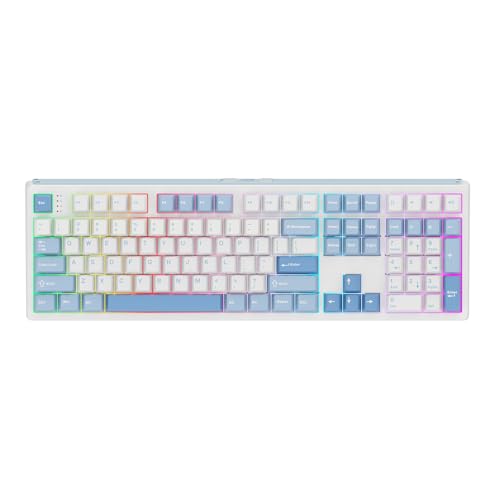
For gamers and professionals seeking a combination of performance and tranquility, the EPOMAKER TH108 Full Size Mechanical Gaming Keyboard stands out with its remarkable 5-layer padded gasket-mount design. This feature enhances sound and comfort, making your typing experience satisfying. With 108 double-shot PBT keycaps and a sturdy plastic body, it’s built to last. Enjoy low latency across wired and wireless modes, perfect for intense gaming. Plus, its hot-swappable PCBA lets you customize keystrokes easily. The tri-mode wireless functionality and customizable RGB backlighting round out this keyboard, offering both versatility and style for your gaming setup.
Best For: Gamers and professionals seeking a high-performance keyboard that combines durability, low latency, and customizable features.
Pros:
- Robust build quality with 108 double-shot PBT keycaps for longevity.
- Low latency performance in both wired and wireless modes, ideal for gaming.
- Hot-swappable PCBA for easy customization of mechanical switches.
Cons:
- The keyboard’s weight (over 1.2kg) may not be ideal for portability.
- Limited built-in storage for macros and layouts compared to some competitors.
- RGB lighting customization may require software installation, which some users might find cumbersome.
Keychron K8 Wireless Mechanical Keyboard

With its quiet Silent Red switches, the Keychron K8 Wireless Mechanical Keyboard is perfect for anyone seeking a peaceful typing experience, whether you’re working in a shared office or gaming late at night. This tenkeyless keyboard connects via Bluetooth 5.1 to up to three devices, making multitasking a breeze. You can also switch to wired mode for a faster response while gaming. The soft white LED backlight and shine-through keycaps enhance visibility in low light. Weighing just 2.2 pounds, it’s portable and well-rated, with a 4.3 out of 5 stars from over 1,000 reviews. Enjoy your typing bliss!
Best For: Anyone seeking a quiet and efficient typing experience in shared spaces or during late-night gaming sessions.
Pros:
- Bluetooth 5.1 connectivity allows seamless multitasking with up to three devices.
- Silent Red switches provide a soft and quiet typing experience, ideal for noise-sensitive environments.
- Soft white LED backlight with shine-through keycaps enhances visibility in low light conditions.
Cons:
- Being a tenkeyless design, it lacks a dedicated numeric keypad which may be inconvenient for some users.
- Limited backlight color options, with only soft white available.
- Some users may prefer a heavier keyboard for stability during intense typing or gaming sessions.
SteelSeries Apex 3 RGB Gaming Keyboard

Perfect for gamers who crave a quiet environment, the SteelSeries Apex 3 RGB Gaming Keyboard features whisper-quiet switches that guarantee nearly silent operation. With a lifespan of 20 million low-friction keypresses, you can enjoy reliable performance during intense gaming sessions. The stunning 10-zone RGB illumination offers customizable color schemes and reactive effects, adding flair to your setup. Plus, its IP32 water resistance protects against liquid spills, ensuring durability. The premium magnetic wrist rest provides full palm support for long hours of comfortable gameplay, while dedicated multimedia controls make volume adjustments effortless. It’s compatible with multiple platforms, enhancing your gaming experience.
Best For: Gamers seeking a quiet and comfortable keyboard experience without sacrificing performance or style.
Pros:
- Whisper-quiet switches for nearly silent operation, perfect for quiet gaming environments.
- 10-zone RGB illumination allows for customizable color schemes and reactive effects, enhancing visual appeal.
- IP32 water resistance protects against liquid spills, ensuring durability during intense gaming sessions.
Cons:
- Limited key customization compared to some higher-end mechanical keyboards.
- Plastic construction may not feel as premium as other materials used in gaming keyboards.
- RGB lighting effects may require software setup, which could be a drawback for users seeking a plug-and-play experience.
Factors to Consider When Choosing a Silent Mechanical Keyboard
When choosing a silent mechanical keyboard, you should think about several key factors. Consider the switch type, as different options can affect both feel and noise level. Don’t forget to look at ergonomic features, connectivity options, and the quality of keycap materials to guarantee you get the best fit for your needs.
Switch Type Variations
Choosing the right switch type is crucial for finding a silent mechanical keyboard that meets your needs. Silent mechanical keyboards often feature specialized switches, like silent red or brown variants, which greatly reduce noise without compromising the typing experience. For instance, CHERRY MX2A Silent Red switches provide quiet operation and longevity, lasting over 50 million keystrokes. If you prefer tactile feedback, silent brown switches offer satisfying resistance while minimizing sound, ideal for both office tasks and gaming. Additionally, consider keyboards with gasket-mounted designs and sound-absorbing materials to further dampen noise and vibrations. If customization is important to you, opt for hot-swappable silent switches, allowing you to easily tailor your keyboard to your personal preferences without any soldering.
Noise Level Considerations
While selecting a silent mechanical keyboard, you’ll want to pay close attention to the noise levels produced during typing. The switch type plays an essential role—opt for silent red or tactile switches designed for quiet operation. CHERRY MX2A Silent Red switches are particularly effective in minimizing sound in quieter environments. Additionally, consider keyboards with noise reduction features like sound-absorbing materials and gasket structures, which can further dampen keypress acoustics. Keyboards with pre-lubed switches also enhance smoothness while reducing friction and noise. Don’t overlook the layout and design, as soft keycaps and dampening layers can greatly impact overall noise levels. Choosing wisely will guarantee you enjoy a peaceful typing experience without disturbing those around you.
Ergonomic Design Features
A silent mechanical keyboard isn’t just about noise reduction; it should also prioritize your comfort during long typing sessions. Look for adjustable feet and key arrangements that promote a comfortable typing height, which can greatly reduce strain. Many models feature a gasket structure, enhancing key stability and minimizing noise, making your typing experience more enjoyable. Keycap materials like PBT are designed to be sweat-proof and non-slippery, ensuring better grip and durability. A compact TKL layout maximizes desk space while keeping essential keys accessible. Additionally, consider keyboards with wrist rests, as they provide full palm support and help reduce fatigue during those marathon typing sessions. Comfort and efficiency go hand in hand for the best typing experience.
Connectivity Options Available
Selecting the right connectivity options for your silent mechanical keyboard can greatly enhance your overall experience. Many models offer versatile choices, including Bluetooth, 2.4GHz wireless, and USB-C wired connections, allowing you to use them across various devices. If you multitask, look for Bluetooth options that let you pair with PCs, laptops, tablets, and smartphones without cables. For gaming or high-performance tasks, a wired connection typically provides faster response times and lower latency. Additionally, consider models with multi-device connectivity, enabling you to switch between devices effortlessly using key combinations. Finally, hot-swappable designs let you customize switches easily, adding to the keyboard’s flexibility and tailoring it to your preferences.
Keycap Material Quality
When choosing a silent mechanical keyboard, the quality of keycap material plays a significant role in your overall typing experience. Opt for PBT keycaps over ABS, as PBT offers greater durability, fade resistance, and sweat-proof properties. High-quality keycaps often use double-shot or dye-sublimation processes, ensuring that legends remain clear and legible over time. Thicker keycaps not only dampen sound better but also provide a more satisfying acoustic profile. Textured surfaces can enhance grip and comfort during long typing sessions, while smooth finishes may improve aesthetics. Finally, consider the keycap design and profile, as these factors influence finger placement and typing ergonomics, ultimately contributing to your comfort and typing efficiency.
Customization and Programming Options
Many enthusiasts find that customization and programming options greatly enhance their experience with silent mechanical keyboards. Many models offer hot-swappable designs, letting you easily change switches and keycaps without soldering, expanding your customization possibilities. Macro programming capabilities enable you to record and assign custom key functions, boosting your efficiency during gaming or work. You can also enjoy extensive RGB lighting customization, choosing from millions of colors and effects to make your setup truly yours. Additionally, many keyboards support connecting multiple devices simultaneously, allowing you to switch effortlessly between them with simple key combinations. With advanced software support, you can adjust settings like backlighting, key sensitivity, and layout configurations to tailor the keyboard to your precise preferences.