
If you’re looking to amplify your graphics performance in 2026, eGPU enclosures with Thunderbolt 5 are a game changer. They support the latest NVIDIA and AMD GPUs, offering powerful upgrades for gaming and creative tasks. With a variety of options available, each with unique features, you might wonder which one suits your needs best. Let’s explore the top ten models that stand out in this evolving market.
Sonnet Breakaway Box 850 T5 eGPU Enclosure
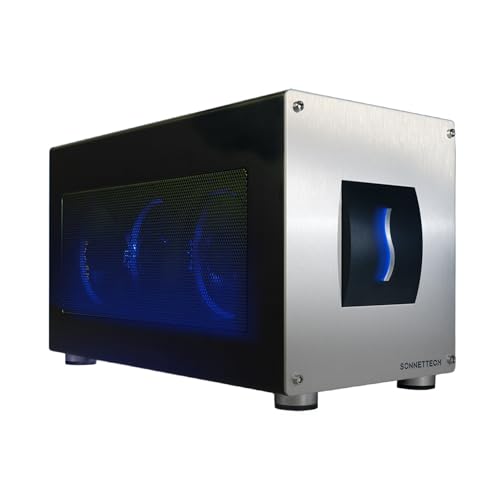
The Sonnet Breakaway Box 850 T5 eGPU Enclosure is perfect for professionals seeking to elevate their graphics performance. With support for Thunderbolt 5, 4, and USB4, it’s designed specifically for Windows 11 laptops. You’ll enjoy near-desktop GPU power, thanks to its 80 Gbps bi-directional bandwidth, which enhances tasks like editing, rendering, and color grading. It accommodates powerful GPU cards from NVIDIA and AMD, while the 850W power supply guarantees peak performance. Plus, the built-in Thunderbolt 5 dock and multiple USB ports offer excellent connectivity. This enclosure supercharges your AI-driven applications, making it a must-have for graphics-intensive fields.
Best For: Professionals in graphics-intensive fields seeking enhanced GPU performance for their Windows 11 laptops.
Pros:
- Supports Thunderbolt 5, Thunderbolt 4, and USB4 for versatile connectivity.
- Delivers 80 Gbps bi-directional bandwidth for near-desktop GPU power.
- Includes an 850W power supply and effective cooling for high-performance GPU cards.
Cons:
- Designed specifically for Windows 11 laptops, limiting compatibility with other systems.
- High initial investment may not be feasible for casual users.
- Size and weight may hinder portability for some users.
Razer Core X V2 External Graphics Enclosure (eGPU)

For gamers and creators seeking a powerful graphics boost, the Razer Core X V2 External Graphics Enclosure stands out with its compatibility for high-performance NVIDIA and AMD desktop GPUs. Designed for Thunderbolt 4 and 5 devices, it delivers ultra-fast bandwidth of up to 80 Gbps, perfect for demanding applications and AAA games. The tool-free installation makes swapping GPUs a breeze, while the built-in 120 mm fan guarantees your system stays cool during heavy loads. Its durable vented steel chassis enhances airflow, maximizing performance. Just remember, the power supply and GPU aren’t included, so you’ll need to supply those separately.
Best For: Gamers and creators looking to enhance their systems with high-performance graphics capabilities through an external graphics enclosure.
Pros:
- Ultra-fast Thunderbolt 5 bandwidth of up to 80 Gbps, ideal for demanding applications and gaming.
- Tool-free installation allows for easy GPU swaps and upgrades without the need for additional tools.
- Durable vented steel chassis promotes optimal airflow and cooling during intense tasks.
Cons:
- Power supply and GPU not included, requiring additional purchases for full functionality.
- Limited compatibility with Mac devices featuring M1 or later chipsets, restricting user options.
- Larger size may be less portable compared to other eGPU solutions, making it less convenient for on-the-go use.
Sonnet Echo SE I T5 PCIe Card Expansion Chassis

Designed for creative professionals and gamers alike, the Sonnet Echo SE I T5 PCIe Card Expansion Chassis stands out with its Thunderbolt 5 connectivity, offering lightning-fast data transfer speeds. You can expand your computer’s capabilities seamlessly with support for high-performance PCIe cards, delivering up to 6000 MB/s bi-directional bandwidth. It’s compatible with full-height and half-length PCIe 4.0 x8 cards, ensuring versatility for your needs. The lightweight aluminum design features a quiet, temperature-controlled fan, making it perfect for desktops and studios. Plus, the auxiliary power and daisy-chaining capabilities enhance your workflow, keeping everything connected and running smoothly.
Best For: Creative professionals and gamers looking to enhance their computer’s performance with high-speed PCIe card expansion.
Pros:
- High-speed connectivity: Thunderbolt 5 support delivers up to 6000 MB/s bi-directional bandwidth.
- Versatile compatibility: Supports both full-height and half-length PCIe 4.0 x8 cards, accommodating various expansion needs.
- Quiet cooling design: Lightweight aluminum enclosure with a temperature-controlled fan ensures efficient and quiet operation.
Cons:
- Limited to one PCIe card: Only supports a single full-height PCIe card, which may not meet the needs of users requiring multiple expansions.
- Price point: May be considered expensive for casual users or those with lower performance needs.
- Power requirements: Some high-performance cards may require additional power, which might complicate setup for certain users.
ANQ-L336 Mini eGPU Enclosure for Laptop

With its compact design and robust compatibility, the ANQ-L336 Mini eGPU Enclosure is perfect for gamers and creative professionals seeking enhanced graphics performance on the go. This PCIe external GPU dock supports Windows, Linux, and macOS, connecting via Thunderbolt 3/4 or USB4. Powered by the JHL7440 module, it delivers impressive 40Gbps data transfer rates, ideal for gaming and 3D modeling. Supporting NVIDIA RTX 50 Series and AMD RX 9000 Series GPUs, you’ll experience stunning visuals. Additionally, its 10Gbps USB-A and dual Thunderbolt 4 ports make it a versatile hub for all your devices. Don’t miss out on this powerhouse!
Best For: The ANQ-L336 Mini eGPU Enclosure is best for gamers and creative professionals seeking enhanced graphics performance on the go.
Pros:
- High data transfer rates of up to 40Gbps, ensuring smooth performance for gaming and 3D modeling.
- Compact and portable design, making it easy to transport and use with various devices.
- Versatile connectivity options with Thunderbolt 4 and USB-A ports for multiple external device connections.
Cons:
- Power supply unit (PSU) is not included, which may require an additional purchase.
- Limited to specific GPU models, potentially excluding some users with other brands or older GPUs.
- Customer rating of 3.9 out of 5 stars indicates mixed reviews and some potential concerns.
eGPU Enclosure Thunderbolt 3/4 USB4 Dock for NVIDIA/AMD Graphics Cards

The eGPU Enclosure Thunderbolt 3/4 USB4 Dock stands out as the ideal choice for gamers and content creators seeking to elevate their graphics performance. It supports NVIDIA RTX 50 and AMD RX 7000 series graphics cards, ensuring exceptional compatibility with Windows, Linux, and MacOS. With a PCIe 4.0 x16 data transfer mode, you’ll experience lightning-fast 32Gbps data speeds. The durable aluminum alloy design keeps your setup sleek while accommodating graphics cards of any length. Plus, with PD 85W charging through its Thunderbolt ports, you’ll keep your devices powered up and ready for intense gaming sessions or creative projects.
Best For: Gamers and content creators looking to enhance their graphics performance with high compatibility and speed.
Pros:
- Supports a wide range of high-performance graphics cards, including NVIDIA RTX 50 series and AMD RX 7000 series.
- Offers fast data transfer speeds of up to 32Gbps with PCIe 4.0 x16 mode for seamless gaming and content creation.
- Durable aluminum alloy construction ensures a sleek design while accommodating unlimited graphics card lengths.
Cons:
- Requires Thunderbolt 3/4 or USB4 support, limiting compatibility with some devices.
- Higher initial investment compared to traditional GPU setups.
- May require additional power supplies for certain high-end graphics cards beyond the provided PD charging.
Sonnet eGPU Breakaway Box 750ex – External GPU Chassis

For creatives seeking a significant boost in graphics performance, the Sonnet eGPU Breakaway Box 750ex stands out as an ideal solution. This external GPU chassis connects high-performance GPU cards to your computer via Thunderbolt 3 ports, enhancing your editing, rendering, and animation tasks. It’s compatible with both Mac and Windows systems (except M1 Macs) and supports a variety of GPU models, including NVIDIA and AMD. With its robust 750W power supply, it guarantees that even the latest GPUs run smoothly. Plus, you get extra connectivity with four USB Type A ports and an RJ45 Ethernet port for all your peripheral needs.
Best For: Creatives and professionals looking to enhance their graphics performance for tasks such as video editing, rendering, and animation.
Pros:
- High compatibility: Works with a wide range of GPU models from both AMD and NVIDIA.
- Robust power supply: The 750W power supply ensures support for the latest GPU requirements, making it future-proof.
- Additional connectivity: Includes four USB Type A ports and an RJ45 Ethernet port for versatile peripheral connections.
Cons:
- Limited compatibility with M1 Macs: The product does not support Apple’s M1 Macs, restricting its use for some users.
- Requires Thunderbolt 3: Users must have a Thunderbolt 3 port on their computer to utilize the eGPU.
- Potentially bulky: The external chassis may take up additional space and may not be portable for all users.
MINISFORUM DEG1 eGPU Dock for RTX 4090 and AMD RX 7900 XTX

Designed specifically for high-performance graphics cards, the MINISFORUM DEG1 eGPU Dock is an ideal choice for gamers and content creators looking to enhance their systems with the RTX 4090 or AMD RX 7900 XTX. This external GPU docking station features Oculink 4i connectivity for seamless integration, but remember, you’ll need to power off your machine to connect it. It supports ATX and SFX power supplies, giving you flexibility in your setup, though the power supply isn’t included. Just keep in mind that the follow-start function is compatible only with MINISFORUM Mini PCs using original wires.
Best For: Gamers and content creators seeking to enhance their systems with high-performance graphics cards like the RTX 4090 or AMD RX 7900 XTX.
Pros:
- High-performance compatibility with leading graphics cards.
- Flexible power supply options (ATX and SFX) for various setups.
- Designed for seamless integration with MINISFORUM Mini PCs.
Cons:
- Power supply not included in the package.
- Oculink interface requires the machine to be powered off for connection (no hot plugging).
- Follow-start function limited to MINISFORUM Mini PCs using original wires only.
eGPU Enclosure Dock for Thunderbolt 3/4 Compatible Laptops and Gaming Handhelds

Releasing exceptional graphics performance, the eGPU enclosure dock is perfect for Thunderbolt 3/4 compatible laptops and gaming handhelds. It supports top-tier NVIDIA RTX 50 Series and AMD RX 7000 Series GPUs, ensuring you’ll experience elite capabilities for gaming, AI tasks, and 3D rendering. Powered by the JHL7440 controller, this dock offers universal compatibility, connecting seamlessly with various devices. With connectivity options like a 10Gbps USB A port and a Thunderbolt 4 port, it serves as a versatile hub for your external devices. Just make sure your device has the correct ports to activate its full potential.
Best For: Gamers and professionals seeking enhanced graphics performance on Thunderbolt 3/4 compatible laptops and handhelds.
Pros:
- Supports high-end GPUs: Compatible with NVIDIA RTX 50 Series and AMD RX 7000 Series, providing superior graphics capabilities.
- Versatile connectivity: Equipped with multiple ports including a 10Gbps USB A port and a Thunderbolt 4 port for easy connection of external devices.
- Workstation-grade performance: Powered by JHL7440 controller, ideal for demanding applications such as gaming, AI training, and 3D rendering.
Cons:
- No power supply or GPU included: Requires separate purchase of ATX power supply and graphics card to function.
- Compatibility limitations: Only works with devices that have Thunderbolt 3/4 or USB4 ports.
- Potential for misuse: Incorrect cable connections may lead to automatic power-off protection, requiring careful handling.
RIITOP eGPU Enclosure USB4.0 for Thunderbolt 4 Graphics Card
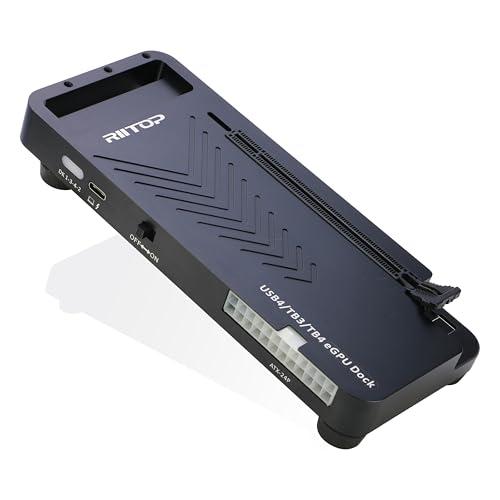
The RIITOP eGPU Enclosure USB4.0 is a game-changer for anyone looking to elevate their laptop’s graphics performance. Compatible with Thunderbolt 4 devices, it supports the latest NVIDIA RTX 50 Series and AMD RX 7000 Series GPUs, transforming thin laptops into powerful machines for gaming, AI computing, and video editing. With a straightforward installation process, you’ll secure your graphics card, connect the necessary cables, and power up in no time. Its open design accommodates various card sizes, ensuring you can maximize your setup. Just remember, you’ll need a compatible power supply and a laptop with a 40Gbps bandwidth.
Best For: Gamers, content creators, and AI developers seeking to enhance graphics performance on thin laptops with Thunderbolt 4 compatibility.
Pros:
- High-performance graphics for demanding applications like gaming, video editing, and AI computing.
- Easy installation process with clear steps for securing the graphics card and connecting necessary cables.
- Open design that accommodates various graphics card sizes, providing flexibility in hardware choices.
Cons:
- Requires a compatible power supply and specific GPU which may limit options for some users.
- Limited compatibility for Mac OS users, as it only supports AMD graphics cards.
- Performance dependent on the laptop’s bandwidth; older models may not achieve full potential.
Qwiizlab Fanless NVMe Enclosure (Compatible with Thunderbolt 5)

If you’re looking for a high-performance solution to enhance your graphics capabilities, the Qwiizlab Fanless NVMe Enclosure is an excellent choice. With its 80Gbps speeds, you’ll experience lightning-fast performance, thanks to the Intel JHL9480 controller. This enclosure supports PCIe M.2 SSDs up to 8TB, ensuring you have ample storage for your needs. Its rugged aluminum chassis and fanless design keep your setup cool and quiet. Plus, it’s compatible with Thunderbolt 5 and backward compatible with Thunderbolt 4/3 and USB4. Included accessories make installation a breeze, making it a solid investment for gamers and creatives alike.
Best For: Gamers and creatives seeking a high-performance, fanless NVMe enclosure with ample storage and compatibility with the latest Thunderbolt technology.
Pros:
- High-speed performance with sequential speeds over 6,300MB/s write and 5,900MB/s read.
- Fanless design ensures quiet operation while effectively dissipating heat.
- Broad compatibility with PCIe Gen 5 and Gen 4 SSDs, supporting various M.2 sizes.
Cons:
- Limited to M.2 SSD types, which may not be suitable for users with different storage formats.
- Price point may be higher compared to other standard NVMe enclosures.
- Requires installation which might be challenging for some users without prior experience.
Factors to Consider When Choosing an eGPU Enclosure With Thunderbolt 5
When you’re choosing an eGPU enclosure with Thunderbolt 5, you need to take into account several key factors. Make sure it’s compatible with your devices and meets your performance needs. Also, think about the power supply, cooling solutions, and connectivity options to get the best graphics experience.
Compatibility With Devices
Choosing an eGPU enclosure with Thunderbolt 5 can greatly enhance your graphics performance, provided you consider several key compatibility factors. First, ascertain the enclosure supports Thunderbolt 5 to maximize compatibility with the latest laptops and devices. It’s also wise to check for backward compatibility with Thunderbolt 4 and USB4, which offers flexibility if you’re using older devices. Confirm that the enclosure works with your specific operating system, as some may have limitations with Mac, Windows, or Linux. Additionally, verify that the enclosure can accommodate your chosen GPU model regarding size and power requirements. Finally, look for extra connectivity options like USB ports or Ethernet to boost functionality with peripheral devices.
Performance Capabilities
One key factor to evaluate in your eGPU enclosure decision is performance capabilities, particularly with Thunderbolt 5‘s impressive 80 Gbps bi-directional bandwidth. This allows for near-desktop GPU performance, making it vital to choose enclosures that support PCIe 4.0 or higher for faster data transfer rates. This enhancement is essential when running demanding applications. You should also verify compatibility with a variety of high-performance GPUs, like the NVIDIA GeForce RTX 30/40 Series or AMD Radeon RX 6000/9000 Series, to maintain upgrade versatility. Additionally, consider enclosures with integrated USB ports and Ethernet capabilities, as these features can markedly boost your overall eGPU setup’s utility and performance. Prioritizing these elements will lead to a powerful graphics experience.
Power Supply Requirements
Selecting the right power supply for your eGPU enclosure is essential to guarantee peak performance. Make sure the power supply unit (PSU) meets the wattage requirements of your graphics card, typically between 750W to 850W for high-performance GPUs. Check if the enclosure includes an integrated PSU or if you’ll need to buy one separately, as many don’t come with a GPU or PSU included. If you want your enclosure to charge connected devices, consider models that support additional power delivery, which may require a higher wattage PSU. Also, verify the type of power connectors your GPU needs, like 6-pin or 8-pin. For power-hungry PCIe cards, look for enclosures with auxiliary PCIe power connections for stable performance.
Cooling Solutions
Once you’ve confirmed your power supply meets the demands of your GPU, the next significant factor to take into account is cooling solutions. Effective cooling is essential, especially for high-performance graphics cards that generate substantial heat during intensive tasks. Look for eGPU enclosures with temperature-controlled, variable-speed fans that adjust their speed based on thermal demands, ensuring efficient cooling. Some designs enhance airflow through rugged aluminum bodies and grooved structures, providing passive cooling alongside active systems. Remember, adequate cooling is important for the power supply, particularly with high-wattage GPUs. A well-ventilated enclosure not only improves performance but also extends your GPU’s lifespan by maintaining lower operating temperatures during prolonged use in graphics-intensive applications.
Connectivity Options
When you’re considering an eGPU enclosure with Thunderbolt 5, it’s important to prioritize connectivity options that enhance your overall experience. Look for enclosures with a built-in Thunderbolt 5 dock featuring multiple peripheral ports. This not only boosts connectivity but also guarantees you can connect various devices seamlessly. Confirm the enclosure supports data transfer rates of up to 80 Gbps bi-directional bandwidth for peak performance. Compatibility with Thunderbolt 4 and USB4 interfaces is vital, as it allows versatile connections with different laptops and peripherals. Additional USB Type A ports and Ethernet connections are great for fast networking. Finally, consider enclosures that offer daisy-chaining capabilities, letting you connect multiple devices through a single Thunderbolt port without overcrowding.
Design and Build Quality
Choosing the right eGPU enclosure goes beyond just connectivity—it also hinges on design and build quality. You’ll want a durable enclosure, often made from aluminum or steel, to guarantee it withstands wear and promotes ideal airflow for cooling. Look for models with a variable-speed, temperature-controlled fan system to efficiently manage heat during intensive tasks. An open design can accommodate various graphics card sizes, enhancing compatibility for future upgrades. If portability’s a priority, lightweight enclosures make it easier to transport without sacrificing performance. Finally, consider the aesthetics and layout; tool-free designs allow for quick GPU swaps, making installations seamless and hassle-free. Prioritize these factors to maximize your eGPU experience.