
If you’re looking to elevate your gaming experience in 2026, choosing the right eGPU enclosure for your Windows setup is essential. With so many options available, it can be intimidating to find the one that fits your needs. From enhanced graphics performance to seamless connectivity, each enclosure has unique features that can greatly impact your gaming. Let’s explore the top ten choices that promise to transform how you game.
Sonnet Breakaway Box 850 T5 eGPU Enclosure
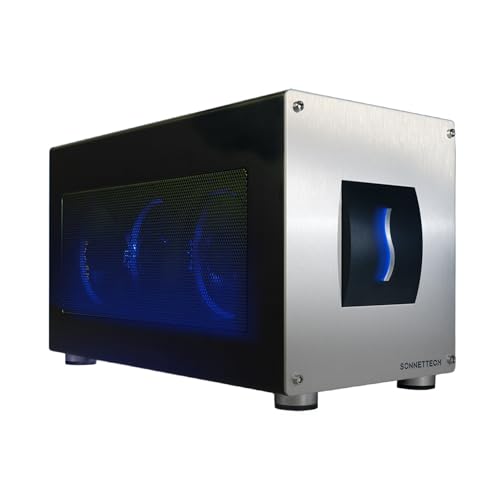
The Sonnet Breakaway Box 850 T5 eGPU Enclosure is a game changer for Windows 11 laptop users looking to elevate their graphics performance. With support for Thunderbolt 5, Thunderbolt 4, and USB4, it delivers an impressive 80 Gbps bi-directional bandwidth. You’ll experience near-desktop GPU power, perfect for demanding tasks like editing and rendering. Compatible with popular GPU models, it’s equipped with an 850W power supply and a temperature-controlled fan, ensuring ideal cooling. Plus, the built-in dock offers multiple connectivity options, including a fast Ethernet port. This enclosure supercharges your workflow, making it an essential tool for creative professionals.
Best For: Creative professionals using Windows 11 laptops who need enhanced graphics performance for demanding applications like editing and rendering.
Pros:
- High Performance: Delivers near-desktop GPU power with 80 Gbps bi-directional bandwidth for intensive tasks.
- Multiple Connectivity Options: Includes a Thunderbolt 5 dock and various USB ports for versatile connections.
- Robust Cooling System: Equipped with an 850W power supply and a temperature-controlled fan to keep graphics cards cool.
Cons:
- Cost: May be considered expensive for casual users or those with less demanding graphics needs.
- Size: The enclosure may take up additional space, which could be a concern for users with limited work area.
- Compatibility Restrictions: Limited to specific GPU models, which may not suit all users’ preferences or existing hardware.
ANQ-L336 Mini eGPU Enclosure for Laptop

For gamers and creative professionals seeking a powerful upgrade, the ANQ-L336 Mini eGPU Enclosure stands out with its impressive compatibility across multiple operating systems, including Windows, Linux, and MacOS. With a robust JHL7440 controller, it delivers high performance for gaming, AI training, and 3D modeling. You’ll enjoy lightning-fast data transfer rates of 40Gbps through Thunderbolt 3/4. The enclosure supports NVIDIA’s RTX 50 Series and AMD’s RX 9000 Series GPUs, ensuring you can harness top-tier graphics. Plus, with multiple ports, including USB-A and Thunderbolt 4, it doubles as a handy hub for your external devices.
Best For: Gamers and creative professionals looking for a high-performance external GPU solution compatible with multiple operating systems.
Pros:
- High performance: Equipped with a JHL7440 controller, providing fast data transfer rates of up to 40Gbps.
- Versatile compatibility: Supports both NVIDIA RTX 50 Series and AMD RX 9000 Series GPUs, suitable for various graphic-intensive applications.
- Multi-port functionality: Acts as a hub with multiple ports, including Thunderbolt 4 and USB-A, allowing easy connectivity for external devices.
Cons:
- Power supply not included: Requires an external power supply, which may add to the total cost.
- Limited GPU support: Only compatible with specific GPU models, potentially excluding other options.
- Moderate customer rating: With a 3.9 out of 5 stars from 54 reviews, there may be concerns regarding reliability or satisfaction.
GMKtec AD-GP1 External GPU Docking Station with AMD Radeon 7600M XT

Looking to elevate your gaming experience? The GMKtec AD-GP1 External GPU Docking Station with AMD Radeon 7600M XT is your ticket to stunning visuals and smooth gameplay. With RDNA 3.0 architecture and clock speeds up to 2300 MHz, it drastically enhances rendering performance. You can connect up to four monitors simultaneously thanks to its quad 8K video output capabilities via HDMI and DisplayPort. Plus, the compact design makes it easy to transport, whether you’re gaming at home or on the go. Enjoy peace of mind with a 1-year warranty and reliable support from GMKtec.
Best For: Gamers and professionals seeking enhanced graphics performance and multi-monitor setups for immersive experiences.
Pros:
- High-performance graphics with AMD Radeon 7600M XT and RDNA 3.0 architecture for smooth gameplay.
- Quad 8K video output capability allows for connecting up to four monitors for an expansive visual experience.
- Portable design makes it easy to transport for gaming at home or on the go.
Cons:
- Requires device compatibility confirmation before connecting to ensure optimal performance.
- Limited to a 1-year warranty, which may not cover all potential issues over time.
- May not be suitable for users with lower power requirements or those who do not need multi-monitor setups.
eGPU Enclosure Thunderbolt 3/4 for NVIDIA/AMD Graphics Cards

Imagine boosting your laptop or compact gaming console’s performance with an eGPU enclosure that seamlessly integrates NVIDIA or AMD graphics cards. This Thunderbolt 3/4 enclosure supports high-performance models like the NVIDIA RTX 50 series and AMD RX 7000 series, ensuring top-tier gaming experiences. With a PCIe 4.0 x16 data transfer mode, it delivers impressive speeds up to 32Gbps. The robust aluminum alloy construction keeps it lightweight yet durable, while the open design accommodates graphics cards of any length. Plus, with dual Thunderbolt ports and DisplayPort connectivity, you’ll enjoy hassle-free setup and powerful performance for all your gaming needs.
Best For: Gamers and professionals seeking to enhance their laptop or compact gaming console’s graphics performance with high-end NVIDIA or AMD graphics cards.
Pros:
- High compatibility with a wide range of NVIDIA and AMD graphics cards, including the latest models.
- Impressive data transfer speeds of up to 32Gbps with PCIe 4.0 x16 support, ensuring smooth performance during intensive tasks.
- Durable and lightweight design made from aluminum alloy, allowing for easy transport and longevity.
Cons:
- Requires Thunderbolt 3/4 or USB4 support, limiting compatibility with some devices without these interfaces.
- Potentially high cost associated with high-performance graphics cards needed to fully utilize the eGPU enclosure.
- Limited charging options with only 85W and 15W PD charging capabilities through the Thunderbolt ports.
eGPU Enclosure Dock Compatible with Thunderbolt 3/4

Designed specifically for gamers and creative professionals, the eGPU Enclosure Dock compatible with Thunderbolt 3/4 releases exceptional performance with support for the latest NVIDIA and AMD graphics cards. Powered by the JHL7440 controller, it delivers workstation-grade capabilities perfect for gaming, AI training, and 3D rendering. This dock offers universal compatibility with devices featuring Thunderbolt 3/4 or USB4 ports, ensuring high-performance graphics across various workloads. With a 10Gbps USB A port and a Thunderbolt 4 port, it also functions as a hub for your external devices. Just remember to keep your connections correct to avoid power issues.
Best For: Gamers and creative professionals seeking enhanced graphics performance for demanding applications.
Pros:
- High compatibility with Thunderbolt 3/4 and USB4 devices for versatile use.
- Exceptional performance powered by the JHL7440 controller, ideal for gaming and 3D rendering.
- Multiple connectivity options, including a Thunderbolt 4 port and 10Gbps USB A port, functioning as a hub for external devices.
Cons:
- Does not include ATX power supply or graphics card, requiring additional purchases.
- Requires specific port types (Thunderbolt 3/4 or USB4) for operation, limiting usage with older devices.
- Potential for power issues if cables are incorrectly connected, necessitating careful setup.
eGPU Enclosure Compatible with Thunderbolt 3/4 and USB4

For gamers and professionals needing powerful graphics capabilities, an eGPU enclosure compatible with Thunderbolt 3/4 and USB4 is a game changer. With support for daisy chaining and a certified Intel JHL7440 Chip, it guarantees stable, high-speed performance for demanding tasks like gaming and 3D modeling. You’ll benefit from 32Gbps data transfer rates and easy connectivity through USB-A and Thunderbolt ports. Just remember, it’s crucial to use compatible power supplies and keep your Windows 11 updated. This enclosure not only boosts your gaming experience but also enhances overall computer performance by connecting external graphics cards seamlessly.
Best For: Gamers and professionals seeking enhanced graphics performance and efficiency for demanding applications.
Pros:
- Stable and efficient performance with the certified Intel JHL7440 Chip, ideal for gaming and 3D modeling.
- High-speed connectivity with 32Gbps data transfer rates and multiple ports for additional devices.
- Supports Power Delivery (PD) charging up to 85W, making it versatile for various setups.
Cons:
- Limited compatibility as it only supports Thunderbolt 3/4 and USB4 interfaces, excluding other types.
- Requires Windows 11 for optimal functionality, which may limit users with older operating systems.
- Potential complexity in setup, as users must ensure compatible power supplies and configurations.
External GPU Enclosure Dock (Compatible with Win 10/11, Thunderbolt 3/4, USB 4)

If you’re looking to enhance your gaming or graphics performance on a laptop or compact PC, the External GPU Enclosure Dock is an excellent choice. Compatible with Win 10/11 and featuring Thunderbolt 3/4 and USB 4, it supports high-end NVIDIA and AMD graphics cards with PCIe 4.0. The dock delivers 80W Power Delivery via USB-C, ensuring efficient power management. With a JHL7440 controller module, you’ll experience seamless performance in gaming and 3D rendering. Plus, its connectivity options include a 10Gbps USB A port and a Thunderbolt 4 port for easy connections. Just remember to check your device’s compatibility before setup!
Best For: Gamers and professionals seeking to upgrade their laptop or compact PC with high-performance graphics capabilities.
Pros:
- Supports a wide range of high-end NVIDIA and AMD graphics cards, ensuring compatibility with the latest technology.
- Delivers 80W Power Delivery via USB-C, providing efficient power management for connected devices.
- Equipped with multiple connectivity options, including a Thunderbolt 4 port and a 10Gbps USB A port for versatile connections.
Cons:
- Does not include ATX power or graphics card, requiring additional purchases for full functionality.
- Requires compatible Thunderbolt 4, 3, or USB 4 ports on the device for operation, limiting its use with older systems.
- Inserting CPU cables incorrectly can trigger power-off protection, necessitating careful setup to avoid issues.
External GPU Enclosure (eGPU) for Thunderbolt 3/4 and USB4

When you’re looking to boost your laptop or compact gaming machine’s performance, an external GPU enclosure (eGPU) that supports Thunderbolt 3/4 and USB4 can be a game changer. These enclosures, using the Intel JHL7440 chip, deliver stable expansion for demanding tasks like gaming and AI training. They connect seamlessly, offering dual Thunderbolt 3 ports for 32Gbps data transfer. With one USB-A port and ATX power supply compatibility, you can power multiple devices. Just remember, you’ll need Windows 11 for peak performance. If you’ve got the right interfaces, an eGPU can considerably enhance your gaming experience.
Best For: Gamers and professionals using laptops or compact machines with Thunderbolt 3/4 or USB4 interfaces who want to enhance their system’s graphics performance.
Pros:
- High Performance: Supports demanding applications like gaming, AI training, and 3D modeling.
- Multiple Connectivity Options: Features dual Thunderbolt 3 ports and a USB-A port for versatile device connections.
- Power Supply Compatibility: Works with ATX power supplies and supports PD charging up to 85W for additional devices.
Cons:
- Interface Limitation: Only compatible with Thunderbolt 3/4 and USB4 devices, excluding older technology.
- Windows 11 Requirement: Optimal performance is only available on Windows 11, limiting compatibility for some users.
- Cost: Investing in an eGPU enclosure may require a significant financial commitment, especially for high-performance graphics cards.
GMKtec AD-GP1 External GPU Docking Station with AMD Radeon 7600M XT Graphics Card

The GMKtec AD-GP1 External GPU Docking Station, equipped with the powerful AMD Radeon 7600M XT Graphics Card, is perfect for gamers and content creators seeking to elevate their visual experience. With RDNA 3.0 architecture and impressive clock speeds, this setup delivers stunning graphics and smooth gameplay. You can enjoy quad 8K video output through its dual HDMI2.1 and dual DP2.0 ports, connecting up to four monitors simultaneously. The Oculink port guarantees higher bandwidth and lower lag, while the compact design makes it easily portable. Plus, GMKtec offers a one-year warranty for added peace of mind.
Best For: Gamers and content creators looking to enhance their graphics performance and multitasking capabilities with high-resolution displays.
Pros:
- High graphics performance with AMD Radeon 7600M XT and RDNA 3.0 architecture for stunning visuals.
- Supports quad 8K video output, allowing connection to up to four monitors simultaneously for an immersive experience.
- Compact and portable design makes it easy to transport for on-the-go gaming or content creation.
Cons:
- Requires compatible devices to fully utilize the Oculink and USB4 ports, which may limit usability for some users.
- Potentially higher cost compared to traditional internal GPUs, which may not be suitable for budget-conscious buyers.
- Limited warranty period of one year, which may not provide sufficient coverage for long-term users.
External GPU Dock Station Compatible with Thunderbolt 3/4 and USB4

For Windows users seeking enhanced graphics performance, the external GPU dock station compatible with Thunderbolt 3/4 and USB4 stands out as an ideal solution. This dock harnesses the power of the JHL7440 controller, allowing data transfer rates of up to 32Gbps. To utilize its full potential, confirm your system runs Windows 11 and has the appropriate Thunderbolt port. It supports various power supplies and provides a 10Gbps USB A port for additional connectivity. Just remember not to connect the CPU cable to the PCIe-8PIN port to avoid issues. This dock elevates your gaming experience seamlessly and efficiently.
Best For: Windows users looking to enhance their graphics performance through an external GPU solution compatible with Thunderbolt 3/4 and USB4.
Pros:
- High Data Transfer Rates: Achieves up to 32Gbps data transfer with the JHL7440 controller.
- Versatile Connectivity: Features a 10Gbps USB A port and Thunderbolt 4 port for additional device connections.
- Power Delivery Support: Provides charging up to 85W, adding convenience for users with power-hungry devices.
Cons:
- Windows 11 Requirement: Only compatible with the latest version of Windows 11 for detection.
- Limited Compatibility: Not compatible with older Thunderbolt versions or USB-C products.
- No Included Power Supply: Requires a separate purchase of an appropriate power supply and graphics card.
Factors to Consider When Choosing an eGPU Enclosure for Windows
When you’re picking an eGPU enclosure for Windows, several factors are essential to guarantee you get the best performance. You’ll want to take into account compatibility with your graphics card, power supply needs, and available connectivity options. Don’t forget to check the performance specs and cooling efficiency to keep everything running smoothly.
Compatibility With Graphics Cards
Choosing an eGPU enclosure that’s compatible with your graphics card is essential for maximizing performance and guaranteeing a seamless gaming or creative experience. First, confirm that the enclosure supports your specific graphics card series, like NVIDIA GeForce RTX 30, 40, or 50 Series, or AMD Radeon RX 6000, 7000, or 9000 Series. Next, check the PCIe interface type; some enclosures only support PCIe 4.0 or 3.0, which can impact data transfer rates. Don’t forget to verify the enclosure’s maximum GPU size and length to guarantee a proper fit. Finally, confirm compatibility with your operating system, as some enclosures only work with Windows 10/11, while others may support Linux or macOS too.
Power Supply Requirements
Power supply requirements play an essential role in selecting the right eGPU enclosure for your Windows setup. Make sure the enclosure provides at least 850W to meet the demands of high-performance graphics cards. Look for enclosures that support Power Delivery (PD) charging, ideally offering a minimum of 85W, to power connected devices while you game. It’s also important to confirm compatibility with various power supply types like ATX, SFX, or DC 12V, ensuring it fits your setup. Keep in mind that some enclosures might not include a power supply, meaning you’ll need to purchase one separately. Finally, check for protections against incorrect connections to avoid potential power-off issues. This attention to detail will enhance your gaming experience.
Connectivity Options Available
Connectivity options are essential in selecting the right eGPU enclosure for your Windows setup. Look for enclosures that support Thunderbolt 3, Thunderbolt 4, or USB4 interfaces to guarantee high-speed data transfer rates, reaching up to 40Gbps. Consider the number and types of ports available; USB-A ports can help connect additional peripherals, while Thunderbolt ports allow for daisy chaining multiple devices. Make sure the enclosure is compatible with your devices, as those designed for Thunderbolt interfaces may not work with older standards. Also, check for Power Delivery capabilities, as some enclosures offer up to 85W charging. Finally, evaluate bandwidth capabilities; higher bandwidth can greatly enhance performance in graphics-intensive tasks like gaming and 3D rendering.
Performance Specifications Overview
When evaluating performance specifications for an eGPU enclosure, it’s crucial to contemplate several key factors that can greatly impact your setup’s efficiency. First, consider the data transfer rate; options like Thunderbolt 3/4 and USB4 offer up to 40 Gbps, while advanced models can reach 80 Gbps, markedly enhancing performance. Compatibility with high-performance graphics cards, such as NVIDIA’s RTX 50 series or AMD’s RX 7000 series, is essential for maximizing capabilities. Additionally, check the power supply—many enclosures come rated at 850W or more to support demanding GPUs. Finally, the integration of advanced controller modules, like the JHL7440, boosts stability and efficiency, ensuring seamless data transfer for your gaming or rendering applications. Choose wisely to optimize your gaming experience!
Cooling System Efficiency
As you explore the performance of eGPU enclosures, don’t overlook the importance of an effective cooling system. High-performance graphics cards generate considerable heat, which can lead to thermal throttling and reduced performance. Look for enclosures with temperature-controlled, variable-speed fans that adjust according to the thermal load, enhancing cooling efficiency. Ideal airflow design is essential; it helps dissipate heat effectively, maintaining stable operating temperatures during long gaming sessions. Some enclosures also feature larger heatsinks or additional cooling mechanisms that further improve thermal management. Regularly monitoring internal temperatures and ensuring unobstructed airflow can greatly extend the lifespan of your eGPU enclosure and the installed graphics card, allowing you to enjoy your gaming experience without interruptions.
Size and Portability
Size and portability are essential factors to evaluate when choosing an eGPU enclosure for Windows. When you’re on the go, consider the dimensions and weight of the enclosure, as a compact design around 6 to 7 inches in height and width can enhance convenience. Lightweight models, typically around 0.7 kg (1.5 lbs), make transport a breeze. However, verify that the enclosure accommodates your GPU’s length and width, as high-performance graphics cards often exceed standard sizes. Opt for enclosures with an open design to support longer graphics cards while maintaining portability. Balancing size and functionality can greatly impact your gaming or professional experience, so choose wisely to keep your setup efficient and mobile.
Build Quality and Design
Choosing an eGPU enclosure that stands out in build quality and design can greatly enhance your overall experience. Look for enclosures made from aluminum alloy or anodized materials, as they offer durability and resistance to rust and fading. A compact, lightweight design is key for portability, making it easier to transport your setup for gaming or professional use. Guarantee the enclosure features adequate ventilation and cooling systems, like temperature-controlled fans, to prevent overheating during intense sessions. Compatibility with various power supply types, such as ATX and SFX, adds flexibility. Finally, opt for an open design that accommodates different lengths of graphics cards to assure you can upgrade in the future without hassle.
Price and Value Comparison
When selecting an eGPU enclosure, it’s important to take into account price and value alongside build quality and design. Prices can range from $200 to over $800, influenced by performance, power supply capacity, and features. Higher-priced models often support enhanced power delivery, accommodating powerful GPUs with up to 850W. If you need advanced connectivity, like Thunderbolt 5 or multiple USB ports, expect to pay a premium for that versatility. Additionally, consider performance specifications; enclosures with data transfer rates of 40Gbps for Thunderbolt 3/4 provide better GPU efficiency. Finally, warranty and customer support can greatly impact value, with higher-priced options usually offering longer warranties and superior after-sales assistance. Choose wisely to maximize your investment.