
When it comes to rackmount PC cases, choosing the right one can greatly impact your system’s performance and maintenance. You want a case that not only guarantees excellent cooling but also offers easy access to components. With various options available, including the Rosewill and SilverStone models, each brings unique features to the table. Let’s explore the top contenders that combine durability with functionality, making certain your setup meets the demands of any environment.
4U Server Cabinet Case – Rackmount Server Chassis
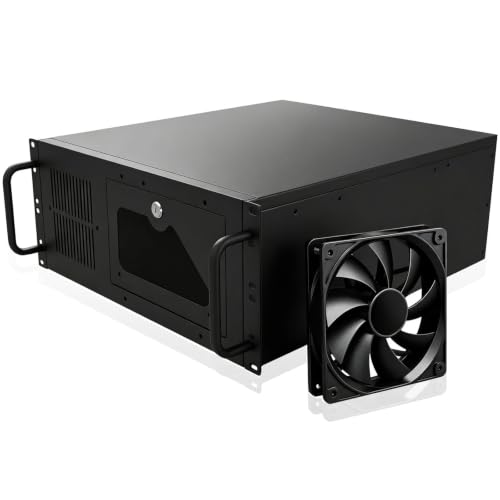
If you’re looking for a robust solution to house your essential hardware, the 4U Server Cabinet Case is an excellent choice for both IT professionals and enthusiasts. With 7 PCI slots, it offers ample storage for various components, from servers to audio/video accessories. Its combined internal architecture guarantees efficient airflow, while the lockable design protects your gear from tampering and theft. Plus, the front door’s foam filter minimizes dust, extending the life of your hardware. Universally mountable in standard racks, this case supports various motherboard sizes, making it a versatile option for any setup. Enjoy peak performance and easy access!
Best For: IT professionals and hardware enthusiasts seeking a secure and versatile server chassis for their components.
Pros:
- Ample storage capacity with 7 PCI slots for various hardware and accessories.
- Lockable design enhances security, protecting against tampering and theft.
- Efficient airflow and dust filtration extend the longevity of hardware components.
Cons:
- Limited to standard rack compatibility, which may not fit all custom setups.
- Size may be too large for users with minimal hardware requirements.
- Installation of components may require technical knowledge, which could be a barrier for beginners.
Rosewill 4U Server Chassis Rackmount Case (RSV-R4100U)

The Rosewill 4U Server Chassis Rackmount Case (RSV-R4100U) is an excellent choice for IT professionals and enthusiasts seeking a robust and versatile solution for their server setups. With 7 internal 3.5” HDD bays and room for 2 additional 5.25” devices, you’ll enjoy plenty of storage options. It supports ATX and CEB motherboards and offers 7 PCI expansion slots for future upgrades. The cooling system features 3 pre-installed PWM fans, ensuring efficient airflow while keeping noise to a minimum. Plus, the sleek silver/black finish and front panel security lock enhance both aesthetics and protection for your valuable hardware.
Best For: IT professionals and enthusiasts looking for a versatile and secure server chassis with ample storage and expansion options.
Pros:
- Spacious design with 7 internal 3.5” HDD bays for extensive storage.
- Efficient cooling system with 3 pre-installed PWM fans to minimize noise.
- Built-in front panel lock for enhanced security of hardware components.
Cons:
- Limited to 4U height, which may restrict some larger components.
- The weight of the chassis may be cumbersome for frequent transport.
- Only supports ATX and CEB motherboards, limiting compatibility with smaller form factors.
Rosewill 4U Server Chassis (RSV-R4000U)
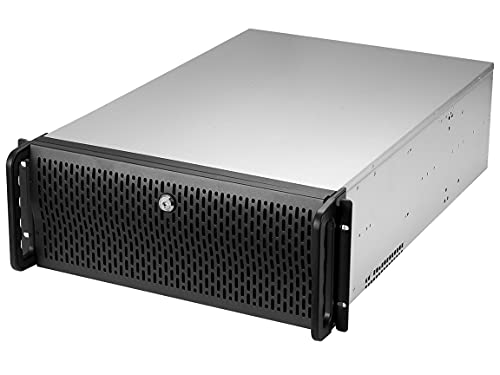
For those seeking a robust solution for server applications, the Rosewill 4U Server Chassis (RSV-R4000U) stands out with its impressive 11-bay design. You’ll enjoy eight internal 3.5” HDD bays and three additional 5.25” device bays, providing ample storage. At 21″ deep, it accommodates ATX and CEB motherboards comfortably. With seven PCI expansion slots, this chassis offers great growth potential. The four pre-installed cooling fans guarantee efficient airflow while maintaining quiet operation. Plus, front panel LED indicators and two USB 3.0 ports enhance usability. Secure your setup with the built-in front panel lock for added peace of mind.
Best For: Users seeking a spacious and expandable server chassis with efficient cooling for demanding server applications.
Pros:
- Ample Storage: Features 11 bays, including 8 internal 3.5” HDD bays and 3 additional 5.25” device bays.
- Efficient Cooling: Comes with 4 pre-installed fans designed for optimal airflow and quiet operation.
- Expandable Design: Offers 7 PCI expansion slots for future upgrades and growth.
Cons:
- Size: The 21″ depth may not fit in smaller server racks or tight spaces.
- Limited USB Ports: Only 2 USB 3.0 ports may be insufficient for users requiring multiple connections.
- Weight: The robust design can make the chassis heavier, potentially complicating installation and transport.
RackChoice MicroATX/Mini-ITX 2U Rackmount Server Chassis

Designed for those who need a compact yet powerful solution, the RackChoice MicroATX/Mini-ITX 2U Rackmount Server Chassis offers a perfect blend of space efficiency and functionality. This sturdy chassis supports Micro-ATX and Mini-ITX motherboards and uses a zinc-coated steel frame with an aluminum front bezel. You’ll find ample storage with up to seven 3.5″ drive bays and excellent cooling options, accommodating 120mm or 80mm fans. Plus, with two USB 3.0 ports for quick access, staying connected is easy. It’s an ideal choice for anyone looking to maximize performance without sacrificing valuable rack space.
Best For: Those seeking a compact and efficient rackmount server chassis that supports Micro-ATX and Mini-ITX motherboards while maximizing storage and cooling options.
Pros:
- Supports both Micro-ATX and Mini-ITX motherboards, offering flexibility for various builds.
- Ample storage capacity with up to seven 3.5″ drive bays for extensive data storage needs.
- Excellent cooling options available, accommodating both 120mm and 80mm fans for optimal thermal management.
Cons:
- Limited to a 2U form factor, which may not suit all server configurations or larger components.
- The depth of 15.7″ may require specific rack space considerations for installation.
- The aluminum front bezel, while stylish, may be less durable compared to fully steel constructions in rugged environments.
2U Micro ATX Compact Rackmount Chassis for HDD and SSD

Looking for a compact solution that maximizes storage without sacrificing performance? The 2U Micro ATX Compact Rackmount Chassis is your answer. It accommodates up to three 3.5-inch HDDs and one 2.5-inch SSD, perfectly balancing storage needs with space efficiency. Compatible with ATX PS2 standard power supplies, it supports microATX and mini-ITX motherboards. Plus, you can fit a GPU of up to 29 cm in length and 12 cm in width. With front access USB 2.0 ports, you’ll enjoy easy connectivity. This chassis is designed for those who demand performance in a compact rackmount setup.
Best For: Those seeking a compact and efficient rackmount chassis that supports multiple storage drives and is compatible with standard power supplies and motherboards.
Pros:
- Compact design allows for efficient use of space in rackmount applications.
- Supports multiple storage options with space for three 3.5-inch HDDs and one 2.5-inch SSD.
- Easy connectivity with front access USB 2.0 ports for convenient access.
Cons:
- Limited to microATX and mini-ITX motherboards, restricting motherboard options.
- Maximum GPU length of 29 cm may not accommodate larger graphics cards.
- May require additional cooling solutions due to compact size and limited airflow.
4U Server Case Rack Mount Chassis with 8 HDD Bays

The 4U Server Case Rack Mount Chassis, featuring 8 HDD bays, is perfect for tech enthusiasts and professionals who require ample storage for their home lab, NAS, or streaming PC setups. With a lockable design and a front door foam filter, you’ll enhance security and keep dust at bay. Crafted from high-quality SGCC steel, this durable chassis supports various motherboard sizes and includes 7 PCI slots for expansion. You’ll appreciate the pre-installed cooling fans, ensuring peak performance. Plus, with dual USB 2.0 connectors on the front panel, accessing your devices becomes effortless. It’s a solid choice for any tech-savvy user.
Best For: Tech enthusiasts and professionals needing ample storage and security for home lab, NAS, or streaming PC setups.
Pros:
- Durable construction from high-quality SGCC steel ensures longevity and strength.
- Lockable design enhances security, preventing unauthorized access.
- Ample expansion options with 7 PCI slots and compatibility with various motherboard sizes.
Cons:
- The chassis may be heavy (9 kg/20 lbs) and cumbersome for some users.
- Additional fans for optimal cooling are sold separately, increasing overall costs.
- Limited to USB 2.0 connectors, which may not be sufficient for newer devices needing faster data transfer rates.
SilverStone RM44 Rackmount Server Chassis

For those seeking robust performance in a compact design, the SilverStone RM44 Rackmount Server Chassis stands out with its impressive cooling capabilities. Supporting up to 360mm liquid cooling radiators and accommodating high-end graphics cards up to 424mm, it guarantees your components stay cool during intense tasks. Weighing 29.9 pounds and measuring 18.43 x 17.32 x 6.93 inches, its sleek black design fits seamlessly in any setup. With eight expansion slots and room for additional drives, you’ll enjoy versatile storage options. Plus, the sliding rail mounting holes make installation a breeze. This chassis is a top-rated choice among users, boasting a 4.5-star rating.
Best For: The SilverStone RM44 Rackmount Server Chassis is best for users seeking a high-performance, compact server solution with advanced cooling and ample expansion capabilities.
Pros:
- Supports up to 360mm liquid cooling radiators for optimal thermal management.
- Compatible with high-end graphics cards up to 424mm, catering to demanding applications.
- Sliding rail mounting holes facilitate easy and quick installation.
Cons:
- Weighs 29.9 pounds, which may be cumbersome for frequent transport.
- Limited to a specific color option (black), which might not suit all aesthetic preferences.
- The return policy may have conditions that could complicate the return process for some users.
Rosewill 2U Server Chassis Rackmount Case (RSV-Z2850U)
Designed with versatility in mind, the Rosewill 2U Server Chassis Rackmount Case (RSV-Z2850U) is ideal for those seeking a compact yet powerful solution for their server needs. It features four internal 3.5-inch HDD bays and two 2.5-inch device bays, providing ample storage. With seven PCI expansion slots, you can easily customize your setup. The dual pre-installed 80mm PWM fans facilitate excellent airflow and quiet operation, while there’s room for two additional fans. Plus, the front panel LED indicators offer a quick visual assessment of your system status. Enjoy convenient connectivity with two USB 3.0 ports in a sleek silver and black design.
Best For: Those looking for a compact and efficient server chassis that supports extensive customization and storage options.
Pros:
- Ample Storage: Four internal 3.5-inch HDD bays and two 2.5-inch device bays for significant storage capacity.
- Excellent Cooling: Comes with dual pre-installed 80mm PWM fans and additional fan slots for optimal airflow.
- User-Friendly Features: Front panel LED indicators provide immediate feedback on system status, and two USB 3.0 ports enhance connectivity.
Cons:
- Limited Space: The 2U form factor may restrict the installation of larger components or additional cooling solutions.
- No Tool-less Design: Some users may find the assembly process less convenient due to the lack of tool-less features.
- Fan Size Limitation: Only supports 80mm fans, which may not be sufficient for users needing high-performance cooling.
RackChoice 3U Rackmount Server Chassis (Compatible with ATX/Micro ATX/Mini-ITX)

Looking for a versatile rackmount solution? The RackChoice 3U Rackmount Server Chassis is compatible with ATX, Micro ATX, and Mini-ITX motherboards, making it a great choice for various setups. With a depth of 420mm, it offers ample space for up to eight 3.5-inch drives or a mix of drives. Cooling is efficient, featuring multiple pre-installed fans. The robust aluminum front and zinc-coated steel chassis guarantee durability. Plus, front access USB 3.0 ports make connecting peripherals easy. Just remember, using an ATX motherboard might limit access to some components. Upgrade your server experience with this reliable chassis!
Best For: Users seeking a versatile and durable rackmount chassis for various motherboard configurations, including ATX, Micro ATX, and Mini-ITX.
Pros:
- Ample Drive Capacity: Supports up to eight 3.5-inch drives or a combination of 3.5-inch and 2.5-inch drives for flexible storage options.
- Efficient Cooling System: Comes with multiple pre-installed fans to ensure optimal airflow and cooling for components.
- Durable Construction: Made from a combination of aluminum and zinc-coated steel, offering a sturdy and reliable build.
Cons:
- Limited Access with ATX Motherboards: Installing an ATX motherboard may restrict access to some components due to its position under the PSU.
- GPU Size Restrictions: Requires the removal of the HDD bracket to accommodate longer GPUs, which may not be ideal for all users.
- Depth Consideration: At 420mm, users need to ensure their racks can accommodate the chassis depth without issues.
3U Rackmount Server Chassis with USB Ports and ATX Compatibility
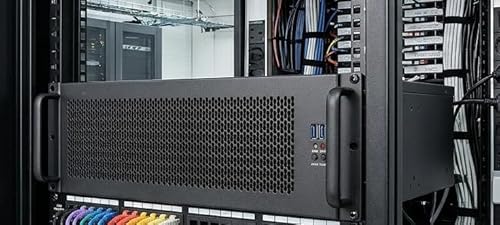
The 3U Rackmount Server Chassis stands out as an ideal choice for IT professionals and enthusiasts who need reliable performance and versatility in their setups. With support for various motherboard sizes, including EATX and Mini ITX, you’ll find it easy to configure your system. The chassis features four USB ports—two USB 3.0 and two USB 2.0—allowing for efficient connectivity. Cooling won’t be an issue either, as it supports up to three 120mm fans. Plus, the multiple drive bay locations and ATX-compatible power supply options guarantee you can customize your storage and power needs to fit your requirements perfectly.
Best For: IT professionals and enthusiasts seeking a versatile and reliable server chassis for various motherboard configurations.
Pros:
- Supports multiple motherboard sizes (EATX, CEB, ATX, MicroATX, Mini ITX) for flexible system configurations.
- Four USB ports (two USB 3.0 and two USB 2.0) for efficient connectivity with devices.
- Ample cooling options with support for up to three 120mm fans, ensuring effective thermal management.
Cons:
- Limited fan size options may not cater to users needing larger cooling solutions.
- Rackmount design may not appeal to those preferring traditional desktop cases.
- Potentially complex installation for users unfamiliar with server chassis setups.
Factors to Consider When Choosing a Rackmount PC Case
When you’re selecting a rackmount PC case, you’ll want to take into account several key factors. Size and compatibility are vital to guarantee it fits your setup, while cooling options can greatly influence performance. Additionally, think about security features, expansion slots, and the quality of the materials used for durability.
Size and Compatibility
Choosing the right rackmount PC case hinges on several vital factors, primarily size and compatibility. First, verify your case fits your motherboard size, whether it’s ATX, Micro-ATX, or Mini-ITX. The case height, measured in U (rack units), is also significant; common sizes like 2U, 3U, or 4U dictate how much rack space you’ll occupy. Additionally, consider the depth of the case, which impacts installation in standard server racks, usually between 15.7 inches and over 21 inches. Don’t overlook drive bays; make certain they align with your storage needs, supporting 3.5-inch and 2.5-inch drives. Finally, adequate PCI slots are vital for expansion cards, with configurations typically offering seven or more slots.
Cooling Options Available
How do you guarantee ideal cooling in your rackmount PC case? Effective cooling is essential, especially in high-performance environments where multiple components generate heat. Look for cases that come with pre-installed fans, ranging from single 120mm to multiple 80mm or 120mm fans, to provide optimal airflow. Consider models designed for liquid cooling, which can support radiators up to 360mm for superior thermal management. Pay attention to fan placement—top, front, or rear mounting can greatly enhance airflow, depending on your case’s design. Finally, don’t overlook noise reduction; many cases feature fan designs that keep operational sound to a minimum while still delivering efficient cooling. Choose wisely to keep your system running cool and quiet.
Security Features Importance
While you might focus on performance and cooling, overlooking security features in your rackmount PC case can expose your valuable hardware to risks. Lockable designs are essential, as they prevent unauthorized access and protect against theft or tampering. A lockable front door not only minimizes the risk of internal component damage but also safeguards your critical data. Additionally, dust filters, like foam filters on front doors, maintain cleanliness and prolong component lifespan by reducing dust accumulation that could lead to overheating. Built-in visual indicators for power and HDD activity allow you to quickly assess system status, helping identify potential security breaches. Enhanced security measures can also lower liability and insurance costs, especially for businesses handling sensitive information.
Expansion Slot Count
After verifying your rackmount PC case has robust security features, it’s important to contemplate the number of expansion slots available. The number of slots determines how many additional components, like graphics cards and network cards, you can install. Common configurations offer 7 to 8 slots, but more slots mean greater flexibility for future upgrades. Think about the intended use of your server; if you need heavy computational power, more slots for high-performance GPUs or extra network interfaces will be beneficial. Also, verify the expansion slot compatibility, like PCI or PCIe, matches your components. Finally, consider the case layout, as it affects airflow and cooling efficiency when adding multiple cards that generate heat.
Build Material Quality
When selecting a rackmount PC case, the quality of the build material plays an essential role in ensuring durability and longevity. Materials like SGCC steel offer excellent strength and resistance to wear and tear, making them ideal for demanding environments. If you prefer a lighter chassis, consider aluminum front bezels—they enhance aesthetic appeal while simplifying installation. A sturdy construction also reduces vibrations and noise, which is vital for maintaining consistent performance in server settings. Additionally, the material choice impacts thermal conductivity, promoting better airflow and cooling efficiency. High-quality finishes and coatings protect against scratches and corrosion, further enhancing your rackmount case’s lifespan and reducing maintenance efforts. Choose wisely for the best performance!
Design and Aesthetics
How important is design and aesthetics when choosing a rackmount PC case? The design should prioritize functionality, guaranteeing it efficiently houses and protects your hardware while allowing easy access for maintenance. A sleek finish, like silver or black, enhances the server environment’s appearance without sacrificing utility. Features such as front panel LED indicators for power and HDD status offer quick visual assessments, improving your work experience. Opt for a well-constructed chassis made from aluminum and high-quality steel for durability and professionalism. Additionally, ergonomic design considerations, like the placement of USB ports and cooling options, enhance airflow and overall system performance. Balancing aesthetics with functionality guarantees you get the best of both worlds.