
When you’re in the market for a new PC case, you want something that balances both cooling efficiency and style. Mesh front panels are a popular choice for good reason—they promote airflow while adding an aesthetic touch. In this guide, you’ll discover ten top-rated options that not only enhance your system’s performance but also elevate your setup’s look. Let’s explore these standout cases and what they bring to the table.
NZXT H5 Flow Compact ATX Mid-Tower PC Gaming Case

If you’re a gamer seeking ideal cooling and sleek aesthetics, the NZXT H5 Flow Compact ATX Mid-Tower PC Gaming Case is tailor-made for you. With its high airflow design, this case features ultra-fine mesh panels that maximize ventilation, keeping your components cool during intense gaming sessions. You’ll appreciate the exceptional GPU cooling thanks to the perforated PSU shroud and support for up to a 360mm radiator in the front. Plus, the included two 120mm Quiet Airflow fans guarantee solid performance right out of the box. The thoughtful cable management system allows for a clean, organized build that looks as good as it performs.
Best For: Gamers looking for exceptional cooling and a stylish, organized build.
Pros:
- High airflow design with ultra-fine mesh panels for optimal ventilation.
- Exceptional GPU cooling supported by a perforated PSU shroud and radiator compatibility.
- Effective cable management system for a cleaner and more organized interior.
Cons:
- Limited space for additional cooling components compared to larger cases.
- Tempered glass panels may be prone to fingerprints and smudges.
- Potentially challenging installation for users unfamiliar with cable management techniques.
PC Case with 4 RGB Fans and Tempered Glass Side Panel
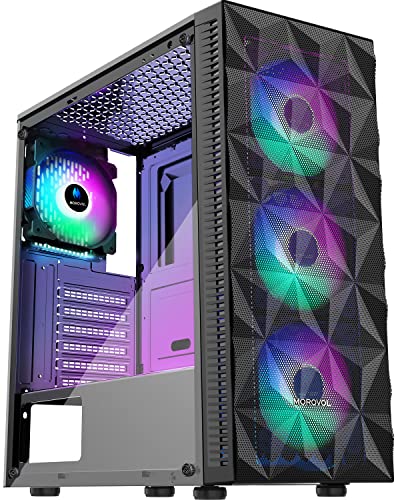
For gamers seeking a balance between aesthetics and performance, the Morovol 621-N4 PC case stands out with its four pre-installed RGB fans and stylish tempered glass side panel. This ATX gaming case measures 14.56 x 7.67 x 16.73 inches and supports various motherboard sizes, including ATX and Mini-ITX. With a diamond mesh front panel, it guarantees peak airflow while showcasing vibrant lighting. You’ll appreciate the removable side panel for easy access to components and ample storage for two SSDs and two HDDs. Priced affordably, it boasts a solid build and a 4.1-star rating from users, making it a popular choice.
Best For: Gamers looking for an affordable, stylish PC case that offers excellent cooling and ample storage options.
Pros:
- Pre-installed with four RGB fans for enhanced aesthetics and cooling performance.
- Removable tempered glass side panel allows for easy access to internal components.
- Supports various motherboard sizes and multiple storage options, making it versatile.
Cons:
- Fixed RGB lighting may limit customization options for users wanting addressable RGB.
- GPU length support is limited to 300mm, which may not accommodate larger graphics cards.
- The PSU length is capped at 160mm, potentially restricting some power supply options.
MoKo DIY PC Case Dust Mesh Filter (2 Pack)

The MoKo DIY PC Case Dust Mesh Filter (2 Pack) is an ideal choice for PC enthusiasts looking to maintain peak airflow while keeping dust at bay. Measuring 400 x 300mm, you can easily cut the mesh to fit your specific cooling ports. It comes with eight magnetic strips, allowing for a hassle-free installation without drilling. Simply peel the adhesive and attach the filter to your PC’s iron shell. The 1mm hole design effectively blocks dust and hair while ensuring maximum ventilation, helping to prolong the life of your components. Plus, it’s versatile enough for other applications like gaming consoles.
Best For: PC enthusiasts and gamers who want to keep their systems dust-free while ensuring optimal airflow.
Pros:
- Customizable Size: Easy to cut to fit various cooling ports for a tailored installation.
- Magnetic Installation: Includes magnetic strips for simple attachment without the need for drilling.
- Effective Dust Protection: 1mm hole design prevents dust and hair from entering while maintaining airflow.
Cons:
- Limited to PVC Material: May not be as durable as metal filters in the long run.
- Requires Adhesive Maintenance: The adhesive may lose effectiveness over time and might need replacement.
- Not Pre-Cut: Requires users to cut the mesh themselves, which may be inconvenient for some.
GAMDIAS ATX Mid Tower Gaming Computer PC Case with Tempered Glass

Looking for a gaming PC case that combines style and functionality? The GAMDIAS ATX Mid Tower is your answer. Its sleek stealth black finish and full-sized tempered glass side panel let you showcase your internal components beautifully. With a mesh front panel and four built-in 120mm ARGB fans, you’ll enjoy superior airflow and cooling. This case supports various motherboard sizes and offers ample expandability, including multiple HDD options. Plus, it accommodates up to six fans and a 360mm radiator. With convenient USB ports and tool-free installation, it’s designed for easy access and connectivity.
Best For: Gamers and PC builders seeking a stylish and functional case with excellent airflow and expandability.
Pros:
- Sleek design with a full-sized tempered glass panel for showcasing components.
- Superior cooling capabilities with a mesh front panel and four ARGB fans.
- Versatile compatibility with various motherboard sizes and multiple storage options.
Cons:
- Limited color options as it only comes in a stealth black finish.
- Potential for dust accumulation due to the open mesh design.
- Size may be restrictive for extremely large GPUs or custom cooling solutions.
Montech X3 Mesh ATX Mid-Tower PC Gaming Case

Gamers and PC enthusiasts seeking an affordable yet high-performing case will find the Montech X3 Mesh ATX Mid-Tower PC Gaming Case to be an excellent choice. With a sleek black design, it features a full panoramic view through its tempered glass panels, showcasing your system and RGB lighting. The case supports up to six fans, including three massive 140mm front fans for ideal airflow. You’ll appreciate the user-friendly side swivel panel for easy access to components. Plus, the fixed RGB lighting adds a stylish touch, making this case not just functional but visually striking. It’s a smart buy for any build!
Best For: Gamers and PC enthusiasts looking for an affordable, high-performance case with excellent airflow and RGB lighting.
Pros:
- Great price-to-performance ratio, making it accessible for budget-conscious builders.
- High airflow design with three 140mm front fans ensures optimal cooling for components.
- User-friendly side swivel tempered glass panel allows for easy access to internal components.
Cons:
- Fixed RGB lighting may limit customization options for users who prefer addressable lighting.
- The black color scheme may not appeal to those seeking a more vibrant or unique aesthetic.
- Limited space for additional cooling options beyond the six pre-installed fans.
DARKROCK EC2 Black ATX Mid Tower PC Case

For those seeking an efficient blend of aesthetics and performance, the DARKROCK EC2 Black ATX Mid Tower PC Case stands out with its striking tempered glass side panels and a meshed front that maximizes airflow. You’ll appreciate its cooling capabilities, supporting up to 8 x 120mm fans and a 360mm radiator, with one pre-installed fan for immediate efficiency. It’s compatible with ATX, M-ATX, and ITX motherboards, accommodating powerful graphics cards and power supplies. Plus, the Type-C connectivity guarantees modern compatibility. With magnetic dust filters, maintaining a clean interior becomes effortless, allowing you to focus on what matters—your performance.
Best For: Gamers and PC enthusiasts looking for a stylish and highly functional mid-tower case with excellent cooling options.
Pros:
- Spacious design allows for multiple cooling fans and a large radiator for optimal temperature management.
- Tempered glass panels showcase your hardware while providing a sleek aesthetic.
- Easy maintenance with magnetic dust filters that keep the interior clean and dust-free.
Cons:
- Limited GPU length support may restrict options for high-end graphics cards.
- Pre-installed fan count might not be sufficient for users requiring extensive cooling setups.
- Type-C connectivity may not be necessary for all users, potentially adding to the cost without value for some.
LIAN LI LANCOOL 207 Compact ATX RGB Gaming Computer Case

Designed with versatility and performance in mind, the LIAN LI LANCOOL 207 Compact ATX RGB Gaming Computer Case is perfect for enthusiasts who crave robust cooling solutions and aesthetic appeal. Its M-ATX chassis supports ATX compatibility and accommodates a 360mm radiator, ensuring peak airflow. You’ll appreciate the four pre-installed fans, including two 140mm ARGB front fans that create stunning lighting effects. With a GPU anti-sag bracket, your graphics card stays secure. Plus, the front PSU positioning makes access to connections seamless. The large mesh panels enhance airflow, keeping your components cool while looking fantastic in any setup.
Best For: Gaming enthusiasts seeking a compact case with advanced cooling solutions and striking RGB aesthetics.
Pros:
- Versatile Compatibility: Supports ATX motherboards and accommodates large GPUs and radiators for high-performance builds.
- Effective Cooling: Features four pre-installed fans and a large mesh panel for optimal airflow, maintaining component temperatures.
- Aesthetic Appeal: ARGB lighting and an infinity mirror on front fans enhance the visual experience of your setup.
Cons:
- Limited Space: While compact, the case may restrict airflow for certain high-end components compared to larger cases.
- Cable Management: The front PSU position may complicate cable routing for some users, affecting overall tidiness.
- Price Point: Higher cost compared to simpler cases that lack advanced features and aesthetic enhancements.
Montech AIR 903 MAX E-ATX Mid Tower Case

If you’re seeking a case that prioritizes airflow and cooling efficiency, the Montech AIR 903 MAX E-ATX Mid Tower is an excellent choice. With a remarkable 51% ventilation rate, it guarantees peak thermal management through its mesh front panel and tempered glass side. The case comes equipped with three 140mm ARGB PWM fans and one additional 140mm PWM fan, supporting powerful AIO coolers. It accommodates graphics cards up to 400mm and CPU coolers with a height of 180mm. Plus, the high-performance fans offer 21 lighting effects, enhancing your gaming setup’s aesthetics while keeping components cool.
Best For: Gamers and PC builders looking for a high-performance case that offers excellent airflow and cooling capabilities.
Pros:
- Superior cooling performance with a 51% ventilation rate and multiple fan configurations.
- Exceptional compatibility with high-end components, accommodating large graphics cards and CPU coolers.
- Aesthetic appeal enhanced by ARGB fans with 21 lighting effects, creating a vibrant gaming atmosphere.
Cons:
- Limited color options, as it is only available in black.
- Potential dust accumulation due to the mesh front panel, requiring regular cleaning.
- Size considerations, as the E-ATX form factor may not fit in smaller setups.
Cooler Master MasterBox Q300L Micro-ATX Tower

The Cooler Master MasterBox Q300L Micro-ATX Tower stands out as an ideal choice for gamers and PC builders seeking a balance of performance and aesthetics. It supports Micro-ATX and Mini-ITX motherboards, accommodating CPU coolers up to 159mm and GPUs up to 360mm. With an open thermal design and perforated sides, airflow is maximized, allowing you to install a 240mm liquid cooler or up to five fans. The transparent acrylic side panel showcases your build, while the adjustable I/O panel offers flexibility. Plus, magnetic dust filters keep your components clean, merging functionality with style effortlessly.
Best For: Gamers and PC builders looking for a compact case that combines performance, aesthetics, and flexibility.
Pros:
- Supports a variety of motherboards including Micro-ATX and Mini-ITX, catering to different build preferences.
- Excellent cooling capabilities with the option to install a 240mm liquid cooler and up to five fans for optimal airflow.
- Modular I/O panel allows for customizable positioning, enhancing accessibility and design versatility.
Cons:
- Limited PSU space with a maximum length of 160mm, which may restrict options for power supply units.
- Acrylic side panel may be more prone to scratches compared to tempered glass options, potentially affecting aesthetic longevity.
- Less room for high-end components due to size constraints, making it less suitable for extreme performance builds.
MUSETEX ATX PC Case with 6 PWM ARGB Fans

For gamers and PC enthusiasts seeking both style and performance, the MUSETEX ATX PC Case with 6 PWM ARGB Fans stands out with its striking polygonal mesh front panel. This mid-tower case features a tempered glass side panel that showcases your components and customizable ARGB lighting. With six adjustable-speed fans, you’ll enjoy exceptional cooling and noise management. It supports up to five SSDs and offers versatile graphics card mounting options, including vertical display. Plus, the easy-access side-opening door simplifies cleaning and assembly, while the smart I/O panel with USB 3.0 ports guarantees fast data transfer for your audio accessories.
Best For: Gamers and PC enthusiasts looking for a stylish and high-performance PC case with customizable lighting options.
Pros:
- Stylish design with a polygonal mesh front panel and tempered glass side for showcasing components.
- Excellent cooling performance with six adjustable-speed PWM ARGB fans, ensuring efficient airflow and noise management.
- Versatile storage options accommodating up to five SSDs or a combination of SSDs and HDDs, along with flexible graphics card mounting methods.
Cons:
- Limited to mid-tower size, which may not accommodate larger components or advanced cooling solutions for some users.
- Requires additional hardware such as the motherboard, graphics card, power supply, and radiator, which are not included in the package.
- Potential for dust accumulation on the mesh front panel, necessitating regular cleaning to maintain aesthetics and performance.
Factors to Consider When Choosing a PC Case with Mesh Front
When choosing a PC case with a mesh front, you need to contemplate several key factors. Airflow efficiency and cooling support options are vital for keeping your components cool, while build quality and compatibility with your parts guarantee durability and functionality. Don’t forget to take into account the aesthetic appeal, as a well-designed case can enhance your overall setup.
Airflow Efficiency
Choosing a PC case with a mesh front panel is vital if you want to maximize airflow efficiency and keep your components cool. A mesh design allows considerably more air to enter the case compared to solid panels, promoting better cooling for your internal parts. Look for cases with high airflow designs that feature multiple pre-installed fans, strategically positioned to enhance air intake and exhaust, preventing heat buildup. The size and density of the mesh holes are also essential; larger, well-spaced holes improve air movement while filtering out dust. Additionally, many mesh cases come with dust filters and perforated side panels, further improving airflow and protecting your components from dust accumulation, ensuring your system runs at peak temperatures.
Cooling Support Options
Several key factors come into play regarding cooling support options in PC cases with mesh front panels. First, the mesh design considerably enhances airflow, allowing more air to enter and improving cooling efficiency. Look for cases that support multiple fan configurations; larger fans, like 140mm or even 200mm, can provide better heat dissipation. If you’re considering liquid cooling, many mesh front cases accommodate larger radiators, such as 240mm or 360mm, for peak performance. Additionally, enhanced dust filtration systems are typically integrated into these designs, keeping dust buildup at bay while maintaining airflow. Overall, a case with a mesh front can achieve a ventilation rate of up to 51%, maximizing thermal performance and prolonging your hardware’s lifespan.
Build Quality Assessment
As you assess the build quality of a PC case with a mesh front, consider the materials used, such as durable steel or high-quality plastic, which protect your internal components. A well-constructed mesh front panel should guarantee adequate airflow while being reinforced to avoid deformation over time. Look for cases with tempered glass side panels; they enhance aesthetics and showcase your components effectively. Additionally, evaluate the ease of assembly and disassembly, as a robust build should allow straightforward installation and maintenance without compromising structural integrity. Finally, a high-quality mesh design minimizes dust entry while maintaining airflow, promoting peak cooling performance and the longevity of your internal components. Your choice in build quality directly impacts your system’s functionality and appearance.
Compatibility With Components
A high-quality build serves as a foundation for compatibility with your components. When choosing a PC case with a mesh front, first verify it fits your motherboard size, whether ATX, Micro-ATX, or Mini-ITX. Next, check the maximum GPU length supported—some cases hold graphics cards up to 410mm, while others may restrict you. Don’t forget to check the CPU cooler height clearance; many cases accommodate coolers up to 160mm or more, which is crucial for high-performance systems. Additionally, assess PSU length compatibility, with most cases allowing up to 200mm or more. Finally, look at fan slots and radiator support, as many mesh-front cases can house multiple fans and larger radiators (up to 360mm) for ideal cooling.
Aesthetic Appeal Factors
When you’re selecting a PC case with a mesh front, considering its aesthetic appeal can greatly enhance your overall setup. A sleek, modern design can elevate the look of your gaming space, while the visibility of RGB lighting through the mesh creates a striking visual effect. Many mesh panels feature diamond or honeycomb patterns that not only add interest but also improve airflow. Pairing a mesh front with tempered glass side panels showcases your internal components beautifully, adding an attractive contrast. Additionally, mesh panels come in various colors and finishes, giving you the flexibility to choose a case that matches your personal style. Ultimately, a well-chosen case can reflect your aesthetic preferences while ensuring ideal cooling.
Cable Management Solutions
Choosing a PC case with a mesh front becomes even more important when you consider effective cable management solutions. Look for cases that feature wide channels, hooks, and straps, which help you route and conceal cables seamlessly, promoting a clean interior. Removable side panels are another great option, as they provide easy access to cable management areas, simplifying installation. Some designs offer built-in cable management systems that keep cables tidy and out of airflow paths, enhancing cooling efficiency. Cases with multiple tie-down points or grommets give you flexibility in routing while preventing interference with airflow. Additionally, evaluate options with designated compartments to segregate power cables from data cables, reducing clutter and improving aesthetics.
Dust Filtration Features
Effective cable management sets the stage for considering dust filtration features in a PC case with a mesh front. You’ll want to look for cases that feature ultra-fine mesh panels designed to optimize airflow while keeping larger particles, like dust and hair, out. Some models come with integrated dust filters that are easy to remove and clean, ensuring your system stays efficient and tidy. Remember, effective dust filtration can greatly extend the lifespan of your components by minimizing dust buildup on essential hardware, such as fans and heatsinks. Additionally, cases boasting a ventilation rate of 51% or more often strike a great balance between airflow and dust protection. Magnetic dust filters are a handy feature, making maintenance a breeze without extra tools.
Price and Value Comparison
While evaluating your options for a PC case with a mesh front, it’s important to weigh the price against the features that matter most to you. Consider the number and quality of pre-installed fans, as cases with better airflow can offer greater long-term cooling performance. Look for a balance of price and aesthetics, like tempered glass side panels, which enhance your build without a hefty price increase. Evaluate warranty and return policies, since longer warranties reflect manufacturer confidence in durability. Check storage capacity and compatibility options; versatile configurations may justify a higher price. Finally, think about future-proofing with additional fan slots and radiator support, as investing in adaptability can save you money on upgrades down the line.