
If you’re looking to enhance your gaming setup without the distracting noise of traditional coolers, you’re in the right place. The best silent AIO CPU coolers combine impressive cooling performance with whisper-quiet operation, making them ideal for gamers like you. From elegant designs to customizable features, there’s a lot to explore. Let’s take a closer look at the top options that can help you maintain a peaceful gaming environment.
be quiet! Silent Loop 3 360mm AIO Liquid Cooler

If you’re seeking a powerful yet quiet cooling solution for your high-performance CPU, the be quiet! Silent Loop 3 360mm AIO Liquid Cooler is an excellent choice. It features three Silent Wings 4 fans that operate almost silently, ensuring minimal noise during intense gaming sessions. The advanced 3-chamber pump design enhances cooling performance while reducing turbulence. Plus, with its refillable design and easy-access port, maintaining this cooler is a breeze. It supports a wide range of CPUs, including Threadripper, and comes with a 3-year warranty, showcasing its exceptional German engineering and quality. You’ll enjoy both performance and tranquility with this cooler.
Best For: Gamers and PC enthusiasts seeking a high-performance, quiet cooling solution for demanding CPUs.
Pros:
- Powerful cooling performance with a 3-chamber pump design and engineered cooling block.
- Near-silent operation thanks to the Silent Wings 4 fans and dampened pump.
- Easy maintenance with a refillable design and accessible coolant port.
Cons:
- Larger size may not fit in all cases due to the 360mm radiator.
- Higher price point compared to standard air coolers.
- Installation complexity may be challenging for beginners without prior experience.
MONTECH HyperFlow Silent 360 AIO Liquid CPU Cooler

The MONTECH HyperFlow Silent 360 AIO Liquid CPU Cooler is an ideal choice for gamers and content creators who value a quiet workspace without sacrificing cooling performance. With a powerful 3100RPM pump and high-efficiency radiator, it delivers superior heat dissipation. The three Metal Pro 12 Silent fans operate at just 24.8dBA, ensuring distraction-free performance. Its sleek, minimalist design features a premium mirror-metal finish and an ARGB-free aesthetic. You’ll appreciate the hassle-free installation, thanks to pre-installed fans and pre-applied thermal paste. Plus, it’s backed by a 6-year warranty and built-in leakage protection for peace of mind.
Best For: Gamers and content creators looking for a quiet yet powerful cooling solution for their CPUs.
Pros:
- Ultra-quiet operation with fans running at only 24.8dBA, ensuring minimal noise disruption.
- High cooling efficiency due to the powerful 3100RPM pump and high-efficiency radiator.
- Easy installation with pre-installed fans and pre-applied thermal paste, simplifying the setup process.
Cons:
- Limited aesthetic options with an ARGB-free design that may not appeal to users seeking customizable lighting.
- Size may be a concern for smaller cases, as the 360mm radiator requires ample space for installation.
- Higher price point compared to traditional air coolers, which might not fit all budgets.
CORSAIR Nautilus 360 RS Liquid CPU Cooler

For users seeking a powerful yet quiet cooling solution, the CORSAIR Nautilus 360 RS Liquid CPU Cooler stands out with its whisper-quiet operation at just 20 dBA. This 360mm AIO cooler is compatible with Intel LGA 1851, LGA 1700, and AMD AM5/AM4 sockets, ensuring versatility for your build. Its efficient pump delivers high coolant flow, maximizing cooling performance. The included RS120 fans feature CORSAIR AirGuide technology and magnetic dome bearings, enhancing airflow while minimizing noise. Plus, installation is a breeze with easy daisy-chained connections and a single 4-pin PWM fan header, making it perfect for a clean setup.
Best For: Users looking for a high-performance, quiet cooling solution for their Intel or AMD CPUs.
Pros:
- Whisper-quiet operation at just 20 dBA, ideal for silent builds.
- High static pressure fans with CORSAIR AirGuide technology enhance airflow efficiency.
- Easy installation with daisy-chained connections and a single 4-pin PWM fan header.
Cons:
- The 360mm size may not fit in smaller cases.
- Higher price point compared to standard air coolers.
- Requires regular maintenance to ensure optimal liquid performance.
PCCOOLER ARGB CPU Cooler (CPS DA360 Pro)

Looking to keep your high-performance CPU cool without the noise? The PCCOOLER ARGB CPU Cooler (CPS DA360 Pro) is your answer. This 360mm AIO water cooling solution features three 120mm silent PWM fans, ensuring efficient heat dissipation while maintaining a whisper-quiet operation. With its premium copper cold plate and infinite Halo ARGB lighting effects, it not only cools effectively but also enhances your PC’s aesthetics. Compatible with various Intel and AMD sockets, installing it is a breeze thanks to the adjustable waterblock direction. Upgrade your cooling game and enjoy a serene gaming experience with the CPS DA360 Pro!
Best For: Gamers and PC enthusiasts looking for an efficient and visually appealing cooling solution for high-performance CPUs.
Pros:
- Efficient Cooling: The premium copper cold plate and 360mm radiator provide excellent heat dissipation for high-performance CPUs.
- Silent Operation: The three 120mm silent PWM fans ensure quiet operation, making it ideal for noise-sensitive environments.
- Aesthetic Appeal: Infinite Halo ARGB lighting effects enhance the look of any PC build, adding a stylish touch.
Cons:
- Size Constraint: The 360mm radiator may not fit in smaller PC cases, limiting compatibility for some builds.
- Installation Complexity: While adjustable, the installation process may be challenging for novice builders unfamiliar with AIO coolers.
- Price Point: Higher initial investment compared to standard air coolers, which may deter budget-conscious users.
be quiet! Pure Loop 3 360mm All-in-One Water Cooling System
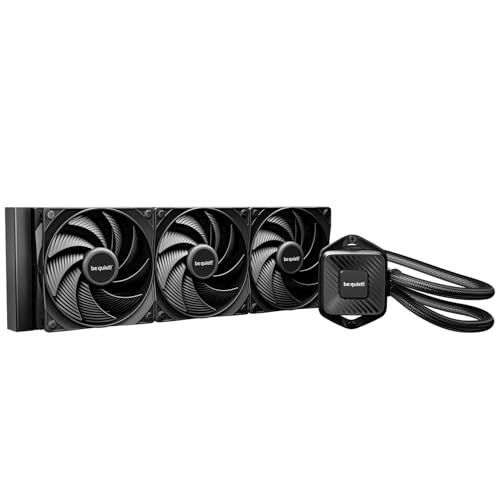
Designed specifically for overclockers and users demanding peak performance, the be quiet! Pure Loop 3 360mm All-in-One water cooling system offers exceptional cooling power for your AMD or Intel setup. Its powerful PWM pump operates quietly, thanks to a 6-pole 3-phase motor that guarantees smooth performance at various RPMs. With three Pure Wings 3 120mm PWM fans generating high air pressure, you’ll maintain low temperatures without the noise—maxing out at just 30.9 dB(A). The funnel-shaped air outlet enhances airflow, while the daisy chain function keeps your cables tidy, making installation and maintenance a breeze.
Best For: Overclockers and users who demand peak performance from their AMD or Intel systems.
Pros:
- Exceptional cooling power that maintains low temperatures during high CPU performance.
- Whisper-quiet operation with a maximum noise level of only 30.9 dB(A).
- Easy installation and maintenance with flexible tubes and an accessible refill port.
Cons:
- Larger size may not fit in all cases, requiring compatibility checks.
- Higher price point compared to standard air cooling solutions.
- Potentially more complex installation process for beginners unfamiliar with liquid cooling systems.
PCCOOLER 360mm AIO Liquid CPU Cooler
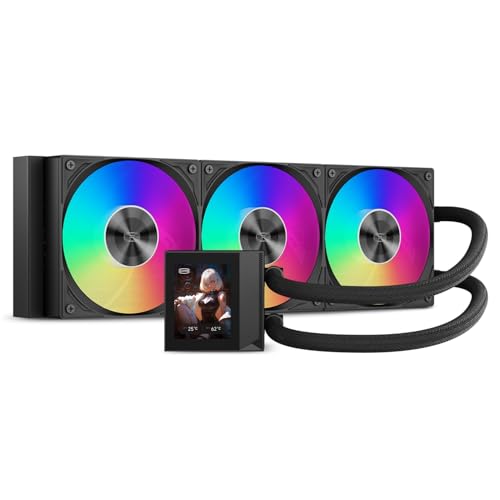
The PCCOOLER 360mm AIO Liquid CPU Cooler stands out for gamers and overclockers seeking a powerful yet whisper-quiet cooling solution. With its silent 2600 RPM pump and 15 dBA noise level, you’ll enjoy efficient cooling without the distraction of noise. The premium F5 ARGB fans deliver impressive airflow and pressure, making them perfect for intense gaming sessions. Plus, you can customize fan speeds for the ideal balance of performance and silence. The vibrant 2.4-inch IPS display adds a touch of flair, showing CPU temperatures or animations. Its durable design and wide compatibility guarantee an easy installation for your setup.
Best For: Gamers and overclockers looking for a powerful, quiet cooling solution with customizable features.
Pros:
- Silent operation with a 15 dBA noise level, ensuring minimal distraction during gaming or work.
- High-performance fans deliver excellent airflow and static pressure, ideal for demanding tasks and overclocking.
- Customizable display allows users to showcase CPU temperatures or animations, enhancing the aesthetic appeal of the build.
Cons:
- Larger size may require ample space in the case for installation.
- Potential compatibility issues with certain older motherboard models.
- Price point may be higher compared to standard air coolers.
ARCTIC Liquid Freezer III Pro 360 AIO CPU Cooler

If you’re after a powerful yet whisper-quiet cooling solution, the ARCTIC Liquid Freezer III Pro 360 AIO CPU Cooler stands out with its innovative PWM pump and optimized fan design. This cooler features three 120 mm ARCTIC P12 PRO fans that excel at low speeds, ensuring quiet operation while delivering superior performance. Its 38 mm radiator and native offset mounting enhance heat transfer, prolonging your CPU’s lifespan. Plus, the integrated VRM fan keeps voltage regulator temperatures in check. With a sleek black design and concealed PWM cables, it not only performs well but also looks great in any build.
Best For: Gamers and PC enthusiasts seeking high-performance cooling solutions that operate quietly.
Pros:
- Superior cooling performance with three 120 mm ARCTIC P12 PRO fans optimized for low-speed operation.
- Integrated VRM fan helps maintain lower voltage regulator temperatures, enhancing overall system reliability.
- Sleek black design with concealed cables ensures an aesthetically pleasing build.
Cons:
- Large radiator size may limit compatibility with smaller cases.
- Installation complexity can be challenging for beginners without prior experience.
- Higher price point compared to traditional air coolers.
Minorsonic AIO CPU Cooler (360mm)

For gamers and creators seeking a blend of high performance and quiet operation, the Minorsonic AIO CPU Cooler (360mm) stands out with its industrial-grade 3-phase motor and smart PWM fans. This cooler’s 120mm fans auto-adjust up to 1600 RPM, ensuring ideal airflow while minimizing noise. Its high-speed ceramic-bearing pump operates at 3000 RPM, providing faster coolant flow for stable thermal performance. Plus, its sleek, low-profile design enhances your setup’s aesthetics. With compatibility across Intel LGA 1851 / 1700 and AMD AM5 / AM4 sockets, this cooler strikes the perfect balance between powerful cooling and whisper-quiet operation for your gaming or workstation needs.
Best For: Gamers and creators looking for high-performance cooling solutions with low noise levels.
Pros:
- Effective cooling performance with a high-speed ceramic-bearing pump and industrial-grade fans.
- Quiet operation even under heavy load, making it ideal for noise-sensitive environments.
- Sleek design that enhances the aesthetics of any gaming or workstation setup.
Cons:
- Large size may not fit in smaller cases or setups.
- Potentially higher price point compared to basic cooling solutions.
- Installation complexity may be challenging for beginners without prior experience.
Thermalright Aqua Elite 120 V3 AIO CPU Cooler

Designed with noise-conscious users in mind, the Thermalright Aqua Elite 120 V3 AIO CPU Cooler stands out due to its remarkably low noise level of just 25.6 dBA. Its fourth-generation pump head and 120mm black aluminum fin heat sink guarantee efficient cooling while minimizing vibrations. The dual TL-C12B-S V2 fans spin at 1500 RPM, providing impressive airflow of 66.17 CFM. Installation is a breeze, supporting various AMD and Intel sockets, and includes a fan hub for easy power management. Plus, the ARGB lighting adds a stylish touch, syncing seamlessly with your motherboard for a customized look.
Best For: Users seeking a quiet and efficient cooling solution for their CPUs, especially those with RGB lighting preferences.
Pros:
- Low noise level of just 25.6 dBA, making it ideal for quiet environments.
- Strong airflow with a maximum of 66.17 CFM, ensuring effective heat dissipation.
- Easy installation process with compatibility for various AMD and Intel sockets, along with included accessories.
Cons:
- Limited radiator size may not be sufficient for high-performance overclocking setups.
- ARGB features require a compatible motherboard for full functionality.
- Fans may not be as powerful as larger models, potentially limiting cooling performance in extreme conditions.
ENERMAX LIQMAX V4 120mm AIO CPU Liquid Cooler

The ENERMAX LIQMAX V4 120mm AIO CPU Liquid Cooler stands out with its innovative Gen.2 Xtreme Pump Design, making it an excellent choice for gamers and PC enthusiasts seeking efficient cooling without the noise. This cooler is compatible with Intel and AMD sockets, supporting up to 320W TDP. Its Silent Flow Fan features thicker blades and optimized angles for advanced cooling while minimizing noise levels. With a magnetic rotatable real-time status display, you can easily monitor CPU/GPU temperatures and fan speeds. Plus, the PWM-controlled design adjusts fan speeds based on system load, ensuring quieter operation during intense gaming sessions.
Best For: The ENERMAX LIQMAX V4 120mm AIO CPU Liquid Cooler is best for gamers and PC enthusiasts looking for efficient, quiet cooling solutions for high-performance systems.
Pros:
- Superior Cooling Capacity: The Gen.2 Xtreme Pump Design provides enhanced cooling performance.
- Quiet Operation: The Silent Flow Fan minimizes noise while maintaining effective airflow.
- Real-time Monitoring: The magnetic rotatable display allows for easy tracking of temperatures and fan speeds.
Cons:
- Limited Compatibility: While it supports various Intel and AMD sockets, it may not fit all motherboard configurations.
- Size Constraints: The 120mm radiator may not provide sufficient cooling for extremely high TDP CPUs compared to larger coolers.
- Potential Software Dependency: Full functionality of monitoring features may require additional software installation.
Factors to Consider When Choosing a Silent Aio Cpu Cooler
When you’re picking a silent AIO CPU cooler, there are several key factors to keep in mind. You’ll want to contemplate noise level specifications, cooling performance, and compatibility with your system. Don’t forget about installation ease and the cooler’s aesthetic design, as these can greatly affect your overall experience.
Noise Level Specifications
How important is noise level to you when choosing a silent AIO CPU cooler? Noise levels, measured in decibels (dBA), play an essential role in your cooling experience. Lower values indicate quieter operation, with models around 20 dBA being nearly inaudible. High-performance AIO coolers often feature silent fans that run at low RPMs, effectively reducing noise while maintaining cooling efficiency. Look for pumps designed with dampening and 6-pole motors, as they tend to operate quietly. Additionally, advanced fan technologies, like magnetic bearings, minimize friction and sound. When selecting a cooler, check for maximum noise levels; high-quality models typically range from 15 dBA to 30 dBA, ensuring a serene gaming environment.
Cooling Performance Efficiency
Choosing a silent AIO CPU cooler means balancing noise levels with cooling performance efficiency. The design of the pump and radiator greatly impacts cooling effectiveness, so look for multi-chamber pumps and high-efficiency radiators that enhance heat dissipation. Pay attention to the maximum RPM of the pump and fans; higher speeds, like 3100 RPM, improve coolant flow rates and heat transfer. Fan design also matters; fans with high static pressure ratings guarantee ideal airflow through the radiator, maximizing cooling performance. Finally, aim for coolers that maintain low noise levels—some designs can achieve as low as 15 dBA—while still delivering adequate cooling power. This balance is vital for a whisper-quiet yet efficient gaming experience.
Compatibility With Sockets
Compatibility with your CPU socket is essential when selecting a silent AIO CPU cooler. Make sure the cooler matches your motherboard’s socket type, like Intel LGA 1700 or AMD AM4, for proper installation. Most AIO coolers support a variety of sockets, so always check the manufacturer’s specifications for compatibility with your specific CPU model. Some coolers feature universal mounting systems that can accommodate multiple socket types, offering flexibility for future upgrades. Don’t forget to evaluate the cooler’s dimensions, especially if you’re eyeing larger models like 360mm radiators, as they need to fit within your PC case. Finally, verify that the cooler includes the necessary mounting hardware for your socket type to avoid any installation issues.
Installation Ease and Complexity
After ensuring your AIO cooler is compatible with your CPU socket, the next step is to evaluate how easy it is to install. Look for AIO coolers that come with pre-installed fans and pre-applied thermal paste; these features simplify setup and save time. Opt for models with universal mounting brackets that support a variety of CPU sockets, making installation hassle-free. Flexible tubing and accessible refill ports can also streamline both installation and maintenance. A design that minimizes cable clutter, like daisy chain fan connections, further enhances airflow management. Finally, check for detailed installation instructions and included accessories, as these can greatly ease the assembly process, ensuring you get your cooler up and running quickly.
Aesthetic and Design Features
When it comes to selecting a silent AIO CPU cooler, aesthetic and design features play an essential role in complementing your system’s overall look. You’ll want a sleek finish, like mirror-metal or black aluminum, to enhance your build’s visual appeal while keeping a minimalist style. Look for coolers with customizable ARGB lighting that syncs with your motherboard for dynamic effects. Consider the layout of components—funnel-shaped air outlets and optimized thermal paste patterns not only improve airflow but also integrate visually within your case. Models with a daisy chain fan design simplify cable management, resulting in a cleaner appearance. Premium materials, like CNC aluminum housing, add durability and elegance, making your cooler not just functional but also stylish.
Warranty and Durability
While aesthetics and performance are essential, warranty and durability should also be at the forefront of your decision-making process when choosing a silent AIO CPU cooler. Pay close attention to warranty durations, which can range from 3 to 6 years; a longer warranty often indicates the manufacturer’s confidence in the product’s durability. Look for coolers made with high-quality materials, like CNC aluminum, as these enhance lifespan. Built-in leakage protection systems are vital for preventing damage to your components. Additionally, consider models with a refillable design for easier maintenance and coolant replacement, which can improve reliability over time. Finally, check if the manufacturer regularly updates and offers replacement parts, showcasing their commitment to product longevity and user support.
Maintenance and Refilling Options
Considering maintenance and refilling options is essential for guaranteeing your silent AIO CPU cooler performs at its best. Some models come with easy-to-access refill ports, allowing you to replenish coolant without extensive disassembly, which can extend the cooler’s lifespan. Regular maintenance is important; it helps prevent issues like pump failure or overheating due to low coolant levels. Look for AIO coolers with a refillable design to replace coolant as needed, maintaining peak cooling efficiency. Monitoring coolant levels and quality can help prevent leaks and guarantee proper heat dissipation, crucial for high-performance CPUs. Many models even include coolant bottles, making the refilling process straightforward and user-friendly for your maintenance tasks.