
A mini PC can save desk space without giving up the processing power needed for demanding work. But the Core i9 name alone does not tell you how a compact system will perform: cooling, memory, ports, and configuration matter too.
These 10 options span everyday desktops, higher-core-count systems, and network-focused workstations. Use the guide below to narrow your choice by workload rather than model number alone.
Best 10 Mini PC with Intel I9 Picks for 2026
Compact Workstation Pick

- 24-core i9-13900HX and 32GB RAM
- Triple 4K display outputs
- VESA mount and expandable storage
Best For: Space-saving, multi-monitor productivity
Connectivity Pick
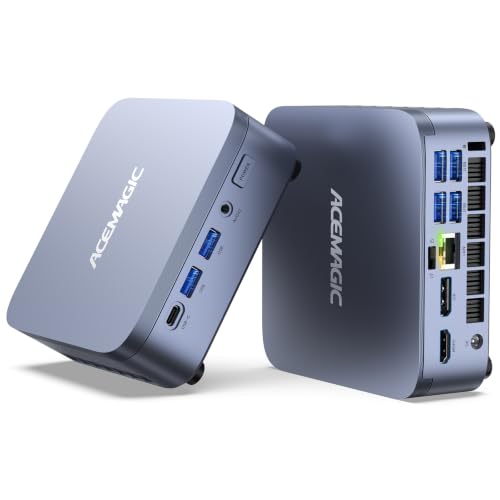
- 24-core i9 with 32GB RAM
- USB4 and 2.5GbE connectivity
- Windows 11 Pro preinstalled
Best For: Connected creative and professional desks
Business Desktop Pick

- Windows 11 Pro for office use
- DDR5 memory and multiple display ports
- Keyboard and mouse included
Best For: Compact business desktops
Storage Expansion Pick

- i9-13900HX with 32GB RAM
- Dual M.2 slots; up to 8TB listed
- Triple 4K display support
Best For: File-heavy, multi-monitor work
Quad-Display Pick

- Core i9-13900HK with 16GB RAM
- Four 4K@60Hz display outputs
- Dual 2.5Gbps Ethernet ports
Best For: Four-screen workstations and digital signage
Homelab Workstation Pick

- Core i9-13900H, 32GB DDR5, 1TB SSD
- Dual 10Gbps SFP+ and dual 2.5Gbps RJ45
- Three M.2 SSD options and PCIe expansion
Best For: Homelabs and network-heavy workstations
Easy-Upgrade Pick

- Core i9-12900HK with 16GB RAM
- Four 4K@60Hz display outputs
- Pop-up design for easier upgrades
Best For: Upgrade-minded four-monitor users
Expandable Office Pick

- 24-core i9-13900HX
- RAM and dual-SSD expansion
- Triple-display outputs and 2.5GbE
Best For: Expandable three-display office setups
Business-Ready Pick

- 24-core i9-14900T
- Windows 11 Pro and peripherals included
- Triple-4K connections
Best For: Ready-to-use business desks
Cooling-Focused Pick

- 24-core i9-13900HX
- Three-heat-pipe cooling design
- Dual-SSD and triple-display support
Best For: Expandable multitasking setups
Compact Workstation Pick – KAMRUI Hyper H2 i9-13900HX
If you want a mini pc with intel i9 for demanding desktop work without a full-size tower, the KAMRUI Hyper H2 pairs a 24-core i9-13900HX with 32GB of DDR4 memory and a 1TB SSD in a 5.04-inch-square chassis.
Best For: Multitaskers and creators who want an expandable, space-saving workstation with three display outputs.
Pros:
- 32GB of installed RAM, expandable to 64GB, plus two M.2 slots supporting up to 4TB total.
- HDMI, DisplayPort, and USB-C outputs support three 4K displays at 60Hz.
- Wi-Fi 6E, Gigabit Ethernet, and an included VESA mount offer flexible placement and connectivity.
Cons:
- Intel UHD integrated graphics are a limitation if dedicated-GPU gaming is the priority.
- Gigabit Ethernet is slower than the 2.5GbE ports listed for some other models here.
The H2 makes the strongest case as a compact productivity PC: its memory and storage expansion leave room for larger projects, while its display connections suit a multi-monitor desk.
The ACEMAGIC M5 is a mini pc with intel i9 that stands out for its connections: alongside its 24-core i9-13900HX, 32GB of RAM, and 1TB SSD, it offers USB4, 2.5GbE, and Wi-Fi 6E.
Best For: Creators and power users who need fast networking, high-speed peripherals, and a ready-to-use Windows 11 Pro system.
Pros:
- USB4 supports up to 40Gbps transfers and DisplayPort Alt Mode.
- 2.5GbE, Wi-Fi 6E, and triple-display support suit a connected workstation.
- Windows 11 Pro comes preinstalled; RAM and storage can expand to 64GB and 4TB.
Cons:
- The listing does not specify a dedicated graphics card, so check GPU requirements before buying for gaming or GPU-heavy work.
- Its included 1TB drive may need expansion for large media libraries.
Choose the M5 when USB4 and faster wired networking matter as much as CPU power. Its preinstalled operating system also removes a setup step.
For a business-focused mini pc with intel i9, the HP Elite Mini 800 G9 combines Windows 11 Pro, 16GB of DDR5 memory, and a compact chassis with a useful selection of front and rear ports.
Best For: Office users who want a small Windows 11 Pro desktop with wired peripherals included.
Pros:
- The supplied specifications list a 24-core Intel Core i9-14900 and Intel UHD 770 graphics.
- Two DisplayPort 1.4 outputs, HDMI 2.1, Ethernet, and front USB-C provide practical desk connectivity.
- Includes a wired keyboard and mouse; memory is listed as expandable to 64GB.
Cons:
- The 256GB SSD and 16GB of installed RAM are modest for an i9 desktop.
- Graphics are integrated rather than dedicated.
This is the office-oriented choice, but confirm the exact processor before ordering: the product title says i9-14900T, while the supplied specifications say i9-14900.
The MINISFORUM M1-1390 is a mini pc with intel i9 worth considering if your projects need room to grow. It ships with an i9-13900HX, 32GB of DDR4 memory, and a 1TB SSD, plus a second M.2 slot for storage expansion.
Best For: Users managing large files who want substantial SSD expansion and a three-monitor workspace.
Pros:
- Two PCIe 4.0 M.2 2280 slots support up to 8TB of storage according to the listing.
- 32GB of installed DDR4 memory is expandable to 64GB.
- Supports up to three 4K displays and includes 2.5GbE and Wi-Fi 6E.
Cons:
- Uses integrated Intel UHD graphics rather than a dedicated GPU.
- The supplied operating-system detail says only “OS,” so confirm what software is included.
The M1-1390’s standout feature is its stated 8TB storage ceiling. It is a practical fit for file-heavy work, provided you verify the operating-system configuration before purchase.
Quad-Display Pick – MINISFORUM NAB9S
If you need a mini pc with intel i9 for a multi-monitor desk, the MINISFORUM NAB9S pairs a Core i9-13900HK with 16GB of RAM and a 500GB SSD. Its two HDMI and two USB-C video outputs support four 4K displays at 60Hz.
Best For: Office setups, digital signage, or monitoring stations that need four displays and wired networking.
Pros:
- 14-core, 20-thread Core i9-13900HK boosts up to 5.4GHz.
- Dual 2.5Gbps Ethernet ports suit network-focused setups.
- Two DDR4 slots and a spare 2.5-inch SATA bay offer upgrade options.
Cons:
- Integrated Iris Xe graphics are a limitation for graphics-heavy workloads.
- The included 500GB SSD may be tight for large media libraries.
The NAB9S makes the most sense when display outputs and Ethernet matter more than dedicated graphics. Check your storage needs before settling on the included configuration.
Homelab Workstation Pick – MINISFORUM MS-01
The MINISFORUM MS-01 is a mini pc with intel i9 built for buyers who need more than a compact office desktop. This configuration combines a Core i9-13900H, 32GB of DDR5 RAM, and a 1TB SSD with unusually broad networking and storage options.
Best For: Homelabs and business workstations that need fast network connections and flexible storage.
Pros:
- Two 10Gbps SFP+ ports and two 2.5Gbps RJ45 ports.
- Supports up to three M.2 NVMe SSDs, with a U.2 storage option.
- Includes two USB4 ports and a PCIe 4.0 x16 expansion slot.
Cons:
- Its specialized ports may be unnecessary for a basic home-office setup.
- Integrated Iris Xe graphics may not suit buyers who need dedicated graphics out of the box.
Choose the MS-01 for its connectivity and expansion, not just its processor. Its feature set is especially useful when a small PC must also handle demanding network or storage duties.
Easy-Upgrade Pick – MINISFORUM NAB9
For a mini pc with intel i9 that leaves room for straightforward upgrades, consider the MINISFORUM NAB9. It ships with a Core i9-12900HK, 16GB of DDR4 RAM, and a 512GB PCIe 4.0 SSD in a pop-up design that simplifies access to its upgradeable components.
Best For: Home or business users who want a four-display desktop with accessible memory and storage upgrades.
Pros:
- Two HDMI and two USB-C outputs support four 4K@60Hz displays.
- Dual 2.5Gbps Ethernet ports, Wi-Fi 6, and Bluetooth 5.2.
- Dual DDR4 slots support up to 32GB, and the SSD can be upgraded to 2TB.
Cons:
- Integrated Iris Xe graphics are better matched to lighter graphics work than demanding gaming.
- The included 16GB RAM and 512GB SSD may need upgrading for larger workloads.
The NAB9 balances display connectivity and upgrade access well. Its cooling design includes dual heat pipes and air vents, though buyers seeking stronger graphics performance should look beyond its integrated GPU.
Expandable Office Pick – MINISFORUM M1-1390 i9-13900HX
If you need a mini pc with intel i9 for a compact office setup, this M1-1390 pairs a 24-core i9-13900HX with 16GB of DDR4 RAM and a 500GB PCIe 4.0 SSD. Its HDMI, DisplayPort, and USB-C outputs support a three-display workspace.
Best For: Office users who want strong multicore capability, three displays, and room to expand storage.
Pros:
- 24-core, 32-thread processor with boost speeds up to 5.4GHz.
- Supports up to 64GB of RAM and two SSDs with up to 8TB total capacity.
- Includes 2.5GbE, Wi-Fi 6E, and Bluetooth 5.2.
Cons:
- Ships with 16GB of RAM and a 500GB SSD, so demanding workloads may call for upgrades.
- Integrated Intel UHD Graphics is not a substitute for a dedicated graphics card.
Choose this configuration if expansion and wired networking matter more than dedicated graphics. Confirm the listed OS meets your needs before ordering.
Business-Ready Pick – HP Elite Mini 800 G9
For buyers seeking a mini pc with intel i9 that comes ready for office use, the HP Elite Mini 800 G9 includes Windows 11 Pro, a wired keyboard and mouse, and a 24-core i9-14900T. Its two DisplayPort connections and HDMI port support a triple-4K setup.
Best For: Business desks that need Windows 11 Pro, included peripherals, and multiple monitor connections.
Pros:
- i9-14900T offers 24 cores and 32 threads, with turbo speeds up to 5.5GHz.
- Includes 16GB DDR5 RAM, a 512GB NVMe SSD, Windows 11 Pro, and a wired keyboard and mouse.
- Provides six USB ports, Ethernet, Wi-Fi 6, two DisplayPort outputs, and HDMI.
Cons:
- Intel UHD Graphics 770 is integrated rather than dedicated graphics.
- The included 16GB RAM and 512GB SSD may be modest for large projects.
This is the straightforward office choice of the three if the included operating system and peripherals save you setup time. Its appeal is a complete business configuration, not graphics-heavy performance.
Cooling-Focused Pick – MINISFORUM M1-1390 i9 Mini PC
This M1-1390 is another mini pc with intel i9 aimed at users who want a small machine for multitasking. It combines the 24-core i9-13900HX with 16GB of DDR4 RAM and a 500GB SSD, while its listed cooling design uses three copper heat pipes and a turbine fan.
Best For: Multitasking setups where cooling design, storage expansion, and three-display support are priorities.
Pros:
- 24-core, 32-thread i9-13900HX processor with speeds up to 5.4GHz.
- Supports up to 64GB of DDR4 RAM and two M.2 NVMe SSDs, up to 8TB total.
- Offers HDMI, DisplayPort, and Type-C display connections, plus 2.5GbE and Wi-Fi 6E.
- Lists a three-heat-pipe copper cooling design and turbine fan.
Cons:
- Only 16GB of RAM and 500GB of storage are preinstalled.
- The supplied notes do not specify an operating system; check the listing before purchase.
Compared with a basic fixed-storage mini PC, this configuration gives you clear upgrade paths. The cooling hardware is a useful design detail, but the supplied notes do not establish measured noise or sustained-performance results.
How We Picked the Best Mini PC with Intel I9
We compared the listed processor, memory, storage, display outputs, and networking for each configuration, then considered which workloads those specifications suit. The selection includes compact office desktops, Core i9-13900HX systems with higher core counts, and a workstation-oriented model with faster network connections. We did not treat a higher advertised boost clock as a guarantee of better sustained performance: cooling and power limits can make a substantial difference in a small chassis. Check the exact seller configuration before buying, since RAM, SSD capacity, included accessories, and ports can vary between listings.
Quick Comparison: Which Type Fits Your Work?
- For heavily threaded tasks: The listed Core i9-13900HX models offer 24 cores and 32 threads. Compare their cooling, installed RAM, and available display ports before choosing among similar configurations.
- For office deployment: The HP Elite Mini 800 G9 configurations are worth considering if you prefer a business-desktop format. Confirm the exact processor, warranty, and upgrade access for the listing you choose.
- For networking and home labs: The MINISFORUM MS-01 stands out for its listed dual 10Gbps SFP+ and dual 2.5GbE connections; make sure those interfaces match your switches and cabling.
- For a lower-capacity starting point: Several listings include 16GB RAM and a 500GB or 512GB SSD. Budget for upgrades if your projects or virtual machines need more room.
Key Buying Factors for a Mini PC with Intel I9
Processor and Sustained Performance
These systems use different Core i9 chips, including HX, HK, H, T, and standard desktop variants. They do not have identical core counts or power characteristics. If you render, compile, or run multiple virtual machines, look beyond the processor label and seek independent sustained-load and noise testing for the exact model. For lighter office work, peak specifications may matter less than quiet operation.
RAM, Storage, and Upgrades
Choose 32GB RAM if you routinely multitask across large applications; 16GB is a more modest starting point. Check whether memory is replaceable, the maximum supported capacity, how many SSD slots are available, and whether opening the case affects warranty coverage. A 256GB SSD may fill quickly once applications and project files are installed.
Displays, Ports, and Graphics
Count the monitors you need and verify each port’s supported resolution and refresh rate. USB-C does not always carry video, and USB4 support can differ by device. An integrated GPU may be enough for productivity and media, but a “gaming” label alone does not establish strong performance in demanding games. Confirm graphics capability against the titles or creative apps you use.
Networking and Physical Fit
Check Ethernet speed, Wi-Fi support, chassis dimensions, power adapter size, and mounting options. For home labs, fast wired networking may be more useful than an extra display output.
Who Should Buy Which Mini PC with Intel I9?
Choose a Core i9-13900HX configuration if your priority is CPU-intensive work and you can verify its cooling suits long sessions. Pick an HP Elite Mini configuration for a business-oriented compact desktop, subject to the seller’s warranty and specifications. Consider the MS-01 for a network-heavy workstation or lab. If your needs are mainly browsing, documents, and video calls, compare less expensive Core i5 or Core i7 mini PCs too; a Mini PC with Intel I9 may offer more processing power than you need.