
A small PC can free up your desk without forcing you to give up demanding games. But compact towers and mini PCs make different trade-offs in graphics performance, noise, and future upgrades.
These 10 picks range from Mini-ITX desktops with desktop graphics cards to smaller systems with laptop-class GPUs. Here’s what to check before choosing one.
Best 10 Sff Gaming PC Picks for 2026
Best Desktop-GPU Pick
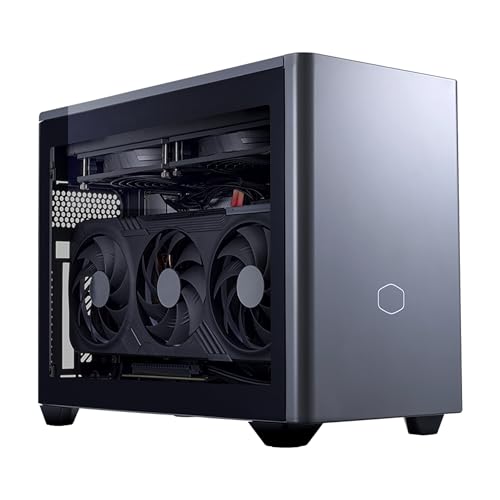
- Ryzen 7 9800X3D and RTX 5070 Ti 16GB
- 18.25L Mini-ITX chassis with 280mm cooling
- 32GB DDR5 and 2TB Gen4 SSD
Best For: Desktop graphics power in a compact tower
Best Design-Forward Pick
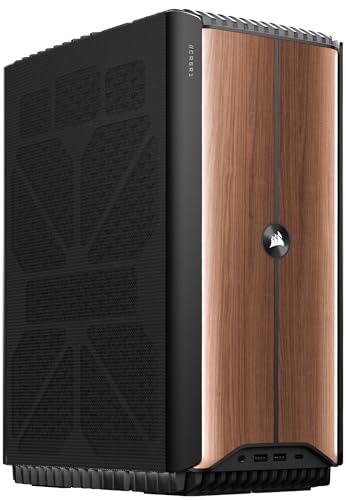
- Core Ultra 7 and RTX 5070 12GB
- Dual 240mm liquid coolers
- Wood Dark finish and compact footprint
Best For: A stylish, fixed-desk gaming setup
Best Slim Mini PC

- Ryzen 9 9955HX3D and RTX 5070 laptop GPU
- 2.22-inch-thin, 6.1-pound chassis
- Wi-Fi 7 and three-year warranty
Best For: Minimal desk space and easier transport
Best Connectivity-Focused Mini

- i9-13900HX and RTX 4070 8GB
- Six USB ports and 2.5G Ethernet
- Dual 4K/60Hz display outputs
Best For: Peripheral-heavy gaming and dual-monitor use
Best Balanced Build
Cooler Master NR2 Pro RTX 5070

- 18.25L Mini-ITX case
- RTX 5070 and Core Ultra 7 265F
- 32GB DDR5 and 2TB SSD
Best For: Compact 1440p-oriented gaming with ample storage
Best Connectivity Pick
- Core i9-13900HX and mobile RTX 4060
- 32GB DDR5 and 1TB SSD
- Wi-Fi 6E, 2.5Gb LAN, extra M.2 slots
Best For: Compact gaming with strong connectivity and storage expansion
Best High-End Pick
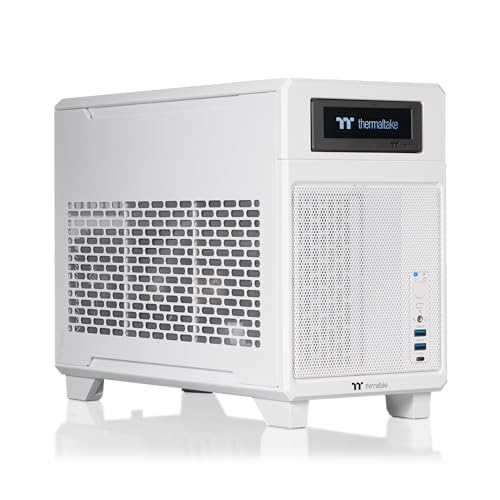
- Ryzen 7 9800X3D and RTX 5080
- 18.4L dual-chamber Mini-ITX case
- 32GB DDR5 and 2TB NVMe SSD
Best For: High-end gaming hardware in a compact desktop
High-Power Pick

- 145W desktop RTX 5060
- 16-core Ryzen 9; 32GB RAM
- 3.8L chassis; 5GbE and Wi-Fi 7
Best For: Sustained gaming and creative workloads
Compact ROG Pick

- RTX 5070 mobile GPU
- 3L case with thumb-screw access
- Windows 11 Home; Thunderbolt 4
Best For: A small, ready-to-use gaming setup
Multi-Display Pick
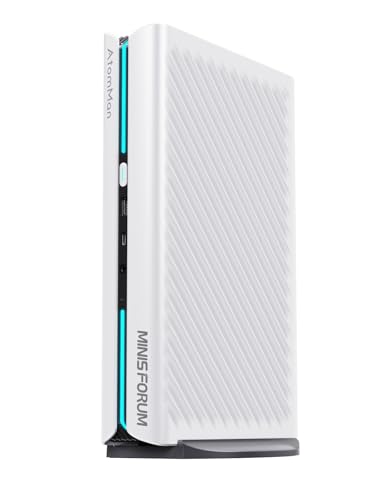
- Ryzen 9 and RTX 5060 8GB
- Outputs for up to four displays
- 5GbE, Wi-Fi 7, extra M.2 slot
Best For: Gaming alongside multi-monitor work
Best Desktop-GPU Pick – Cooler Master NR2 Pro
The Cooler Master NR2 Pro is an sff gaming pc for buyers who want a desktop RTX 5070 Ti 16GB and Ryzen 7 9800X3D in an 18.25L Mini-ITX case. Its 32GB of DDR5 memory and 2TB Gen4 SSD leave room for a sizable game library.
Best For: Gamers prioritizing desktop-class graphics hardware and storage in a compact tower.
Pros:
- RTX 5070 Ti 16GB and Ryzen 7 9800X3D pairing.
- 280mm liquid cooler and included 850W 80+ Gold power supply.
- Choice of glass or mesh side panel, plus USB-C, Wi-Fi, and Bluetooth.
Cons:
- At 28 pounds, it is compact but not especially portable.
- Mini-ITX motherboard has limited expansion space.
Choose this model if GPU capability matters more than achieving the smallest possible footprint; the 15 x 12 x 8-inch chassis still needs dedicated desk space.
Best Design-Forward Pick – Corsair ONE i600 Wood Dark
The Corsair ONE i600 is an sff gaming pc for buyers who want a compact, furniture-friendly tower without giving up dedicated graphics. This Wood Dark configuration pairs an Intel Core Ultra 7 processor with an RTX 5070 12GB and 32GB of DDR5 memory.
Best For: A prominent desk setup where restrained styling and liquid cooling matter.
Pros:
- Separate 240mm liquid coolers for the CPU and GPU.
- Vented chassis and CORSAIR ONE Dashboard thermal controls.
- Compact 11.8 x 7.6 x 15.3-inch footprint and a two-year manufacturer warranty.
Cons:
- At 27.1 pounds, it is better suited to a fixed desk than frequent travel.
- Listed maximum RAM capacity is 32GB, the same as the installed amount.
The i600 makes its strongest case through its integrated cooling and distinctive finish; check the exact SSD capacity before buying, as the supplied specifications do not state it clearly.
Best Slim Mini PC – ASUS ROG GR70
The ASUS ROG GR70 is an sff gaming pc for buyers with very little desk space. Its 2.22 x 11.12 x 7.39-inch chassis houses a Ryzen 9 9955HX3D, an RTX 5070 laptop GPU, and 32GB of DDR5 memory.
Best For: A slim gaming setup that is easier to move than a conventional tower.
Pros:
- Thin chassis weighs 6.1 pounds.
- Wi-Fi 7, Bluetooth 5.4, and eight USB ports.
- Three-year manufacturer warranty.
Cons:
- Uses a laptop RTX 5070 GPU rather than a desktop graphics card.
- Supplied specifications do not clearly identify the installed SSD capacity.
The GR70 is the space-saving choice here, but compare it against desktop-GPU systems on the basis of its mobile graphics hardware—not the RTX 5070 name alone.
Best Connectivity-Focused Mini – TOPGRO T1-MAX
The TOPGRO T1-MAX is an sff gaming pc aimed at players who also need a busy peripheral setup. It combines an i9-13900HX, RTX 4070 8GB graphics, 32GB DDR5 memory, and a 1TB PCIe 4.0 SSD.
Best For: Gaming and multitasking with multiple USB devices and two 4K displays.
Pros:
- HDMI 2.0 and DisplayPort 1.4 outputs support two 4K displays at 60Hz.
- Six USB ports, 2.5G Ethernet, Wi-Fi 6E, and Bluetooth 5.3.
- One-touch full-speed fan control and simple RGB on/off switch.
Cons:
- RTX 4070 has 8GB of VRAM.
- Full-speed fan mode may be less appealing when quiet operation is a priority.
This is a practical choice if ports and wired networking top your checklist. Its display-output specifications describe monitor support, not a guarantee of 4K gaming frame rates.
Best Balanced Build – Cooler Master NR2 Pro RTX 5070
The Cooler Master NR2 Pro is an sff gaming pc that pairs a desktop GeForce RTX 5070 with an Intel Core Ultra 7 265F in an 18.25-liter Mini-ITX case. Its 32GB of DDR5 memory and 2TB SSD make it a practical ready-to-use choice for gaming and everyday creative work.
Best For: Buyers who want strong 1440p-oriented hardware in a compact desktop with generous storage.
Pros:
- RTX 5070 with 12GB of graphics memory and a 20-core Core Ultra 7 processor.
- 32GB DDR5-6000 RAM and a 2TB Gen4 NVMe SSD.
- 280mm liquid cooler, 850W Gold-rated power supply, and a choice of glass or mesh side panel.
Cons:
- At 28 pounds, it is compact but not especially light to carry.
- The Mini-ITX format offers less room to work inside than a full-size tower.
Choose this model if you value a balanced set of gaming components and storage more than the smallest possible footprint. The listed 1440p frame-rate claim is a manufacturer claim; actual results will vary by game and settings.
Best Connectivity Pick – TOPGRO T1-Pro Mini Gaming PC
The TOPGRO T1-Pro is an sff gaming pc built around a Core i9-13900HX and a mobile GeForce RTX 4060. It suits buyers who want a small Windows 11 Pro desktop with dedicated graphics, flexible networking, and room to add storage.
Best For: Gamers and multitaskers who prioritize connectivity, storage expansion, and a compact setup.
Pros:
- 24-core Core i9-13900HX, mobile RTX 4060, and 32GB DDR5-5200 memory.
- 1TB PCIe 4.0 SSD plus two additional M.2 2280 SSD slots.
- Wi-Fi 6E, Bluetooth 5.3, 2.5Gb Ethernet, and user-adjustable RGB and fan speeds.
Cons:
- The RTX 4060 is a mobile GPU, not a desktop RTX 4060.
- The included 1TB SSD offers less initial storage than the 2TB configurations in this roundup.
This is a useful fit if a compact desktop and expansion options matter as much as graphics hardware. Check the performance requirements of your preferred games rather than assuming its mobile GPU will match a desktop card with a similar name.
Best High-End Pick – Thermaltake Traveler 9880S
The Thermaltake Traveler 9880S is an sff gaming pc for buyers seeking high-end components without moving to a conventional tower. Its 18.4-liter Mini-ITX build combines a Ryzen 7 9800X3D, GeForce RTX 5080, and 280mm closed-loop liquid cooler.
Best For: Buyers who want a compact, high-end gaming desktop with 2TB of storage.
Pros:
- Ryzen 7 9800X3D and GeForce RTX 5080 hardware.
- 32GB DDR5-6000 memory and a 2TB NVMe M.2 SSD.
- 18.4-liter dual-chamber layout separates the GPU from the motherboard and SFX power supply.
Cons:
- The compact Mini-ITX layout leaves less working room for component changes than a larger tower.
- Its GPU uses a PCIe 4.0 riser cable, adding a consideration for future hardware changes.
The Traveler makes the most sense when the Ryzen 7 9800X3D and RTX 5080 are priorities but desk space is limited. Its dual-chamber design and liquid cooler are notable features; the supplied specifications do not establish specific gaming frame rates or noise levels.
High-Power Pick – MINISFORUM G1 Pro RTX 5060
The MINISFORUM G1 Pro is an sff gaming pc for buyers who want a dedicated desktop RTX 5060 in a compact 3.8L chassis. Its Ryzen 9 8945HX, 32GB of DDR5, and 1TB SSD also make it a capable choice for demanding multitasking and creative work.
Best For: Gamers and creators prioritizing sustained GPU and CPU power in a small footprint.
Pros:
- 145W RTX 5060 with 8GB GDDR7 and DLSS 4 support.
- 16-core, 32-thread Ryzen 9 processor and cooling designed for sustained loads.
- 5Gb Ethernet, Wi-Fi 7, and connections for up to four 4K displays.
Cons:
- At 3.8L, it takes more space than the 3L ROG NUC in this roundup.
- The supplied listing identifies the operating system only as “OS”; confirm what’s installed before buying.
Choose this configuration if its stated 145W desktop GPU and cooling capacity matter more to you than having the smallest possible case.
Compact ROG Pick – ASUS ROG NUC 2025 RTX 5070
The ASUS ROG NUC 2025 is an sff gaming pc that pairs an Intel Core Ultra 9 processor with an RTX 5070 mobile GPU in a 3L enclosure. It ships with Windows 11 Home, 32GB of DDR5, and a 1TB NVMe SSD.
Best For: Buyers who want a compact, ready-to-use gaming PC with straightforward memory and storage access.
Pros:
- RTX 5070 mobile graphics with DLSS support.
- Three fans and a dual vapor chamber for cooling.
- Thumb-screw access for upgrades, plus Thunderbolt 4 and Aura Sync lighting.
Cons:
- Uses a mobile GPU rather than a desktop graphics card.
- The supplied specifications conflict on maximum RAM capacity; verify the limit before planning an upgrade.
The ROG NUC stands out for its 3L size, Windows installation, and accessible interior. Confirm its upgrade ceiling if additional memory is part of your buying plan.
Multi-Display Pick – MINISFORUM G1 Pro White
This white MINISFORUM G1 Pro is an sff gaming pc suited to a desk that doubles as a multi-monitor workspace. It combines a 16-core Ryzen 9 8945HX and dedicated RTX 5060 8GB graphics with 32GB of DDR5 and a 1TB PCIe 4.0 SSD.
Best For: Gaming and graphics-intensive work across several displays.
Pros:
- Five video outputs support up to four monitors.
- RTX 5060 graphics support ray tracing and DLSS 4.
- 5Gb Ethernet, Wi-Fi 7, and an additional M.2 slot.
Cons:
- The supplied listing names the operating system only as “OS”; verify it before ordering.
- The listing gives conflicting RAM expansion figures, so confirm the supported maximum before upgrading.
This version makes particular sense if four-display connectivity and the white finish fit your setup. Check its software and upgrade specifications with the seller before purchase.
How We Picked These Sff Gaming PCs
We focused on compact systems with dedicated graphics hardware and compared their listed CPU and GPU configurations, memory, storage, connectivity, and form factor. We also considered practical ownership questions: how easily you can add storage or replace parts, and whether a smaller chassis could make cooling or noise more important. A specification sheet cannot establish real-world frame rates or acoustics, so check independent tests for the exact configuration before buying.
Quick Comparison: Mini-ITX Towers Vs. Gaming Mini PCs
The Cooler Master NR2 Pro configurations and Thermaltake Traveler are Mini-ITX-style options for shoppers who want desktop-oriented hardware in a compact tower. The Corsair ONE i600 takes a premium, integrated approach. The ASUS ROG GR70, ROG NUC, TOPGRO models, and MINISFORUM G1 Pro configurations target buyers who need an even smaller footprint.
Do not compare GPU names alone. The ROG GR70 and ROG NUC list laptop or mobile RTX 5070 graphics, while the NR2 Pro models list desktop RTX 5070-series cards. GPU power limits, cooling, and memory can change performance substantially even when model numbers look similar.
Key Buying Factors for an Sff Gaming PC
Graphics Performance and Display Target
Start with the games, resolution, and refresh rate you actually use. For demanding games at higher settings, prioritize the GPU and look for benchmarks at your target resolution. Check the exact graphics configuration and video outputs if you plan to connect multiple monitors or a high-refresh display.
Size, Cooling, and Noise
Measure the available desk or shelf space, then allow room around vents. A smaller enclosure is not automatically quieter: cooling design and fan behavior matter under sustained gaming loads. If the PC will sit beside you, look for load-temperature and noise measurements rather than relying on dimensions alone.
Upgrades, Ports, and Total Cost
Confirm whether RAM and storage are accessible and whether the GPU uses a replaceable desktop card or integrated mobile graphics. Check front and rear USB, display connections, networking, and wireless support against your peripherals. Include any needed monitor, operating system, or storage upgrades in the total price.
Who Should Buy Which Sff Gaming PC?
Choose a Mini-ITX tower such as an NR2 Pro or Traveler configuration if desktop-class graphics and potential serviceability matter more than the smallest footprint. Consider the Corsair ONE i600 if you prefer a distinctive, compact prebuilt and are comfortable checking its exact configuration and upgrade limits first. Look at the ROG GR70, ROG NUC, TOPGRO, or MINISFORUM options when desk space is the priority; compare their GPU type and power limits before deciding. For similarly named MINISFORUM G1 Pro listings, verify that the exact model includes the dedicated GPU you expect.